




Agentic AI in Healthcare: How Can CIOs Plan AI Implementation Across Departments

Background summary

Hospitals and home-health teams face repeat snags across Patient Access, ED, Inpatient Nursing, Radiology, Peri-op, and more. They face messy referrals and coverage checks, alert noise, heavy charting, imaging backlogs, or delays, medication risks, missed visits, claim denials, and late insight from feedback.  

Agentic AI tackles the repeat work behind these issues by reading context, deciding next steps, acting inside your EHR or ERP, and writing back with an audit trail, which speeds flow, reduces errors, and steadies cash. This article maps each department to clear Agentic AI capabilities across departments citing proof points and role-based benefits. -“Keep the lights on, fix the gaps, then let AI take the grunt work.

That quote, shared by a Mid-Atlantic hospital CIO in April, sums up 2025’s mood in health-system IT suites across the U.S. Cost pressure remains high, yet the conversation has moved from whether to apply AI to where first. 

Healthcare needs AI implementation, now! 

A fresh State of the CIOs survey of 906 healthcare IT leaders puts hard numbers behind the chatter: What Healthcare CIOs Care About Most in 2025
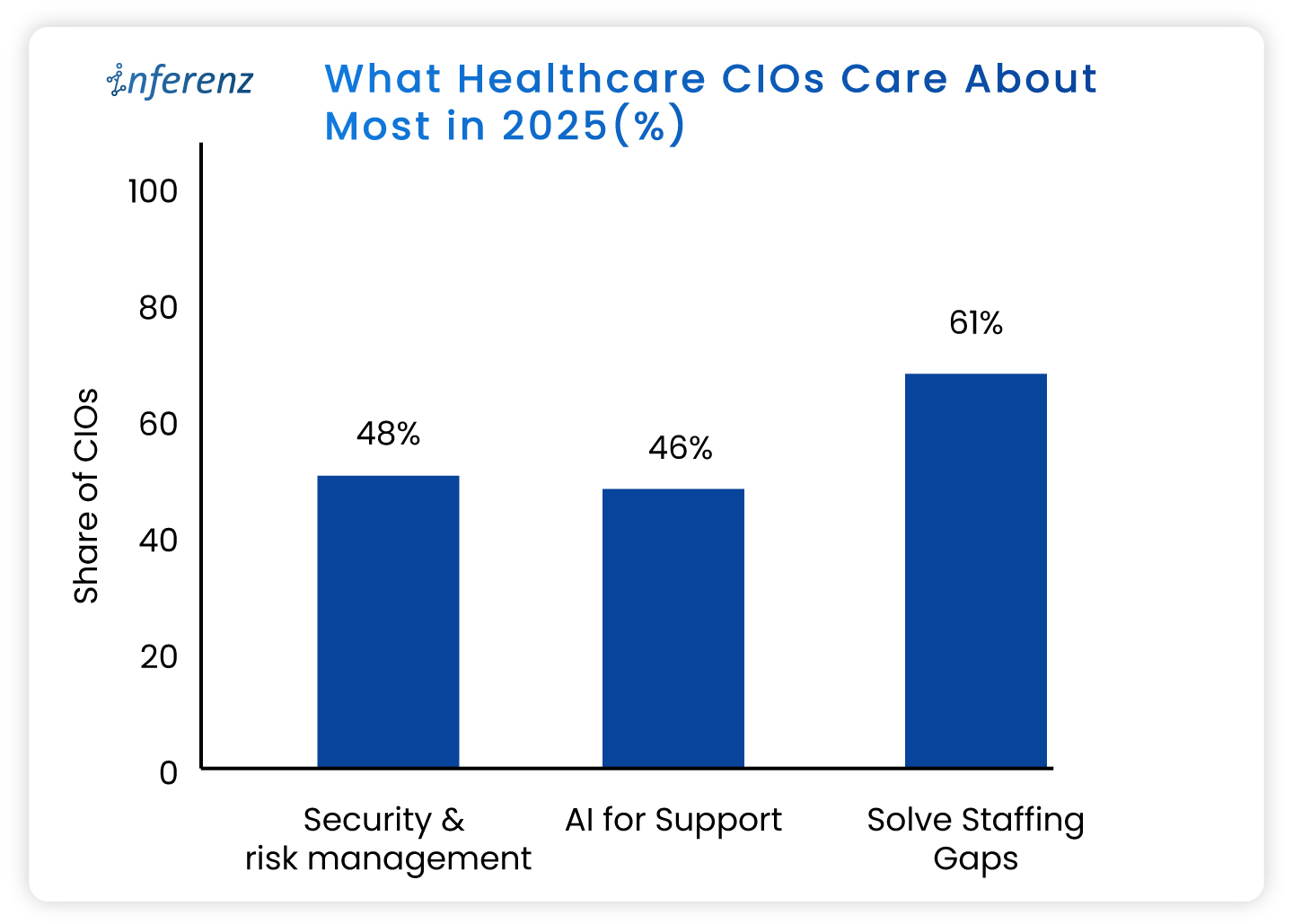
 

  • Solving IT staffing shortages ranks even higher, flagged by 61%.
    • Recruiting and keeping skilled people is harder than finding capital. 
  • AI for support and workflow relief lands at 46 %
    • This trend eclipses past favourites like cloud migrations. 
  • Security and risk management tops the chart at 48%
    • Ransomware worries still wake leaders at 3 a.m. 

What do these healthcare CIO priorities tell us? 

  • Staffing pressure makes patient access automation urgent, not optional. 
    • Leaders want bots that shave minutes, not moon-shot labs that promise a payoff five years out. 
  • AI momentum is practical. 
    • CIOs are testing agent-based tools inside revenue cycle, nursing rosters, and patient access because those areas pay back in months, not quarters or years. 
  • Security first means guardrails are non-negotiable. 
    • HIPAA-compliant AI is a must. The implementations need to comply also with HITRUST, and the new HHS cybersecurity proposals out for comment. 

Read more about the top operational issues that have got CIOs worried.  

Now that priorities are in place, let us see how agentic AI can help you simplify and enhance your operations. 

Agentic AI in healthcare, in full-speed action 

Agentic AI work like small digital co-workers that handle repeat work and quick decisions inside your existing systems. Each agent reads context from the EHR or ERP, decides the next step, takes the action, and writes back with a clear audit trail. That is why it fits real operations.  

The question is: where do you start? 

You start where delays hurt most, set a simple outcome, and let agents carry the routine tasks across three phases of care: Start of Care, Care Delivery, and Post Care. The payoff shows up as fewer handoffs, shorter queues, cleaner data, and faster payment cycles. 

Below, we set the context and the core challenge for the major operational areas. Under each, you will see the exact Agentic AI capabilities that meet healthcare AI use cases, using the solution buckets you shared so you can cross-link or pilot right away. 
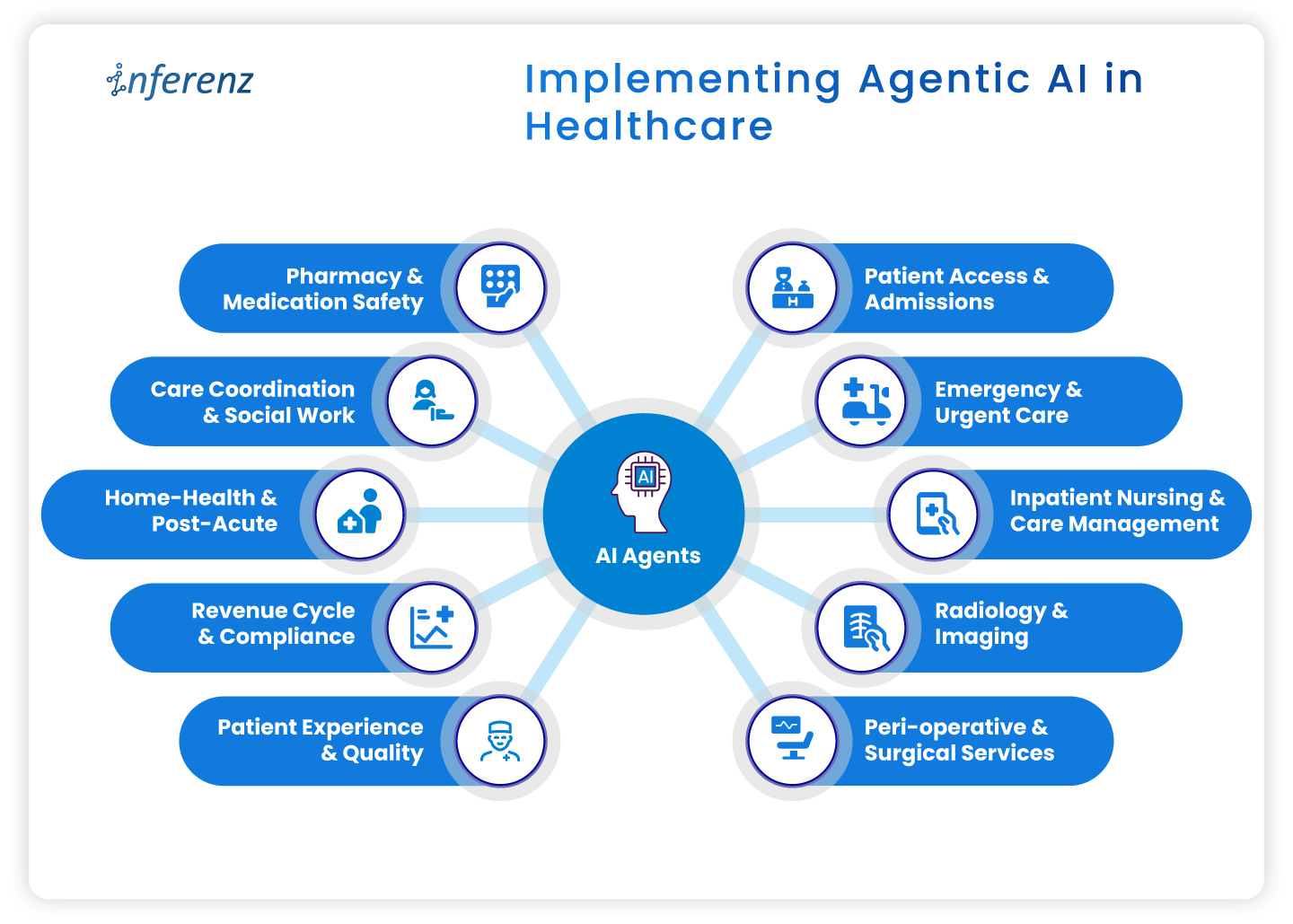
Implementing Agentic AI in HealthcareImplementing agentic AI in healthcare 

  • Patient access & admissions 
  • Emergency & urgent care 
  • Inpatient nursing & care management 
  • Radiology & imaging 
  • Peri-operative & surgical services 
  • Pharmacy & medication safety 
  • Care coordination & social work 
  • Home-health & post-acute 
  • Revenue cycle & compliance 
  • Patient experience & quality 


1. Patient access & admissions 

Context. Intake teams deal with referrals that arrive in mixed formats, copy data across systems, and chase benefits by phone. Queues grow. First visits slip. 

How agentic AI helps. 

  • Referral & digital intake automation pulls, cleans, and routes referral data into the record. 
  • Eligibility checks & prior authorization verifies coverage and starts approvals without back-and-forth. 
  • Patient outreach sends reminders, prep steps, education, and e-consent through the channel patients prefer. 
  • Digital front desk lets patients book, reschedule, and confirm without a call. 
  • SDOH analytics flags transport or language barriers early to ease patient onboarding efforts. 
  • Intake fraud detection prevents duplicate or false identities at the gate. 

Operational outcome.

Faster first appointments, fewer re-keyed fields, cleaner claims from day one. 

2. Emergency & urgent care 

Context. Clinicians need early signal on deterioration. Alert fatigue and manual triage slow action. 

How agentic AI helps. 

  • Active monitoring streams vitals and new labs to an agent that watches for change. 
  • Alert prioritization filters noise and shows only actionable risks to the right role. 
  • Clinical risk modeling scores sepsis, readmit, or fall risk in near real time. 
  • Natural language copilots summarize recent notes so the team sees context on arrival. 

Operational outcome.  

Faster recognition, fewer false alarms, clearer handoffs. 

3. Inpatient nursing & care management 

Context. Nurses split time between bedside tasks and documentation. Care plans go stale when conditions shift. 

How agentic AI helps. 

  • Dynamic care plan personalization updates tasks and goals mid-cycle based on new data. 
  • AI documentation for clinicians drafts visit notes and care plans from voice or short prompts. ICD-10 and HHRG codes are proposed for review. 
  • Alert prioritization keeps clinicians focused on the few patients who need action now. 
  • Patient Caregiver Matching to align with patient and caregiver schedules dynamically and intelligently to stay ahead of patient needs. 

Operational outcome.  

More bedside time, fewer charting hours, faster response on the floor.

4. Radiology & imaging

Context. Studies arrive faster than they are read. Critical cases can wait behind routine ones. Reporting workflows feel heavy. 

How agentic AI helps. 

  • Clinical risk modeling uses order data, vitals, and history to score urgency, so teams handle the right studies first. 
  • Natural language copilots pre-draft structured impressions from key images and prior reports. 
  • AI documentation turns dictated notes into clean, compliant reports ready for sign-off. 

Operational outcome.  

Quicker turnaround, fewer sticky handoffs between techs and readers. 

5. Peri-operative & surgical services

Context. Small delays at pre-op and PACU ripple across the day. Discharge notes and coding often lag. 

How agentic AI helps. 

  • Dynamic care plan personalization keeps surgical pathways current from pre-op to recovery. 
  • Automated discharge & transition summaries create clear handoffs for floor teams and home-health partners. 
  • Billing/Compliance automation converts post-op documentation into coded encounters and gathers needed attachments. 

Operational outcome.  

Tighter case flow, on-time handoffs, faster coding after wheels-out. 

6. Pharmacy & medication safety

Context. Medication lists change often. Renal function, allergies, and interactions can be missed during rush hours. 

How agentic AI helps. 

  • Clinical risk modeling checks interactions and dose risks against labs and history. 
  • Natural language copilots summarize med rec and highlight conflicts for pharmacists. 
  • AI documentation writes structured notes for interventions and education.  

Operational outcome.  

Fewer preventable events and clearer documentation for audits. 

7. Care coordination & social work

Context. Teams try to close loops across clinics, payers, and community partners. Calls and emails eat hours. 

How agentic AI helps. 

  • SDOH analytics surfaces access risks that block progress. A solution like home care analytics works in this regard backed by natural language without dashboards. 
  • Patient outreach sends targeted messages, education, and transportation prompts. 
  • Automated follow-up schedules check-ins by protocol and milestone, then tracks responses. 
  • Feedback mining & sentiment analysis reads messages and surveys to spot issues before they escalate. 

Operational outcome.  

More completed actions per coordinator and fewer avoidable returns. 

8. Home-health & post-acute 

Context. Visit schedules, caregiver skills, and travel time rarely align. Drop-offs after week one are common. 

How agentic AI helps. 

  • Remote monitoring tracks symptoms or device readings between visits and flags change. 
  • Automated follow-up sends check-ins and instructions that match the care plan. 
  • Retention analytics predicts disengagement and suggests outreach that brings patients back. 

Operational outcome.  

More visits per day, steadier adherence, fewer surprises between appointments. 

9. Revenue cycle & compliance 

Context. Missing fields and late attachments create denials. Manual status checks slow payment. 

How agentic AI helps. 

  • AI documentation and billing/ compliance automation convert care notes into coded, compliant claims with proofs attached. 
  • Eligibility checks & prior authorization starts early at intake, then updates status automatically after visits as part of revenue cycle automation. 
  • Natural language copilots draft appeal letters and collect the right excerpts from the record. 

Operational outcome.  

Cleaner first-pass claims, fewer reworks, faster cash. 

10. Patient experience & quality 

Context. Comments from portals, calls, and surveys get scattered. Teams react late. 

How agentic AI helps. 

  • Feedback mining & sentiment analysis aggregates themes and flags risk in near real time. 
  • Automated discharge & transition summaries set clear expectations and reduce confusion. 
  • Longitudinal recovery prediction compares recovery against expected trends and signals when to step in. 

Operational outcome.  

Fewer escalations, clearer communication, tighter loop closure.  

Wrap-up 

Agentic AI pays off when it sits inside daily work, not beside it. Start with one area where delays or denials sting, choose a small outcome, and pilot the single agent that clears the path. Once the metrics move, extend the same logic to the next step in the care cycle. Hours return to care teams, data gets cleaner, and cash moves faster. 

Next step.  

If this flow matches your roadmap, you will certainly benefit having a short, printable CIO checklist for use-case selection, data access, privacy controls, success metrics, and for each healthcare department. 

Frequently asked questions  

1. Where should a CIO start with agentic AI?

Pick one workflow with a clear bottleneck and a single owner. Set one metric, such as first-pass claim rate or ED alert response time, and run a 60–90 day pilot. 

2. How does this connect to existing EHRs and ERPs?

Use standard interfaces like FHIR, HL7, and vendor APIs. Keep writes minimal at first, then expand once audit logs and role permissions are proven. 

3. What data access is required for a pilot?

Limit to the minimum fields that drive the task. Start with read access and a small write scope, enable full audit trails, and review logs weekly. 

4. Is HIPAA compliance realistic with agentic AI?

Yes. Enforce the minimum necessary rule, encrypt PHI in transit and at rest, control access by role, and keep Business Associate Agreements in place. 

5. How fast can we see impact?

Most pilots show movement within one quarter if the metric is narrow. Examples include shorter intake time, faster prior auth, or fewer denials. 

6. What are the top risks to plan for?

Data quality, alert fatigue, and unclear ownership. Reduce risk with a short pilot scope, clear playbooks, and weekly reviews. 

7. How do we prevent biased model behavior?

Test against stratified cohorts, monitor false positives and false negatives by group, and add simple rules that route edge cases to humans. 

8. What does change management for AI in healthcare look like?

Train the smallest group that touches the workflow. Use short job aids, shadow support for two weeks, and a clear feedback path to fix snags. 

9. How do we choose success metrics?

Tie each agent to a single operational number: minutes saved per referral, prior-auth turnaround, denials per 1,000 claims, or readmission alerts resolved. 

10. Do we need a data lake before starting?

No. Start with the systems you have. A lake or Snowflake layer helps at scale, but pilots can work with EHR and ERP feeds. 

11. How much does this affect staffing needs?

Agents reduce manual steps and overtime in targeted areas. Use attrition and reassignment rather than broad cuts to maintain buy-in. 

12. Can we reuse agents across departments?

Yes. Intake, documentation, and follow-up patterns repeat. Standardize connectors and governance so you can lift and place agents with minor tweaks. 

Top operational issues that have got Healthcare CIOs worried

Summary

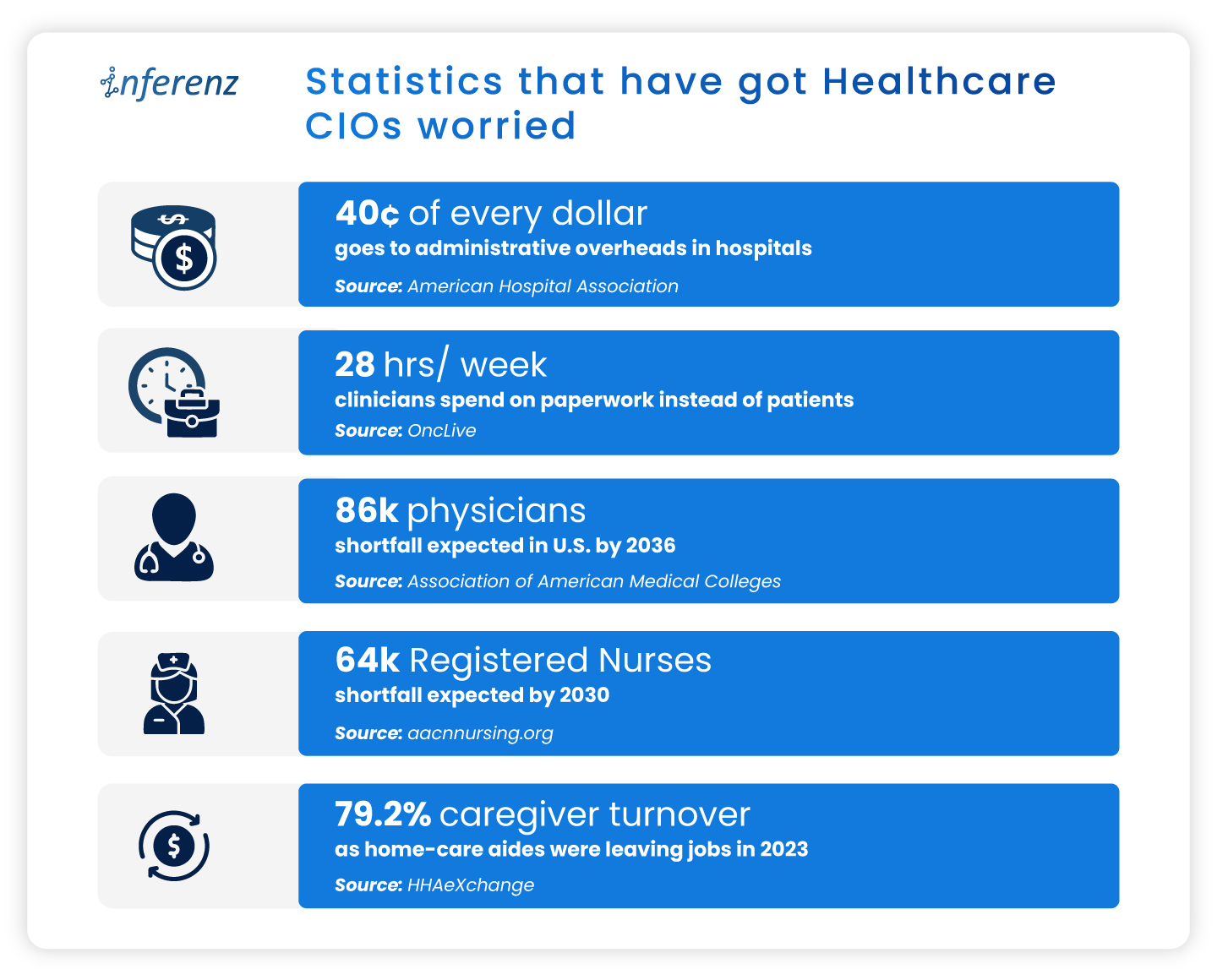
US hospitals and home-care teams now juggle data silos, paperwork that eats cents of every dollar, and record turnover among doctors, nurses, and caregivers. This article lays out eight pressure points like data fragmentation, revenue leakage, caregiver burnout, and staffing gaps, sharing how each one drains time or cash. It also highlights key Healthcare CIOs challenges and shows how early wins with AI in healthcare and agentic AI hint at practical fixes that reclaim clinical hours, speed payments, and steady the workforce.-America’s healthcare bill keeps climbing, yet the day-to-day experience inside clinics and homes feels under-resourced.  

In 2023, national health spending had already reached $4.9 trillion, equal to 17.6 percent of GDP, and the share is still inching up. Patients see new buildings and apps, but behind the scenes many teams fight the same old bottlenecks. 

Statistics that have got Healthcare CIOs worried

These cracks in data, dollars, and staffing weaken everything from preventive visits to complex surgeries.  

Early pilots suggest that well-targeted AI in healthcare—think ambient note-taking, predictive scheduling, real-time claims checks, and other caregiver burnout solutionscan relieve some of the load. The sections that follow unpack where the pain is sharpest before we outline, in a later article, how AI can begin to ease it.

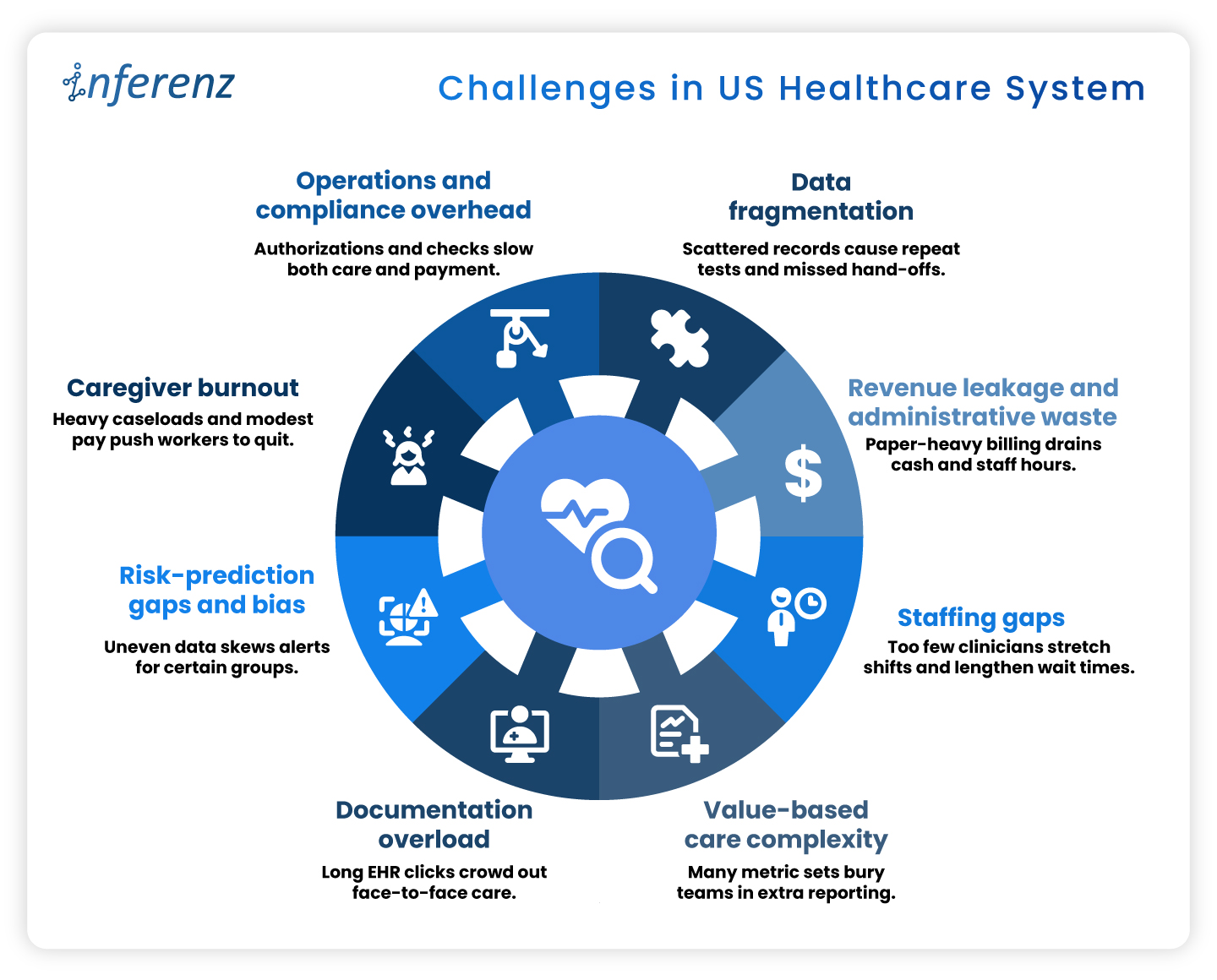
Challenges in US Healthcare System

1. Data Fragmentation

Fragmented electronic records drive at least $200 billion a year in repeat labs, imaging, and other avoidable services. Patients often move between dozens of disconnected systems, and prior tests rarely follow them, leading to duplicate records too.  

Among chronically ill Medicare beneficiaries, those in the mostfragmented quartile run $4,542 higher annual costs and show more preventable hospitalizations than peers with integrated care. Scattered data undermines diagnosis accuracy, pushes redundant work onto staff destroying caregiver connect. You need a handy dedupe AI tool to avoid patient representation and other AI solutions to stop inflated claims that payers later dispute. 

2. Revenue Leakage and Administrative Waste

Hospitals run sophisticated clinical services, yet their business offices often look like paper factories. Prior authorizations, claim edits, and duplicate data entry push invoices back for revision and restart the payment clock. Each rework touches coders, billers, and case managers, draining time that could fund patient-facing roles. 

One hard number shows the scale: administrative costs now consume about 40 percent of every hospital dollar spent. When almost half the budget never reaches a bedside, leaders have less room to raise wages, buy new diagnostic tools, or expand rural outreach. The cycle feeds on itself: tight margins lead to leaner billing teams, which can increase denials and stretch accounts-receivable even further. News flash: Efficient revenue cycle management services are the need of the hour!

3. Staffing Gaps

Clinical talent has become the scarcest supply in health care. Retirement-age physicians leave faster than residency slots can refill them, and many younger clinicians choose outpatient or telemedicine roles over hospital call schedules. Nurses face similar pressures, with heavy workloads and limited autonomy pushing them toward travel contracts or careers outside medicine. 

The Association of American Medical Colleges warns that the United States could be short as many as 86,000 physicians by 2036. Staff shortage drives the system: wait times lengthen, overtime soars, and remaining staff shoulder extra shifts that speed burnout. For home-care agencies, thin rosters translate to missed visits and lost revenue when referrals must be declined. 

4. Value-Based Care Complexity

Linking payment to outcomes sounds simple on paper. In practice, every bonus program carries its own data dictionary, audit trail, and submission portal. Teams juggle dozens of Medicare, Medicaid, and commercial contracts, with different look-back periods and attribution rules. 

A landmark Health Affairs study found that physician practices sink about 15 hours per doctor each week into collecting and reporting quality metrics, at an annual cost of $15.4 billion nationwide. That is nearly two working days lost to spreadsheets instead of patient counseling or chronic-care planning. The hidden toll is morale: clinicians see quality work as vital, yet they resent duplicative forms that rarely inform real-time decisions. 

5. Documentation Overload

Electronic health records promised efficiency but often delivered extra clicks. Templates proliferate, alerts pop up mid-exam, and note bloat forces physicians to scroll through pages of copied text. After clinic closes, many providers log back in from home to finish charts. 

Recent research in JAMA Network Open shows primary-care doctors spending a median 36.2 minutes in the EHR for a 30-minute visit. Such documentation overload squeezes appointment slots, delays billing, and fuels frustration on both sides of the screen. Patients wait longer for follow-up calls, and clinicians lose family time, accelerating departure from full-time practice. 

6. Risk-Prediction Gaps and Bias

Predictive models guide everything from sepsis alerts to readmission flags, but they inherit the blind spots of the data beneath them. If some groups receive fewer tests, algorithms may label truly sick patients as low risk. Poor signal leads to poor care and potential legal exposure. 

A University of Michigan study found that white emergency patients received up to 4.5 percent more diagnostic tests than Black patients with similar presentations. When such data bias in records train AI, the resulting tools underrate risk for under-tested populations and can widen outcome gaps that policy aims to shrink. Predictive staffing in healthcare suffers on this front, a lot. 

7. Caregiver Burnout

Home-care aides, nurses, and therapists anchor community health, yet their jobs are physically taxing and poorly paid. Heavy caseloads, unpredictable schedules, and emotional labor drive many to exit the field. Agencies then scramble to recruit replacements, often at higher cost, instead of looking for effective caregiver burnout solutions. 

Industry tracking shows caregiver turnover in home care reached 79.2 percent last year. Nearly four in five workers left within twelve months, erasing institutional knowledge and breaking continuity for vulnerable clients. High churn forces agencies to reject new referrals or rely on overtime, compounding stress for those who remain. 

8. Operations and Compliance Overhead

Regulatory safeguards protect patients but can swamp providers in forms. Prior authorization, eligibility checks, and electronic visit verification (EVV) each add data steps between care and payment. Staff must phone insurers, upload documents, and wait for green lights before proceeding. 

An American Medical Association survey reports that 94 percent of physicians say prior authorization delays access to needed care. These holdups lead to cancelled procedures, rehospitalizations, and frustrated families. Organizations also pay for the privilege: teams spend hours per week on approvals that rarely change clinical decisions, yet every stalled claim inflates days-cash-on-hand risk. 


Why AI Sits at the Pivot Point 

Taken together, the pressure points above form a single pattern: vital clinical minutes vanish into data hunts, billing loops, and staffing scrambles. Every home care agency especially need to take note that 

  •  When intake stalls, a patient’s first touch runs late.  
  • When documentation drags, the visit itself shrinks.  
  • When claims wait in limbo, funds for follow-up dry up.  

The system feels these shocks end to end. 

Agentic AI in Healthcare

Agentic AI offers a direct counterweight because it slots into each phase of care: 

  • Start of care: Conversational intake tools collect histories, verify coverage, and label high-risk cases before the first appointment. Clean data flows forward instead of fragmenting at the gate. 
  • Point of care: Ambient notetaking, real-time risk scores, and predictive staffing engines give clinicians more face time and safer shift patterns. The visit becomes richer while administrative drag drops. 
  • Post care: Automated coding, denial prediction, and longitudinal analytics speed payment and flag avoidable readmissions through AI-based patient engagement software. Dollars return sooner, lessons cycle back into quality plans, and staff energy stays on patients rather than portals. 


Advanced analytics, ambient clinical documentation, predictive scheduling, and automated claims triage each target the pain points above. Early results such as Agentic AI scribes cutting note-taking time and fairness-aware models closing bias gaps, hint at relief.  

The next article will map problem-solution pairs in depth; for now, it is enough to see that AI, applied responsibly, can clear data blockages, shorten queues, and free human attention for care itself. 

Frequently Asked Questions 

1. How does AI in healthcare cut the daily paperwork load?
Smart tools pull data from multiple EHRs, fill forms, and flag missing fields in real time. Clinicians review and sign instead of typing from scratch, easing the healthcare administrative burden without changing clinical workflows. 

2. What makes agentic AI different from other healthcare AI systems?
Agentic models work as goal-driven “mini agents.” They read context, decide next steps, and update tasks across apps—ideal for EHR integration or claim edits that need many small, fast decisions. 

3. Can automation really fix revenue leaks?
Yes. Modern revenue cycle management services combine denial prediction with inline coding checks. They stop errors before submission, improve first-pass rates, and speed cash back to hospitals. 

4. How do hospitals use artificial intelligence scheduling to close staffing gaps?
Algorithms study census trends, PTO requests, and overtime patterns. The result is predictive staffing healthcare rosters that match demand hour by hour, which lowers burnout and agency-nurse spend. 

5. What role does ambient clinical documentation play at the point of care?
Voice AI listens during the visit, writes concise notes, and posts them to the chart. Providers keep eye contact with patients and note lag drops—often by more than half. 

6. How can a home care agency tackle 79 % caregiver turnover?
Platforms that blend caregiver burnout solutions with fair route planning let aides pick shifts, cut idle travel, and get instant mileage pay. Happier schedules improve 90-day retention. 

7. Why should payers and providers care about AI for prior authorization now? 
Automated PA engines read clinical notes, fill payer forms, and chase status updates. They shorten approval windows from days to minutes, freeing staff for higher-value tasks and improving patient engagement software scores. 

8. What do top healthcare AI companies focus on when starting a project? 
They begin with data quality. Clean data feeds every downstream model, whether for infection alerts or remote-care analytics. A solid pipeline beats flashy features that sit on bad inputs. 

Building ‘Unify’- The Smart Data Dedupe App with Useful Lessons in Snowflake Native App Development

Summary

Healthcare data teams want apps that live where their data lives. Building Unifyone of our first Snowflake Native Apps—showed us why that choice solves headaches around security, speed, and trust. Here we break down each stage of the build for the deduplication app, share the problems we met, and list the habits that kept us on track. -Most healthcare data management apps still live outside the warehouse, pulling rows across networks and piling audit tasks onto already-tired security teams.  

We wanted a cleaner path.  

So, we built Unify as one of our first Snowflake Native Apps that run inside the customer account. Doing so changed how we think about trust, speed, and even pricing. This article spells out what we learned during the development of a data dedupe app, starting with the core idea—keeping the work where the healthcare data already lives. 

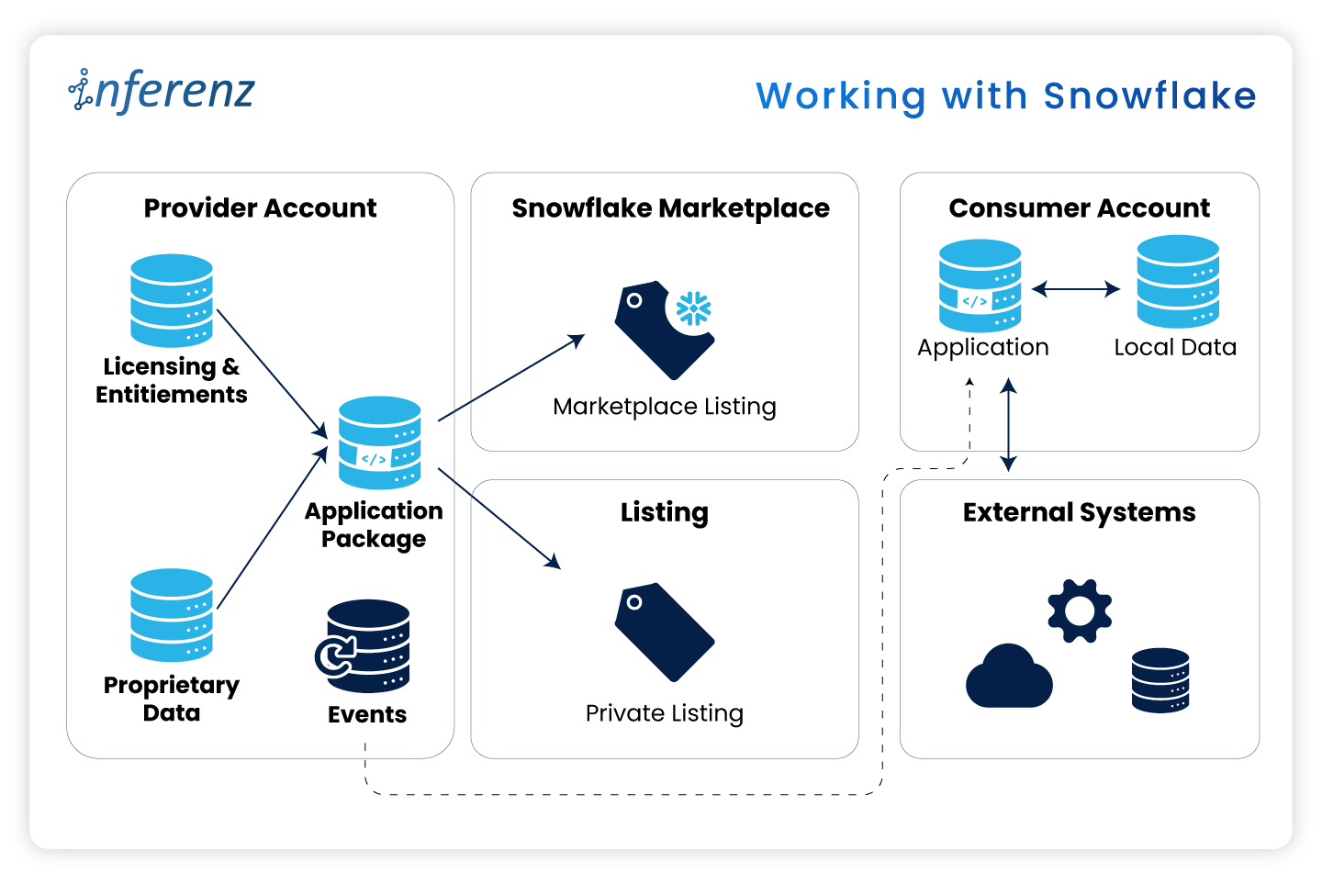
Working with Snowflake 

Security officers keep telling us the same thing: “If data leaves our Snowflake account, we need another risk review.” Those reviews can stall a project for weeks. When the data stays put, those blockers vanish.

The Snowflake Native App Framework

Here are some real-world pain points: 

  • Extra ETL hops slow reports and raise spend. 
  • Legal teams hold sign-off if data crosses a network line. 
  • Cyber teams reject any tool that opens a fresh inbound port. 

Let me elucidate how the Native App model fixes these issues here:
Native app model fixes issues

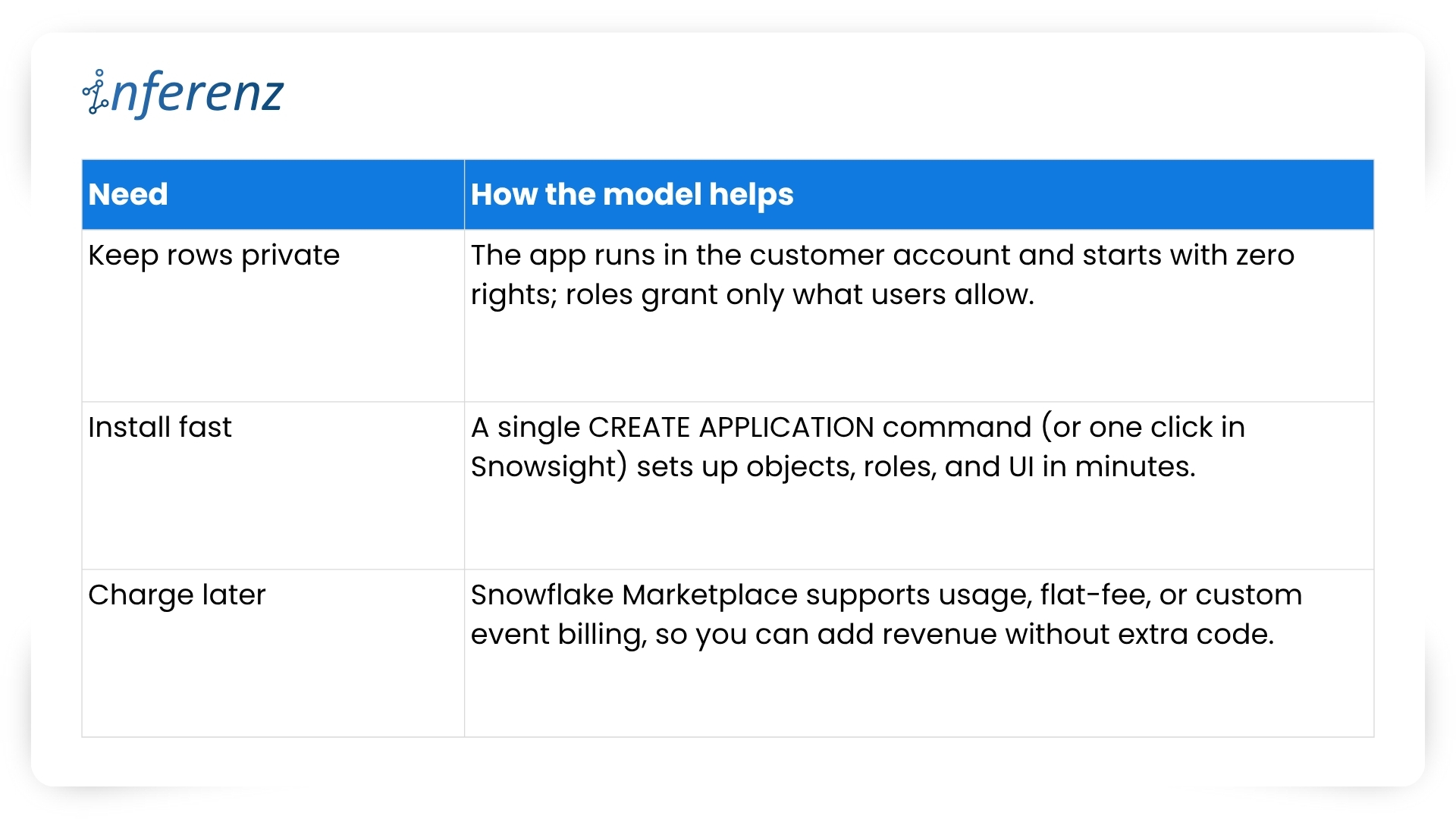
What this means for project teams

Running inside Snowflake flips the sales story.  

  • Security reviews shrink because no healthcare data exits the account.  
  • Legal teams check off fewer boxes.  
  • Ops teams stay happy because there is no new infrastructure to patch.  
  • And when the finance group is ready, you can turn on billing models that match real usage, with no speculation involved, whatsoever! 

Before we jump into code, folder names, and Git commands, let’s pause for a moment. You now know why staying inside Snowflake calms auditors and speeds go-live.  

The next question is how to keep that peace when your dev team starts shipping features at full tilt.  

A tidy project layout gives you that calm. It stops commit chaos, helps new engineers find their way on day one, and lets CI/CD jobs run without a hitch. In short, an ordered home keeps tech debt low and feature velocity high.

Setting up a clean project layout 

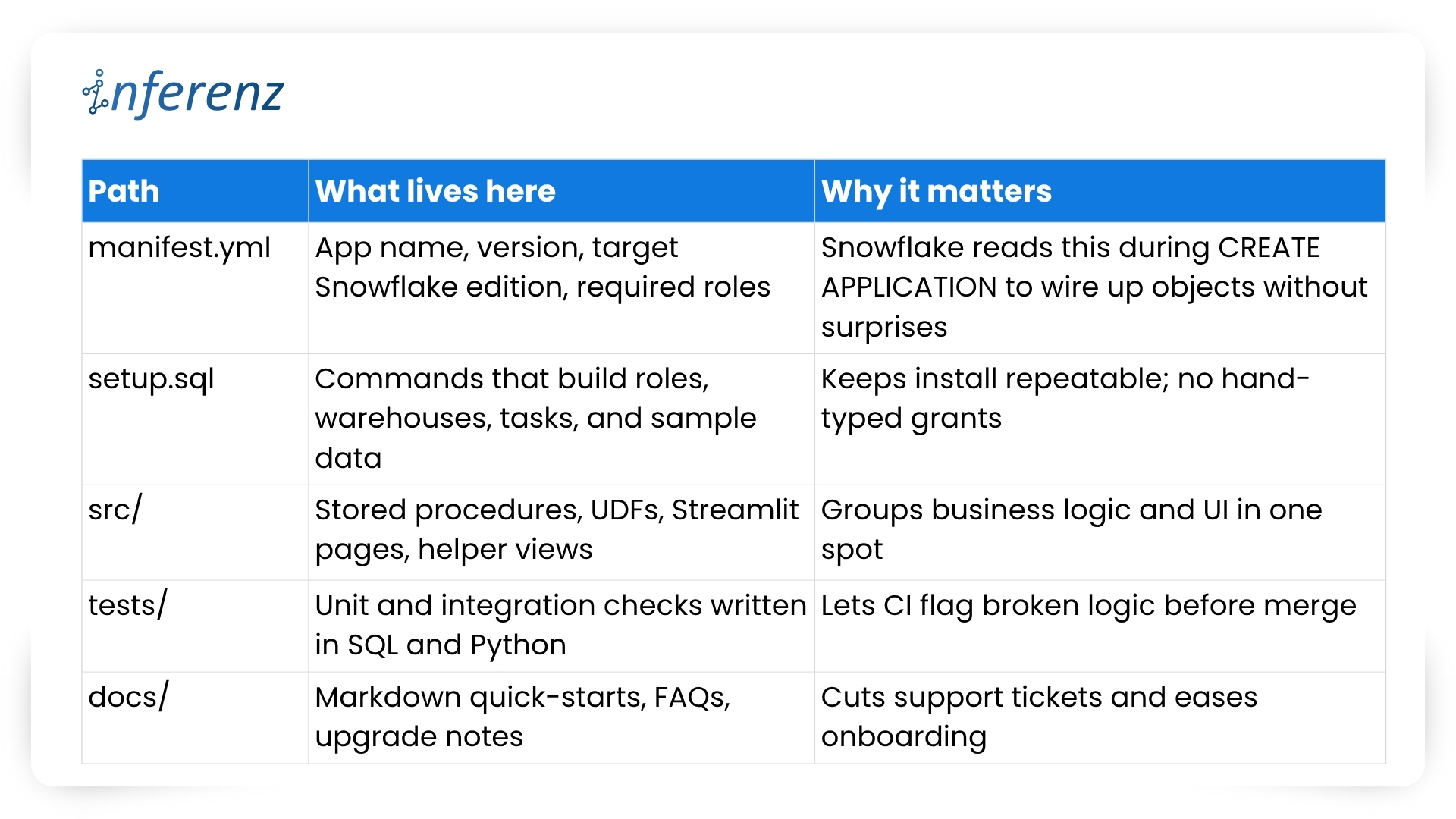
Think of Snowflake Native Apps as small, self-contained products. Every script, test, or doc page must live where others can spot it in seconds. Messy trees hide bugs; neat ones surface them early. 

Key folders and files 

Important elements to lock in early 

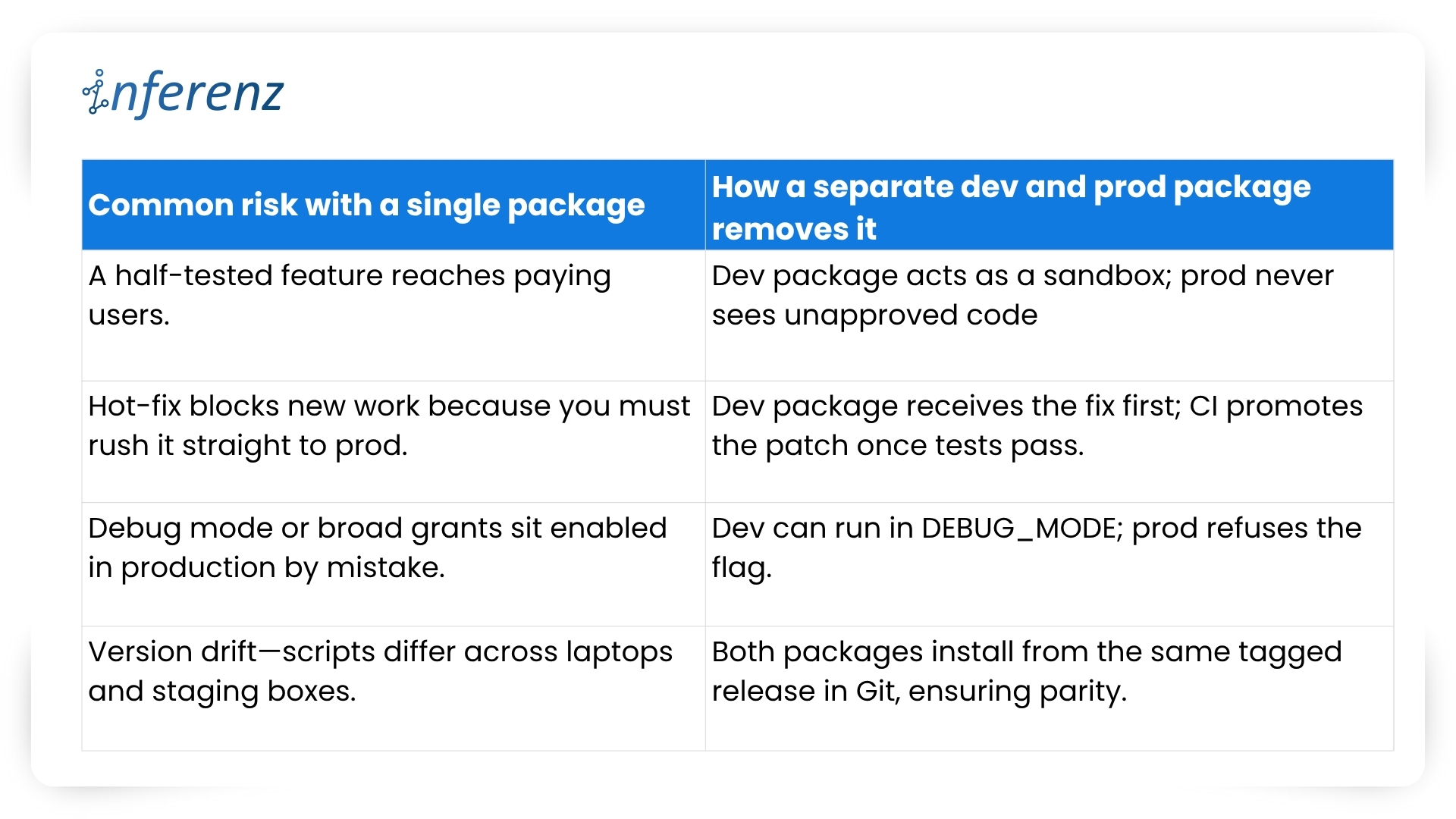
  1. One Git repo, two packages 
    • Create a dev package for daily commits and a prod package for signed releases.  
    • Both packages pull from the same branch but differ in version tags. 
    • Use semantic versions like 1.4.0-dev and 1.4.0 so rollback is a single command. 
  2. CI/CD with guardrails 
    • Hook your repo to a CI runner that  
      • spins up a Snowflake scratch account,  
      • loads the dev package,  
      • runs the tests/ suite, and  
      • fails on any blocked grant or failed assertion. 
    • Push to main only after CI passes; a promo script tags and pushes the prod build. 
  3. Streamlit in Snowflake for fast UI loops 
    • Store each page in src/streamlit/.  
    • Designers can tweak layouts while analysts see live data—no extra staging server needed. 
  4. Readable docs 
    • Keep install steps short: “Run setup.sql, grant the role, open /home in Snowsight.” 
    • Add a change log at docs/release_notes.md so users track what changed and why. 
  5. Security baked in 
    • Script every role, grant, and warehouse size in setup.sql. This guarantees least-privilege on each install. 
    • Place a permission matrix table in docs/security.md so buyers can audit in minutes. 

With a clear structure, your team ships features without fear, and your users enjoy stable installs that never drift from the source. Next, we will explore repeatable testing and deployment tactics that keep both packages in sync and production-ready. 

Speed with the right tool chain 

Teams juggle UI tweaks, SQL logic, and version bumps at once. Without a clear loop, staging environments drift and testers chase phantom bugs. 

Typical pain points we faced 

  • UI work stalls while engineers wait for fresh sample data. 
  • Manual deploy steps slip through Slack threads and get lost. 
  • Merge conflicts appear because no one owns the single source of truth. 

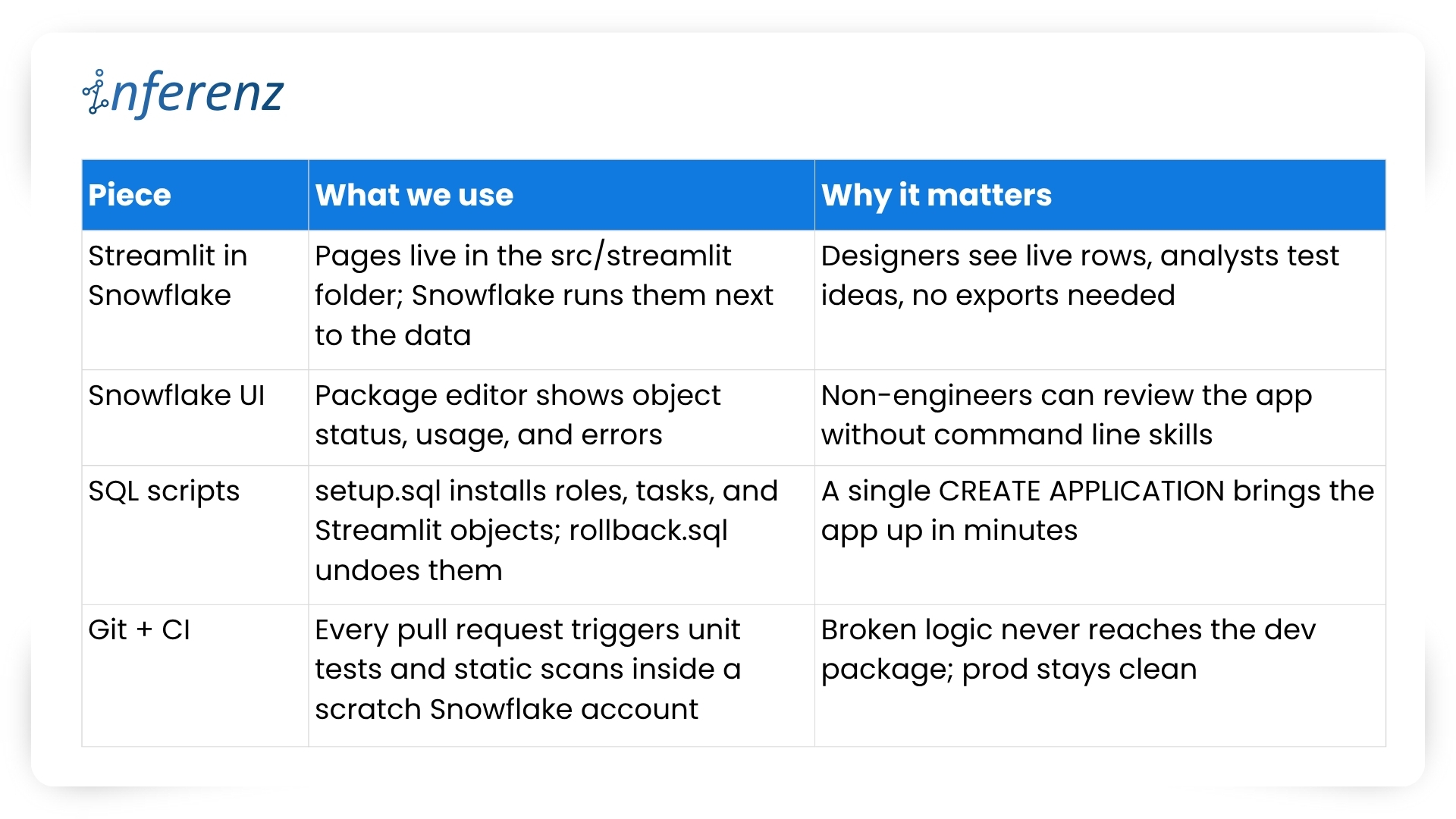
Our four-piece workflow 

Important habits that keep the loop tight 

  1. One repo, two packages: 1.5.0-dev lives in the dev package while 1.5.0 runs in prod. CI promotes only when tests pass and a human approves. 
  2. Self-testing setup: The same setup.sql that customers run also drives CI. If that script breaks, the build fails early. 
  3. Streamlit previews: Product owners open the dev package in Snowsight, click the /home page, and give feedback in real time. No separate staging server, no extra VPNs. 
  4. Automated rollbacks: rollback.sql reverses grants and drops objects, so you can reset an environment in seconds. 
  5. Consistent naming: Procedures and UDFs carry the app version in the schema name, which avoids clashes during side-by-side tests. 

We’ve covered why native apps live safer inside the warehouse and how a tidy repo plus a smart tool chain keeps feature work moving. The next guard-rail is environment isolation—running two application packages that share one codebase. Doing so sounds simple, yet it saves countless rollback headaches. 

Two packages, one codebase 

Why split environments? 

Snowflake itself recommends this two-package pattern to keep upgrades safe and reversible.  

Our promotion pipeline 

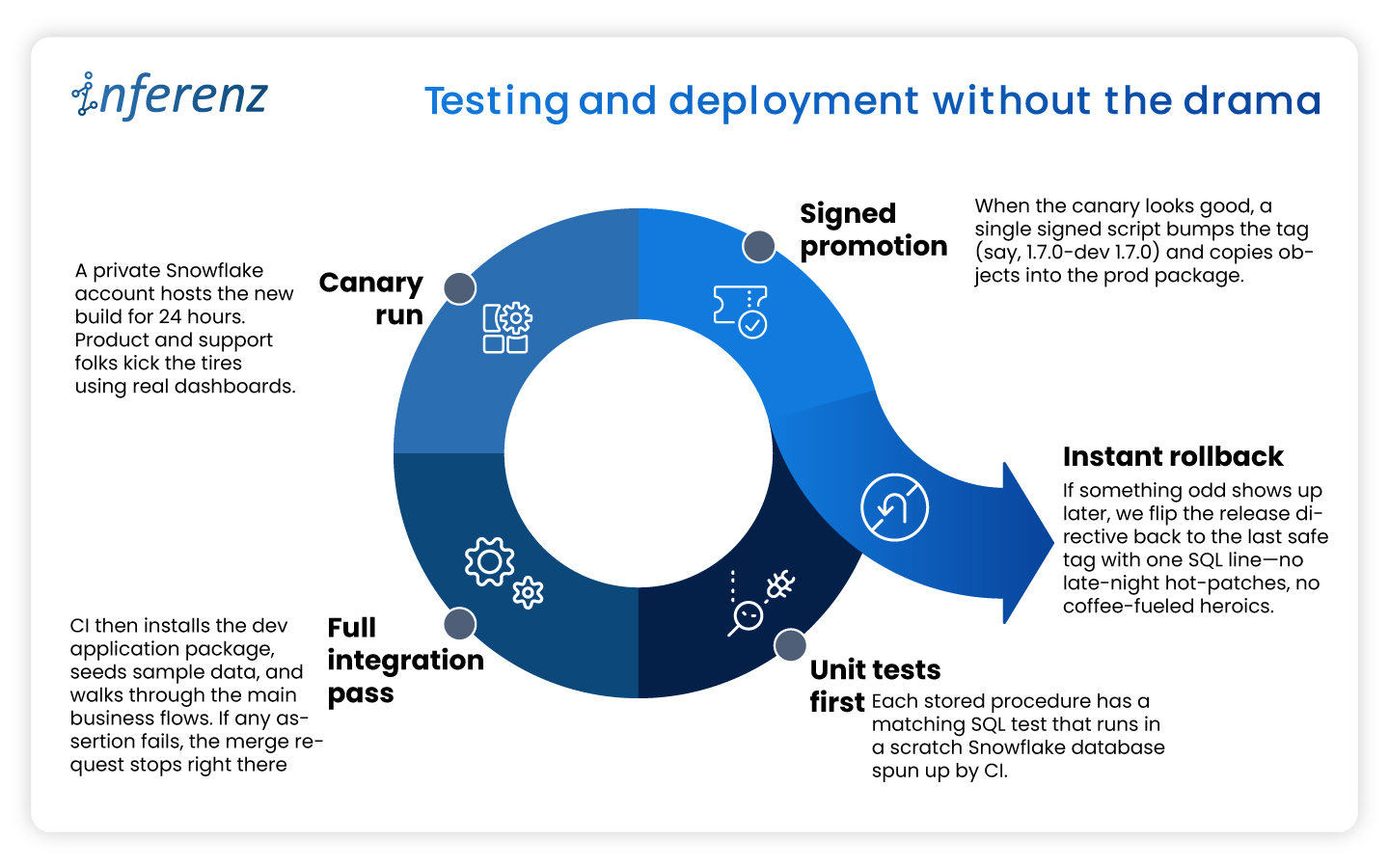
  1. Commit — Every change lands in a feature branch. 
  2. CI spin-up — The runner creates a fresh dev package with CREATE APPLICATION and runs the full tests/ suite.  
  3. Manual QA — Product owners open the Streamlit pages inside the dev package and sign off. 
  4. Tag & promote — A signed SQL script bumps the version (1.6.0-dev → 1.6.0) and copies objects into the prod package. 
  5. Release directive — We set RELEASE DIRECTIVE VERSION = ‘1.6.0’, so new installs pull only the stable build. 
  6. Rollback ready — If something slips through, ALTER APPLICATION … SET RELEASE DIRECTIVE VERSION = ‘1.5.2’ brings users back in seconds. 

Versioning habits that keep both worlds calm 

  • Semantic tags — major.minor.patch with a -dev suffix during QA: 2.0.0-dev. 
  • Schema per version — Runtime objects live in APP_DB.CODE_V1_6. This avoids name clashes when dev and prod packages sit side by side. 
  • Automated object diff — CI compares the manifest in dev vs. prod; promotion stops if objects are out of sync. 
  • Read-only prod — We grant end users a minimal role that blocks CREATE and ALTER inside the prod package, so accidental edits never persist. 

What it buys the business 

  • Predictable releases — Stakeholders get a calendar of when prod changes; no wild pushes. 
  • Audit clarity — Logs show who promoted what, matching each tag in Git. 
  • Happy support desk — Rollback is one SQL line, not a cross-cloud fire drill. 
  • Future compatibility — Older clients can stay on version 1.x while early adopters try 2.x in a separate prod package if needed. 

With isolation in place, both engineers and risk officers sleep better. Next, we’ll dig into security best practices—how strict roles, static scans, and clear docs keep Unify trusted from day one. 

Security that travels with the app 

Security isn’t a bolt-on for Unify, the data deduplication app; it’s wired into the first CREATE APPLICATION script. Because the app sits inside each customer’s Snowflake account, we start from “no rights at all” and grant only what the features need. 

How we keep things tight 

  • Role-based access control – The install script creates an application-specific role with the narrowest set of privileges. All other objects inherit from that role, so nothing sits under a catch-all admin profile. Snowflake calls this the least-privilege pattern, and it makes auditors smile.  
  • Static scans on every merge – Our CI pipeline blocks the build if open-source libraries or stored-proc code show known CVEs. No red flags, no deploy. 
  • Secrets stay secret – Any outbound call (think Slack alerts or usage pings) pulls its token from a Snowflake secret object, never from plain text. 
  • End-to-end encryption – Snowflake handles disk and wire encryption for us, so we get AES-256 at rest and TLS in flight out of the box. 
  • Transparent docs – A short security appendix lists every grant and why we need it. Buyers can paste those commands into their own console and verify the scope in minutes.  

Result: Security teams see clear boundaries, compliance teams get quick sign-off, and our support desk fields fewer “Why does the app need this privilege?” emails. 

Testing and deployment without the drama 

A solid security story means little if the next release ships a typo to production. To avoid that nightmare we treat every change—no matter how small—the same way: 

This disciplined loop lets us ship improvements every two weeks while keeping both the dev and prod packages in lock-step—fast for engineers, calm for customers. 

Listing now, billing later 

When we first released Unify, the data deduplication app in the Snowflake Marketplace we kept the price at zero.  

A free listing let users test the app without budget hoops and gave us real usage stats. Snowflake’s marketplace model also means we can switch to pay-as-you-go, flat monthly, or custom event billing as soon as clients ask for an SLA. Turning that knob is mostly paperwork: update the listing, set a rate card, and push a new release. No extra infrastructure and no fresh contracts. 

Why this matters? 

  • Low-friction trials. Users click “Get” and start working in minutes. 
  • Clear upgrade path. When buyers need production support, we offer a price plan that matches their workload. 
  • Built-in invoicing. Snowflake handles metering and billing, so finance teams on both sides stay happy. 

The marketplace route shifts sales from long demos to quick hands-on proof. That streamlines procurement and puts the product in front of more data teams. 

Keeping the loop alive 

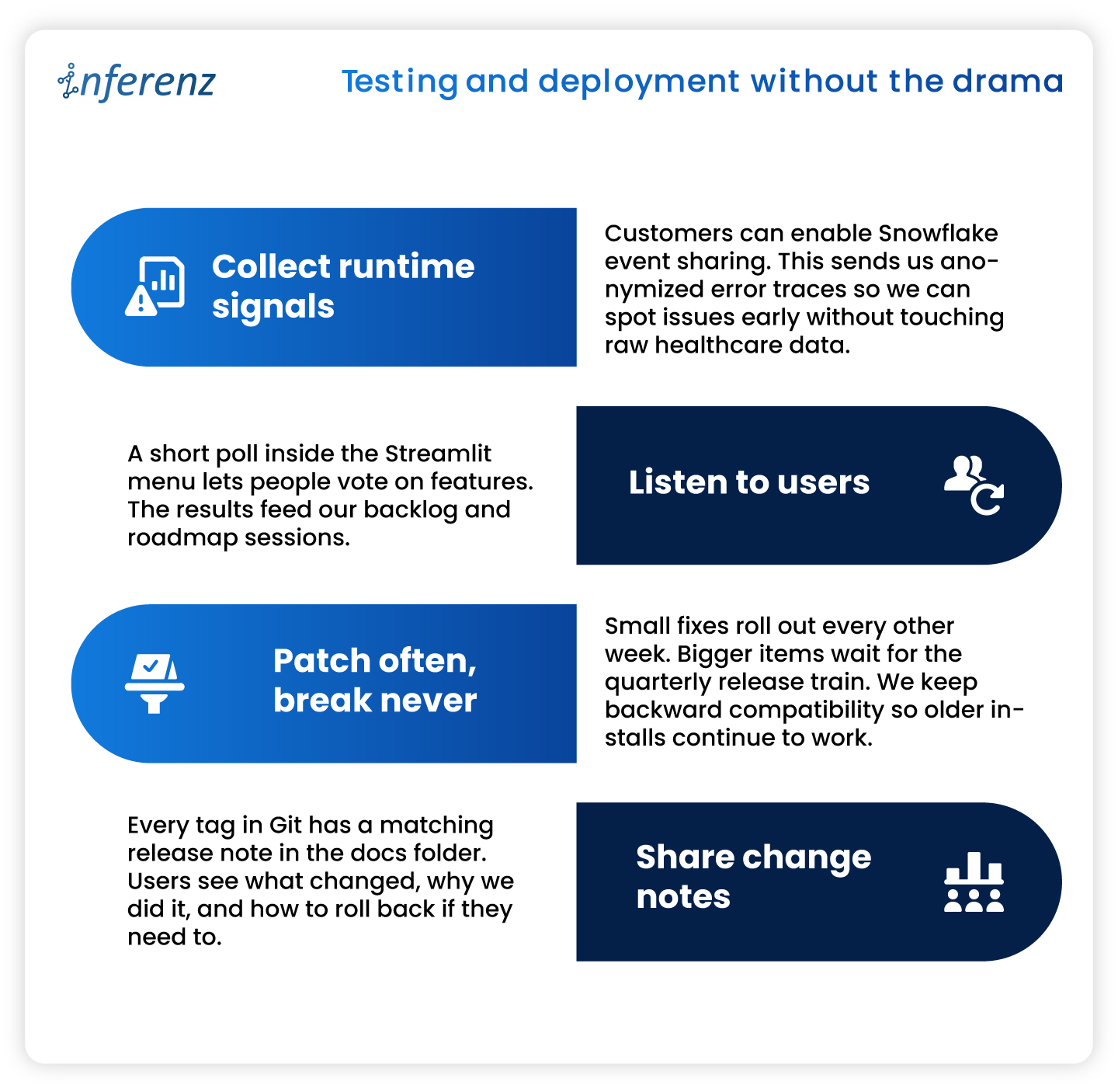
Shipping an app is only half the job. We keep Unify healthy and useful with a steady feedback cycle. 

What we do every sprint 

Note: Continuous improvement keeps trust high and shows users that the product is still moving forward. 

10 Key Takeaways from Our “Unify” Experience 

  1. Maintain separate development and production app packages from the same codebase to safeguard against accidental bugs. 
  2. Use Streamlit within Snowflake for efficient, interactive local development and prototyping. 
  3. Manage application packages using the Snowflake UI for clarity and ease. 
  4. Handle local deployment and testing through SQL for precise control. 
  5. Rely on robust version control and clear promotion processes for reliable releases. 
  6. Enforce strict security and access controls from day one. 
  7. Test thoroughly in both local and Snowflake environments before publishing. 
  8. Provide transparent, user-friendly documentation and support. 
  9. Continuously monitor, update, and improve your app based on real user feedback. 
  10. Plan for monetization early, even if you are not monetizing at launch. 

Conclusion 

Building inside Snowflake changed how we think about healthcare data management apps. Running code where the data already sits cuts risk, shortens audits, and speeds time-to-value. A tidy repo, two isolated packages, strict tests, and clear docs keep releases smooth. Marketplace listing turns installs into self-serve trials and unlocks revenue when clients are ready. If you plan to ship a native app, adopt these habits early. Your future self—and your customers—will thank you. 

Frequently Asked Questions about Snowflake Native App Development and Unify 

  1. Does Unify copy my data outside Snowflake?
    No. The app runs inside your Snowflake account, and all processing stays there. Only opt-in event logs (never raw rows) leave the warehouse for support purposes. 
  2. How long does installation take?
    Most teams finish in under few minutes. Go to Snowflake Marketplace, search the data dedupe app, click of ‘Get’ button, grant the app role, and you are ready. 
  3. Can I try new features without risking production?
    Yes. Keep a separate dev application package. Install the latest version there, run tests, and promote to prod when you are satisfied. 
  4. Do I need to upgrade/update application if new features released after I install it?
    No, you don’t need to do it yourself. All current installations are upgraded to new patch/version automatically (within few seconds to few hours depends on Cloud/Region) when new patch/version is released.  
  5. What happens if an upgrade causes trouble?
    Every release is versioned. Application can roll you back to the previous tag either through command or UI.  
  6. When will paid plans launch?
    We are finalizing usage metrics with early adopters. Expect flexible pricing options—usage based, subscription, and custom event billing—later this year. 

Natural Language Analytics: A Simple Doorway to Deeper Home-Care Insight

Summary

Home-care leaders need answers in real time. Our stack joins Snowflake, CrewAI, Neo4j, and GraphRAG; Grok3 writes the SQL, while Azure OpenAI crafts the insights and formats the results for the best-fit chart— all in seconds. A six-step flow rewrites the query, tags intent, adds knowledge-graph context, writes Snowflake-ready SQL, and shapes the result while keeping HIPAA data safe.  

Early runs cut report queues by 90 percent, surfaced overtime risk days sooner, and set the scene for smarter patient-caregiver matching. -Care teams swim in data. Payroll records, visit logs, EMR notes, and staffing rosters sit in different tools and formats.  

Now, when a manager wants a quick view — “Which aides carried more than ten active cases last month?”— they often wait on analysts or write fragile SQL by hand.  

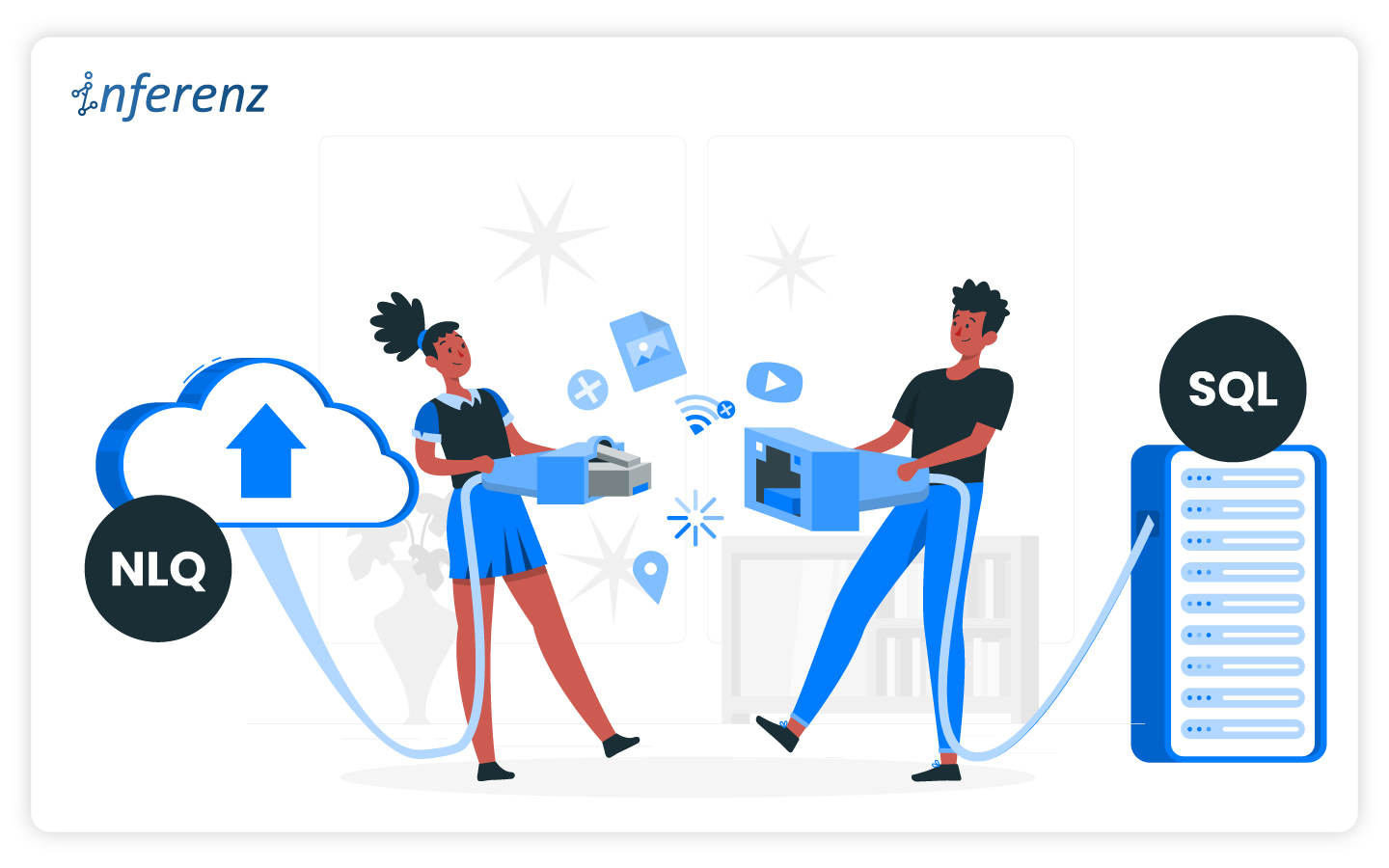
A natural-language-to-SQL (NLQ-to-SQL) layer fixes that gap. It lets any leader ask plain-English questions and see answers powered by natural language analytics 

Large health systems have already shown the impact of agentic AI in research; now the same model can drive natural language processing for sharper caregiver workload insight and smarter staffing balance

What We Built? And Why? 

Our home-care clients kept raising the same pain point: “We have mountains of data, yet simple staffing questions still take a day.” We wanted a proof of concept that showed how NL2SQL, natural language analytics, and agentic AI could shorten that wait to seconds. The goal was not a lab toy but a tool busy branch managers could trust before the next shift roster went live. 

We began with five key parts working as one: 

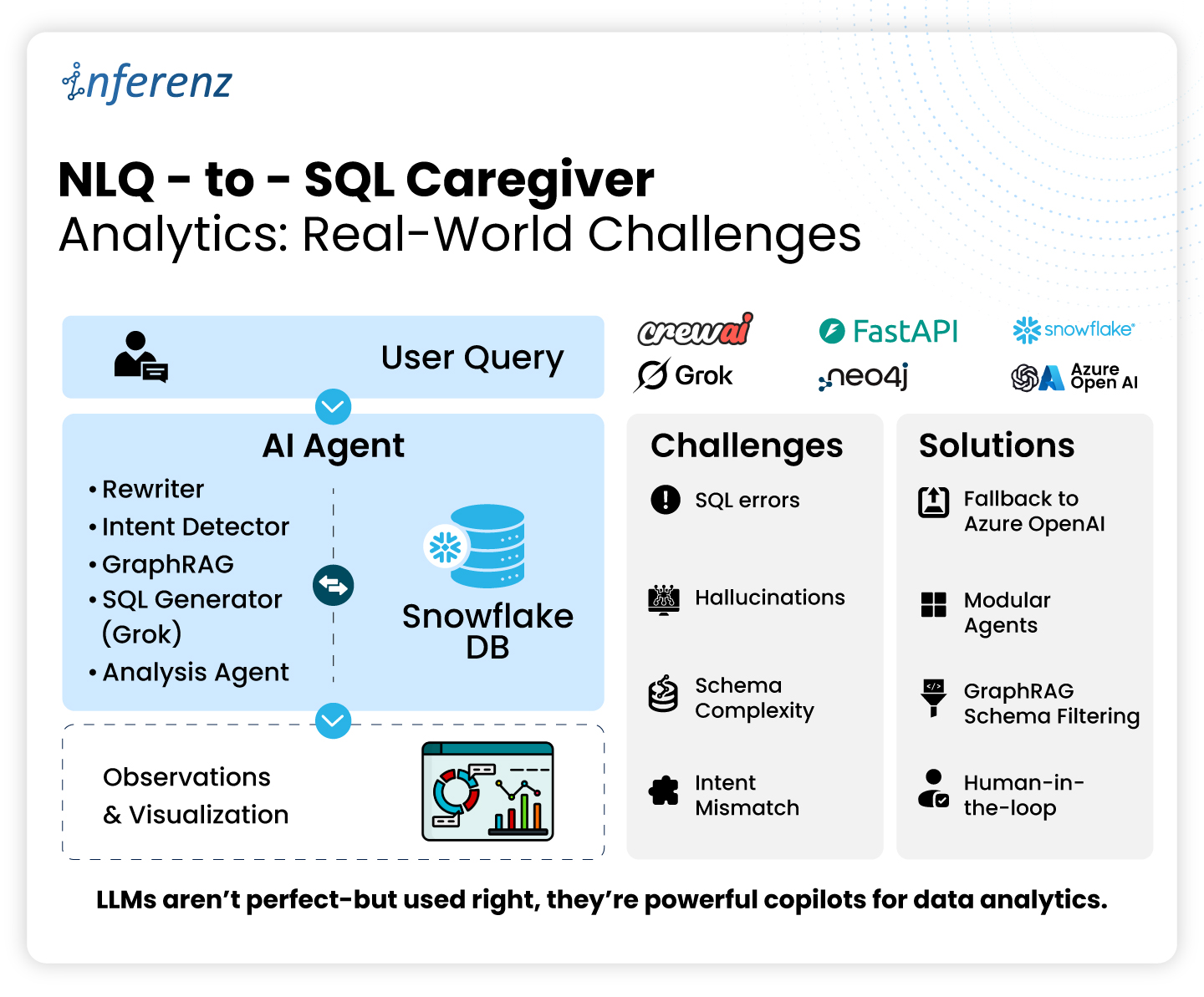
  • CrewAI agents + FastAPI served the front door. FastAPI gave us a light web layer, while CrewAI split each task—rewrite, intent check, SQL build, chart—for cleaner tests and quick swaps. 
  • Snowflake handled storage and compute. Its near-instant clones let us demo new data models without copying terabytes. 
  • Neo4j plus a GraphRAG step kept the schema map tight. Each user question only pulled tables that mattered, so the large language model stayed on track. 
  • Grok3 on Azure OpenAI acted as the fallback. When Snowflake flagged a syntax error, the agent sent the message back to Grok3, got a cleaned query, and reran it.  
  • Smart Visualizer Service then scanned the result set, picked the best chart type, and shaped the data for instant display—raising successful answers by about 20 percent. 

Security was non-negotiable. Every call ran inside HIPAA guardrails. Role-based views made sure a branch supervisor could see staffing tables but never payroll for another region. We leaned on CrewAI’s Snowflake connector. Although CrewAI does not yet call Snowflake’s new data-agent hooks first unveiled at Snowflake Summit 2025, the built-in link let our agents run inside the warehouse instead of in a sidecar, trimming weeks from our schedule. 

The result is terrific. This living pilot answers real staffing load, overtime, and visit-gap questions in seconds. It proves that a small, well-planned stack can turn scattered caregiver data into clear action—exactly the clarity home-care CIOs ask for every quarter.

Meet the Five Agents that Own their Tasks

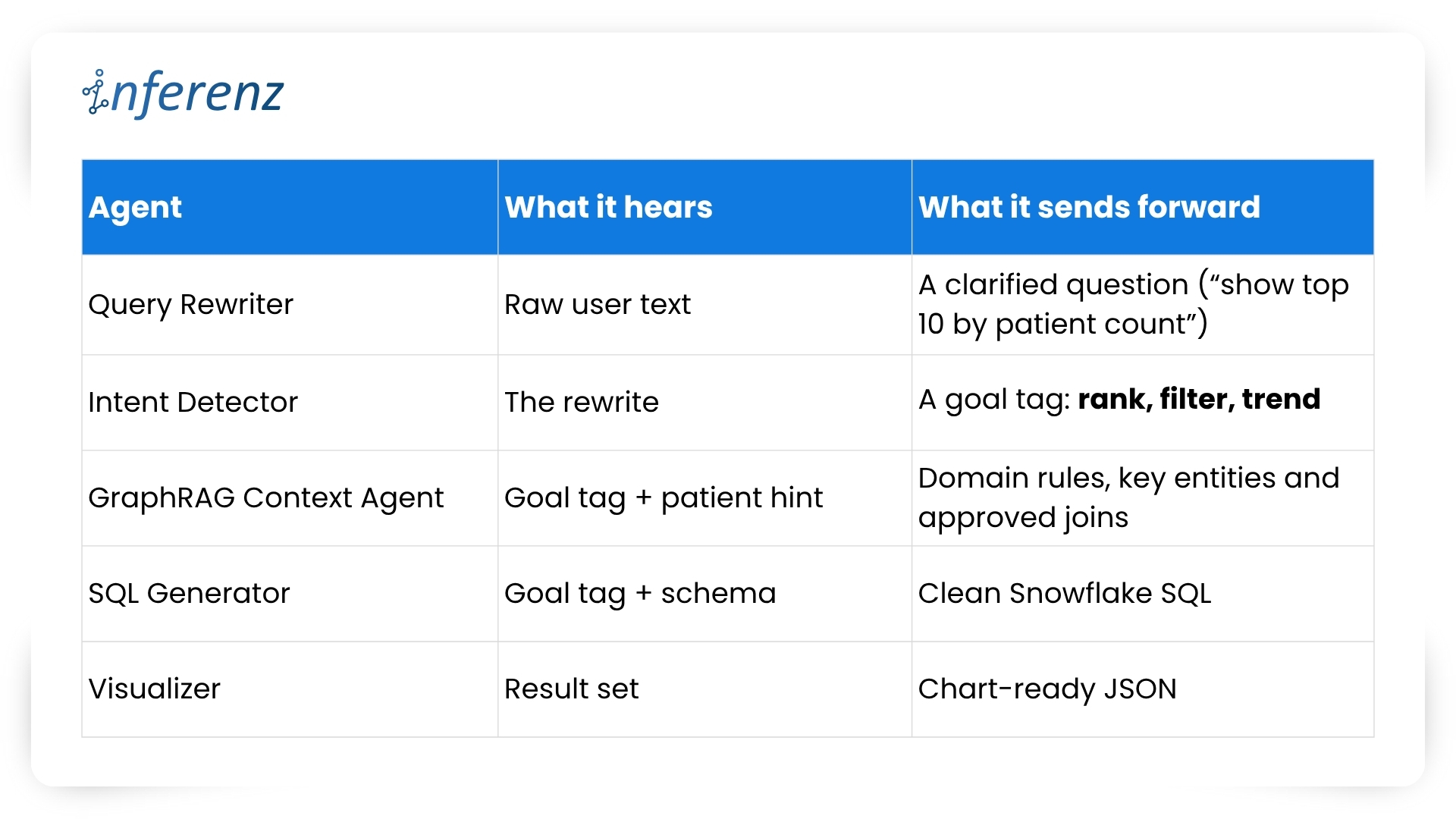
We wanted a flow that felt like a relay race rather than a black box. So, we broke the NLQ-to-SQL path into five lean agents, each with a single duty.  

  • Query Rewriter cleans the user question. 
  • Intent Detector tags the goal. 
  • GraphRAG Context Agent calls the knowledge graph to fetch domain terms, KPI rules, and approved joins. 
  • SQL Generator writes Snowflake code. 
  • Visualizer shapes the chart. 

By giving every agent one clear task, we keep bugs local and upgrades quick. Here’s the lineup that powers our natural language analytics for home-care data: 

Each agent owns one step. That keeps fixes small and testable. 

The Challenges We Faced 

  1. Wrong columns, wrong joins
    Agents guessed table names that looked right but were not in the model. 
  2. Generic SQL
    Public training sets leaned the model toward Postgres-style syntax, which Snowflake then rejected. 
  3. Loose questions
    A user typed “caregiver workload Q1” with no metric or slice. 
  4. Bigger schema, louder noise
    The healthcare data warehouse stored 300+ tables. Many of them were redundant and confusing for the model. 
  5. Context drop in follow-ups
    “Now show only California” lost the link to the prior result. 

How We Fixed Them

  • Error-aware fallback
    When Snowflake raised an error, we fed the message to Fallback agent powered by Grok3. Success jumped by 18%. 
  • GraphRAG pruning
    Neo4j stored a knowledge graph representing tables, columns, KPI definitions, dashboards and their relationships. The SQL agent looked up only what matched the question. Speed and accuracy both rose, considerably. 
  • Prompt tuning
    We shifted prompts from “write SQL” to “return a list of steps you will take, then SQL.” Planning before code cut hallucinations. 
  • Modular tests
    Because each agent is a micro-service, we swapped versions without hitting the front end. 

A Week in Production: Real Questions We Saw

During the first week of our pilot, the natural language analytics layer fielded real-world questions such as: 

  1. “Show caregivers with missed-visit rates over five percent for June.” 
  2. “Chart overtime hours by branch for this year.” 
  3. “Rank each RN by the number of first-time patients they onboarded last quarter.” 

Powered by our stack of AI agents in healthcare and agentic AI, every request returned in seconds and fed an instant bar or line chart. Supervisors used the answers in daily huddles to fine-tune rosters with our AI-based home healthcare scheduling software, easing overload and lowering caregiver burnout risk.  

Recruiting and retention of homecare workers top the 2024 agenda across home health care agencies, while steady insight keeps patient visits—and morale—on track. 

Why It Matters for CIOs in Home Care 

Here’s what real-time home care analytics powered by natural language analytics and agentic AI delivers where it counts. The gains below hit staffing, compliance, cost, and morale—core metrics every CIO tracks. 

  • Faster staffing calls: Natural language analytics turns every staffing query into a quick, voice-style search. Supervisors spot overload, drill down to branch or shift, and move aides before a gap harms patient visits. CIOs gain a real-time safety net that guards service levels without waiting on nightly jobs or manual exports. 
  • Cleaner audits: Each query flows through a governed, repeatable path from question to Snowflake SQL to result. Auditors see one chain of truth instead of scattered sheets. This traceability meets HIPAA demands and slashes review time when payers or state boards knock on the door. 
  • Lower spend: Self-serve insight trims the ticket queue for report writers. Analysts focus on high-value models like readmission risk forecasting, not ad-hoc counts. Contractor hours go down, and the IT budget moves toward strategic AI pilots rather than rote data pulls. 
  • Better morale: When aides view fair caseload dashboards, they feel heard. Balanced rosters cut overtime spikes and shrink the 65 percent churn rate that plagues the field. Stable teams mean steadier care quality, fewer rehiring costs, and higher patient trust. 

InferenzHome Care Analytics Approach with Natural Language

Within our home care analytics solution, we aim to tailor every NLQ layer to healthcare rules and home-care realities: 

  • HIPAA-grade security – Row-level filters and least-privilege roles baked in. 
  • Domain vocab – Knowledge graph included CPT codes, visit types, and state billing terms. 
  • Human-in-loop – Flagged queries route to analysts, not silence. 
  • Agentic AI roadmap – The same CrewAI spine can host new agents for RCM, readmission risk, and staffing forecasts, all within one interface. Snowflake’s agent scaffold announced in June lets us add skills without moving data. 

We are now planning A/B trials where one branch uses NLQ daily and a control branch stays on canned reports. We will track time-to-answer, overtime spend and missed-visit fines.  

Early signs point to double-digit gains, but real proof will close the loop. Stay tuned to this space for more updates. 

Till  then, you can check our ingenious patient-caregiver matching solution that is already making waves in  the home care industry. 

Frequently Asked Questions

  1. How does NL2SQL-based home care analytics speed our staffing calls?
    The natural language layer turns plain questions into Snowflake SQL in seconds. Supervisors get live caregiver-workload charts without waiting for analysts. 
  2. What protects patient data when we use agentic AI?
    Role-based views, HIPAA-grade encryption, and least-privilege access keep data locked. AI agents touch only the tables each user is cleared to see. 
  3. Will natural language analytics link to our EHR and scheduling software?
    Yes. Standard APIs stream records from EHR, payroll, and visit logs into Snowflake. No rip-and-replace. Your current tools stay in place. 
  4. How fast can we launch the AI agents in healthcare ops like ours?
    A focused pilot with key tables and ten users goes live in four to six weeks thanks to CrewAI modules. 
  5. How does quick insight help reduce caregiver burnout and churn?
    Instant views of missed visits, overtime, and patient mix let managers shift loads before stress builds. Fair rosters lower turnover and boost care quality. 

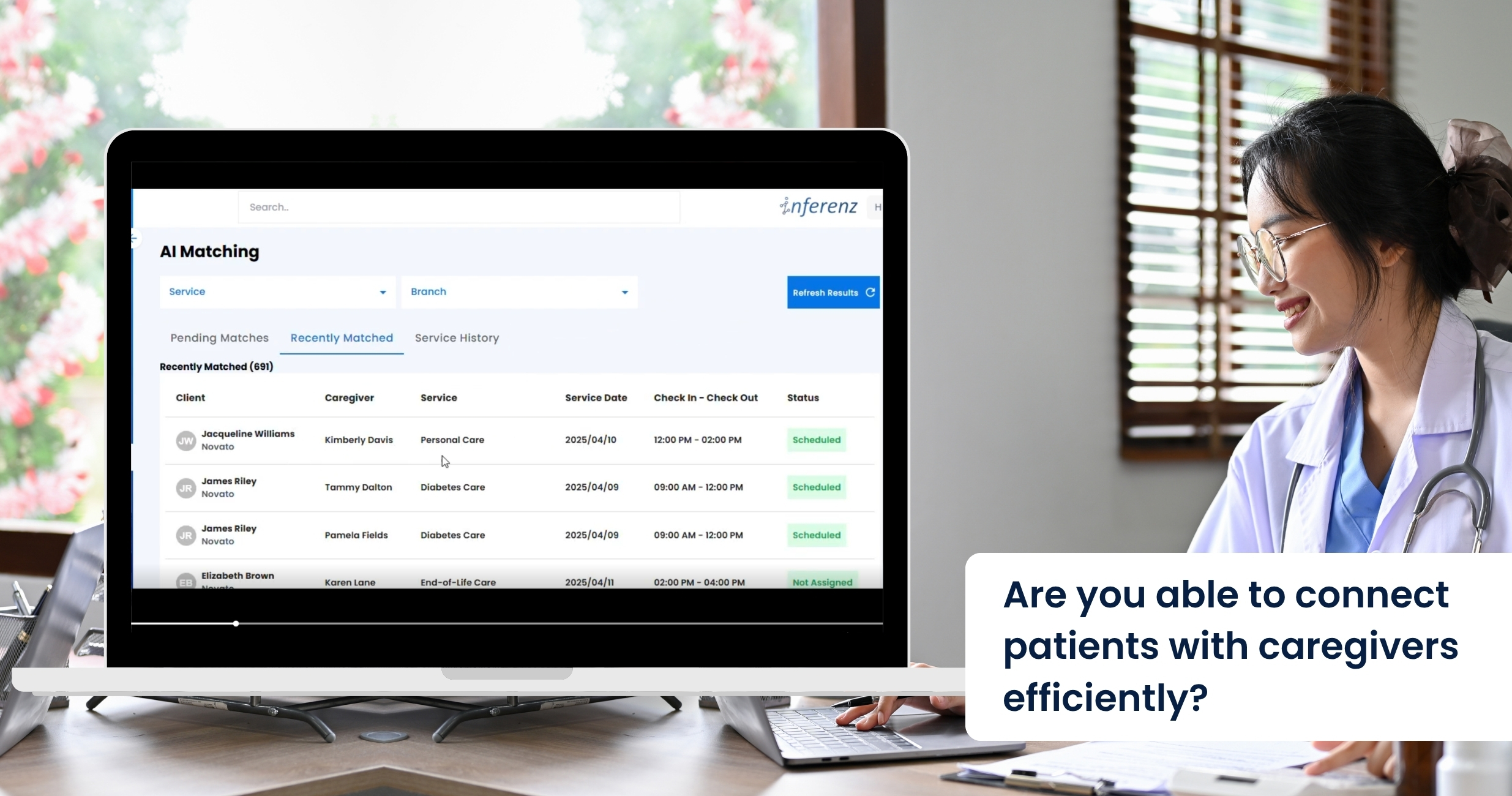
Patient Caregiver Matching: The AI-Powered Caregiver Connect Solution is Transforming Home Care

Overtime overruns alone threaten to siphon $1.05 billion from U.S. home- and community-care budgets this year, says Avalere Health—proof that shaky patient-caregiver matching is no longer just an operational headache but a bottom-line crisis. 

Schedulers still juggle phone calls, spreadsheets, and rule-based software that crumbles when a caregiver calls in sick. A comprehensive caregiver connect solution powered by agentic AI can flip that script. It watches every shift, learns from each match, and plugs gaps in minutes. No frantic dial-around, no client left waiting. Expect all efficiency with AI in healthcare. 

Problems Faced by the Homecare Industry in Scheduling Appointments


Modern EMR and AMS platforms capture plenty of data, yet most still fail at turning that data into fast, smart schedules. When we ask schedulers and field staff where things fall apart, three patterns rise to the top. 

Manual firefighting 

A single caregiver call-out often touches four or five tools: phone, text thread, spreadsheet, agency software, and finally an “all-staff” blast message. In practice, the rescue takes two to four hours, during which the client risks a missed visit. Home care organizations call this weekend scramble “unsustainable” and link it to high office burnout. 

Every unfilled hour can cost $25–$40 in lost billing. Late or missed wound-care checks raise hospital readmit odds by up to 15% (Loving Home Care study). Schedulers report after-hours stress as a top quit trigger; when one quits, five caregivers follow. 

Data silos 

Most schedulers never see real-time clinical flags. A recent report mentions that only about one in three U.S. home-care agencies have a point-of-care EHR that talks to their patient scheduling tool. The rest rely on notes or phone calls.  

Result: 

  • A wound-care alert sits in the EHR while the AMS assigns a basic aide. 
  • Medication-change notices arrive hours after the caregiver has left. 
  • Coordinators must cross-check two or three systems before offering a shift, slowing coverage. And there is the issue of duplicate patient records that create more chaos and confusion in scheduling. Check out our AI data duplication solution here. 

Without unified data, matches ignore skills that matter most—like current wound-vac certs, language fit, or post-surgery protocols. 

Burnout churn 

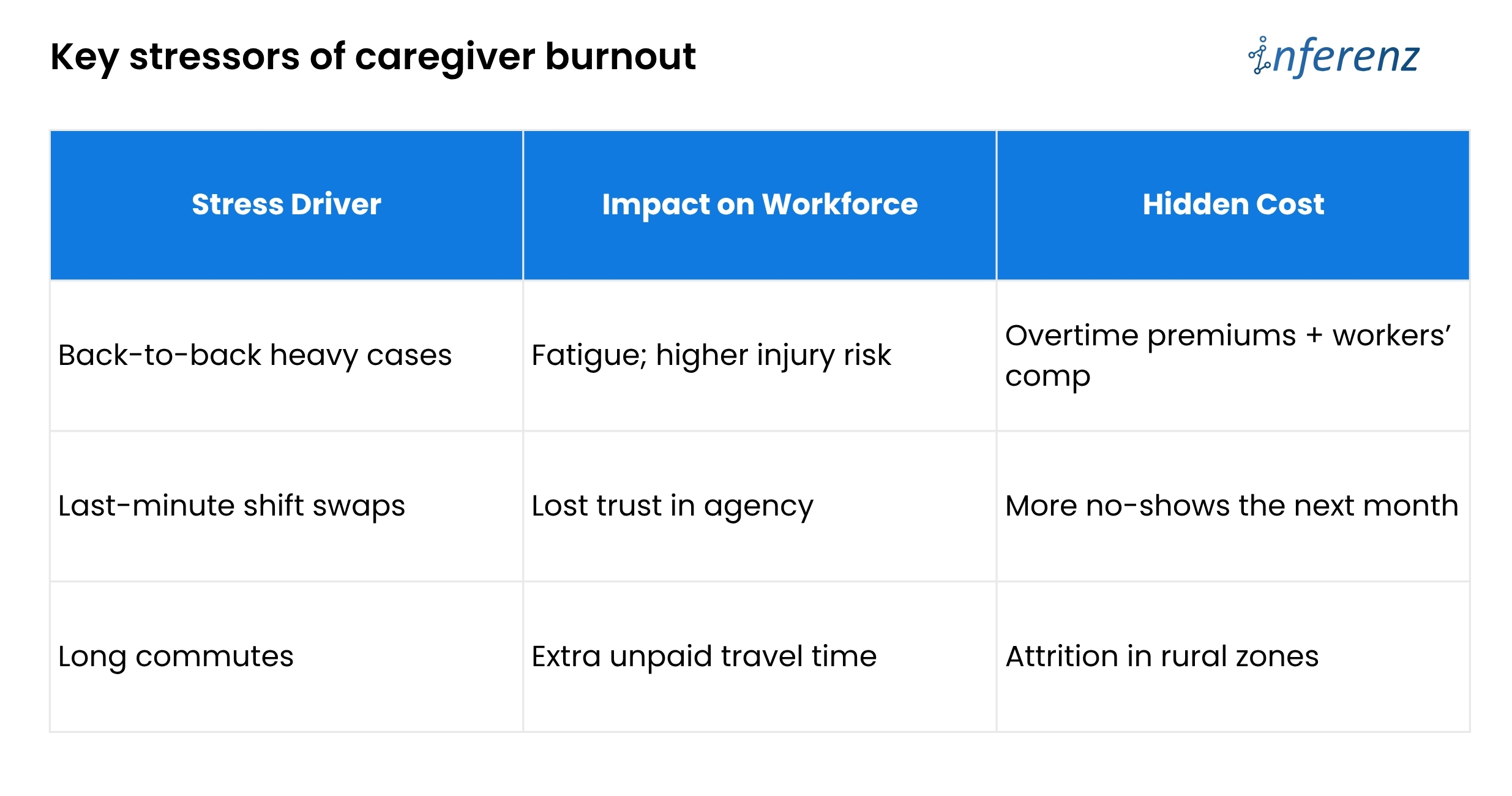
Shift imbalance drives turnover faster than pay issues. The 2024 Activated Insights Benchmarking Report put caregiver turnover at 79%—the highest in six years. Schedulers themselves are leaving too; agencies that lose a scheduler often see a linked caregiver exodus.  

Poor balance means good aides get overbooked, newer aides sit idle, and both groups start scanning job boards. Until schedules pull live clinical data, automate call-out recovery, and watch workload signals, agencies will keep paying for empty visits and exit interviews.  
The article now chalks out how predictive care in Patient Caregiver Matching solution fixes those three weak spots. 

What Is Agentic AI? 

Think of it as a digital care coordinator that can perceive, decide, and act without waiting for humans. Unlike first-gen AI healthcare companies that graft models onto old software, a true agentic layer: 

  1. Learns from every shift – Outcome scores, travel times, and client feedback loop back into the model. 
  2. Optimises on many goals at once – It balances continuity, cost, and worker well-being instead of chasing only fill rate. 
  3. Acts in real time – If traffic halts Nurse Maya, the agent reroutes someone closer and messages all parties automatically. 

The result is a living schedule that keeps adapting—no stale rule set, no bias from tired staff. 

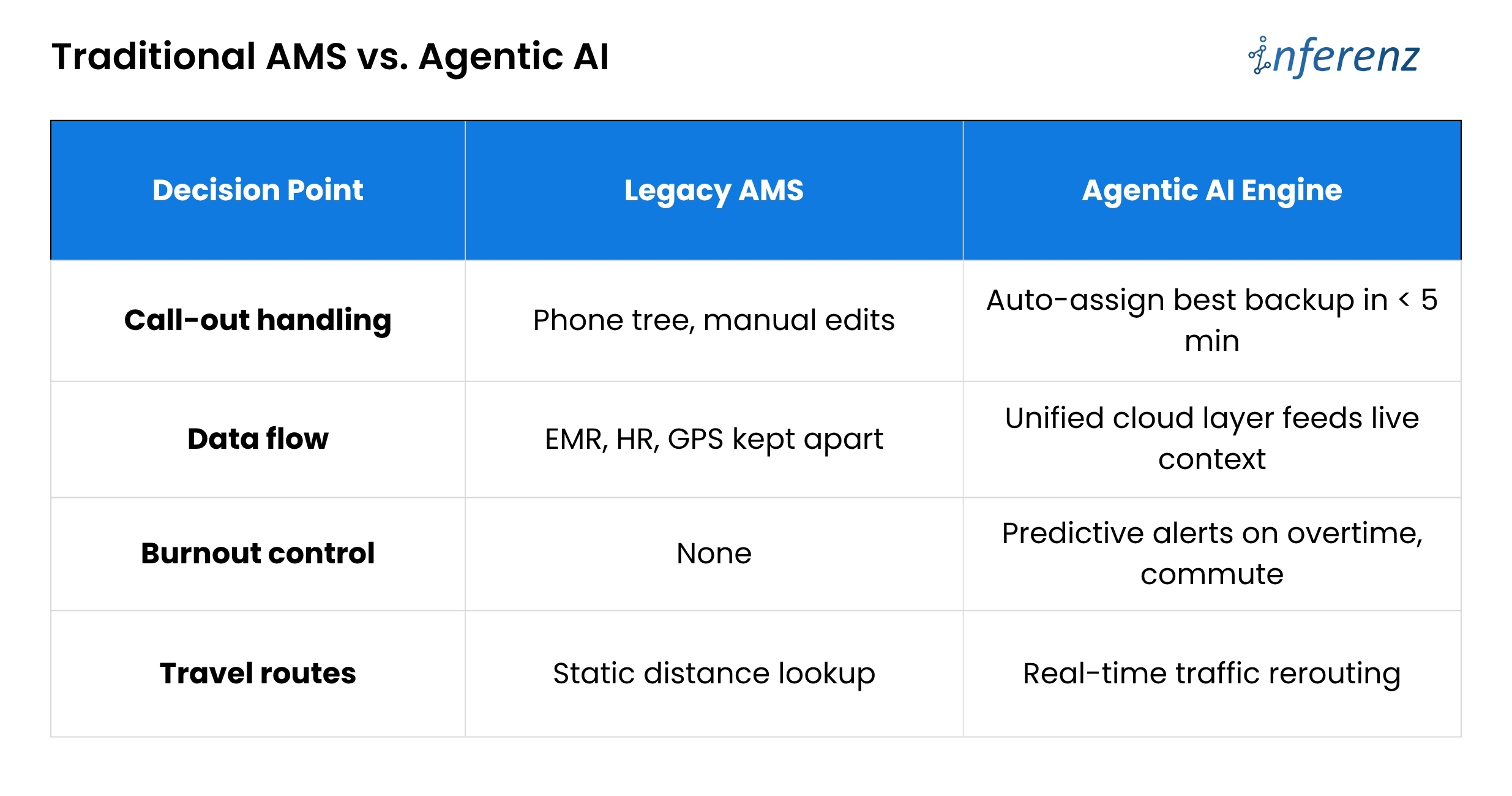
Traditional AMS vs. Agentic AI 

Bottom line: Outdated tools act like a notebook. An AI engine acts like a live dispatcher. 

PCM: the heart of smart scheduling

Patient Caregiver Matching (PCM) sits at the core of the agentic engine. It blends hard data that includes skills, licenses, and shift history with soft cues like language, pet comfort, and even commute stress.  

Each visit logged, each survey filled, feeds a feedback loop that sharpens the next match. 

AI extracts relevant details and binds them in a single narrative. This narrative helps caregivers walk in fully prepared and better informed about their assigned patients.  

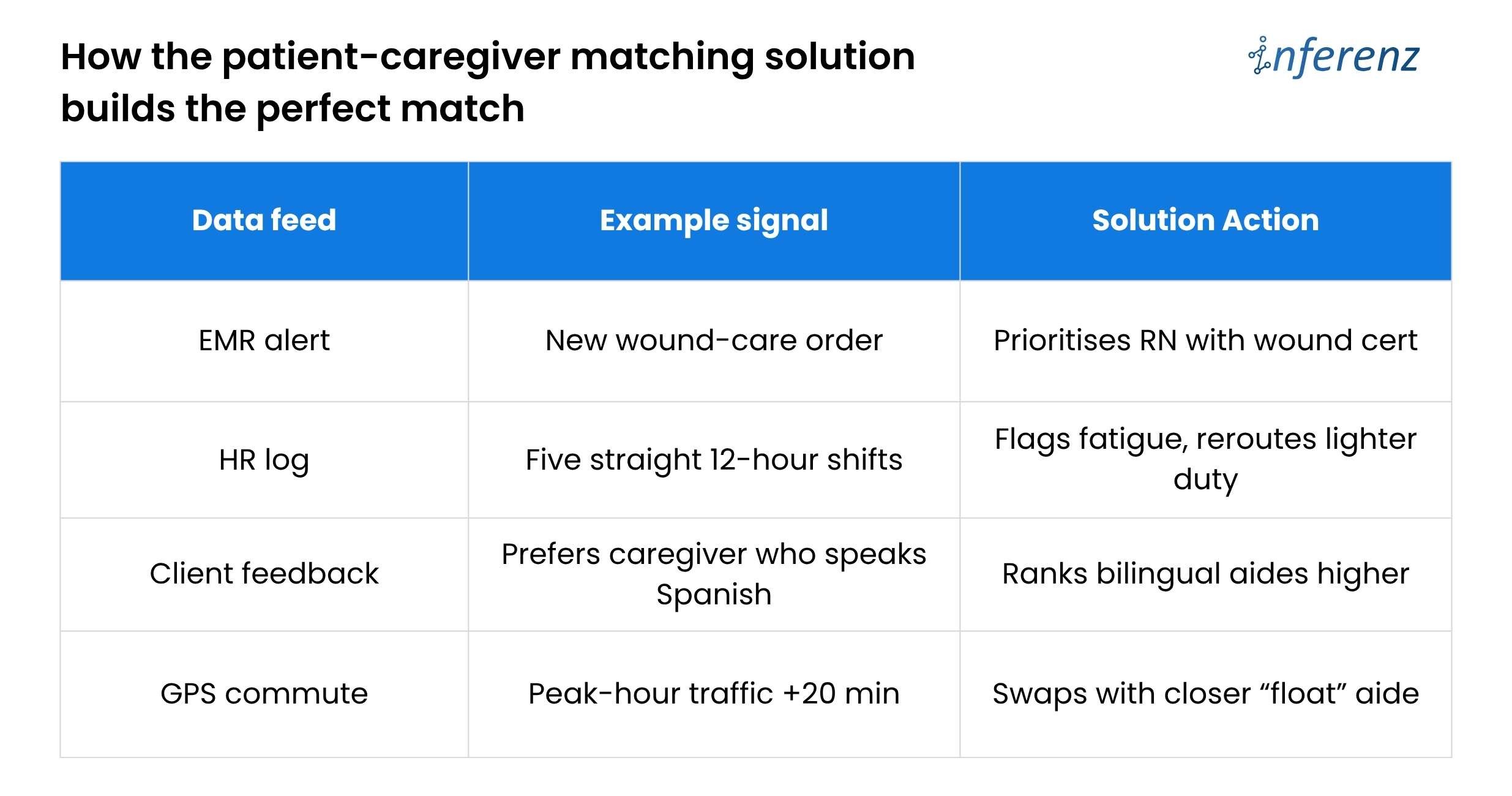
How the patient-caregiver matching solution builds the perfect match 

PCM makes thousands of micro-decisions that a human scheduler simply cannot track in real time.  

Caregiver Connect and Smart Scheduling in Homecare – Three Phases 

Phase 1 – Assist 

  • Role of AI:
    The system watches current openings, checks skill, location, and past ratings, then lists the best caregiver for each visit. It also sends and tracks shift texts for you. 
  • Why it matters:
    Speed is life in home care. By moving the “who is free and right for this client” search to an AI engine, booking time drops by half. A spot that once took twenty calls now locks in minutes. 
  • Effort change:
    Coordinators still approve picks, yet their keyboard time falls about 50%. That freed hour can go to client follow-ups or staff coaching. 

Phase 2 – Co-pilot 

  • Role of AI:
    The tool no longer waits for you to act when a callout hits. It finds the next best caregiver, confirms the shift, and pushes a note into the EMR so nurses see the new name. 
  • Why it matters:
    Missed visits tumble toward zero. Clients stay safe, and the agency avoids fines or angry phone calls on Friday night. 
  • Effort change:
    Because the AI covers most last-minute gaps, schedulers work on harder tasks and see about 70% less day-to-day scramble. 

Phase 3 – Autonomous 

  • Role of AI:
    The agent drafts the full weekly rota, juggles swaps, and even alerts HR when future demand will outrun supply. It chats with caregivers to shift times if traffic or family issues pop up. 
  • Why it matters:
    Fill rate climbs to 98% and holds steady. Fewer gaps mean higher revenue, better reviews, and calmer staff. 
  • Effort change:
    Coordinators shift to oversight. They scan dashboards, spot edge cases, and mentor teams. Routine scheduling work is now background noise handled by the system. 

During Phase 1, a coordinator still approves matches, building trust. By Phase 3, the agent posts a full weekly roster, flags any legal or pay exceptions for quick sign-off, and frees leaders to focus on quality and growth. 

A CXO-level Path to Patient–Caregiver Matching that Actually Works

Home-care agencies lose time and money because scheduling lives in silos. Skills sit in one system, vitals in another, PTO in a third.  

When a caregiver calls out, coordinators must sift through them all. The fix is a Patient Caregiver Matching (PCM) engine that learns and acts in real time—but only if leaders roll it out with equal focus on data, change control, and trust.  

Here is how to move from today’s chaos to tomorrow’s self-tuning roster, without hiring a small army of project managers. 

Start with clean data, not clever code. 

Feed every AMS, EMR, and HR stream into one secure lake through FHIR or other HIPAA-ready APIs. A single source of truth stops double entry and lets the AI see the full picture: licenses, wound alerts, commute times, even overtime risk. Until that lake is live, smart matching cannot begin. 

Prove value in a 90-day branch pilot. 

Switch PCM on for one location and track three simple numbers: shift fill rate, overtime hours, and coordinator minutes per booking. A branch-level test gives hard evidence, keeps risk low, and shows frontline staff that the tool helps rather than replaces them. 

Move to “co-pilot” across the agency. 

Once the pilot hits its marks, let PCM auto-cover call-outs everywhere. Keep one senior scheduler in an “air-traffic control” role to handle edge cases and to reassure teams that humans still guide policy. The daily scramble fades; missed visits trend toward zero. 

Let the AI look three months ahead. 

With real-time cover in place, turn on the forecasting lens. PCM scans referral trends, PTO calendars, and skill gaps, then warns HR before shortages hit. Growth continues without surprise overtime or rushed hiring. 

Build trust into every decision. 

A live roster run by AI only sticks if people believe it is fair and safe.  

Each match stores a plain-language reason such as “Carla assigned for dementia skill, four-mile commute.” Hard caps on weekly hours, license scope, and labor law live inside the rule set, so the engine cannot overstep. Monthly bias scans compare assignments across age, gender, and minority status while retraining drift triggers. The cloud zones keep scheduling live even if one data center fails. 

The payoff 

Weekend duty spreads evenly, time-off requests stick, and early fatigue signs rise to the surface before they become burnout. CXOs gain tighter control over cost and care quality without adding layers of back-office staff. Coordinators finally go home on time. 

“Caregivers who gain more autonomy over their schedule report lower stress.” — Cleveland Clinic flexible scheduling study 

Future-ready edge tapping the private caregiver pool 

Growth pressures will not spare preferred home health care brands. The patient-caregiver matching solution can open an on-demand bench of vetted private caregivers when internal staff hit capacity. The agent weighs cost, compliance, and continuity, then fills gaps without overtime blowouts. 

This “elastic staffing” positions agencies as connected care hubs, not just schedule brokers. It also sidesteps the narrow talent funnel that hammers many healthcare AI companies today. 


FAQs about Patient Caregiver Matching solution by Inferenz 

  1. What problem does Patient Caregiver Matching (PCM) solution fix in home-care scheduling?
    It cuts the costly overtime overruns that pile up when staff call out or shifts go unfilled. By learning from every visit, it matches the right aide in minutes and keeps clients from missing care. 
  2. How does Predictive Care Matching feature choose the best caregiver?
    The feature weighs skills, licenses, client feedback, travel time, and live clinical alerts, then ranks caregivers by overall fit in real time. 
  3. Will the system lower my agency’s overtime cost?
    Yes. Agencies in pilot tests saw overtime hours fall because open shifts got covered early, not at the last second when rates spike. 
  4. Can it handle a call-out at 7 p.m. on Friday?
    It can. The tool auto-selects the next best caregiver, sends the shift offer, and updates your EMR and AMS without manual intervention. 
  5. How does it guard against caregiver burnout churn?
    The engine flags heavy caseloads, long commutes, and back-to-back double shifts, then spreads work more evenly to keep staff fresh. 
  6. What data feeds the matching engine?
    It pulls live inputs from EMR, AMS, HR, and GPS tools, ending the data silos that slow most schedulers. 
  7. How soon will we see a higher shift fill rate?
    Most branches notice smoother coverage inside 30 days, with clear fill-rate gains by the end of a 90-day pilot. 
  8. Does it plug into our current EMR and AMS?
    Yes. A unified data layer links to standard FHIR or vendor APIs, so you keep your existing systems while adding smarter matching. 
  9. Is patient data secure and HIPAA-ready?
    Data stays in an encrypted, cloud-based lake with strict access controls and full audit logs that meet HIPAA standards. 


Databricks Data+AI Summit 2025: Announcements & Insights

Databricks just dropped a wave of updates at Data + AI Summit 2025 —and it’s safe to say, they’re doing more than just adding features. They’re rebuilding the modern data and AI stack from the ground up.  

Databricks Summit 2024 now feels like the dress rehearsal for these announcements! 

Whether you’re an engineer, analyst, or decision-maker, here are the 10 biggest product announcements that will shape how you work with data this year and beyond. 

1- Lakebase 

A Postgres-like metadata engine built for the Lakehouse
Lakebase brings transactional consistency, fast queries, and metadata performance to your lakehouse architecture. It’s the glue layer that makes structured access possible across massive data volumes—without sacrificing openness or scale. 

2- Agent Bricks 

Your enterprise AI agents, now production-grade
Agent Bricks is a new framework that makes it easy to build, evaluate, and deploy AI agents that use your organization’s data via Retrieval-Augmented Generation (RAG). Expect faster time-to-value and lower GenAI experimentation risk. 

3- Spark Declarative Pipelines 

Define your data logic. Let Spark figure out the rest.
With a new declarative syntax, Spark pipelines become cleaner and easier to manage. Think configuration over code. Now your intent would meet automation seamlessly and the pipeline building process gets simplified. 

4- Lakeflow 

Managed orchestration for your data workloads
Databricks Lakeflow helps you build, schedule, and monitor complex data workflows without managing infra. Built to scale with your team’s needs, it replaces scattered DAGs with one consistent orchestration layer. 

5- Lakeflow Designer 

Drag. Drop. Deliver.
A visual canvas for creating ETL pipelines without code. Lakeflow Designer makes pipeline building intuitive for analysts and operators, while still producing production-grade Databricks workflows. 

6- Unity Catalog Metrics 

Governance meets observability
Unity Catalog now offers live metrics for data quality, usage, freshness, and access lineage. This tightens control and makes compliance and trust easier to prove—no more data blind spots. 

7- Lakebridge 

Free, AI-powered data migration into Databricks SQL
Move from Snowflake, Redshift, or legacy warehouses without friction. Lakebridge is a no-cost, open-source migration tool that helps you modernize your stack on your terms. 

8- Databricks AI/BI (formerly Genie) 

BI without the query language
Business users can now ask natural-language questions and get dashboards, metrics, and insights—powered by GenAI and structured on trusted data. It’s self-service analytics, evolved. 

9- Databricks Apps 

Build internal apps on Databricks—securely and scalably
Now you can create and run interactive applications directly on the Databricks platform with enterprise-grade identity control and data governance baked in, for the benefit of the Databricks community. 

10- Databricks Free Edition 

Get started with Databricks—forever free
No credit card. No setup cost. The Free Edition is perfect for developers, learners, and small teams to explore the full power of Databricks. 

What This Means for Databricks users? 

The common thread in all these announcements are 

  • Better Access.  
  • Adherence to Simplicity.  
  • Streamlined Governance.  
  • Prompt AI-readiness. 

Databricks is now no longer just for engineers. With tools like Agent Bricks, Lakeflow Designer, and AI/BI, business teams now can impose their objectives with a front row seat in the data conversation. 

Quick recap 

Inferenz, an official Databricks partner, is already applying the latest updates to power its agentic AI solutions in healthcare. From real-time patient-caregiver matching to workforce analytics and natural language-based insights, our tools are built to act on fresh, unified data.  

Expect faster decisions, earlier risk detection, and zero extra tech layers. As AI in healthcare accelerates, the Databricks ecosystem is setting the pace, and we’re already building caregiver connect solutions with it. 

Want to see it in action? Contact us soon. 


FAQs on the 2025 Databricks Summit Highlights 

  1. What makes the new Lakehouse engine different from a classic warehouse?
    Lakebase brings a transactional layer to the Databricks Lakehouse model, giving you ACID reliability without leaving open-format storage. 
  2. How will the new metrics improve governance?
    The live metrics inside Unity catalog in Databricks give instant views on data quality, freshness, and usage—crucial for audit and compliance teams. 
  3. Where can I monitor pipeline runs built in Lakeflow?
    Every run appears in the new Databricks workflow job dashboard, offering status, lineage, and error details in one place. 
  4. Is there a no-code entry point for building workflows?
    Yes—Lakeflow Designer lets analysts drag and drop tasks, then schedules the flow using the same engine that powers Databricks workspace and its automation. 
  5. What’s new for model tracking and deployment?
    The summit added tighter hooks between Databricks MLflow and Agent Bricks; you can now call models through a unified Databricks API during agent execution. 
  6. Will third-party tools integrate more smoothly?
    Yes—expect richer SDK support through Databricks connect and a growing Databricks marketplace of certified partner solutions. 


Snowflake Summit 2025: Key Highlights and Announcements

Snowflake Summit 2025 was unlike any other summit that happened before. It was a like a magnificent product launchpad, and it did full justice to the action-packed four days as part of the event schedule.  

The data-cloud giant showed how it plans to cut query costs, add trusted AI, and open its platform to every format from Iceberg to Postgres. Leaders teased faster warehouses, live FinOps alerts, and chat-style analytics that turn plain English into charts. They also sealed a $250 million Postgres deal and signed on as the data engine for the LA 28 Olympics. Staggering, isn’t it? 

Why does this matter though, you may ask?  

Because teams everywhere still wrestle with slow reports, rising bills, and security gaps. Snowflake’s new moves promise hands-off tuning, real-time guardrails, and AI tools that stay inside the same secure walls.  

The highlights below break down what shipped, what’s in preview, and how each change could move the needle on cost, speed, and trust. 

Compute that runs faster and costs less 

Gen2 Standard Warehouses hit general availability and already show about 2.1× faster query time in live customer tests. Pair that with Snowflake Adaptive Compute (private preview) and the platform now picks cluster size, parks idle nodes, and pools resources across jobs without manual tuning. 

  • To keep Snowflake pricing in check, the FinOps console adds Cost-Based Anomaly Detection (public preview) and Tag-Based Budgets (GA soon). Both alert teams to cost spikes before month-end surprises.  
  • Workspaces now bundle inline Copilot help, Git sync, and a GA Terraform provider, so builders can code, test, and ship inside one browser tab. 
  • Python 3.9 is live in Notebooks, plus custom Git URLs for smoother CI/CD. 

Take-away:  Faster analytics with less knob-twisting and clearer bills. 

Stronger governance and security 

Horizon Catalog gains an AI Copilot for natural-language search plus Iceberg catalog-linked databases, so data stewards can find and govern tables sitting outside the core warehouse.  

On access control, Snowflake now supports passkeys, authenticator apps, and programmatic tokens, moving the service toward a full MFA-only stance before November 2025.  

For backups, new Immutable Snapshots (preview) keep point-in-time copies that cannot be altered—extra insurance against ransomware. Here are some more updates: 

  • Horizon Catalog adds external-data discovery, letting stewards govern dashboards and other cloud stores from one pane. 
  • Trust Center picks up passkeys, new MFA choices, and leaked-password shielding—tightening the lock before year-end. 
  • Snowflake Trail widens coverage, and Openflow now emits pipeline telemetry for faster root-cause checks. 

Data engineering and the open Lakehouse 

Snowflake Openflow (GA on AWS) is a multimodal ingestion service powered by Apache NiFi. Teams can pull data from hundreds of sources into Snowflake or keep it in place and still query it. 

Lakehouse fans got welcome news: Iceberg queries are now up to 2.4× quicker, and catalog-linked databases let Iceberg tables live under the same roof as native Snowflake tables. 

  • Native dbt Projects and Pandas on Snowflake (both previews) shorten the “extract-transform-load” cycle by letting engineers work inside the platform. 
  • Openflow ships an Oracle-to-Snowflake CDC path, easing the biggest on-prem migration ask we hear from clients. 
  • Iceberg gains VARIANT support and Merge-on-Read, closing format gaps while keeping those 2.4× speed gains. 

AI & analytics for every role 

Here are some updates relevant to AI and analytics from the summit: 

  • Snowflake Intelligence (public preview) turns the familiar ai.snowflake.com chat bar into a way to ask, “Why did sales dip in Q3?” and get charts back in seconds. 
  • Cortex AISQL folds AI operators into normal SQL so analysts can label images or sum up PDFs without leaving the warehouse. Document AI lifts tables straight out of PDFs, while Cortex Search scans it all in seconds—no helper scripts. 
  • Data Science Agent builds data sets, trains models, and sets up pipelines on demand—handy for teams that lack ML engineers.  
  • SnowConvert AI speeds “lift-and-shift” moves off legacy warehouses.  
  • Built-in AI observability traces every LLM call inside Cortex Apps, satisfying audit teams. 
  • Semantic Views hit GA, turning raw tables into shared business logic that both SQL and AI tools can read. 

Together these moves push AI deeper into the Snowflake data cloud while keeping the SQL surface that users already know. 

Apps, marketplace, and collaboration 

The Snowflake Marketplace now lists Agentic Native Apps and Cortex Knowledge Extensions so buyers can install third-party AI helpers inside their own account—no extra data pipes.  

  • Cortex Knowledge Extensions pull curated news and research into agent answers—helpful for care-trend insights. 
  • Teams can now share full Semantic Models with partners, keeping metrics in sync across firms. 
  • Snowflake native apps depend on a framework that picks up versioning, runtime stats, and a compliance badge, meeting release rules. 

Clean-room upgrades and an Egress Cost Optimizer make cross-company sharing cheaper and privacy-aware. 

Acquisitions and partnerships 

  • Postgres joins the party. Snowflake is buying Crunchy Data for roughly $250 million and will offer Snowflake Postgres, a managed enterprise Postgres service that sits right beside Unistore. 
  • Olympic-scale data. Snowflake became the official data collaboration provider for LA 28 Olympics and Team USA, proving that the platform can handle real-time, high-profile workloads. 
  • Ecosystem bet. Snowflake Ventures backed Sema4.ai, whose Team Edition agent will ship as a Snowflake Native App, reinforcing the agentic theme across the marketplace. 

What this means for your stack 

  1. Less handholding, more insight. Automatic compute plus FinOps alerts free engineers to focus on models, not knobs. 
  1. Trusted AI without new silos. Cortex tools and agentic apps stay inside the Snowflake security perimeter, so data governance rules still apply. 
  1. Freedom of choice. With Iceberg support and Postgres on deck, Snowflake no longer forces a single storage format or engine. Use what suits each workload. 

Quick recap 

Snowflake Summit 2025 moved from vision to shipped code: faster compute, visible spend controls, built-in AI agents, and an open stance on formats, from Iceberg to Postgres. The result is a data platform that lets teams ask bigger questions without breaking a sweat. In short, Snowflake just made data work simpler, cheaper, and safer.  

Inferenz, an official Snowflake Select partner, is already wiring these gains into its agentic AI tools for caregiver connect including patient-caregiver matching, workforce analytics, and conversational AI reporting through natural language. The upshot is that healthcare teams can spot risks sooner and act faster, without piling on new tech debt. Expect Healthcare AI companies to follow suit soon enough! 

Connect with us today to know more. 

FAQs on Snowflake Summit 2025 

  1. What were the headline launches at Snowflake Summit 2025?
    Snowflake unveiled Gen2 Standard Warehouses, Adaptive Compute, Horizon Catalog Copilot, Cortex AI SQL, and the managed Snowflake Postgres service—all aimed at faster analytics, lower costs, and broader data-format support.
  2. How will Adaptive Compute affect Snowflake pricing for day-to-day workloads?
    Adaptive Compute auto-sizes clusters and suspends idle nodes, so teams pay only for the minutes they use, reducing surprise bills and smoothing monthly budgets.
  3. What new capabilities arrived in Snowflake Cortex during the summit?
    Cortex gained AI SQL operators for text, image, and audio analysis; built-in LLM observability; and Data Science Agent for no-code model pipelines, making advanced AI tasks accessible by plain SQL.
  4. How does the updated Snowflake Marketplace help developers after these releases?
    The marketplace now features Agentic Native Apps and Cortex Knowledge Extensions, letting users install third-party AI helpers and shared Semantic Models directly inside their Snowflake account with a single click.
  5. Do I need to change anything at snowflake login to test the new features?
    No. Once your account admin enables the relevant previews, the new tools appear in Snowsight under the same secure login, with no extra setup.
  6. Will the summit changes impact snowflake certification paths such as SnowPro Core?
    Yes. The exam guides will add sections on Adaptive Compute, Cortex AI SQL, and Horizon Catalog Copilot. Snowflake recommends reviewing the updated study outline before scheduling an exam.
  7. How do these releases strengthen the overall Snowflake data cloud story?
    They tighten cost control, expand open-format support, embed AI in every layer, and add governance safeguards, reinforcing Snowflake’s position as a one-stop data and AI platform for enterprises.

Navigating Healthcare Data Security & Compliance

As AI technology becomes increasingly integrated into healthcare, ensuring strict healthcare data security and regulatory compliance is essential for its seamless adoption. These AI systems allow healthcare providers to make more accurate interventions, improving care efficiency.

The use of AI algorithms to process different types of healthcare data, such as electronic health records and medical images, has become key to predicting health outcomes and refining individualized treatment plans. However, the sensitive nature of healthcare data makes its protection a primary concern.

Multi-layered encryption, real-time anomaly detection, multi-party computation, and access restrictions are vital to ensure the security of patient data. Healthcare providers must adopt comprehensive security measures, including data masking, federated learning, and robust auditing mechanisms.

Inferenz ensures compliance by leveraging automated systems alongside advanced encryption and access control, facilitating seamless integration of these protocols into AI systems, and providing healthcare organizations with a secure and compliant environment.

Key Compliance Regulations in Healthcare AI

Healthcare compliance regulations consist of laws and standards that safeguard patient privacy and ensure the quality of care. To navigate the complexities of healthcare data security, one needs a deep understanding of the regulations listed below:

HIPAA (Health Insurance Portability and Accountability Act) 1996

HIPAA establishes strict standards for the confidentiality and security of individually identifiable health information. Primary healthcare providers and their business collaborators are required to implement safeguards and notify individuals in the event of a breach.

HITECH Act  2009

The act strengthens HIPAA by enhancing penalties for data breaches and promoting the adoption of electronic health records (EHRs). It emphasizes secure electronic health information exchange, further protecting patient data and encouraging healthcare innovation.

21st Century Cures Act 2016

The act aims to foster scientific innovation, reduce administrative burdens, and improve healthcare data sharing and privacy protections. It also enhances the overall healthcare experience for patients while prioritizing healthcare data security.

GDPR (General Data Protection Regulation) 2018

GDPR applies primarily to the European Union and affects U.S. healthcare organizations handling data of EU citizens. It sets stringent rules for data protection, including health data, and mandates informed consent for data processing.

CCPA (California Consumer Privacy Act) 2020

The CCPA grants California residents control over their personal information, including health data. It mandates transparency in data practices and allows individuals to request the deletion of their data.

HITRUST CSF (Health Information Trust Alliance Common Security Framework)

Even though it is not a regulation, HITRUST provides a security framework for medical facilities. This framework helps ensure compliance with various regulations and protects patient data across platforms.

Information Blocking Rule  2021

Enforced by the Office of the National Coordinator for Health IT (ONC), this rule prohibits information-blocking practices and promotes interoperability while safeguarding the privacy and security of patient information.

Interoperability and Patient Access Final Rule 2021

Enforced by the Centers for Medicare & Medicaid Services (CMS), this rule advances patient data access and exchange. Health systems are required to share electronic patient data upon request, giving patients more control over their healthcare data.

According to the NHS, it’s essential to recognize that these regulations do not encompass AI applications such as software for health management, administrative tools, or clinical support systems for healthcare providers.

As these applications are intended to be used by qualified individuals who can make their own rational decisions based on the AI’s recommendations.

The analysis of global regulatory frameworks for AI in healthcare reveals that regulations predominantly include professional guidelines, voluntary standards, and codes of conduct adopted by both governments and industry players. However, these frameworks are not directly enforced by governments.

Addressing Healthcare Data Security Challenges

While AI enhances healthcare outcomes, it also brings forth challenges related to healthcare data security.

In the most recent period, in line with the Advisory board, the latest updates from California, DC, and Texas suggest that 2023 saw an alarming rise in healthcare data breaches, with 727 reported incidents compromising the data of nearly 133 million individuals.

The HIPAA Journal further reveals that in this year itself, February 2024 witnessed 69.5% of healthcare data breaches attributed to hacking, compromising nearly 5 million records in only one month. Here is a more detailed explanation:

Healthcare Data Security Breaches

The large volumes of sensitive data handled by healthcare organizations, combined with AI systems’ reliance on this data, make them vulnerable to data breaches and cyber-attacks.

Vulnerabilities in Machine Learning Models

ML models are at risk of data leakage, potentially resulting in privacy crises for organizations. As stated by the National Library of Medicine, while machine learning (ML) can significantly enhance physicians’ decision-making, it also introduces vulnerabilities in healthcare systems that are susceptible to attacks.

ML models are particularly vulnerable to various types of attacks, including data poisoning, where the training data is compromised. Evasion attacks, where test data is manipulated to mislead the model invalidation and backdoor exploits.

In response to these concerns, employing techniques like encryption, anonymization, and secure storage is essential for safeguarding sensitive healthcare data. While encryption secures data during both transfer and storage, anonymization minimizes the potential exposure of personal identifiers.

Data engineers and tech leaders are at the forefront of implementing these measures, working to ensure that AI architectures are both secure and scalable.

Inferenz boasts a team of skilled data engineers who specialize in developing AI-driven healthcare solutions that seamlessly integrate top-tier security practices, ensuring data protection and regulatory compliance.

Balancing Compliance and Security in AI Development

As suggested by the Diagnostic and Interventional Radiology Journal, research has shown that AI algorithms may unintentionally absorb biases in their models. Whether intentional or not, such biases could lead to unforeseen challenges in clinical practice.

To prevent bias in AI systems, it is crucial to focus on early-stage strategies in AI development. Here are key principles that are essential to guide AI design and minimize the risk of bias:

  • Transparency: Ensures that data collection and processing methods are clear, fostering trust and accountability in the AI system.
  • Fairness: Promotes equal treatment and considers diversity, preventing discriminatory practices and ensuring that AI systems serve all users impartially.
  • Non-maleficence: Focuses on ensuring AI systems do not cause harm, particularly by avoiding biased, discriminatory, or ineffective decisions that could negatively impact patient outcomes.
  • Privacy: Ensures that data is used responsibly, giving patients control over their information and maintaining the ethical handling of sensitive data.

Thus, by balancing compliance and security at every stage of AI development, from data collection and processing to model deployment, service providers can minimize the risk of breaches and vulnerabilities.

Real-Time Auditing and Cross-Functional Review

For sustained compliance and security, healthcare data security measures should be consistently audited and assessed using real-time monitoring tools for risks such as unauthorized access or breaches in data handling.

Furthermore, robust compliance relies on seamless collaboration between regulatory advisors, data analysts, and healthcare experts. Healthcare law advisors can ensure that the AI systems meet evolving regulatory standards. AI engineers can design and implement security measures, and clinicians can provide insights into clinical requirements.

This cross-functional teamwork will ensure that all aspects of AI system development and deployment are fully compliant with regulations and aligned with best practices for healthcare data security and patient care.

Conclusion

Healthcare data security is critical, and it demands unwavering attention to privacy and regulatory standards. Top executives, Chief Technology Officers (CTOs), and data architects need to work in tandem to ensure that patient data remains protected while pushing the boundaries of AI-driven innovation.

Essential AWS Basics For Beginners: A Comprehensive Tutorial

AWS basics for beginners tutorial focuses on what AWS is, how it works, its advantages, purpose, and features, and how to get started with the cloud computing platform in 2024. 

Enterprises are adopting cloud computing platforms as they are highly scalable and comprehensive compared to traditional storage methods. AWS is one of the top contenders in the cloud computing space, followed by Microsoft Azure and Google Cloud Platform. 

AWS cloud architect offers computing, analytics, databases, and storage solutions, making it a one-stop solution for all business sizes. If you are an enterprise owner wanting to migrate data to AWS or a learner wishing to understand the basics, this AWS tutorial for beginners is for you. 

Introduction To AWS Tutorial For Beginners 

According to Statista, AWS holds a 34% share of the cloud computing market. It is the nearly combined market share of AWS competitors — Azure and GCP. In addition, it has a comprehensive infrastructure of around 99 availability zones and 31 regions. Research predicts that AWS will cross $2.19 billion by 2028 at a CAGR of 15.3%. Hence, we can expect many more organizations to adopt the AWS solution. 

Purpose & Features Of AWS Architecture

AWS is one of the top providers of cloud services, offering around 175 fully featured services from data centers worldwide. Some of the exclusive features of AWS cloud services include: 

  • Scalable: Enterprises can scale the AWS resources up and down based on the demand, all thanks to the high scalability of AWS infrastructure. 
  • Pay-as-you-go Pricing Model: The pay-as-you-go model of AWS makes it affordable for small and large businesses. 
  • Secure: The cloud computing platform gives end-to-end security and privacy to the customers. 

Advantages Of Using AWS For Beginners

AWS cloud storage solution provides a wide range of benefits to businesses. Below we list the top 5 advantages of AWS for beginners. 

High Flexibility 

Not all organizations are the same, and neither are the solutions or applications they want to develop. Amazon Web Services help you select the programming language, database, and operating system based on your organization’s needs and preferences. The high customization and flexibility of AWS for beginners are why businesses opt for AWS services. 

Advanced Security Features 

AWS cloud service offers advanced security features, such as a built-in firewall, AWS IAM to manage users and access to resources, multi-factor authentication, etc. Regardless of the business size, AWS ensures that the security remains robust. 

No Contract

One of the primary reasons why companies are using AWS is no prior commitment or contract. In addition, there is no defined minimum spend for using the services. You can start and end the services anytime and on demand without worrying about overpaying for storage or services. 

Recovery & Backup

AWS offers easy methods to store, back up, and recover data compared to other cloud computing providers. The ability to restore data quickly during data loss makes Amazon Web Services acceptable and helpful for companies. 

Limitless Storage 

With data being an essence for businesses, it’s vital to store it appropriately. AWS computing services provide nearly limitless storage, so you don’t have to stress about additional fees or pay for storage. 

AWS Cloud Computing Platform Services

Next, in this AWS basics for beginners guide, let us reveal the critical services provided by the platform. 

AWS Elastic Beanstalk: It enables you to quickly deploy and manage all applications in the AWS cloud without worrying about the underlying infrastructure that runs those applications. 

AWS Lambda: With an AWS service like AWS Lambda, you can run codes without managing or provisioning servers. You can automatically scale your application depending on the incoming requests. 

Amazon EC2: Amazon Elastic Compute Cloud is specially designed to provide resizable cloud computing capacity to make web-scale cloud computing easier for developers. 

AWS Batch: It enables you to run batch computing workloads on the AWS (Amazon Web Services) cloud. 

Amazon EC2 Auto Scaling: It allows you automatically scale AWS EC2 instances up and down, depending on the demand. 

Amazon EKS (Elastic Kubernetes Service): It lets you run Kubernetes on AWS without any need to install, operate, or maintain your Kubernetes control plane. 

VMware Cloud on AWS: It lets you run VMware vSphere-based workloads on AWS. 

Amazon Lightsail: It combines virtual machine, data transfer, SSD-based storage, DNS management, and static IP address to help you build and launch a website. 

Amazon S3: The fully-managed object storage service provided by AWS provides durable data storage and secure integration solutions for enterprises. 

You can check out the comprehensive AWS tutorial to learn about the cloud computing platform and get started with cloud computing.

Scale Your Business With AWS Cloud Practitioner

Opting for Amazon Web Services cloud computing service lets you reduce your business data infrastructure costs. It is a secure, affordable, and feature-rich cloud platform that allows your business to scale exponentially. That’s why companies are choosing AWS, Azure, or GCP as their cloud partners. 

However, one important thing to note is that the feature-rich platform can be intimidating for many business owners. If that’s the case, feel free to connect with Inferenz experts. The data and cloud experts team will help you store, manage, and analyze business data in the cloud. Schedule a call with Inferenz experts and understand the AWS basics for beginners or migrate data to the cloud.

Snowflake Tutorial For Beginners: Guide To Architecture

Snowflake tutorial for beginners gives you a perfect start to learning everything you need to master the cloud-based warehousing platform. Keep reading as we have briefed Snowflake database architecture and its fundamentals. 

Built on the top of AWS (Amazon Web Services), Snowflake is a cloud-based data warehousing platform. It is a true SaaS offering. The Snowflake data warehouse is much faster, easy to set up, and far more flexible compared to traditional data warehouse solutions. 

With the demand for big data growing, enterprises are shifting from traditional data storage solutions to cloud data warehouses. The reason behind choosing the cloud for storage is its high scalability and flexibility. Snowflake is one of the most widely popular cloud data solutions on the market. 

Read our beginner’s guide to learn data warehousing solutions, their features, Snowflake architecture, and so much more. 

What Is Snowflake Cloud Data Warehouse? 

According to a 6Sense report for 2023, over 11718 companies have started using Snowflake as their data warehousing tool. The reason behind the adoption of Snowflake is its high scalability and easy data management. Snowflake is the first analytics database built for the cloud. In addition, it can run on the most popular cloud providers like AWS, Azure, and Google Cloud platforms. 

Snowflake is a data warehousing platform that enables businesses to store, manage, and analyze large data volumes. The unique multi-cluster shared data architecture delivers the concurrency, performance, and elasticity that organizations require. It features three main layers — compute, storage, and global services — that are physically separated but integrated logically. 

Architecturally, there are three layers in the Snowflake platform. 

Database Storage Layer 

The core aim of the database storage layer is to break massive volumes of data into multiple tiny partitions. The scalable cloud blob storage stores structured and semi-structured data systematically to make data management simple. Compute nodes link to the storage layer to acquire data for query processing. 

Query Processing Layer 

The second layer is responsible for query execution with the help of virtual warehouses. MPP (Massively Parallel Processing) compute clusters comprise many nodes with Memory and CPU hosted on the cloud. The best part about virtual warehouses is that they can be auto-resumed and auto-suspended using the auto-scaling factor. 

Cloud Services Layer 

The cloud services layer coordinates and handles all other services in Snowflake, such as sessions, SQL compilation, encryption, etc. The services in this layer include infrastructure management, authentication, metadata management, access control, and query parsing and optimization. 

Let’s take an example to understand how these different layers work together in a Snowflake. 

  • Snowflake connects through one of the supported clients and starts a session.
  • The first virtual warehouse starts working by submitting a query. 
  • The service verifies the authorized access data in the database to execute operations defined in the query. 
  • Once Snowflake processes the queries, the service layer creates an optimized query plan and sends query execution instructions to the virtual warehouse. 
  • Upon receiving the instructions, the virtual warehouse allocates resources to let the data in the storage layer execute the query. 
  • Finally, the users get the end results. 

Snowflake Tutorial: Connect & Load Data  

Now let us learn how to connect to Snowflake data warehouse in this Snowflake tutorial for beginners. There are multiple ways to connect with other services, including: 

  • ODBC and JDBC drivers
  • Third-party connectors like BI tools and ETL tools
  • Native connectors 
  • Command-line clients 
  • Web-based user interface 

Below we include the four options that enable you to load data in the scalable and secure cloud platform. 

SnowSQL for Build Loading 

The build loading is performed in two phases — file staging and loading data from CSV files. 

Staging the files: In this phase, all the data files are uploaded to a location where Snowflake can access them. Next, it loads massive amounts of data from stage files into tables in the database system. 

Loading the data: In the second phase, you will need a virtual warehouse to load data into Snowflake. The warehouse extracts data from each file. Next, it inserts the data as rows in the table. 

Snowpipe

Snowpipe is an excellent option for bulk-loading data in Snowflake. You can use this method to stage files in external locations. The best part about Snowpipe is that you can automate the process by using COPY command with additional features. With the help of external computing resources, you can continuously load the data and eliminate any need for a virtual warehouse. 

Third-Party Tools

Snowflake offers a comprehensive ecosystem of services and applications that lets you load data from disparate external data sources. 

Web Interface 

The last method to load data into a scalable and secure Snowflake platform is the web interface. You need to simply select the table and press the load button. This will help you load data into Snowflake. As it combines both staging and loading data into one operation, it simplifies the overall process. 

Whether you want to implement Snowflake or load data into it with the help of Snowflake tutorial for beginners, having an expert team by your side is vital. The Inferenz team has been helping enterprises streamline their data migration process. Feel free to contact Inferenz experts to make data management simple. 

Get Started With Snowflake Tutorial For Beginners

Snowflake is one of the best tools for data stacks, helping enterprises load and process data quickly. One of the best benefits that Snowflake provides is that the virtual warehouse can be scaled up or down to leverage the compute resources and pay only for what you use. 

Inferenz can help you transfer data to the fully managed cloud data warehouse — Snowflake. Our expert will focus on understanding your needs to load or store data in the modern cloud stack. For more information about the Snowflake tutorial for beginners or to learn more about the migration, contact Inferenz experts today.