














Summary
Databricks Genie One is the agentic coworker on Databricks’ Data Intelligence Platform, letting any business user, not just analysts, ask questions of governed data, save repeatable skills, and automate recurring work through scheduled tasks. It runs on Genie Agents and Metric Views for descriptive analytics, then extends into predictive use cases, like hospital readmission risk, through custom agents built on the Mosaic AI Agent Framework. This guide covers setup, accuracy and cost tuning, and field-tested best practices for rolling Genie One out across marketing, finance, sales, HR, and clinical operations teams.
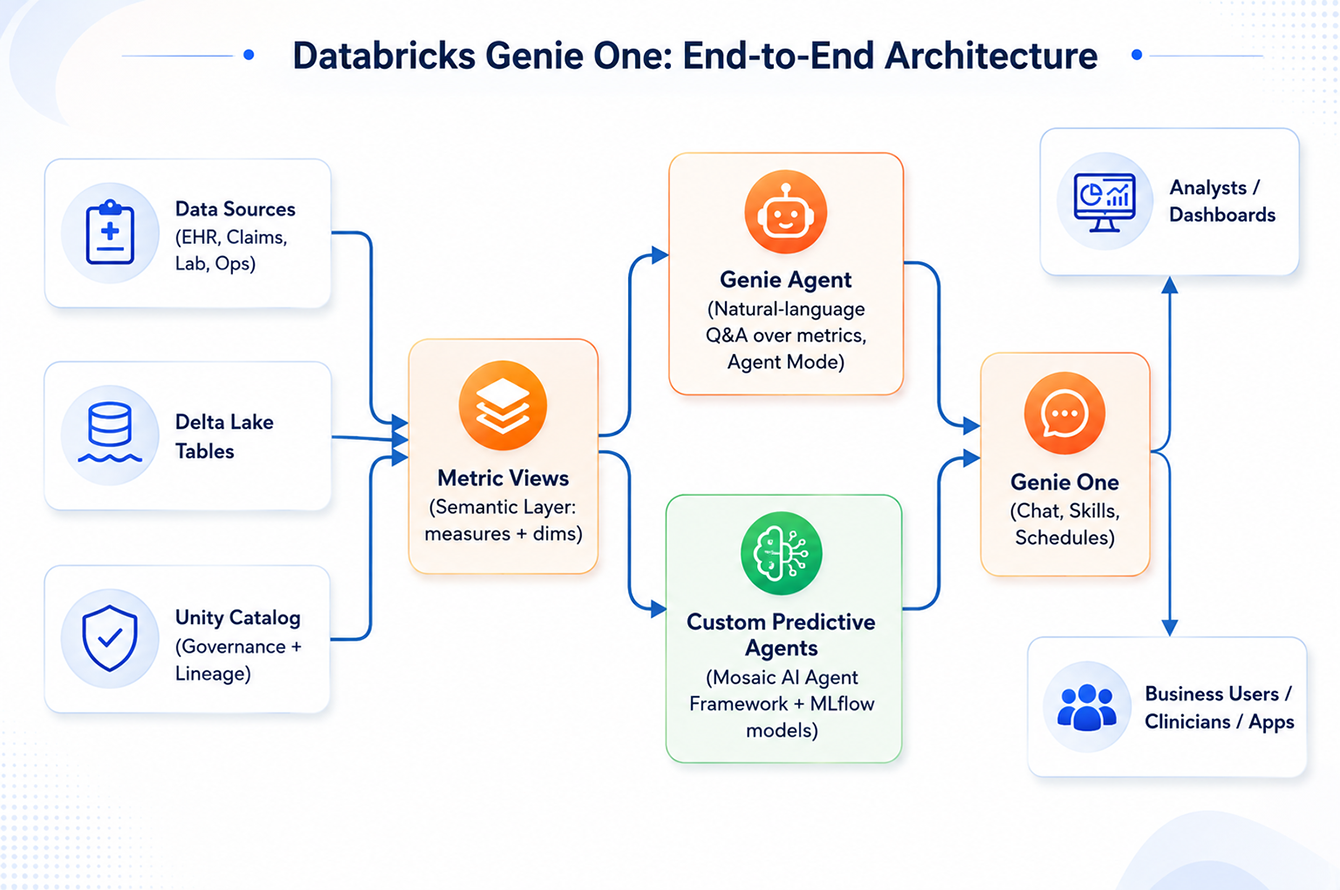
A care coordination lead at a mid-size hospital system used to lose two days to a single readmission report: pulling numbers from three dashboards, emailing an analyst, and hoping the definitions matched. That wait is going away.
Databricks Genie One, the agentic coworker built into the Data Intelligence Platform, lets any business user, not just analysts, ask questions of governed data, teach it repeatable skills, and hand it recurring work through scheduled tasks. Gartner expects 40% of enterprise applications to embed task-specific AI agents by the end of 2026, up from under 5% in 2025, and Genie One is Databricks’ clearest answer to that shift yet.
This guide breaks down what Genie One does, the Genie Agents and Metric Views it runs on, how teams extend it into predictive work, and where the real accuracy and cost trade-offs live.

What Is Databricks Genie One?
Databricks Genie One is the general-purpose chat surface of the Data Intelligence Platform, built for people who have never written a line of SQL.
Where a Genie Agent is a governed, domain-scoped data building block, Genie One is the coworker any business user talks to. It draws its verified context from Genie Ontology and its trusted data and metrics from one or more Genie Agents, then layers on the capabilities a conversational agent needs to actually get work done. It answers questions, drafts documents and artifacts, takes action through MCP tools, etc. The two capabilities most relevant to day-to-day adoption are covered in depth below: skills and scheduled tasks.
- Self-service in plain language: any business team can ask a question of governed data in natural language and get an answer without learning a BI tool or waiting on an analyst.
- Answers grounded in your data: accuracy comes from Genie Ontology, Genie Agents, and Metric Views, which give Genie One a working understanding of the organization’s own vocabulary, tables, and certified business metrics rather than a generic model guess.
- Governed by design: every answer, regardless of which team asks or how the question is phrased, is scoped to the same Unity Catalog permissions and lineage that govern the underlying data, so results stay compliant with existing access and governance policies.
Databricks announced it on June 16, 2026 at the Data + AI Summit, positioning it as a real step up from the original Genie, which only answered questions about data already sitting inside Databricks.
Genie One reaches further. It works across structured and unstructured data, inside and outside the platform, and it ships on web, iOS, and Android. Marketing, finance, sales, HR, and clinical operations teams all get the same coworker, grounded in the same Unity Catalog permissions and lineage that govern everything else on the platform.
At Inferenz, a data and AI solutions-led services company and Databricks partner, our team has believed that the differentiators sit underneath: Genie Agents, Metric Views, and, once the question turns predictive, custom agents, built on the Mosaic AI Agent Framework.
Skills and scheduled tasks: how Genie One learns to work like you do
Two features separate Genie One from a chatbot that forgets everything after each session.
A skill is a task you teach the coworker once and reuse by name. Ask it to build your weekly metrics report, and it saves that approach as reusable, inspectable text under the open Agent Skills standard, the same convention Genie Code runs on. User skills currently sit in Public Preview, saved privately to your workspace, and Genie One applies one automatically unless you @-mention it directly.
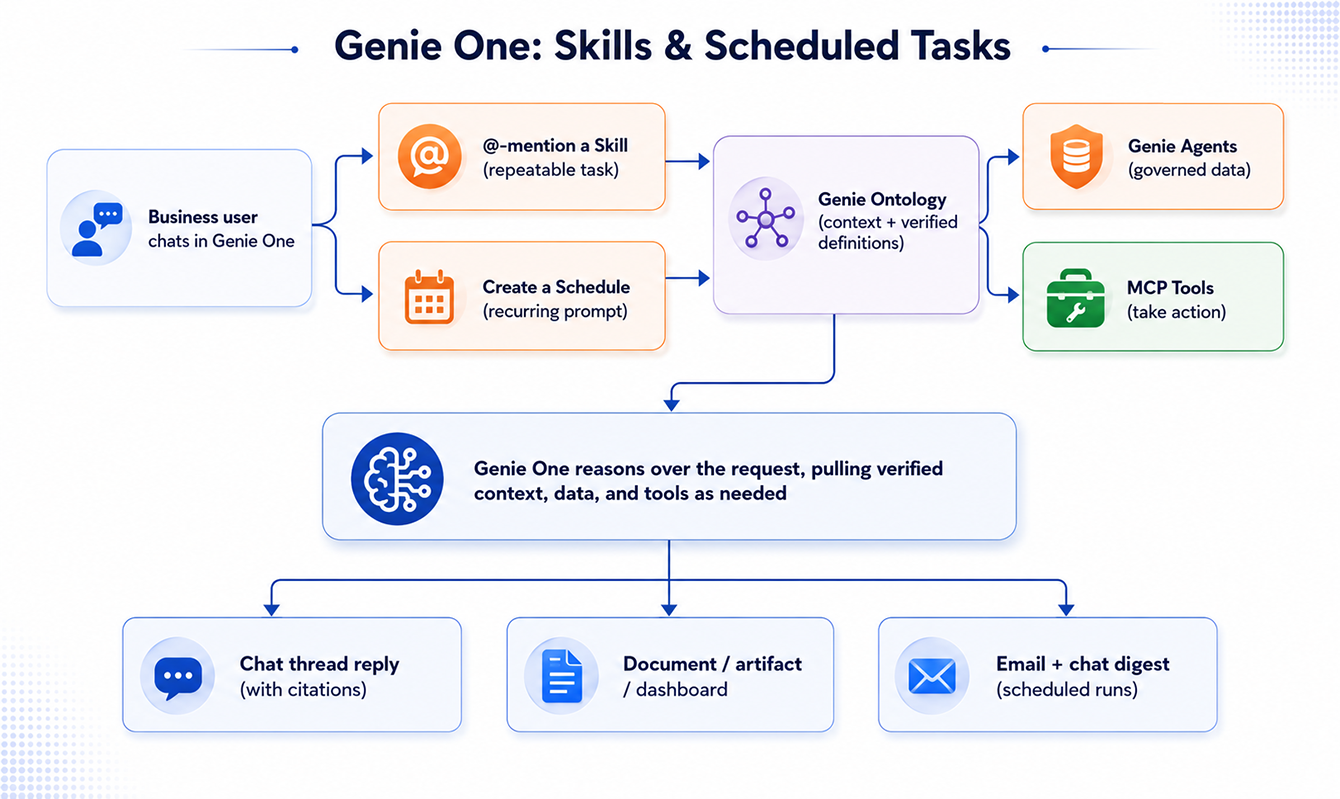
A scheduled task runs that same logic on a cadence you set, in plain English (something like “send me a daily briefing of new customer reviews”), then posts results into a chat thread plus an email. Schedules currently cap at daily frequency by default and need the Databricks SQL access entitlement to create or run.
| Dimension | Skills | Scheduled Tasks |
| Trigger | Manual, or auto-detected by Genie One | Runs automatically on a set cadence |
| Best for | Repeatable, on-demand tasks | Recurring reports and monitoring |
| Output | Chat response, document, or action | Chat message plus an email notification |
| How you set it up | Ask Genie One to save an approach, or build one directly | Natural-language request, or a manual form: Title, Instructions, Connections, Schedule, Timezone |
| Governance note | Ordinary files in your workspace folder, not hidden settings | Capped at daily frequency by default; needs the SQL access entitlement |
 Genie Agents: What They Are, and How to Set One Up
None of this works without trustworthy data underneath it, and that’s the job of a Genie Agent (what Databricks called a Genie Space through mid-2026). It’s a curated, conversational layer built over roughly 30 tables or views at most in current releases, configured with three things: instructions that teach Genie your vocabulary, SQL examples that anchor its query generation, and trusted assets, certified metrics Genie reuses instead of regenerating from scratch.
A user’s question becomes SQL, runs on a SQL Warehouse, and comes back with the generated query attached for verification. Nothing here is a black box. As of mid-2026, Agent Mode adds iterative reasoning for open-ended “why” and “what-if” questions, running several queries and returning a cited report instead of a single number.
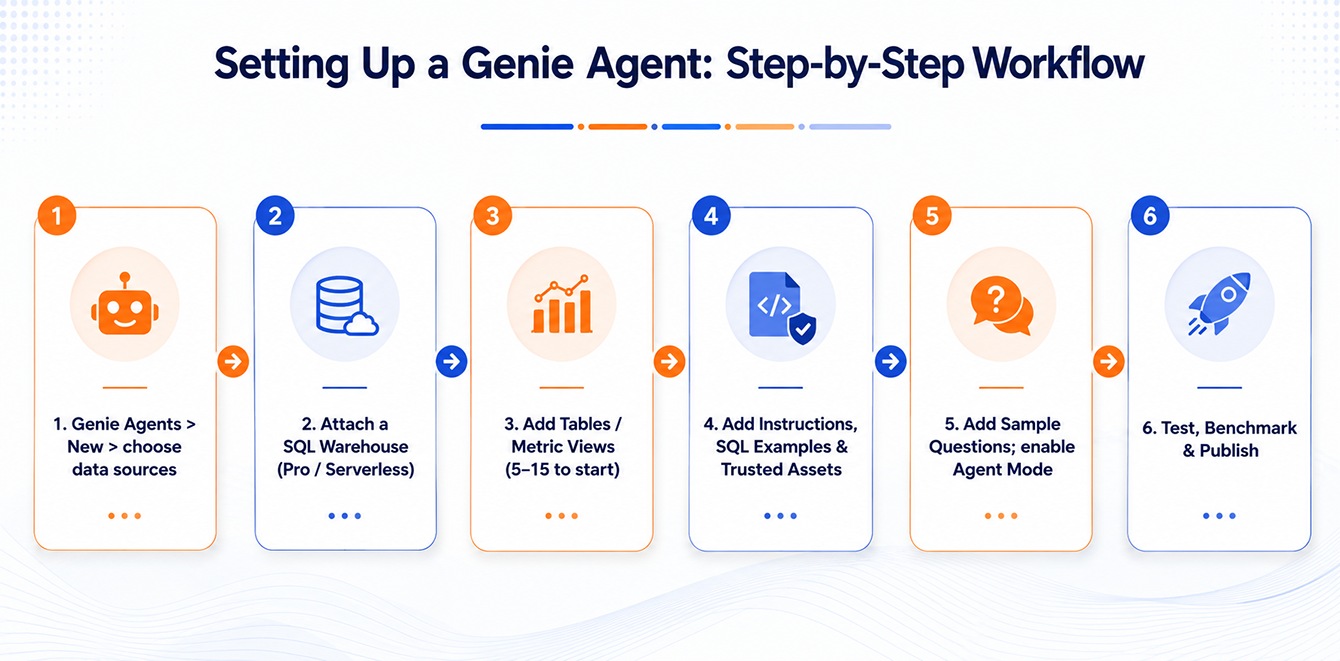
Setting one up is mostly configuration, not code:
- Prerequisites: a Pro or Serverless SQL Warehouse, Unity Catalog SELECT privileges, and well-documented tables (column comments, keys, certified tags).
- Create the agent: pick your Unity Catalog sources, name it, attach a warehouse.
- Add data assets: start with 5 to 15 tables or Metric Views in one business domain, not the whole warehouse.
- Add context: instructions, SQL examples, trusted assets. This is the single highest-leverage step for accuracy.
- Add sample questions, and enable Agent Mode if users will ask open-ended, multi-step questions.
- Test, benchmark, and publish, then connect it to Genie One through Unity Catalog groups.
At Inferenz, this is exactly the discipline we bring to Unity Catalog rollouts across healthcare Lakehouse environments: narrow scope first, governance built in from step one, not bolted on after.
Metric views: why Genie One never gives two different answers
Ask two people the same business question in different words, and a language model can generate two different SQL statements, and two different numbers. That’s the failure Metric Views were built to close.
A Metric View is a Unity Catalog object that defines dimensions, measures, joins, and, in current releases, parameters that let one definition answer differently depending on what’s calling it: a dashboard, a Genie Agent conversation, or a Genie One skill. Write a readmission_rate_30d calculation once, certify it once, and every surface on the platform reuses that same logic instead of re-deriving it from scratch. 2026 updates added native median and percentile expressions (useful for skewed metrics like length of stay), cluster-by configuration for large fact tables, and wildcard expressions that cut boilerplate when composing layered views.
Genie Agent or Custom Predictive Agent: Which one do you actually need?
A Genie Agent answers questions from data that already exists. “What’s our 30-day readmission rate this quarter?” sits squarely in its lane, even with Agent Mode’s deeper reasoning. The moment a question turns forward-looking, “which of my current inpatients is likely to be readmitted, and what should we do about it?”, you need a custom predictive agent built on the Mosaic AI Agent Framework instead.
This is a genuinely different tool. You own the model choice, the tool calls, the orchestration, and the evaluation, all inside the same Unity Catalog governance boundary. Genie One can call either one the same way: as an MCP-connected tool, or wrapped inside a skill so a business user never sees the machinery underneath.
| Dimension | Genie Agent | Custom Predictive Agent |
| Best for | Descriptive, exploratory Q&A over governed tables and Metric Views | Predictive, multi-step, tool-calling workflows |
| Who owns the logic | Databricks-managed reasoning and SQL generation | You define the reasoning, tools, and orchestration |
| Runs on | A SQL Warehouse | Model Serving endpoints, MLflow models, UC functions |
| Typical output | An answer, generated SQL, or a cited Agent Mode report | A ranked list, a risk score, or a recommendation |
| Reached from Genie One via | Direct chat, skills, scheduled tasks | An MCP tool connection, or a skill that wraps it |
Turning a readmission risk score into action in healthcare
Hospital readmissions are one of the most closely watched numbers in healthcare, for good reason. According to CMS, historically about one in five Medicare patients discharged from a hospital are readmitted within 30 days, and the Hospital Readmissions Reduction Program financially penalizes hospitals that exceed their peer benchmark. The gap that matters here isn’t the prediction. It’s what happens between a risk score sitting in a dashboard and a care team acting on it before the patient walks out the door.
A Genie-One-orchestrated version looks like this:
- A care-coordination lead could define a Genie One skill called weekly_readmission_digest that pulls the latest 30-day readmission metrics from a Genie Agent
- It cross-references a custom predictive agent’s high-risk worklist, and formats both into a one-page summary.
- A scheduled task then runs that skill every Monday morning and delivers the digest to the unit’s chat thread and inbox, turning a report someone used to assemble by hand into something that simply shows up, grounded in the same governed data and metric definitions used everywhere else on the platform.
Unifying fragmented clinical data and then acting on it is exactly the kind of work Inferenz does for hospital and home-based care operators moving from reactive reporting to real-time, value-based care, using predictive models built for clinical operations.
None of this replaces clinical judgment. Any production system touching protected health information still needs to clear your organization’s HIPAA and model-governance review before it influences care.
Tuning accuracy and cost: The discipline behind reliable answers
Genie One is only as good as the Genie Agents and Metric Views feeding it, so accuracy is a stack-wide habit, not a setting you flip once and forget.
Start by writing down 20 to 50 representative questions with known-correct answers before touching a single instruction. Prioritize SQL examples and trusted assets over prose instructions, since concrete patterns anchor SQL generation far more reliably than descriptive text. Keep instructions short and free of contradictions, and re-run the benchmark after every schema change or instruction edit. Field reports cite 10 to 40 percent accuracy gains from this loop alone, applied consistently, against an agent nobody ever benchmarks.
| Result | What It Means | What To Do |
| Pass | Correct answer, correct grain | Keep as a regression test |
| Partial | Right direction, wrong filter or period | Add a targeted SQL example |
| Fail, schema | Can’t find or join the right tables | Add column comments, keys, or a Metric View |
| Fail, ambiguity | Maps to more than one plausible metric | Add a trusted asset to disambiguate |
Cost follows a similar rhythm. Serverless SQL Warehouses suit the bursty, ad-hoc pattern of conversational analytics better than always-on clusters, and Genie’s query-level attribution makes it possible to track cost per agent and manage the operating model, not just per warehouse, which is what makes chargeback to a specific business unit realistic. Agent Mode and scheduled tasks both add real compute. Budget for them separately from ad-hoc chat, and audit schedules nobody actually reads.

The bottom line
Genie One gives every business team one coworker to talk to, instead of five dashboards and an analyst’s calendar. But the chat interface is the easy part. What makes it trustworthy is everything underneath: Genie Agents that turn governed Unity Catalog data into plain language, Metric Views that keep every surface computing the same number, and custom predictive agents that pick up exactly where descriptive analytics runs out of road.
Treat the whole stack the way you would any production system: benchmark it, tune it on a short loop, and keep watching it after launch. The organizations already ahead here aren’t the ones with the flashiest chat interface. They are the ones who did the unglamorous data foundation work first.