


Summary
Delta Lake never edits a Parquet file in place. Every UPDATE, MERGE, or DELETE writes new files and records the change in _delta_log:the transaction log that also powers ACID guarantees, time travel, and VACUUM’s retention rules. Understand that log, and the next five “weird” Delta behaviors stop being weird.
Introduction
Most of us started using Delta Lake the same way, we swapped “parquet” for “delta” in a write call, things kept working, and we moved on. It reads like Parquet, it writes like Parquet, and MERGE INTO feels like a normal SQL statement. So, it’s easy to build a mental model of Delta Lake as “Parquet with extra features” and never look further.
Understanding the Delta Lake transaction log; the append-only ledger that decides what every reader and writer sees, is what separates engineers who trust their pipelines from those who get blindsided by them.
That model works fine until it doesn’t, until a job rewrites far more data than expected, or a VACUUM quietly breaks time travel for your Business Intelligence team.
Underneath every Delta table is a transaction log, a directory called _delta_log sitting right next to your data files. Once you understand what that log is doing, a lot of Delta’s behavior stops feeling like magic. Here are five misconceptions that trip people up, and the log-level reason behind each one.
1. Delta Lake updates Parquet files directly
“UPDATE” and “DELETE” are words we use for in-place changes everywhere else in a database, so it’s natural to picture Delta reaching into an existing Parquet file and rewriting the relevant bytes.
It doesn’t, because it can’t. Parquet files are immutable by design. There’s no supported way to modify a single row inside one without rewriting the whole file, because of how column chunks, row groups, and footers are laid out. Delta works with that constraint instead of fighting it:
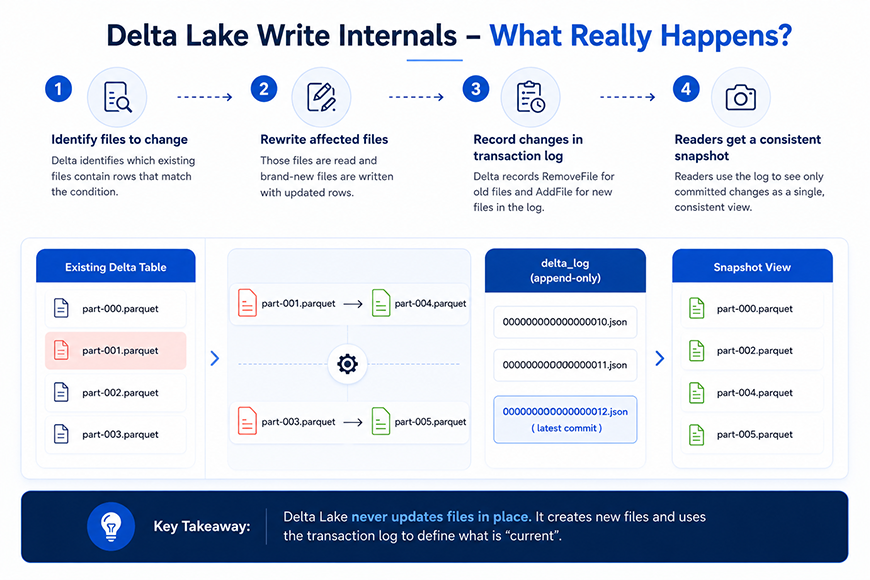
- Delta identifies which existing files contain rows that match the update.
- It reads those files and writes brand-new files that include the updated rows.
- It records a RemoveFile action in the log for every old file that’s no longer valid.
- It records an AddFile action for every new file that replaces it.
- The old physical files are not touched or deleted yet, they’re just marked as logically removed from the table’s current state.
The takeaway: the unit of change in Delta Lake is the file, not the row. That’s why an UPDATE touching a single row can still rewrite a 500MB file.
2. MERGE updates only the rows that changed
MERGE reads like row-level logic, “when matched, update when not matched, insert”, so it’s tempting to assume Delta finds the exact rows and patches them in place.
What actually happens is a two-phase operation:
- Scan phase, Delta compares source and target to figure out which files in the target table contain at least one row that needs to change.
- Rewrite phase, every one of those files is rewritten in full, even if only one row inside it needed an update, producing a fresh set of AddFile and RemoveFile actions for the commit.
MERGE INTO target t
 USING updates u
 ON t.id = u.id
 WHEN MATCHED THEN UPDATE SET *
 WHEN NOT MATCHED THEN INSERT *
Why it matters for performance:
- If matching rows are scattered across many files, MERGE has to rewrite all of those files, even if the actual number of changed rows is small.
- Keeping join keys aligned with your partitioning strategy (or using liquid clustering) narrows down how many files a MERGE has to touch in the first place.
- DESCRIBE HISTORY shows the number of files added and removed by a MERGE, usually the fastest way to explain a slow MERGE to someone.
3. Readers can see partially written data
This worry comes from experience with plain object storage. If a large batch job produces dozens of files and fails halfway through, it seems reasonable that a concurrent reader might see a mix of old and new files, an inconsistent, half-committed table.
Delta avoids this because readers never look at files in storage to decide what’s “current.” They look at the transaction log:
- A table’s state at any version is defined by replaying the AddFile and RemoveFile actions recorded in _delta_log, in order, up to that version.
- A reader opening a table is reconstructing a snapshot from the log, not scanning a folder.
- A write only becomes visible once its JSON commit file is successfully written to _delta_log, and that write is atomic.
- If a job dies mid-write, the new Parquet files it produced just sit in storage, unreferenced by any commit. No reader ever sees them, because nothing in the log points to them.
This is Delta’s version of snapshot isolation, every read is against a consistent, fully-committed version of the table, never one in progress.
The commit itself relies on optimistic concurrency control (OCC):
- Delta doesn’t take a lock up front. Each writer proceeds assuming no conflict.
- When it’s ready to commit, it checks whether the version it based its changes on is still the latest version in the log.
- If someone else committed first, the commit is rejected, and the writer re-checks for conflicts and retries.
Put together, this is what delivers Delta’s ACID transactions: atomicity from the single, all-or-nothing JSON commit, and isolation from readers always working off a fixed snapshot.
4. Time travel keeps multiple copies of my table
Querying a table as it looked at version 40, or three days ago, sounds like it requires Delta to be storing a separate copy for each version, the way some snapshot-based systems do.
It isn’t. There’s only ever one set of data files; some are referenced by the current version, some aren’t anymore.
- The transaction log keeps every commit, not just the latest one, each is a numbered JSON file in _delta_log (version 0, version 1, and so on).
- Querying an old version means replaying the log up to that version number and reconstructing which files were valid at that point in time.
- Replaying thousands of commits from scratch every time would be slow, so Delta periodically writes a checkpoint, a Parquet file capturing the fully reconstructed state at a given version, so readers can start there instead of from version 0.
- Checkpoints happen roughly every 10 commits by default (configurable) and are a performance optimization, not a separate source of truth, the log still defines correctness.
— query by version
SELECT * FROM my_table VERSION AS OF 40
— query by timestamp
SELECT * FROM my_table TIMESTAMP AS OF '2026-07-01'
— see the commit history
DESCRIBE HISTORY my_table
Enterprises that depend on point-in-time reporting, healthcare organizations reconciling patient records across systems, for instance; often build their entire audit trail on this exact mechanism. Our recent work unifying 40+ source systems into a single enterprise data platform for a national home-based care provider leaned on this same time-travel guarantee for rollback and audit.
This also explains why time travel isn’t free forever: it only works as far back as the data files it needs are still physically present in storage, which brings us to the last misconception.
5. VACUUM only deletes old files
VACUUM is a cleanup command, and cleanup commands delete things. What catches people off guard is how fast the connection between VACUUM and time travel can bite you.
There are two distinct kinds of “delete” at play:
- Logical delete, an UPDATE, DELETE, or MERGE never removes the old Parquet files it replaces. It just records a RemoveFile action so the log stops pointing to them. The file still sits in storage, unused by the current version, but still referenced by older versions, this is exactly what makes time travel work.
- Physical delete, this is what VACUUM does. It looks for data files no longer referenced by any version within the retention window and removes them from storage for good.
— preview what would be deleted, without deleting anything
VACUUM my_table DRY RUN
— delete files older than the default 7-day retention
VACUUM my_table
What this means in practice:
- The default retention period is 7 days, and it exists specifically to protect concurrent readers and time travel queries, not as an arbitrary safety number.
- Once VACUUM physically deletes a file, any table version that depended on it can no longer be reconstructed. Time travel to that version fails, even though the version still shows up in DESCRIBE HISTORY.
- The log remembers the version existed; it just can’t rebuild it anymore, because the underlying data is gone.
- Lowering the retention period below the default is risky enough that Delta requires you to explicitly disable a safety check to do it, a long-running query reading an old snapshot can get caught out by a VACUUM that runs while it’s still in flight.
Retention windows like this sit at the center of compliance-driven governance in regulated industries. For a closer look at how retention and access controls work together in practice, see our breakdown of building a unified data governance layer with Databricks Unity Catalog in healthcare.
Here’s the short version, if you’re skimming for the fix rather than the full mechanics:
| Misconception | What’s Actually Happening in _delta_log | Why It Matters |
| Delta Lake updates Parquet files directly | New files are written; old ones are marked removed via RemoveFile/AddFile actions | Explains why a single-row UPDATE can rewrite a 500MB file |
| MERGE updates only the rows that changed | MERGE rewrites every file that contains a matched row, not just the row itself | Why a “small” MERGE can run far longer than expected |
| Readers can see partially written data | Snapshot isolation via log replay + one atomic JSON commit | Guarantees consistent, ACID-compliant reads even during concurrent writes |
| Time travel keeps multiple copies of the table | One set of files; older versions are rebuilt by replaying the log and checkpoints | Explains why storage stays lean but old queries can still fail |
| VACUUM only deletes old files | VACUUM permanently deletes files that time travel still needs | The 7-day retention window isn’t arbitrary; it protects live queries |
How a write actually gets from Spark to a reader
Putting all of that together, here’s the path a single write operation takes, from the moment Spark executes it to the moment it’s visible to someone running a query:
- Spark executes the write: an UPDATE, DELETE, MERGE, or INSERT.
- Delta scans the log to identify which existing files contain affected rows.
- New Parquet files are written with the updated data; the old files stay untouched in storage.
- Delta checks for conflicts under optimistic concurrency control, comparing against the latest version in _delta_log.
- If there’s no conflict, a new atomic JSON commit is written, recording the AddFile and RemoveFile actions for that write.
- The instant that JSON commit lands, it becomes the new “current” version of the table.
- A reader querying the table replays the log up to the requested version and resolves exactly which files are valid right now.
Every one of those steps maps back to something in this article: immutable Parquet files, AddFile and RemoveFile actions, atomic JSON commits, optimistic concurrency control, and a version number that readers resolve against. None of it is hidden, it’s all sitting in _delta_log if you want to go look.
Conclusion
None of this changes how you write day-to-day SQL or PySpark against Delta tables. But the next time a MERGE runs longer than expected, or a time travel query fails right after a VACUUM, you’ll know exactly where to look, and that the transaction log had the answer the whole time.
If your team is scaling Delta Lake pipelines and wants a second set of eyes on MERGE performance, VACUUM policy, or transaction log health, that’s the kind of data engineering work we do day to day at Inferenz.

Frequently asked questions
Q: What is the Delta Lake transaction log?
A: It’s the directory (_delta_log) sitting next to a Delta table’s data files, containing a numbered, ordered series of JSON commit files. Every AddFile and RemoveFile action ever recorded lives there, and replaying those actions up to a given version is how Delta reconstructs exactly which files make up the table at that point in time.
Q: How does Delta Lake guarantee ACID transactions?
A: Atomicity comes from the single, all-or-nothing JSON commit written to _delta_log. Isolation comes from readers always resolving a fixed, fully-committed snapshot instead of scanning storage directly, which is what prevents anyone from seeing a half-finished write.
Q: What is optimistic concurrency control in Delta Lake?
A: It’s how Delta handles concurrent writers without locking the table up front. Each writer proceeds assuming no conflict, then checks at commit time whether the version it started from is still the latest. If another commit landed first, the write is rejected and retried against the new version.
Q: How does time travel work in Delta Lake?
A: Delta keeps only one set of physical data files, but every commit stays in the log. Querying an old version replays the log (starting from the nearest checkpoint) to figure out which files were valid at that version, rather than restoring a separate stored copy.
Q: What’s the difference between a logical delete and a physical delete in Delta Lake?
A: A logical delete happens on every UPDATE, DELETE, or MERGE — the old file is marked removed in the log but stays in storage, which is what keeps time travel working. A physical delete is what VACUUM does: it permanently removes files from storage once they fall outside the retention window.
Q: What is the default VACUUM retention period, and can I shorten it?
A: The default is 7 days, set specifically to protect concurrent readers and time travel queries. You can lower it, but Delta requires you to explicitly disable a safety check first, since doing so risks breaking in-flight queries and permanently disabling time travel to affected versions.
Q: What is a Delta Lake checkpoint file?
A: A checkpoint is a Parquet file that captures the fully reconstructed table state at a given version, written roughly every 10 commits by default. It’s a performance shortcut so readers don’t have to replay every commit from version 0; the transaction log remains the actual source of truth.