




Summary
Healthcare data teams want apps that live where their data lives. Building Unify—one of our first Snowflake Native Apps—showed us why that choice solves headaches around security, speed, and trust. Here we break down each stage of the build for the deduplication app, share the problems we met, and list the habits that kept us on track. -Most healthcare data management apps still live outside the warehouse, pulling rows across networks and piling audit tasks onto already-tired security teams.
We wanted a cleaner path.
So, we built Unify as one of our first Snowflake Native Apps that run inside the customer account. Doing so changed how we think about trust, speed, and even pricing. This article spells out what we learned during the development of a data dedupe app, starting with the core idea—keeping the work where the healthcare data already lives.
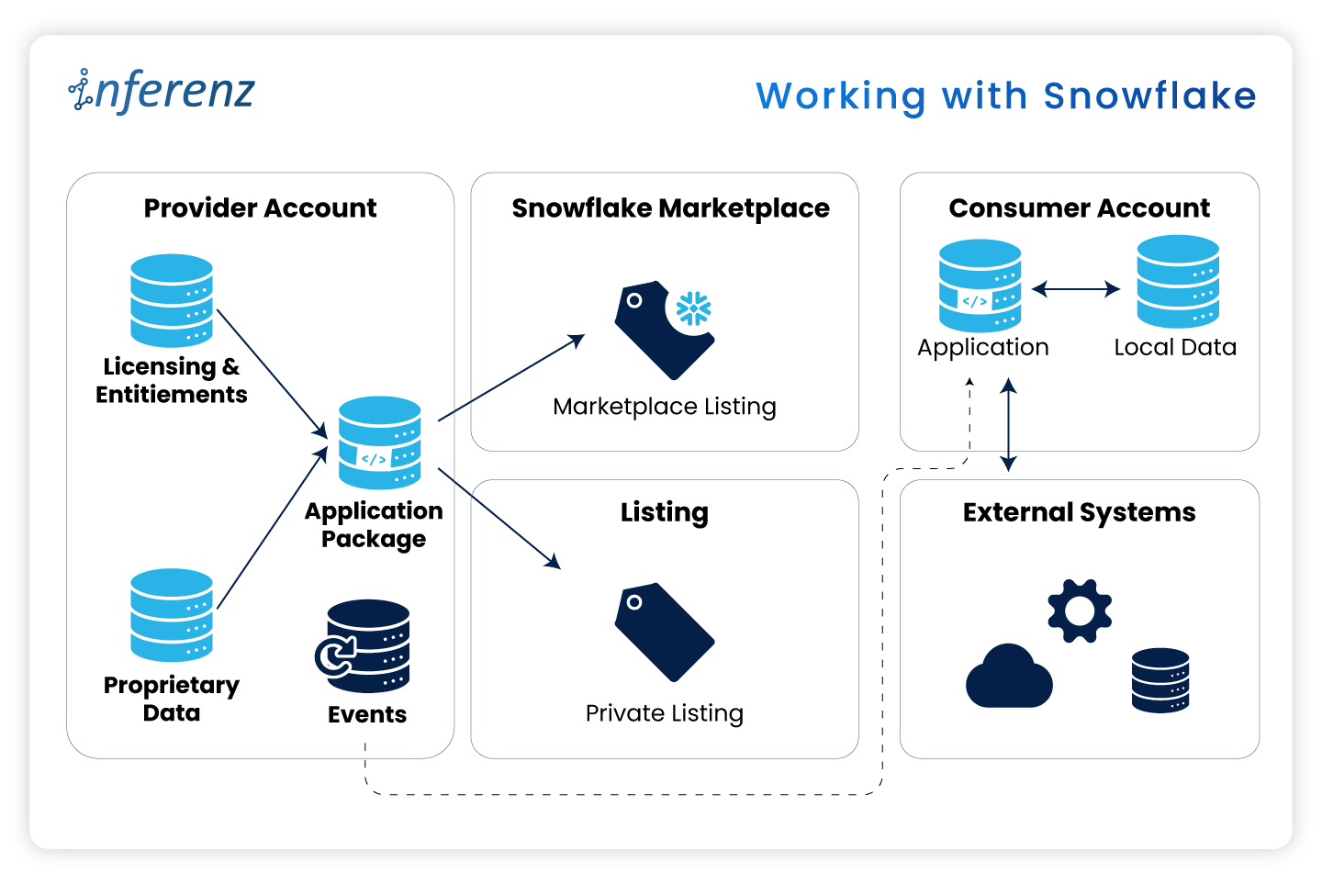
Working with Snowflake
Security officers keep telling us the same thing: “If data leaves our Snowflake account, we need another risk review.” Those reviews can stall a project for weeks. When the data stays put, those blockers vanish.
Here are some real-world pain points:
- Extra ETL hops slow reports and raise spend.
- Legal teams hold sign-off if data crosses a network line.
- Cyber teams reject any tool that opens a fresh inbound port.
Let me elucidate how the Native App model fixes these issues here:
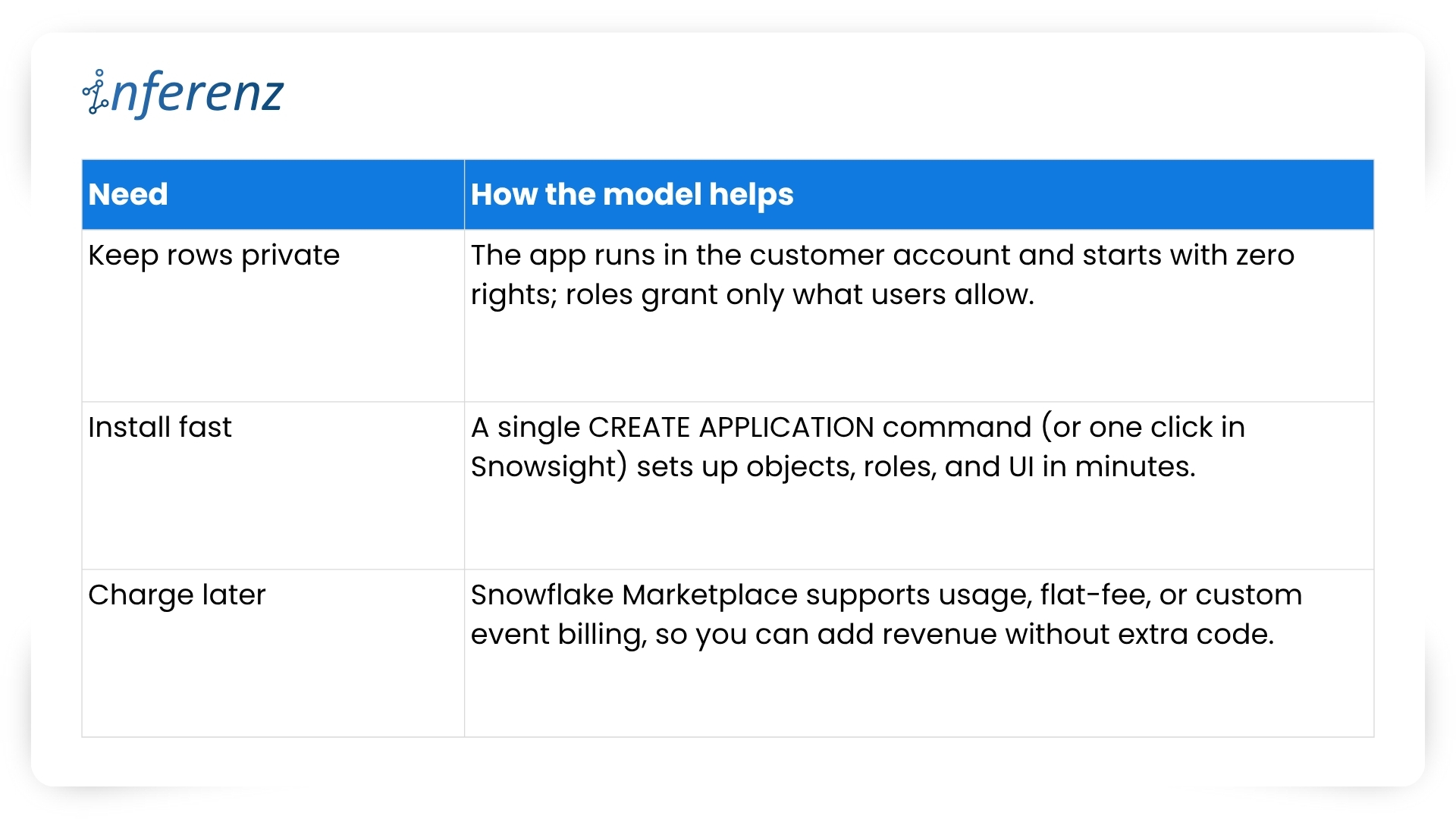
What this means for project teams
Running inside Snowflake flips the sales story.
- Security reviews shrink because no healthcare data exits the account.
- Legal teams check off fewer boxes.
- Ops teams stay happy because there is no new infrastructure to patch.
- And when the finance group is ready, you can turn on billing models that match real usage, with no speculation involved, whatsoever!
Before we jump into code, folder names, and Git commands, let’s pause for a moment. You now know why staying inside Snowflake calms auditors and speeds go-live.
The next question is how to keep that peace when your dev team starts shipping features at full tilt.
A tidy project layout gives you that calm. It stops commit chaos, helps new engineers find their way on day one, and lets CI/CD jobs run without a hitch. In short, an ordered home keeps tech debt low and feature velocity high.

[fluentform id=”9″]
Setting up a clean project layout
Think of Snowflake Native Apps as small, self-contained products. Every script, test, or doc page must live where others can spot it in seconds. Messy trees hide bugs; neat ones surface them early.
Key folders and files
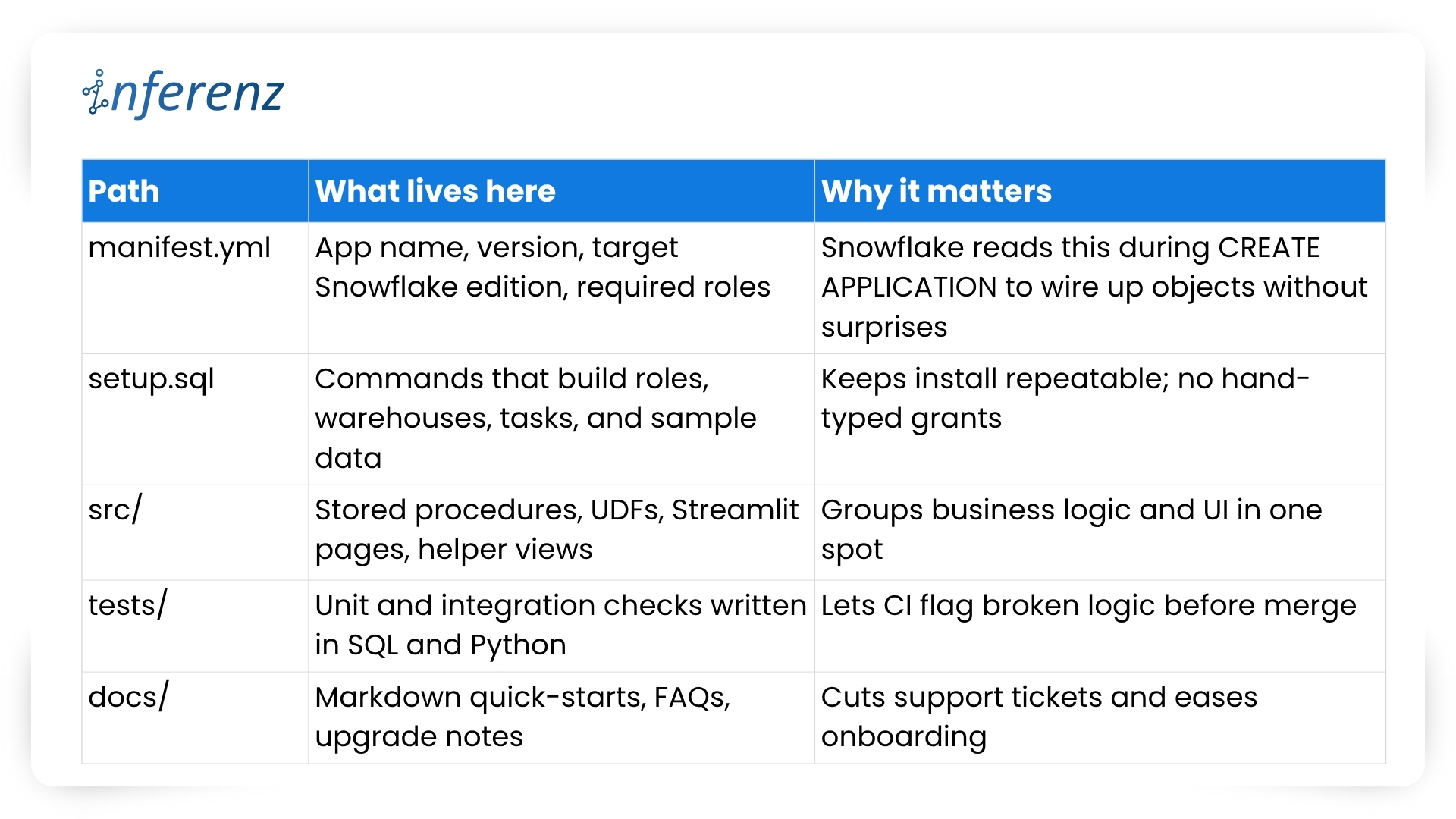
Important elements to lock in early
- One Git repo, two packages
- Create a dev package for daily commits and a prod package for signed releases.
- Both packages pull from the same branch but differ in version tags.
- Use semantic versions like 1.4.0-dev and 1.4.0 so rollback is a single command.
- CI/CD with guardrails
- Hook your repo to a CI runner that
- spins up a Snowflake scratch account,
- loads the dev package,
- runs the tests/ suite, and
- fails on any blocked grant or failed assertion.
- Push to main only after CI passes; a promo script tags and pushes the prod build.
- Hook your repo to a CI runner that
- Streamlit in Snowflake for fast UI loops
- Store each page in src/streamlit/.
- Designers can tweak layouts while analysts see live data—no extra staging server needed.
- Readable docs
- Keep install steps short: “Run setup.sql, grant the role, open /home in Snowsight.”
- Add a change log at docs/release_notes.md so users track what changed and why.
- Security baked in
- Script every role, grant, and warehouse size in setup.sql. This guarantees least-privilege on each install.
- Place a permission matrix table in docs/security.md so buyers can audit in minutes.
With a clear structure, your team ships features without fear, and your users enjoy stable installs that never drift from the source. Next, we will explore repeatable testing and deployment tactics that keep both packages in sync and production-ready.

Speed with the right tool chain
Teams juggle UI tweaks, SQL logic, and version bumps at once. Without a clear loop, staging environments drift and testers chase phantom bugs.
Typical pain points we faced
- UI work stalls while engineers wait for fresh sample data.
- Manual deploy steps slip through Slack threads and get lost.
- Merge conflicts appear because no one owns the single source of truth.
Our four-piece workflow
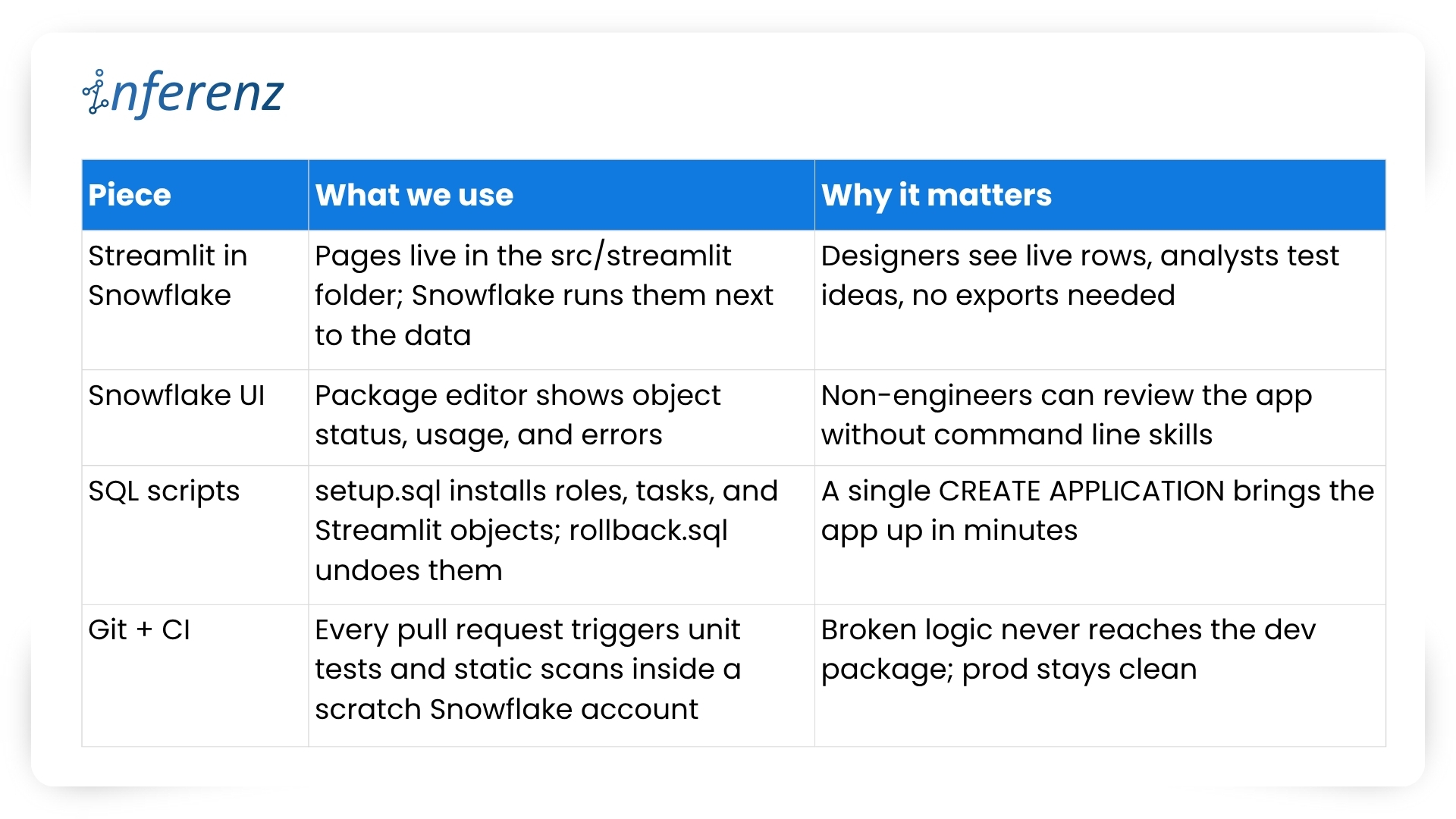
Important habits that keep the loop tight
- One repo, two packages: 1.5.0-dev lives in the dev package while 1.5.0 runs in prod. CI promotes only when tests pass and a human approves.
- Self-testing setup: The same setup.sql that customers run also drives CI. If that script breaks, the build fails early.
- Streamlit previews: Product owners open the dev package in Snowsight, click the /home page, and give feedback in real time. No separate staging server, no extra VPNs.
- Automated rollbacks: rollback.sql reverses grants and drops objects, so you can reset an environment in seconds.
- Consistent naming: Procedures and UDFs carry the app version in the schema name, which avoids clashes during side-by-side tests.
We’ve covered why native apps live safer inside the warehouse and how a tidy repo plus a smart tool chain keeps feature work moving. The next guard-rail is environment isolation—running two application packages that share one codebase. Doing so sounds simple, yet it saves countless rollback headaches.
Two packages, one codebase
Why split environments?
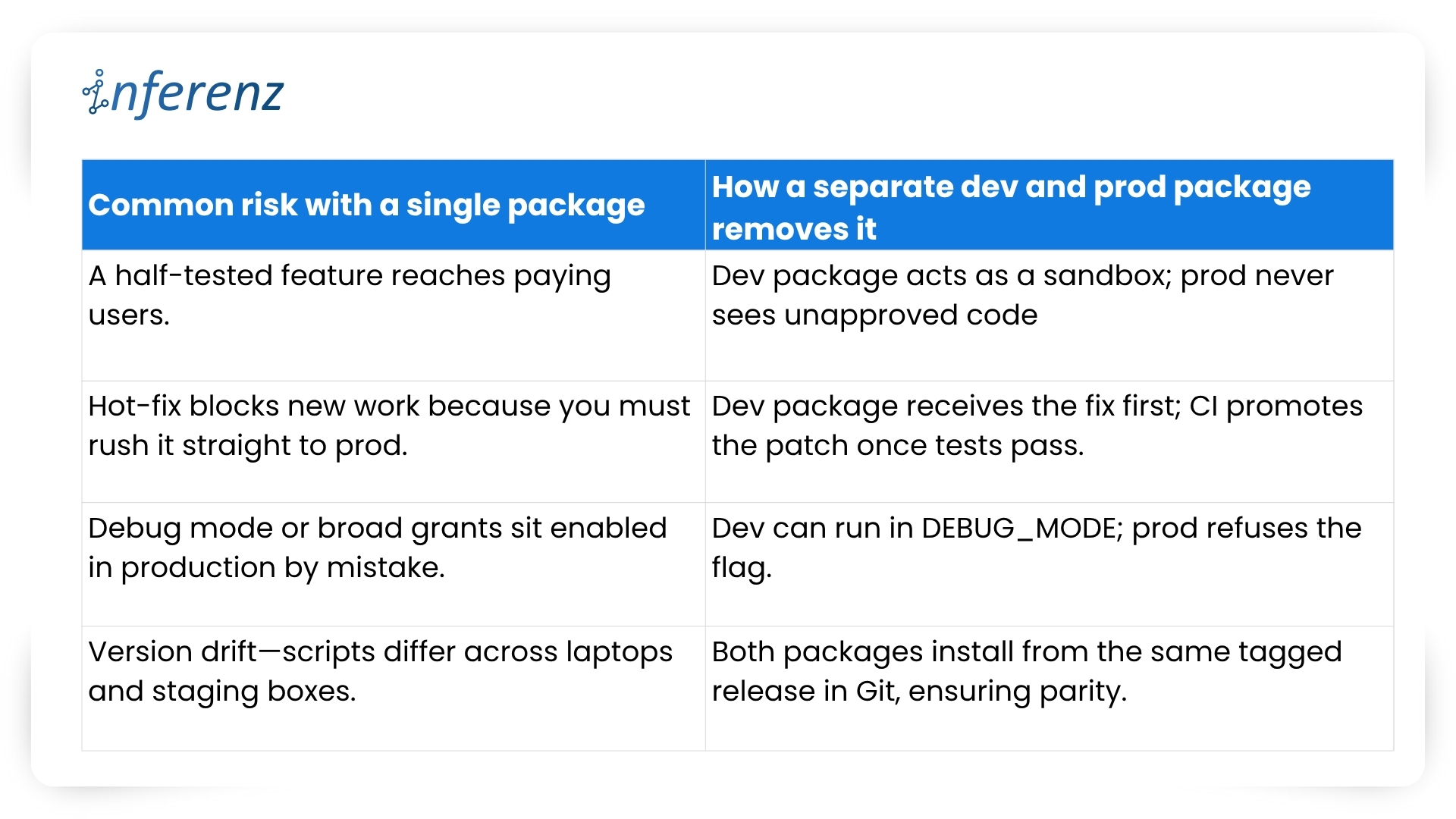
Snowflake itself recommends this two-package pattern to keep upgrades safe and reversible.
Our promotion pipeline
- Commit — Every change lands in a feature branch.
- CI spin-up — The runner creates a fresh dev package with CREATE APPLICATION and runs the full tests/ suite.
- Manual QA — Product owners open the Streamlit pages inside the dev package and sign off.
- Tag & promote — A signed SQL script bumps the version (1.6.0-dev → 1.6.0) and copies objects into the prod package.
- Release directive — We set RELEASE DIRECTIVE VERSION = ‘1.6.0’, so new installs pull only the stable build.
- Rollback ready — If something slips through, ALTER APPLICATION … SET RELEASE DIRECTIVE VERSION = ‘1.5.2’ brings users back in seconds.
Versioning habits that keep both worlds calm
- Semantic tags — major.minor.patch with a -dev suffix during QA: 2.0.0-dev.
- Schema per version — Runtime objects live in APP_DB.CODE_V1_6. This avoids name clashes when dev and prod packages sit side by side.
- Automated object diff — CI compares the manifest in dev vs. prod; promotion stops if objects are out of sync.
- Read-only prod — We grant end users a minimal role that blocks CREATE and ALTER inside the prod package, so accidental edits never persist.
What it buys the business
- Predictable releases — Stakeholders get a calendar of when prod changes; no wild pushes.
- Audit clarity — Logs show who promoted what, matching each tag in Git.
- Happy support desk — Rollback is one SQL line, not a cross-cloud fire drill.
- Future compatibility — Older clients can stay on version 1.x while early adopters try 2.x in a separate prod package if needed.
With isolation in place, both engineers and risk officers sleep better. Next, we’ll dig into security best practices—how strict roles, static scans, and clear docs keep Unify trusted from day one.
Security that travels with the app
Security isn’t a bolt-on for Unify, the data deduplication app; it’s wired into the first CREATE APPLICATION script. Because the app sits inside each customer’s Snowflake account, we start from “no rights at all” and grant only what the features need.
How we keep things tight
- Role-based access control – The install script creates an application-specific role with the narrowest set of privileges. All other objects inherit from that role, so nothing sits under a catch-all admin profile. Snowflake calls this the least-privilege pattern, and it makes auditors smile.
- Static scans on every merge – Our CI pipeline blocks the build if open-source libraries or stored-proc code show known CVEs. No red flags, no deploy.
- Secrets stay secret – Any outbound call (think Slack alerts or usage pings) pulls its token from a Snowflake secret object, never from plain text.
- End-to-end encryption – Snowflake handles disk and wire encryption for us, so we get AES-256 at rest and TLS in flight out of the box.
- Transparent docs – A short security appendix lists every grant and why we need it. Buyers can paste those commands into their own console and verify the scope in minutes.
Result: Security teams see clear boundaries, compliance teams get quick sign-off, and our support desk fields fewer “Why does the app need this privilege?” emails.
Testing and deployment without the drama
A solid security story means little if the next release ships a typo to production. To avoid that nightmare we treat every change—no matter how small—the same way:
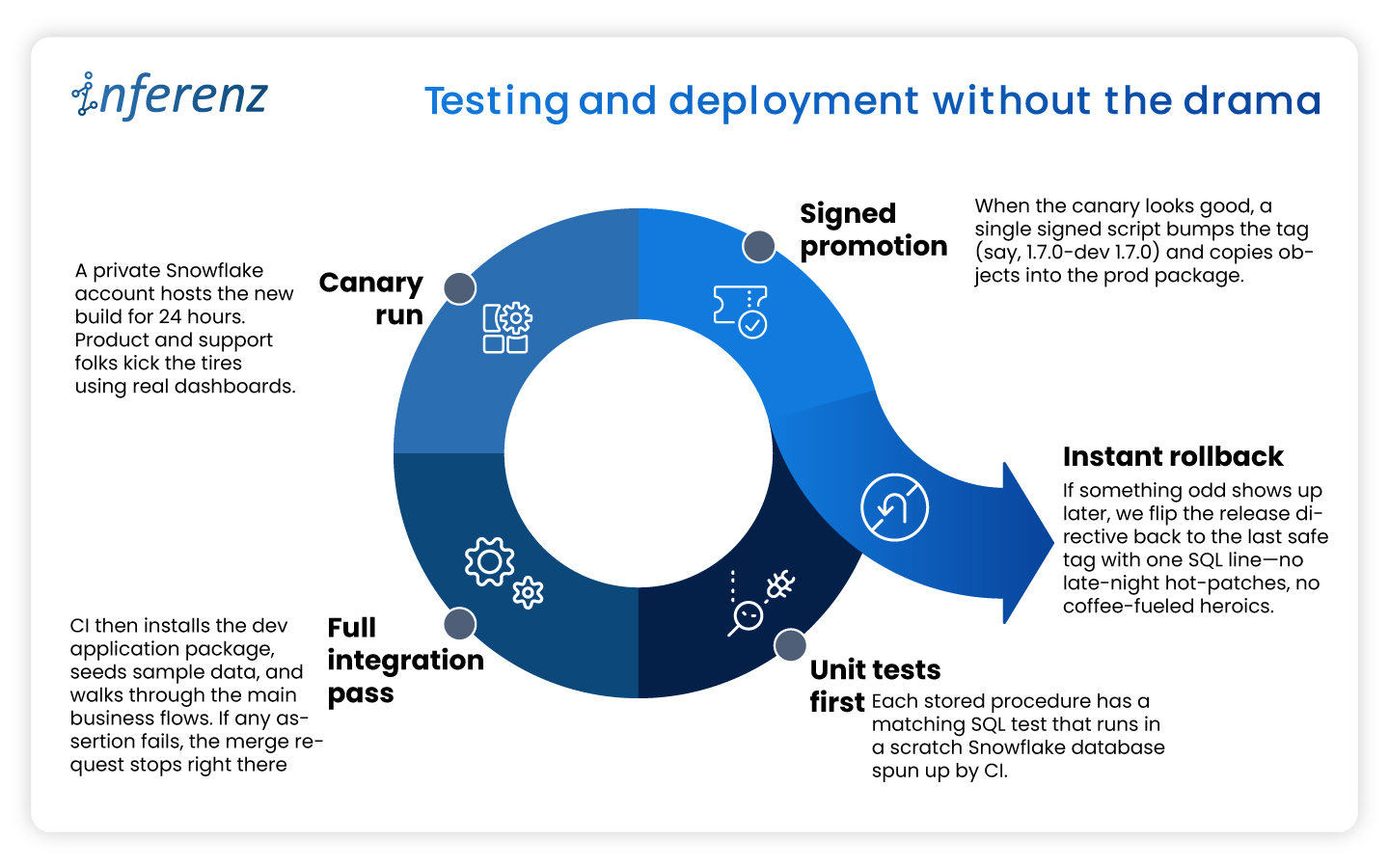
This disciplined loop lets us ship improvements every two weeks while keeping both the dev and prod packages in lock-step—fast for engineers, calm for customers.
Listing now, billing later
When we first released Unify, the data deduplication app in the Snowflake Marketplace we kept the price at zero.
A free listing let users test the app without budget hoops and gave us real usage stats. Snowflake’s marketplace model also means we can switch to pay-as-you-go, flat monthly, or custom event billing as soon as clients ask for an SLA. Turning that knob is mostly paperwork: update the listing, set a rate card, and push a new release. No extra infrastructure and no fresh contracts.
Why this matters?
- Low-friction trials. Users click “Get” and start working in minutes.
- Clear upgrade path. When buyers need production support, we offer a price plan that matches their workload.
- Built-in invoicing. Snowflake handles metering and billing, so finance teams on both sides stay happy.
The marketplace route shifts sales from long demos to quick hands-on proof. That streamlines procurement and puts the product in front of more data teams.
Keeping the loop alive
Shipping an app is only half the job. We keep Unify healthy and useful with a steady feedback cycle.
What we do every sprint
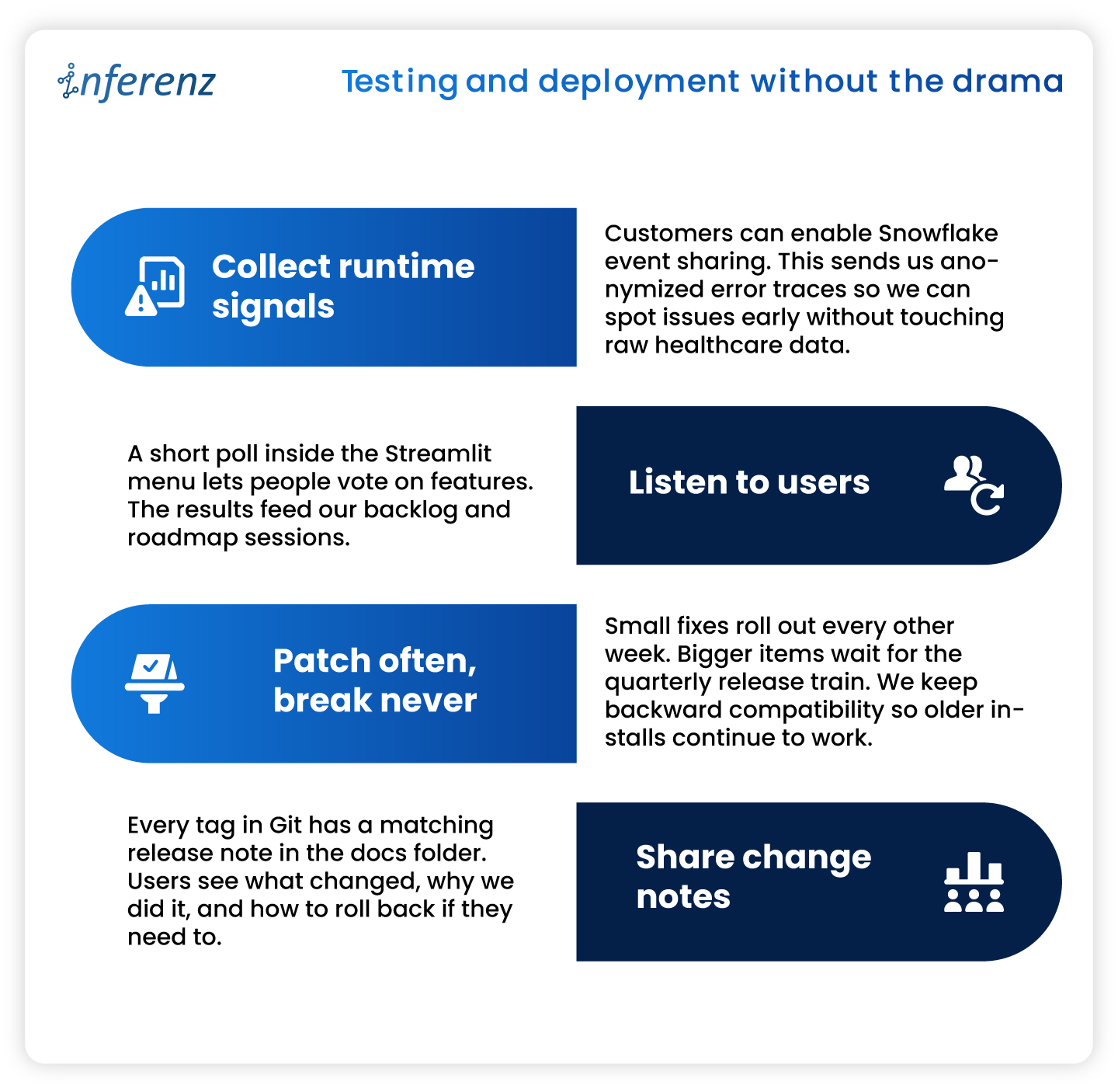
Note: Continuous improvement keeps trust high and shows users that the product is still moving forward.
10 Key Takeaways from Our “Unify” Experience
- Maintain separate development and production app packages from the same codebase to safeguard against accidental bugs.
- Use Streamlit within Snowflake for efficient, interactive local development and prototyping.
- Manage application packages using the Snowflake UI for clarity and ease.
- Handle local deployment and testing through SQL for precise control.
- Rely on robust version control and clear promotion processes for reliable releases.
- Enforce strict security and access controls from day one.
- Test thoroughly in both local and Snowflake environments before publishing.
- Provide transparent, user-friendly documentation and support.
- Continuously monitor, update, and improve your app based on real user feedback.
- Plan for monetization early, even if you are not monetizing at launch.
Conclusion
Building inside Snowflake changed how we think about healthcare data management apps. Running code where the data already sits cuts risk, shortens audits, and speeds time-to-value. A tidy repo, two isolated packages, strict tests, and clear docs keep releases smooth. Marketplace listing turns installs into self-serve trials and unlocks revenue when clients are ready. If you plan to ship a native app, adopt these habits early. Your future self—and your customers—will thank you.

Frequently Asked Questions about Snowflake Native App Development and Unify
- Does Unify copy my data outside Snowflake?
No. The app runs inside your Snowflake account, and all processing stays there. Only opt-in event logs (never raw rows) leave the warehouse for support purposes. - How long does installation take?
Most teams finish in under few minutes. Go to Snowflake Marketplace, search the data dedupe app, click of ‘Get’ button, grant the app role, and you are ready. - Can I try new features without risking production?
Yes. Keep a separate dev application package. Install the latest version there, run tests, and promote to prod when you are satisfied. - Do I need to upgrade/update application if new features released after I install it?
No, you don’t need to do it yourself. All current installations are upgraded to new patch/version automatically (within few seconds to few hours depends on Cloud/Region) when new patch/version is released. - What happens if an upgrade causes trouble?
Every release is versioned. Application can roll you back to the previous tag either through command or UI. - When will paid plans launch?
We are finalizing usage metrics with early adopters. Expect flexible pricing options—usage based, subscription, and custom event billing—later this year.


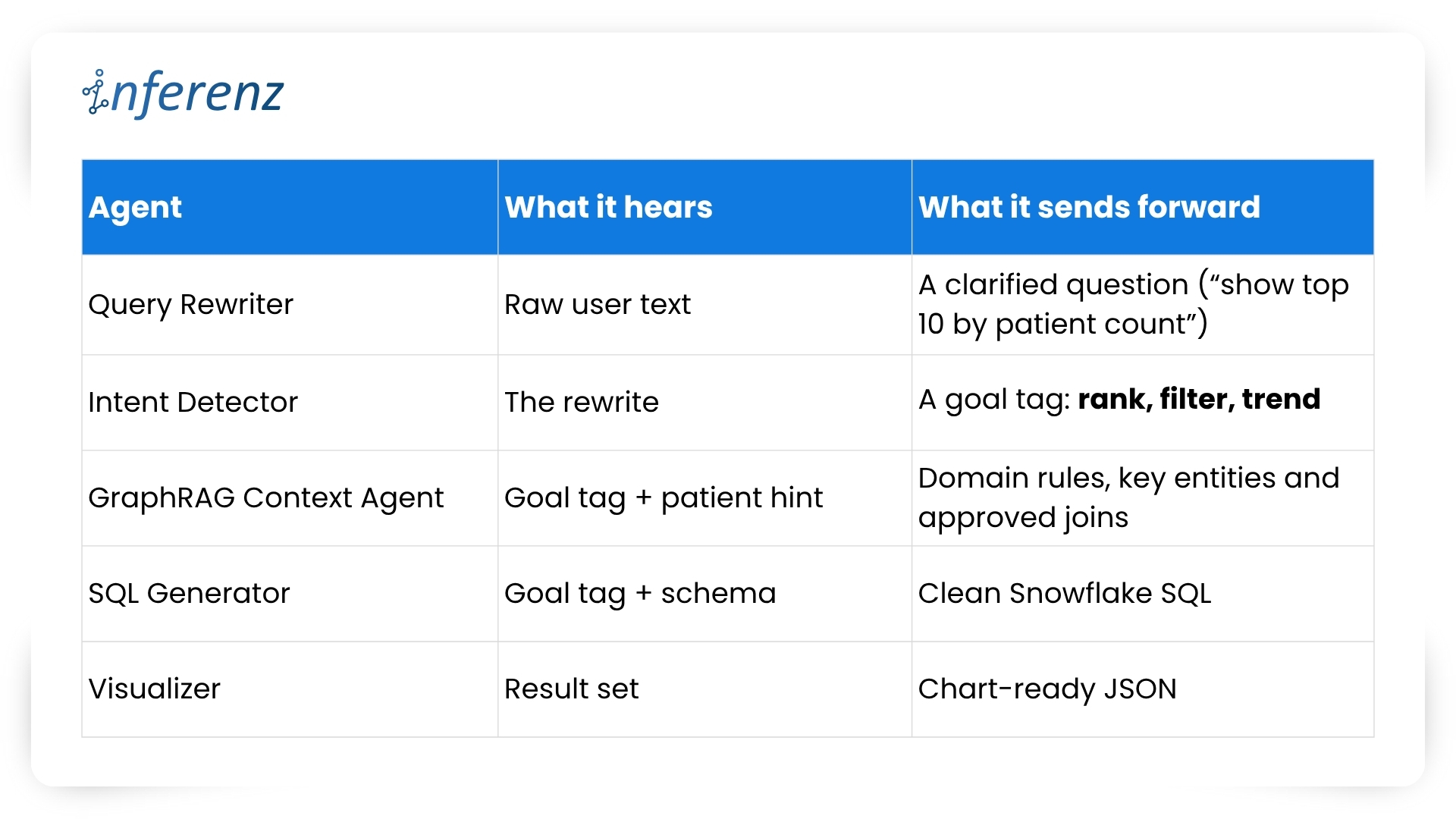 Each agent owns one step. That keeps fixes small and testable.