










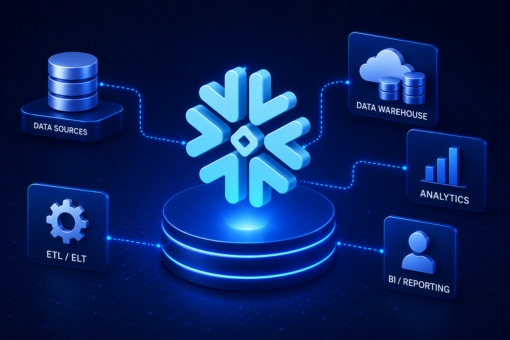
Snowflake Tutorial For Beginners: Guide To Architecture

Snowflake tutorial for beginners gives you a perfect start to learning everything you need to master the cloud-based warehousing platform. Keep reading as we have briefed Snowflake database architecture and its fundamentals. 

Built on the top of AWS (Amazon Web Services), Snowflake is a cloud-based data warehousing platform. It is a true SaaS offering. The Snowflake data warehouse is much faster, easy to set up, and far more flexible compared to traditional data warehouse solutions. 

With the demand for big data growing, enterprises are shifting from traditional data storage solutions to cloud data warehouses. The reason behind choosing the cloud for storage is its high scalability and flexibility. Snowflake is one of the most widely popular cloud data solutions on the market. 

Read our beginner’s guide to learn data warehousing solutions, their features, Snowflake architecture, and so much more. 

What Is Snowflake Cloud Data Warehouse? 

According to a 6Sense report for 2023, over 11718 companies have started using Snowflake as their data warehousing tool. The reason behind the adoption of Snowflake is its high scalability and easy data management. Snowflake is the first analytics database built for the cloud. In addition, it can run on the most popular cloud providers like AWS, Azure, and Google Cloud platforms. 

Snowflake is a data warehousing platform that enables businesses to store, manage, and analyze large data volumes. The unique multi-cluster shared data architecture delivers the concurrency, performance, and elasticity that organizations require. It features three main layers — compute, storage, and global services — that are physically separated but integrated logically. 

Architecturally, there are three layers in the Snowflake platform. 

Database Storage Layer 

The core aim of the database storage layer is to break massive volumes of data into multiple tiny partitions. The scalable cloud blob storage stores structured and semi-structured data systematically to make data management simple. Compute nodes link to the storage layer to acquire data for query processing. 

Query Processing Layer 

The second layer is responsible for query execution with the help of virtual warehouses. MPP (Massively Parallel Processing) compute clusters comprise many nodes with Memory and CPU hosted on the cloud. The best part about virtual warehouses is that they can be auto-resumed and auto-suspended using the auto-scaling factor. 

Cloud Services Layer 

The cloud services layer coordinates and handles all other services in Snowflake, such as sessions, SQL compilation, encryption, etc. The services in this layer include infrastructure management, authentication, metadata management, access control, and query parsing and optimization. 

Let’s take an example to understand how these different layers work together in a Snowflake. 

  • Snowflake connects through one of the supported clients and starts a session.
  • The first virtual warehouse starts working by submitting a query. 
  • The service verifies the authorized access data in the database to execute operations defined in the query. 
  • Once Snowflake processes the queries, the service layer creates an optimized query plan and sends query execution instructions to the virtual warehouse. 
  • Upon receiving the instructions, the virtual warehouse allocates resources to let the data in the storage layer execute the query. 
  • Finally, the users get the end results. 

Snowflake Tutorial: Connect & Load Data  

Now let us learn how to connect to Snowflake data warehouse in this Snowflake tutorial for beginners. There are multiple ways to connect with other services, including: 

  • ODBC and JDBC drivers
  • Third-party connectors like BI tools and ETL tools
  • Native connectors 
  • Command-line clients 
  • Web-based user interface 

Below we include the four options that enable you to load data in the scalable and secure cloud platform. 

SnowSQL for Build Loading 

The build loading is performed in two phases — file staging and loading data from CSV files. 

Staging the files: In this phase, all the data files are uploaded to a location where Snowflake can access them. Next, it loads massive amounts of data from stage files into tables in the database system. 

Loading the data: In the second phase, you will need a virtual warehouse to load data into Snowflake. The warehouse extracts data from each file. Next, it inserts the data as rows in the table. 

Snowpipe

Snowpipe is an excellent option for bulk-loading data in Snowflake. You can use this method to stage files in external locations. The best part about Snowpipe is that you can automate the process by using COPY command with additional features. With the help of external computing resources, you can continuously load the data and eliminate any need for a virtual warehouse. 

Third-Party Tools

Snowflake offers a comprehensive ecosystem of services and applications that lets you load data from disparate external data sources. 

Web Interface 

The last method to load data into a scalable and secure Snowflake platform is the web interface. You need to simply select the table and press the load button. This will help you load data into Snowflake. As it combines both staging and loading data into one operation, it simplifies the overall process. 

Whether you want to implement Snowflake or load data into it with the help of Snowflake tutorial for beginners, having an expert team by your side is vital. The Inferenz team has been helping enterprises streamline their data migration process. Feel free to contact Inferenz experts to make data management simple. 

Get Started With Snowflake Tutorial For Beginners

Snowflake is one of the best tools for data stacks, helping enterprises load and process data quickly. One of the best benefits that Snowflake provides is that the virtual warehouse can be scaled up or down to leverage the compute resources and pay only for what you use. 

Inferenz can help you transfer data to the fully managed cloud data warehouse — Snowflake. Our expert will focus on understanding your needs to load or store data in the modern cloud stack. For more information about the Snowflake tutorial for beginners or to learn more about the migration, contact Inferenz experts today.

3 Essential Activities in Azure Data Factory: Beginners Tutorial

The activities in Azure Data Factory and pillars can help you construct end-to-end data-driven workflows for your data movement and data processing. Learn about the 3 types of activities you can run with Microsoft Azure Data Factory in this tutorial. 

Microsoft introduced a well-architected framework to help enterprises improve the quality of workload performance on the cloud. The two most important components you will come across are pipelines and activities. A pipeline acts as a logical collection of activities working together for task completion. 

The three types of activities you can run with Microsoft Azure Data Factory include data movement, data transformation, and control activities. An activity generally takes one or more than one input dataset to output one or more datasets. 

In this Azure Data Factory tutorial, we will discuss the activities and main pillars of Azure architecture. 

3 Types of Activities You Can Run With Microsoft Azure Data Factory 

Azure Data Factory is a serverless, fully managed data integration service for businesses, having a market share of 6.34%. Before we explain the list of Azure Data Factory activities, let us understand the pipeline and activities in simple words. 

A pipeline groups activities together to perform a specific task. Instead of deploying or scheduling activities individually, a pipeline allows you to manage activities as a unit. 

The activities grouped together in the pipeline are the actions you perform on the data. For instance, when a pipeline is created for any ETL task, multiple activities are responsible for extracting, transforming, and loading information into a data warehouse. 

The three Azure Data Factory activities include: 

Data Movement Activities 

The Copy Activity in Azure Data Factory and Synapse pipelines lets you copy data between on-premises and cloud data repositories. Once you copy data, the next step is to transform and examine it for different operations. 

You can publish transformation and analysis results for BI (business intelligence) and appliance consumption using the Copy activity. It is generally executed in integration runtime. The advantage of using copy activity is to copy files as-is between two file-based data stores. 

Some tools or SDKs that will help you perform the Copy action using a pipeline are: 

  • The Azure Resource Manager template 
  • The REST API 
  • The .NET SDK
  • The Copy Data Tool
  • The Azure portal 
  • The Python SDK
  • Azure PowerShell

Data Transformation Activities 

Data transformation is the second activity that enables enterprises to derive valuable predictions and insights from the raw data. There are two ways to transform data in ADF: 

  • Either use data flows, such as mapping or data wrangling, to transform data. You can choose this method if you don’t want to write code. 
  • Secondly, you can use external sources like Azure HDInsight Pig activity or HDInsight Hive activity. In this instance, you can hand-code transformations as well as manage external computing environments. 

Data Control Activity 

The third important activity in ADF is data control. It includes: 

  • Append Variable Activity 
  • Execute Pipeline Activity 
  • Filter Activity 
  • For Each Activity 
  • Get Metadata Activity 
  • If Condition Activity 
  • Lookup Activity 
  • Set Value 
  • Until Activity 
  • Wait Activity 
  • Web Activity 
  • Webhook Activity 

Whether you’re a cloud user wanting to improve security or an organization wanting to migrate data to the cloud, contact Inferenz experts. The data and cloud migration experts help you seamlessly transfer data and ensure you are running robust workloads. 

5 Pillars of Azure Architecture 

For a high-quality workload, enterprises need to understand the five pillars of Azure architecture. 

Reliability

Organizations can improve the reliability of their applications by architecting reliability into application components. A highly reliable cloud ensures you can easily recover applications from failures, such as downtime, data loss, or ransomware incidents. 

Cost-Optimization 

The cost optimization pillar helps Azure customers control overall cloud computing expenses while preventing potential cost spikes. Enterprises can optimize expenses by: 

  • Choosing the right compute-optimized and memory-optimized resources. 
  • Focusing on flexible budgets instead of fixed budgets. 
  • Using real-time monitoring to check how you spend resources on the cloud. 

Performance Efficiency 

With performance efficiency, you can align user demands with the workload. The simple way to do so is by optimizing potential bottlenecks, implementing resource scaling, achieving optimum performance, etc. 

Security 

Azure’s security pillar guides users on how to protect data and systems, mitigate security incident impact, identify potential security threats, and control access. In addition, Azure users must focus on end-to-end encryption, creating a disaster response plan, and limiting access to authorized individuals. 

Operational Excellence 

The pillar lets users get a complete picture of their applications in the cloud. Therefore, companies should consistently design high-quality modernized structures. This will help shorten the development and release cycle. In addition, implementing systems and processes to monitor operational health can strengthen application reliability on the cloud. 

Build Pipelines and Activities in Azure Data Factory 

Following the five pillars in Azure Data Factory will help you build and deploy high-quality solutions on Azure. While building applications or deploying solutions, it’s important to understand the concept of pipelines and activities. However, it’s worth noting that you can have a maximum of 40 activities in an ADF pipeline. 

If you want to understand or create pipelines and activities in Azure Data Factory, contact Inferenz experts. The team of professionals can help you digitize your business by migrating on-premise data to the cloud. With the help of experts, you can build, manage, or secure activities in Azure Data Factory to streamline your business operations. 

Which Has High Demand AWS Vs GCP: Ultimate Beginners Guide

The AWS vs GCP blog provides a detailed comparative analysis between the two best cloud computing platforms of 2023. Keep reading to understand which cloud platform has high demand in 2023 and beyond. 

Many SMEs and large enterprises have adopted computing platforms, leading to the emergence of new cloud storage services. Google Cloud storage and AWS are two leading cloud service providers, dominating the cloud market share

Since the inception of AWS in 2002, cloud computing service has dominated the cloud market. It has maintained a significant margin from other cloud solutions like Microsoft Azure and Google Cloud Platform. 

Google launched its Google Cloud Platform in 2008, which soon began gaining market traction. Thus, companies began to find AWS and GCP as two tough competitors. In this AWS vs GCP guide for beginners, we will cover which cloud platform has high demand in 2023. 

Why Choose GCP Over AWS (Amazon Web Services)? 

When choosing the top cloud provider, you will undoubtedly discover three major cloud providers: AWS, Azure, and GCP. According to the Google Trends graph, AWS has always maintained a significant margin over GCP in the last five years. Let us see how Google Cloud vs AWS Cloud service differs in demand. 


The main reason for AWS’s domination is the wide range of AWS products and services it offers to its users. On the other hand, the AWS alternative — GCP, is continuously growing and giving a tough fight to the largest cloud solution. Many enterprises are choosing GCP over AWS as it is relatively cheaper in pricing. When customers choose cloud by Google, they receive $300 in credits for GCP services and products up to the free monthly usage limit. 

Aside from pricing, GCP has the best Machine Learning platform. The vast number of products and services, from low-level VMs for Deep Learning to high-level APIs, make GCP suitable for ML enthusiasts and businesses. While AWS focuses more on Serverless, Google Cloud customers can leverage the benefits of Kubernetes, which provides a friendly ecosystem to run much workload. 

If you are a developer planning to build Gen-Z apps using a cloud machine learning engine and artificial intelligence, choose Google Cloud Platform. It features high security and compliance, all thanks to the recent update of Vertex AI and Gen App Builder. 

Which Cloud Is Most Demanding In 2023? 

A recent survey indicates that the cloud computing market size will exceed $1 trillion by 2028. Therefore, it’s safe to say that the cloud market is evolving. Companies should focus on choosing the most demanding cloud platform in 2023 to secure their business data and stay ahead. 

Below are the three highly public cloud platforms, Azure, AWS, or GCP, which will dominate the public cloud market in 2023. 

Amazon Web Services 

Compared to Google Cloud Platform, cloud giant Amazon Web Services is regarded as the largest cloud service provider worldwide and market leader. It currently spans around 99 availability zones within 31 geographic regions worldwide. AWS also announced plans for 15 more availability zones and 5 AWS regions in Israel, Malaysia, Canada, New Zealand, and Thailand. 

Microsoft Azure 

Like AWS, Microsoft Azure is the second largest global public cloud service provider, offering a hybrid cloud experience. The cloud platform presently has 60 regions and 116 availability zones distributed throughout the United States, Asia Pacific, the Americas, the Middle East, and many more.

Google Cloud Platform 

Google Cloud Services have around 37 regions, 112 zones, and 187 network Edge locations, making it the third largest cloud infrastructure solution. The GCP provides an assemblage of services and products that operates on the same infrastructure as that of Google, YouTube, etc. 

The best cloud computing platform choice will depend on the specific business needs. For instance, AWS provides over 200 fully featured services to its users, including compute, storage, and database. Hence, you can choose AWS over GCP if you want more assistance. 

On the other hand, GCP is the enterprise-ready cloud service provider that helps developers to build, test, and deploy applications. In addition, the pay-as-you-go pricing model of GCP cloud computing solutions makes it an affordable choice for startups. If you are still confused between Google Cloud and AWS, contact Inferenz data and cloud migration experts. 

Choose The Best Cloud Platform Between AWS Vs GCP 

Comparing these two cloud technologies and choosing one seems a tough call. This is because both cloud solutions are decent and have thriving cloud communities. As a user, you have to pick a cloud platform that meets your needs and budget constraints. 

For instance, during AWS vs GCP comparison, the Google Cloud provider offers multiple machine learning frameworks and utilities. You can easily integrate them with Google Cloud. If the prime goal is analytics, GCP could be an ideal choice between Amazon and Google Cloud. 

Whether you’re planning to migrate on-premise data to the cloud or switch from one vendor to another, it is essential to have the expertise and understand the migration process. At Inferenz, we take pride in helping SMEs and large enterprises shift from on-premise data to the cloud and choose the best cloud solution — AWS vs GCP — that matches their requirements.

ChatGPT 3 Vs. ChatGPT 4: How They Are Different From GPT 3.5

ChatGPT 3 vs. ChatGPT 4 has become a hotly debated topic since OpenAI released the latest version of the large language model. Since the launch of ChatGPT, the powerful and unique AI chatbot has never failed to amaze users with its abilities. However, it had a few limitations, such as inaccurate data generation, hallucinations, etc. 

OpenAI unveiled its latest creation, GPT-4, to address and eliminate the shortcomings of ChatGPT. The main difference between ChatGPT 3 and GPT-4 is that the latter can generate up to 25,000 words eight times faster than its predecessor. Compared to ChatGPT 3.5, ChatGPT 4 can analyze images and generate answers based on the picture. 

Undoubtedly, GPT-4 is the improved version of ChatGPT 3 and ChatGPT 3.5. But is it worth paying for? Here we have covered everything you need to know about the multimodal developed by OpenAI. 

What Is ChatGPT 4 & How To Access It? 

After the launch of OpenAI’s viral AI chatbot – ChatGPT, various developments in the tech world have occurred. ChatGPT is an app that relies on ChatGPT 3 vs. ChatGPT 4 to produce human-like text. 

Think of it this way: if ChatGPT is a car, GPT is like the engine that powers it. It is the brain behind the app that can be tailored for different purposes like text summarizing, parsing text, copywriting, or translating languages. 

GPT 4 is nearly ten times more advanced than its predecessor, GPT-3.5. It can better understand the inputs and distinguish nuances thanks to its efficiency and accuracy. Hence, it leads to more coherent and accurate responses. 

However, if you are using the current free version of the viral AI chatbot – ChatGPT, you are accessing GPT 3.5. You will need to subscribe to ChatGPT Plus to explore the capabilities of GPT-4.

Differences Between GPT-4 And Its Predecessor GPT 3.5

OpenAI, the developer of GPT 3.5 and GPT-4, said, “We spent six months making GPT-4 safer and more aligned.” They added, “GPT-4 is 82% less likely to respond to disallowed content requests and 40% more likely to generate factual responses than GPT-3.5.” 

Here are a few more differences between the two artificial intelligence models developed by OpenAI – ChatGPT 3 vs. ChatGPT 4. We will compare the models with ChatGPT 3.5 – a model that is used by the free version of ChatGPT to generate texts. 

  • GPT 4 has advanced capabilities and has been designed to generate and interpret the text in various dialects. As the multimodal can respond sensitively to users expressing frustration or sadness, it generates more personalized and genuine responses. 
  • Unlike ChatGPT 3.5, GPT-4 can understand complex tasks that require contextual understanding. In addition, it can process complex mathematical and computational concepts. Be it solving an advanced calculus problem or stimulating chemical reactions, GPT-4 can do it all. 
  • GPT-4 has stronger programming powers than its predecessor. It can debug the existing code or generate code snippets more efficiently and in less time. You never know when GPT-4 will lead ChatGPT and Copilot in terms of code generation. 
  • ChatGPT 3.5 focuses primarily on generating text, whereas GPT 4 is capable of identifying trends in graphs, describing photo content, or generating captions for the images.

GPT 3 was released by OpenAI in 2020 with an impressive 175 billion parameters. In 2022, OpenAI fine-tuned it with the GPT 3.5 series, and within a few months, GPT-4 was launched on March 14, 2023, which can do many more things.

Impact Of New Tools Impact The Tech World In 2023 

Microsoft and Google are two leading companies that have entered the bandwagon after the release of ChatGPT by OpenAI. However, it’s essential to understand that no AI tool is perfect, but it can help individuals and companies in multiple ways. 

Businesses can integrate AI apps or tools to automate mundane tasks and improve employee productivity. These tools can eliminate the unnecessary usage of resources, helping you save money. If you are a business owner wanting to stay ahead, it’s time to develop an AI app that meets the needs of your organization and performs multiple tasks simultaneously.  

Inferenz has dedicated and professional Artificial Intelligence and Machine Learning experts who understand your requirements and develop an AI app. Remember, the ChatGPT 3 vs. ChatGPT 4 debate is the beginning of the AI-driven world, so get ready for the future with your own AI app! 

Best ChatGPT Alternatives in 2026: Free and Paid Options Compared

Summary

ChatGPT remains the most recognized AI assistant, but it is not always the best fit for every use case, user, or budget. A new generation of AI tools has emerged, offering stronger coding support, real-time web access, multimodal capabilities, and enterprise-grade reliability. This guide evaluates the leading ChatGPT alternatives across categories, from general-purpose assistants to coding copilots and specialized vertical tools, helping you make an informed decision based on actual capability, not hype.

Introduction

The AI assistant market has moved well beyond “ChatGPT or nothing.” Enterprises building on LLMs, developers debugging production code, and professionals writing technical documents all have distinct requirements that a single tool rarely satisfies. ChatGPT has faced capacity constraints, knowledge cutoff limitations, and pricing pressures. Meanwhile, competitors have moved aggressively, with models from Anthropic, Google, Microsoft, Meta, and Mistral challenging OpenAI’s dominance across nearly every performance benchmark.

The real question for most users is not whether to use an AI assistant, but which one is aligned with their workflow, data sensitivity requirements, and output quality expectations. This guide gives you the signal to cut through that decision.

What Is ChatGPT and Why Look Beyond It?

ChatGPT is a conversational AI developed by OpenAI, built on the GPT-4o model family as of 2025. It handles text generation, code assistance, document analysis, image interpretation, and structured reasoning. OpenAI offers a free tier and a ChatGPT Plus plan at $20 per month, with enterprise and API pricing layered on top.

Despite its capabilities, several structural limitations drive users to look for alternatives.

Key limitations of ChatGPT:

  • Knowledge cutoffs can lag by months, affecting research and current event queries.
  • Context window management can degrade on very long documents without proper tooling.
  • API costs scale quickly for high-volume enterprise use cases.
  • The free tier has meaningful restrictions on model access, speed, and file handling.
  • Privacy-sensitive industries require data handling guarantees that OpenAI’s standard offering does not always provide.

How to Choose a ChatGPT Alternative

Before selecting a tool, align your choice against four criteria: use case fit, model quality, data privacy standards, and total cost of ownership. A creative writer has entirely different requirements from a compliance analyst or a backend engineer.

Questions to guide your selection:

  • Does the tool have real-time web access, or is it working from a fixed training set?
  • What is the maximum context window, and does it handle long documents reliably?
  • Is the tool deployable on-premises or via private cloud, if data residency matters?
  • Does it support multimodal input (images, PDFs, audio)?
  • Is pricing usage-based, seat-based, or flat-rate?

The Best ChatGPT Alternatives in 2026

General-Purpose AI Assistants

Claude (Anthropic) Claude, built by Anthropic, is one of the most capable general-purpose alternatives to ChatGPT available today. The Claude 3.7 and upcoming Claude 4 family offer an exceptionally large context window, precise instruction-following, and strong performance on complex reasoning tasks. Claude is particularly well-regarded in enterprise settings for its constitutional AI approach, which prioritizes safe and reliable outputs. Available via Claude.ai and the Anthropic API. Pricing includes a free tier; Claude Pro is $20 per month.

Google Gemini Google’s Gemini models (Ultra, Pro, Flash) are deeply integrated into Google Workspace, giving them a practical edge for organizations already operating within the Google ecosystem. Gemini Ultra is competitive with GPT-4o on most benchmarks and offers native multimodal processing. Gemini’s integration with Google Search gives it a real-time information advantage over models working from static training data.

Microsoft Copilot (Bing AI) Built on OpenAI’s model stack and integrated across Microsoft 365, Bing Search, and Azure, Microsoft Copilot is the most tightly embedded AI assistant in the enterprise productivity space. For organizations running on Microsoft infrastructure, Copilot’s contextual awareness across Outlook, Word, Excel, and Teams makes it a high-value alternative.

Perplexity AI Perplexity is purpose-built for research-oriented queries. It retrieves and synthesizes live web content with source citations, making it a strong choice for analysts, journalists, and researchers who need current, verifiable information. Its Pro tier adds GPT-4o and Claude model access, file uploads, and expanded context.

Meta Llama (Open Source) Meta’s Llama models are open-weight, meaning they can be downloaded, fine-tuned, and deployed on private infrastructure. For enterprises with the engineering capacity to run their own inference, Llama offers maximum control over data and customization. Llama 3.1 405B is competitive with closed frontier models on many benchmarks.

AI Tools for Coding and Development

GitHub Copilot GitHub Copilot remains the standard for AI-assisted development. Powered by OpenAI’s Codex and GPT-4 models, it provides inline code completion, multi-file context awareness, pull request summaries, and CLI support. It integrates across VS Code, JetBrains IDEs, and Neovim. Pricing starts at $10 per month for individuals.

Amazon CodeWhisperer Amazon’s CodeWhisperer is optimized for AWS environments and supports Python, Java, JavaScript, TypeScript, and C#, among others. It includes security scanning to flag vulnerable code patterns, making it a practical choice for development teams building cloud-native applications on AWS infrastructure. Free tier available for individual developers.

Tabnine Tabnine differentiates itself with privacy-first positioning and an option to run the model entirely on-device or in a private cloud. It supports over 80 languages and integrates with most major IDEs. For teams with strict IP or compliance requirements around code, Tabnine’s data isolation model is a meaningful advantage.

Cursor Cursor is an AI-native code editor built on VS Code. It allows developers to write code using natural language, refactor entire codebases in a single prompt, and query their codebase semantically. It has emerged as a high-productivity tool for engineers working on greenfield projects and complex refactoring tasks.

Replit AI (Ghostwriter) Replit’s AI tooling is embedded directly in its cloud-based IDE. For educators, student developers, and teams prototyping quickly without local environment setup, Replit AI offers a streamlined path from idea to running code.

AI Writing and Content Tools

Jasper AI Jasper is designed specifically for marketing teams and content operations at scale. It offers brand voice training, campaign workflows, and integrations with CMS platforms. Teams producing high volumes of landing pages, ad copy, and blog content benefit from its templated workflows. Jasper operates on GPT-4 and proprietary fine-tuned models.

Writesonic / Chatsonic Chatsonic, built on the Writesonic platform, integrates real-time Google Search results, making it more current than standard LLM outputs for trending topics. It also supports image generation through Stable Diffusion integration. Pricing starts at around $13 per month after the free trial.

Rytr Rytr is a cost-efficient writing assistant covering 40-plus use cases including product descriptions, email drafts, and blog outlines. It is not a frontier model tool, but for teams prioritizing cost over raw capability, Rytr’s flat-rate pricing (including a generous free tier) makes it accessible for small businesses and freelancers.

QuillBot QuillBot remains a strong tool for paraphrasing, grammar correction, summarization, and translation. Its translator supports over 30 languages. It does not replace a general-purpose LLM but serves a specific editorial workflow effectively.

WordTune WordTune focuses on rewriting and improving existing text rather than generating from scratch. It is particularly useful for non-native English speakers polishing professional documents, or for teams seeking to adapt content across tonal registers.

AI Tools for Research and Search

You.com (YouChat) You.com’s YouChat offers a conversational interface layered on top of a customizable search engine. It supports app integrations for coding, writing, and image generation within the same interface. YouChat 2.0 adds richer source citations and improved answer quality.

Neeva AI Neeva’s AI search product emphasizes privacy, with no tracking and no ad-based revenue model. Its Gist feature provides a quick AI-powered browsing summary. Pricing is approximately $5 per month after the trial period.

Elicit Elicit is purpose-built for academic research workflows. It reads and synthesizes information from research papers, extracts key findings, and identifies study limitations. For researchers doing systematic reviews or literature analysis, Elicit is considerably more precise than a general-purpose chatbot.

AI Tools for Specialized Use Cases

Midjourney For AI image generation, Midjourney remains the quality benchmark. It operates via Discord and a web interface, producing high-fidelity visual content from text prompts. The describe command, which converts images into text prompts, is useful for reverse-engineering visual styles.

Otter.ai Otter.ai automates meeting transcription, summary generation, and action item extraction. It integrates with Zoom, Google Meet, and Microsoft Teams. For teams managing high meeting volumes, Otter reduces the overhead of note-taking and follow-up documentation significantly.

Character AI Character AI enables conversation with custom AI personas, including fictional and public figure-inspired characters. It is primarily a consumer entertainment product rather than a professional tool, but it demonstrates the breadth of what conversational AI interfaces can support when applied to engagement-driven use cases.

Socratic by Google Socratic is an education-focused AI assistant designed for K-12 students. It provides step-by-step explanations across subjects including math, science, and history. Available as a free mobile app on iOS and Android.

ChatGPT vs. Key Alternatives: A Capability Comparison

ToolReal-Time WebCode FocusMultimodalFree TierBest For
ChatGPT (GPT-4o)Yes (Plus)StrongYesLimitedGeneral use
Claude 3.7PartialStrongYesYesLong docs, reasoning
Gemini UltraYesStrongYesYesGoogle Workspace
Perplexity AIYesModerateYesYesResearch, citations
GitHub CopilotNoSpecializedNoNoDevelopment teams
Jasper AINoNoLimitedNoMarketing content
MidjourneyNoNoImage genNoVisual content

Limitations to Understand Before Switching

No AI tool is universally superior. Each alternative involves a trade-off.

Switching costs are real. Prompting styles, integrations, and fine-tuned workflows often do not transfer cleanly between platforms. A team that has optimized around ChatGPT’s API behavior will incur retraining and integration time moving to a different provider.

Benchmark performance does not equal task-specific performance. A model that scores higher on MMLU or HumanEval may still underperform on your specific use case. Pilot testing on representative tasks is the only reliable evaluation method.

Open-source models require infrastructure. Running Llama 3 or Mistral models privately requires GPU infrastructure, model serving expertise, and ongoing maintenance. The “free” label on open-weight models does not account for operational costs.

Conclusion

The competitive landscape for AI assistants has matured significantly. ChatGPT is no longer the only credible option, and in many specific use cases, it is not the best one. Claude leads on long-document reasoning and safety-conscious enterprise deployment. GitHub Copilot and Tabnine dominate the development workflow. Perplexity and Elicit serve researchers who need grounded, cited outputs. Gemini is the natural choice for Google Workspace-native organizations.

The strategically sound approach is not to pick one tool for all tasks, but to build a small, deliberate stack aligned to your actual workflows. For most professional and enterprise contexts, that means a primary general-purpose assistant, a specialized coding tool, and one research-oriented interface. The tools exist; the priority is the evaluation discipline to match them to genuine requirements.


Frequently Asked Questions

What is the best free alternative to ChatGPT in 2025?
Claude by Anthropic, Google Gemini, and Perplexity AI all offer capable free tiers. Claude and Gemini handle long documents and general reasoning well. Perplexity is the strongest option if you need real-time sourced information. The right choice depends on whether you prioritize reasoning depth, current information, or integration with existing tools.

Which ChatGPT alternative is best for coding?
GitHub Copilot is the industry standard for AI-assisted development and integrates directly into most major IDEs. Cursor is a strong alternative for developers who prefer an AI-native editor. Amazon CodeWhisperer is the best fit for teams working primarily within the AWS ecosystem. Tabnine is worth considering if data privacy and on-premises deployment are priorities.

Is there a ChatGPT alternative with real-time internet access?
Yes. Perplexity AI, Google Gemini, and Microsoft Copilot all retrieve live web content. Chatsonic also integrates Google Search results. ChatGPT Plus supports web browsing as well, but several alternatives make real-time retrieval a core part of their product rather than an optional add-on.

What is the best ChatGPT alternative for enterprise use?
Claude (Anthropic) and Microsoft Copilot are the most commonly selected options for enterprise deployment. Claude offers strong data handling policies and is available via the AWS Bedrock and Google Cloud Vertex AI model catalogs. Microsoft Copilot integrates across the Microsoft 365 suite and benefits from Microsoft’s enterprise compliance infrastructure.

Are open-source ChatGPT alternatives reliable?
Meta’s Llama 3.1 405B and Mistral’s frontier models are competitive with commercial alternatives on many benchmarks and are fully auditable. The reliability depends less on model quality and more on deployment infrastructure. Organizations with the engineering capacity to run robust inference pipelines can achieve strong, cost-efficient results with open-weight models. Without that infrastructure, hosted commercial options are more dependable in practice.

What AI tool should I use instead of ChatGPT for research?
Perplexity AI is the most practical general research tool, offering real-time citations and source transparency. Elicit is the stronger choice for academic research, particularly for synthesizing findings from scientific literature. For business research requiring current market data, Gemini’s integration with Google Search provides a natural advantage.

AI Chatbots For Businesses: ChatGPT & 12 Best AI Chatbots

Finding the best AI chatbots have become a hot topic lately, and that too for a good reason. Individuals are using conversational AI chatbots to automate repetitive and mundane tasks. Besides, many businesses are leveraging the power of advanced AI chatbot platforms to streamline interactions with customers. 

From welcoming customers on the website to help them during product discovery, an AI-powered chatbot can do it all. But not all chatbots are the same. In order to maximize the benefits of chatbot technology, it’s vital to choose the best AI chatbots for 2023. This guide reveals the best chatbots so you can make the ideal choice for your business. 

What Are Artificial Intelligence Chatbots Online? 

Chatbot technology has come a long way and is reshaping the customer service experience. An AI-enabled chatbot uses machine learning to converse with people. Customers can ask questions to intelligent chatbots online and get quick solutions to their queries. 

As per Statista, the size of the chatbot market is expected to cross 1.25 billion U.S. dollars in 2025. This indicates that more businesses are using chatbots to improve customer service, increase business sales, and boost website engagement. 

Some of the best benefits of using artificial intelligence chatbots in 2023. 

Increased Sales

AI chatbot solutions can recommend products depending on customer demands and requirements. It can upsell and cross-sell products during its conversation with the customers. 

Personalized Shopping Experience 

Customers spend more time with a brand if they offer a personalized shopping experience. Shoppers say they will likely buy from retailers if they receive customized recommendations. Integrating smart chatbots will help you boost sales and improve the online shopping experience. 

Improved Communication 

Many companies prefer integrating the best AI chatbots to improve communication between the brand and customer. As chatbots are available 24*7, they can keep your website visitors engaged and offer quick support. 

13 Best AI Chatbots For Your Business [2023]

Let us now reveal the list of the best AI chatbots available online for businesses. 

ChatGPT

Since ChatGPT’s inception in late 2022, it has been in the news due to its unmatchable capabilities. The conversational AI platform is based on OpenAI’s GPT-3.5 or GPT 4 and is free. You can use ChatGPT by writing detailed and customized prompts to generate answers, letters, emails, and more. However, due to its limited knowledge of world events, it may provide inaccurate results. 

Tidio

Tidio is an artificial intelligence chatbot for your business that uses deep learning to improve customer support and sales generation. This best chatbot tool is easy to use, helping you to create your eCommerce AI chatbot. These AI chatbots use machine learning and natural language processing (NLP) technology to support shoppers and boost sales efficiently. 

Drift

Drift is one of the best AI-powered chatbots, specially designed for B2B brands. The chatbot offers real-time engagement and personalized user experience for buyers. The best part about the powerful AI chatbot is that it can integrate with other tools like Zaiper, MailChimp, Google Analytics, etc. 

atSpoke

One of the best AI chatbots available online in 2023 is atSpoke. It provides employees with all the knowledge they need about customers and business. The internal ticketing system with built-in help desk AI technology allows internal teams to enjoy 5x faster resolutions while automatically answering 40% of requests. 

WP Chatbot

WP-Chatbot can easily integrate with a Facebook Business page and power live and automated interactions with a WordPress site. The easy one-click installation process allows fast addition to live chat. 

Kasisto

The custom chatbot is designed for finance businesses and delivers real-time customer service using deep conversational AI models. It can serve as a virtual assistant for banking customers and improve engagement on various platforms. 

Medwhat

One of the best AI chatbots for personal medical assistance is Medwhat. It can provide medical consulting to patients with relevant information based on their health condition. This chatbot benefits organizations wanting to adopt AI in healthcare and reduce human error. 

Infeedo

One of the most advanced AI chatbots that collect employee feedback for companies is Infeedo. The virtual assistant communicates with the employees to understand those who are unhappy, about to leave, or disengaged. 

WATI 

WATI, officially integrated with WhatsApp, is an AI chatbot application for customer service. Companies that operate on WhatsApp can integrate the tool to improve customer interaction and optimize experiences, leading to more sales. 

Intercom 

Intercom is one of the feature-rich AI software that supports chatbots and live chat and offers messenger-based experiences for prospects. It can answer around 33% of customer queries while providing a personalized experience. 

Watson Assistant 

Developed by IBM, Watson Assistant can efficiently run on messaging channels, websites, mobile apps, or customer service tools. In addition, the AI-powered chatbot is pre-trained with content from your specific industry. This helps the popular AI tool to understand historical chat or call logs, search for answers in the knowledge base, provide straightforward solutions to customers, or guide them to human representatives. 

Infobip

The intelligent chatbot-building platform of Infobip allows you to create and deploy a smart AI-powered virtual assistant for customer service support. The new level of automation, speed, and availability boosts customer satisfaction while reducing overall customer support costs. 

Zendesk Answer Bot

Many brands are leveraging chatbot software to engage their customers and streamline in-house operations. Zendesk Answer Bot is a multilingual tool that works alongside your support team. You can deploy the Zendesk Answer Bot fly solo or use additional technology on top of the Zendesk chatbot within mobile apps or on your website chat. 

AI experts help brands build chatbots that can understand customer queries and offer quick solutions. If you want to know more about developing an AI app, schedule a call with Inferenz experts today! 

Build The Best AI Chatbot Or App With Inferenz Experts 

Undoubtedly, AI chatbot software is a conversational tool that can benefit businesses in multiple ways. Not only can a powerful chatbot improve customer interaction, but it can also help brands boost sales. If you are a business owner wanting to stay ahead and understand the ins and outs of the competitive world, it’s vital to invest in creating your AI app. 

Inferenz has a team of dedicated and professional Artificial Intelligence and Machine Learning experts who understands your business needs and help you get off on the right foot. Whether you are a healthcare or an eCommerce owner, we will help you create the best AI chatbots for business to improve customer support.

ChatGPT Plugins: How To Use Plugins With ChatGPT

ChatGPT plugins are alluded to as the “eyes and ears” for the language model by OpenAI due to their unmatchable capabilities. Since the launch of ChatGPT, the AI tool has swayed the world by storm. Its ability to write code, generate human-like responses, analyze raw data, etc., is the main reason why users prefer using the chatbot. 

However, it is also fraught with drawbacks and limitations. ChatGPT plugins are designed to eliminate these shortcomings by making the chatbot safe to interact with. If you are planning to get access to ChatGPT plugins, this guide is for you. In this ultimate guide, we will walk you through what plugins are, how to use them, their benefits, and much more! 

What Are ChatGPT Plugins? 

Until now, OpenAI ChatGPT failed to access real-time information or solve complex mathematical problems. However, this is going to change now as OpenAI has announced a set of proprietary plugins and the inclusion of third-party plugins. 

You can think of ChatGPT plugins as tools that will help ChatGPT access up-to-date information, ease complicated computation, and integrate third-party services. With the new set of plugins and accurate prompts, ChatGPT can browse the Internet and provide relevant answers to users. 

In addition, ChatGPT will enable users to book tickets, do shopping, share their to-do list to automate tasks, and much more. 

Types Of ChatGPT Plugins & Their Uses

OpenAI, in collaboration with third-party companies, hosted multiple ChatGPT plugins to help users make the most out of using ChatGPT. These include: 

Web Browser Plugin

With the help of a web browser plugin, ChatGPT can access data from the Internet. That said, the web browsing ability of ChatGPT allows users to generate answers to the latest topics or get information that is too recent. 

Code Interpreter Plugin

ChatGPT is capable of writing and debugging code, making it a competitor of Copilot. The code interpreter plugin is limited to python and helps users to run and interpret the code on ChatGPT better than Copilot. 

Retrieval Plugin 

The open-source plugin enhances the usefulness of the system by allowing ChatGPT to obtain a document from its knowledge base. Hence, it helps users to get relevant answers quickly. 

On the other hand, a few plugins created by third-party services include: 

  • Expedia 
  • Zaiper 
  • Wolfram
  • Speak 
  • Slack 
  • Klarna
  • Milo 
  • KAYAK
  • OpenTable
  • Instacart
  • FiscalNote
  • Shopify 

Let us understand how these third-party plugins work: 

Expedia 

This ChatGPT plugin will allow users to converse about traveling with the AI tool. It will act as a travel guide to help users plan trips and check flight prices, vacation rentals, or hotels. 

Wolfram

Wolfram boosts the capabilities of ChatGPT by allowing it to solve complex problems with mathematical and computational information without hallucinations. 

OpenTable 

With OpenTable plugins, users can book a table at a nearby restaurant or place a home delivery for food. In addition, the plugin helps users to learn more about the restaurants in their vicinity with a few clicks. 

InstaCart 

InstaCart makes ordering groceries and other household items easy. To use the plugin, you can list your requirements, and ChatGPT will automatically place the order. 

Kayak

One of the best plugins for OpenAI’s ChatGPT is Kayak which allows ChatGPT users to plan their short or long holidays. From making a list of arrangements to managing and arranging everything in advance, ChatGPT can do it all. 

Benefits Of ChatGPT Plugins 

Plugins for ChatGPT offer multiple benefits to users. Some of the best benefits of using ChatGPT plugins include the following: 

  • Users can access real-time data and use ChatGPT viral AI chatbot as their assistant to automate mundane tasks. 
  • With access to ChatGPT plugins from the plugin store, the AI chatbot can browse a user’s query from the web as well as retrieve data from the Internet. 
  • ChatGPT plugins like code interpreters help users easily write, debug, and run code. 

Plugins will make the AI chatbot more useful and accurate. If you want to develop an AI app that meets your business requirements, contact the Inferenz experts. The team of dedicated professionals will help you with Artificial Intelligence and Machine Learning services to build your AI app. 

How To Join The Waitlist To Access ChatGPT Plugins? 

As ChatGPT plugins are available only to a limited set of insiders and developers, you will have to join the waitlist to use them. Here is the step-by-step answer to how to join the waitlist to get ChatGPT Plugins. 

  • Click on https://openai.com/waitlist/plugins, and you will find the ChatGPT plugin waitlist. 
  • Scroll below the page until you find the “Join waitlist form.” 
  • Start filling in all the required details, such as full name, email, country of residence, use cases, etc. 
  • Once you complete the form filling, click on the “Join waitlist” button. 
  • A confirmation message will be displayed on your screen “Thank you. You will soon hear from us.” 

That’s it! You have successfully joined the waitlist to get access to the ChatGPT plugins. 

Note:- Developers and ChatGPT Plus users are more likely to be selected to try the plugins initially. 

How To Use The ChatGPT Plugins? 

If you are among the selected users, here is how to use the ChatGPT Plugins. 

  1. Click on the official website of GPT-4 (https://openai.com/product/gpt-4) and select “Try on ChatGPT Plus.” 
  2. On the account page, you can either log in or sign up. If you already have an account, click on login to continue and skip to step 7.
  3. If you do not have an account, click on sign up and enter your email address. Click continue. 
  4. Create a strong password and continue to proceed. 
  5. Verify your email using the mail received from OpenAI ChatGPT. From the email, select login. 
  6. Fill in all the required information, such as first name, last name, and your organization’s name. Click continue. 
  7. Now you will be directed to the free version of ChatGPT based on GPT 3.5. Select the “Upgrade to Plus” option on the page’s left side. 
  8. Select the “Upgrade Plan” in the pop-up window and fill in the payment details. 
  9. Choose the plugin model from the ChatGPT chat interface. A drop-down menu will appear. Click on the Plugin Store. 
  10. Install the plugins and get ready to use them to automate tasks. 

ChatGPT will leverage the installed plugins to perform a variety of tasks, fetch answers, or offer real-time information. 

Get Ready For The Artificial Intelligence World 

Artificial intelligence technology is taking the world by storm, with new tools and chatbots entering the market. The recent announcement of plugins for ChatGPT reveals that these plugins will be a true game-changer. Depending on their needs and requirements, individuals and businesses can build their own AI models. 

If you are planning for artificial intelligence system development or want to initiate a new machine learning project, contact Inferenz experts today. Leveraging the power of technology and understanding advanced tools like ChatGPT plugins will ensure your business stays ahead of the competition.
Chatbot For Healthcare: Key Use Cases, Benefits, & Risks Of AI

A chatbot for healthcare is a game changer for the medical industry, as it helps professionals serve patients 24*7. The conversational artificial intelligence chatbot reduces caseloads by assisting patients with easy access to healthcare. 

Using technology in healthcare is not a new concept. Healthcare professionals are already using various types of artificial intelligence, like machine learning, predictive analytics, etc., to address multiple issues. 

Thanks to new technology inventions, many healthcare organizations are leveraging the power of medical chatbots. If you are a healthcare provider wanting to integrate AI healthcare chatbots, this guide is for you. 

In this ultimate guide, we will discuss everything you need to know before implementing chatbot technology in healthcare. 

What Are Conversational AI Chatbots? 

There is no denying that chatbots in healthcare are becoming more critical than ever. According to Allied Market Research, the global healthcare chatbot market that accounted for $116.9 million in 2018 will cross $345.3 million by the end of 2026. That said, we can expect more implementation of chatbots in healthcare organizations. 

But before we dig deeper into chatbot technology in healthcare, let’s start with what a chatbot can do. In medical terms, healthcare bots are designed to provide guidance and appropriate help to patients digitally. Instead of searching online and understanding the cause of their symptoms, chatbots offer reliable and accurate information to patients. 

Many professionals believe that chatbots are designed to help patients who aren’t sure about the severity of their diseases. Chatbots work by collecting basic information from patients. Then, based on the input, healthcare AI bots provide patients with more information about their conditions. In addition, the chatbot can suggest the next steps or connect patients with doctors based on their health condition. 

Key Use Cases Of AI Healthcare Chatbot In Healthcare

Let us learn how healthcare providers can use chatbots to improve the patient experience. 

Health Tracking 

Many patients require daily health monitoring and tracking. Healthcare chatbots can be used to create a link between the patient and the doctor. Not only does the chatbot provide a detailed record of a patient’s health condition to the doctor, but it also assesses how well-prescribed medicines work to improve a patient’s health. 

Symptom Checking 

Chatbots can offer symptom checking to patients without them having to leave their homes. The Natural Language Processing (NLP) technology of chatbots helps patients to check their symptoms online and understand their medical condition. 

Patients can input their requests in the conversational AI in healthcare. The bot can access the information and narrow down the cause behind their symptoms. Thus, it will help patients determine whether they need professional treatment. 

Schedule Medical Appointments 

Scheduling doctor appointments has never been an easy feat. Patients have to wait in long queues, making it hard to get quick health information. Chatbots are proven to be a fantastic solution to this problem due to round-the-clock availability. 

Patients can quickly access medical information via chatbot by using its message interface. Plus, a well-designed healthcare chatbot can schedule medical appointments based on the doctor’s availability and the patient’s health. 

AI-powered chatbots can also send follow-up messages or reminders via email, text, or voice messages to remind patients about their appointments. The best part about scheduling appointments via chatbot is that the staff won’t get overwhelmed when inquiries become high. 

Easy Hiring & Employee Training 

Hiring and onboarding new employees can be cumbersome and time-consuming, especially in a large healthcare company. That’s why they implement AI chatbots to make the job of the HR department easy. 

Chatbots, for instance, can help new employees receive information about the company. In addition, new joiners can use the chatbot to automate multiple tasks, including maternity leave, requests for vacation time, etc. 

Answer Frequently Asked Questions 

One of the primary use cases of medical chatbots is providing timely answers to questions based on patient data. Many healthcare organizations can deploy an interactive chatbot feature on their homepage to answer common questions.

For example, a chatbot can help website visitors understand payment tariffs, insurance information, business hours, etc. This, in turn, lowers the workload on the in-house team and helps patients get quick information without any wait times. 

If you are planning to get started with a project related to machine learning or artificial intelligence system development, contact Inferenz experts. The AI and ML professionals will help you integrate advanced technology into your organization without spending out of your budget. 

Benefits Of Medical Chatbots For Healthcare 

In today’s technology-driven world, every industry is leveraging the power of AI, and the medical industry is no different. Chatbots for healthcare can automate repetitive and mundane tasks, so healthcare experts can focus on complex ones. Below we cover a few common benefits of chatbots for healthcare. 

  • Chatbots help patients get immediate responses, improving patient engagement, providing better care, and reducing wait time. 
  • AI-enabled healthcare chatbot understands patient behavior to deliver personalized recommendations in real-time. 
  • Delegating repetitive tasks to medical chatbots can help organizations reduce the need for human resources. 
  • Patients with minor medical issues can chat with the bot to get simpler medical advice based on their medical history. 

Risks Associated With Using Healthcare Chatbots 

Similar to other technologies, a healthcare chatbot comes with a few disadvantages and shortcomings. Chatbots can work with doctors to provide immediate care, but they can never replace doctors in the healthcare industry. Ultimately, it’s the doctor who will provide physical and mental health assistance. 

User privacy is the main concern when it comes to using AI chatbots to provide medical assistance. That said, medical professionals need to implement data safety measures and ensure their platforms are resistant to cyber-attacks. 

The Future Of Chatbot Technology In The Healthcare Industry 

AI-enabled chatbots can be used to check patients’ symptoms online, book appointments, contact doctors via video call, or answer simple medical questions. 

That said, it is clear that healthcare chatbots are transforming the healthcare sector. We can expect many more organizations to deploy machine learning and artificial intelligence technologies in healthcare to streamline their processes. 

If you want to know how healthcare organizations can use modern technologies to stay ahead, contact Inferenz experts today. Our professionals will help you in your health tech project or answer your questions related to chatbots for healthcare deployment.

Create A Chatbot Using ChatGPT: Step-By-Step Tutorial For Beginners

If you want to create a chatbot using ChatGPT, this 5-minute guide is all you need to read. 

ChatGPT (or Chat Generative Pre-trained Transformer) is an artificial intelligence tool developed by OpenAI. The chatbot is capable of answering questions on a variety of topics. ChatGPT creator, OpenAI recently introduced the ChatGPT API to developers and the public. 

ChatGPT Plus, powered by the new GPT-3.5 turbo model, has been recently released by OpenAI at a 10x lower price. These steps have opened the door for endless opportunities in the field of artificial intelligence. Even if you are a non-coder, you can create a chatbot using ChatGPT API for free.  

In this ChatGPT tutorial for beginners, we will reveal a step-by-step guide on how to create a personalized AI with ChatGPT API.

Steps To Set Up Software Environment For AI Chatbot

To create a chatbot using ChatGPT, you will need a ChatGPT API. It is relatively easy to use, and developers can send requests to the API with desired input text and functionality. You can access the API using Python, JavaScript, and Ruby. Though all these programming languages are easy to integrate, we will use Python to explain the chatbot development. Some other tools you will require include OpenAI, Pip, and Gradio libraries. 

Step 1: Start By Installing Python

First things first, you need to install Python by downloading the latest version for Windows. Click on https://www.python.org/downloads/ and then download python 3.11.2. 

Before clicking on the “Install Now,” make sure you enable the checkbox for “Add Python.exe to PATH” present at the bottom of the page. Now press “Install Now” and follow the usual steps to install Python. 

Pro Tip: Open the terminal on your PC or use Command Prompt “python –version” to check if Python is installed appropriately. 

Step 2: Upgrade Pip

When you install Python, Pip automatically gets installed on your system. It is a package manager for Python that plays a crucial role in creating a chatbot by allowing you to install thousands of Python libraries. However, it’s essential to upgrade it before you proceed. Here are a few simple steps that will help you upgrade Pip. 

  • Open Terminal and run the command “python -m pip install -U pip.” 
  • Install the OpenAI library to interact with ChatGPT via API. Then run the command “pip install openai.” 
  • Next, install Gradio, which helps you develop a friendly web interface. It allows you to demo your AI chatbot or share the chatbot on the Internet through a shareable link. Use the command “pip install gradio.” 
  • Lastly, download a code editor to edit codes easily. You can use Notepad++, VS code, Caret app, or Sublime Text. 

Once you have installed everything, your software environment is ready. 

Step 3: Get The OpenAI API Key For Free

You need an API key from OpenAI to create a chatbot using ChatGPT. OpenAI is currently offering free API keys for the first three months. ChatGPT users will have a free credit worth $18. 

  • Create a free account by clicking on https://platform.openai.com/signup. If you have an existing account, log in by filling in your details. 
  • At the right corner of the page, click on your profile. Select “View API keys” using the drop-down menu. 
  • Now you can click on “Create new secret key.” Make sure you copy the API key to your Notepad file. 
  • As there are private keys, make sure you do not share or display them in public. 

If you need any help in artificial intelligence or machine learning projects, contact Inferenz experts today. 

Easy Steps To Build Your Own Chatbot With ChatGPT API

Now we will build an AI chatbot using OpenAI’s latest GPT-3.5 turbo model. 

  • Open Notepad++ or any code editor and paste the code. You can even generate code using ChatGPT or Copilot — two popular tools that help in code development. 
  • Add your API key that we have generated before. 
  • Now save the code by clicking on File and then Save As using the drop-down menu. 
  • Set the file name by adding “.py” at the end and save it to “All files.” 
  • Move to the saved file location, right-click on it, and select “Copy as path.” 
  • Open the terminal, enter Python, add a space, paste the copied path, and hit enter.
  • On the below page, you will find local and public URLs. Copy the local URL and then paste it into the browser. 

That’s it! You have built your own AI chatbot with ChatGPT API. Now, you can share the public URL with anyone, as it will be live for 72 hours. You can stop the server anytime by pressing Ctrl + C. 

Start Your Artificial Intelligence Project In 2023

ChatGPT is a relatively easy-to-use artificial intelligence chatbot. It can carry out human-like conversations or write codes using the correct prompts. Besides creating a conversational chatbot, ChatGPT API can be used for a variety of purposes. You can use it to create content, translate languages, summarize text, etc. 

If you are still perplexed about how to implement artificial intelligence or machine learning in your project, feel free to contact Inferenz experts. The AI professionals will help you from start to finish so you can create a chatbot using ChatGPT tailored to your business needs.