



The Importance of PII/PHI Protection in Healthcare

Background summary

This article explains how a healthcare data team secured PII/PHI in an Azure Databricks Lakehouse using Medallion Architecture. It covers encryption at rest and in transit, column-level encryption, data masking, Unity Catalog policies, 3NF normalization for RTBF, and compliance anchors for HIPAA and CCPA.-
 

Introduction

In healthcare, trust starts with how you protect patient data. Every lab result, claim, and encounter add to a record that links back to a person. If that link leaks, the cost is more than penalties. It affects patient confidence and care coordination.
In 2024, U.S. healthcare reported 725 large breaches, and PHI for more than 276 million people was exposed. That is an average of over 758,000 healthcare records breached per day, which shows how urgent this problem has become.
With cloud analytics and healthcare data lakes now standard, teams must protect Personally Identifiable Information (PII) and Protected Health Information (PHI) through the entire pipeline while meeting HIPAA, CCPA, and other rules.
This article shows how we secured PII/PHI on Azure Databricks using column-level encryption, data masking, Fernet with Azure Key Vault, and Medallion Architecture across Bronze, Silver, and Gold layers. The goal is simple. Keep data useful for analytics, but safe for patients and compliant for auditors. Microsoft and Databricks outline the technical controls for HIPAA workloads, including encryption at rest, in transit, and governance.

The challenge: securing PII/PHI in a cloud data lake

Healthcare data draws attackers because it contains identity and clinical context. The largest U.S. healthcare breach to date affected about 192.7 million people through a single vendor incident, and it disrupted claims at a national scale. The lesson for data leaders is clear. You must plan for data loss, lateral movement, and recovery, not only for perimeter events.

Our needs were twofold:

  • Data security
    Protect PII/PHI as it moves from ingestion to analytics and machine learning.
  • Compliance
    Meet HIPAA, CCPA, and internal standards without slowing down reporting.

We adopted end-to-end encryption and column-level security and enforced them per layer using Medallion Architecture:

Bronze

Raw, encrypted data with rich lineage and tags.

Silver

Cleaned, standardized, 3NF-normalized data with PII columns clearly marked.

Gold

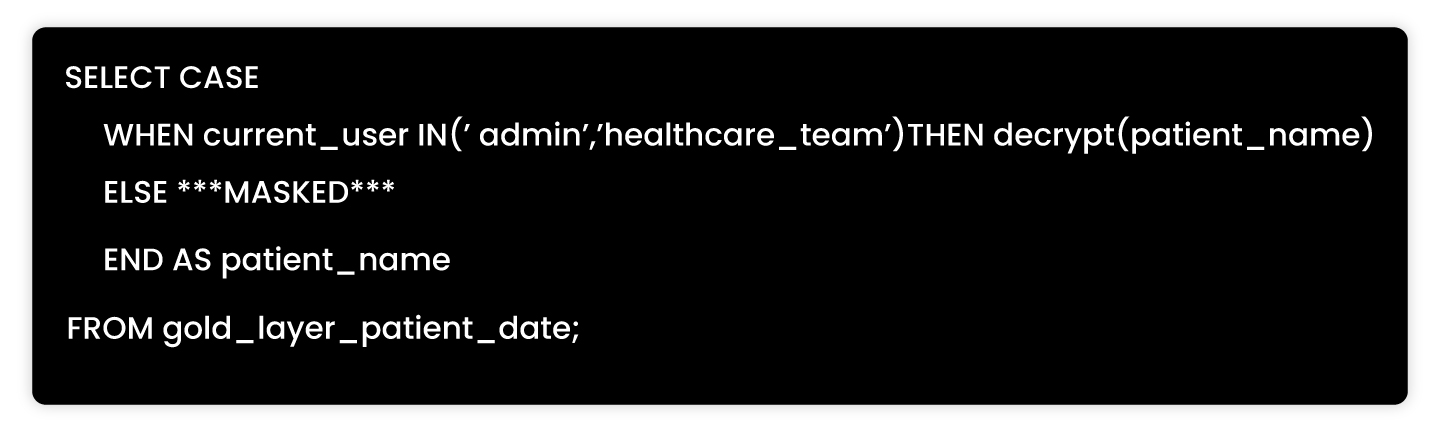
Aggregated, masked datasets for BI and data science, with policy-driven access and role-based access control.

For scale, we added Unity Catalog controls and policy objects that apply at schema, table, column, and function levels. This helps enforce row filters and column masks without custom code in every job.

Protecting PII/PHI: encryption at every stage

We used three layers of protection so PII/PHI stays safe and still usable.

Encryption in transit

Data travels over TLS from sources to Azure Databricks. For cluster internode traffic, Databricks supports encryption using AES-256 over TLS 1.3 through init scripts when needed. This reduces exposure during shuffle or broadcast.

Encryption at rest

Raw data in Bronze and refined data in Silver/Gold stay encrypted at rest with AES-256 using Azure storage service encryption. Azure’s model follows envelope encryption and supports FIPS 140-2 validated algorithms. This satisfies common control requirements for HIPAA encryption standards and workloads.

Column-level encryption

This is the last mile. We encrypted specific fields that contain PII/PHI.

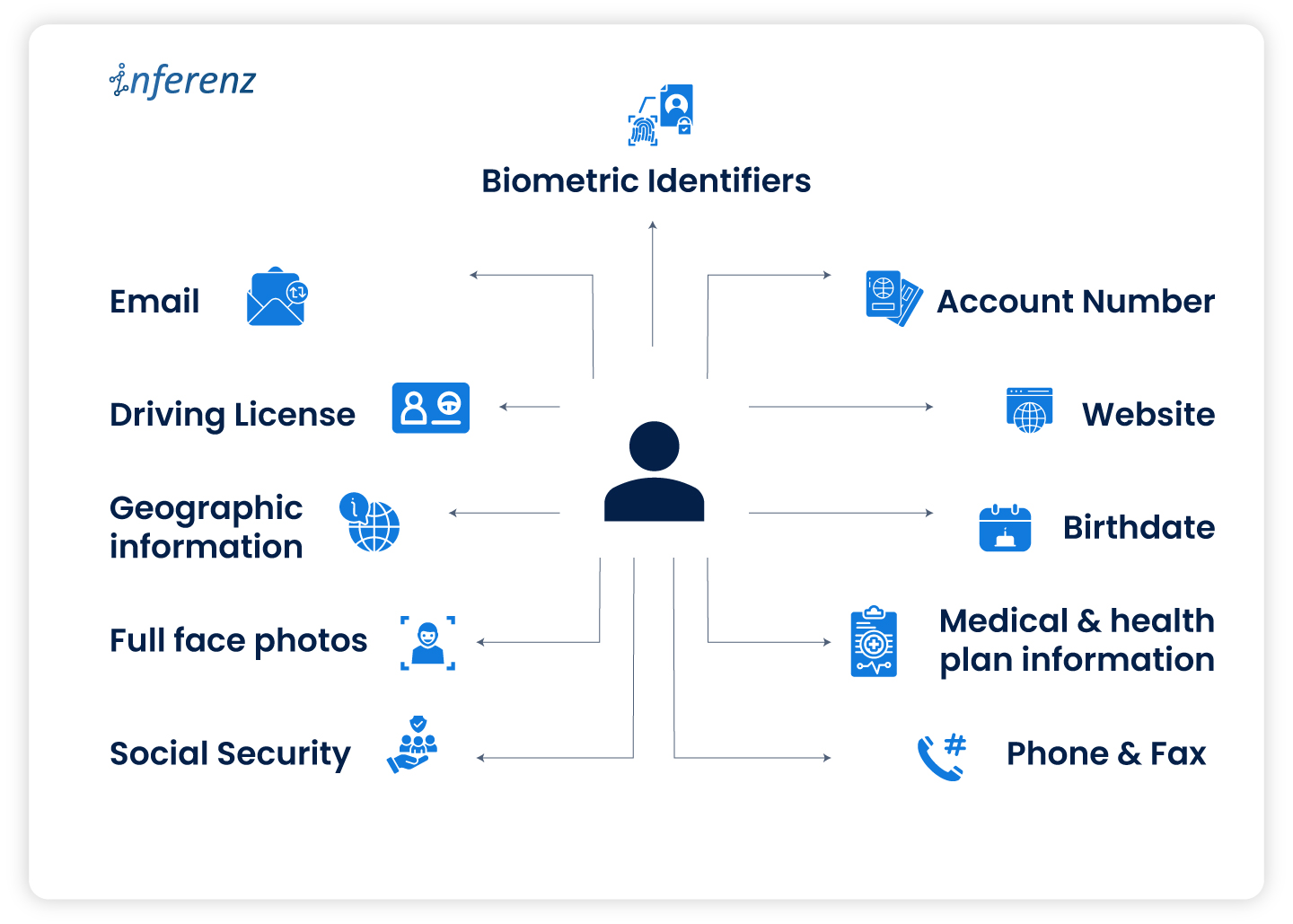
  • Identify sensitive columns. With data owners and compliance teams, we tagged names, contact details, SSNs, MRNs, and any content that can re-identify a person.
  • Fernet UDFs on Azure Databricks. We used Fernet in a User-Defined Function so encryption is non-deterministic. The same input encrypts to different outputs, which reduces linking risk across tables.
  • Azure Key Vault for key management. We stored encryption keys in Azure Key Vault and used Databricks secrets for retrieval. We set rotation, separation of duties, and least privilege to keep access tight. Microsoft documents customer-managed key options for the control plane and data plane.

Together, these patterns form our Azure Databricks PII encryption approach and support HIPAA control mapping.

Identifying PII in healthcare data: a collaborative and automated approach
PII storage

  • Collaboration with business teams
    Subject-matter experts show which fields matter most for care and billing. They confirm what counts as PII/PHI by dataset and by jurisdiction, since a payer file and an EHR table carry different fields and retention rules. We document these rules in a data catalog entry and bind them to  Unity Catalog policies.
  • Automated Python scripts for data profiling
    Our scripts look for regex patterns, outliers, and value density that point to contact info or identifiers. We score each column for PII likelihood and tag it at ingestion. We also write the score and the supporting evidence to the catalog. That way, audits can see when we marked a column and why.
  • Analyzing nested data for sensitive information
    Clinical feeds often arrive as JSON or XML with nested groups. We flatten with stable keys, then scan inner nodes. We also search free-text fields for names or IDs. The same rules apply: detect, tag, then protect.
  • What we do with tags
    Tags flow into policies for masking, access control, and key selection. This reduces manual steps and keeps rules consistent as teams add new feeds.

This practice underpins data governance in healthcare and makes PII/PHI classification repeatable.

Databricks Unity Catalog: Building a Unified Data Governance Layer in Modern Data Platforms

Background summary

Modern healthcare and homecare organizations are struggling with scattered data, compliance pressure, and rising operational costs. A unified governance framework like Databricks Unity Catalog helps CIOs secure PHI, enforce HIPAA-ready controls, and streamline analytics across teams. By centralizing access, metadata, and lineage, it transforms the healthcare data platform into a scalable, trusted foundation for care delivery.-Modern healthcare systems are rich with data but often poor in data governance. From patient records and billing data to IoT streams and clinical notes, information is scattered across teams, tools, and cloud environments. This fragmentation increases compliance risks, slows down analytics, and creates operational bottlenecks. 

Databricks Unity Catalog changes that. As a modern data governance solution built for platforms like Databricks, it provides centralized access control, audit trails, metadata management, and fine-grained lineage—all critical for healthcare CIOs navigating HIPAA, payer audits, and workforce scaling. 

In this article, we share how Inferenz, a data-to-AI solutions provider, rolled out Unity Catalog across its Azure-based lakehouse environments. You’ll find architectural insights and real-world production lessons to align governance with clinical and operational goals. 

Problem statement

Before adopting Unity Catalog, Inferenz’s data platform faced several critical challenges: 

  • Data assets were scattered across multiple workspaces with inconsistent schema definitions 
  • Permissions were often defined manually in notebooks, leading to uncontrolled access sprawl 
  • Compliance teams faced audit fatigue due to the lack of visibility into access and lineage 
  • Schema drift frequently occurred between dev, staging, and production environments 

These issues led to data sprawl, poor discoverability, increased operational risk, and slow onboarding of analysts and engineers. 

What we did 

To standardize governance across its healthcare and finance data, Inferenz implemented Unity Catalog using a CI/CD-driven, modular strategy: 

  • Deployed Azure-backed Unity Catalog metastore at the account level 
  • Created environment-specific catalogs: inferenz_dev, inferenz_qa, inferenz_prod 
  • Organized schemas by domain (e.g., care_quality, claims_analytics, rfm_analytics) 
  • Used SCIM groups (like data_analysts, clinical_qa) for access provisioning 
  • Managed Terraform-defined ACLs via GitHub Actions 
  • Enabled automated tagging and classification using naming conventions (e.g., phi_ prefix flags HIPAA data) 
  • Leveraged Databricks lineage capabilities to track data access and propagation across pipelines 

This rollout made governance automatic—not manual—and aligned with regulatory frameworks like HIPAA, GDPR, and SOX. 

Databricks unity catalog in the finance and healthcare domain 

Granular access control for sensitive data 

In both finance and healthcare, granular access control is critical. Unity Catalog supports: 

  • Table-level and column-level permissions 
  • Row-level filters based on user roles (ABAC) 
  • Sensitive fields like SSN or patient names masked for all except approved roles 
  • Temporary access grants with expiration for auditors or research teams 

This is especially valuable when handling PHI or claims data where least-privilege access is non-negotiable. 

  • ed Databricks lineage capabilities to track data access and propagation across pipelines 

This rollout made governance automatic—not manual—and aligned with regulatory frameworks like HIPAA, GDPR, and SOX. 

Databricks unity catalog in the finance and healthcare domain 

Granular access control for sensitive data 

In both finance and healthcare, granular access control is critical. Unity Catalog supports: 

  • Table-level and column-level permissions 
  • Row-level filters based on user roles (ABAC) 
  • Sensitive fields like SSN or patient names masked for all except approved roles 
  • Temporary access grants with expiration for auditors or research teams 

This is especially valuable when handling PHI or claims data where least-privilege access is non-negotiable. 

Metadata, discovery, and audit trails 

Audit readiness is a continuous concern for CIOs. Unity Catalog enables: 

  • Real-time lineage tracking for each query and transformation 
  • Centralized user activity logs—who accessed what and when 
  • Simplified reporting during audits or compliance checks 

Inferenz reduced audit prep time by 70% after implementing automated audit pipelines linked to Unity Catalog logs. 

Secure cross-team collaboration 

Using Delta Sharing and clean rooms, Inferenz enabled secure access across finance, clinical ops, and customer success teams. For example: 

  • Clinical analysts access de-identified patient outcomes data 
  • Finance teams use the same schema to evaluate cost-effectiveness 
  • All teams use governed queries, with full traceability across departments

Use case: real-time risk monitoring in homecare 

A large homecare provider needed real-time monitoring for high-risk patients. Unity Catalog was used to: 

  • Create governed managed tables for patient visits, vitals, and readmission flags 
  • Apply access policies based on clinician roles and region 
  • Track data lineage for downstream predictive risk models 
  • Isolate test, staging, and production pipelines with workspace-catalog bindings 

This ensured scalable analytics while meeting HIPAA and internal audit requirements. 

Centralized Isolation for Regulated Environments 

Centralized isolation for regulated environments workspace-catalog binding 

Workspace-catalog binding is a key feature for enforcing strict data segregation. Inferenz mapped each Databricks workspace to a specific catalog: 

  • dev-dataengineering could only access inferenz_dev 
  • qa-analytics was bound to inferenz_qa 
  • prod-finance and prod-care accessed only their corresponding production catalogs 

Even admin users couldn’t bypass this setup—enforcing airtight isolation between clinical staging and live production environments. 

Managed storage locations 

Databricks unity catalog allows storage control at the catalog or schema level: 

  • Managed tables stored in predefined, access-controlled locations 
  • Policies enforced on both read/write access 
  • Optimizations like auto-compaction and caching improve performance on large healthcare datasets 

For healthcare CIOs, this means reduced risk of accidental PHI exposure and better control over cloud storage costs. 

Data access models: centralized vs. decentralized

Unity Catalog supports both centralized and decentralized data governance, with trade-offs:

Feature  Centralized access  Decentralized access 
Policy management  Single metastore manages all  Local enforcement by entity or team 
Audit trails  Unified across workspaces  Scattered, requires aggregation 
Resilience  May be a single point of failure  More robust, no central bottleneck 
Flexibility  Consistent but less adaptive  Dynamic, context-based 
Compliance  Easier to manage centrally  Harder to control across domains 

For most healthcare and homecare CIOs, centralized access with workspace-catalog bindings offers the right balance of security, simplicity, and control.

Architectural visuals & best practices 

In healthcare, visuals play a big role in helping technical and non-technical stakeholders align. Unity Catalog supports a clean, modular structure that’s easy to explain—and even easier to audit. 

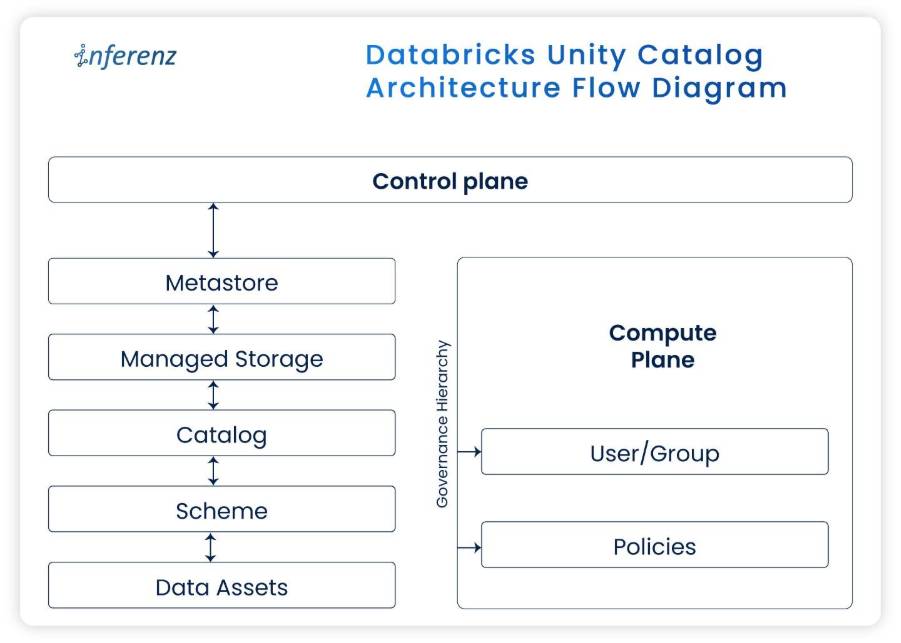
Architecture flow diagram 

Key Layers:

  • Metastore (Control Plane): Single source of truth for all policies, schema, and object access 
  • Catalogs (By Environment): prod_care, qa_finance, dev_ops, etc. 
  • Schemas (By Domain): patient_risk, ehr_exports, care_analytics, claims_costs 
  • Tables/Views: Row- and column-level permissions applied per role group 
  • Lineage Tracking: Enabled via Databricks lineage capabilities; integrated into daily audit logs 

This structure enables HIPAA-compliant access, ensures dataset consistency, and supports rapid scale. 

Centralized vs. decentralized governance: visual breakdown 

Component  Centralized model  Decentralized model 
Access policies  Set at metastore, inherited by all  Custom per catalog or domain 
Workspace binding  Strict and enforced  Flexible, harder to audit 
Audit logs  Streamlined, integrated  Spread across workspaces 
Change management  GitOps + CI/CD pipelines  Manual or local scripts 
Ideal for  Healthcare orgs with strict PHI rules  Research-focused orgs with looser boundaries 

What can healthcare CIOs Do:
Use centralized binding for clinical and operations data. You can selectively decentralize for research units or external partners via Delta Sharing.

Best practices for databricks unity catalog in healthcare 

Area  Recommendation  Why It Matters 
Access Provisioning  SCIM with Azure AD  Scales roles, revokes access instantly on staff exits 
Workspace Binding  One catalog per environment  Keeps dev/test data from touching production 
Privilege Management  Assign to groups, not users  Prevents sprawl and simplifies reviews 
Storage Strategy  Use managed tables over external  Better for lineage, optimization, and compliance 
Audit Readiness  Automate reporting with Databricks lineage capabilities  Cuts compliance prep time 
Data Sharing  Use clean rooms + Delta Sharing  Enables research without PHI leaks 

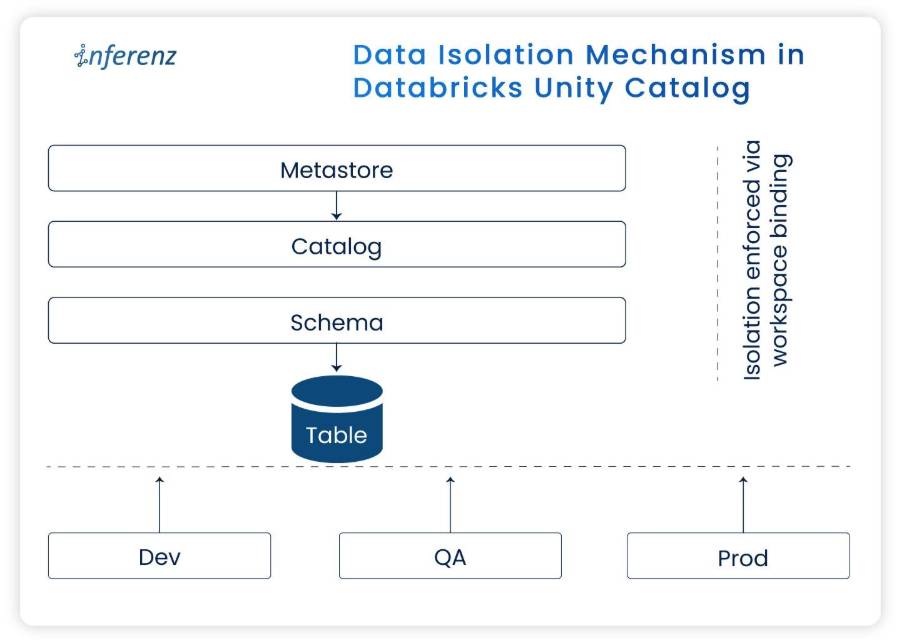
Data isolation mechanism flow


Data Isolation Mechanism in Unity Catalog

This diagram illustrates the hierarchical structure from the Unity Catalog metastore through catalog and schema boundaries to managed tables, showing how financial and market data are partitioned and isolated. 

Patient onboarding analytics 

Use Case: A multi-location homecare group wanted to analyze ai patient onboarding trends across sites. 

Without unity catalog: 

  • No central record of who accessed patient intake logs 
  • Dev team had access to prod patient data 
  • Lineage for EHR and referral data was incomplete 
  • Audit took 3+ weeks to assemble 

With unity catalog: 

  • Onboarding tables in prod_onboarding catalog, workspace-bound to ops users 
  • phi_ and pii_ fields auto-tagged and masked for analysts 
  • Only care coordinators could run named queries 
  • Audit logs traced access by user, IP, and timestamp 

Result: 

  • Full audit prep in under 2 days 
  • No schema drift in 6 months 
  • Role-based dashboards with zero PHI violations 

Lessons from production: what worked, what didn’t 

Topic  Lesson learned 
Terraform drift  Manual overrides broke pipelines → Switched to GitHub-enforced TF-only deployments 
Workspace binding  Initially blocked test users → Added temporary aliases with staged access 
ACL design  Group creep created confusion → Refactored into read_finance, write_clinical, admin_ops roles 
Lineage tracking  Dynamic SQL broke tracking → Added logic to extract column lineage using Spark instrumentation 
CI/CD gaps  Some pipelines lacked approvers → Added Azure DevOps approval gates 

Conclusion and key insights for healthcare CIOs

Unity Catalog gave Inferenz a framework to enforce privacy, scale self-service, and meet stringent audit demands—without slowing teams down. As an official Databricks partner, we apply these controls across Lakehouse deployments and stay aligned with the latest Summit guidance. 

Outcomes realized 

  • 70% less time spent on audit prep 
  • 2x faster analyst onboarding 
  • 30+ domains migrated into governed, catalogued models 
  • 0 data violations in live patient data environments 

Takeaways for CIOs 

  • Workspace-catalog binding is critical for PHI isolation 
  • SCIM + Terraform = scalable, HR-synced access model 
  • CI/CD pipelines enforce naming, tagging, and audit at source 
  • Delta Sharing + Clean Rooms support secure research use cases 
  • Real-time lineage and metadata visibility reduce compliance stress 

FAQ: unity catalog for healthcare CIOs

  1. How does Unity Catalog support HIPAA compliance in healthcare data platforms?
    Unity Catalog provides fine-grained access control, row- and column-level masking, and automated audit trails that align with HIPAA requirements for PHI protection.
  2. Can Unity Catalog integrate with existing EHR systems and claims data pipelines?
    Yes. Unity Catalog works with structured (claims, EHR exports) and unstructured (clinical notes, PDFs) data, enabling governed ingestion and analytics across the healthcare ecosystem.
  3. How does Unity Catalog prevent data access sprawl in large homecare networks?
    Through workspace-catalog binding and SCIM-based role provisioning, access is tightly scoped by environment, preventing analysts or developers from reaching production PHI unintentionally.
  4. What are the advantages of centralized governance vs. decentralized governance in healthcare?
    Centralized governance simplifies audit prep, enforces consistency, and reduces compliance risk. Decentralized models allow flexibility for research but increase monitoring complexity.
  5. How does Unity Catalog improve caregiver enablement and operational analytics?
    By enabling governed self-service dashboards, frontline caregivers and coordinators can view insights like visit trends, readmission risks, or scheduling metrics—without exposing PHI unnecessarily.
  6. What measurable outcomes can healthcare CIOs expect after deploying Unity Catalog?
    Organizations typically see a 60–70% reduction in audit preparation time, faster analyst onboarding, zero schema drift across environments, and higher confidence in data-driven decision-making.

AI-Powered Patient Onboarding: The Smartest Way for Providers to Save Time, Cut Costs, and Improve Care

Background summary

AI-powered patient onboarding is reshaping healthcare operations by automating patient intake, reducing manual workload, and improving care quality. This technology empowers homecare providers to streamline processes, enhance patient satisfaction, and deliver cost-effective, personalized care from day one.  -First impressions in healthcare shape how patients engage with your team.
Onboarding is often the first real contact a patient has with a homecare provider. At that moment, they fill out forms and seek clarity, support, and direction. The onboarding process though can be slow and confusing.

  • Forms are repetitive.
  • Follow-ups take time.
  • And caregiver assignments don’t always meet patient’s expectations.

These delays impact care delivery. They also drain staff time and slow down billing.
Many healthcare organizations continue to rely on manual intake systems. That means more errors, longer wait times, and lower patient satisfaction scores. It also puts pressure on intake teams, who must chase down missing data or correct mismatches late in the workflow.

AI-powered patient onboarding changes that. It speeds up intake, reduces manual steps, and connects patients with the right caregivers based on skills, location, and availability.
For CXOs leading homecare or healthcare networks, improving the intake process creates measurable gains—in time, cost, and patient outcomes. It’s a decision that improves how the business runs every day.

The state of patient onboarding in US healthcare

Let’s get real: most patient onboarding processes are designed for administrators, not patients.

A recent survey by Accenture found that 36% of patients who switched providers in the past year cited poor onboarding and communication as a key reason. At the same time, the administrative cost of onboarding a new patient can run as high as $200 when factoring in manual data entry, verification, and scheduling time. Multiply that across hundreds or thousands of patients per month, and the financial impact is clear.

Key stats you should know:

  • 2–7 days: Average onboarding time for new patients in traditional workflows.
  • 75%: Share of patients who expect digital-first intake options (McKinsey).
  • $18 billion: Estimated annual cost of redundant admin tasks in US healthcare (CAQH Index).

These numbers aren’t just eye-catching—they’re telling you something. There’s a clear disconnect between what patients expect and what providers are currently offering.

Onboarding, when done right, is not just a compliance formality. It’s a moment of truth. It affects patient retention, caregiver utilization, operational costs, and even Medicare ratings. The good news? Automation and AI can address most of the pain points—without replacing your human staff.

What today’s homecare leaders expect

Healthcare executives aren’t looking for shiny tech. They’re looking for practical outcomes.

A COO doesn’t want another dashboard. They want their intake team to process 100 new patients a day without burning out. A CIO isn’t chasing buzzwords. They want systems that integrate securely with their EHRs, handle data reliably, and actually reduce workload.

Here’s what’s consistently coming up in boardroom conversations when it comes to patient onboarding:

What CXOs want from modern onboarding:

  • Speed without compromising compliance
  • A consistent patient experience across multiple touchpoints
  • Automated caregiver matching based on real data, not manual guesswork
  • Fewer handoffs between systems and departments
  • Clear metrics for tracking onboarding performance and satisfaction

One of the recurring frustrations we’ve heard is this: teams spend more time fixing onboarding errors than actually engaging with patients. That’s not scalable. It’s not efficient. And in today’s landscape, it’s not acceptable.

AI-powered automation offers a fix. But only if it solves real operational problems—without becoming another system that needs babysitting.

AI-powered onboarding: what it actually means

Most leaders agree: onboarding needs to be better. But what does “better” really look like? More importantly, what does AI-powered onboarding actually mean in day-to-day operations?

Let’s break it down without the tech jargon.

At its core, AI-powered onboarding is about speed, precision, and personalization—without burdening your staff or losing regulatory grip. It takes a traditionally manual, fragmented workflow and makes it smarter, connected, and almost invisible to the patient.

So, what does a modern AI-enabled onboarding workflow actually look like?

Imagine a new patient—let’s call her Janet—who’s seeking home health support after a hospital discharge.

Instead of filling out a physical packet or struggling through a clunky portal, she’s greeted by a smart chatbot on her phone. It asks clear, relevant questions. It already knows which forms to show based on her zip code or insurance provider. It even checks that the document photos she uploads (like her insurance card or ID) are valid. The backend? Handled by AI—no need for an admin to sift through every file manually.

In minutes, Janet has completed her intake. She’s matched with a caregiver based on her preferences (language, availability, proximity), and both parties receive a personalized email with the appointment details. It feels seamless.

But under the hood, here’s what’s at play:

Key components of AI-powered patient onboarding

1. Conversational AI for intake

  • A bot guides the patient using questions that feel human and helpful.
  • Questions adapt dynamically based on previous answers.
  • It confirms responses in real-time (e.g., “Did you mean 2023 or 2024?”).
  • If a patient uploads a document twice without success, the system switches to manual entry instead of creating a bottleneck.

Business win: Reduces form abandonment, improves data accuracy, and saves staff time.

2. Document parsing that actually works

  • Patients can upload a variety of file types: PDFs, photos, even ZIP folders with multiple documents.
  • Azure AI extracts key fields like name, DOB, policy number, and address.
  • The data is normalized and mapped to the right fields in your system (e.g., Snowflake database).

Business win: Cuts down 80% of manual data entry, minimizes data errors, and speeds up insurance verification.

3. Custom state management

  • Let’s say Janet drops off midway through onboarding. She gets interrupted.
  • No problem. When she returns, the system remembers exactly where she left off.

Business win: Increases completion rates and reduces patient frustration. Helps your intake metrics look better without any staff intervention.

4. Smart caregiver matching

  • The system looks at more than just availability.
  • It checks caregiver skills, past visit history, languages spoken, and travel distance.
  • It computes a weighted score and recommends the best match—not just a random one.

Business win: Higher match quality means better care, fewer complaints, and improved outcomes. Also helps balance caregiver workload.

5. Scheduling and notifications

  • The system finds the earliest suitable appointment and sends a clear email with the date, time, and contact info.
  • If rescheduling is needed, the link is right there in the email.

Business win: Reduces no-shows, improves transparency, and eliminates back-and-forth calls.

In simpler terms, AI automation doesn’t just speed up onboarding. It improves the quality of the match, the accuracy of the data, and the confidence of the patient walking into their first appointment.

It does what manual teams often struggle with under pressure—at scale and in real time.

Impact on operational efficiency: why CXOs should pay attention

If the previous section showed you the moving parts, this section shows why they matter.

AI-powered onboarding is an operational upgrade that translates into real business value across leadership roles.

For CEOs: faster onboarding = faster revenue

  • The faster a patient is onboarded, the sooner care begins—and the sooner you can bill.
  • In many homecare networks, delays of 2–5 days between referral and care initiation are common. AI cuts this down to under 24 hours.
  • Improved satisfaction during onboarding often reflects in CAHPS and HCAHPS scores, directly influencing your reputation and Medicare payments.

📊 Stat you can use: Healthcare organizations with high onboarding satisfaction scores report up to 25% higher patient retention over a 12-month period. (Source: NRC Health)

For COOs: reducing friction across locations

  • With AI automation, form templates, workflows, and caregiver matching logic stay consistent—whether your teams are in Chicago, Dallas, or Miami.
  • It’s easier to standardize SOPs, train new staff, and maintain service quality.
  • Centralized oversight (via admin dashboards) means your regional heads can spot bottlenecks quickly and resolve them before they escalate.

📊 Time saved: A mid-sized home health agency estimated a 60% drop in average onboarding time across its five regions after implementing AI intake.

For CIOs: secure, scalable, and compliant

  • The tech stack is built on secure, cloud-native tools like Azure AI, Snowflake, and FastAPI.
  • All data handling is HIPAA-compliant, with field-level validations and audit logs.
  • System components integrate easily with EHRs or existing CRMs without rewriting everything from scratch.

💡 Why it matters: You don’t need to rebuild your tech landscape. AI onboarding layers in modularly, with low lift on your internal teams.

Metrics that matter (And that you can actually track)

Metric Before AI After AI Change
Avg. time to onboard 2–3 Days <10 Minutes -95%
Form abandonment rate 40% <10% -75%
Manual entry errors High Minimal -80%
Matched within SLA ~60% 90%+ +30%
Admin hours saved N/A 4–6 FTEs/month Cost savings


AI onboarding helps patients better than before by removing operational drag and unlocking value from day one.
And most importantly, it’s not hypothetical. It’s already working in real organizations across the US

Automated Patient Onboarding

The tech stack that works

Let’s keep it simple. The system works because it combines proven tools in a patient-centric way. Here’s the ecosystem in plain English:

Component What it does Why it matters
LangChain Powers the chatbot and forms dynamic questions Reduces intake friction, adapts in real-time
Azure AI Reads documents like ID cards, insurance Eliminates manual typing, lowers error rate
Snowflake Stores all validated data securely Scales fast, works with analytics and dashboards
Neo4j Creates smart caregiver-patient match logic Improves accuracy and personalization
FastAPI Exposes onboarding & matching results via secure API Easy to integrate with your other systems

Security? ✅ HIPAA-compliant
Integration? ✅ Plug-and-play APIs
Scalability? ✅ Built for large volumes without lag
You don’t need a full digital transformation to get started. This plugs into your existing tech quietly and efficiently.

Challenges and what to watch out for

No system is perfect out of the box. But the common pitfalls with AI onboarding are manageable with the right approach:

  • Training intake staff: Even with automation, your team should know how to troubleshoot or step in if a patient gets stuck.
  • Patient trust in automation: For older adults or less tech-savvy users, the chatbot needs to feel approachable and human.
  • Garbage in, garbage out: Data validation steps are critical. Weak input logic can ruin caregiver matches.

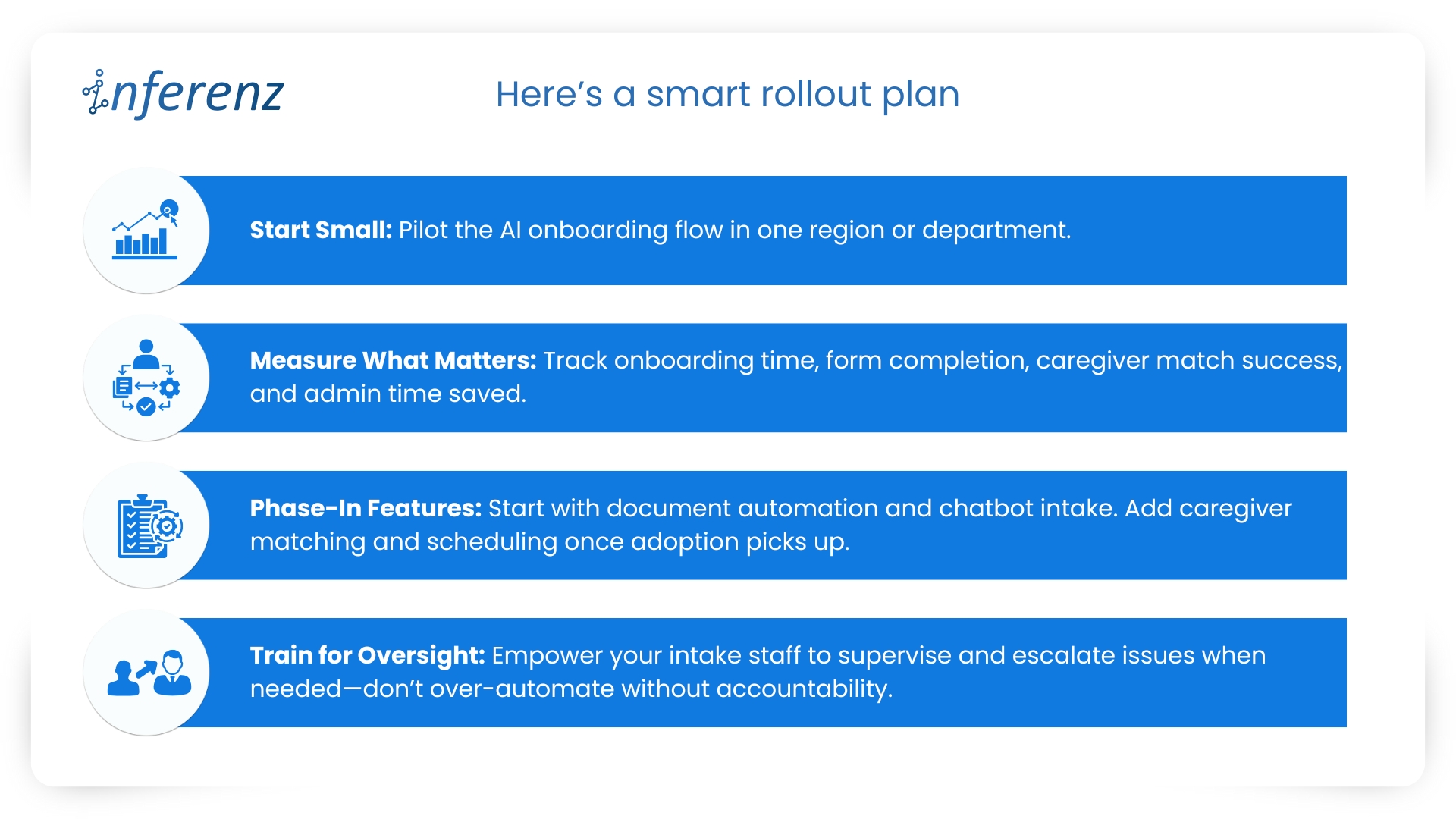
Pro tip: Start with a single-region rollout and use metrics like form abandonment, average onboarding time, and caregiver match score to measure success. If the data looks good in 30 days, expand from there.

How to get started without disrupting operations

You don’t need to rip out your existing systems to make this work. AI onboarding solutions are designed to slide in—not shake up.

Here’s a smart rollout plan:
smart rollout plan
💡 Pro Tip: Choose vendors who offer modular deployment, HIPAA-compliance guarantees, and support for EHR integration (like Epic, Cerner).

The future of onboarding: what’s next

AI onboarding is just the beginning. As the healthcare ecosystem evolves, next-gen tools are already taking shape.

Voice-first intake for seniors

Scenario: A 78-year-old in assisted living completes onboarding by simply answering a few questions over a voice assistant or phone call—no typing, no touchscreen.
Sourced statistics: According to CB Insights, over 30% of AI health startups in 2024 are building voice-enabled interfaces for aging populations.

Multilingual bots for inclusive access

Scenario: A caregiver in Florida uses the chatbot in Spanish to complete intake for a new patient. Forms are automatically translated, and backend data remains unified.
Sourced statistics: McKinsey reports that multilingual tech will be a competitive differentiator for Medicaid and community-based care providers by 2026.

Pre-onboarding risk prediction

Scenario: Before a patient is onboarded, the system flags high hospitalization risk based on intake data. A higher-touch care plan is auto-suggested.
Sourced statistics: Gartner’s 2025 predictions on predictive AI in healthcare cite onboarding-level data as a new frontier for early intervention.

Seamless claims triggering

Scenario: Once a patient is onboarded and matched, billing pre-auth is initiated immediately based on care codes linked to intake data.
Sourced statistics: HealthEdge’s payer-tech report shows a 35% reduction in claim delays when intake is linked to backend revenue cycle systems.

Closing note: don’t let your first touchpoint be the weakest link

Here’s the simple truth: If your onboarding experience still runs on PDFs and follow-up calls, you’re losing patients, revenue, and goodwill—quietly, every day.

AI-powered onboarding isn’t about replacing people. It’s about giving your team room to breathe and your patients a reason to stay. And the best part? It pays for itself in efficiency, satisfaction, and speed to care.

If there’s one place to start your AI journey, it’s not billing. It’s onboarding.

Let your first impression be your strongest one.


Automated Patient Onboarding

FAQs for CXOs exploring AI-powered onboarding

  1. How long does it take to implement AI onboarding in a mid-sized care facility?

With a modular setup, initial rollout (including chatbot, form automation, and document parsing) can go live in 4–6 weeks. Full caregiver matching and scheduling can follow after pilot testing.

  1. Will this integrate with our existing EHR or CRM systems?

Yes. The system uses secure RESTful APIs and works well with platforms like Epic, Cerner, Salesforce Health Cloud, or even custom-built portals. Integration typically requires limited IT involvement.

  1. What’s the ROI we can expect within the first quarter?

Typical early benefits include a 60–80% drop in onboarding time, 75% reduction in admin errors, and a 20–25% increase in form completion rates—leading to faster care starts and fewer dropouts.

  1. How do we ensure patient data security and HIPAA compliance?

The entire architecture is designed with encryption, audit logging, access control, and HIPAA compliance baked in. Azure and Snowflake components adhere to top-tier security standards.

  1. What if our patients aren’t tech-savvy?

The system uses an intuitive chatbot interface with fallback options like voice-based intake or manual intervention. For seniors or non-digital users, guided support workflows ensure inclusivity.

  1. Can we customize caregiver matching rules to fit our network’s protocols?

Absolutely. The recommendation engine allows you to prioritize attributes such as languages, visit history, location radius, or skills based on your care guidelines.