




QA in the Modern Data Stack: Using Python, Zephyr Scale & Unity Catalog for End-to-End Quality Assurance

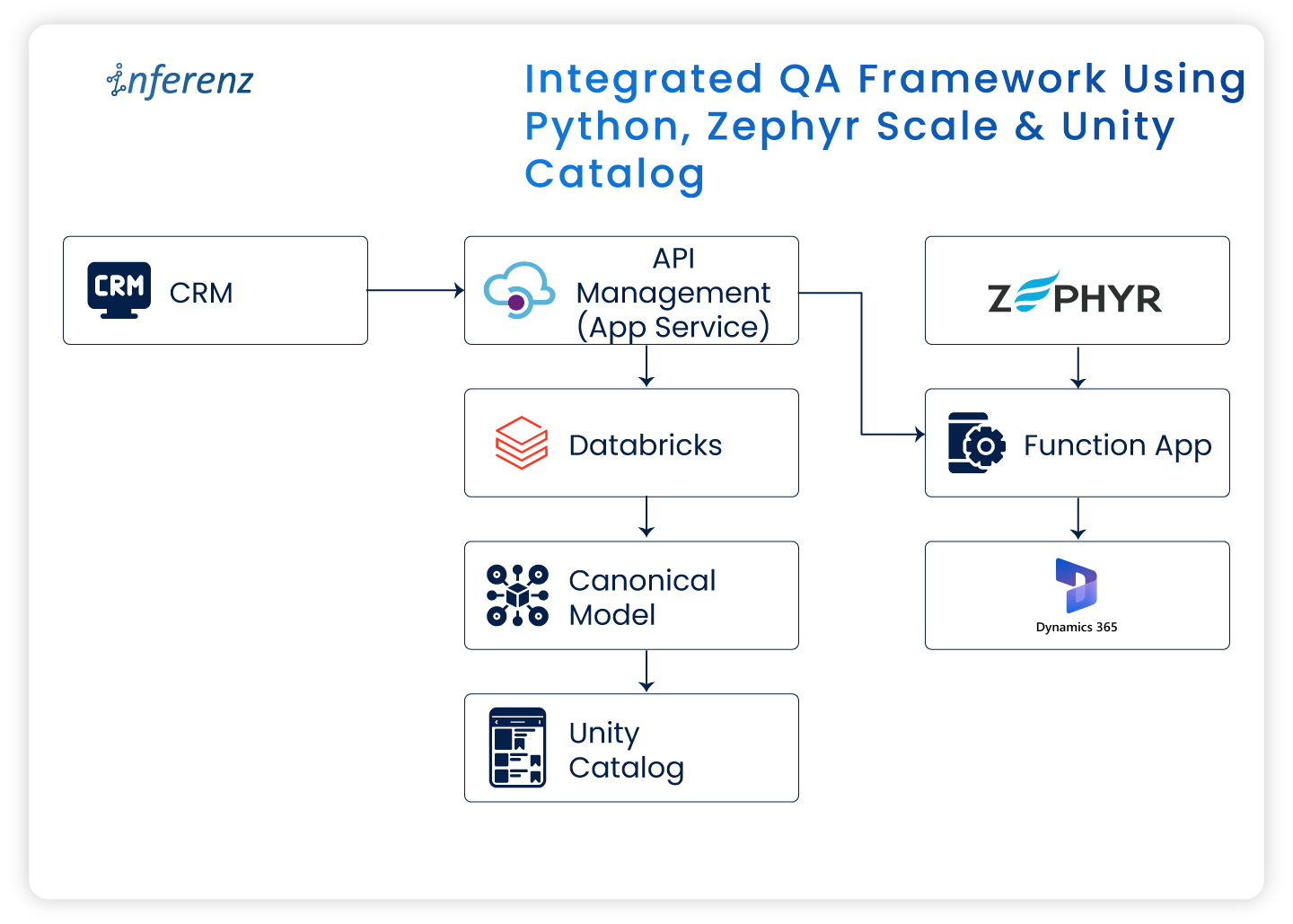
Integrated QA framework using Python, Zephyr Scale & Unity Catalog

Introduction

Quality Assurance (QA) in the software world has moved beyond functional testing and interface validation. As modern enterprises shift toward data-centric architectures and cloud-native platforms, QA now involves ensuring data accuracy, integrity, governance, and system compliance end to end.

In a recent enterprise project, I worked on migrating a legacy Customer Relationship Management (CRM) system to Microsoft Dynamics 365 (MS D365). It wasn’t merely a technology shift. It involved moving large data volumes, aligning new business rules, setting up strong governance layers, and ensuring uninterrupted business operations.

In this article, I’ll share how QA was handled across this transformation using Zephyr Scale for test management, Python for automation, and Databricks Unity Catalog for governance and access control.

QA challenges in migrating to Microsoft Dynamics 365

Migrating from a legacy CRM to a modern cloud platform brings unique QA challenges. The main focus areas included:

Focus Area QA Objective Common Issues
Data Validation Ensure data integrity and accuracy post-migration Missing, duplicate, or corrupted records
Functional Testing Validate end-to-end workflows across Bronze → Silver → Gold layers Breaks in business logic or incomplete process flow
Integration Testing Verify KPI accuracy in downstream systems Data mismatch or inconsistent calculations

This was my first experience in a hybrid QA setup—where data engineering and cloud CRM validation worked together. Automation became essential from the start.

Test management with Zephyr Scale in Jira

We used Zephyr Scale within Jira to manage all QA activities. It ensured complete traceability from test case creation → execution → defect resolution.

The test planning followed an iterative Agile structure:

Sprint Phase Description
Sprint 1 System Integration Testing (SIT) Validation of data flow, transformations, and business rules
Sprint 2 User Acceptance Testing (UAT) Final stage readiness checks before production deployment

Sample migration test case

Objective: Validate that data from the Bronze layer is accurately transferred to the Silver layer.

Steps:

  1. Query record counts in the Bronze schema.  
  2. Query corresponding counts in the Silver schema.  
  3. Compare totals and sample values.  
  4. Confirm no data loss or duplication.

Zephyr Scale offered complete visibility—allowing both QA and business teams to align quickly and demonstrate readiness during go-live reviews.

Writing effective test scenarios and cases

In a data migration project, QA must cover both systems—the old CRM and the new MS D365—along with the underlying Databricks Lakehouse layers.

The following scenarios formed the backbone of our testing effort:

  • Data validation: Ensuring every record from the old subscription is fully and accurately migrated.
  • Schema validation: Confirming the data flow through Bronze → Silver layers, with cleansing and normalization (3NF) applied.
  • KPI validation: Verifying 16 business KPIs for accuracy, completeness, and correct duration (annual or quarterly).
  • Governance validation: Checking access permissions, lineage, and audit logs for compliance.

This structured approach ensured coverage across the technical and business sides of the migration.

QA automation with Python

Manual validation quickly became impractical with large datasets and frequent syncs. Automation was the only sustainable approach.

Automated checks included:

  • Record counts between schemas/tables/columns
  • Schema conformity checks in migrated tables
  • Data Validation from Bronze to Silver to Gold
  • Naming convention checks
  • Storage location validations
  • KPI Calculations

This automation saved countless hours and ensured we caught discrepancies quickly.

Sample script:
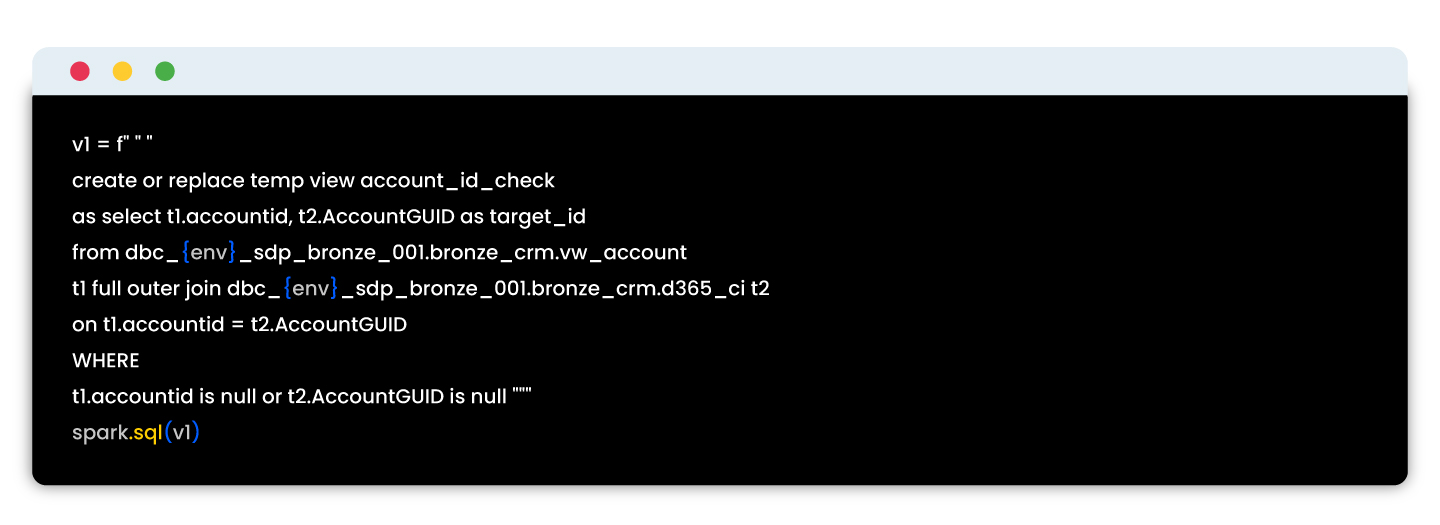
These automated tests reduced QA time, enabled early detection of errors, and ensured reliable validation across migration batches.

Unity Catalog: Governance in the data pipeline

Data governance was as important as data accuracy in this project. Using Databricks Unity Catalog, we centralized security, access, and lineage validation for all datasets.

As part of QA, we validated:

Governance Check QA Objective
Access Control Ensure only authorized users can view Personally Identifiable Information (PII).
Schema Locking Validate that schema versions remain consistent across deployments.
Audit Logging Confirm all data access events are recorded and retrievable.

Testing with Unity Catalog reinforced compliance while maintaining transparency across teams.

End-to-end QA workflow in the migration

Each tool contributed to the overall assurance model:

Step Tool Used QA Outcome
Test scenario creation Zephyr Scale + Jira Linked to user stories for visibility
Data validation Python automation Verified migration accuracy
Governance checks Unity Catalog Validated access control and data lineage
Reporting Zephyr dashboards Weekly QA progress reports


Workflow overview

Stage Process Primary Tool QA Outcome
1 Data migration from legacy CRM Migration scripts Source-to-target data movement
2 Data lake layering Databricks (Bronze → Silver → Gold) Data transformation and enrichment
3 Automated validation Python Record and schema verification
4 Governance enforcement Unity Catalog Role-based access, lineage, and audit logging
5 Test management Zephyr Scale Test execution tracking and reporting
6 Issue management Jira Ticketing, sign-off, and visibility

This structure built confidence through traceability and consistent automation cycles.

Key takeaways from the CRM to D365 transition
  • Treat CRM migration as a business transformation, not just data movement.
  • Use Zephyr Scale for transparent test tracking.
  • Automate frequent checks using Python to maintain speed and precision.
  • Leverage Unity Catalog for governance assurance and compliance.

Final thoughts

Migrating to Microsoft Dynamics 365 while building a modern data stack highlighted how deeply QA intersects with data engineering and governance.

By combining Zephyr Scale, Python automation, and Unity Catalog, we achieved a QA framework that was:

  • Structured for traceability,
  • Automated for efficiency, and
  • Governed for compliance.


This foundation now serves as a blueprint for future enterprise migrations, ensuring data trust from ingestion to insight.

How We Reduced DynamoDB Costs and Improved Latency Using ElastiCache in Our IoT Event Pipeline

Background Summary

For executives, architects, and healthcare leaders exploring AI-powered platforms, this article explains how Inferenz tackled real-time IoT event enrichment challenges using caching strategies. 

By optimizing AWS infrastructure with ElastiCache and Lambda-based microservices, we not only achieved a 70% latency improvement and 60% cost reduction but also built a scalable foundation for agentic AI solutions in business operations. The result: faster insights, lower costs, and an enterprise-ready model that can power predictive analytics and context-aware services.-

Overview

When working with real-time IoT data at scale, optimizing for performance, scalability, and cost-efficiency is mandatory. In this blog, we’ll walk through how our team tackled a performance bottleneck and rising AWS costs by introducing a caching layer within our event enrichment pipeline.

This change led to:

  • 70% latency improvement
  • 60% reduction in DynamoDB costs
  • Seamless scalability across millions of daily IoT events

Business impact for enterprises

  • Faster insights: Sub-second enrichment drives better clinical and operational decisions.
  • Lower TCO: Cutting database costs by 60% reduces IT spend and frees budgets for innovation.
  • Scalability with confidence: Handles millions of IoT events daily without trade-offs.

Future-ready foundation: Supports predictive analytics, patient engagement tools, and compliance reporting.

Scaling real-time metadata enrichment for IoT security events

In the world of commercial IoT security, raw data isn’t enough. We were tasked with building a scalable backend for a smart camera platform deployed across warehouses, offices, and retail stores environments that demand both high uptime and actionable insights. These cameras stream continuous event data in real-time motion detection, tampering alerts, and system diagnostics into a Kafka-based ingestion pipeline.

But each event, by default, carried only skeletal metadata: camera_id, timestamp, and org_id. This wasn’t sufficient for downstream systems like OpenSearch, where enriched data powers real-time alerts, SLA tracking, and search queries filtered by business context.

To make the data operationally valuable, we needed to enrich every incoming event with contextual metadata, such as:

  • Organization name
  • Site location
  • Timezone
  • Service tier / SLA
  • Alert routing preferences

This enrichment had to be low-latency, horizontally scalable, and fault-tolerant to handle thousands of concurrent event streams from geographically distributed locations. Building this layer was crucial not only for observability and alerting, but also for delivering SLA-driven, context-aware services to enterprise clients.

The challenge: redundant lookups, latency bottlenecks, and soaring costs

All organizational metadata such as location, SLA tier, and alert preferences was stored in Amazon DynamoDB. Our initial enrichment strategy involved embedding the lookup logic directly within Logstash, where each incoming event triggered a real-time DynamoDB query using the org_id.

While this approach worked well at low volumes, it quickly unraveled at scale. As the number of events surged across thousands of cameras, we ran into three critical issues:

  • Redundant reads: The same org_id appeared across thousands of events, yet we fetched the same metadata repeatedly, creating unnecessary load.
  • Latency overhead: Each enrichment added ~100–110ms due to network and database round-trips, becoming a bottleneck in our streaming pipeline.
  • Escalating costs: With read volumes spiking during traffic bursts, our DynamoDB costs began to grow rapidly threatening long-term sustainability.

This bottleneck made it clear: we needed a smarter, faster, and more cost-efficient way to enrich events without hammering the database.

Our event pipeline architecture

Layer Technology Purpose
Event Ingestion Apache Kafka Stream raw events from IoT cameras
Processing Logstash Event parsing and transformation
Enrichment Logic Ruby Plugin (Logstash) Embedded custom logic for enrichment
Org Metadata Store Amazon DynamoDB Source of truth for organization data
Caching Layer AWS ElastiCache for Redis Fast in-memory cache for org metadata
Search Index Amazon OpenSearch Service Stores enriched events for analytics

Our solution: using AWS ElastiCache for read-through caching

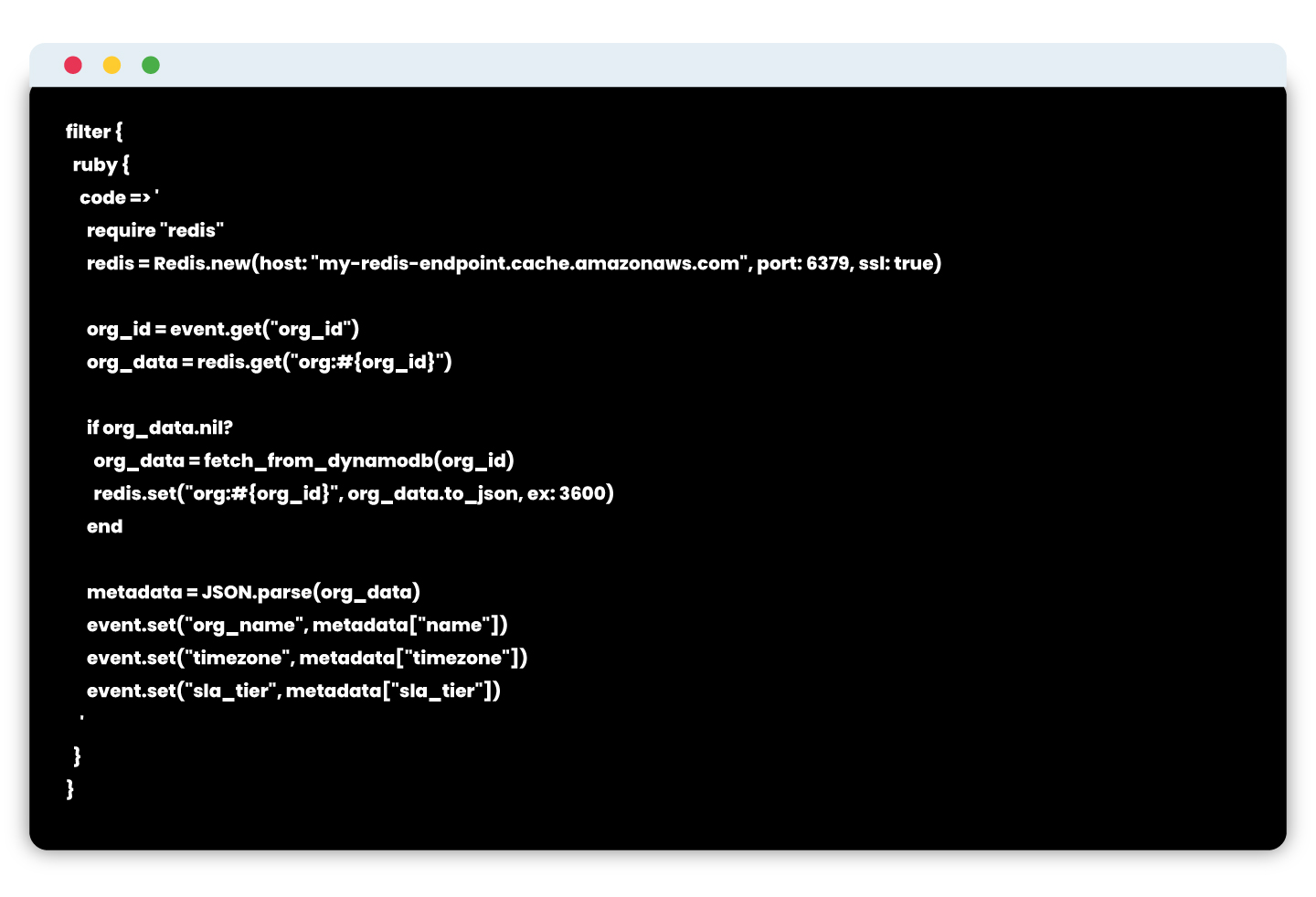
To reduce DynamoDB dependency, we implemented read-through caching using AWS ElastiCache for Redis. This managed Redis offering provided us with a high-performance, secure, and resilient cache layer.

New enrichment flow:

  1. Raw event is read by Logstash from Kafka
  2. Inside a custom Ruby filter:
    • Check ElastiCache for cached org metadata.
    • If cache hit → use cached data.
    • If cache miss → query DynamoDB, then write to ElastiCache with TTL.
  3. Enrich the event and push to OpenSearch.

Logstash snippet using ElastiCache

Note: ElastiCache is configured inside a private subnet with TLS enabled and IAM-restricted access.

Results: performance and cost improvements

After integrating ElastiCache into the enrichment layer, we saw immediate improvements in both speed and cost.

Metric Before (DynamoDB Only) After (ElastiCache + DynamoDB)
Avg. DynamoDB Reads/Minute ~100,000 ~20,000 (80% reduction)
Avg. Enrichment Latency ~110 ms ~15 ms
Cache Hit Ratio N/A ~93%
OpenSearch Indexing Lag ~5 seconds <1 second
Monthly DynamoDB Cost $$$ (~60% savings)


Enterprise-grade benefits of using ElastiCache

  • In-memory speed: Sub-millisecond access time
  • TTL-based invalidation: Ensures freshness without complexity
  • Secure access: Deployed inside VPC with TLS and IAM controls
  • High availability: Multi-AZ replication with automatic failover
  • Integrated monitoring: CloudWatch metrics and alarms for hit/miss, memory usage

Scaling smarter: enrichment as a stateless microservice

As our event volume and platform complexity grew, we realized our architecture needed to evolve. Embedding enrichment logic directly inside Logstash limited our ability to scale, debug, and extend functionality. The next logical step was to offload enrichment to a dedicated, stateless microservice, giving us clearer separation of concerns and unlocking platform-wide benefits.

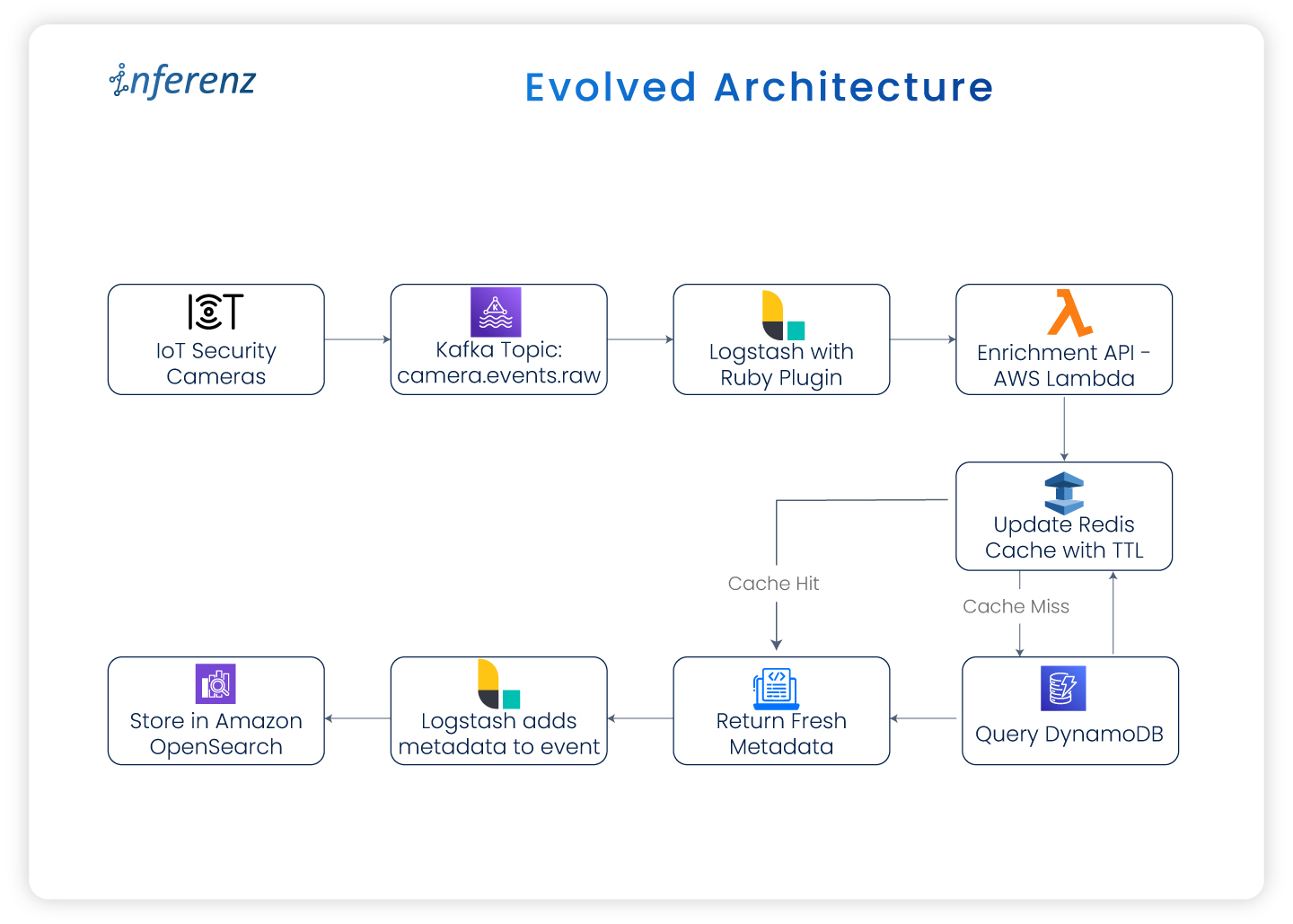
Evolved architecture:

Whether deployed as an AWS Lambda function or a containerized service, this microservice became the single source of truth for enriching events in real time.

Output flow description:

  • Cameras → Kafka
  • Kafka → Logstash
  • Logstash → AWS Lambda Enrichment
  • Lambda → Redis (ElastiCache)
    • If cache hit → Return metadata
    • If cache miss → Query DynamoDB → Update cache → Return metadata
  • Logstash → OpenSearch

Why it worked: key benefits

  • Decoupled logic:
    By removing enrichment from Logstash, we gained flexibility in testing, deploying, and scaling independently.
  • Version-controlled rules:
    Enrichment logic could now be maintained and versioned via Git making schema updates traceable and deployable through CI/CD.
  • Reusable across teams:
    The microservice exposed a central API that could be leveraged not just by Logstash, but also by alerting engines, APIs, and other consumers.
  • Improved observability:
    With AWS X-Ray, CloudWatch dashboards, and retry logic in place, we had deep visibility into cache hits, fallback rates, and enrichment latency.

Enterprise-grade security & monitoring

To ensure the new design was production-ready for enterprise environments, we baked in security and monitoring best practices:

  • TLS-in-transit enforced for all connections to ElastiCache and DynamoDB
  • IAM roles for fine-grained access control across Lambda, Logstash, and caches
  • CloudWatch metrics and alarms for Redis hit ratio, memory usage, and fallback load
  • X-Ray tracing enabled for full latency transparency across the enrichment path

This architecture proved to be robust, cost-effective, and scalable handling millions of events daily with low latency and high reliability.

From optimization to transformation

While caching solved immediate performance and cost challenges, its broader value lies in enabling enterprise-grade AI adoption. By combining IoT enrichment with caching, even healthcare organizations can unlock:

  • Predictive patient care (anticipating risks from real-time signals)
  • Automated compliance reporting for HIPAA and SLA adherence
  • Scalable patient-caregiver coordination through AI-driven scheduling and alerts

This architecture is a blueprint for how agentic AI can operate at scale in healthcare ecosystems.

Conclusion

Introducing caching into the enrichment pipeline delivered more than performance gains. By adopting AWS ElastiCache with a microservice-based model, the system now enriches millions of IoT events with sub-second speed while keeping costs under control. For enterprises, this architecture translates into faster insights for caregivers, stronger SLA compliance, and predictable operating costs.

The design also creates a future-ready foundation for agentic AI in enterprises. Enriched data can now flow directly into predictive analytics, business tools, and compliance systems. Instead of reacting late, organizations can respond to real-time signals with agility and confidence.

At Inferenz, we view caching as a strategic enabler for enterprise-grade AI. It allows security platforms to be faster, more resilient, and prepared for the next wave of intelligent automation.

Key takeaways

  • Cache repeated lookups like org metadata to reduce both latency and cloud database costs
  • Use ElastiCache as a production-grade, scalable caching layer
  • Decouple enrichment logic using microservices or Lambda for better maintainability and control
  • Monitor cache hit ratios and fallback patterns to tune performance in production

As your system grows, always ask: “Is this database call necessary?”
If the data is static or semi-static, caching might just be your smartest optimization.

FAQs

Q1. Why is caching so important in IoT event pipelines?
Caching eliminates repetitive database queries by storing frequently accessed metadata in memory. This ensures enriched event data is available instantly, improving response times for alerts, monitoring dashboards, and downstream analytics.

Q2. How does caching support advanced automation in IoT systems?
With metadata readily available in real time, IoT platforms can automate responses such as triggering alerts, updating monitoring tools, or routing events to the right teams without delays caused by database lookups.

Q3. What measurable results did this approach deliver?
Latency improved by 70%, database read costs dropped by 60%, and the pipeline scaled efficiently to millions of daily events. These gains lowered infrastructure spend while delivering faster, more reliable event processing.

Q4. How does the microservice model add value beyond speed?
Moving enrichment logic into a stateless microservice allowed independent scaling, version control, and CI/CD deployments. It also made enrichment logic reusable across other services like alerting engines, APIs, and analytics platforms.

Q5. How is data accuracy and security maintained in this setup?
TTL policies refresh cached metadata regularly, keeping event enrichment accurate. All services run inside a private VPC with TLS encryption, IAM-based access controls, and CloudWatch monitoring for cache performance and reliability.

Q6. Can this architecture support predictive analytics in other industries?
Yes. Once enrichment happens in real time, predictive models can be applied across industries—whether analyzing security camera feeds, monitoring industrial sensors, or tracking retail operations—to anticipate issues and optimize responses.

Data Observability in Snowflake: A Hands-On Technical Guide

Background summary

In the US data landscape, ensuring accurate, timely, and trustworthy analytics depends on robust data observability. Snowflake offers an all-in-one platform that simplifies monitoring data pipelines and quality without needing external systems. 

This guide walks US data engineers through practical observability patterns in Snowflake: from freshness checks and schema change alerts to advanced AI-powered validations with Snowflake Cortex. Build confidence in your data delivery and accelerate decision-making with native Snowflake tools.-

Introduction to data observability

Data observability is the proactive practice of continuously monitoring the health, quality, and reliability of your data pipelines and systems without manual checks. For US-based data teams, this means answering critical operational questions like:

  • Is the daily data load complete and on time?
  • Are schema changes breaking pipeline logic?
  • Are key metrics stable or exhibiting unusual drift?
  • Are these pipeline resources being queried as expected?

Replacing outdated scripts with automated, real-time observability reduces risk and speeds issue resolution.

Why Snowflake is the ideal platform for data observability in the US?

Snowflake’s unified architecture brings data storage, processing, metadata, and compute resources into one scalable cloud platform, especially beneficial for US enterprises with complex compliance and scalability requirements. Key advantages include:

  • Direct access to system metadata and query history for real-time insights.
  • Built-in Snowflake Tasks for scheduling observability queries without external jobs.
  • Snowpark support to embed Python logic for custom anomaly detection and validation.
  • Snowflake Cortex, a game-changing AI observability tool with native Large Language Model (LLM) integration for intelligent data evaluation and alerting.
  • Seamless integration with popular US monitoring and communication tools such as Slack, PagerDuty, and Grafana.

These features empower US data engineers to build scalable observability frameworks fully on Snowflake.

Core observability patterns to implement in Snowflake

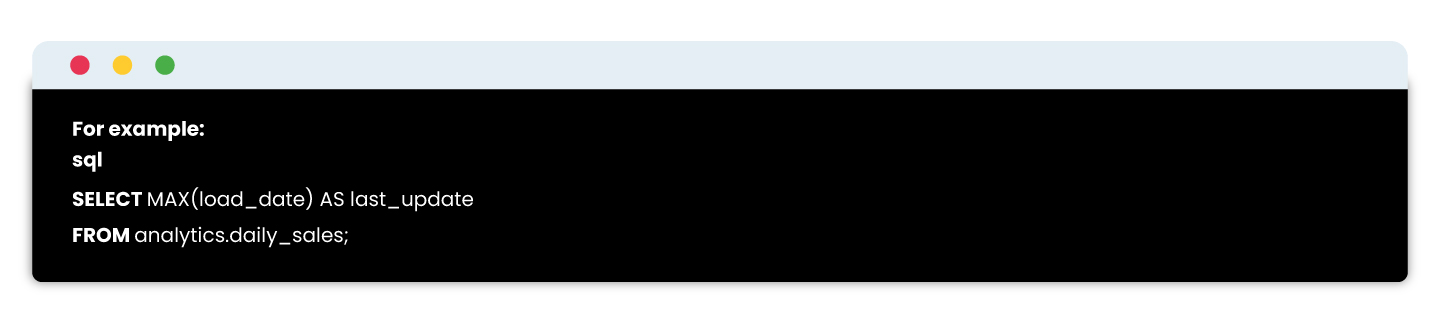
1. Data freshness monitoring

Verify that your critical tables update as expected daily with timestamp comparisons.
By scheduling this as a Snowflake Task and logging results, you catch delays early and comply with SLAs vital for US business responsiveness.

2. Trend monitoring with row counts

Sudden spikes or drops in row counts can signal data quality issues. Collect daily counts and compare to a rolling 7-day average. Use Snowflake Time Travel to audit past states without complex bookkeeping.

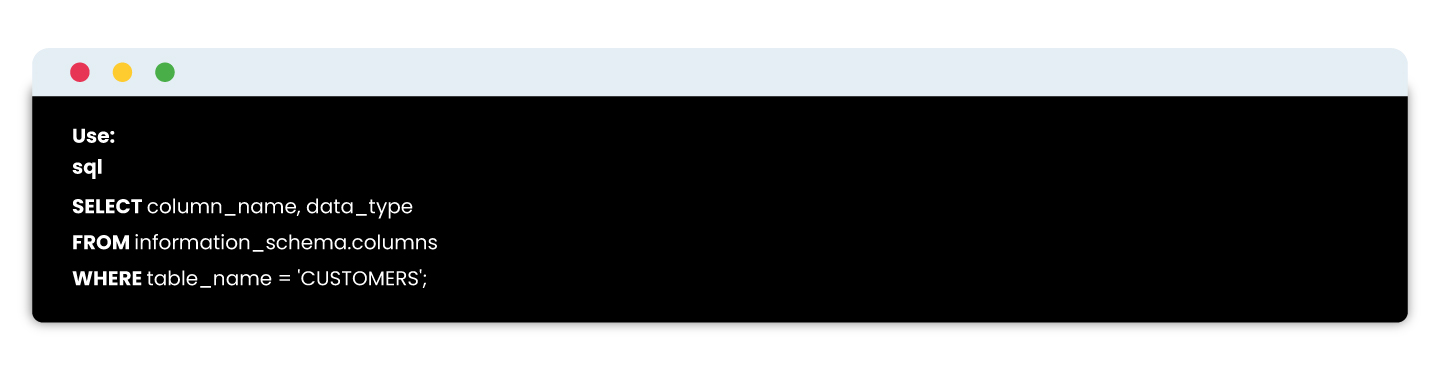
3. Schema change detection

Changes in table schemas can break consuming applications.
Snapshotted regularly, this helps detect unauthorized or accidental alterations.

4. Value and distribution anomalies via Snowpark

Leverage Python within Snowpark to check data distributions and business logic rules, such as:

  • Null value rate spikes
  • Unexpected new categorical values
  • Numeric outliers beyond thresholds

For US compliance or finance sectors, these anomaly detections support regulation-ready controls.

5. Advanced AI checks with Snowflake Cortex

Snowflake Cortex enables embedding LLMs directly in SQL to evaluate complex data conditions naturally and intelligently. 

This eliminates complex manual rules while providing human-like explanations for data integrity, rising in demand across US enterprises with AI-driven reporting .


How it works?

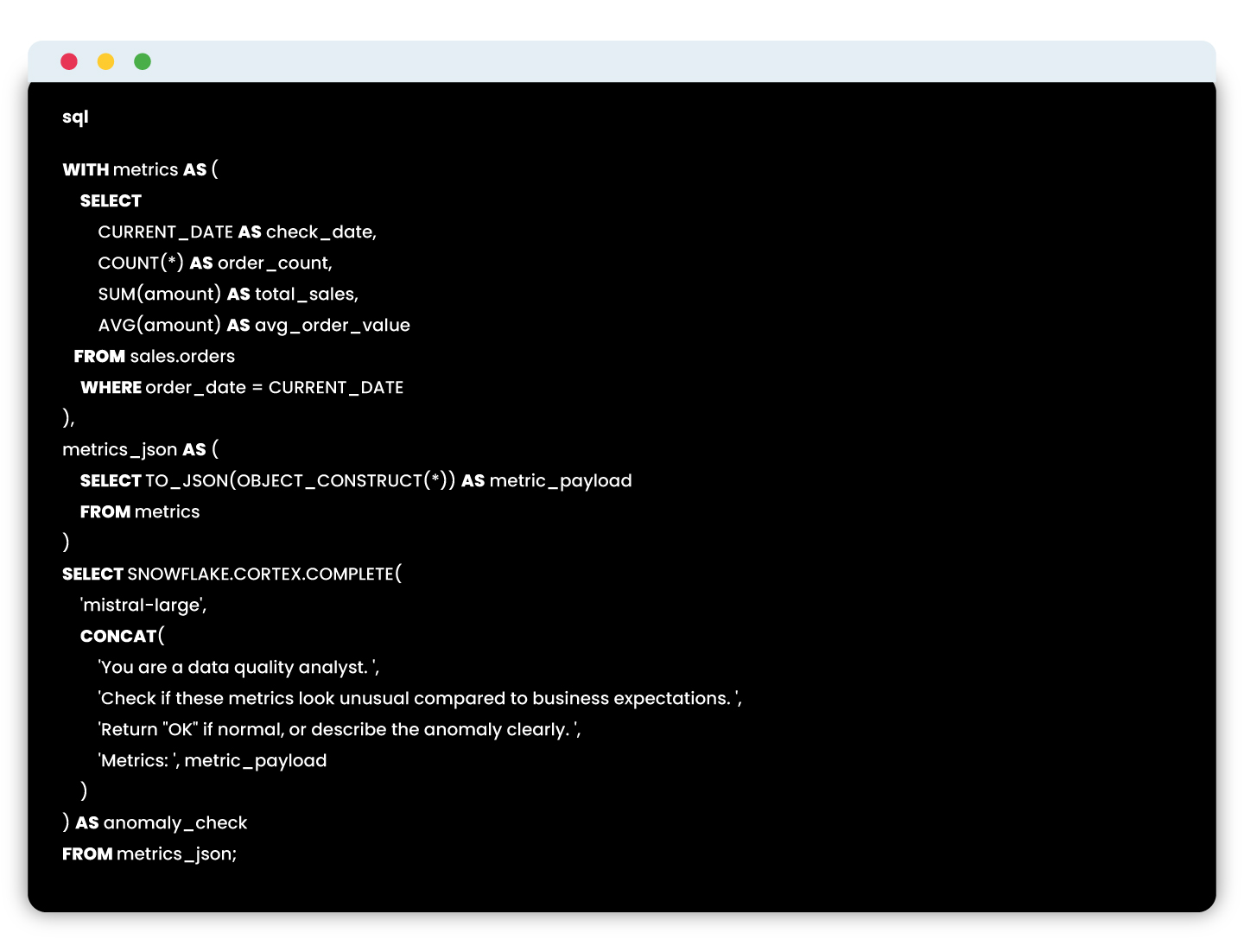
The basic idea is to leverage LLMs to evaluate data the way a human might—based on instructions, patterns, and past context. Here’s a deeper look at how this works in practice:

  1. Capture metric snapshots
    You gather the current and previous snapshots of key metrics (e.g., client_count, revenue, order_volume) into a structured format. These could come from daily runs, pipeline outputs, or audit tables.
  2. Convert to JSON format
    These metric snapshots are serialized into JSON format—Snowflake makes this easy using built-in functions like TO_JSON() or OBJECT_CONSTRUCT().
  3. Craft a prompt with business logic
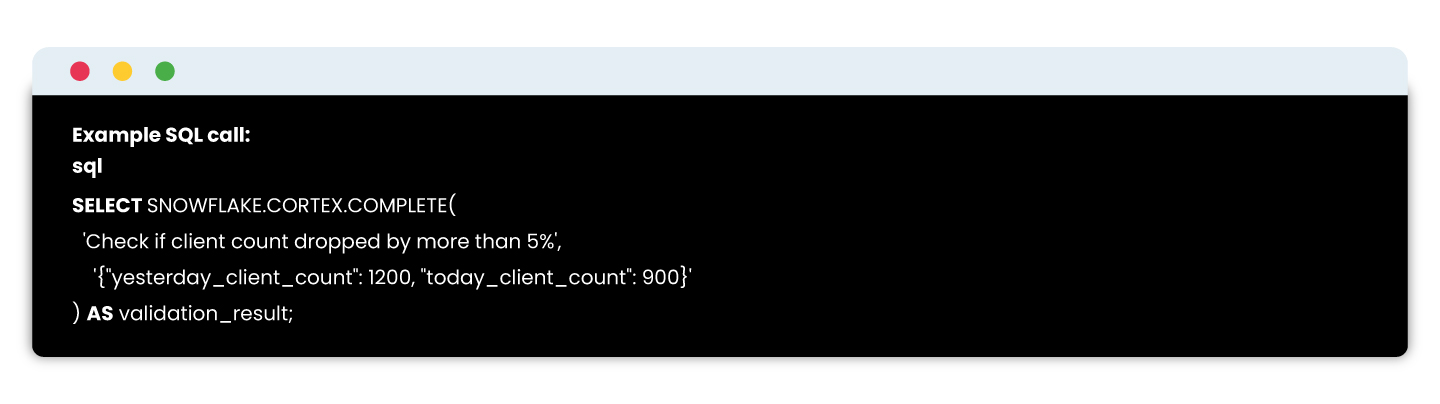
    You design a prompt that defines the logic you’d normally write in Python or SQL. For example:

  4. Invoke the LLM using SQL
    With Cortex, you can call the LLM right inside your SQL using a statement like:\

  5. Interpret the output
    The response is a natural language or simple string output (e.g., ‘Failed’, ‘Passed’, or a full explanation), which can then be logged, flagged, or displayed in a dashboard.

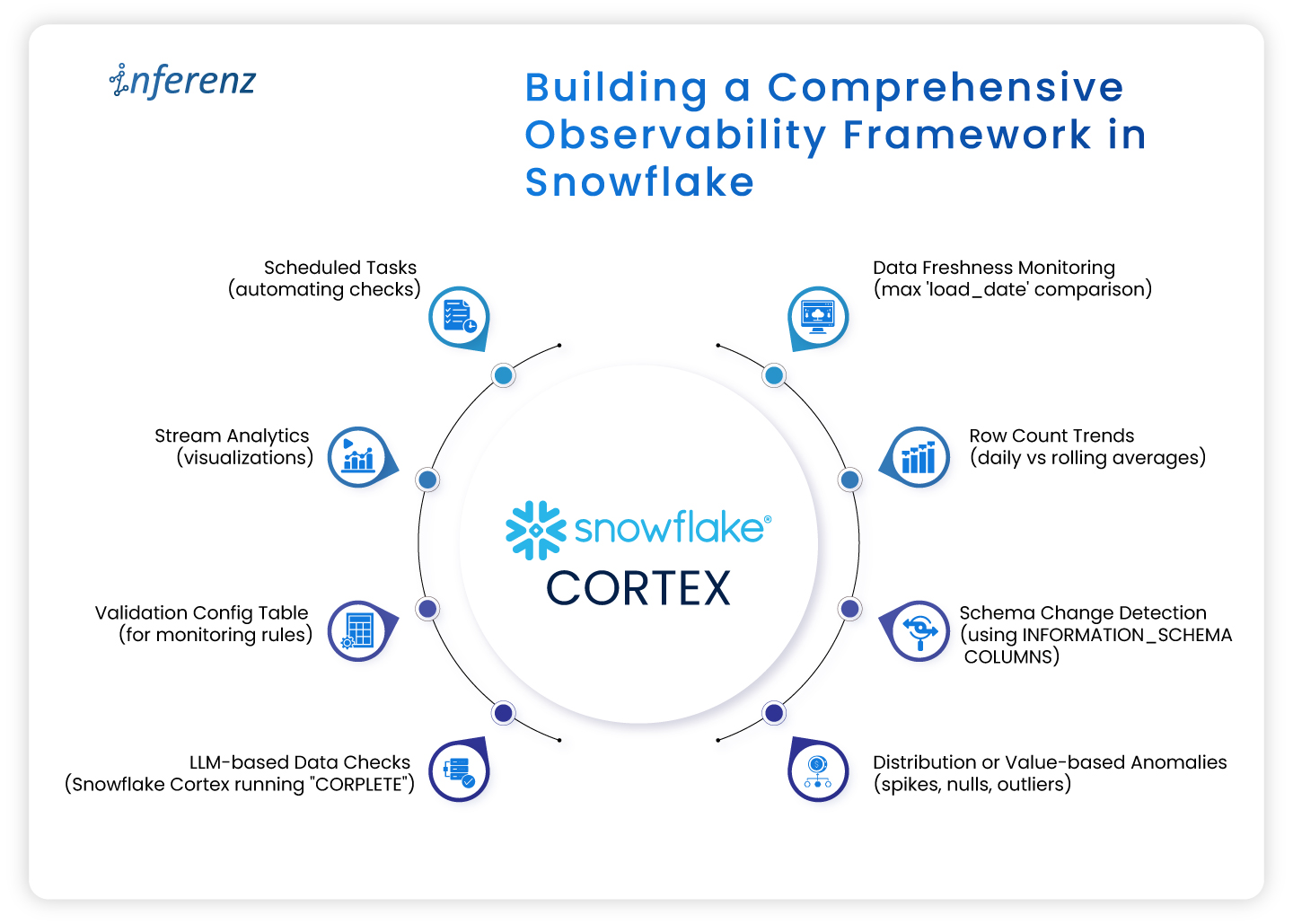
Building a comprehensive observability framework in Snowflake

A robust framework typically includes:

  • Config tables defining what to monitor and rules to trigger alerts.
  • Scheduled SNOWFLAKE Tasks to execute data quality checks and log metrics.
  • Centralized metrics repository tracking historical results.
  • Alert notifications routed to US-favored channels (Slack, email, webhook).
  • Dashboards (via Snowsight, Snowpark-based apps, Grafana integrations) visualizing trends and failures in real-time.

Snowflake’s 2025 innovations such as Snowflake Trail and AI Observability increase visibility into pipelines, enhancing time-to-detect and time-to-resolve issues for US data teams.

Conclusion

Data observability is crucial for US data engineering teams aiming for trustworthy analytics and regulatory compliance. Snowflake provides an unparalleled integrated platform that brings together data, metadata, compute, and AI capabilities to monitor, detect, and resolve data quality issues seamlessly. By implementing the observability strategies outlined here, including Snowflake Tasks, Snowpark, and Cortex, data teams can reduce manual overhead, accelerate root-cause analysis, and ensure data confidence. Snowflake’s continuous innovation in observability cements its position as the go-to cloud data platform for US enterprises seeking operational excellence and trust in their data pipelines.


Frequently asked questions (FAQs)

Q1: What is data observability in Snowflake?
Data observability in Snowflake means continuously monitoring and analyzing your data pipelines and tables using built-in features like Tasks, system metadata, and Snowpark to ensure data freshness, schema stability, and data quality without manual checks.

Q2: How can I schedule data quality checks in Snowflake?
Using Snowflake Tasks, you can schedule SQL queries or Snowpark procedures to run data validations periodically and log results for monitoring trends and alerting.

Q3: What role does AI play in Snowflake observability?
Snowflake Cortex integrates Large Language Models (LLMs) natively within Snowflake SQL, enabling adaptive, intelligent assessments of data health that simplify complex rule writing and improve anomaly detection accuracy as part of data and AI strategy.

Q4: Can Snowflake observability tools help with compliance?
Yes, by automatically tracking data quality metrics, schema changes, and anomalies with audit trails, Snowflake observability supports regulatory requirements for data accuracy and traceability, critical for US healthcare, finance, and retail sectors.

Q5: What third-party integrations work with Snowflake observability?
Snowflake’s observability telemetry and event tables support OpenTelemetry, allowing integration with US-favored monitoring tools like Grafana, PagerDuty, Slack, and Datadog for alerts and visualizations.