




Maximizing Speed, Revenue & Insights with the Right Data Warehouse Design 

Summary

Data warehouse design decides how fast your teams get answers, how much they trust the numbers, and how easily you can scale analytics and AI. This guide breaks down architecture approaches, schema options, and implementation patterns, with clear “use when” guidance for each. 

Introduction: Understanding Data Warehouse Designs 

In today’s data-driven world, organizations rely on data warehouses to consolidate, organize, and analyze massive volumes of information. But building a data warehouse is not just about storing data – it’s about designing it in a way that maximizes speed, accuracy, and business value

data warehouse design determines how data is structured, stored, and accessed. It affects everything from query performance to reporting accuracymachine learning capabilities, and regulatory compliance.  

Choosing the right design is crucial because a poorly designed warehouse can slow analytics, increase costs, and lead to incorrect business decisions. 

Why Data Warehouse Design Matters 

  • Performance: Ensures queries run quickly, enabling real-time dashboards and faster decision-making. 
  • Scalability: Supports data growth without costly re-engineering. 
  • Data Quality & Governance: Reduces redundancy, ensures consistency, and provides audit traceability. 
  • Business Alignment: Reflects how the business measures success, making analytics intuitive for end-users. 

The following designs apply to organizations that provide data in batches. Details on warehouse design for organizations that provide real-time data, will be covered separately. 

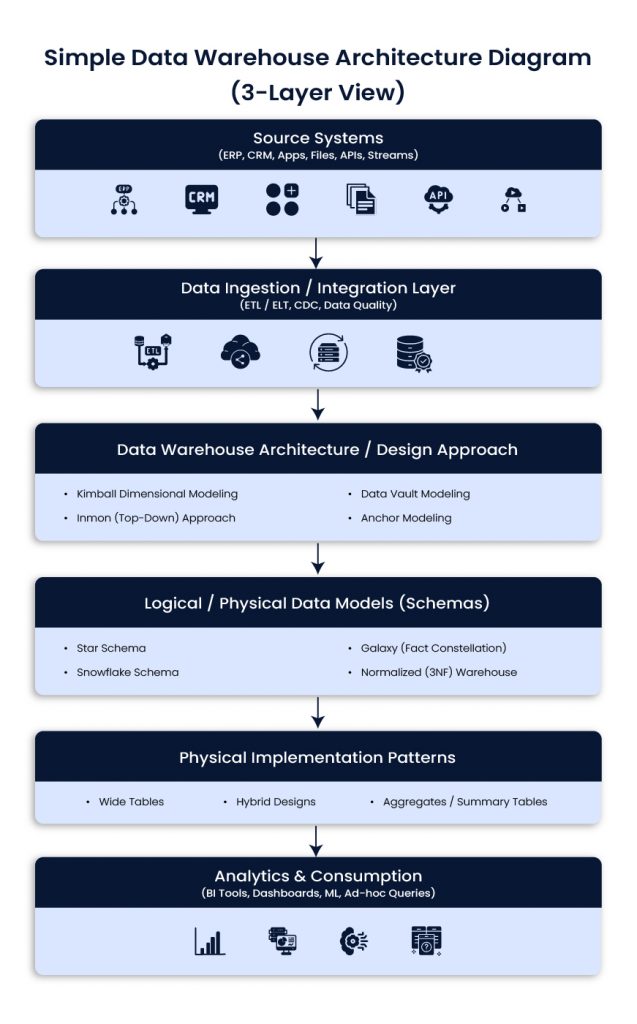
Simple Data Warehouse Architecture Diagram (3-Layer View) 

Simple Data Warehouse Architecture Diagram (3-Layer View)

Source systems 
ERP, CRM, product apps, files, APIs, event streams 

Ingestion and integration 
ETL or ELT, CDC, data quality checks, standardization 

Warehouse and modeling layers 
Architecture approach (Kimball, Inmon, Data Vault, Anchor) 
Schema design (star, snowflake, galaxy, 3NF) 
Implementation patterns (wide tables, aggregates, hybrid) 

Consumption 
BI tools, dashboards, ad-hoc queries, ML workflows

An Architecture and Modeling Review Awaits You

Data Warehouse Architecture / Design Approaches 

Data warehouse architecture defines the overall strategy and methodology for building a data warehouse, guiding how data is collected, integrated, stored, and accessed for analysis. Unlike individual schema designs that focus on table structures, these approaches provide a high-level blueprint for enterprise data management and analytics. 

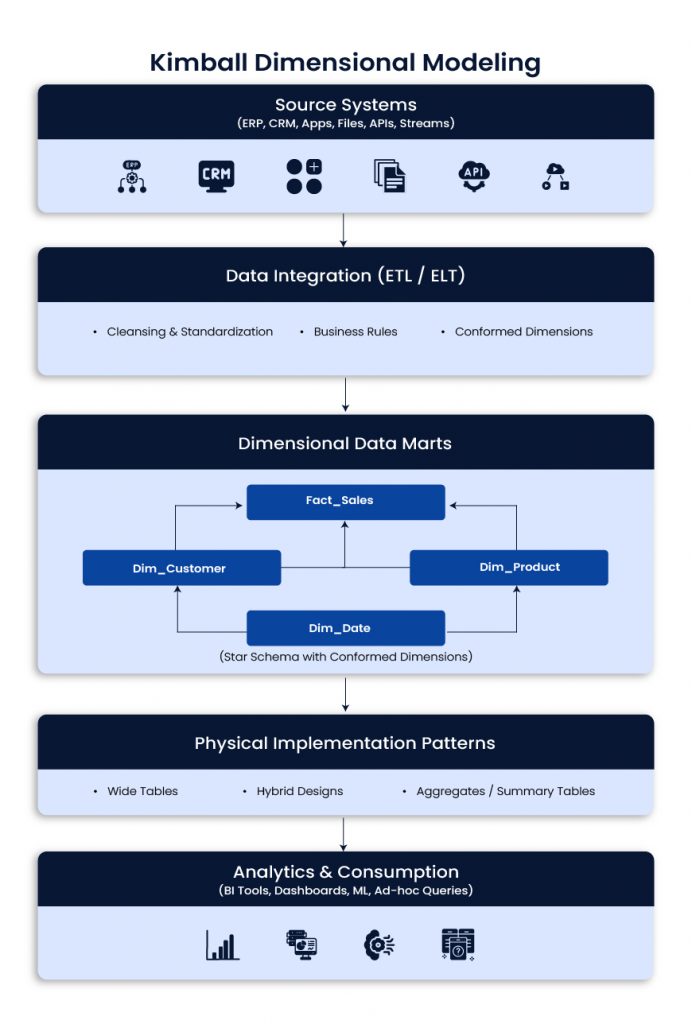
Kimball Dimensional Modeling 

Kimball focuses on building dimensional models around business processes, often as data marts that roll up into a broader analytical layer. It is popular because it is easy to understand and fast for BI. 

Kimball Dimensional Modeling

Use when 

  • Business users need intuitive reporting quickly 
  • Requirements are stable and well understood 
  • You want incremental delivery with visible wins 

Best fit 

  • BI dashboards, finance and revenue reporting, sales and marketing analytics 

Typical impact 

  • Faster time to value, strong user adoption, simpler reporting model 

Example scenario 
Marketing needs campaign performance dashboards quickly. Kimball supports focused data marts, conformed dimensions, and fast reporting delivery. 

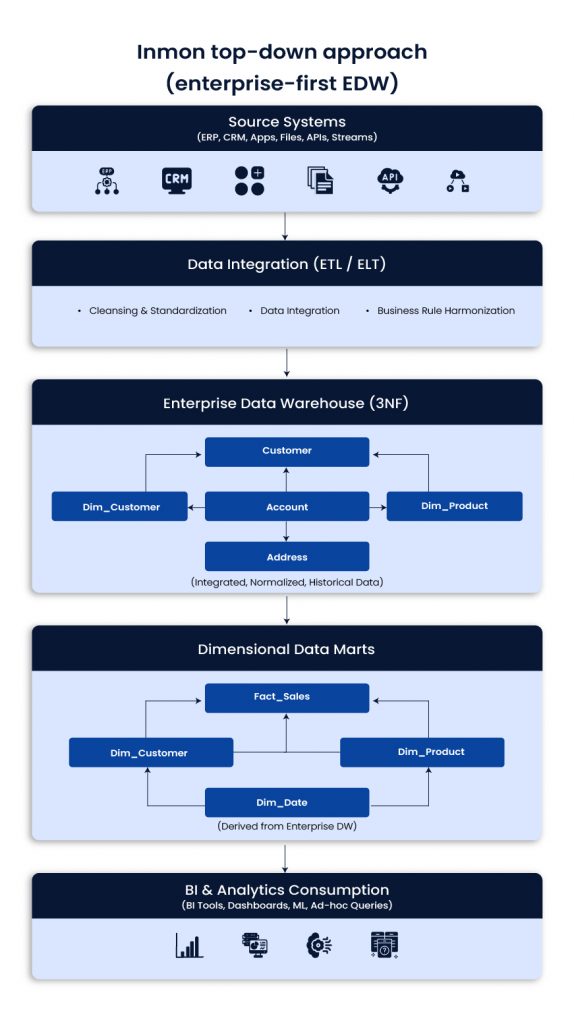
Inmon top-down approach (enterprise-first EDW) 

Inmon starts with a centralized enterprise data warehouse, usually in normalized 3NF structures. Data marts are derived later for performance and ease of reporting. It takes longer to build but supports consistent enterprise definitions. 

Inmon top-down approach (enterprise-first EDW)

Use when 

  • A single version of truth is required across functions and regions 
  • Governance and standardization are priorities 
  • Integration across many systems is complex 

Best fit 

  • Large enterprises with strict KPI consistency and governance needs 

Typical impact 

  • Higher trust in metrics, stronger control, better enterprise alignment 

Example scenario 
A global company needs standardized KPIs across regions. Inmon supports centralized definitions and reduces conflicting reports. 

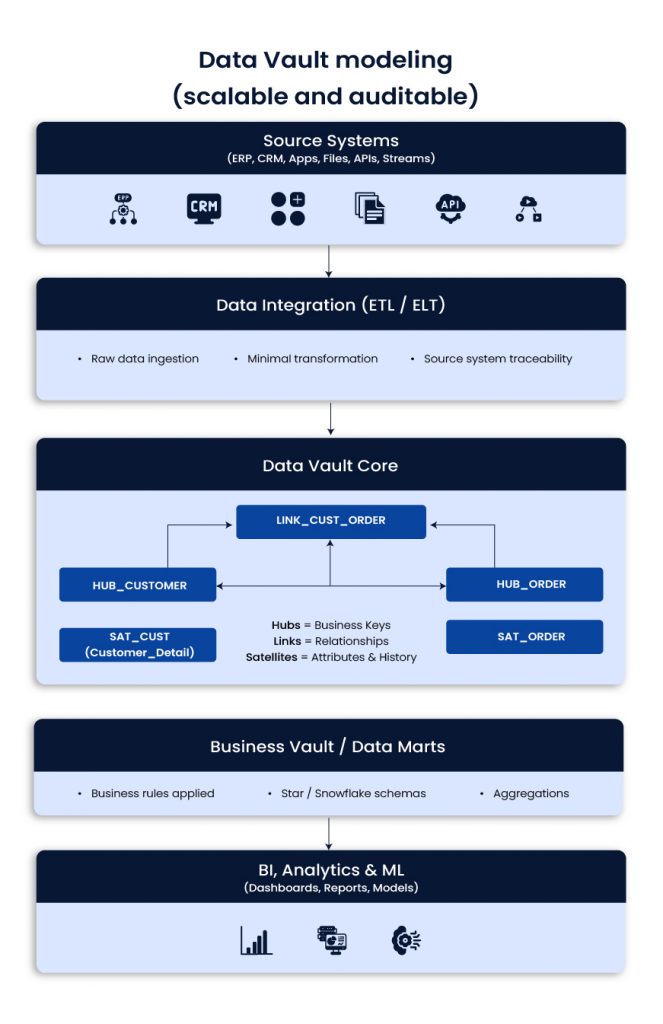
Data Vault modeling (scalable and auditable) 

Data Vault organizes data into Hubs (business keys), Links (relationships), and Satellites (descriptive history). It separates raw ingestion from business logic, which helps with change, traceability, and long-term integration. 

Data Vault modeling (scalable and auditable)

Use when 

  • Source systems change often 
  • Historical tracking and auditability matter 
  • You expect new domains and sources over time 

Best fit 

  • Telecom, finance, insurance, regulated industries, complex enterprise integration 

Typical impact 

  • Faster onboarding of sources, fewer breakages from schema drift, stronger lineage 

Example scenario 
A telecom adds new products and pricing models often. Data Vault reduces the blast radius of change and keeps history intact. 

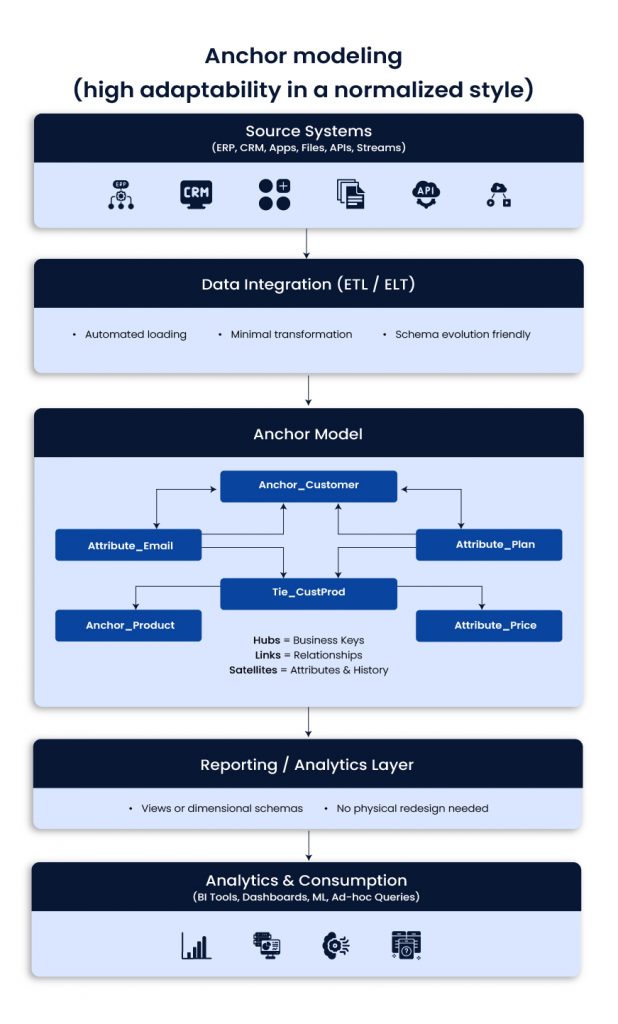
Anchor modeling (high adaptability in a normalized style) 

Anchor modeling uses Anchors (core entities), Attributes, and Ties (relationships). It is designed for frequent change. You can add new attributes without redesigning large parts of the model. 

Anchor modeling (high adaptability in a normalized style)

Use when 

  • Business attributes and rules change frequently 
  • You need flexibility without major table redesign 
  • You want a long-lived model that evolves with the business 

Best fit 

  • Fast-changing SaaS environments and evolving product analytics needs 

Typical impact 

  • Less rework, easier schema evolution, better maintainability 

Example scenario 
A SaaS business keeps adding customer attributes. Anchor modeling supports this without downtime-heavy redesigns. 

Clear Layers to Prevent Workloads from Breaking Each Other

Schema designs: logical and physical models 

Schemas define how tables are structured. They affect join patterns, usability, and performance. 

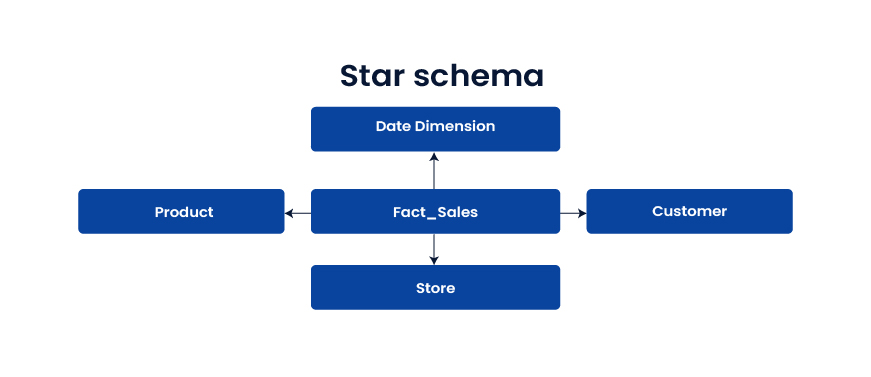
Star schema 

The star schema is a central fact table that connects to denormalized dimensions. It is widely used because it is fast and easy to query. 

Star schema

Use when 

  • You want fast BI and simple reporting 
  • Many users run ad-hoc analysis 
  • Business teams need clear dimensions and metrics 

Best fit 

Dashboards, KPI reporting, analytics that depend on speed 

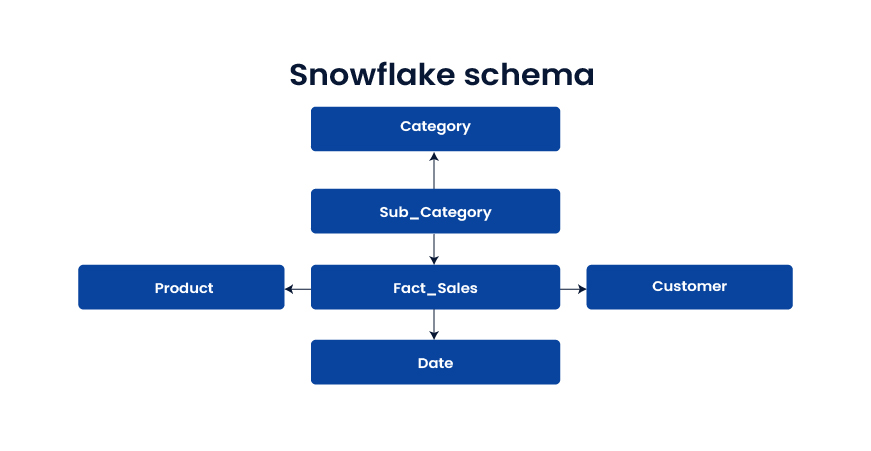
Snowflake schema 

Dimensions are normalized into sub-tables, often to manage hierarchies and reduce redundancy. It can save storage but adds joins. 

Snowflake schema

Use when 

  • Dimension hierarchies are complex 
  • Storage efficiency matters 
  • Slightly slower queries are acceptable 

Best fit 

Large product catalogs, structured hierarchies, domains with frequent hierarchy updates 

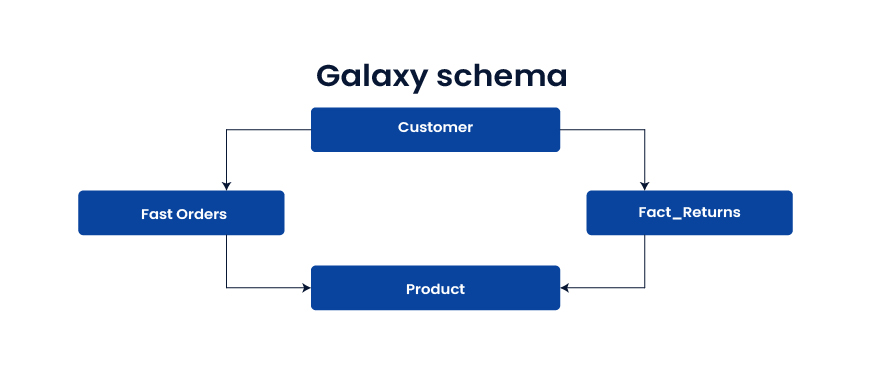
Galaxy schema (fact constellation) 

Multiple fact tables share dimension tables. It supports cross-process analytics across domains like orders, shipments, returns, and inventory. 

Galaxy schema (fact constellation)

Use when 

  • You need analysis across multiple business processes 
  • Shared dimensions create enterprise views of the customer or product 

Best fit 

E-commerce, supply chain, end-to-end customer journey analytics 

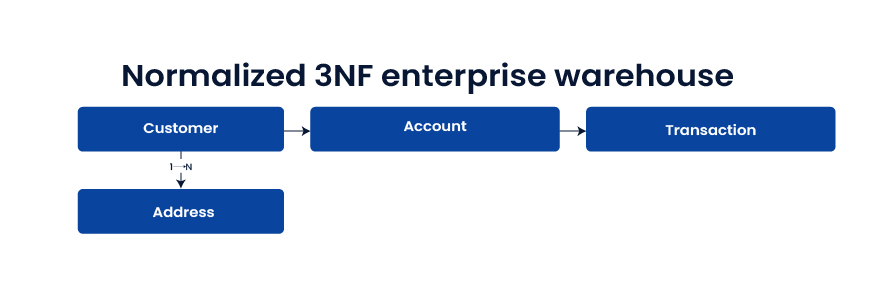
Normalized 3NF enterprise warehouse 

Highly normalized tables reduce redundancy and enforce integrity. It is strong for integration and governance, but reporting queries can be slower without downstream marts. 

Normalized 3NF enterprise warehouse 

Use when 

  • The warehouse is a system of record 
  • Audit and regulatory demands are high 
  • Integration consistency matters more than reporting speed 

Best fit 

Enterprise integration layer, regulated domains, “one source of truth” requirements 

Physical implementation patterns 

These patterns influence performance and cost once architecture and schemas are chosen. 

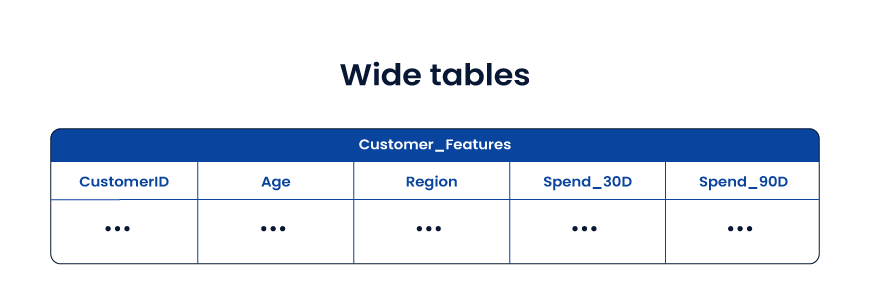
Wide tables 

Wide tables store facts and useful attributes together in a denormalized structure. They reduce joins and speed up analytics and ML feature use.

Wide tables 

Use when 

  • ML feature pipelines suffer from join complexity 
  • Query speed is more important than storage 
  • Data models are stable enough for denormalization 

Best fit 

  • AI feature stores, customer 360 analytics, experimentation analytics 

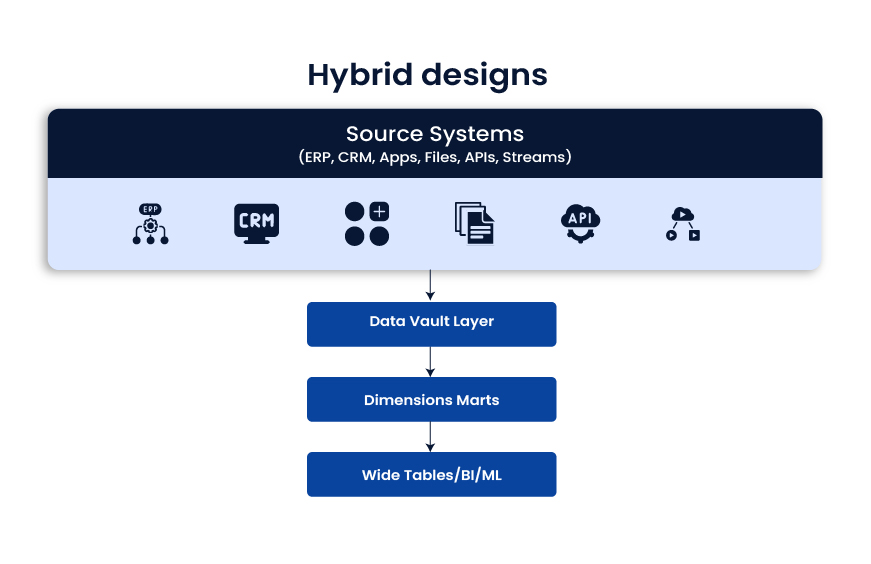
Hybrid designs 

Hybrid designs mix approaches and optimize each layer for its job. A common pattern is: raw integration layer (often Data Vault), then dimensional marts for BI, then wide tables for ML and performance-heavy use cases. 

Hybrid designs

Use when 

  • You support BI, advanced analytics, and ML together 
  • Workloads differ by team and tool 
  • You want both governance and speed 

Best fit 

  • Modern enterprise data platforms where one model cannot satisfy every use case 

Practical selection guide 

  • Fast reporting and quick wins: Kimball + star schema 
  • Enterprise consistency and governance: Inmon or 3NF EDW feeding marts 
  • Frequent source change and deep audit needs: Data Vault 
  • Rapidly evolving attributes and long-term flexibility: Anchor modeling 
  • Cross-domain process analytics: Galaxy schema 
  • Performance-heavy analytics and ML features: Wide tables 
  • Mixed workloads across BI and AI: Hybrid layered approach 

Conclusion 

The best data warehouse design is the one that fits your business reality, not the one that looks best on a whiteboard. Every architecture choice shapes what happens downstream: dashboard speed, reporting trust, integration effort, governance strength, and how ready your teams are for advanced analytics and AI. 

For most U.S. enterprises, the smartest path is to separate concerns. Use a strong data warehouse architecture for integration and traceability, choose the right data warehouse schema design for reporting, and apply performance patterns like wide table design only where they make sense. In many environments, that naturally leads to a hybrid data warehouse architecture, where Data Vault modeling supports scalable ingestion, Kimball dimensional modeling powers BI adoption, and curated layers enable ML without breaking reporting. 

Whether you choose the Inmon approach, a pure dimensional strategy, or a layered model, the goal stays the same: reduce friction between data teams and decision-makers. When the design is right, analytics becomes faster, costs become predictable, and the warehouse becomes a stable foundation for growth, modernization, and AI-driven outcomes. 

Frequently Asked Questions  

  1. How do I know if our data warehouse design is the reason dashboards are slow 

If users complain about long load times, frequent timeouts, or “works for one report but not another,” design is a common root cause. Look for heavy join chains, inconsistent grains in fact tables, and unclear dimensional modeling. 

  1. What’s the best data warehouse design for AI and machine learning in production? 

Most teams succeed with a layered approach: governed integration, curated marts for metrics, and feature-friendly wide tables for training and inference. This structure keeps business reporting stable while supporting fast model iteration. 

  1. Should we standardize on one modeling approach across the enterprise? 

A single approach sounds tidy, but it often causes trade-offs. BI, operational reporting, and ML have different needs. Many CTOs choose a hybrid design so each layer stays fit for purpose without constant compromise. 

  1. Kimball vs Inmon: which one fits a modern cloud data platform? 

Kimball is often faster to deliver for analytics teams and business stakeholders. Inmon supports a centralized EDW with strong standardization. In cloud environments, many enterprises combine them, with enterprise integration feeding dimensional marts. 

  1. What changes usually reduce cost without breaking performance? 

The biggest wins often come from fixing data duplication, standardizing metric definitions, reducing unnecessary transforms, and tuning partitioning and clustering. You also get savings by separating workloads so BI queries do not compete with batch jobs or ML pipelines. 

FinOps in Real-World Practice: Transforming Cloud Spend into Strategic Value

Summary

As cloud adoption grows in fintech, cloud cost management becomes harder because usage and pricing shift every hour. FinOps helps teams link spend to real outcomes like cost per transaction, fraud checks, and feature delivery. Learn how fintech teams apply FinOps in daily operations, using tagging, visibility, forecasting, and automation to turn cloud spend into strategic value.-Cloud spend to strategic value with FinOps

Introduction

Cloud makes fintech faster. Teams can ship features quickly, scale during peak transaction windows, and run analytics without buying hardware. 

The catch is simple: consumption pricing turns every new workload into a variable cost line. And in fintech, workloads spike for reasons that feel “business as usual” such as payout cycles, fraud bursts, seasonal lending, or a partner API change.

FinOps exists to keep that variability from becoming chaos. The FinOps Foundation defines FinOps as an operational framework and cultural practice that maximizes business value from cloud and technology through timely, data-driven decisions and shared financial accountability across engineering, finance, and business teams. 

This guide shows what FinOps looks like when you apply it day to day in fintech environments, where speed, governance, and predictability matter at the same time.

Why fintech teams feel cloud cost pressure sooner

Fintech cloud usage tends to concentrate in a few expensive areas:

  • Always-on customer experiences: low-latency apps, APIs, identity, and observability.
  • Risk and fraud analytics: streaming, feature stores, model training, and bursty compute.
  • Data platforms: warehouses and lakehouses that grow quietly with retention, audit, and regulatory needs.
  • Security controls: logging, monitoring, scanning, and encryption overhead that is necessary, but rarely “free.”

And cloud spend keeps climbing across industries. Gartner forecasts public cloud end-user spending at $723.4B in 2025

So, the question for fintech leaders is rarely “should we spend less?” It’s “how do we spend with intent, and prove it with numbers?”

That’s where FinOps becomes a business discipline, not a billing exercise.

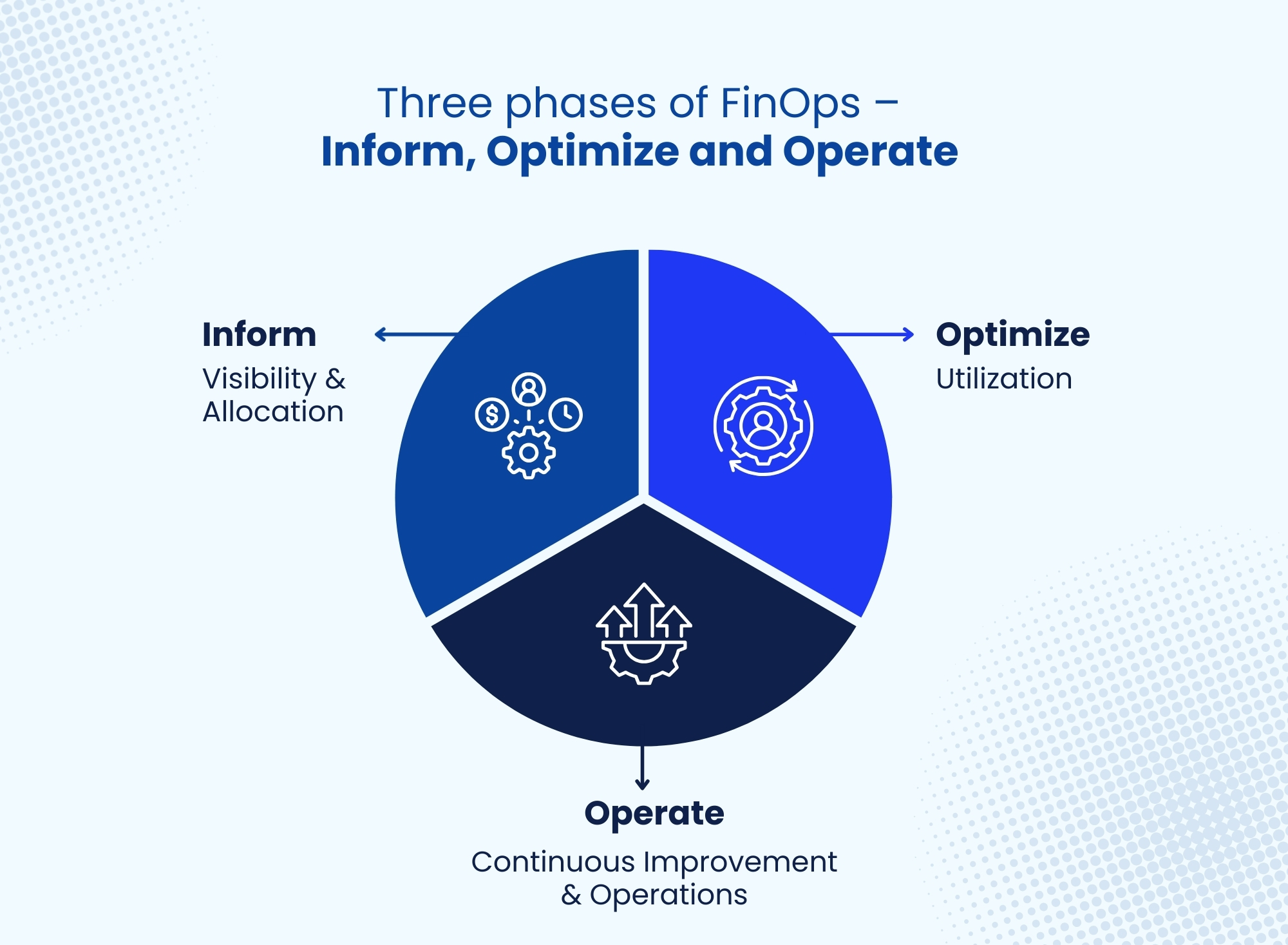
Three phases of FinOps

FinOps in daily operations: the practices that change outcomes

1) Unify teams around shared financial accountability

FinOps works when engineering and finance stop treating cloud cost as someone else’s job. The practical shift looks like this:

  • Finance gets clear ownership views: by product, environment, and business line.
  • Engineering gets fast feedback loops: cost impact is visible before and after a release.
  • Product and leadership get unit economics: cost per transaction, cost per active customer, cost per underwriting decision, cost per fraud check.

Example
Before launching a new real-time payments feature, the platform team reviews expected throughput, storage growth, and observability overhead with finance. They agree on a target unit cost (say, cost per 1,000 transactions) and track it weekly. If unit cost rises, teams investigate whether it came from higher log volume, unbounded retries, or an over-sized compute tier.

What Inferenz typically adds here is the operating model: who owns which cost domains, what gets reviewed weekly versus monthly, and how teams turn cost data into decisions without slowing delivery.

2) Make cost visibility usable with tagging, allocation, and clean data

Visibility is more than a dashboard. It’s consistent, trusted allocation that supports action.

For fintech teams, a tagging and allocation baseline usually includes:

  • Product / business line
  • Environment (prod, staging, dev)
  • Cost center
  • Workload type (API, batch, streaming, ML training, BI)
  • Data classification (helps align cost with governance and audit needs)

Tools such as AWS Cost Explorer and Azure Cost Management help, but they depend on clean tagging and consistent account structure.

Quick win that matters:
Create a “no tag, no launch” gate for production infrastructure as a guardrail that prevents unknown spend from becoming permanent.

Data quality and governance blog

3) Shift from month-end surprises to real-time decisions

FinOps teams operate on short cycles because cloud changes daily. When cost signals arrive a month later, the money is already gone.

In real practice, fintech teams do things like:

  • Auto-shutdown non-critical environments after hours
  • Rightsize compute based on actual utilization
  • Use commitment planning (Savings Plans, Reserved Instances) where usage is steady
  • Move storage to lower-cost tiers with policy-based lifecycle rules

FinOps Foundation guidance frames this as a loop across visibility, optimization, and operations. 

Example
A fraud model retrains nightly. The pipeline grew over time and now runs on larger nodes than needed. FinOps flags the change in cost per training run, the data team confirms stable runtime targets, and the platform team applies right-sizing and schedule controls. The end result is predictable spend without weakening detection.

4) Treat forecasting like a product KPI, not a finance exercise

Forecasting is where fintech teams often struggle because demand is real-time and spiky. Still, you can forecast well if you forecast the right thing.

Instead of asking, “What will AWS bill be next month?”, focus on:

  • forecasted unit volumes (transactions, API calls, onboarding checks)
  • expected model usage (training runs, inference calls)
  • the unit cost curve (cost per 1,000 events)

Then tie cloud spend to those business drivers.

Cloud spend management remains a widespread challenge, which makes forecasting discipline a differentiator.

Where Inferenz fits: building data pipelines that merge billing exports, usage telemetry, and product metrics so forecasts reflect how the business actually runs, beyond what the invoice says.

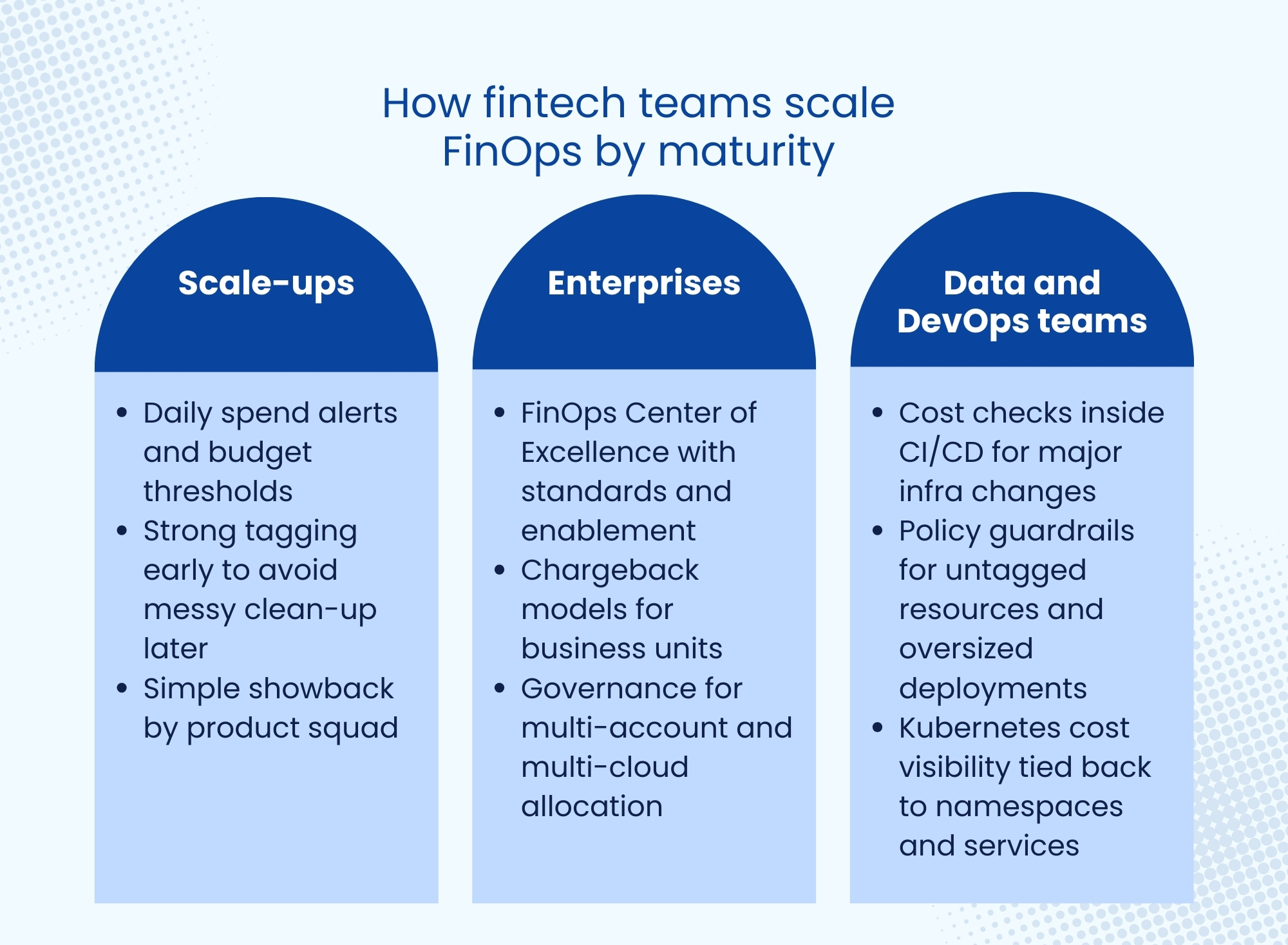
How fintech teams scale FinOps by maturity

How fintech teams scale FinOps by maturity

Common roadblocks and how to get past them

Three obstacles to scaling FinOps

  • Resistance from teams
    Engineers may assume cost controls will slow delivery. Fix that by using automation, clear thresholds, and fast feedback, not manual approvals.
  • Complex pricing and confusing bills
    Cloud pricing is hard. The fix is to translate billing into “engineering terms” such as runtime, storage growth, egress, and query patterns.
  • Inconsistent governance
    If tagging rules vary by team, visibility collapses. Standardize the minimum required tags and enforce them with policy.

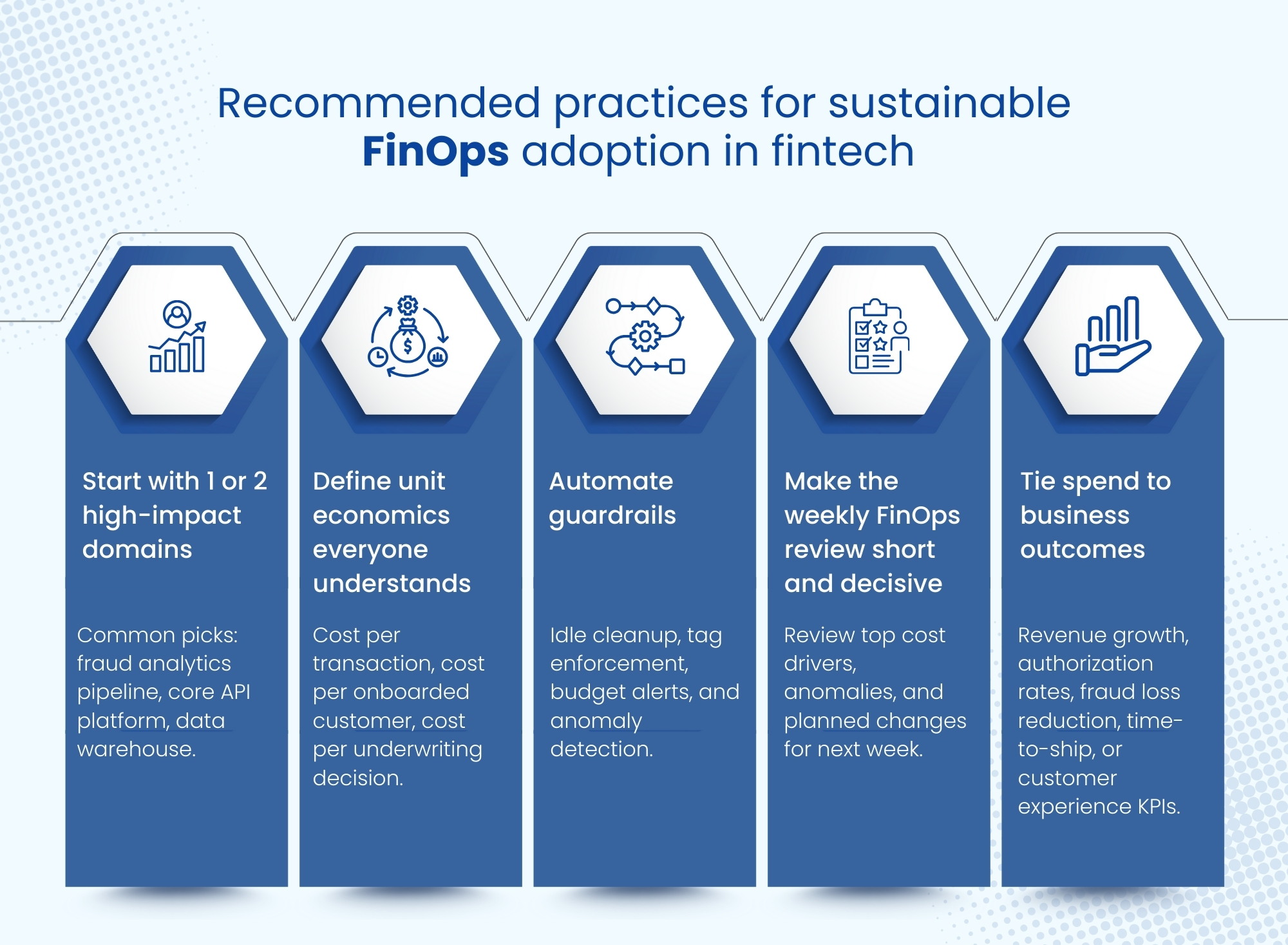
Recommended practices for sustainable FinOps adoption in fintech

Recommended practices for sustainable FinOps adoption in fintech

  1. Start with 1 or 2 high-impact domains
    Common picks: fraud analytics pipeline, core API platform, data warehouse.
  2. Define unit economics everyone understands
    Cost per transaction, cost per onboarded customer, cost per underwriting decision.
  3. Automate guardrails
    Idle cleanup, tag enforcement, budget alerts, and anomaly detection.
  4. Make the weekly FinOps review short and decisive
    Review top cost drivers, anomalies, and planned changes for next week.
  5. Tie spend to business outcomes
    Revenue growth, authorization rates, fraud loss reduction, time-to-ship, or customer experience KPIs.

Final thoughts

FinOps becomes valuable in fintech when it connects cloud spend to product reality: usage, risk controls, and customer outcomes. With the right allocation, unit economics, and automation, teams keep speed while making spend predictable and defensible.

CTA Contact Us

Frequently asked questions

What is FinOps in a fintech cloud environment?

FinOps is how fintech teams manage cloud spend day to day, together. Finance, engineering, and product share ownership so costs stay visible, predictable, and tied to outcomes.

How do you measure cloud unit economics for payments and fraud workloads?

Pick a unit (cost per 1,000 transactions, cost per fraud check, cost per model run). Allocate cloud costs to that unit with tags and workload boundaries, then track the trend weekly.

What tagging strategy works best for cost allocation in regulated teams?

Keep required tags strict and few: Product, Owner, Environment, CostCenter, Workload, DataClass. Enforce tagging at creation time so production spend never shows up as “unknown.”

How do you forecast cloud spend when usage spikes daily?

Forecast the driver first (transactions, checks, model runs), not the bill. Use a rolling weekly forecast with a range (base/high), plus alerts for sudden spikes.

Data Quality & Governance: The Strategic Blueprint for Sustainable Organizational Success

-In an era defined by data, organizations are navigating a fundamental paradox: they are data-rich but insight-poor. The sheer volume of information, intended to be a strategic asset for every Fortune 100 contender and nimble startup alike, often becomes a source of complexity and confusion. 

Without a structured approach, this asset quickly turns into a liability, leading to flawed strategies, missed opportunities, and eroded trust. The solution is not more data, but better, more reliable data, managed under a coherent strategic framework. This is the essence of data quality and governance: the strategic blueprint for transforming data chaos into a sustainable competitive advantage.

The data imperative: Why trustworthy data is non-negotiable

In today’s digital economy, every critical business function relies on data. From personalizing a customer journey to optimizing supply chains with big data analytics, the accuracy and reliability of the underlying information dictate the outcome. 

Poor Data Quality directly translates to poor decision-making, misguided strategies, and inefficient operations. When leadership cannot trust the numbers presented in a Business intelligence dashboard, strategic planning becomes a game of guesswork, and the organization’s ability to respond to market shifts is severely compromised. 

Trustworthy data is the foundational prerequisite for organizational agility and resilience.

The Promise of AI: unlocking potential through data excellence

AI initiatives promise to change industries. However, AI is not magic; it is a sophisticated consumer of data. 

Machine learning algorithms are only as effective as the data they are trained on. Biased, incomplete, or inaccurate data leads to flawed models, unreliable predictions, and potentially disastrous business outcomes. A staggering number of AI projects fail to move from pilot to production, not because the algorithms are weak, but because the data foundation is unstable. 

True AI Readiness begins with a deep commitment to data quality and governance, ensuring that your most advanced initiatives are built on a bedrock of trust.

Setting the stage: Data Quality and Governance as your strategic foundation

Viewing data quality and governance as mere compliance obligations or IT-centric tasks is a critical strategic error. Instead, they must be positioned as the central pillars of an organization’s data strategy: the keys to why Data Quality and governance drive digital success. A robust governance framework acts as the control system, defining the rules of engagement for all data assets, while a commitment to data quality ensures those assets are fit for purpose. 

Together, they create an environment where data can be confidently accessed, shared, and leveraged to drive innovation and create tangible business value, forming the strategic blueprint for enduring success.

The indispensable foundation: Unpacking Data Quality and Governance

Before building a data-driven enterprise, leaders must understand the core components of its foundation. Data Quality and data governance are distinct but deeply interconnected disciplines. One cannot succeed without the other. Governance provides the structure, rules, and accountability, while quality represents the tangible, measurable state of the data itself.

Defining Data Quality: dimensions of trust

Data Quality is not a single attribute but a multi-dimensional concept, often defined by standards like ISO/IEC 25012. To be considered high-quality, data must meet several key criteria:

  • Accuracy: Does the data correctly reflect the real-world object or event it describes?
  • Completeness: Are all the necessary data points present?
  • Consistency: Is the data uniform across different systems and applications?
  • Timeliness: Is the data available when it is needed for analysis and decision-making?
  • Uniqueness: Are there duplicate records that could skew analysis and operations?
  • Validity: Does the data conform to the defined format, type, and range (e.g., a valid email address format)?

Assessing and improving data across these dimensions is the first step toward building a trusted data ecosystem.

Defining Data Governance: The strategic framework for control and value

Data governance frameworks provide the structure for managing an organization’s data assets. This is not about restricting access but about enabling responsible use. A comprehensive framework establishes the necessary policies, standards, procedures, and controls. It clearly defines who can take what action, with which data, under what circumstances, and using which methods. These Data policies are the rulebook that guides every user in the organization, ensuring that data is handled securely, ethically, and in a way that maximizes its value while minimizing risk.

The Intertwined Nature: How robust governance ensures data Integrity and quality

Data governance is the engine that drives Data Quality. Without a governance framework, efforts to clean up data are temporary fixes at best. Governance establishes the roles and processes needed to maintain data excellence over time. It defines Data stewards who are accountable for specific data domains, implements procedures for data entry and validation, and provides a mechanism for resolving data issues. This structured approach is what ensures Data Integrity: the overall accuracy, consistency, and reliability of data throughout its lifecycle. Governance transforms data quality from a reactive, project-based activity into a proactive, embedded discipline.

The Cost of Neglect: Addressing Data Trust Issues and Mitigating Reputational Damage

Ignoring data quality and governance carries a steep price. Inaccurate customer data leads to poor service and lost sales. Flawed financial data can result in compliance failures and hefty fines. 

According to Gartner, the average organization loses $12.9 million annually due to poor data quality. Operationally, bad data creates immense inefficiency as employees spend valuable time hunting for reliable information or correcting errors. Perhaps most damaging is the erosion of trust. When customers lose faith in your ability to manage their information, or when executives can no longer rely on reports to guide the business, the resulting reputational damage can be irreversible.

Crafting Your Strategic Blueprint: Core Pillars of Effective Governance

An effective data governance program is not a one-size-fits-all solution. It must be a carefully designed blueprint tailored to the organization’s specific needs, maturity, and strategic goals. However, several core pillars are universally essential for success.

        1. Roles and Responsibilities: Empowering Data Stewardship and Leadership

Data governance is a team sport that requires clear accountability. A successful program establishes a hierarchy of roles, starting with executive sponsorship from a Chief Data Officer (CDO) or a similar leader who champions the vision. The most critical on-the-ground role is that of Data stewards. These individuals, typically business experts from various departments, are entrusted with overseeing specific organizational data assets. They are responsible for defining data standards, monitoring quality, and ensuring that Data policies are followed within their domain, acting as the crucial link between IT and the business.

        2. Master Data Management (MDM): Achieving a Single, Trusted View of Key Data

Many organizations struggle with fragmented data, where information about a single customer, product, or supplier exists in multiple, often conflicting, versions across different systems. Master data management (MDM) is the discipline and technology used to resolve this chaos. MDM creates a single, authoritative “golden record” for critical data entities. By creating a central, trusted source of master data, organizations remove inconsistencies. They simplify processes. They make sure all analytics and decisions are based on a shared, accurate view of the business.

        3. Designing Your Target Operating Model for Data Governance: Structure and Workflow

A Target Operating Model (TOM) for data governance outlines how people, processes, and technology will work together to execute the governance strategy. It defines the structure of the governance council or committee, the workflows for data issue resolution, and the processes for creating and enforcing policies. The TOM serves as the practical implementation plan, detailing how governance will be embedded into the daily operations of the business. It clarifies reporting lines, meeting cadences, and the escalation paths for data-related issues, turning abstract policy into concrete action.

        4. The Data Lifecycle: Ensuring Quality and Governance from Inception to Archival

Data is not static; it has a lifecycle that begins with its creation and ends with its eventual archival or deletion. Applying data quality and governance principles consistently across this entire journey is essential for maintaining trust and value over time.

Holistic Data Lifecycle Management: A Continuous Journey

Effective data lifecycle management requires a holistic view. This includes managing data creation, storage, usage, sharing, and eventual retirement. Governance procedures must be applied at each stage. For example, data quality checks should be implemented at the point of data entry, access controls must govern its use, and retention policies should dictate how long it is stored. This continuous oversight ensures that Data Integrity is maintained from start to finish.

Data Lineage: Tracing Data’s Journey and Transformations

Data lineage provides a complete audit trail of data’s journey through an organization’s systems. It documents where data originated, what transformations it underwent, and how it is used in various reports and applications. This visibility is crucial for building trust. Data lineage is essential for fixing errors. It helps analyze the impact before system changes. It also meets rules for tracking data for regulatory compliance. When a user can see the source and history of a data point, they have more confidence in its accuracy.

Quality and Governance in Modern Data Architectures

The rise of big data technologies, Data lakes, and Cloud computing has introduced new challenges for governance. The sheer volume, velocity, and variety of data make manual oversight impossible. To adapt, modern governance frameworks must use metadata management tools to automatically list data assets in a data lake. Implement governance controls within cloud platforms. Design a “data middle platform” that enforces policies and quality checks on data as it moves between systems. This ensures a single, governed Data Lake environment rather than a data swamp.

Managing Data Migration and Integration with Quality in Mind

Data migration and system integration projects are high-risk moments for Data Quality. Moving data between systems without proper planning can introduce errors and corrupt information. A robust governance framework is essential to guide these projects. It requires data profiling before migration to find quality problems. It sets clear mapping rules for integration. It demands thorough checks and reconciliation after moving data. This ensures no data is lost or damaged during transfer.

Driving Business Value: Turning Trustworthy Data into Strategic Advantage

The ultimate goal of data quality and governance is not simply to have clean, well-managed data. It is to leverage that data as a strategic asset to drive tangible business outcomes, create competitive differentiation, and foster sustainable growth.

Powering Better Decision-Making and Business Intelligence

The most direct benefit of a strong data governance program is the improvement in strategic and operational decision-making. When executives and managers trust the data in their Business intelligence dashboards and reports, they can make faster, more confident choices. Governed data eliminates the ambiguity and debate over whose numbers are correct, allowing teams to focus on analyzing insights and taking action rather than questioning data validity.

Fueling Advanced Analytics and AI Initiatives

High-quality, well-documented, and easily accessible data is the essential fuel for advanced analytics and AI Initiatives. Predictive maintenance models, customer churn predictions, and other machine learning algorithms depend on a rich history of reliable data. A governance framework makes sure data is available. It ensures data lineage is clear. It also confirms data is suitable for advanced applications. This greatly raises the chance of success for an organization’s top projects.

Enhancing Customer and User Experience with Reliable Data

Reliable data is the foundation of a superior customer experience. A single, accurate view of the customer, enabled by MDM, allows for true personalization, targeted marketing, and seamless service interactions. When a user contacts support, they expect the agent to have their complete and correct history. Inaccurate or incomplete data leads to frustrating, disjointed experiences that damage customer loyalty and brand perception.

Optimizing Business Processes and Operational Efficiency

Clean, consistent, and timely data is a powerful catalyst for operational excellence. It streamlines business processes by removing the friction caused by data errors. For example, accurate product data reduces shipping errors in logistics, correct supplier data ensures timely payments in procurement, and valid employee data simplifies HR and payroll processes. These efficiencies compound across the organization, reducing operational costs and freeing up employee time for more value-added activities.

Enabling Data Accessibility and Responsible Data Sharing

A common misconception is that governance is about locking data down. In reality, good governance supports responsible data access. By establishing clear ownership, security classifications, and access policies, governance creates a framework for Data Accessibility where data can be shared confidently and securely across the organization. This “data democratization” empowers more users to access the data they need to perform their jobs effectively while ensuring that sensitive information is protected.

Mitigating Risk & Ensuring Trust: The Compliance and Security Imperative

In an increasingly regulated world, robust data governance is no longer optional; it is a fundamental component of risk management. It provides the necessary controls and oversight to protect the organization from regulatory penalties, security breaches, and the associated reputational fallout.

Navigating the Complex Landscape of Regulatory Compliance

Organizations today face a complex web of privacy laws and data protection regulations, such as the EU’s GDPR and the California Consumer Privacy Act (CCPA). Adhering to these rules requires a deep understanding of what data is collected, where it is stored, and how it is used. Data governance frameworks manage regulatory compliance. They document data processing activities, handle consent, and enforce policies. These ensure data is used according to legal rules.

Proactive Risk Management: Data Audit and Data Observability for Continuous Oversight

Instead of reacting to data breaches or quality failures, leading organizations are adopting proactive risk management strategies. This includes regular data audits to assess compliance with internal policies and external regulations. The emerging field of Data Observability goes a step further, using automated tools to continuously monitor the health of data pipelines and systems. This provides real-time alerts on data quality degradation, schema changes, or anomalous data patterns, allowing teams to identify and resolve issues before they impact the business.

Establishing Clear Data Issue Escalation and Resolution Processes

Even with the best controls, data issues will inevitably arise. A key function of data governance is to establish clear, efficient procedures for identifying, escalating, and resolving these issues. A defined data issue escalation path ensures that when a user spots a problem, they know exactly who to report it to. This process guarantees that the right Data stewards and technical teams are engaged quickly to perform root cause analysis and implement a lasting solution, preventing the same issue from recurring.

The Human Element & Cultural Transformation: Building a Data-Driven Organization

Ultimately, technology and policies are only part of the solution. Achieving a truly data-driven organization requires a cultural transformation. It means fostering a shared sense of responsibility for data quality across all departments and empowering every employee with the skills and knowledge to treat data as a critical enterprise asset. This cultural shift, supported by strong leadership and continuous training, is what turns a governance blueprint into a living, breathing reality.

Conclusion

Data quality and governance are not mere technical exercises or compliance hurdles; they are the strategic blueprint for sustainable success in the digital age. By implementing a robust framework built on clear roles, effective processes, and enabling technologies like Master data management, organizations can transform their data from a chaotic liability into their most powerful asset. This change helps make smarter decisions. It improves the customer experience and increases operational efficiency. It also creates a necessary base for successful AI initiatives.

The journey begins by treating data as a core business function, not an IT afterthought. It requires building a culture of accountability where everyone understands their role in preserving Data Integrity and upholding quality. By committing to this blueprint, organizations can confidently navigate the complexities of the modern data landscape, mitigate risk, and unlock the full potential of their information assets. By investing in this plan, your organization can do more than manage data. It can actively use data to find new ways to innovate. It can reduce risks and gain a lasting competitive edge.

The Far-Reaching Impact of Model Drift and its Data Drama

Background Summary

Model drift is more than a real data science headache, it’s a silent business killer. When the data your AI relies on changes, predictions falter, decisions suffer, and trust erodes. This guide explains what drift is, why it affects every industry, and how a mix of smart monitoring, robust data pipelines, and AI-powered cleaning tools can keep your models performing at their peak.-Imagine launching a new product, rolling out a service upgrade, or opening a flagship store after months of preparation, only to find customer complaints piling up because something invisible changed behind the scenes. In AI, that invisible culprit is often model drift.

Your model worked perfectly in testing. Predictions were accurate, dashboards lit up with promising KPIs.  But months later, results dip, costs climb, and customer trust erodes. What changed? 

The data feeding your model no longer reflects the real world it serves. 

This article breaks down why that happens, why it matters to every industry, and how modern tools can stop drift before it damages outcomes.

What is “Data Drama”?

“Data drama” means wrestling with disorganized, inconsistent, or incomplete data when building AI solutions, leading to model drift. Model drift refers to the degradation of a model’s performance over time due to changes in data distribution or the environment it operates in.

Think of it as junk in the trunk: if your AI is the car, bad data makes for a bumpy ride, no matter how powerful the engine is.

Picture a hospital that wants to use AI to predict patient health risks:

  • Patient names are sometimes written “Jon Smith,” “John Smith,” or “J. Smith.”
  • Some records are missing phone numbers or have outdated addresses.
  • The hospital’s old records are stored in paper files or weird formats.

Even if the AI is “smart,” it struggles to learn from such confusing information. There are three primary types of drifts that affect the scenarios:

  • Data drift (covariate shift): The input distribution P(x) changes. Example: new user behavior, seasonal trends, new data sources.
  • Concept drift: The relationship between features and target P(yx) changes. Example: fraud tactics evolve customer churn reasons shift.

Label drift (prior probability shift): The distribution of P(y) changes. Common in imbalanced classification tasks.

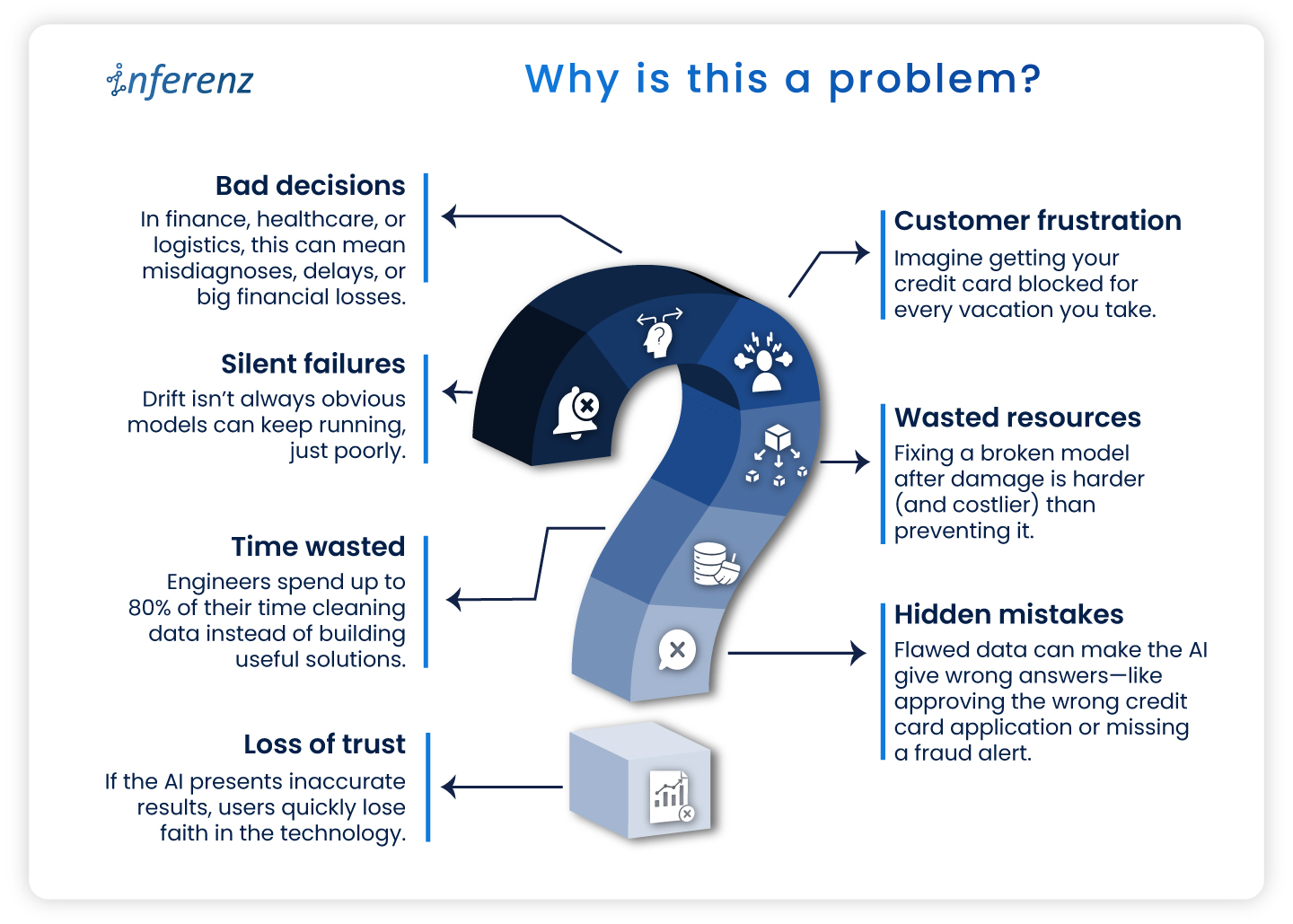
Why is this a problem?

  • Silent failures: Drift isn’t always obvious models can keep running, just poorly.
  • Bad decisions: In finance, healthcare, or logistics, this can mean misdiagnoses, delays, or big financial losses.
  • Customer frustration: Imagine getting your credit card blocked for every vacation you take.
  • Wasted resources: Fixing a broken model after damage is harder (and costlier) than preventing it.
  • Time wasted: Engineers spend up to 80% of their time cleaning data instead of building useful solutions.
  • Hidden mistakes: Flawed data can make the AI give wrong answers—like approving the wrong credit card application or missing a fraud alert.
  • Loss of trust: If the AI presents inaccurate results, users quickly lose faith in the technology.

Why is it hard to catch?

  • Most production pipelines don’t monitor live feature distributions or prediction confidence.
  • Business KPIs may degrade before engineers notice any statistical performance drop.
  • Retraining isn’t always feasible daily, especially without label feedback loops.

How can we solve the data drama?

Today, AI itself helps clean and fix messy data, making life easier for both techies and non-techies. Here’s a step-by-step technical approach for managing drift in production systems: 

           1. Track key statistical metrics on input data:

      • Population stability index (PSI)
      • Kullback-leibler divergence (KL Divergence)
      • Kolmogorov-smirnov (KS) test
      • Wasserstein distance (for continuous features)

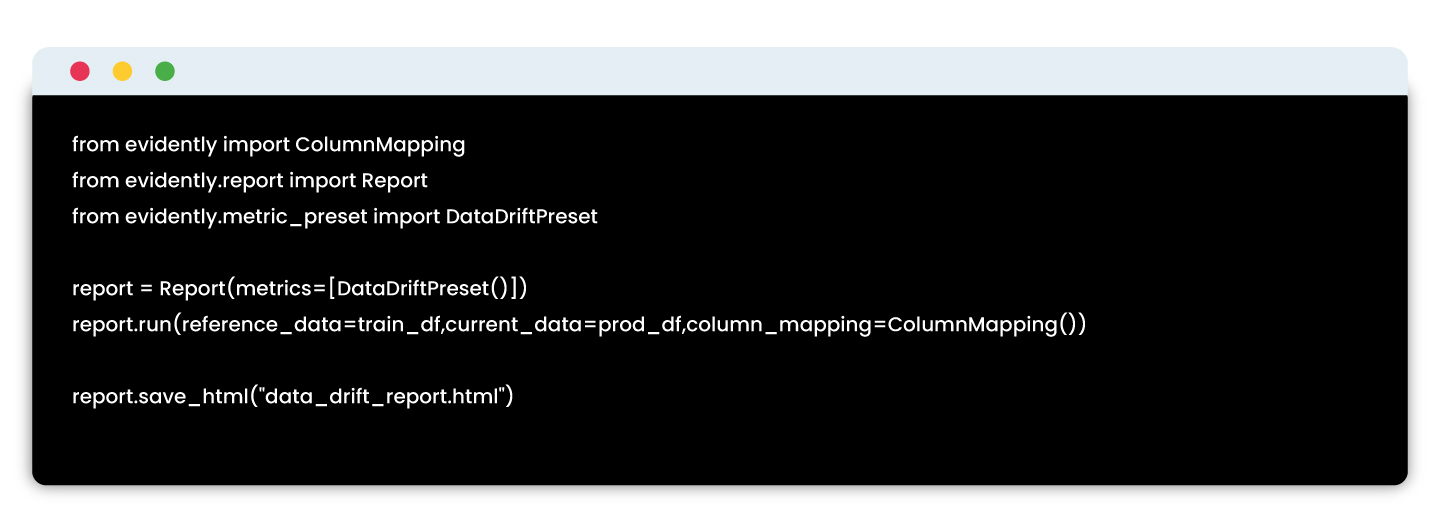
Implementation example:

Tools: Evidently AI, WhyLabs, Arize AI

          2. Monitoring model performance without labels

If you can’t get real-time labels, use proxy indicators:

      • Confidence score distributions (are they shifting?)
      • Prediction entropy or uncertainty variance
      • Output class distribution shift

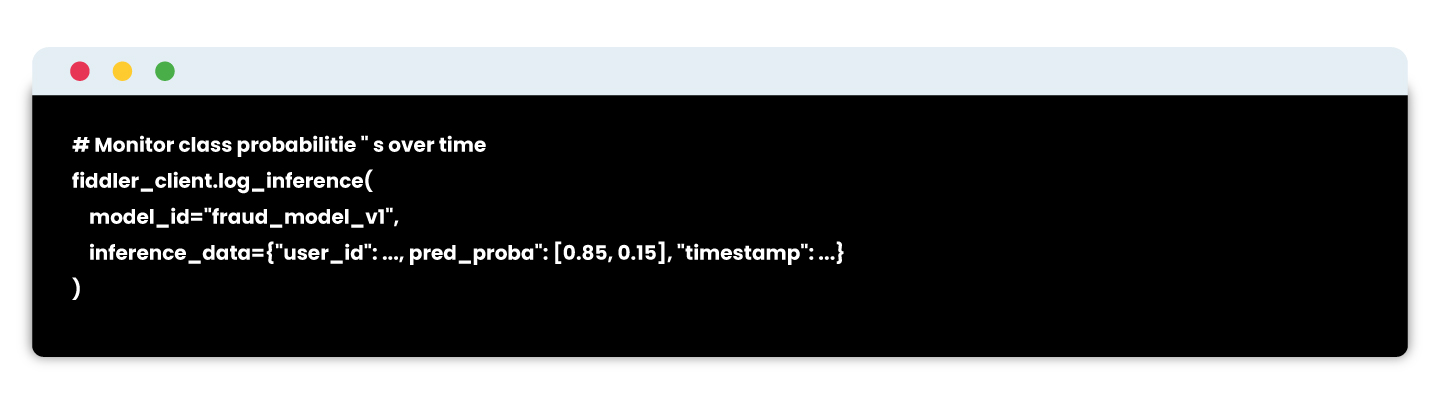
Example using fiddler AI:


# Detect divergence from training output distributions

          3. Retraining pipelines & model registry integration

Build retraining workflows that:

      • Pull recent production data
      • Recompute features
      • Revalidate on held-out test sets
      • Re-register the model with metadata

Example stack:

      • Feature store: Feast / Tecton
      • Training pipelines: MLflow / SageMaker Pipelines / Vertex AI
      • CI/CD: GitHub Actions + DVC

Registry: MLflow or SageMaker Model Registry

Tools & solutions 

This is broken down by stages of the solution pipeline:

1.Understanding what data is missing

Before solving the problem, you need to identify what is missing or irrelevant in your dataset.

Tool Purpose Features
Great expectations Data profiling, testing, validation Detects missing values, schema mismatches, unexpected distributions
Pandas profiling / YData profiling Exploratory data analysis Generates auto-EDA reports; useful to check data completeness
Data contracts (openLineage, dataplex) Define expected data schema and sources Ensures the data you need is being collected consistently


 2. Data collection & logging infrastructure

To fix missing data, you need to collect more meaningful, raw, or contextual signals—especially behavioral or operational data.

Tool Use Case Integration
Apache kafka Real-time event logging Captures user behavior, app events, support logs
Snowplow analytics User tracking infrastructure Web/mobile event tracking pipeline for custom behaviors
Segment Customer data platform Collects customer touchpoints and routes to data warehouses
OpenTelemetry Observability for services Track service logs, latency, API calls tied to user sessions
Fluentd / Logstash Log collectors Integrate service and system logs into pipelines for ML use


3. Feature engineering & enrichment

Once the relevant data is collected, you’ll need to transform it into usable features—especially across systems.

Tool Use Case Notes
Feast Open-source feature store Manages real-time and offline features, auto-syncs with models
Tecton Enterprise-grade feature platform Centralized feature pipelines, freshness tracking, time-travel
Databricks feature store Native with Delta Lake Integrates with MLflow, auto-tracks lineage
DBT + Snowflake Feature pipelines via SQL Great for tabular/business data pipelines
Google vertex AI feature store Fully managed Ideal for GCP users with built-in monitoring


4. External & third-party data integration

Some of the most relevant data may come from external APIs or third-party sources, especially in domains like finance, health, logistics, and retail.

Data type Tools / APIs
Weather, location OpenWeatherMap, HERE Maps, NOAA APIs
Financial scores Experian, Equifax APIs
News/sentiment GDELT, Google Trends, LexisNexis
Support tickets Zendesk API, Intercom API
Social/feedback Trustpilot API, Twitter API, App Store reviews


5. Data observability & monitoring

Once new data is flowing, ensure its quality, freshness, and availability remain intact.

Tool Capabilities
Evidently AI Data drift, feature distribution, missing value alerts
WhyLabs Real-time observability for structured + unstructured data
Monte Carlo Data lineage, freshness monitoring across pipelines
Soda.io Data quality monitoring with alerts and testing
Datafold Data diffing and schema change tracking


6. Explainability & impact analysis

You want to make sure your added features are actually helping the model and understand their impact.

Tool Use Case
SHAP / LIME Explain model decisions feature-wise
Fiddler AI Combines drift detection + explainability
Arize AI Real-time monitoring and root-cause drift analysis
Captum (for PyTorch) Deep learning explainability library


Why model drift is every business’s problem

Model drift may sound like a technical glitch, but its consequences ripple across industries in ways that hurt revenue, efficiency, and trust.

  • Healthcare – A drifted model can misread patient risk levels, causing missed diagnoses, delayed interventions, or unnecessary tests. In critical care, this can directly affect patient outcomes.
  • Finance – Inconsistent data patterns can produce incorrect credit scoring or flag legitimate transactions as fraudulent, frustrating customers and damaging loyalty.
  • Retail & E-commerce – Changing buying behavior or seasonal demand shifts can lead to inaccurate demand forecasts, resulting in overstock that ties up cash or stockouts that push customers to competitors.
  • Manufacturing & supply chain – Predictive maintenance models can miss early signs of equipment wear, leading to unplanned downtime that halts production lines.

The common thread?

  • Revenue impact – Poor predictions lead to lost sales opportunities and operational waste.
  • Compliance risk – In regulated sectors, drift can create breaches in reporting accuracy or fairness obligations.

Brand reputation – Customers and partners lose trust if decisions feel inconsistent or incorrect.

The cost of ignoring model drift

The business case for tackling drift is backed by hard numbers:

  • Data quality issues cost organizations an average of $12.9 million annually.
  • For predictive systems, downtime can cost $125,000 per hour on an average depending on the industry.
  • Recovery from a drifted model, retraining, redeployment, and regaining lost customer trust, can take weeks to months, costing far more than prevention.

Implementing automated drift detection can reduce model troubleshooting time drastically.  Early intervention can prevent revenue losses in industries where decisions are AI-driven.

In other words, the cost of not acting is often several times higher than the cost of building proactive safeguards.

From detection to prevention

Drift management is about more than catching problems, it’s about designing systems that keep models healthy and relevant from the start.

Approach What It Looks Like Outcome
Reactive Model performance dips → business KPIs drop → engineers scramble to investigate. Higher downtime, lost revenue, longer recovery cycles.
Proactive Continuous monitoring of data and predictions → alerts trigger retraining before business impact. Minimal disruption, sustained model accuracy, preserved customer trust.

Why proactive wins:

  • Reduces firefighting and emergency fixes.
  • Ensures AI systems adapt alongside market or operational changes.
  • Turns drift management into a competitive advantage, keeping predictions accurate while competitors struggle with outdated models.


Takeaway

In fast-moving markets, your AI is only as good as the data it learns from. Drift happens quietly, but its effects ripple loudly across customer experiences, operational efficiency, and revenue. By combining continuous monitoring with adaptive retraining, businesses can turn model drift from a costly disruption into a controlled, measurable process.

The real win is beyond the fact that it fixes broken predictions. Now you can build AI systems that grow alongside your business, staying relevant and reliable in any market condition.

Implementing Event-Driven CDC (Change Data Capture) in Azure with D365, Service Bus & Azure Functions

Background Summary

Modern organisations today look beyond traditional batch-based systems. At Inferenz we build platforms that enable agentic AI and real-time data transformation, and this article shows a concrete architecture that makes that possible. 

Using Microsoft Dynamics 365, Azure Service Bus and Azure Functions we implement an event-driven Change Data Capture pipeline that powers up-to-the-second data delivery. Read on to understand how you can shift from static snapshots to continuous, intelligent data flows.-

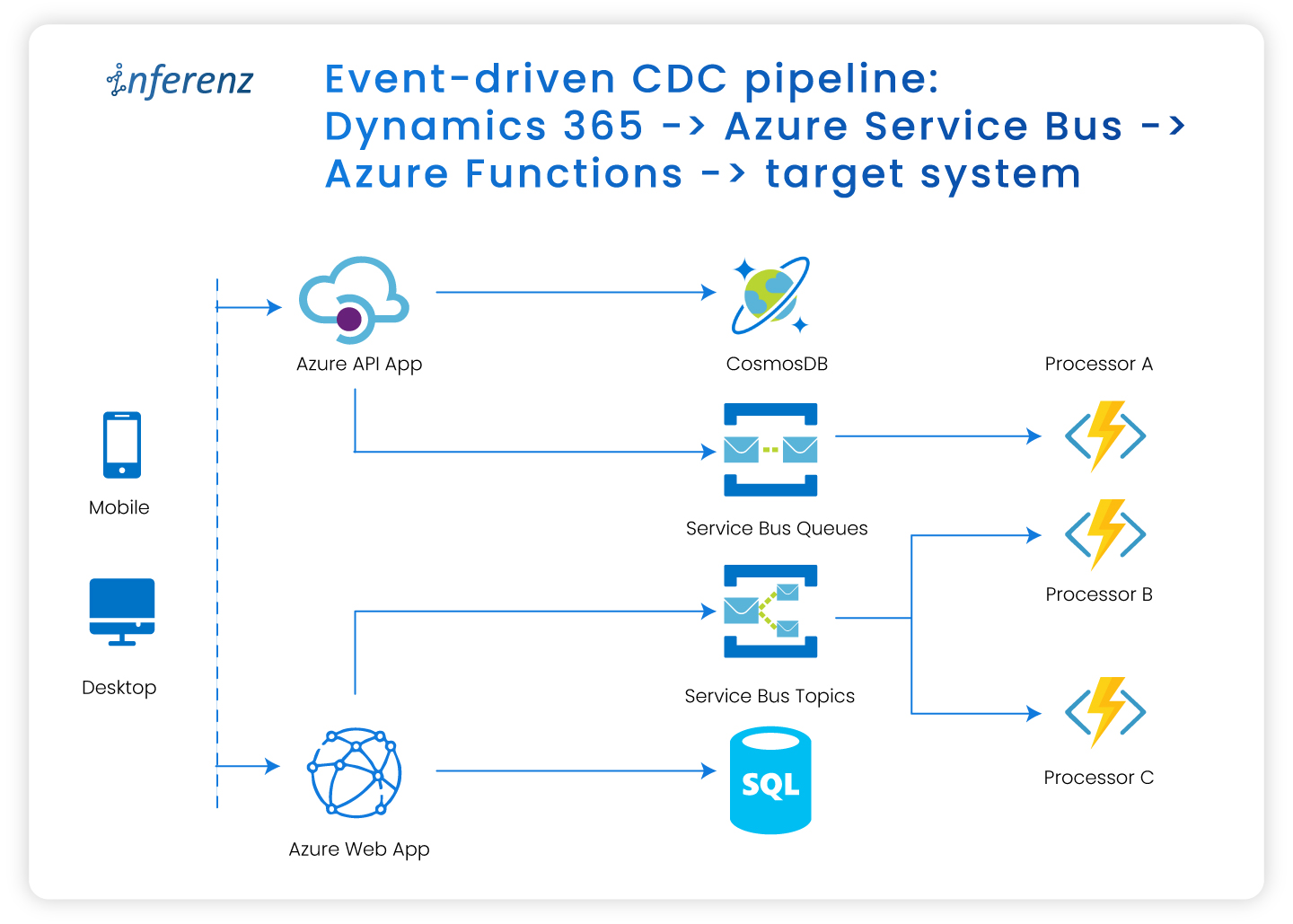
Event-driven CDC pipeline: Dynamics 365 → Azure Service Bus → Azure Functions → target system

Introduction

Change Data Capture, or CDC, is a design pattern that captures inserts, updates and deletes in source systems so downstream workflows can react immediately. Traditional batch or polling-based mechanisms often lag and consume excessive resources. Thanks to event-driven architectures, CDC now supports near-real-time processing. That means faster insights, smoother data flow and tighter coupling between business events and system responses.

In this blog, we walk through how to build a real-time CDC pipeline using Microsoft Dynamics 365 (D365), Azure Service Bus, and Azure Functions. This architecture ensures that every data change in D365 is captured, transformed, and routed in near real-time to downstream systems like Redis Cache or Azure SQL.

The challenge: Timely data sync from D365 to target system

We worked with a client who needed updates from Dynamics 365 to show up in the target system and be query-able via APIs within just 3–5 seconds. Meeting this SLA meant designing a pipeline with minimal end-to-end latency and consistent performance across all layers.

Key challenges faced:

  • Single-entity query limitation
    D365 Web API allows querying only one entity at a time, which led to multiple sequential calls when fetching data from related entities — increasing end-to-end latency.
  • Lack of business rule enforcement
    Since data was extracted directly from plugin event context and pushed to the target system, D365 business logic or calculated fields were not applied. Any additional transformation had to be implemented after retrieval, adding to the overall response time.

Solution architecture overview

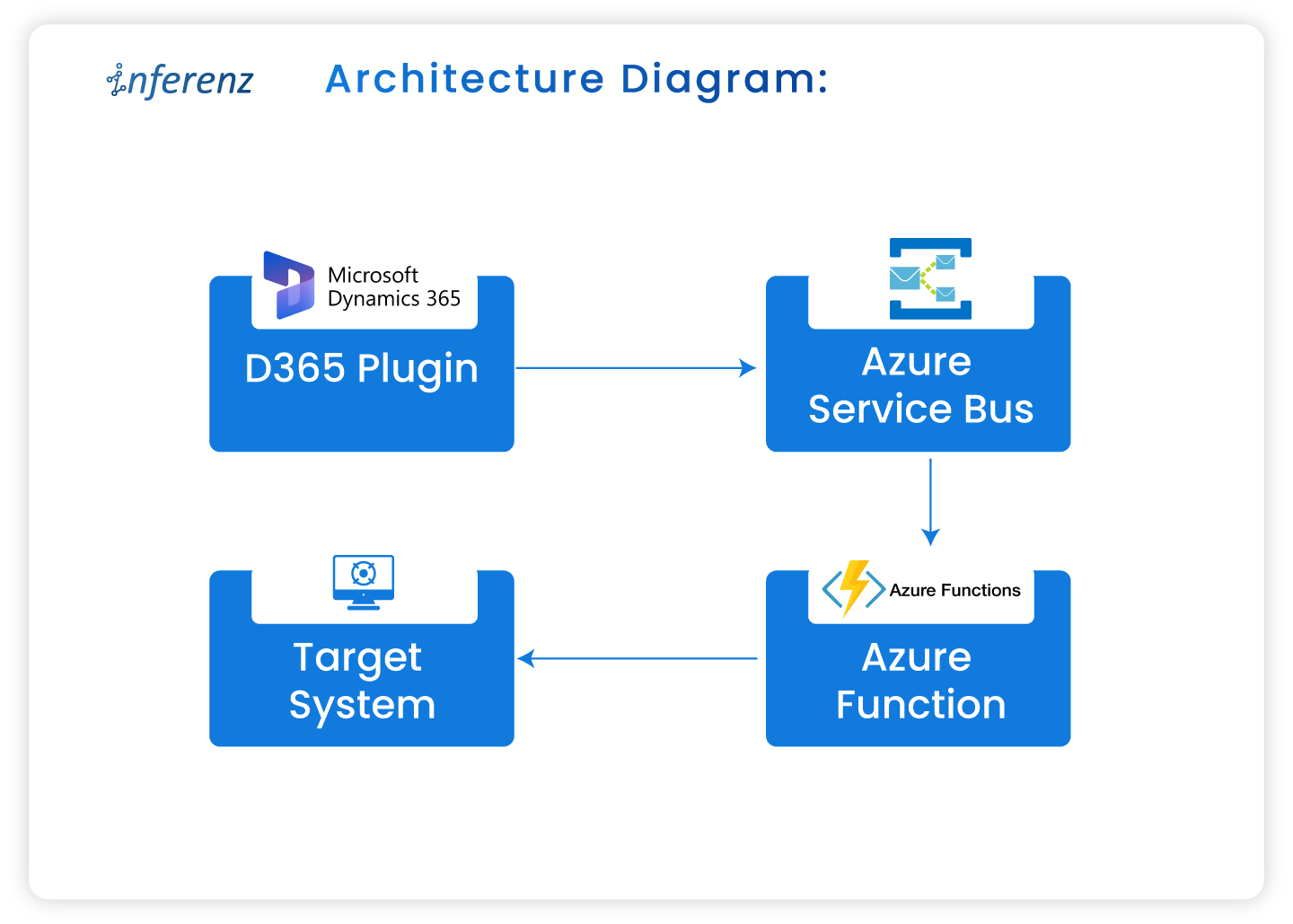
Architecture diagram:

Components:

  • Dynamics 365 (D365): Acts as the data source generating change events (create, update, delete).
  • Azure service bus: An enterprise-grade message broker that decouples the sender and consumer.
  • Azure functions: Serverless compute that consumes the event and applies business logic.
  • Target system: Any data sink or consumer (e.g., Redis, Azure SQL) that receives updates.

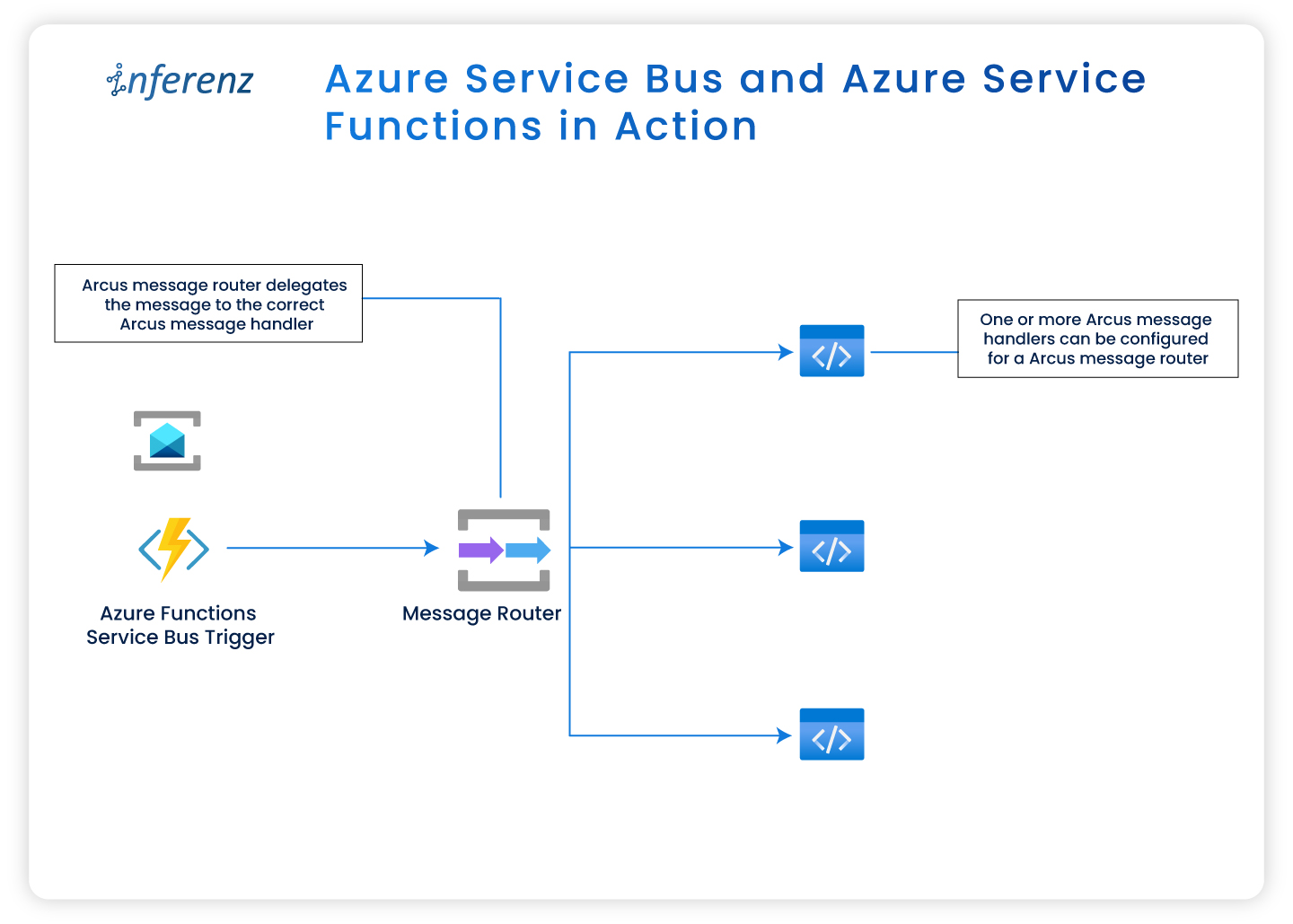
Azure Service Bus and Azure Service Functions in action

Azure-native advantage:

Because we built every component in Azure (Service Bus, Function Apps, Redis Cache, etc.), we could manage the full pipeline end-to-end. That offered us:

  • Better control over retries, scaling and performance tuning
  • Native observability using Application Insights and Log Analytics
  • Rapid troubleshooting with no reliance on third-party services

Publishing events to Azure Service Bus

    1. Create Service Bus namespace with Topic or Queue.
    2. Message structure:
      • The message sent to Service Bus via the Service Endpoint will follow the standard structure defined by Dynamics 365 for remote execution contexts. The format may evolve over time as Dynamics updates its schema, so consumers should be built to handle possible changes in structure.

Setting up change tracking in Dynamics 365

Steps:

    1. Enable change tracking:
      • Navigate to Power Apps > Tables > enable ‘Change Tracking’ for each entity required for CDC.
    2. Plugin registration:
      • Use Plugin Registration Tool (PRT) to:
        • Register external service endpoint for Service Bus endpoint.
        • Link this endpoint to a step so that the message is sent from D365 to the specified external service when a data event (Create, Update, etc.) occurs.
        • Register message steps like Create, Update, Delete, Associate, Disassociate on specific entities
        • Configure execution stage and filtering attributes
      • Associate/Disassociate events in Dynamics 365 represent changes in many-to-many relationships between entities. Capturing these events is essential if downstream systems rely on accurate relationship mappings.
      • Important: The PRT only registers and connects the plugin code to events in D365. The logic inside the plugin (such as sending a message to Azure Service Bus) must be written in the plugin code itself using supported libraries like Microsoft.Azure.ServiceBus.
    3. Authentication & Access:
      |The authentication setup provides the foundational credentials and access paths that allow Azure services to securely communicate with Dynamics 365 APIs and other Azure components.
    • Register an Azure AD App for D365 API access.
      • This provides the Application (Client) ID and Tenant ID, which will be used later in service connections or token generation to authorize calls to D365 APIs
      • The app also holds the client secret (or certificate), which acts like a password in service-to-service authentication flows.
    • Assign a user-assigned managed identity to secure resources.
      • This identity is linked to services like Azure Functions and used to securely access resources like D365 and Service Bus without storing credentials. It allows Azure Functions to authenticate when interacting with APIs or retrieving secrets.
    • Grant permissions in Azure AD and D365.
      • Granting API access in Azure AD allows the app to interact with D365, while assigning roles in D365 ensures the app or identity has the necessary data permissions. These access levels determine the ability to publish or process events.

Event handling with Azure Functions

  1. Create Azure Function with a Service Bus trigger.
  2. Process Message:
    • Deserialize JSON
    • Apply business logic (e.g., enrich, transform, validate)
    • Insert/Update target system
  3. Writing to Target System:
    • The processed message is then written to the configured target system.

    • For Redis Cache, Azure Functions typically store data as JSON objects keyed by entity ID, enabling fast lookups.
    • For Azure SQL, the function may use INSERT, UPDATE, or MERGE operations depending on the change type (e.g., create/update/delete).
    • Ensure that data mapping aligns with the entity schema from Dynamics 365.
    • For our use case, we had a time goal to apply CDC changes in the target system under 3–5 seconds along with the LOB apps that would query the data from the target system using APIs exposed via APIM. Redis proved to be both faster and more cost-effective compared to Azure SQL.
    • Additionally, our data size was relatively small and expected to remain limited in the future, making Redis a more suitable choice.
  4. Best Practices Implemented:
    • Used DLQ for unhandled failures
    • Ensured idempotency for retries
    • Added structured logging in Log Analytics Workspace

Monitoring and observability

  1. Enable Application Insights for Azure Functions.
  2. Use Azure Monitor to:
    • Track execution metrics (Success, Failures)
    • Setup alerts for Service Bus dead-letter queues
  3. Use Log Analytics queries for debugging and advanced insights
  4. Create dashboards in Azure portal for quick insights for business users and monitoring for developers

Testing & validation

  • Create a test record in D365.
  • Verify plugin execution and message delivery in Service Bus.
  • Check Azure Function logs for event processing.
  • Introduce controlled failures to test DLQ behavior.

Best practices & lessons learned

  • Use RBAC + MSI for secure access
  • Define message contracts (schema) early
  • Track event versions to handle schema evolution
  • Avoid sending sensitive PII data without encryption
  • Design for failure and retry from day one
  • Design the schema evolution for target system thoughtfully

From event-driven CDC to agentic AI

This architecture does more than move data quickly. It sets the foundation for agentic AI workflows that respond to change in real time. When events from Dynamics 365 flow through Azure Service Bus into function-based processing, that data can power:

  • Real-time scoring models that assess risk or customer intent as updates occur
  • Automated alerts and triggers for operational teams when certain thresholds are crossed
  • Predictive recommendations that learn from continuous data streams instead of daily batches

Such event-driven systems become the nervous system of AI-enabled enterprises—where every update feeds insight and every event leads to action.


Conclusion

Event-driven CDC unlocks real-time integration between D365 and downstream systems. By combining Service Bus, Azure Functions, and plugin-driven triggers, you can create a scalable and reactive architecture that meets modern enterprise needs.

Explore how this can be extended to support data lakes, event analytics, and multiple system syncs — all using Azure-native tools.

FAQs

1) What is event-driven CDC in Azure with Dynamics 365?
Event-driven CDC captures create, update, and delete events from Dynamics 365 and publishes them to Azure Service Bus. Azure Functions consume these messages and write to targets like Redis or Azure SQL for a real-time data pipeline.

2) How fast can a D365 to target sync run with this design?
With Service Bus and Functions on consumption plans, sub-5-second end-to-end times are common for moderate loads. Tune message size, prefetch, and Function concurrency to hit strict SLAs.

3) Should I choose Redis or Azure SQL as the target for CDC data?
Use Redis when you need very low latency lookups for APIs and short-lived data. Choose Azure SQL when you need relational joins, reporting, or long-term storage tied to CDC events.

4) How do we keep this CDC pipeline reliable and secure?
Use RBAC and Managed Identities for D365, Service Bus, and Functions. Add DLQ, idempotent handlers, replay controls, Application Insights, and Log Analytics for full traceability.

5) Can this CDC setup feed analytics or agentic AI use cases?
Yes. The same event-driven CDC stream can power real-time scoring, alerts, and agentic AI actions. You can also route change events to APIM and data stores that back dashboards.

6) What does implementation involve on the Dynamics 365 side?
Enable Change Tracking on required tables. Register a Service Bus endpoint and plugin steps for Create, Update, Delete, and relationship events, then publish structured messages for Azure Functions to process.

QA in the Modern Data Stack: Using Python, Zephyr Scale & Unity Catalog for End-to-End Quality Assurance

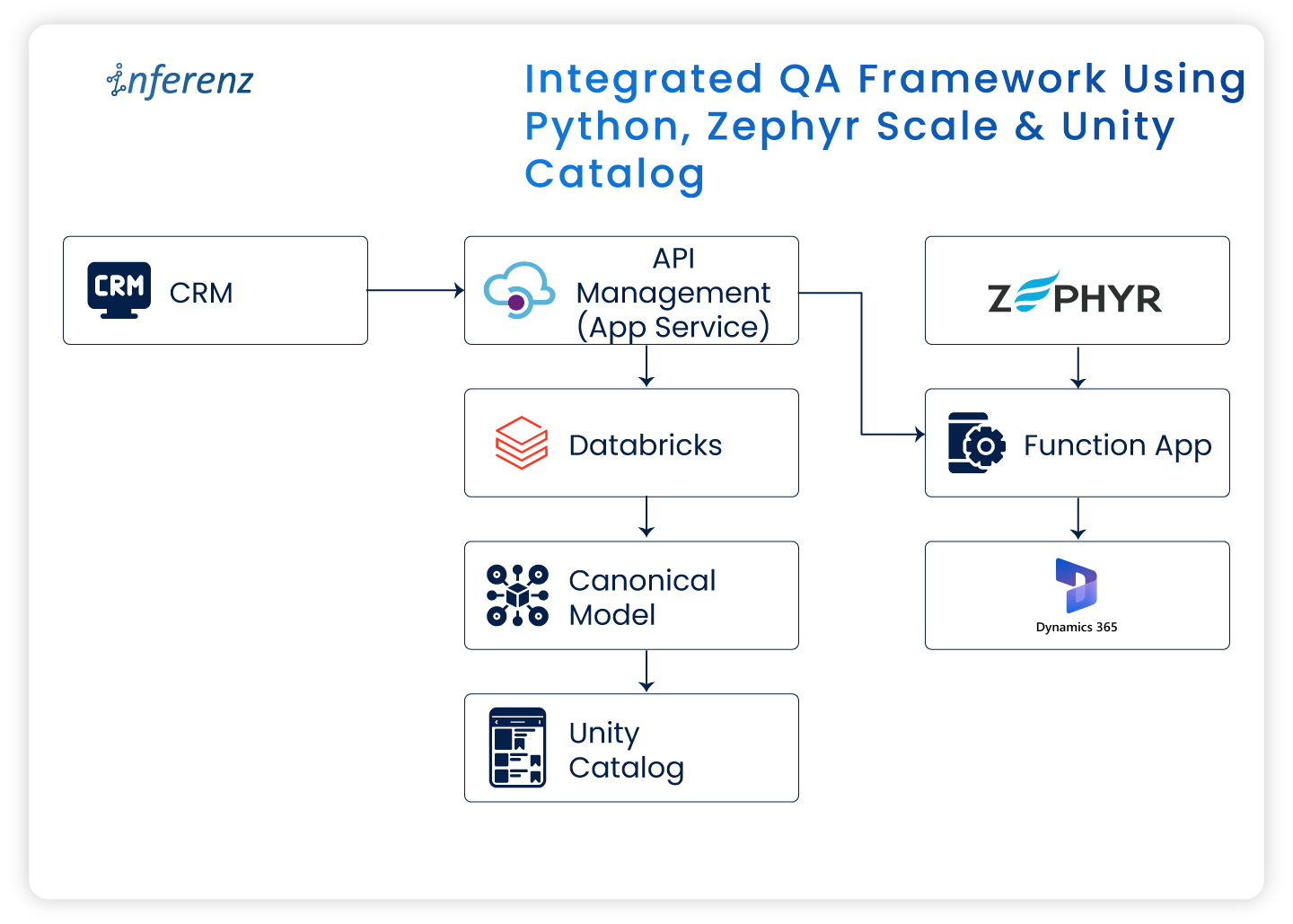
Integrated QA framework using Python, Zephyr Scale & Unity Catalog

Introduction

Quality Assurance (QA) in the software world has moved beyond functional testing and interface validation. As modern enterprises shift toward data-centric architectures and cloud-native platforms, QA now involves ensuring data accuracy, integrity, governance, and system compliance end to end.

In a recent enterprise project, I worked on migrating a legacy Customer Relationship Management (CRM) system to Microsoft Dynamics 365 (MS D365). It wasn’t merely a technology shift. It involved moving large data volumes, aligning new business rules, setting up strong governance layers, and ensuring uninterrupted business operations.

In this article, I’ll share how QA was handled across this transformation using Zephyr Scale for test management, Python for automation, and Databricks Unity Catalog for governance and access control.

QA challenges in migrating to Microsoft Dynamics 365

Migrating from a legacy CRM to a modern cloud platform brings unique QA challenges. The main focus areas included:

Focus Area QA Objective Common Issues
Data Validation Ensure data integrity and accuracy post-migration Missing, duplicate, or corrupted records
Functional Testing Validate end-to-end workflows across Bronze → Silver → Gold layers Breaks in business logic or incomplete process flow
Integration Testing Verify KPI accuracy in downstream systems Data mismatch or inconsistent calculations

This was my first experience in a hybrid QA setup—where data engineering and cloud CRM validation worked together. Automation became essential from the start.

Test management with Zephyr Scale in Jira

We used Zephyr Scale within Jira to manage all QA activities. It ensured complete traceability from test case creation → execution → defect resolution.

The test planning followed an iterative Agile structure:

Sprint Phase Description
Sprint 1 System Integration Testing (SIT) Validation of data flow, transformations, and business rules
Sprint 2 User Acceptance Testing (UAT) Final stage readiness checks before production deployment

Sample migration test case

Objective: Validate that data from the Bronze layer is accurately transferred to the Silver layer.

Steps:

  1. Query record counts in the Bronze schema.  
  2. Query corresponding counts in the Silver schema.  
  3. Compare totals and sample values.  
  4. Confirm no data loss or duplication.

Zephyr Scale offered complete visibility—allowing both QA and business teams to align quickly and demonstrate readiness during go-live reviews.

Writing effective test scenarios and cases

In a data migration project, QA must cover both systems—the old CRM and the new MS D365—along with the underlying Databricks Lakehouse layers.

The following scenarios formed the backbone of our testing effort:

  • Data validation: Ensuring every record from the old subscription is fully and accurately migrated.
  • Schema validation: Confirming the data flow through Bronze → Silver layers, with cleansing and normalization (3NF) applied.
  • KPI validation: Verifying 16 business KPIs for accuracy, completeness, and correct duration (annual or quarterly).
  • Governance validation: Checking access permissions, lineage, and audit logs for compliance.

This structured approach ensured coverage across the technical and business sides of the migration.

QA automation with Python

Manual validation quickly became impractical with large datasets and frequent syncs. Automation was the only sustainable approach.

Automated checks included:

  • Record counts between schemas/tables/columns
  • Schema conformity checks in migrated tables
  • Data Validation from Bronze to Silver to Gold
  • Naming convention checks
  • Storage location validations
  • KPI Calculations

This automation saved countless hours and ensured we caught discrepancies quickly.

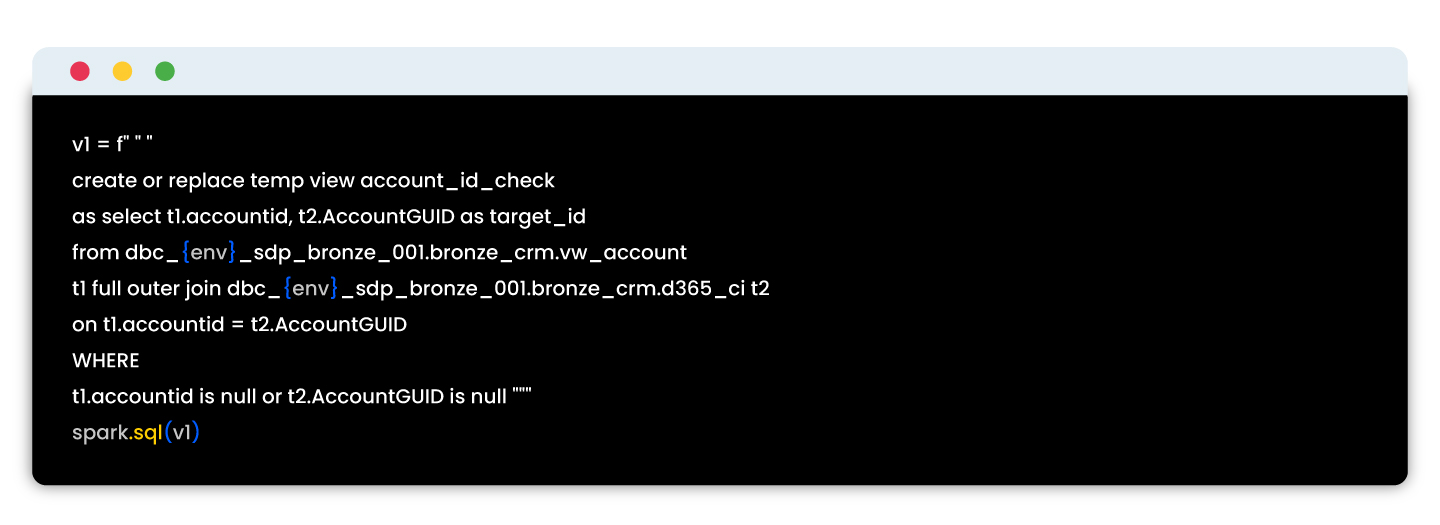
Sample script:

These automated tests reduced QA time, enabled early detection of errors, and ensured reliable validation across migration batches.

Unity Catalog: Governance in the data pipeline

Data governance was as important as data accuracy in this project. Using Databricks Unity Catalog, we centralized security, access, and lineage validation for all datasets.

As part of QA, we validated:

Governance Check QA Objective
Access Control Ensure only authorized users can view Personally Identifiable Information (PII).
Schema Locking Validate that schema versions remain consistent across deployments.
Audit Logging Confirm all data access events are recorded and retrievable.

Testing with Unity Catalog reinforced compliance while maintaining transparency across teams.

End-to-end QA workflow in the migration

Each tool contributed to the overall assurance model:

Step Tool Used QA Outcome
Test scenario creation Zephyr Scale + Jira Linked to user stories for visibility
Data validation Python automation Verified migration accuracy
Governance checks Unity Catalog Validated access control and data lineage
Reporting Zephyr dashboards Weekly QA progress reports


Workflow overview

Stage Process Primary Tool QA Outcome
1 Data migration from legacy CRM Migration scripts Source-to-target data movement
2 Data lake layering Databricks (Bronze → Silver → Gold) Data transformation and enrichment
3 Automated validation Python Record and schema verification
4 Governance enforcement Unity Catalog Role-based access, lineage, and audit logging
5 Test management Zephyr Scale Test execution tracking and reporting
6 Issue management Jira Ticketing, sign-off, and visibility

This structure built confidence through traceability and consistent automation cycles.

Key takeaways from the CRM to D365 transition

  • Treat CRM migration as a business transformation, not just data movement.
  • Use Zephyr Scale for transparent test tracking.
  • Automate frequent checks using Python to maintain speed and precision.
  • Leverage Unity Catalog for governance assurance and compliance.

Final thoughts

Migrating to Microsoft Dynamics 365 while building a modern data stack highlighted how deeply QA intersects with data engineering and governance.

By combining Zephyr Scale, Python automation, and Unity Catalog, we achieved a QA framework that was:

  • Structured for traceability,
  • Automated for efficiency, and
  • Governed for compliance.


This foundation now serves as a blueprint for future enterprise migrations, ensuring data trust from ingestion to insight.

How We Reduced DynamoDB Costs and Improved Latency Using ElastiCache in Our IoT Event Pipeline

Background Summary

For executives, architects, and healthcare leaders exploring AI-powered platforms, this article explains how Inferenz tackled real-time IoT event enrichment challenges using caching strategies. 

By optimizing AWS infrastructure with ElastiCache and Lambda-based microservices, we not only achieved a 70% latency improvement and 60% cost reduction but also built a scalable foundation for agentic AI solutions in business operations. The result: faster insights, lower costs, and an enterprise-ready model that can power predictive analytics and context-aware services.-

Overview

When working with real-time IoT data at scale, optimizing for performance, scalability, and cost-efficiency is mandatory. In this blog, we’ll walk through how our team tackled a performance bottleneck and rising AWS costs by introducing a caching layer within our event enrichment pipeline.

This change led to:

  • 70% latency improvement
  • 60% reduction in DynamoDB costs
  • Seamless scalability across millions of daily IoT events

Business impact for enterprises

  • Faster insights: Sub-second enrichment drives better clinical and operational decisions.
  • Lower TCO: Cutting database costs by 60% reduces IT spend and frees budgets for innovation.
  • Scalability with confidence: Handles millions of IoT events daily without trade-offs.

Future-ready foundation: Supports predictive analytics, patient engagement tools, and compliance reporting.

Scaling real-time metadata enrichment for IoT security events

In the world of commercial IoT security, raw data isn’t enough. We were tasked with building a scalable backend for a smart camera platform deployed across warehouses, offices, and retail stores environments that demand both high uptime and actionable insights. These cameras stream continuous event data in real-time motion detection, tampering alerts, and system diagnostics into a Kafka-based ingestion pipeline.

But each event, by default, carried only skeletal metadata: camera_id, timestamp, and org_id. This wasn’t sufficient for downstream systems like OpenSearch, where enriched data powers real-time alerts, SLA tracking, and search queries filtered by business context.

To make the data operationally valuable, we needed to enrich every incoming event with contextual metadata, such as:

  • Organization name
  • Site location
  • Timezone
  • Service tier / SLA
  • Alert routing preferences

This enrichment had to be low-latency, horizontally scalable, and fault-tolerant to handle thousands of concurrent event streams from geographically distributed locations. Building this layer was crucial not only for observability and alerting, but also for delivering SLA-driven, context-aware services to enterprise clients.

The challenge: redundant lookups, latency bottlenecks, and soaring costs

All organizational metadata such as location, SLA tier, and alert preferences was stored in Amazon DynamoDB. Our initial enrichment strategy involved embedding the lookup logic directly within Logstash, where each incoming event triggered a real-time DynamoDB query using the org_id.

While this approach worked well at low volumes, it quickly unraveled at scale. As the number of events surged across thousands of cameras, we ran into three critical issues:

  • Redundant reads: The same org_id appeared across thousands of events, yet we fetched the same metadata repeatedly, creating unnecessary load.
  • Latency overhead: Each enrichment added ~100–110ms due to network and database round-trips, becoming a bottleneck in our streaming pipeline.
  • Escalating costs: With read volumes spiking during traffic bursts, our DynamoDB costs began to grow rapidly threatening long-term sustainability.

This bottleneck made it clear: we needed a smarter, faster, and more cost-efficient way to enrich events without hammering the database.

Our event pipeline architecture

Layer Technology Purpose
Event Ingestion Apache Kafka Stream raw events from IoT cameras
Processing Logstash Event parsing and transformation
Enrichment Logic Ruby Plugin (Logstash) Embedded custom logic for enrichment
Org Metadata Store Amazon DynamoDB Source of truth for organization data
Caching Layer AWS ElastiCache for Redis Fast in-memory cache for org metadata
Search Index Amazon OpenSearch Service Stores enriched events for analytics

Our solution: using AWS ElastiCache for read-through caching

To reduce DynamoDB dependency, we implemented read-through caching using AWS ElastiCache for Redis. This managed Redis offering provided us with a high-performance, secure, and resilient cache layer.

New enrichment flow:

  1. Raw event is read by Logstash from Kafka
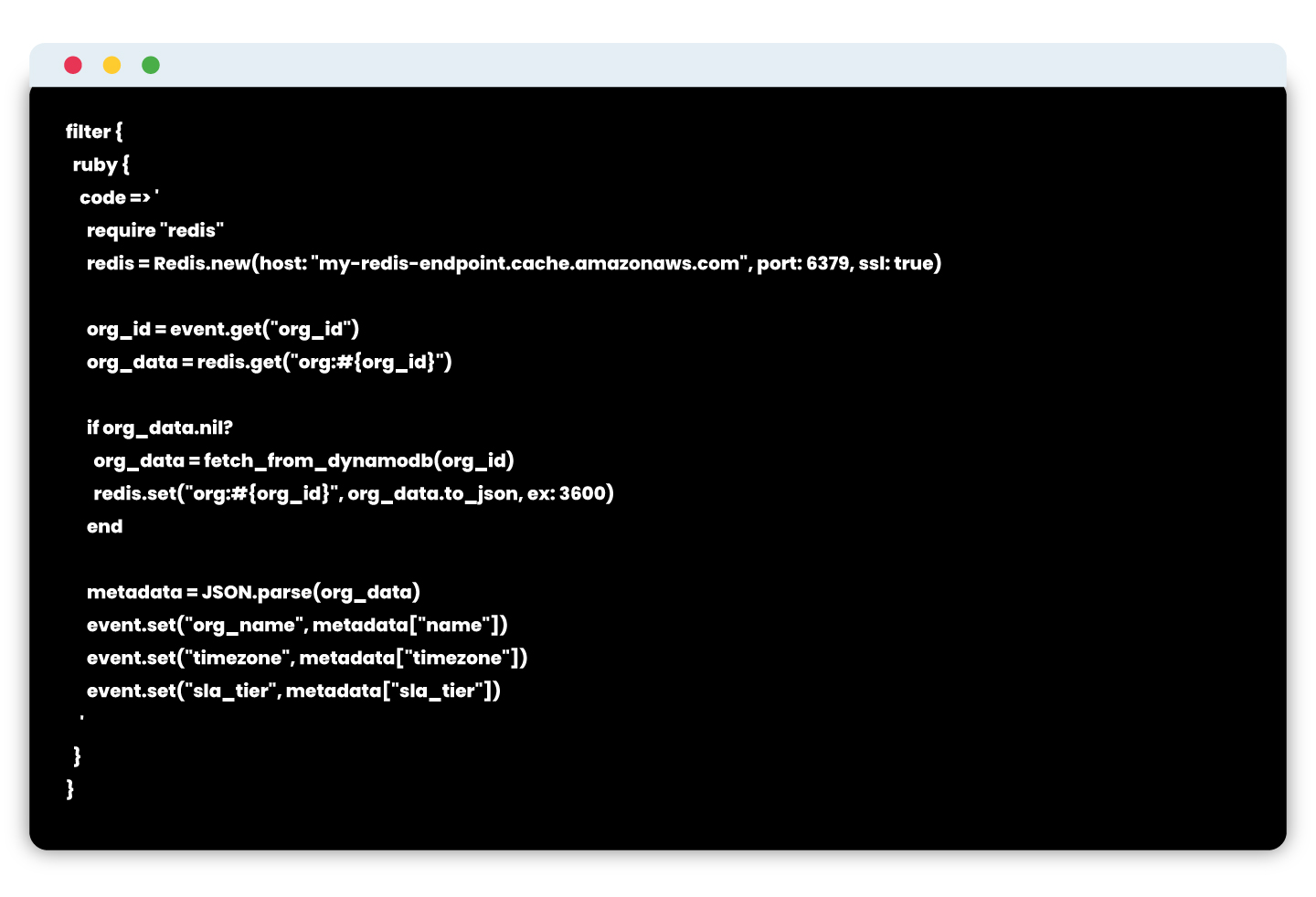
  2. Inside a custom Ruby filter:
    • Check ElastiCache for cached org metadata.
    • If cache hit → use cached data.
    • If cache miss → query DynamoDB, then write to ElastiCache with TTL.
  3. Enrich the event and push to OpenSearch.

Logstash snippet using ElastiCache

Note: ElastiCache is configured inside a private subnet with TLS enabled and IAM-restricted access.

Results: performance and cost improvements

After integrating ElastiCache into the enrichment layer, we saw immediate improvements in both speed and cost.

Metric Before (DynamoDB Only) After (ElastiCache + DynamoDB)
Avg. DynamoDB Reads/Minute ~100,000 ~20,000 (80% reduction)
Avg. Enrichment Latency ~110 ms ~15 ms
Cache Hit Ratio N/A ~93%
OpenSearch Indexing Lag ~5 seconds <1 second
Monthly DynamoDB Cost $$$ (~60% savings)


Enterprise-grade benefits of using ElastiCache

  • In-memory speed: Sub-millisecond access time
  • TTL-based invalidation: Ensures freshness without complexity
  • Secure access: Deployed inside VPC with TLS and IAM controls
  • High availability: Multi-AZ replication with automatic failover
  • Integrated monitoring: CloudWatch metrics and alarms for hit/miss, memory usage

Scaling smarter: enrichment as a stateless microservice

As our event volume and platform complexity grew, we realized our architecture needed to evolve. Embedding enrichment logic directly inside Logstash limited our ability to scale, debug, and extend functionality. The next logical step was to offload enrichment to a dedicated, stateless microservice, giving us clearer separation of concerns and unlocking platform-wide benefits.

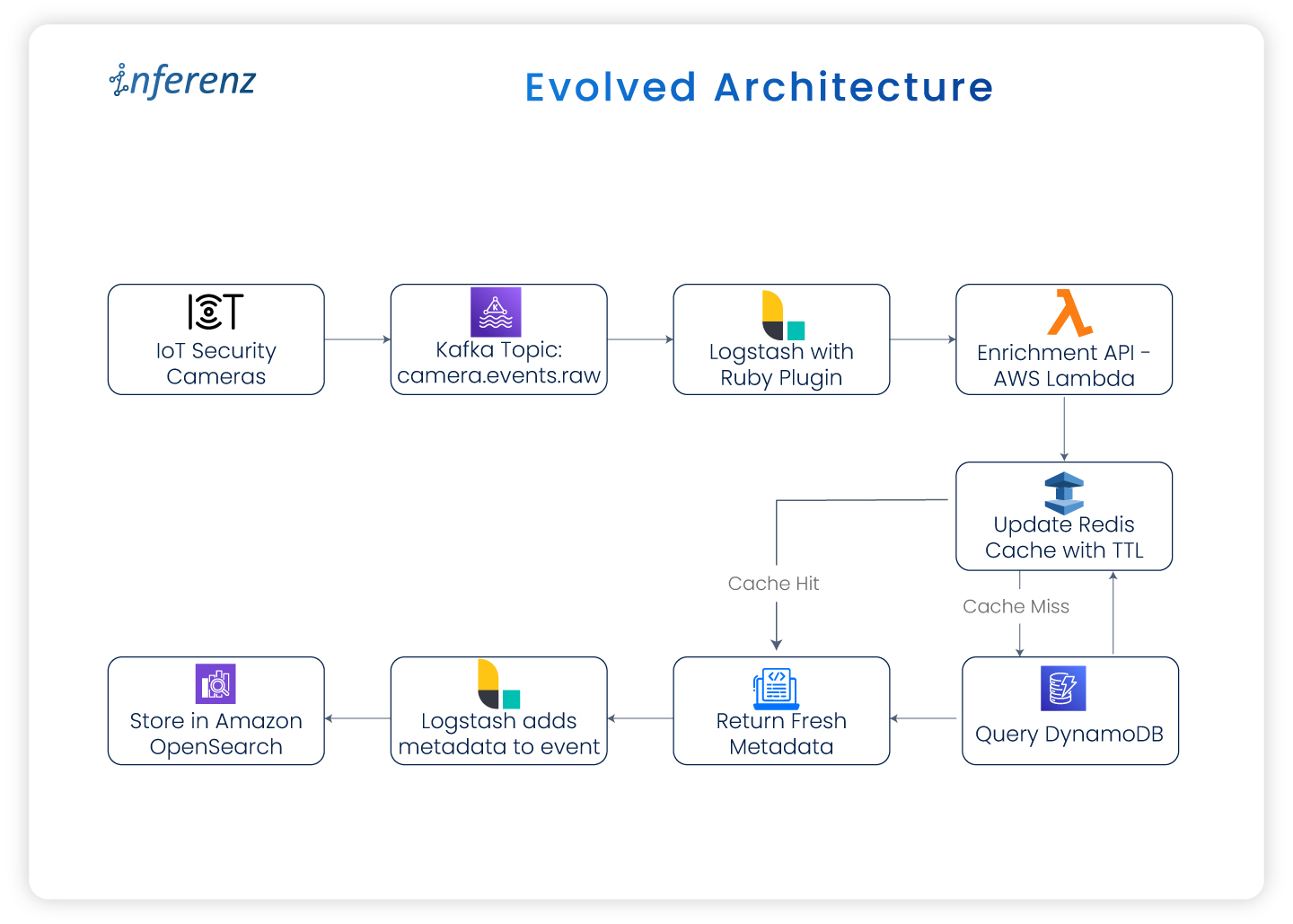
Evolved architecture:

Whether deployed as an AWS Lambda function or a containerized service, this microservice became the single source of truth for enriching events in real time.

Output flow description:

  • Cameras → Kafka
  • Kafka → Logstash
  • Logstash → AWS Lambda Enrichment
  • Lambda → Redis (ElastiCache)
    • If cache hit → Return metadata
    • If cache miss → Query DynamoDB → Update cache → Return metadata
  • Logstash → OpenSearch

Why it worked: key benefits

  • Decoupled logic:
    By removing enrichment from Logstash, we gained flexibility in testing, deploying, and scaling independently.
  • Version-controlled rules:
    Enrichment logic could now be maintained and versioned via Git making schema updates traceable and deployable through CI/CD.
  • Reusable across teams:
    The microservice exposed a central API that could be leveraged not just by Logstash, but also by alerting engines, APIs, and other consumers.
  • Improved observability:
    With AWS X-Ray, CloudWatch dashboards, and retry logic in place, we had deep visibility into cache hits, fallback rates, and enrichment latency.

Enterprise-grade security & monitoring

To ensure the new design was production-ready for enterprise environments, we baked in security and monitoring best practices:

  • TLS-in-transit enforced for all connections to ElastiCache and DynamoDB
  • IAM roles for fine-grained access control across Lambda, Logstash, and caches
  • CloudWatch metrics and alarms for Redis hit ratio, memory usage, and fallback load
  • X-Ray tracing enabled for full latency transparency across the enrichment path

This architecture proved to be robust, cost-effective, and scalable handling millions of events daily with low latency and high reliability.

From optimization to transformation

While caching solved immediate performance and cost challenges, its broader value lies in enabling enterprise-grade AI adoption. By combining IoT enrichment with caching, even healthcare organizations can unlock:

  • Predictive patient care (anticipating risks from real-time signals)
  • Automated compliance reporting for HIPAA and SLA adherence
  • Scalable patient-caregiver coordination through AI-driven scheduling and alerts

This architecture is a blueprint for how agentic AI can operate at scale in healthcare ecosystems.

Conclusion

Introducing caching into the enrichment pipeline delivered more than performance gains. By adopting AWS ElastiCache with a microservice-based model, the system now enriches millions of IoT events with sub-second speed while keeping costs under control. For enterprises, this architecture translates into faster insights for caregivers, stronger SLA compliance, and predictable operating costs.

The design also creates a future-ready foundation for agentic AI in enterprises. Enriched data can now flow directly into predictive analytics, business tools, and compliance systems. Instead of reacting late, organizations can respond to real-time signals with agility and confidence.

At Inferenz, we view caching as a strategic enabler for enterprise-grade AI. It allows security platforms to be faster, more resilient, and prepared for the next wave of intelligent automation.

Key takeaways

  • Cache repeated lookups like org metadata to reduce both latency and cloud database costs
  • Use ElastiCache as a production-grade, scalable caching layer
  • Decouple enrichment logic using microservices or Lambda for better maintainability and control
  • Monitor cache hit ratios and fallback patterns to tune performance in production

As your system grows, always ask: “Is this database call necessary?”
If the data is static or semi-static, caching might just be your smartest optimization.

FAQs

Q1. Why is caching so important in IoT event pipelines?
Caching eliminates repetitive database queries by storing frequently accessed metadata in memory. This ensures enriched event data is available instantly, improving response times for alerts, monitoring dashboards, and downstream analytics.

Q2. How does caching support advanced automation in IoT systems?
With metadata readily available in real time, IoT platforms can automate responses such as triggering alerts, updating monitoring tools, or routing events to the right teams without delays caused by database lookups.

Q3. What measurable results did this approach deliver?
Latency improved by 70%, database read costs dropped by 60%, and the pipeline scaled efficiently to millions of daily events. These gains lowered infrastructure spend while delivering faster, more reliable event processing.

Q4. How does the microservice model add value beyond speed?
Moving enrichment logic into a stateless microservice allowed independent scaling, version control, and CI/CD deployments. It also made enrichment logic reusable across other services like alerting engines, APIs, and analytics platforms.

Q5. How is data accuracy and security maintained in this setup?
TTL policies refresh cached metadata regularly, keeping event enrichment accurate. All services run inside a private VPC with TLS encryption, IAM-based access controls, and CloudWatch monitoring for cache performance and reliability.

Q6. Can this architecture support predictive analytics in other industries?
Yes. Once enrichment happens in real time, predictive models can be applied across industries—whether analyzing security camera feeds, monitoring industrial sensors, or tracking retail operations—to anticipate issues and optimize responses.

Data Observability in Snowflake: A Hands-On Technical Guide

Background summary

In the US data landscape, ensuring accurate, timely, and trustworthy analytics depends on robust data observability. Snowflake offers an all-in-one platform that simplifies monitoring data pipelines and quality without needing external systems. 

This guide walks US data engineers through practical observability patterns in Snowflake: from freshness checks and schema change alerts to advanced AI-powered validations with Snowflake Cortex. Build confidence in your data delivery and accelerate decision-making with native Snowflake tools.-

Introduction to data observability

Data observability is the proactive practice of continuously monitoring the health, quality, and reliability of your data pipelines and systems without manual checks. For US-based data teams, this means answering critical operational questions like:

  • Is the daily data load complete and on time?
  • Are schema changes breaking pipeline logic?
  • Are key metrics stable or exhibiting unusual drift?
  • Are these pipeline resources being queried as expected?

Replacing outdated scripts with automated, real-time observability reduces risk and speeds issue resolution.

Why Snowflake is the ideal platform for data observability in the US?

Snowflake’s unified architecture brings data storage, processing, metadata, and compute resources into one scalable cloud platform, especially beneficial for US enterprises with complex compliance and scalability requirements. Key advantages include:

  • Direct access to system metadata and query history for real-time insights.
  • Built-in Snowflake Tasks for scheduling observability queries without external jobs.
  • Snowpark support to embed Python logic for custom anomaly detection and validation.
  • Snowflake Cortex, a game-changing AI observability tool with native Large Language Model (LLM) integration for intelligent data evaluation and alerting.
  • Seamless integration with popular US monitoring and communication tools such as Slack, PagerDuty, and Grafana.

These features empower US data engineers to build scalable observability frameworks fully on Snowflake.

Core observability patterns to implement in Snowflake

1. Data freshness monitoring

Verify that your critical tables update as expected daily with timestamp comparisons.
By scheduling this as a Snowflake Task and logging results, you catch delays early and comply with SLAs vital for US business responsiveness.

2. Trend monitoring with row counts

Sudden spikes or drops in row counts can signal data quality issues. Collect daily counts and compare to a rolling 7-day average. Use Snowflake Time Travel to audit past states without complex bookkeeping.

3. Schema change detection

Changes in table schemas can break consuming applications.
Snapshotted regularly, this helps detect unauthorized or accidental alterations.

4. Value and distribution anomalies via Snowpark

Leverage Python within Snowpark to check data distributions and business logic rules, such as:

  • Null value rate spikes
  • Unexpected new categorical values
  • Numeric outliers beyond thresholds

For US compliance or finance sectors, these anomaly detections support regulation-ready controls.

5. Advanced AI checks with Snowflake Cortex

Snowflake Cortex enables embedding LLMs directly in SQL to evaluate complex data conditions naturally and intelligently. 

This eliminates complex manual rules while providing human-like explanations for data integrity, rising in demand across US enterprises with AI-driven reporting .


How it works?

The basic idea is to leverage LLMs to evaluate data the way a human might—based on instructions, patterns, and past context. Here’s a deeper look at how this works in practice:

  1. Capture metric snapshots
    You gather the current and previous snapshots of key metrics (e.g., client_count, revenue, order_volume) into a structured format. These could come from daily runs, pipeline outputs, or audit tables.
  2. Convert to JSON format
    These metric snapshots are serialized into JSON format—Snowflake makes this easy using built-in functions like TO_JSON() or OBJECT_CONSTRUCT().
  3. Craft a prompt with business logic
    You design a prompt that defines the logic you’d normally write in Python or SQL. For example:

  4. Invoke the LLM using SQL
    With Cortex, you can call the LLM right inside your SQL using a statement like:\

  5. Interpret the output
    The response is a natural language or simple string output (e.g., ‘Failed’, ‘Passed’, or a full explanation), which can then be logged, flagged, or displayed in a dashboard.

Building a comprehensive observability framework in Snowflake

A robust framework typically includes:

  • Config tables defining what to monitor and rules to trigger alerts.
  • Scheduled SNOWFLAKE Tasks to execute data quality checks and log metrics.
  • Centralized metrics repository tracking historical results.
  • Alert notifications routed to US-favored channels (Slack, email, webhook).
  • Dashboards (via Snowsight, Snowpark-based apps, Grafana integrations) visualizing trends and failures in real-time.

Snowflake’s 2025 innovations such as Snowflake Trail and AI Observability increase visibility into pipelines, enhancing time-to-detect and time-to-resolve issues for US data teams.

Conclusion

Data observability is crucial for US data engineering teams aiming for trustworthy analytics and regulatory compliance. Snowflake provides an unparalleled integrated platform that brings together data, metadata, compute, and AI capabilities to monitor, detect, and resolve data quality issues seamlessly. By implementing the observability strategies outlined here, including Snowflake Tasks, Snowpark, and Cortex, data teams can reduce manual overhead, accelerate root-cause analysis, and ensure data confidence. Snowflake’s continuous innovation in observability cements its position as the go-to cloud data platform for US enterprises seeking operational excellence and trust in their data pipelines.


Frequently asked questions (FAQs)

Q1: What is data observability in Snowflake?
Data observability in Snowflake means continuously monitoring and analyzing your data pipelines and tables using built-in features like Tasks, system metadata, and Snowpark to ensure data freshness, schema stability, and data quality without manual checks.

Q2: How can I schedule data quality checks in Snowflake?
Using Snowflake Tasks, you can schedule SQL queries or Snowpark procedures to run data validations periodically and log results for monitoring trends and alerting.

Q3: What role does AI play in Snowflake observability?
Snowflake Cortex integrates Large Language Models (LLMs) natively within Snowflake SQL, enabling adaptive, intelligent assessments of data health that simplify complex rule writing and improve anomaly detection accuracy as part of data and AI strategy.

Q4: Can Snowflake observability tools help with compliance?
Yes, by automatically tracking data quality metrics, schema changes, and anomalies with audit trails, Snowflake observability supports regulatory requirements for data accuracy and traceability, critical for US healthcare, finance, and retail sectors.

Q5: What third-party integrations work with Snowflake observability?
Snowflake’s observability telemetry and event tables support OpenTelemetry, allowing integration with US-favored monitoring tools like Grafana, PagerDuty, Slack, and Datadog for alerts and visualizations.

The Importance of PII/PHI Protection in Healthcare

Background summary

This article explains how a healthcare data team secured PII/PHI in an Azure Databricks Lakehouse using Medallion Architecture. It covers encryption at rest and in transit, column-level encryption, data masking, Unity Catalog policies, 3NF normalization for RTBF, and compliance anchors for HIPAA and CCPA.-


Introduction

In healthcare, trust starts with how you protect patient data. Every lab result, claim, and encounter add to a record that links back to a person. If that link leaks, the cost is more than penalties. It affects patient confidence and care coordination.
In 2024, U.S. healthcare reported 725 large breaches, and PHI for more than 276 million people was exposed. That is an average of over 758,000 healthcare records breached per day, which shows how urgent this problem has become.
With cloud analytics and healthcare data lakes now standard, teams must protect Personally Identifiable Information (PII) and Protected Health Information (PHI) through the entire pipeline while meeting HIPAA, CCPA, and other rules.
This article shows how we secured PII/PHI on Azure Databricks using column-level encryption, data masking, Fernet with Azure Key Vault, and Medallion Architecture across Bronze, Silver, and Gold layers. The goal is simple. Keep data useful for analytics, but safe for patients and compliant for auditors. Microsoft and Databricks outline the technical controls for HIPAA workloads, including encryption at rest, in transit, and governance.

The challenge: securing PII/PHI in a cloud data lake

Healthcare data draws attackers because it contains identity and clinical context. The largest U.S. healthcare breach to date affected about 192.7 million people through a single vendor incident, and it disrupted claims at a national scale. The lesson for data leaders is clear. You must plan for data loss, lateral movement, and recovery, not only for perimeter events.

Our needs were twofold:

  • Data security
    Protect PII/PHI as it moves from ingestion to analytics and machine learning.
  • Compliance
    Meet HIPAA, CCPA, and internal standards without slowing down reporting.

We adopted end-to-end encryption and column-level security and enforced them per layer using Medallion Architecture:

Bronze

Raw, encrypted data with rich lineage and tags.

Silver

Cleaned, standardized, 3NF-normalized data with PII columns clearly marked.

Gold

Aggregated, masked datasets for BI and data science, with policy-driven access and role-based access control.

For scale, we added Unity Catalog controls and policy objects that apply at schema, table, column, and function levels. This helps enforce row filters and column masks without custom code in every job.

Protecting PII/PHI: encryption at every stage

We used three layers of protection so PII/PHI stays safe and still usable.

Encryption in transit

Data travels over TLS from sources to Azure Databricks. For cluster internode traffic, Databricks supports encryption using AES-256 over TLS 1.3 through init scripts when needed. This reduces exposure during shuffle or broadcast.

Encryption at rest

Raw data in Bronze and refined data in Silver/Gold stay encrypted at rest with AES-256 using Azure storage service encryption. Azure’s model follows envelope encryption and supports FIPS 140-2 validated algorithms. This satisfies common control requirements for HIPAA encryption standards and workloads.

Column-level encryption

This is the last mile. We encrypted specific fields that contain PII/PHI.

  • Identify sensitive columns. With data owners and compliance teams, we tagged names, contact details, SSNs, MRNs, and any content that can re-identify a person.
  • Fernet UDFs on Azure Databricks. We used Fernet in a User-Defined Function so encryption is non-deterministic. The same input encrypts to different outputs, which reduces linking risk across tables.
  • Azure Key Vault for key management. We stored encryption keys in Azure Key Vault and used Databricks secrets for retrieval. We set rotation, separation of duties, and least privilege to keep access tight. Microsoft documents customer-managed key options for the control plane and data plane.

Together, these patterns form our Azure Databricks PII encryption approach and support HIPAA control mapping.

Identifying PII in healthcare data: a collaborative and automated approach

PII storage

  • Collaboration with business teams
    Subject-matter experts show which fields matter most for care and billing. They confirm what counts as PII/PHI by dataset and by jurisdiction, since a payer file and an EHR table carry different fields and retention rules. We document these rules in a data catalog entry and bind them to  Unity Catalog policies.
  • Automated Python scripts for data profiling
    Our scripts look for regex patterns, outliers, and value density that point to contact info or identifiers. We score each column for PII likelihood and tag it at ingestion. We also write the score and the supporting evidence to the catalog. That way, audits can see when we marked a column and why.
  • Analyzing nested data for sensitive information
    Clinical feeds often arrive as JSON or XML with nested groups. We flatten with stable keys, then scan inner nodes. We also search free-text fields for names or IDs. The same rules apply: detect, tag, then protect.
  • What we do with tags
    Tags flow into policies for masking, access control, and key selection. This reduces manual steps and keeps rules consistent as teams add new feeds.

This practice underpins data governance in healthcare and makes PII/PHI classification repeatable.

Databricks Unity Catalog: Building a Unified Data Governance Layer in Modern Data Platforms

Background summary

Modern healthcare and homecare organizations are struggling with scattered data, compliance pressure, and rising operational costs. A unified governance framework like Databricks Unity Catalog helps CIOs secure PHI, enforce HIPAA-ready controls, and streamline analytics across teams. By centralizing access, metadata, and lineage, it transforms the healthcare data platform into a scalable, trusted foundation for care delivery.-Modern healthcare systems are rich with data but often poor in data governance. From patient records and billing data to IoT streams and clinical notes, information is scattered across teams, tools, and cloud environments. This fragmentation increases compliance risks, slows down analytics, and creates operational bottlenecks. 

Databricks Unity Catalog changes that. As a modern data governance solution built for platforms like Databricks, it provides centralized access control, audit trails, metadata management, and fine-grained lineage—all critical for healthcare CIOs navigating HIPAA, payer audits, and workforce scaling. 

In this article, we share how Inferenz, a data-to-AI solutions provider, rolled out Unity Catalog across its Azure-based lakehouse environments. You’ll find architectural insights and real-world production lessons to align governance with clinical and operational goals. 

Problem statement

Before adopting Unity Catalog, Inferenz’s data platform faced several critical challenges: 

  • Data assets were scattered across multiple workspaces with inconsistent schema definitions 
  • Permissions were often defined manually in notebooks, leading to uncontrolled access sprawl 
  • Compliance teams faced audit fatigue due to the lack of visibility into access and lineage 
  • Schema drift frequently occurred between dev, staging, and production environments 

These issues led to data sprawl, poor discoverability, increased operational risk, and slow onboarding of analysts and engineers. 

What we did 

To standardize governance across its healthcare and finance data, Inferenz implemented Unity Catalog using a CI/CD-driven, modular strategy: 

  • Deployed Azure-backed Unity Catalog metastore at the account level 
  • Created environment-specific catalogs: inferenz_dev, inferenz_qa, inferenz_prod 
  • Organized schemas by domain (e.g., care_quality, claims_analytics, rfm_analytics) 
  • Used SCIM groups (like data_analysts, clinical_qa) for access provisioning 
  • Managed Terraform-defined ACLs via GitHub Actions 
  • Enabled automated tagging and classification using naming conventions (e.g., phi_ prefix flags HIPAA data) 
  • Leveraged Databricks lineage capabilities to track data access and propagation across pipelines 

This rollout made governance automatic—not manual—and aligned with regulatory frameworks like HIPAA, GDPR, and SOX. 

Databricks unity catalog in the finance and healthcare domain 

Granular access control for sensitive data 

In both finance and healthcare, granular access control is critical. Unity Catalog supports: 

  • Table-level and column-level permissions 
  • Row-level filters based on user roles (ABAC) 
  • Sensitive fields like SSN or patient names masked for all except approved roles 
  • Temporary access grants with expiration for auditors or research teams 

This is especially valuable when handling PHI or claims data where least-privilege access is non-negotiable. 

  • ed Databricks lineage capabilities to track data access and propagation across pipelines 

This rollout made governance automatic—not manual—and aligned with regulatory frameworks like HIPAA, GDPR, and SOX. 

Databricks unity catalog in the finance and healthcare domain 

Granular access control for sensitive data 

In both finance and healthcare, granular access control is critical. Unity Catalog supports: 

  • Table-level and column-level permissions 
  • Row-level filters based on user roles (ABAC) 
  • Sensitive fields like SSN or patient names masked for all except approved roles 
  • Temporary access grants with expiration for auditors or research teams 

This is especially valuable when handling PHI or claims data where least-privilege access is non-negotiable. 

Metadata, discovery, and audit trails 

Audit readiness is a continuous concern for CIOs. Unity Catalog enables: 

  • Real-time lineage tracking for each query and transformation 
  • Centralized user activity logs—who accessed what and when 
  • Simplified reporting during audits or compliance checks 

Inferenz reduced audit prep time by 70% after implementing automated audit pipelines linked to Unity Catalog logs. 

Secure cross-team collaboration 

Using Delta Sharing and clean rooms, Inferenz enabled secure access across finance, clinical ops, and customer success teams. For example: 

  • Clinical analysts access de-identified patient outcomes data 
  • Finance teams use the same schema to evaluate cost-effectiveness 
  • All teams use governed queries, with full traceability across departments

Use case: real-time risk monitoring in homecare 

A large homecare provider needed real-time monitoring for high-risk patients. Unity Catalog was used to: 

  • Create governed managed tables for patient visits, vitals, and readmission flags 
  • Apply access policies based on clinician roles and region 
  • Track data lineage for downstream predictive risk models 
  • Isolate test, staging, and production pipelines with workspace-catalog bindings 

This ensured scalable analytics while meeting HIPAA and internal audit requirements. 

Centralized Isolation for Regulated Environments 

Centralized isolation for regulated environments workspace-catalog binding 

Workspace-catalog binding is a key feature for enforcing strict data segregation. Inferenz mapped each Databricks workspace to a specific catalog: 

  • dev-dataengineering could only access inferenz_dev 
  • qa-analytics was bound to inferenz_qa 
  • prod-finance and prod-care accessed only their corresponding production catalogs 

Even admin users couldn’t bypass this setup—enforcing airtight isolation between clinical staging and live production environments. 

Managed storage locations 

Databricks unity catalog allows storage control at the catalog or schema level: 

  • Managed tables stored in predefined, access-controlled locations 
  • Policies enforced on both read/write access 
  • Optimizations like auto-compaction and caching improve performance on large healthcare datasets 

For healthcare CIOs, this means reduced risk of accidental PHI exposure and better control over cloud storage costs. 

Data access models: centralized vs. decentralized

Unity Catalog supports both centralized and decentralized data governance, with trade-offs:

Feature  Centralized access  Decentralized access 
Policy management  Single metastore manages all  Local enforcement by entity or team 
Audit trails  Unified across workspaces  Scattered, requires aggregation 
Resilience  May be a single point of failure  More robust, no central bottleneck 
Flexibility  Consistent but less adaptive  Dynamic, context-based 
Compliance  Easier to manage centrally  Harder to control across domains 

For most healthcare and homecare CIOs, centralized access with workspace-catalog bindings offers the right balance of security, simplicity, and control.

Architectural visuals & best practices 

In healthcare, visuals play a big role in helping technical and non-technical stakeholders align. Unity Catalog supports a clean, modular structure that’s easy to explain—and even easier to audit. 

Architecture flow diagram 

Key Layers:

  • Metastore (Control Plane): Single source of truth for all policies, schema, and object access 
  • Catalogs (By Environment): prod_care, qa_finance, dev_ops, etc. 
  • Schemas (By Domain): patient_risk, ehr_exports, care_analytics, claims_costs 
  • Tables/Views: Row- and column-level permissions applied per role group 
  • Lineage Tracking: Enabled via Databricks lineage capabilities; integrated into daily audit logs 

This structure enables HIPAA-compliant access, ensures dataset consistency, and supports rapid scale. 

Centralized vs. decentralized governance: visual breakdown 

Component  Centralized model  Decentralized model 
Access policies  Set at metastore, inherited by all  Custom per catalog or domain 
Workspace binding  Strict and enforced  Flexible, harder to audit 
Audit logs  Streamlined, integrated  Spread across workspaces 
Change management  GitOps + CI/CD pipelines  Manual or local scripts 
Ideal for  Healthcare orgs with strict PHI rules  Research-focused orgs with looser boundaries 

What can healthcare CIOs Do:
Use centralized binding for clinical and operations data. You can selectively decentralize for research units or external partners via Delta Sharing.

Best practices for databricks unity catalog in healthcare 

Area  Recommendation  Why It Matters 
Access Provisioning  SCIM with Azure AD  Scales roles, revokes access instantly on staff exits 
Workspace Binding  One catalog per environment  Keeps dev/test data from touching production 
Privilege Management  Assign to groups, not users  Prevents sprawl and simplifies reviews 
Storage Strategy  Use managed tables over external  Better for lineage, optimization, and compliance 
Audit Readiness  Automate reporting with Databricks lineage capabilities  Cuts compliance prep time 
Data Sharing  Use clean rooms + Delta Sharing  Enables research without PHI leaks 

Data isolation mechanism flow


Data Isolation Mechanism in Unity Catalog

This diagram illustrates the hierarchical structure from the Unity Catalog metastore through catalog and schema boundaries to managed tables, showing how financial and market data are partitioned and isolated. 

Patient onboarding analytics 

Use Case: A multi-location homecare group wanted to analyze ai patient onboarding trends across sites. 

Without unity catalog: 

  • No central record of who accessed patient intake logs 
  • Dev team had access to prod patient data 
  • Lineage for EHR and referral data was incomplete 
  • Audit took 3+ weeks to assemble 

With unity catalog: 

  • Onboarding tables in prod_onboarding catalog, workspace-bound to ops users 
  • phi_ and pii_ fields auto-tagged and masked for analysts 
  • Only care coordinators could run named queries 
  • Audit logs traced access by user, IP, and timestamp 

Result: 

  • Full audit prep in under 2 days 
  • No schema drift in 6 months 
  • Role-based dashboards with zero PHI violations 

Lessons from production: what worked, what didn’t 

Topic  Lesson learned 
Terraform drift  Manual overrides broke pipelines → Switched to GitHub-enforced TF-only deployments 
Workspace binding  Initially blocked test users → Added temporary aliases with staged access 
ACL design  Group creep created confusion → Refactored into read_finance, write_clinical, admin_ops roles 
Lineage tracking  Dynamic SQL broke tracking → Added logic to extract column lineage using Spark instrumentation 
CI/CD gaps  Some pipelines lacked approvers → Added Azure DevOps approval gates 

Conclusion and key insights for healthcare CIOs

Unity Catalog gave Inferenz a framework to enforce privacy, scale self-service, and meet stringent audit demands—without slowing teams down. As an official Databricks partner, we apply these controls across Lakehouse deployments and stay aligned with the latest Summit guidance. 

Outcomes realized 

  • 70% less time spent on audit prep 
  • 2x faster analyst onboarding 
  • 30+ domains migrated into governed, catalogued models 
  • 0 data violations in live patient data environments 

Takeaways for CIOs 

  • Workspace-catalog binding is critical for PHI isolation 
  • SCIM + Terraform = scalable, HR-synced access model 
  • CI/CD pipelines enforce naming, tagging, and audit at source 
  • Delta Sharing + Clean Rooms support secure research use cases 
  • Real-time lineage and metadata visibility reduce compliance stress 

FAQ: unity catalog for healthcare CIOs

  1. How does Unity Catalog support HIPAA compliance in healthcare data platforms?
    Unity Catalog provides fine-grained access control, row- and column-level masking, and automated audit trails that align with HIPAA requirements for PHI protection.
  2. Can Unity Catalog integrate with existing EHR systems and claims data pipelines?
    Yes. Unity Catalog works with structured (claims, EHR exports) and unstructured (clinical notes, PDFs) data, enabling governed ingestion and analytics across the healthcare ecosystem.

  3. How does Unity Catalog prevent data access sprawl in large homecare networks?

    Through workspace-catalog binding and SCIM-based role provisioning, access is tightly scoped by environment, preventing analysts or developers from reaching production PHI unintentionally.
  4. What are the advantages of centralized governance vs. decentralized governance in healthcare?
    Centralized governance simplifies audit prep, enforces consistency, and reduces compliance risk. Decentralized models allow flexibility for research but increase monitoring complexity.
  5. How does Unity Catalog improve caregiver enablement and operational analytics?
    By enabling governed self-service dashboards, frontline caregivers and coordinators can view insights like visit trends, readmission risks, or scheduling metrics—without exposing PHI unnecessarily.
  6. What measurable outcomes can healthcare CIOs expect after deploying Unity Catalog?
    Organizations typically see a 60–70% reduction in audit preparation time, faster analyst onboarding, zero schema drift across environments, and higher confidence in data-driven decision-making.