




Agentic AI in Healthcare: How Can CIOs Plan AI Implementation Across Departments

Background summary

Hospitals and home-health teams face repeat snags across Patient Access, ED, Inpatient Nursing, Radiology, Peri-op, and more. They face messy referrals and coverage checks, alert noise, heavy charting, imaging backlogs, or delays, medication risks, missed visits, claim denials, and late insight from feedback.  

Agentic AI tackles the repeat work behind these issues by reading context, deciding next steps, acting inside your EHR or ERP, and writing back with an audit trail, which speeds flow, reduces errors, and steadies cash. This article maps each department to clear Agentic AI capabilities across departments citing proof points and role-based benefits. -“Keep the lights on, fix the gaps, then let AI take the grunt work.

That quote, shared by a Mid-Atlantic hospital CIO in April, sums up 2025’s mood in health-system IT suites across the U.S. Cost pressure remains high, yet the conversation has moved from whether to apply AI to where first. 

Healthcare needs AI implementation, now! 

A fresh State of the CIOs survey of 906 healthcare IT leaders puts hard numbers behind the chatter: What Healthcare CIOs Care About Most in 2025
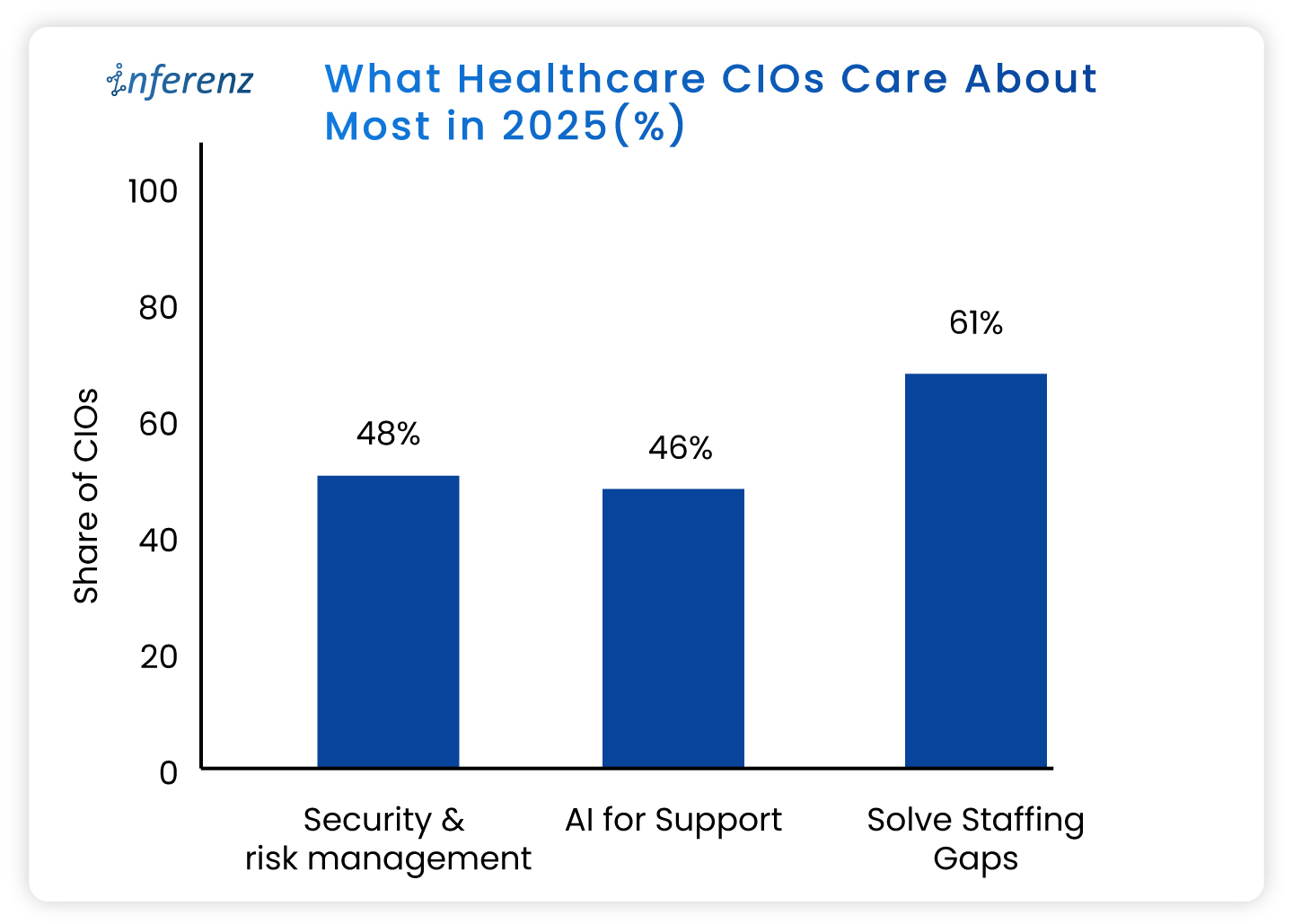
 

  • Solving IT staffing shortages ranks even higher, flagged by 61%.
    • Recruiting and keeping skilled people is harder than finding capital. 
  • AI for support and workflow relief lands at 46 %
    • This trend eclipses past favourites like cloud migrations. 
  • Security and risk management tops the chart at 48%
    • Ransomware worries still wake leaders at 3 a.m. 

What do these healthcare CIO priorities tell us? 

  • Staffing pressure makes patient access automation urgent, not optional. 
    • Leaders want bots that shave minutes, not moon-shot labs that promise a payoff five years out. 
  • AI momentum is practical. 
    • CIOs are testing agent-based tools inside revenue cycle, nursing rosters, and patient access because those areas pay back in months, not quarters or years. 
  • Security first means guardrails are non-negotiable. 
    • HIPAA-compliant AI is a must. The implementations need to comply also with HITRUST, and the new HHS cybersecurity proposals out for comment. 

Read more about the top operational issues that have got CIOs worried.  

Now that priorities are in place, let us see how agentic AI can help you simplify and enhance your operations. 

Agentic AI in healthcare, in full-speed action 

Agentic AI work like small digital co-workers that handle repeat work and quick decisions inside your existing systems. Each agent reads context from the EHR or ERP, decides the next step, takes the action, and writes back with a clear audit trail. That is why it fits real operations.  

The question is: where do you start? 

You start where delays hurt most, set a simple outcome, and let agents carry the routine tasks across three phases of care: Start of Care, Care Delivery, and Post Care. The payoff shows up as fewer handoffs, shorter queues, cleaner data, and faster payment cycles. 

Below, we set the context and the core challenge for the major operational areas. Under each, you will see the exact Agentic AI capabilities that meet healthcare AI use cases, using the solution buckets you shared so you can cross-link or pilot right away. 
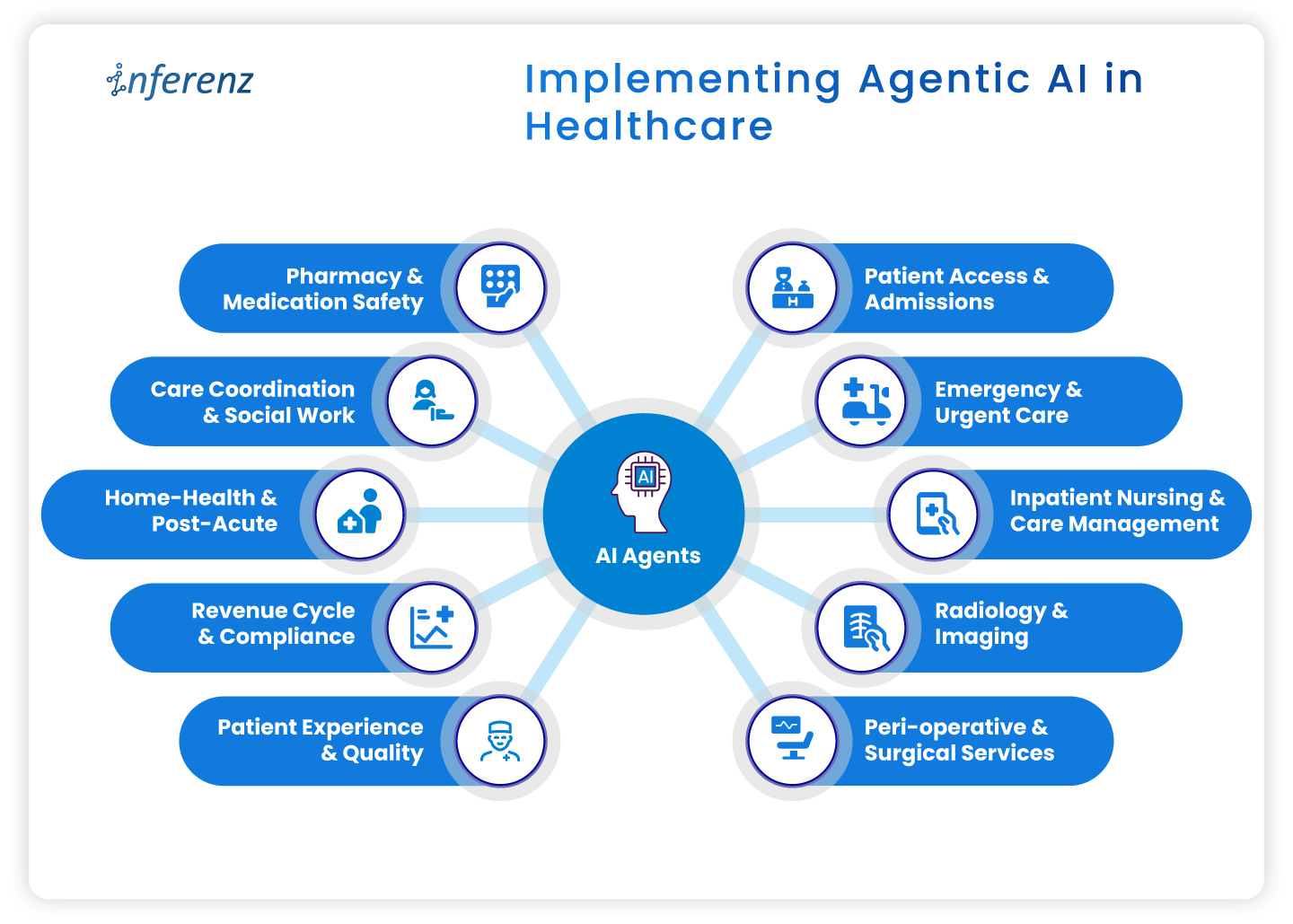
Implementing Agentic AI in HealthcareImplementing agentic AI in healthcare 

  • Patient access & admissions 
  • Emergency & urgent care 
  • Inpatient nursing & care management 
  • Radiology & imaging 
  • Peri-operative & surgical services 
  • Pharmacy & medication safety 
  • Care coordination & social work 
  • Home-health & post-acute 
  • Revenue cycle & compliance 
  • Patient experience & quality 


1. Patient access & admissions 

Context. Intake teams deal with referrals that arrive in mixed formats, copy data across systems, and chase benefits by phone. Queues grow. First visits slip. 

How agentic AI helps. 

  • Referral & digital intake automation pulls, cleans, and routes referral data into the record. 
  • Eligibility checks & prior authorization verifies coverage and starts approvals without back-and-forth. 
  • Patient outreach sends reminders, prep steps, education, and e-consent through the channel patients prefer. 
  • Digital front desk lets patients book, reschedule, and confirm without a call. 
  • SDOH analytics flags transport or language barriers early to ease patient onboarding efforts. 
  • Intake fraud detection prevents duplicate or false identities at the gate. 

Operational outcome.

Faster first appointments, fewer re-keyed fields, cleaner claims from day one. 

2. Emergency & urgent care 

Context. Clinicians need early signal on deterioration. Alert fatigue and manual triage slow action. 

How agentic AI helps. 

  • Active monitoring streams vitals and new labs to an agent that watches for change. 
  • Alert prioritization filters noise and shows only actionable risks to the right role. 
  • Clinical risk modeling scores sepsis, readmit, or fall risk in near real time. 
  • Natural language copilots summarize recent notes so the team sees context on arrival. 

Operational outcome.  

Faster recognition, fewer false alarms, clearer handoffs. 

3. Inpatient nursing & care management 

Context. Nurses split time between bedside tasks and documentation. Care plans go stale when conditions shift. 

How agentic AI helps. 

  • Dynamic care plan personalization updates tasks and goals mid-cycle based on new data. 
  • AI documentation for clinicians drafts visit notes and care plans from voice or short prompts. ICD-10 and HHRG codes are proposed for review. 
  • Alert prioritization keeps clinicians focused on the few patients who need action now. 
  • Patient Caregiver Matching to align with patient and caregiver schedules dynamically and intelligently to stay ahead of patient needs. 

Operational outcome.  

More bedside time, fewer charting hours, faster response on the floor.

4. Radiology & imaging

Context. Studies arrive faster than they are read. Critical cases can wait behind routine ones. Reporting workflows feel heavy. 

How agentic AI helps. 

  • Clinical risk modeling uses order data, vitals, and history to score urgency, so teams handle the right studies first. 
  • Natural language copilots pre-draft structured impressions from key images and prior reports. 
  • AI documentation turns dictated notes into clean, compliant reports ready for sign-off. 

Operational outcome.  

Quicker turnaround, fewer sticky handoffs between techs and readers. 

5. Peri-operative & surgical services

Context. Small delays at pre-op and PACU ripple across the day. Discharge notes and coding often lag. 

How agentic AI helps. 

  • Dynamic care plan personalization keeps surgical pathways current from pre-op to recovery. 
  • Automated discharge & transition summaries create clear handoffs for floor teams and home-health partners. 
  • Billing/Compliance automation converts post-op documentation into coded encounters and gathers needed attachments. 

Operational outcome.  

Tighter case flow, on-time handoffs, faster coding after wheels-out. 

6. Pharmacy & medication safety

Context. Medication lists change often. Renal function, allergies, and interactions can be missed during rush hours. 

How agentic AI helps. 

  • Clinical risk modeling checks interactions and dose risks against labs and history. 
  • Natural language copilots summarize med rec and highlight conflicts for pharmacists. 
  • AI documentation writes structured notes for interventions and education.  

Operational outcome.  

Fewer preventable events and clearer documentation for audits. 

7. Care coordination & social work

Context. Teams try to close loops across clinics, payers, and community partners. Calls and emails eat hours. 

How agentic AI helps. 

  • SDOH analytics surfaces access risks that block progress. A solution like home care analytics works in this regard backed by natural language without dashboards. 
  • Patient outreach sends targeted messages, education, and transportation prompts. 
  • Automated follow-up schedules check-ins by protocol and milestone, then tracks responses. 
  • Feedback mining & sentiment analysis reads messages and surveys to spot issues before they escalate. 

Operational outcome.  

More completed actions per coordinator and fewer avoidable returns. 

8. Home-health & post-acute 

Context. Visit schedules, caregiver skills, and travel time rarely align. Drop-offs after week one are common. 

How agentic AI helps. 

  • Remote monitoring tracks symptoms or device readings between visits and flags change. 
  • Automated follow-up sends check-ins and instructions that match the care plan. 
  • Retention analytics predicts disengagement and suggests outreach that brings patients back. 

Operational outcome.  

More visits per day, steadier adherence, fewer surprises between appointments. 

9. Revenue cycle & compliance 

Context. Missing fields and late attachments create denials. Manual status checks slow payment. 

How agentic AI helps. 

  • AI documentation and billing/ compliance automation convert care notes into coded, compliant claims with proofs attached. 
  • Eligibility checks & prior authorization starts early at intake, then updates status automatically after visits as part of revenue cycle automation. 
  • Natural language copilots draft appeal letters and collect the right excerpts from the record. 

Operational outcome.  

Cleaner first-pass claims, fewer reworks, faster cash. 

10. Patient experience & quality 

Context. Comments from portals, calls, and surveys get scattered. Teams react late. 

How agentic AI helps. 

  • Feedback mining & sentiment analysis aggregates themes and flags risk in near real time. 
  • Automated discharge & transition summaries set clear expectations and reduce confusion. 
  • Longitudinal recovery prediction compares recovery against expected trends and signals when to step in. 

Operational outcome.  

Fewer escalations, clearer communication, tighter loop closure.  

Wrap-up 

Agentic AI pays off when it sits inside daily work, not beside it. Start with one area where delays or denials sting, choose a small outcome, and pilot the single agent that clears the path. Once the metrics move, extend the same logic to the next step in the care cycle. Hours return to care teams, data gets cleaner, and cash moves faster. 

Next step.  

If this flow matches your roadmap, you will certainly benefit having a short, printable CIO checklist for use-case selection, data access, privacy controls, success metrics, and for each healthcare department. 

Frequently asked questions  

1. Where should a CIO start with agentic AI?

Pick one workflow with a clear bottleneck and a single owner. Set one metric, such as first-pass claim rate or ED alert response time, and run a 60–90 day pilot. 

2. How does this connect to existing EHRs and ERPs?

Use standard interfaces like FHIR, HL7, and vendor APIs. Keep writes minimal at first, then expand once audit logs and role permissions are proven. 

3. What data access is required for a pilot?

Limit to the minimum fields that drive the task. Start with read access and a small write scope, enable full audit trails, and review logs weekly. 

4. Is HIPAA compliance realistic with agentic AI?

Yes. Enforce the minimum necessary rule, encrypt PHI in transit and at rest, control access by role, and keep Business Associate Agreements in place. 

5. How fast can we see impact?

Most pilots show movement within one quarter if the metric is narrow. Examples include shorter intake time, faster prior auth, or fewer denials. 

6. What are the top risks to plan for?

Data quality, alert fatigue, and unclear ownership. Reduce risk with a short pilot scope, clear playbooks, and weekly reviews. 

7. How do we prevent biased model behavior?

Test against stratified cohorts, monitor false positives and false negatives by group, and add simple rules that route edge cases to humans. 

8. What does change management for AI in healthcare look like?

Train the smallest group that touches the workflow. Use short job aids, shadow support for two weeks, and a clear feedback path to fix snags. 

9. How do we choose success metrics?

Tie each agent to a single operational number: minutes saved per referral, prior-auth turnaround, denials per 1,000 claims, or readmission alerts resolved. 

10. Do we need a data lake before starting?

No. Start with the systems you have. A lake or Snowflake layer helps at scale, but pilots can work with EHR and ERP feeds. 

11. How much does this affect staffing needs?

Agents reduce manual steps and overtime in targeted areas. Use attrition and reassignment rather than broad cuts to maintain buy-in. 

12. Can we reuse agents across departments?

Yes. Intake, documentation, and follow-up patterns repeat. Standardize connectors and governance so you can lift and place agents with minor tweaks. 

Top operational issues that have got Healthcare CIOs worried

Summary

US hospitals and home-care teams now juggle data silos, paperwork that eats cents of every dollar, and record turnover among doctors, nurses, and caregivers. This article lays out eight pressure points like data fragmentation, revenue leakage, caregiver burnout, and staffing gaps, sharing how each one drains time or cash. It also highlights key Healthcare CIOs challenges and shows how early wins with AI in healthcare and agentic AI hint at practical fixes that reclaim clinical hours, speed payments, and steady the workforce.-America’s healthcare bill keeps climbing, yet the day-to-day experience inside clinics and homes feels under-resourced.  

In 2023, national health spending had already reached $4.9 trillion, equal to 17.6 percent of GDP, and the share is still inching up. Patients see new buildings and apps, but behind the scenes many teams fight the same old bottlenecks. 

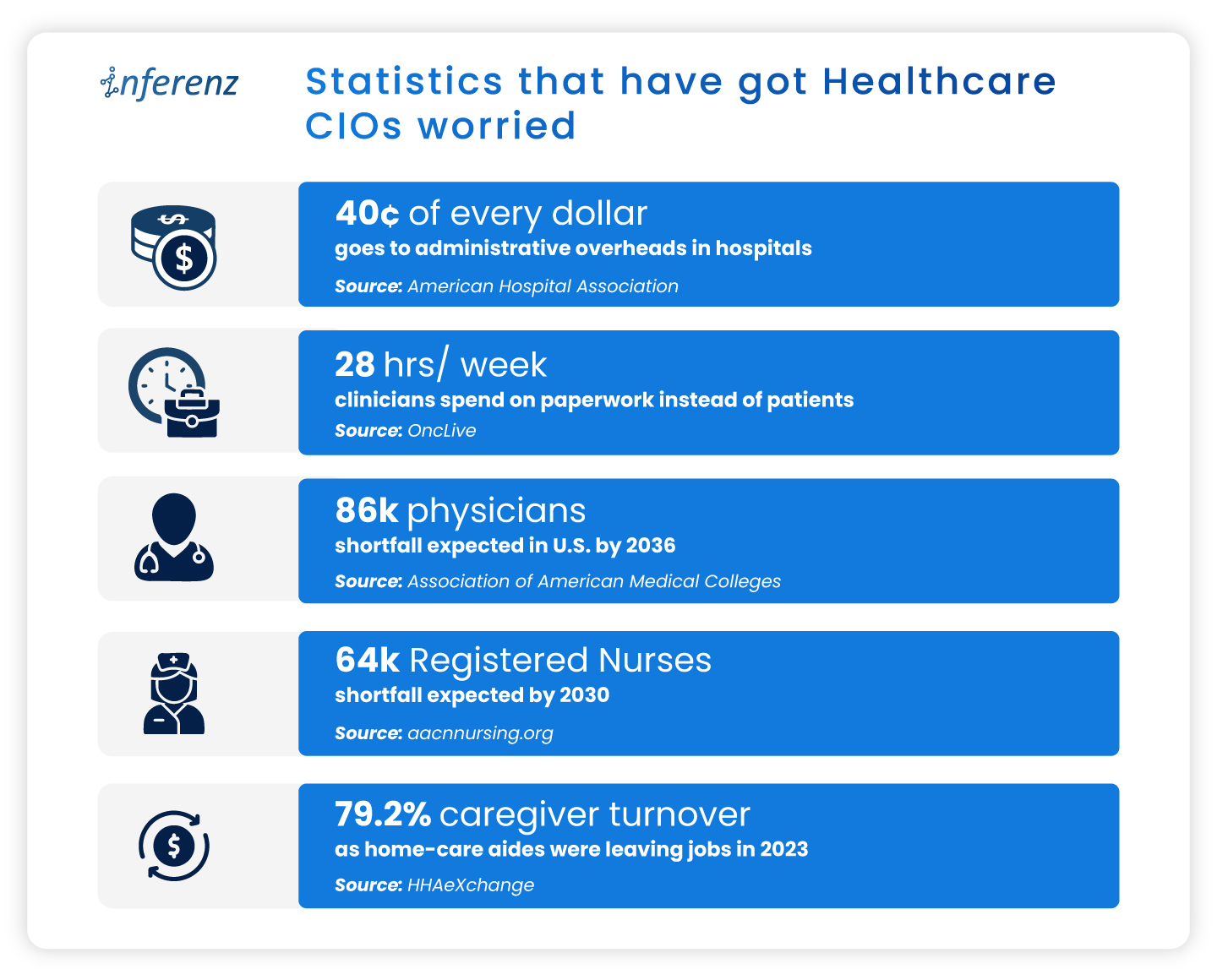
Statistics that have got Healthcare CIOs worried

These cracks in data, dollars, and staffing weaken everything from preventive visits to complex surgeries.  

Early pilots suggest that well-targeted AI in healthcare—think ambient note-taking, predictive scheduling, real-time claims checks, and other caregiver burnout solutionscan relieve some of the load. The sections that follow unpack where the pain is sharpest before we outline, in a later article, how AI can begin to ease it.

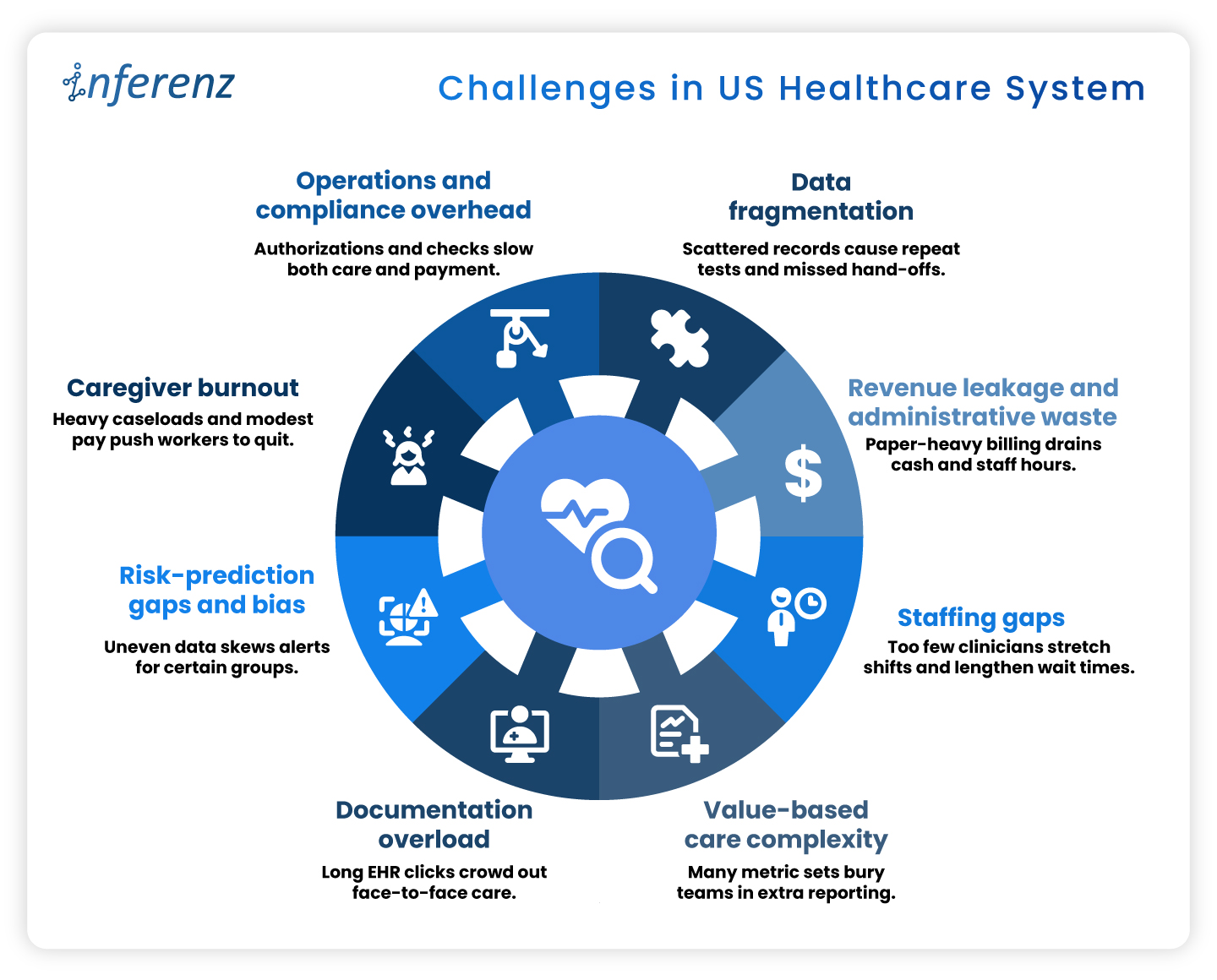
Challenges in US Healthcare System

1. Data Fragmentation

Fragmented electronic records drive at least $200 billion a year in repeat labs, imaging, and other avoidable services. Patients often move between dozens of disconnected systems, and prior tests rarely follow them, leading to duplicate records too.  

Among chronically ill Medicare beneficiaries, those in the mostfragmented quartile run $4,542 higher annual costs and show more preventable hospitalizations than peers with integrated care. Scattered data undermines diagnosis accuracy, pushes redundant work onto staff destroying caregiver connect. You need a handy dedupe AI tool to avoid patient representation and other AI solutions to stop inflated claims that payers later dispute. 

2. Revenue Leakage and Administrative Waste

Hospitals run sophisticated clinical services, yet their business offices often look like paper factories. Prior authorizations, claim edits, and duplicate data entry push invoices back for revision and restart the payment clock. Each rework touches coders, billers, and case managers, draining time that could fund patient-facing roles. 

One hard number shows the scale: administrative costs now consume about 40 percent of every hospital dollar spent. When almost half the budget never reaches a bedside, leaders have less room to raise wages, buy new diagnostic tools, or expand rural outreach. The cycle feeds on itself: tight margins lead to leaner billing teams, which can increase denials and stretch accounts-receivable even further. News flash: Efficient revenue cycle management services are the need of the hour!

3. Staffing Gaps

Clinical talent has become the scarcest supply in health care. Retirement-age physicians leave faster than residency slots can refill them, and many younger clinicians choose outpatient or telemedicine roles over hospital call schedules. Nurses face similar pressures, with heavy workloads and limited autonomy pushing them toward travel contracts or careers outside medicine. 

The Association of American Medical Colleges warns that the United States could be short as many as 86,000 physicians by 2036. Staff shortage drives the system: wait times lengthen, overtime soars, and remaining staff shoulder extra shifts that speed burnout. For home-care agencies, thin rosters translate to missed visits and lost revenue when referrals must be declined. 

4. Value-Based Care Complexity

Linking payment to outcomes sounds simple on paper. In practice, every bonus program carries its own data dictionary, audit trail, and submission portal. Teams juggle dozens of Medicare, Medicaid, and commercial contracts, with different look-back periods and attribution rules. 

A landmark Health Affairs study found that physician practices sink about 15 hours per doctor each week into collecting and reporting quality metrics, at an annual cost of $15.4 billion nationwide. That is nearly two working days lost to spreadsheets instead of patient counseling or chronic-care planning. The hidden toll is morale: clinicians see quality work as vital, yet they resent duplicative forms that rarely inform real-time decisions. 

5. Documentation Overload

Electronic health records promised efficiency but often delivered extra clicks. Templates proliferate, alerts pop up mid-exam, and note bloat forces physicians to scroll through pages of copied text. After clinic closes, many providers log back in from home to finish charts. 

Recent research in JAMA Network Open shows primary-care doctors spending a median 36.2 minutes in the EHR for a 30-minute visit. Such documentation overload squeezes appointment slots, delays billing, and fuels frustration on both sides of the screen. Patients wait longer for follow-up calls, and clinicians lose family time, accelerating departure from full-time practice. 

6. Risk-Prediction Gaps and Bias

Predictive models guide everything from sepsis alerts to readmission flags, but they inherit the blind spots of the data beneath them. If some groups receive fewer tests, algorithms may label truly sick patients as low risk. Poor signal leads to poor care and potential legal exposure. 

A University of Michigan study found that white emergency patients received up to 4.5 percent more diagnostic tests than Black patients with similar presentations. When such data bias in records train AI, the resulting tools underrate risk for under-tested populations and can widen outcome gaps that policy aims to shrink. Predictive staffing in healthcare suffers on this front, a lot. 

7. Caregiver Burnout

Home-care aides, nurses, and therapists anchor community health, yet their jobs are physically taxing and poorly paid. Heavy caseloads, unpredictable schedules, and emotional labor drive many to exit the field. Agencies then scramble to recruit replacements, often at higher cost, instead of looking for effective caregiver burnout solutions. 

Industry tracking shows caregiver turnover in home care reached 79.2 percent last year. Nearly four in five workers left within twelve months, erasing institutional knowledge and breaking continuity for vulnerable clients. High churn forces agencies to reject new referrals or rely on overtime, compounding stress for those who remain. 

8. Operations and Compliance Overhead

Regulatory safeguards protect patients but can swamp providers in forms. Prior authorization, eligibility checks, and electronic visit verification (EVV) each add data steps between care and payment. Staff must phone insurers, upload documents, and wait for green lights before proceeding. 

An American Medical Association survey reports that 94 percent of physicians say prior authorization delays access to needed care. These holdups lead to cancelled procedures, rehospitalizations, and frustrated families. Organizations also pay for the privilege: teams spend hours per week on approvals that rarely change clinical decisions, yet every stalled claim inflates days-cash-on-hand risk. 


Why AI Sits at the Pivot Point 

Taken together, the pressure points above form a single pattern: vital clinical minutes vanish into data hunts, billing loops, and staffing scrambles. Every home care agency especially need to take note that 

  •  When intake stalls, a patient’s first touch runs late.  
  • When documentation drags, the visit itself shrinks.  
  • When claims wait in limbo, funds for follow-up dry up.  

The system feels these shocks end to end. 

Agentic AI in Healthcare

Agentic AI offers a direct counterweight because it slots into each phase of care: 

  • Start of care: Conversational intake tools collect histories, verify coverage, and label high-risk cases before the first appointment. Clean data flows forward instead of fragmenting at the gate. 
  • Point of care: Ambient notetaking, real-time risk scores, and predictive staffing engines give clinicians more face time and safer shift patterns. The visit becomes richer while administrative drag drops. 
  • Post care: Automated coding, denial prediction, and longitudinal analytics speed payment and flag avoidable readmissions through AI-based patient engagement software. Dollars return sooner, lessons cycle back into quality plans, and staff energy stays on patients rather than portals. 


Advanced analytics, ambient clinical documentation, predictive scheduling, and automated claims triage each target the pain points above. Early results such as Agentic AI scribes cutting note-taking time and fairness-aware models closing bias gaps, hint at relief.  

The next article will map problem-solution pairs in depth; for now, it is enough to see that AI, applied responsibly, can clear data blockages, shorten queues, and free human attention for care itself. 

Frequently Asked Questions 

1. How does AI in healthcare cut the daily paperwork load?
Smart tools pull data from multiple EHRs, fill forms, and flag missing fields in real time. Clinicians review and sign instead of typing from scratch, easing the healthcare administrative burden without changing clinical workflows. 

2. What makes agentic AI different from other healthcare AI systems?
Agentic models work as goal-driven “mini agents.” They read context, decide next steps, and update tasks across apps—ideal for EHR integration or claim edits that need many small, fast decisions. 

3. Can automation really fix revenue leaks?
Yes. Modern revenue cycle management services combine denial prediction with inline coding checks. They stop errors before submission, improve first-pass rates, and speed cash back to hospitals. 

4. How do hospitals use artificial intelligence scheduling to close staffing gaps?
Algorithms study census trends, PTO requests, and overtime patterns. The result is predictive staffing healthcare rosters that match demand hour by hour, which lowers burnout and agency-nurse spend. 

5. What role does ambient clinical documentation play at the point of care?
Voice AI listens during the visit, writes concise notes, and posts them to the chart. Providers keep eye contact with patients and note lag drops—often by more than half. 

6. How can a home care agency tackle 79 % caregiver turnover?
Platforms that blend caregiver burnout solutions with fair route planning let aides pick shifts, cut idle travel, and get instant mileage pay. Happier schedules improve 90-day retention. 

7. Why should payers and providers care about AI for prior authorization now? 
Automated PA engines read clinical notes, fill payer forms, and chase status updates. They shorten approval windows from days to minutes, freeing staff for higher-value tasks and improving patient engagement software scores. 

8. What do top healthcare AI companies focus on when starting a project? 
They begin with data quality. Clean data feeds every downstream model, whether for infection alerts or remote-care analytics. A solid pipeline beats flashy features that sit on bad inputs. 

Building ‘Unify’- The Smart Data Dedupe App with Useful Lessons in Snowflake Native App Development

Summary

Healthcare data teams want apps that live where their data lives. Building Unifyone of our first Snowflake Native Apps—showed us why that choice solves headaches around security, speed, and trust. Here we break down each stage of the build for the deduplication app, share the problems we met, and list the habits that kept us on track. -Most healthcare data management apps still live outside the warehouse, pulling rows across networks and piling audit tasks onto already-tired security teams.  

We wanted a cleaner path.  

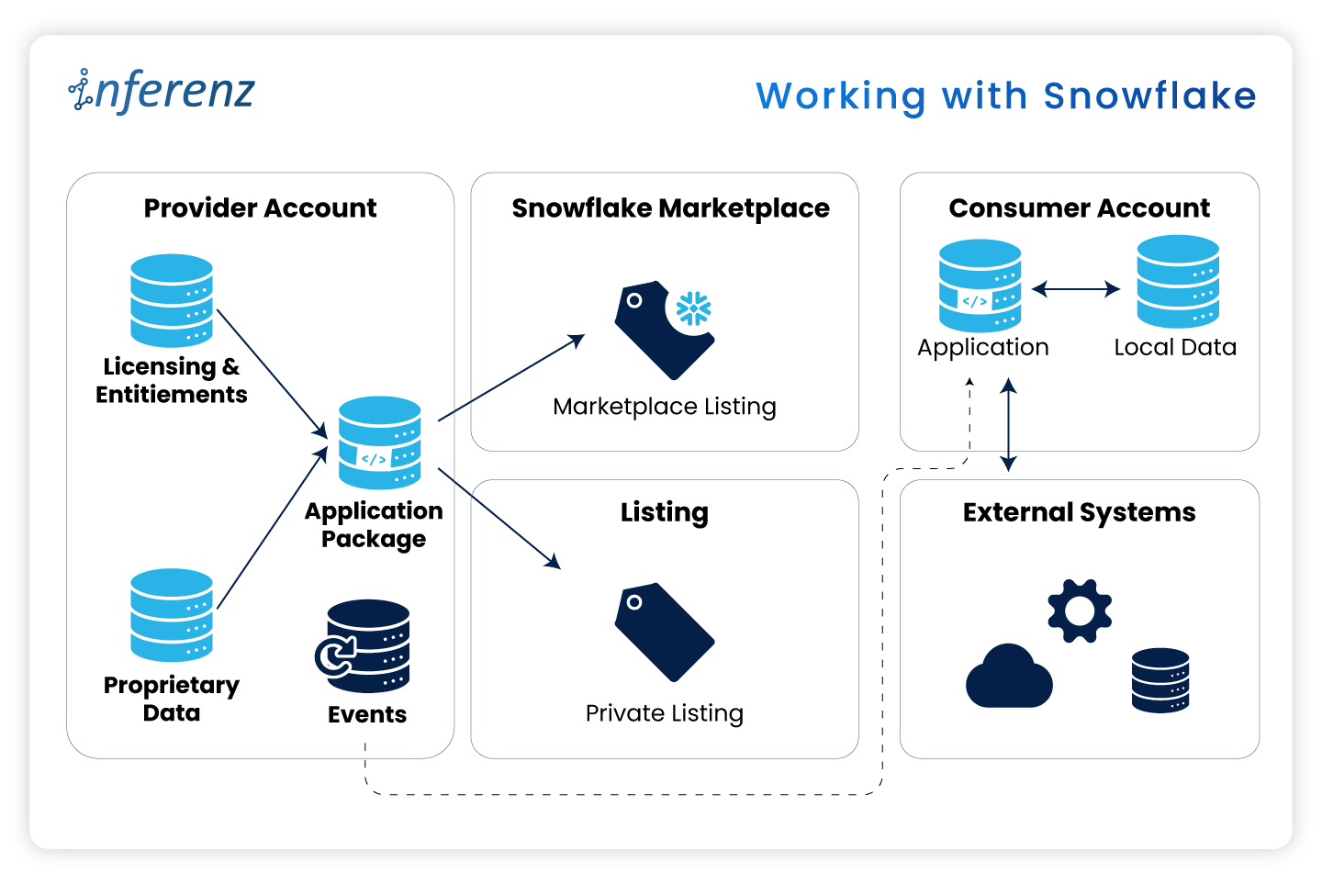
So, we built Unify as one of our first Snowflake Native Apps that run inside the customer account. Doing so changed how we think about trust, speed, and even pricing. This article spells out what we learned during the development of a data dedupe app, starting with the core idea—keeping the work where the healthcare data already lives. 

Working with Snowflake 

Security officers keep telling us the same thing: “If data leaves our Snowflake account, we need another risk review.” Those reviews can stall a project for weeks. When the data stays put, those blockers vanish.

The Snowflake Native App Framework

Here are some real-world pain points: 

  • Extra ETL hops slow reports and raise spend. 
  • Legal teams hold sign-off if data crosses a network line. 
  • Cyber teams reject any tool that opens a fresh inbound port. 

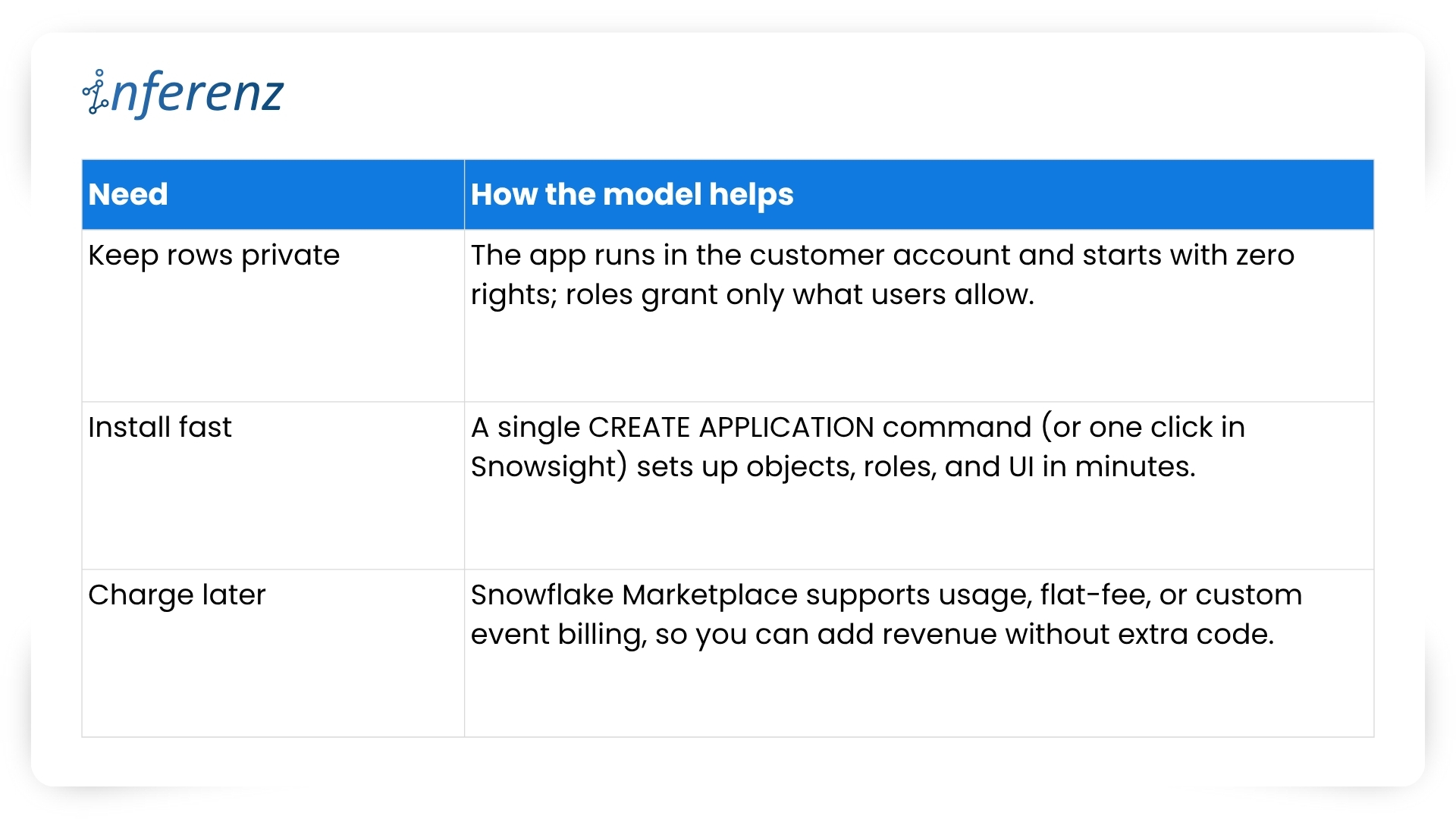
Let me elucidate how the Native App model fixes these issues here:
Native app model fixes issues

What this means for project teams

Running inside Snowflake flips the sales story.  

  • Security reviews shrink because no healthcare data exits the account.  
  • Legal teams check off fewer boxes.  
  • Ops teams stay happy because there is no new infrastructure to patch.  
  • And when the finance group is ready, you can turn on billing models that match real usage, with no speculation involved, whatsoever! 

Before we jump into code, folder names, and Git commands, let’s pause for a moment. You now know why staying inside Snowflake calms auditors and speeds go-live.  

The next question is how to keep that peace when your dev team starts shipping features at full tilt.  

A tidy project layout gives you that calm. It stops commit chaos, helps new engineers find their way on day one, and lets CI/CD jobs run without a hitch. In short, an ordered home keeps tech debt low and feature velocity high.

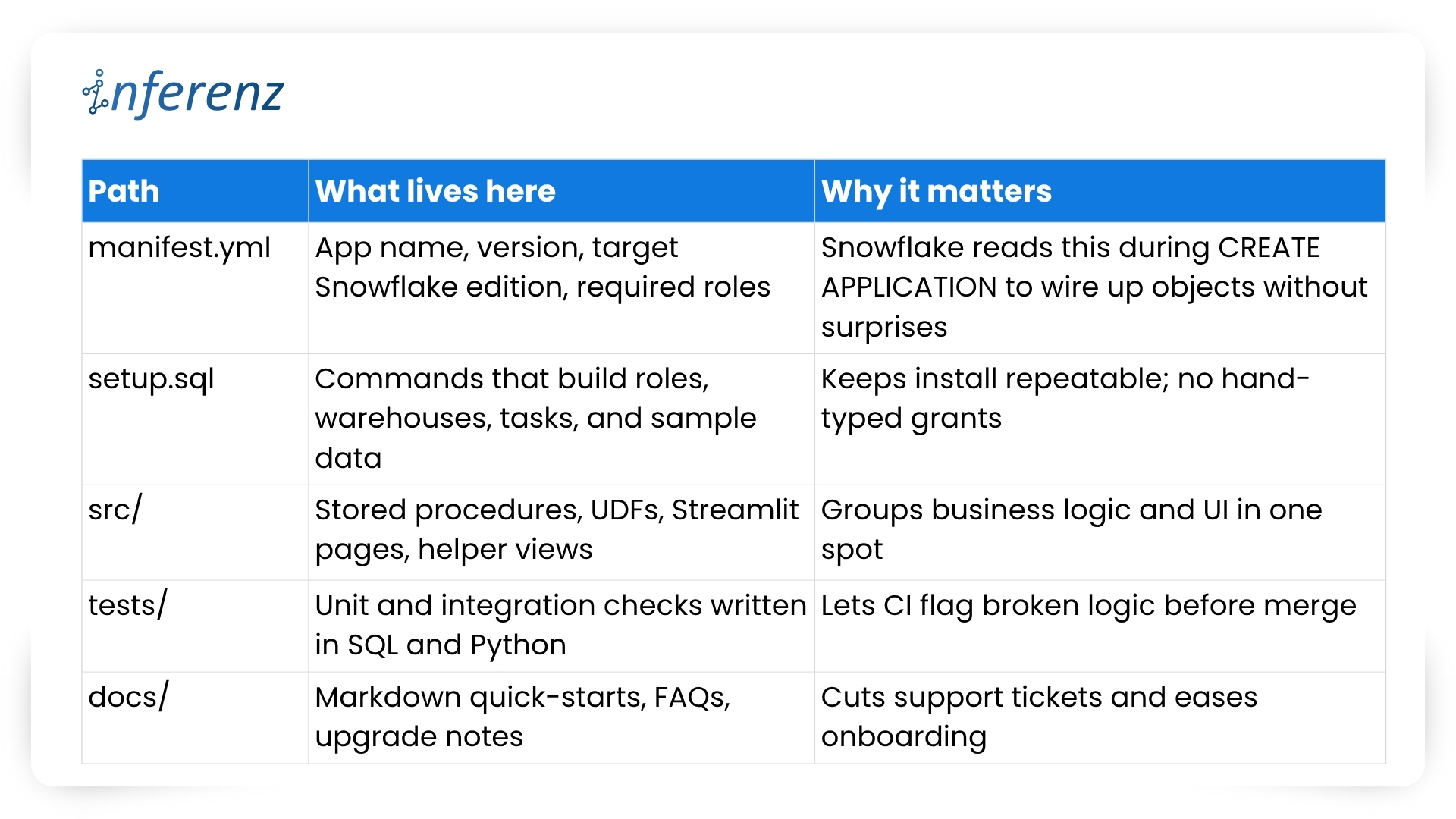
Setting up a clean project layout 

Think of Snowflake Native Apps as small, self-contained products. Every script, test, or doc page must live where others can spot it in seconds. Messy trees hide bugs; neat ones surface them early. 

Key folders and files 

Important elements to lock in early 

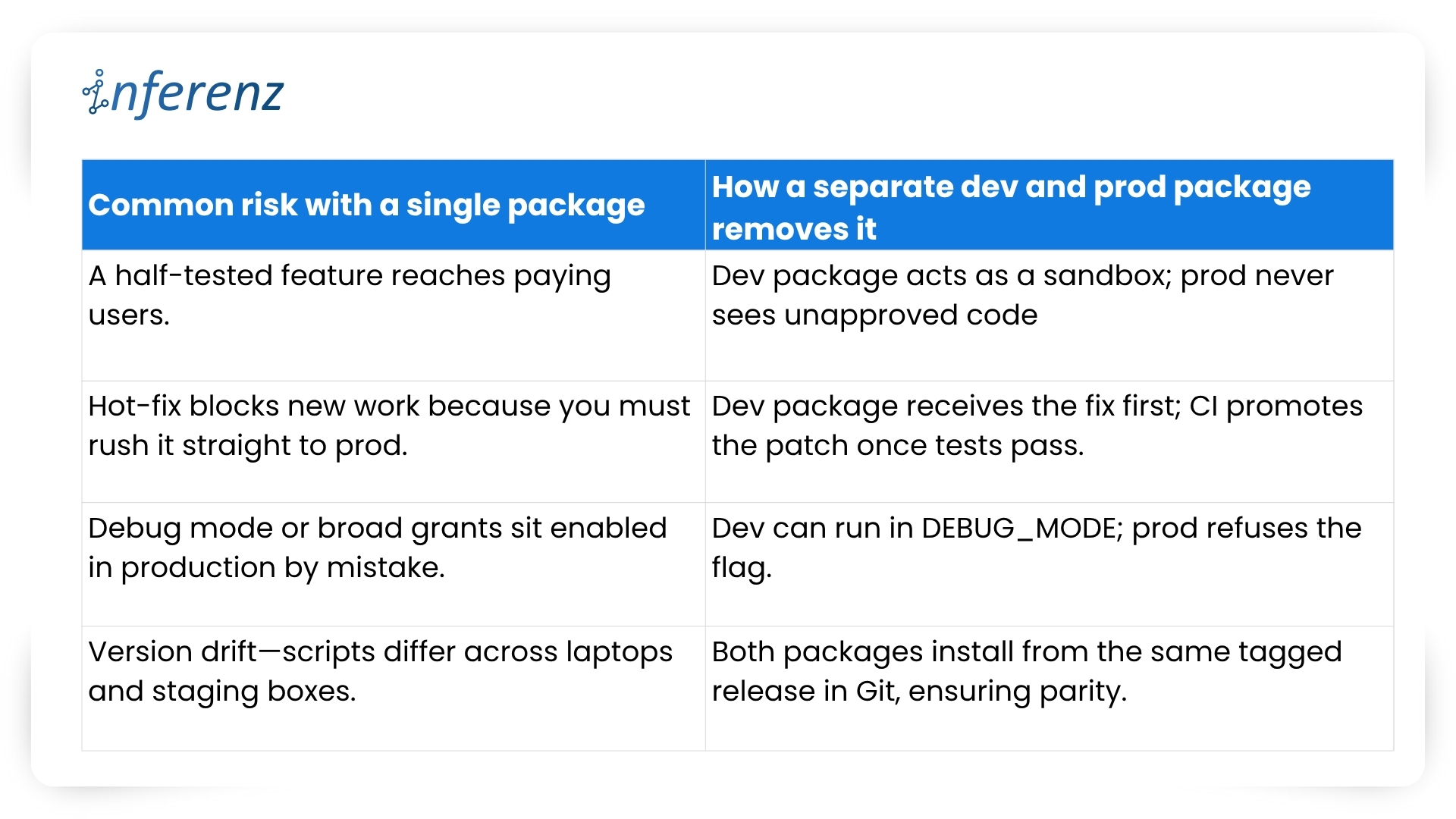
  1. One Git repo, two packages 
    • Create a dev package for daily commits and a prod package for signed releases.  
    • Both packages pull from the same branch but differ in version tags. 
    • Use semantic versions like 1.4.0-dev and 1.4.0 so rollback is a single command. 
  2. CI/CD with guardrails 
    • Hook your repo to a CI runner that  
      • spins up a Snowflake scratch account,  
      • loads the dev package,  
      • runs the tests/ suite, and  
      • fails on any blocked grant or failed assertion. 
    • Push to main only after CI passes; a promo script tags and pushes the prod build. 
  3. Streamlit in Snowflake for fast UI loops 
    • Store each page in src/streamlit/.  
    • Designers can tweak layouts while analysts see live data—no extra staging server needed. 
  4. Readable docs 
    • Keep install steps short: “Run setup.sql, grant the role, open /home in Snowsight.” 
    • Add a change log at docs/release_notes.md so users track what changed and why. 
  5. Security baked in 
    • Script every role, grant, and warehouse size in setup.sql. This guarantees least-privilege on each install. 
    • Place a permission matrix table in docs/security.md so buyers can audit in minutes. 

With a clear structure, your team ships features without fear, and your users enjoy stable installs that never drift from the source. Next, we will explore repeatable testing and deployment tactics that keep both packages in sync and production-ready. 

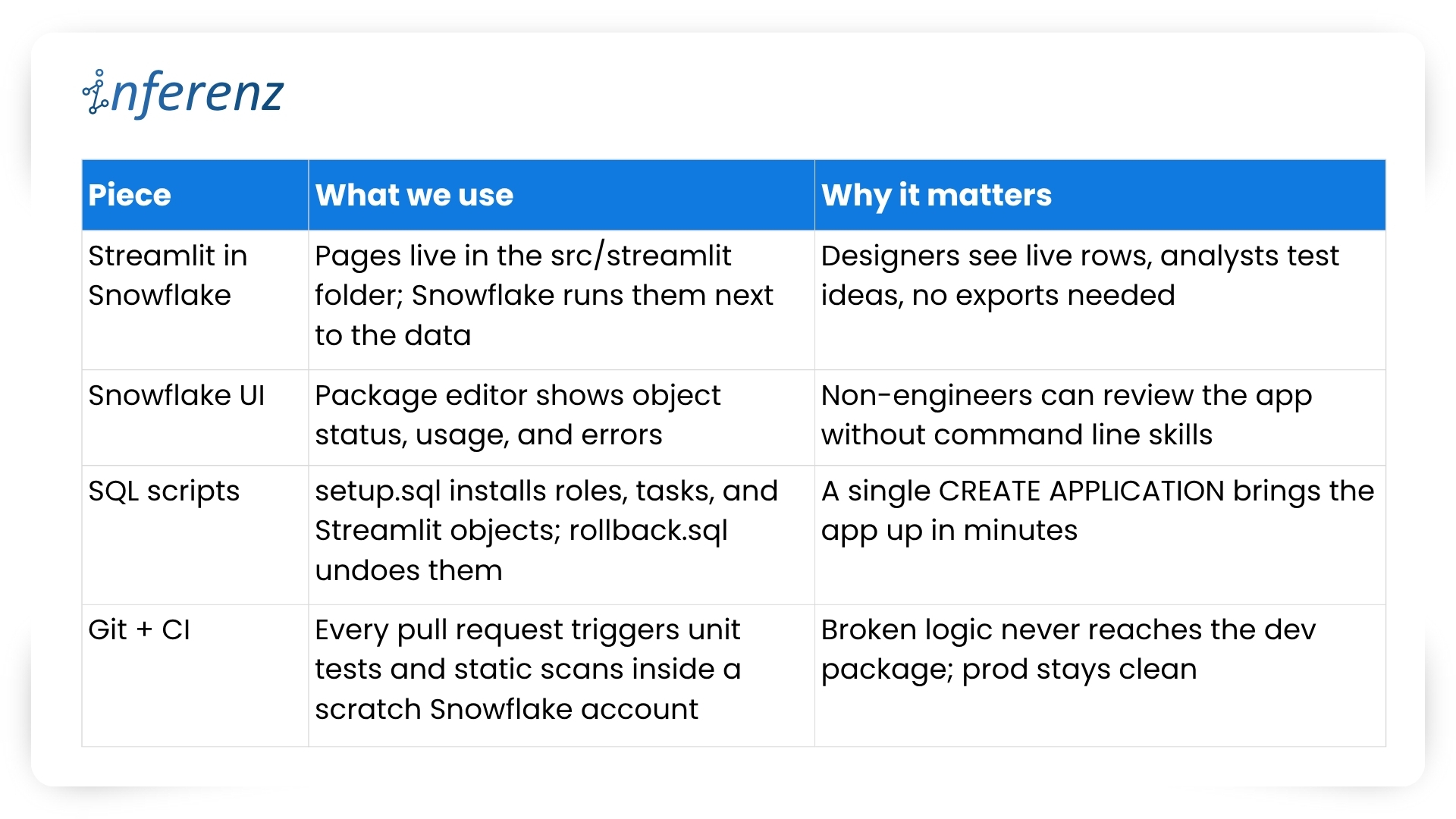
Speed with the right tool chain 

Teams juggle UI tweaks, SQL logic, and version bumps at once. Without a clear loop, staging environments drift and testers chase phantom bugs. 

Typical pain points we faced 

  • UI work stalls while engineers wait for fresh sample data. 
  • Manual deploy steps slip through Slack threads and get lost. 
  • Merge conflicts appear because no one owns the single source of truth. 

Our four-piece workflow 

Important habits that keep the loop tight 

  1. One repo, two packages: 1.5.0-dev lives in the dev package while 1.5.0 runs in prod. CI promotes only when tests pass and a human approves. 
  2. Self-testing setup: The same setup.sql that customers run also drives CI. If that script breaks, the build fails early. 
  3. Streamlit previews: Product owners open the dev package in Snowsight, click the /home page, and give feedback in real time. No separate staging server, no extra VPNs. 
  4. Automated rollbacks: rollback.sql reverses grants and drops objects, so you can reset an environment in seconds. 
  5. Consistent naming: Procedures and UDFs carry the app version in the schema name, which avoids clashes during side-by-side tests. 

We’ve covered why native apps live safer inside the warehouse and how a tidy repo plus a smart tool chain keeps feature work moving. The next guard-rail is environment isolation—running two application packages that share one codebase. Doing so sounds simple, yet it saves countless rollback headaches. 

Two packages, one codebase 

Why split environments? 

Snowflake itself recommends this two-package pattern to keep upgrades safe and reversible.  

Our promotion pipeline 

  1. Commit — Every change lands in a feature branch. 
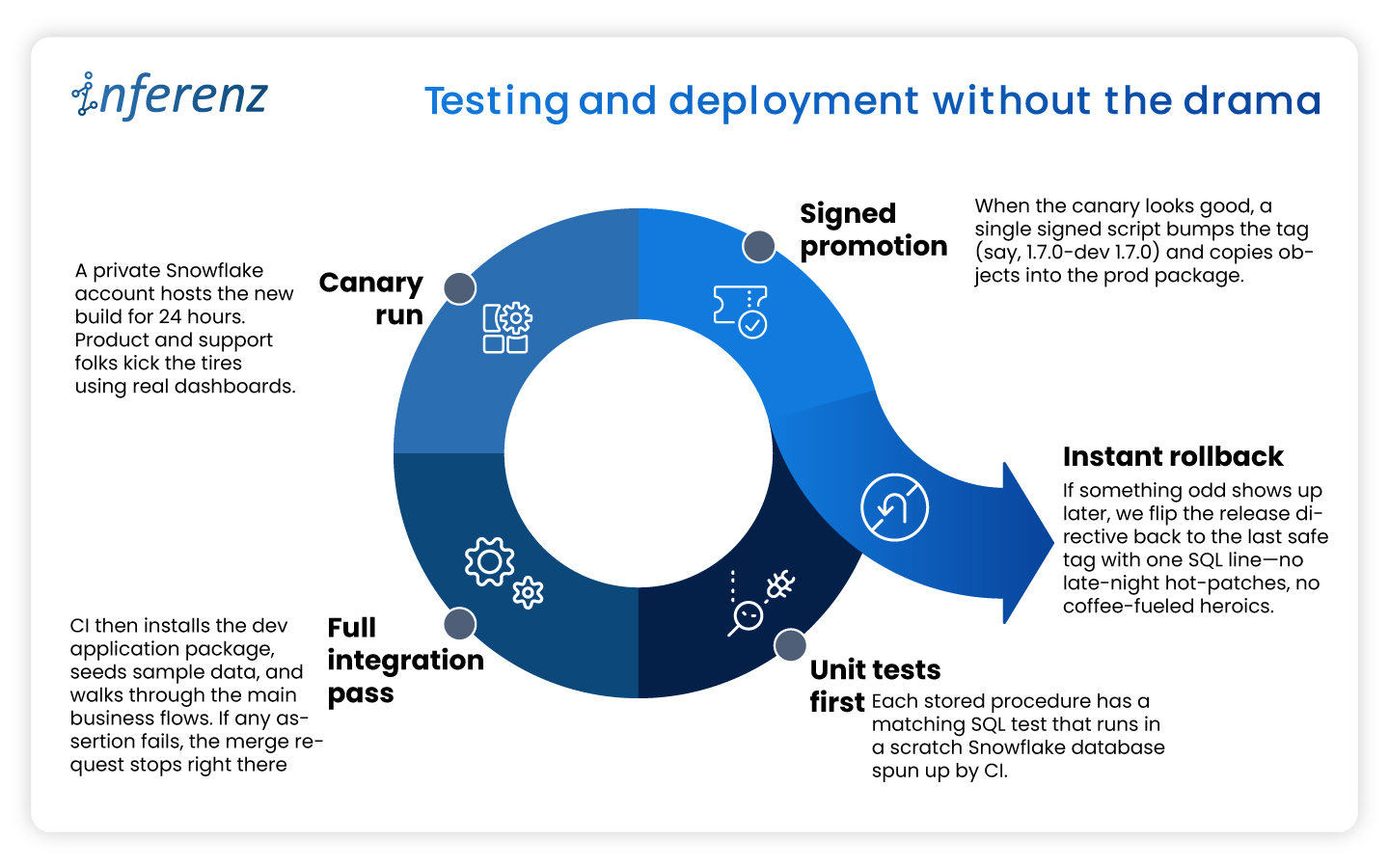
  2. CI spin-up — The runner creates a fresh dev package with CREATE APPLICATION and runs the full tests/ suite.  
  3. Manual QA — Product owners open the Streamlit pages inside the dev package and sign off. 
  4. Tag & promote — A signed SQL script bumps the version (1.6.0-dev → 1.6.0) and copies objects into the prod package. 
  5. Release directive — We set RELEASE DIRECTIVE VERSION = ‘1.6.0’, so new installs pull only the stable build. 
  6. Rollback ready — If something slips through, ALTER APPLICATION … SET RELEASE DIRECTIVE VERSION = ‘1.5.2’ brings users back in seconds. 

Versioning habits that keep both worlds calm 

  • Semantic tags — major.minor.patch with a -dev suffix during QA: 2.0.0-dev. 
  • Schema per version — Runtime objects live in APP_DB.CODE_V1_6. This avoids name clashes when dev and prod packages sit side by side. 
  • Automated object diff — CI compares the manifest in dev vs. prod; promotion stops if objects are out of sync. 
  • Read-only prod — We grant end users a minimal role that blocks CREATE and ALTER inside the prod package, so accidental edits never persist. 

What it buys the business 

  • Predictable releases — Stakeholders get a calendar of when prod changes; no wild pushes. 
  • Audit clarity — Logs show who promoted what, matching each tag in Git. 
  • Happy support desk — Rollback is one SQL line, not a cross-cloud fire drill. 
  • Future compatibility — Older clients can stay on version 1.x while early adopters try 2.x in a separate prod package if needed. 

With isolation in place, both engineers and risk officers sleep better. Next, we’ll dig into security best practices—how strict roles, static scans, and clear docs keep Unify trusted from day one. 

Security that travels with the app 

Security isn’t a bolt-on for Unify, the data deduplication app; it’s wired into the first CREATE APPLICATION script. Because the app sits inside each customer’s Snowflake account, we start from “no rights at all” and grant only what the features need. 

How we keep things tight 

  • Role-based access control – The install script creates an application-specific role with the narrowest set of privileges. All other objects inherit from that role, so nothing sits under a catch-all admin profile. Snowflake calls this the least-privilege pattern, and it makes auditors smile.  
  • Static scans on every merge – Our CI pipeline blocks the build if open-source libraries or stored-proc code show known CVEs. No red flags, no deploy. 
  • Secrets stay secret – Any outbound call (think Slack alerts or usage pings) pulls its token from a Snowflake secret object, never from plain text. 
  • End-to-end encryption – Snowflake handles disk and wire encryption for us, so we get AES-256 at rest and TLS in flight out of the box. 
  • Transparent docs – A short security appendix lists every grant and why we need it. Buyers can paste those commands into their own console and verify the scope in minutes.  

Result: Security teams see clear boundaries, compliance teams get quick sign-off, and our support desk fields fewer “Why does the app need this privilege?” emails. 

Testing and deployment without the drama 

A solid security story means little if the next release ships a typo to production. To avoid that nightmare we treat every change—no matter how small—the same way: 

This disciplined loop lets us ship improvements every two weeks while keeping both the dev and prod packages in lock-step—fast for engineers, calm for customers. 

Listing now, billing later 

When we first released Unify, the data deduplication app in the Snowflake Marketplace we kept the price at zero.  

A free listing let users test the app without budget hoops and gave us real usage stats. Snowflake’s marketplace model also means we can switch to pay-as-you-go, flat monthly, or custom event billing as soon as clients ask for an SLA. Turning that knob is mostly paperwork: update the listing, set a rate card, and push a new release. No extra infrastructure and no fresh contracts. 

Why this matters? 

  • Low-friction trials. Users click “Get” and start working in minutes. 
  • Clear upgrade path. When buyers need production support, we offer a price plan that matches their workload. 
  • Built-in invoicing. Snowflake handles metering and billing, so finance teams on both sides stay happy. 

The marketplace route shifts sales from long demos to quick hands-on proof. That streamlines procurement and puts the product in front of more data teams. 

Keeping the loop alive 

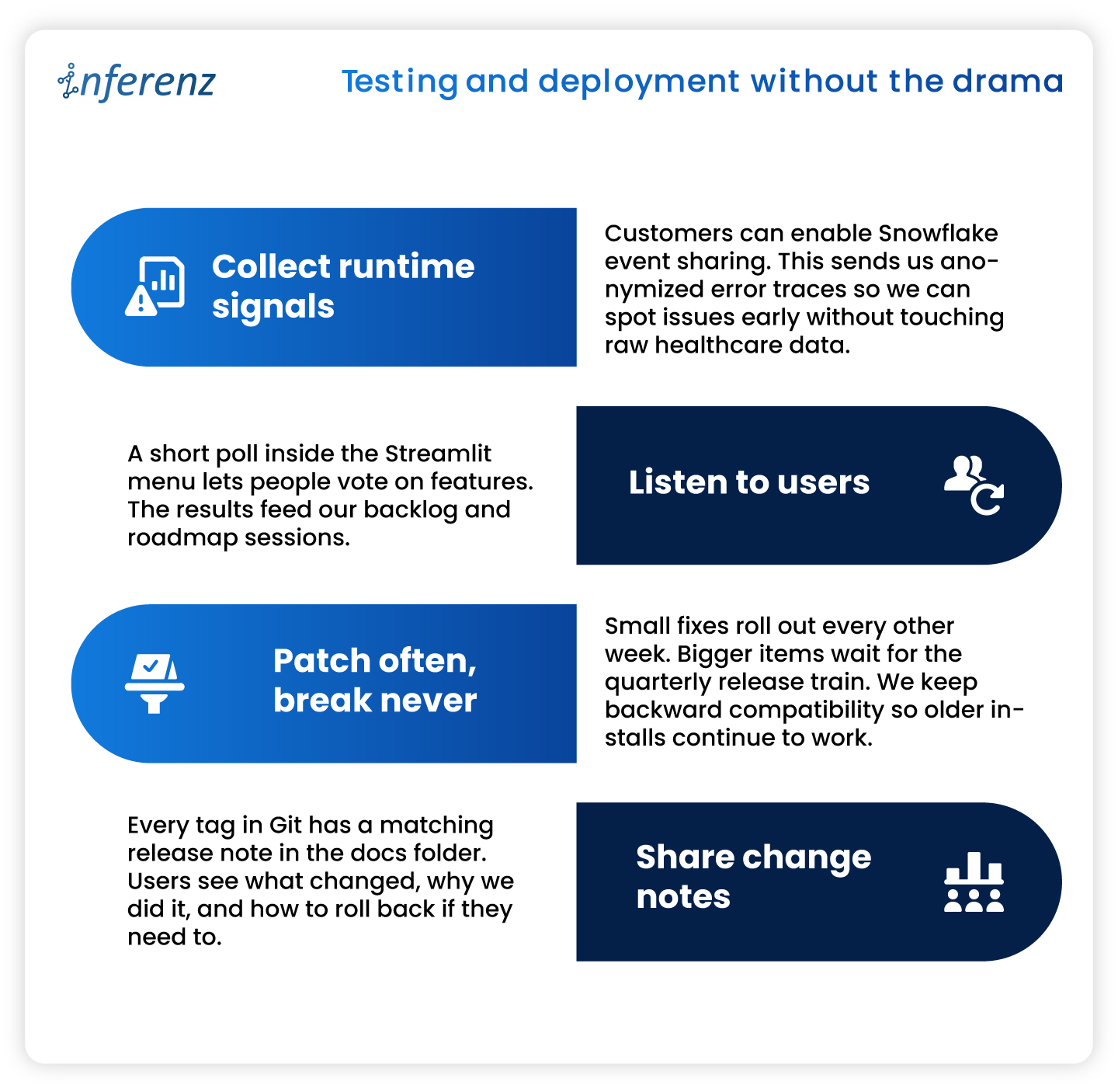
Shipping an app is only half the job. We keep Unify healthy and useful with a steady feedback cycle. 

What we do every sprint 

Note: Continuous improvement keeps trust high and shows users that the product is still moving forward. 

10 Key Takeaways from Our “Unify” Experience 

  1. Maintain separate development and production app packages from the same codebase to safeguard against accidental bugs. 
  2. Use Streamlit within Snowflake for efficient, interactive local development and prototyping. 
  3. Manage application packages using the Snowflake UI for clarity and ease. 
  4. Handle local deployment and testing through SQL for precise control. 
  5. Rely on robust version control and clear promotion processes for reliable releases. 
  6. Enforce strict security and access controls from day one. 
  7. Test thoroughly in both local and Snowflake environments before publishing. 
  8. Provide transparent, user-friendly documentation and support. 
  9. Continuously monitor, update, and improve your app based on real user feedback. 
  10. Plan for monetization early, even if you are not monetizing at launch. 

Conclusion 

Building inside Snowflake changed how we think about healthcare data management apps. Running code where the data already sits cuts risk, shortens audits, and speeds time-to-value. A tidy repo, two isolated packages, strict tests, and clear docs keep releases smooth. Marketplace listing turns installs into self-serve trials and unlocks revenue when clients are ready. If you plan to ship a native app, adopt these habits early. Your future self—and your customers—will thank you. 

Frequently Asked Questions about Snowflake Native App Development and Unify 

  1. Does Unify copy my data outside Snowflake?
    No. The app runs inside your Snowflake account, and all processing stays there. Only opt-in event logs (never raw rows) leave the warehouse for support purposes. 
  2. How long does installation take?
    Most teams finish in under few minutes. Go to Snowflake Marketplace, search the data dedupe app, click of ‘Get’ button, grant the app role, and you are ready. 
  3. Can I try new features without risking production?
    Yes. Keep a separate dev application package. Install the latest version there, run tests, and promote to prod when you are satisfied. 
  4. Do I need to upgrade/update application if new features released after I install it?
    No, you don’t need to do it yourself. All current installations are upgraded to new patch/version automatically (within few seconds to few hours depends on Cloud/Region) when new patch/version is released.  
  5. What happens if an upgrade causes trouble?
    Every release is versioned. Application can roll you back to the previous tag either through command or UI.  
  6. When will paid plans launch?
    We are finalizing usage metrics with early adopters. Expect flexible pricing options—usage based, subscription, and custom event billing—later this year. 

Predictive Analysis Tutorial: Ultimate Guide To Implement Predictive Model

A predictive analysis tutorial helps users to understand the step-by-step process of implementing the advanced forecasting tool in their business. The data-driven world demands enterprises to implement new technologies, and predictive analytics is the enterprise grade that enables companies to forecast future trends and challenges by studying historical data.

When companies understand future trends with business intelligence tools, they can formulate the right strategies to predict customer churn, prevent fraud, improve marketing campaigns, and drive sales. However, to leverage the true potential of the tool, one must systematically execute the implementation process. This predictive analysis tutorial will help users understand the simple steps to integrate predictive analytics tools into their business.

ALSO READ: Snowflake Migration: Ultimate Guide To Migrate Data To Snowflake

Why Predictive Analytics?

Businesses are constantly looking for ways to use their data to make strategic decisions and accelerate business growth. Predictive analytics, a part of Machine Learning, enables enterprises to use their existing business data and build a model. The ultimate goal of predictive modeling is to analyze historical data, identify data patterns, and determine future events. Following are some of how predictive analysis helps businesses and why users should focus on a predictive analysis tutorial.

  • Minimize time and expenses by building effective strategies and predicting outcomes 
  • Analyze and mitigate financial risks to accelerate business growth 
  • Implement advanced tools and technologies that help companies hedge against the competition 
  • Gain better consumer insights by analyzing the data and predicting their future demands 
  • Plan inventory, optimize price and promotional campaigns, and personalize customer service to drive sales

Predictive-Analysis-Tutorial-online

Predictive Analysis Tutorial: Steps To Follow

Companies are focusing more on customer retention than attracting a new customer, as it costs five times more to gain a new consumer than to retain one. Predictive analytics tools help companies personalize the service and deliver the services to existing clients based on customer behavior.

However, users should follow the five key steps to add predictive analytics tools to their business. In addition, statisticians, data scientists, and engineers should collaborate to make informed decisions, select better datasets, and create models for easy deployment. Below are the detailed steps that the predictive analytics team should follow to make the implementation successful.

  • Define Business Requirements 

The initial step for predictive analytics implementation is defining the business problems and framing solutions. For instance, businesses need to analyze their problems, expected outcomes, and the team who will collaborate on the project before they begin the initial phase of the process.

  • Data Collection 

In the second step, data analysts identify the business data relevant to the business requirement. While collecting the data for predictive analysis, analysts should consider the data’s suitability, relevancy, quality, and authority. All structured, unstructured, or semi-structured data should be stored in a data lake to understand the analyzing needs and employ the right tools.

  • Data Analyzing 

Experts suggest analyzing the data before transferring it to the predictive analytics model will help teams identify the problems and take measures to overcome the challenges. Cleaning and structuring data before modeling and deployment is the essential step of a predictive analysis tutorial to ensure businesses get valuable insights from predictive modeling.

  • Data Modeling

Once data scientists get access to the cleansed data and transfer it into the predictive analytics model, the next step is data modeling. Business analysts and data scientists can use open-source programming languages like Python and R to calibrate models in the business infrastructure.

  • Deploy The Model

After the data modeling phase, data engineers can retrieve, clean, and transform the raw data into the predictive analytics model for deployment. The insights obtained from the data should be leveraged by experts to make business decisions and generate profits.

  • Monitor The Results 

Data is not static; a predictive analytics model that works well today might not deliver the best results tomorrow. That said, data experts need to monitor the results periodically and safeguard their business from malicious activity that can impact the overall model’s performance.

The predictive analysis tutorial involves the combined efforts of data scientists, business analytics, and data engineers. Enterprises that lack in-house experts should consider outsourcing the predictive analytics implementation to a well-equipped and experienced team.

Inferenz has a team of certified data engineers, scientists, and analysts who help enterprises develop and deploy predictive analytics tools with the right tools. The team of Inferenz has recently worked with a US-based eCommerce company to build predictive analytics solutions and implement Self Service BI tool to improve data availability and increase conversions. Check out the comprehensive case study here.

ALSO READ: Data Migration Process: Ultimate Guide To Migrate Data To Cloud

Planning-to-implement-Predictive

Implement The Predictive Analytics Tools With Experts 

Predictive analysis tools transform how businesses sell their products to customers or manage their in-house operations. However, the learning curve can be steep, and making one mistake can cost a fortune to the company’s revenue and overall growth.

Enterprises that lack the skills or expertise required to make the predictive analytics implementation project successful should hire the best data analyst team to mitigate risks. Inferenz has a team of skilled data experts who will guide you with a detailed predictive analysis tutorial from start to finish, leading to a successful implementation and the best results.

Predictive Analytics for eCommerce Industry

With the adoption of predictive analytics technology, business owners can predict future risks and understand market opportunities to make better decisions. Modern data analytics technologies can help eCommerce businesses generate more profit by adjusting their business strategies according to the latest industry trends and customer buying patterns.

Business owners, especially eCommerce companies, understand that predicting trends can be a distinguishing factor for success. Leveraging the technology and stored data will help data analysts predict customer behavior based on search history or previous shopping cart activities and build strategies. This guide revolves around why eCommerce businesses need predictive analytics in 2022 to stay competitive in the market.

Predictive-Analysis-for-eCommerce-Business-india-services

Importance of Predictive Analytics in eCommerce Business

eCommerce is proliferating with the dynamic shift of buyers from traditional buying to online shopping. Research suggests that sales will account for 16% of the total retail market in 2022 (as compared to 13% in 2021). The enormous amount of data generated can help in customer profiling, traffic analysis, and web log analysis to build profitable business strategies that bring more customers. Some of the things eCommerce owners can comprehend with analysis of stored data include:

  • Predict customer experience when they are surfing the website for shopping 
  • Understand how customers engage with online stores and how long they stay on the website 
  • Identify the buying habits of the customers by understanding shopping patterns 
  • Analyze the customer preferences to make their shopping experience more personalized

Besides these standard ways to use the technology, there are multiple other data analytics examples that one can focus on to generate revenue, such as creating promotional offers and more.

ALSO READ: Data Warehousing vs. Data Virtualization – How to Store Data Effectively?

Integrating Data Analytics Software In eCommerce Business

E-commerce has grown to an exceptional level, and companies are leveraging technologies to improve customers’ online shopping journey. Retail predictive analytics – one of the most influential technologies – helps companies predict trends and distinguish themselves from the crowd. Below are the top five reasons to integrate data analytics in the eCommerce business.

  • Enhanced Business Intelligence 

With the advent of Business Intelligence tools, companies can predict customer expectations and market trends to improve overall customer experience. Using the past data available can help eCommerce businesses to get an edge against the competition. The accuracy of the decisions derived from previous data enables eCommerce owners to make quick decisions that improve profitability.

  • Automated Product Recommendation

Recommending the right additional products to customers can improve the chances of sales. Predictive customer analytics considers the purchase history, browsing history, previous customer behavior, and the current season to automate product recommendations. Prospective customers get product recommendations according to their buying behaviors, which makes them feel valued and boosts their shopping experience.

Tech giants like Spotify, Amazon, and Netflix use data from disparate sources to create a personalized user experience.

  • Management Of the Supply Chain

For an eCommerce business to grow, they need to focus on supply chain management. Predictive analytics, with the capabilities of Machine Learning, enable business owners to improve stock management, better cash flow usage, enhanced order fulfillment, and much more. Experts can identify the industry patterns to reduce overstock and prevent understock issues, helping them save money.

Inferenz helps eCommerce business owners to implement Business Intelligence tools and predictive analytics solutions to accelerate business growth. The tech experts of Inferenz have helped a Germany-based pharmaceutical company to leverage the power of data analytics in healthcare to predict diseases. Read the case study here.

  • Fraud Management 

Recognizing unusual patterns and preventing fraud are the two most crucial steps to running a profitable online business. Predictive data analytics tools help online retailers to identify customer buying behaviors and payment methods. When business owners have the correct information, they can take steps to reduce credit card payment failures, boost sales and conversions, and secure their online business.

  • Run Effective Campaigns 

Running effective campaigns is more convenient with data analytics, as it allows companies to utilize advanced MI algorithms and determine the correct product pricing based on current demand, season, time, weather, and holidays. Aligning product prices with customer preferences and market trends will ensure the success of brands while minimizing the expenses of failed campaigns.

Planning-to-implement-Predictive

ALSO READ: Implementing Predictive Analytics for Promotion & Price Optimization

Grow Your Business By Implementing Predictive Models With Experts 

Instead of wasting time and resources on human judgments, more and more businesses are choosing intelligent technologies to power up their sales and lead the market. Extensive data analysis allows analysts to identify significant market needs, trends, and risks and get valuable insights for generating better eCommerce business ideas.

If you intend to implement predictive analytics in your eCommerce business and accomplish your business goals, contact the predictive analytics experts of Inferenz.

Implementing Predictive Analytics for Promotion & Price Optimization

Implementing predictive analytics provides an edge to different businesses. With advancements in computing technologies and high market competition, businesses seek diverse ways to get ahead, and predictive analytics offers a trove of information to predict future outcomes. It enables data analysts and business experts to skim past real-time data and predict a customer’s future behavior. Data analysts can acquire better insight beyond comprehending a customer’s past behavior and instead use the gathered data to look forward to the future possibilities that bring success to a business. 

Machine Learning, the subset of Artificial Intelligence (AI) and computing technology, can accelerate the work pace by automating all the manual operations in a business, identifying customer behavior, and improving customer satisfaction by recommending additional products. This predictive analytics guide will focus on two crucial aspects important for every business owner – promotion and price optimization – and why businesses should implement them.

ALSO READ: The Essential Components of a Successful L&D Strategy

Why Is Predictive Analytics Important For A Business?

With the increasing use of Artificial Intelligence and Machine Learning and the drive toward their adoption due to the benefits, the predictive analytics market size will reach USD 28.1 billion by 2026, states research. 

Predictive analytics work by collecting, assembling, organizing, and using the ever-increasing volumes of data to draw a conclusion that leads to profitable results. The sales and marketing experts and the business team can use predictive analytics to evaluate the new pricing strategies and promotional activities to generate sales and revenue per the market trends. Some of the other benefits of predictive analytics for pricing and promotion optimization include the following:

  • Provides actionable insights to devise ways that help to hedge against the competition 
  • Saves time and business resources by eliminating the need for manual research and testing 
  • Reduces the cost of ineffective marketing campaigns
  • Helps businesses attract, engage, and retain customers 
  • Analyzes the historical data of a company to identify factors that lead to product failures 

Two Ways To Implement Predictive Analytics 

Implementing predictive analytics for promotion and price optimization will allow businesses to predict the future better and create a satisfactory user experience for their customers. Thomas Goulding, a renowned professor for the Master of Professional Studies in Analytics program, says during his conversation with Northeastern College of Professional Studies, “Data analytics today is allowing us for the first time to take the massive amount of data we’ve been assembling for years and use it for predictive purposes rather than in just descriptive ways.”

Here are the two ways to implement predictive analytics in one’s business. 

  • Price Optimization 

Price optimization involves analysis of customer purchase patterns and deciding the price that maximizes the company’s revenue. Predictive analytics considers a few aspects, such as competitor’s pricing, market condition, customer demand, and more, to serve customers with the best possible price. Inferenz follows a unified analytics-based approach to implement predictive analytics that leads to improved sales, higher margins, and lower costs. 

Inferenz recently worked with a Germany-based pharmaceutical company to implement predictive analytics; you can check the detailed case study here and see how our predictive analytics and machine learning experts created a model that understood vital parameters for positive and negative patients.

  • Promotion Optimization

By implementing predictive analytics for promotion optimization, business owners can use historical data to determine the impact of their past promotions and prepare the best future promos that save costs and maximize revenue. One can connect the promotions to inventory management to collect data and proactively ensure that the business meets promotional demand and reach its targeted price goal.

ALSO READ: The Future of Blockchain Technology in India

Grow Sales With Inferenz’s Predictive Analytics Experts

No matter the industry, business owners can lean into data by implementing predictive analytics to gain in-depth insights into how customers interact with their business. Based on predictive models, business experts can make data-driven decisions to maximize profits and mitigate potential risks. 

If you want to implement predictive analytics for promotion and price optimization, contact the experts at Inferenz.  who can not only help you evaluate the predictive model but can also devise the implementation method that best fits your business needs.