



Background Summary
Modern organisations today look beyond traditional batch-based systems. At Inferenz we build platforms that enable agentic AI and real-time data transformation, and this article shows a concrete architecture that makes that possible.
Using Microsoft Dynamics 365, Azure Service Bus and Azure Functions we implement an event-driven Change Data Capture pipeline that powers up-to-the-second data delivery. Read on to understand how you can shift from static snapshots to continuous, intelligent data flows.-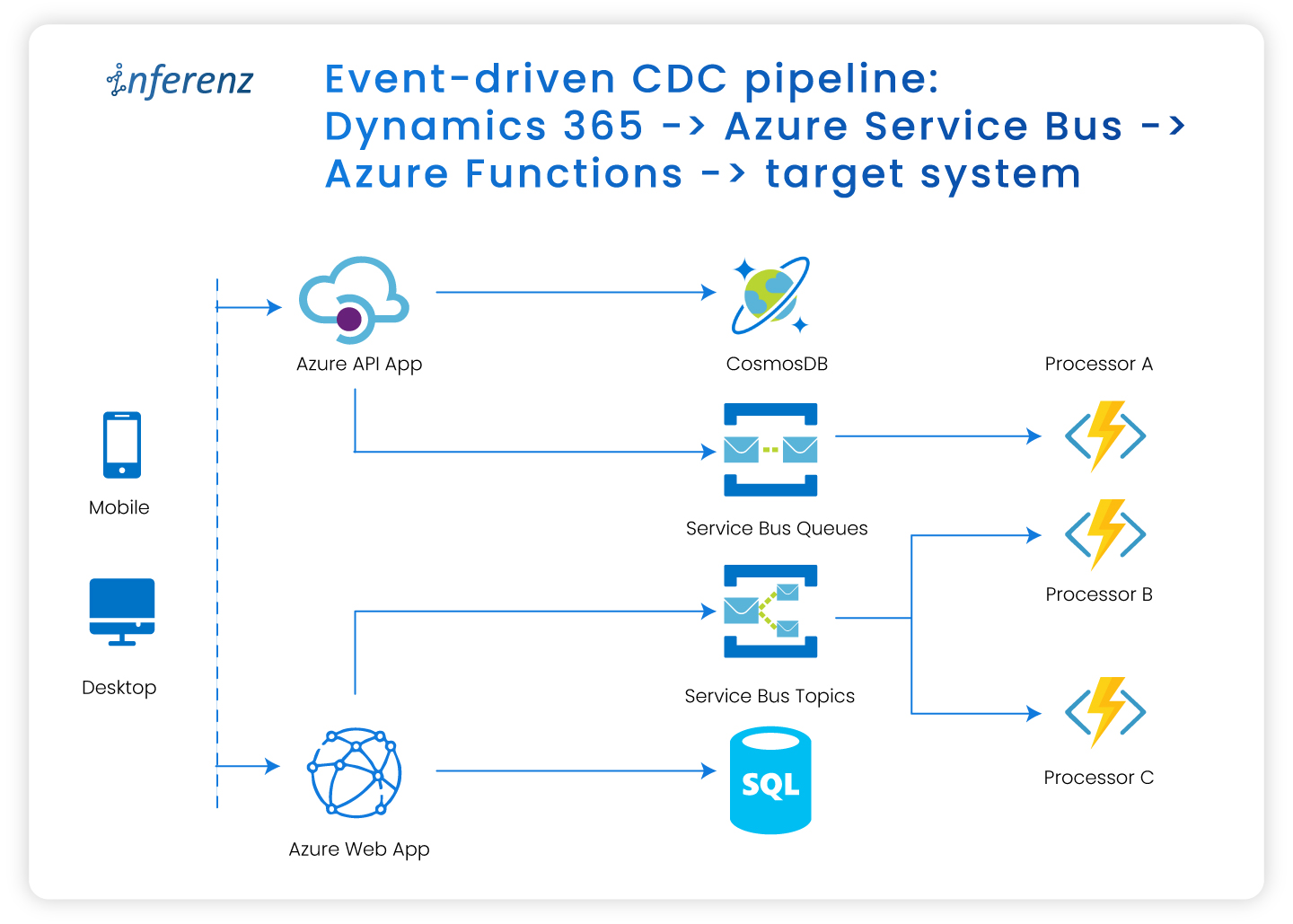
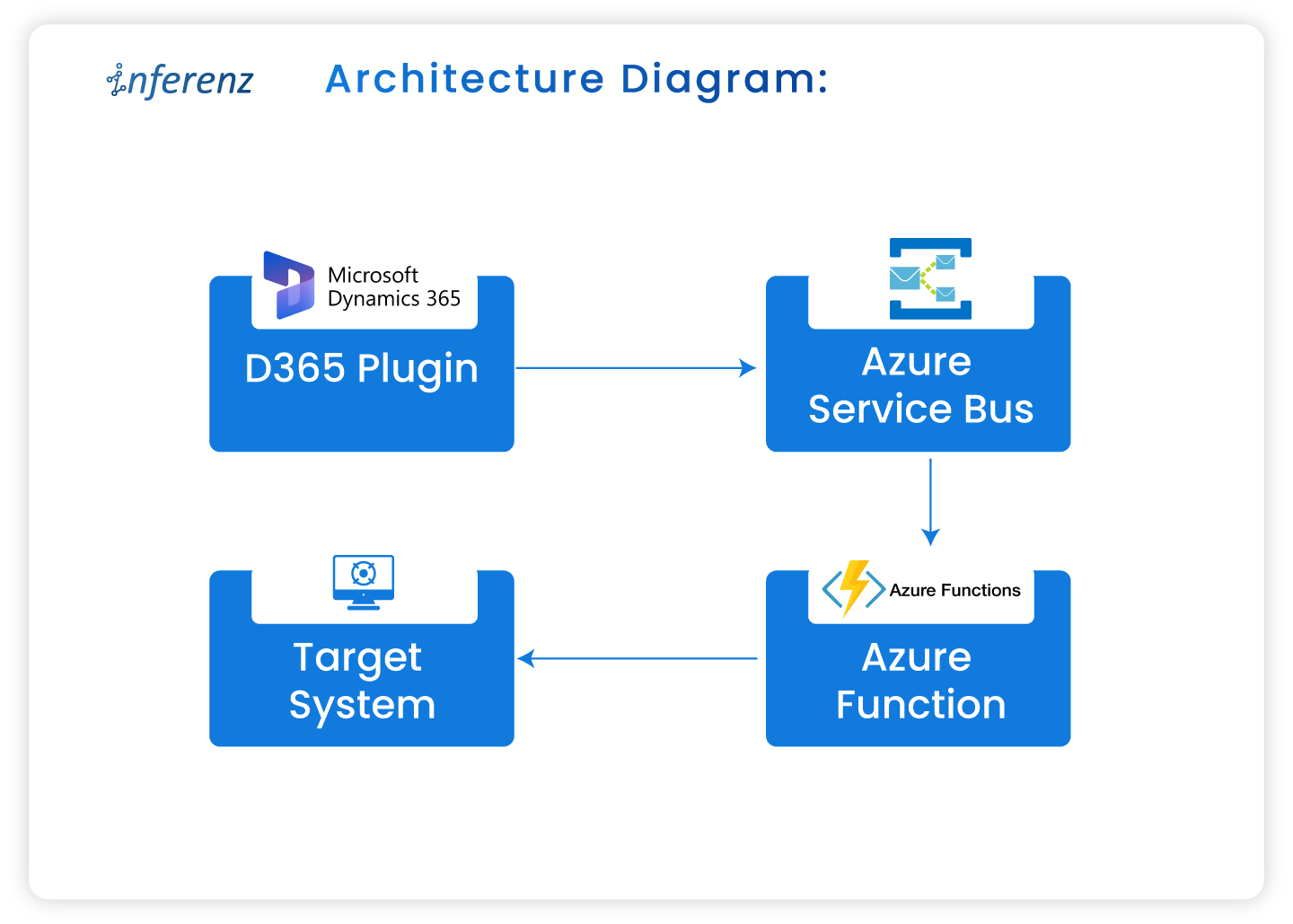
Event-driven CDC pipeline: Dynamics 365 → Azure Service Bus → Azure Functions → target system
Introduction
Change Data Capture, or CDC, is a design pattern that captures inserts, updates and deletes in source systems so downstream workflows can react immediately. Traditional batch or polling-based mechanisms often lag and consume excessive resources. Thanks to event-driven architectures, CDC now supports near-real-time processing. That means faster insights, smoother data flow and tighter coupling between business events and system responses.
In this blog, we walk through how to build a real-time CDC pipeline using Microsoft Dynamics 365 (D365), Azure Service Bus, and Azure Functions. This architecture ensures that every data change in D365 is captured, transformed, and routed in near real-time to downstream systems like Redis Cache or Azure SQL.
The challenge: Timely data sync from D365 to target system
We worked with a client who needed updates from Dynamics 365 to show up in the target system and be query-able via APIs within just 3–5 seconds. Meeting this SLA meant designing a pipeline with minimal end-to-end latency and consistent performance across all layers.
Key challenges faced:
- Single-entity query limitation
D365 Web API allows querying only one entity at a time, which led to multiple sequential calls when fetching data from related entities — increasing end-to-end latency. - Lack of business rule enforcement
Since data was extracted directly from plugin event context and pushed to the target system, D365 business logic or calculated fields were not applied. Any additional transformation had to be implemented after retrieval, adding to the overall response time.
Solution architecture overview
Architecture diagram:
Components:
- Dynamics 365 (D365): Acts as the data source generating change events (create, update, delete).
- Azure service bus: An enterprise-grade message broker that decouples the sender and consumer.
- Azure functions: Serverless compute that consumes the event and applies business logic.
- Target system: Any data sink or consumer (e.g., Redis, Azure SQL) that receives updates.
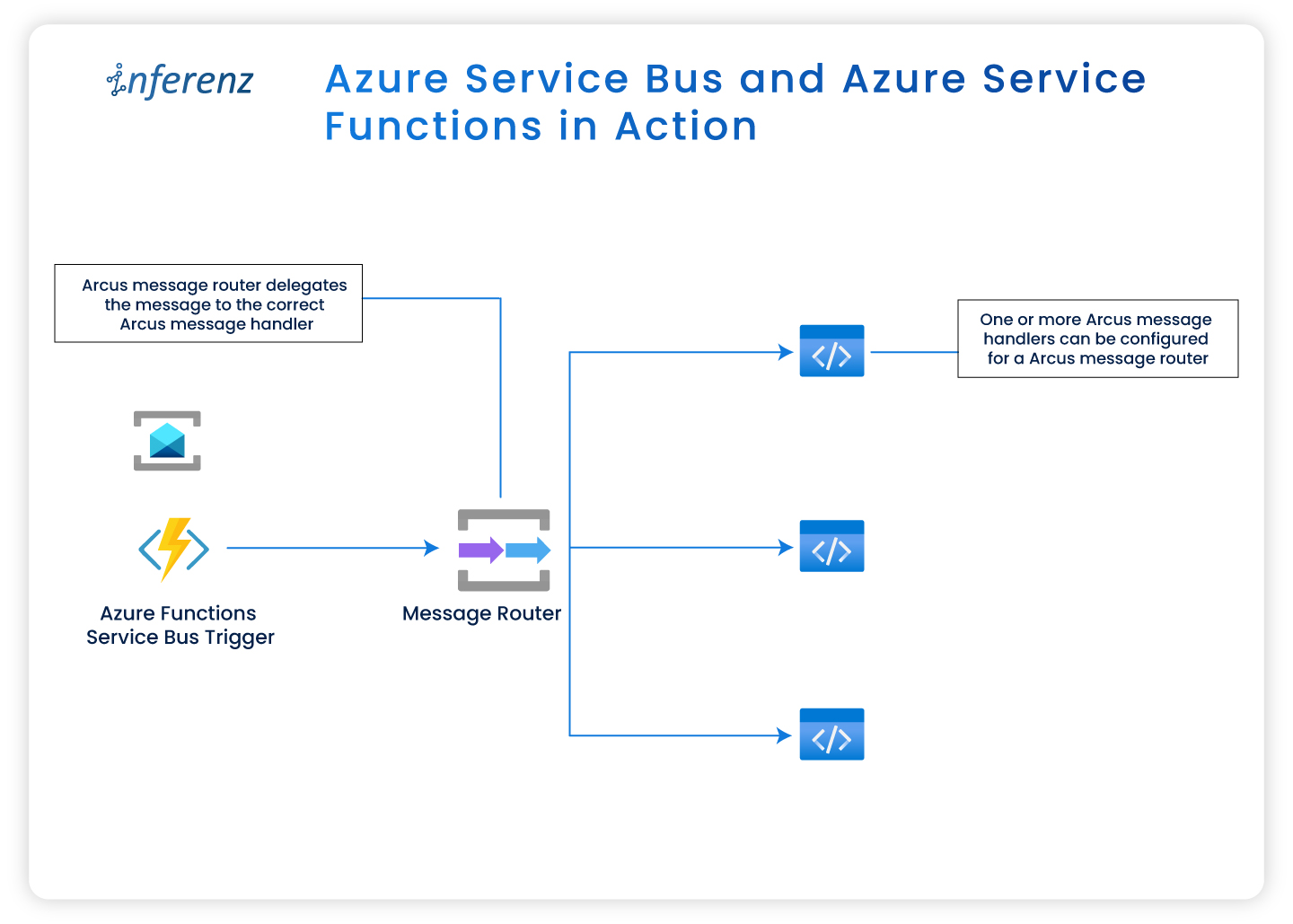
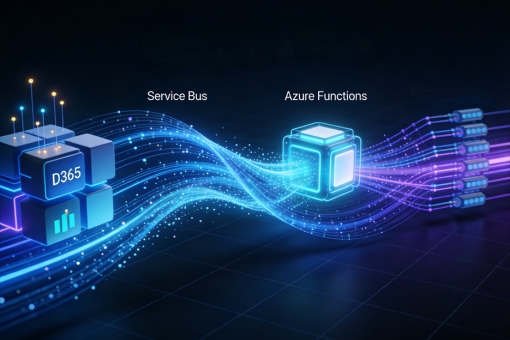
Azure Service Bus and Azure Service Functions in action
Azure-native advantage:
Because we built every component in Azure (Service Bus, Function Apps, Redis Cache, etc.), we could manage the full pipeline end-to-end. That offered us:
- Better control over retries, scaling and performance tuning
- Native observability using Application Insights and Log Analytics
- Rapid troubleshooting with no reliance on third-party services
Publishing events to Azure Service Bus
- Create Service Bus namespace with Topic or Queue.
- Message structure:
- The message sent to Service Bus via the Service Endpoint will follow the standard structure defined by Dynamics 365 for remote execution contexts. The format may evolve over time as Dynamics updates its schema, so consumers should be built to handle possible changes in structure.
Setting up change tracking in Dynamics 365
Steps:
- Enable change tracking:
- Navigate to Power Apps > Tables > enable ‘Change Tracking’ for each entity required for CDC.
- Plugin registration:
- Use Plugin Registration Tool (PRT) to:
- Register external service endpoint for Service Bus endpoint.
- Link this endpoint to a step so that the message is sent from D365 to the specified external service when a data event (Create, Update, etc.) occurs.
- Register message steps like Create, Update, Delete, Associate, Disassociate on specific entities
- Configure execution stage and filtering attributes
- Associate/Disassociate events in Dynamics 365 represent changes in many-to-many relationships between entities. Capturing these events is essential if downstream systems rely on accurate relationship mappings.
- Important: The PRT only registers and connects the plugin code to events in D365. The logic inside the plugin (such as sending a message to Azure Service Bus) must be written in the plugin code itself using supported libraries like Microsoft.Azure.ServiceBus.
- Use Plugin Registration Tool (PRT) to:
- Authentication & Access:
|The authentication setup provides the foundational credentials and access paths that allow Azure services to securely communicate with Dynamics 365 APIs and other Azure components.
- Enable change tracking:
- Register an Azure AD App for D365 API access.
- This provides the Application (Client) ID and Tenant ID, which will be used later in service connections or token generation to authorize calls to D365 APIs
- The app also holds the client secret (or certificate), which acts like a password in service-to-service authentication flows.
- Assign a user-assigned managed identity to secure resources.
- This identity is linked to services like Azure Functions and used to securely access resources like D365 and Service Bus without storing credentials. It allows Azure Functions to authenticate when interacting with APIs or retrieving secrets.
- Grant permissions in Azure AD and D365.
- Granting API access in Azure AD allows the app to interact with D365, while assigning roles in D365 ensures the app or identity has the necessary data permissions. These access levels determine the ability to publish or process events.
- Register an Azure AD App for D365 API access.
Event handling with Azure Functions
- Create Azure Function with a Service Bus trigger.
- Process Message:
- Deserialize JSON
- Apply business logic (e.g., enrich, transform, validate)
- Insert/Update target system
- Writing to Target System:
- The processed message is then written to the configured target system.
- For Redis Cache, Azure Functions typically store data as JSON objects keyed by entity ID, enabling fast lookups.
- For Azure SQL, the function may use INSERT, UPDATE, or MERGE operations depending on the change type (e.g., create/update/delete).
- Ensure that data mapping aligns with the entity schema from Dynamics 365.
- For our use case, we had a time goal to apply CDC changes in the target system under 3–5 seconds along with the LOB apps that would query the data from the target system using APIs exposed via APIM. Redis proved to be both faster and more cost-effective compared to Azure SQL.
- Additionally, our data size was relatively small and expected to remain limited in the future, making Redis a more suitable choice.
- Best Practices Implemented:
- Used DLQ for unhandled failures
- Ensured idempotency for retries
- Added structured logging in Log Analytics Workspace

Monitoring and observability
- Enable Application Insights for Azure Functions.
- Use Azure Monitor to:
- Track execution metrics (Success, Failures)
- Setup alerts for Service Bus dead-letter queues
- Use Log Analytics queries for debugging and advanced insights
- Create dashboards in Azure portal for quick insights for business users and monitoring for developers
Testing & validation
- Create a test record in D365.
- Verify plugin execution and message delivery in Service Bus.
- Check Azure Function logs for event processing.
- Introduce controlled failures to test DLQ behavior.
Best practices & lessons learned
- Use RBAC + MSI for secure access
- Define message contracts (schema) early
- Track event versions to handle schema evolution
- Avoid sending sensitive PII data without encryption
- Design for failure and retry from day one
- Design the schema evolution for target system thoughtfully
From event-driven CDC to agentic AI
This architecture does more than move data quickly. It sets the foundation for agentic AI workflows that respond to change in real time. When events from Dynamics 365 flow through Azure Service Bus into function-based processing, that data can power:
- Real-time scoring models that assess risk or customer intent as updates occur
- Automated alerts and triggers for operational teams when certain thresholds are crossed
- Predictive recommendations that learn from continuous data streams instead of daily batches
Such event-driven systems become the nervous system of AI-enabled enterprises—where every update feeds insight and every event leads to action.

Conclusion
Event-driven CDC unlocks real-time integration between D365 and downstream systems. By combining Service Bus, Azure Functions, and plugin-driven triggers, you can create a scalable and reactive architecture that meets modern enterprise needs.
Explore how this can be extended to support data lakes, event analytics, and multiple system syncs — all using Azure-native tools.
FAQs
1) What is event-driven CDC in Azure with Dynamics 365?
Event-driven CDC captures create, update, and delete events from Dynamics 365 and publishes them to Azure Service Bus. Azure Functions consume these messages and write to targets like Redis or Azure SQL for a real-time data pipeline.
2) How fast can a D365 to target sync run with this design?
With Service Bus and Functions on consumption plans, sub-5-second end-to-end times are common for moderate loads. Tune message size, prefetch, and Function concurrency to hit strict SLAs.
3) Should I choose Redis or Azure SQL as the target for CDC data?
Use Redis when you need very low latency lookups for APIs and short-lived data. Choose Azure SQL when you need relational joins, reporting, or long-term storage tied to CDC events.
4) How do we keep this CDC pipeline reliable and secure?
Use RBAC and Managed Identities for D365, Service Bus, and Functions. Add DLQ, idempotent handlers, replay controls, Application Insights, and Log Analytics for full traceability.
5) Can this CDC setup feed analytics or agentic AI use cases?
Yes. The same event-driven CDC stream can power real-time scoring, alerts, and agentic AI actions. You can also route change events to APIM and data stores that back dashboards.
6) What does implementation involve on the Dynamics 365 side?
Enable Change Tracking on required tables. Register a Service Bus endpoint and plugin steps for Create, Update, Delete, and relationship events, then publish structured messages for Azure Functions to process.

 Introduction