










Manual Precision, Automated Scale: A QA Strategy for Successful Workspace Migration

Summary

Enterprise workspace migrations live or die on one thing, whether users trust the new system enough to abandon the old one. This article breaks down a real-world hybrid QA approach that combined manual validation with Python-driven automation to migrate business-critical reports at scale, retire a costly legacy data warehouse, and restore stakeholder confidence through verified numbers.

Introduction

Enterprise migration programs often focus on architecture, timelines, and cutover plans. But in my experience, one question determines whether migration is truly successful:

Do users trust the new system enough to stop using the old one?

That question becomes especially important during data workspace migrations, where dashboards, reports, and operational decisions depend on numbers being correct every single day. legacy

In a recent large-scale migration program, I supported the transition from a enterprise data warehouse to a modernized cloud-based platform, a core part of successful data and cloud modernization initiatives. The backend migration had largely been completed, but many business-critical reports were still tied to the old workspace.

To retire the legacy environment, every report needed to be validated, reconciled, tested, and approved for release.

What made the difference was not choosing between manual testing or automation. It was combining both.

The Real Challenge in Workspace Migration

From the outside, migrations can look straightforward:

  • Move tables
  • Repoint reports
  • Validate numbers
  • Go live

In reality, migrations are rarely that simple.

Even after the new platform was built, legacy reports were still actively used by the business. That created several risks:

  • Two parallel environments generating similar metrics
  • Conflicting numbers across reports
  • High support overhead
  • Delayed retirement of expensive legacy systems
  • Low stakeholder confidence in migrated outputs

The business goal was clear: complete report migration, decommission the old environment, and ensure zero disruption to reporting operations.

That required a strong QA strategy.

Why Manual Testing Came First

Before introducing automation, manual validation covered key metrics including revenue, headcount, and quantities sold. Historical outputs were compared across six years of data, from 2019 through 2025, for approximately 80 active parks to understand data patterns, business rules, and known exceptions.

This step was non-negotiable.

Automation is powerful. But it should not be the first move when system logic is still being understood. Manual testing answered the questions automation cannot ask on its own:

  • Which source should be treated as authoritative?
  • Were variances caused by logic changes or bad data?
  • Were filters, joins, or calculations inconsistent across reports?
  • Did report visuals reflect correct backend totals?

Without this phase, automation would have scaled confusion faster

When Legacy Data Isn’t the Source of Truth

One of the most important discoveries during testing was that the legacy warehouse was not always correct.

Initial reconciliation between the old and new platforms showed mismatches in revenue and other KPIs. Since the business had relied on the legacy environment for years, it was assumed to be the benchmark.

However, I extended validation to compare the new warehouse against the operational source system.
That independent source confirmed the modern platform was producing the correct results.
This changed the migration narrative entirely.

The question shifted from:
“Why doesn’t the new system match the old one?”
to:
“How quickly can we transition to the accurate system?”

This is where QA becomes more than testing. It becomes a trust-building function.

Scaling with Python Automation

Once the business rules were validated manually, I designed an automation framework using Python, Selenium, SQL, and Excel reporting to reduce repetitive reconciliation effort, similar to other config-driven data automation implementations built for scalable enterprise workflows.

Before Automation vs. After: The Process Comparison
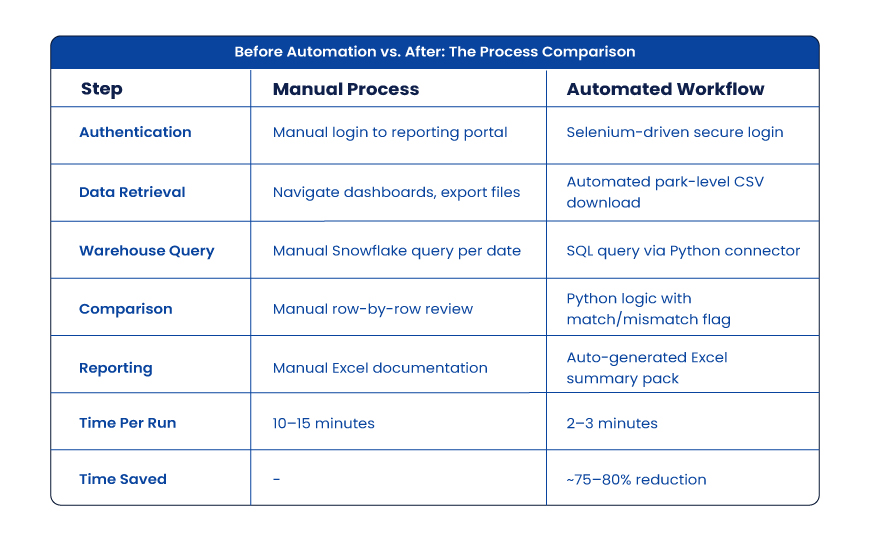
 That speed gain allowed more frequent checks, faster defect isolation, and stronger release readiness.

Automation Delivers Leverage

Once metric logic and report behavior are understood, automation becomes a force multiplier.

In this program, I designed Python-based validation workflows integrating multiple technologies:

  • Python for orchestration and comparison logic
  • SQL for warehouse reconciliation
  • Snowflake for source/target metric extraction
  • Selenium for controlled portal interactions and report retrieval
  • GitHub for version control and maintainability
  • Excel outputs for business-readable evidence packs

This hybrid model reduced repetitive reconciliation cycles dramatically while improving repeatability.

Instead of spending analyst time re-running the same checks manually, teams could focus on exceptions, defects, and release readiness. This is where intelligent automation solutions deliver measurable business impact by eliminating operational friction while improving accuracy.

That is where automation creates strategic value-not replacing testers, but removing waste.

Business Impact Beyond Speed

Across the migration program:

  • 19 reports completed, with remaining reports progressing through the pipeline
  • 75 defects identified and corrected
  • Zero rebuttals raised against QA findings
  • SIT to UAT movement became measurably more efficient
  • Stakeholder confidence improved at the executive level

Most importantly, the organization moved closer to retiring its costly legacy environment and realizing the full ROI from its modern data platform investment.
Why Manual + Automation Is the Winning Formula

Many teams frame this as a binary choice – manual testing or automation, human expertise or scripts. In migration programs, that framing is the problem.

The strongest model runs both tracks in sequence:

  • Manual Precision handles understanding business logic, exploratory testing, edge-case analysis, user acceptance readiness, and data trust validation.
  • Automated Scale handles repeatable reconciliation, regression testing, high-volume comparisons, faster feedback cycles, and continuous confidence checks.

One provides judgment. The other provides speed. You need both, and in that order.

Final Thoughts

Workspace migrations succeed when users confidently stop looking back.

That confidence does not come from architecture diagrams or project plans alone. It comes from proven numbers, tested reports, and reliable validation frameworks.

As QA professionals, our role is no longer just finding defects at the end.In modern migration programs, we help organizations move forward with certainty.And that starts with manual precision, backed by automated scale.
Frequently Asked Questions

1. What is a hybrid QA strategy in data warehouse migration?
A hybrid QA strategy pairs manual testing for business logic discovery with automated testing for high-volume reconciliation. Manual catches edge cases early; automation scales validated checks across reports. The result: faster data migration QA with fewer defects and stronger stakeholder confidence.

2. When should you start automating QA during a migration project?
After manual validation confirms your source of truth, business rules, and pass/fail criteria. Automating before that foundation exists scales bad assumptions. Most enterprise data migration programs need 2–4 weeks of structured manual testing before the first automation script runs.

3. How do you resolve discrepancies between a legacy system and a new platform?
Introduce a third reference: the operational source system. If the new platform matches it and the legacy warehouse doesn’t, the legacy system is wrong. This independent validation approach accelerates stakeholder buy-in and clears the path to cutover faster.

4. What tools are used in automated QA for data migration testing?
The most common stack: Python (orchestration), SQL (reconciliation queries), Snowflake (cloud warehouse extraction), Selenium (portal automation), GitHub (version control), and Excel (stakeholder reporting). Together, they cover most enterprise migration QA use cases end to end.

5. How does migration QA impact AI-driven analytics and AIOps pipelines?
AI models queried against migrated data inherit any undetected errors from the migration layer. A rigorous QA framework, especially one validating multi-year historical data against source systems, reduces hallucinated insights in downstream AI tools. Clean migration data is the prerequisite for trustworthy AI outputs.

QA in the Modern Data Stack: Using Python, Zephyr Scale & Unity Catalog for End-to-End Quality Assurance

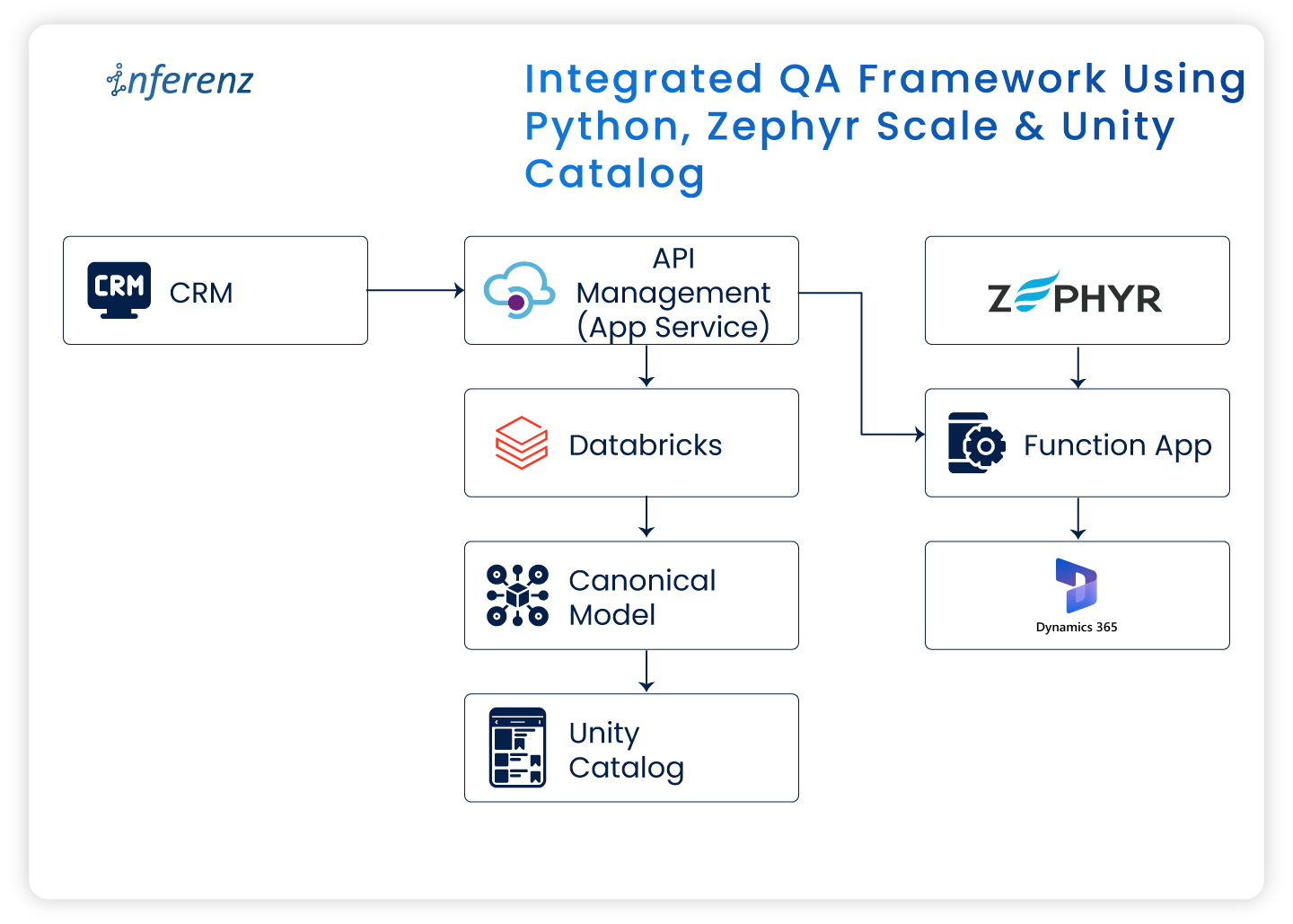
Integrated QA framework using Python, Zephyr Scale & Unity Catalog

Introduction

Quality Assurance (QA) in the software world has moved beyond functional testing and interface validation. As modern enterprises shift toward data-centric architectures and cloud-native platforms, QA now involves ensuring data accuracy, integrity, governance, and system compliance end to end.

In a recent enterprise project, I worked on migrating a legacy Customer Relationship Management (CRM) system to Microsoft Dynamics 365 (MS D365). It wasn’t merely a technology shift. It involved moving large data volumes, aligning new business rules, setting up strong governance layers, and ensuring uninterrupted business operations.

In this article, I’ll share how QA was handled across this transformation using Zephyr Scale for test management, Python for automation, and Databricks Unity Catalog for governance and access control.

QA challenges in migrating to Microsoft Dynamics 365

Migrating from a legacy CRM to a modern cloud platform brings unique QA challenges. The main focus areas included:

Focus AreaQA ObjectiveCommon Issues
Data ValidationEnsure data integrity and accuracy post-migrationMissing, duplicate, or corrupted records
Functional TestingValidate end-to-end workflows across Bronze → Silver → Gold layersBreaks in business logic or incomplete process flow
Integration TestingVerify KPI accuracy in downstream systemsData mismatch or inconsistent calculations

This was my first experience in a hybrid QA setup—where data engineering and cloud CRM validation worked together. Automation became essential from the start.

Test management with Zephyr Scale in Jira

We used Zephyr Scale within Jira to manage all QA activities. It ensured complete traceability from test case creation → execution → defect resolution.

The test planning followed an iterative Agile structure:

SprintPhaseDescription
Sprint 1System Integration Testing (SIT)Validation of data flow, transformations, and business rules
Sprint 2User Acceptance Testing (UAT)Final stage readiness checks before production deployment

Sample migration test case

Objective: Validate that data from the Bronze layer is accurately transferred to the Silver layer.

Steps:

  1. Query record counts in the Bronze schema.  
  2. Query corresponding counts in the Silver schema.  
  3. Compare totals and sample values.  
  4. Confirm no data loss or duplication.

Zephyr Scale offered complete visibility—allowing both QA and business teams to align quickly and demonstrate readiness during go-live reviews.

Writing effective test scenarios and cases

In a data migration project, QA must cover both systems—the old CRM and the new MS D365—along with the underlying Databricks Lakehouse layers.

The following scenarios formed the backbone of our testing effort:

  • Data validation: Ensuring every record from the old subscription is fully and accurately migrated.
  • Schema validation: Confirming the data flow through Bronze → Silver layers, with cleansing and normalization (3NF) applied.
  • KPI validation: Verifying 16 business KPIs for accuracy, completeness, and correct duration (annual or quarterly).
  • Governance validation: Checking access permissions, lineage, and audit logs for compliance.

This structured approach ensured coverage across the technical and business sides of the migration.

QA automation with Python

Manual validation quickly became impractical with large datasets and frequent syncs. Automation was the only sustainable approach.

Automated checks included:

  • Record counts between schemas/tables/columns
  • Schema conformity checks in migrated tables
  • Data Validation from Bronze to Silver to Gold
  • Naming convention checks
  • Storage location validations
  • KPI Calculations

This automation saved countless hours and ensured we caught discrepancies quickly.

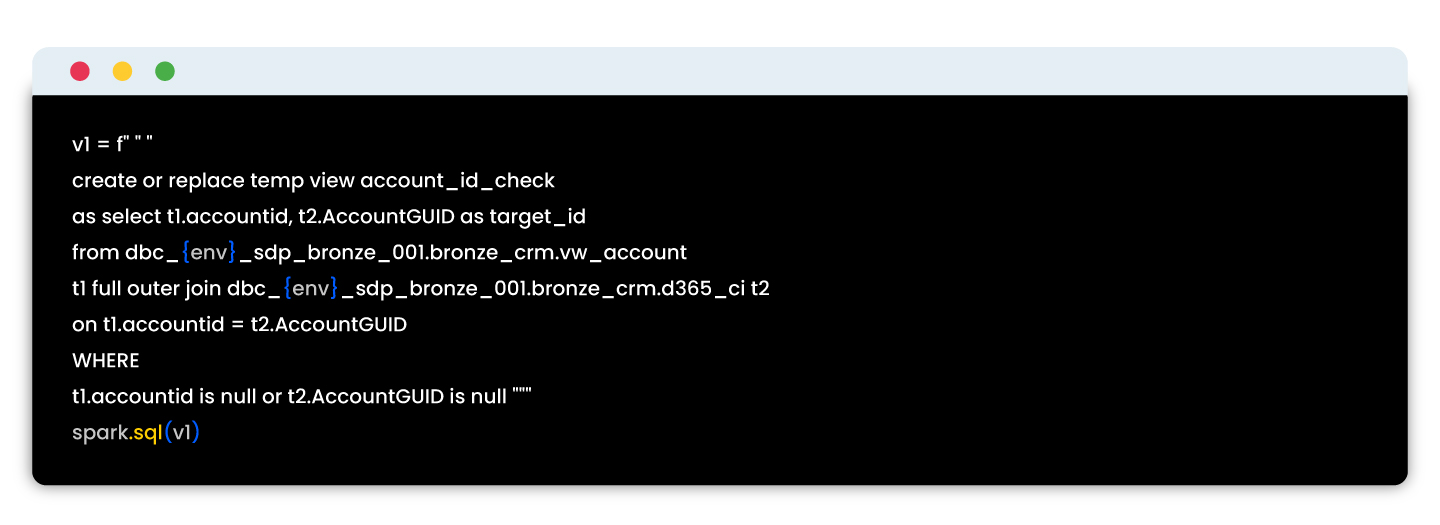
Sample script:

These automated tests reduced QA time, enabled early detection of errors, and ensured reliable validation across migration batches.

Unity Catalog: Governance in the data pipeline

Data governance was as important as data accuracy in this project. Using Databricks Unity Catalog, we centralized security, access, and lineage validation for all datasets.

As part of QA, we validated:

Governance CheckQA Objective
Access ControlEnsure only authorized users can view Personally Identifiable Information (PII).
Schema LockingValidate that schema versions remain consistent across deployments.
Audit LoggingConfirm all data access events are recorded and retrievable.

Testing with Unity Catalog reinforced compliance while maintaining transparency across teams.

End-to-end QA workflow in the migration

Each tool contributed to the overall assurance model:

StepTool UsedQA Outcome
Test scenario creationZephyr Scale + JiraLinked to user stories for visibility
Data validationPython automationVerified migration accuracy
Governance checksUnity CatalogValidated access control and data lineage
ReportingZephyr dashboardsWeekly QA progress reports


Workflow overview

StageProcessPrimary ToolQA Outcome
1Data migration from legacy CRMMigration scriptsSource-to-target data movement
2Data lake layeringDatabricks (Bronze → Silver → Gold)Data transformation and enrichment
3Automated validationPythonRecord and schema verification
4Governance enforcementUnity CatalogRole-based access, lineage, and audit logging
5Test managementZephyr ScaleTest execution tracking and reporting
6Issue managementJiraTicketing, sign-off, and visibility

This structure built confidence through traceability and consistent automation cycles.

Key takeaways from the CRM to D365 transition

  • Treat CRM migration as a business transformation, not just data movement.
  • Use Zephyr Scale for transparent test tracking.
  • Automate frequent checks using Python to maintain speed and precision.
  • Leverage Unity Catalog for governance assurance and compliance.

Final thoughts

Migrating to Microsoft Dynamics 365 while building a modern data stack highlighted how deeply QA intersects with data engineering and governance.

By combining Zephyr Scale, Python automation, and Unity Catalog, we achieved a QA framework that was:

  • Structured for traceability,
  • Automated for efficiency, and
  • Governed for compliance.


This foundation now serves as a blueprint for future enterprise migrations, ensuring data trust from ingestion to insight.