











AI-Powered Patient Onboarding: The Smartest Way for Providers to Save Time, Cut Costs, and Improve Care

Background summary

AI-powered patient onboarding is reshaping healthcare operations by automating patient intake, reducing manual workload, and improving care quality. This technology empowers homecare providers to streamline processes, enhance patient satisfaction, and deliver cost-effective, personalized care from day one.  -First impressions in healthcare shape how patients engage with your team.
Onboarding is often the first real contact a patient has with a homecare provider. At that moment, they fill out forms and seek clarity, support, and direction. The onboarding process though can be slow and confusing.

  • Forms are repetitive.
  • Follow-ups take time.
  • And caregiver assignments don’t always meet patient’s expectations.

These delays impact care delivery. They also drain staff time and slow down billing.
Many healthcare organizations continue to rely on manual intake systems. That means more errors, longer wait times, and lower patient satisfaction scores. It also puts pressure on intake teams, who must chase down missing data or correct mismatches late in the workflow.

AI-powered patient onboarding changes that. It speeds up intake, reduces manual steps, and connects patients with the right caregivers based on skills, location, and availability.
For CXOs leading homecare or healthcare networks, improving the intake process creates measurable gains—in time, cost, and patient outcomes. It’s a decision that improves how the business runs every day.

The state of patient onboarding in US healthcare

Let’s get real: most patient onboarding processes are designed for administrators, not patients.

A recent survey by Accenture found that 36% of patients who switched providers in the past year cited poor onboarding and communication as a key reason. At the same time, the administrative cost of onboarding a new patient can run as high as $200 when factoring in manual data entry, verification, and scheduling time. Multiply that across hundreds or thousands of patients per month, and the financial impact is clear.

Key stats you should know:

  • 2–7 days: Average onboarding time for new patients in traditional workflows.

  • 75%: Share of patients who expect digital-first intake options (McKinsey).
  • $18 billion: Estimated annual cost of redundant admin tasks in US healthcare (CAQH Index).

These numbers aren’t just eye-catching—they’re telling you something. There’s a clear disconnect between what patients expect and what providers are currently offering.

Onboarding, when done right, is not just a compliance formality. It’s a moment of truth. It affects patient retention, caregiver utilization, operational costs, and even Medicare ratings. The good news? Automation and AI can address most of the pain points—without replacing your human staff.

What today’s homecare leaders expect

Healthcare executives aren’t looking for shiny tech. They’re looking for practical outcomes.

A COO doesn’t want another dashboard. They want their intake team to process 100 new patients a day without burning out. A CIO isn’t chasing buzzwords. They want systems that integrate securely with their EHRs, handle data reliably, and actually reduce workload.

Here’s what’s consistently coming up in boardroom conversations when it comes to patient onboarding:

What CXOs want from modern onboarding:

  • Speed without compromising compliance
  • A consistent patient experience across multiple touchpoints
  • Automated caregiver matching based on real data, not manual guesswork
  • Fewer handoffs between systems and departments
  • Clear metrics for tracking onboarding performance and satisfaction

One of the recurring frustrations we’ve heard is this: teams spend more time fixing onboarding errors than actually engaging with patients. That’s not scalable. It’s not efficient. And in today’s landscape, it’s not acceptable.

AI-powered automation offers a fix. But only if it solves real operational problems—without becoming another system that needs babysitting.

AI-powered onboarding: what it actually means

Most leaders agree: onboarding needs to be better. But what does “better” really look like? More importantly, what does AI-powered onboarding actually mean in day-to-day operations?

Let’s break it down without the tech jargon.

At its core, AI-powered onboarding is about speed, precision, and personalization—without burdening your staff or losing regulatory grip. It takes a traditionally manual, fragmented workflow and makes it smarter, connected, and almost invisible to the patient.

So, what does a modern AI-enabled onboarding workflow actually look like?

Imagine a new patient—let’s call her Janet—who’s seeking home health support after a hospital discharge.

Instead of filling out a physical packet or struggling through a clunky portal, she’s greeted by a smart chatbot on her phone. It asks clear, relevant questions. It already knows which forms to show based on her zip code or insurance provider. It even checks that the document photos she uploads (like her insurance card or ID) are valid. The backend? Handled by AI—no need for an admin to sift through every file manually.

In minutes, Janet has completed her intake. She’s matched with a caregiver based on her preferences (language, availability, proximity), and both parties receive a personalized email with the appointment details. It feels seamless.

But under the hood, here’s what’s at play:

Key components of AI-powered patient onboarding

1. Conversational AI for intake

  • A bot guides the patient using questions that feel human and helpful.
  • Questions adapt dynamically based on previous answers.
  • It confirms responses in real-time (e.g., “Did you mean 2023 or 2024?”).
  • If a patient uploads a document twice without success, the system switches to manual entry instead of creating a bottleneck.

Business win: Reduces form abandonment, improves data accuracy, and saves staff time.

2. Document parsing that actually works

  • Patients can upload a variety of file types: PDFs, photos, even ZIP folders with multiple documents.
  • Azure AI extracts key fields like name, DOB, policy number, and address.
  • The data is normalized and mapped to the right fields in your system (e.g., Snowflake database).

Business win: Cuts down 80% of manual data entry, minimizes data errors, and speeds up insurance verification.

3. Custom state management

  • Let’s say Janet drops off midway through onboarding. She gets interrupted.
  • No problem. When she returns, the system remembers exactly where she left off.

Business win: Increases completion rates and reduces patient frustration. Helps your intake metrics look better without any staff intervention.

4. Smart caregiver matching

  • The system looks at more than just availability.
  • It checks caregiver skills, past visit history, languages spoken, and travel distance.
  • It computes a weighted score and recommends the best match—not just a random one.

Business win: Higher match quality means better care, fewer complaints, and improved outcomes. Also helps balance caregiver workload.

5. Scheduling and notifications

  • The system finds the earliest suitable appointment and sends a clear email with the date, time, and contact info.
  • If rescheduling is needed, the link is right there in the email.

Business win: Reduces no-shows, improves transparency, and eliminates back-and-forth calls.

In simpler terms, AI automation doesn’t just speed up onboarding. It improves the quality of the match, the accuracy of the data, and the confidence of the patient walking into their first appointment.

It does what manual teams often struggle with under pressure—at scale and in real time.

Impact on operational efficiency: why CXOs should pay attention

If the previous section showed you the moving parts, this section shows why they matter.

AI-powered onboarding is an operational upgrade that translates into real business value across leadership roles.

For CEOs: faster onboarding = faster revenue

  • The faster a patient is onboarded, the sooner care begins—and the sooner you can bill.
  • In many homecare networks, delays of 2–5 days between referral and care initiation are common. AI cuts this down to under 24 hours.
  • Improved satisfaction during onboarding often reflects in CAHPS and HCAHPS scores, directly influencing your reputation and Medicare payments.

📊 Stat you can use: Healthcare organizations with high onboarding satisfaction scores report up to 25% higher patient retention over a 12-month period. (Source: NRC Health)

For COOs: reducing friction across locations

  • With AI automation, form templates, workflows, and caregiver matching logic stay consistent—whether your teams are in Chicago, Dallas, or Miami.
  • It’s easier to standardize SOPs, train new staff, and maintain service quality.
  • Centralized oversight (via admin dashboards) means your regional heads can spot bottlenecks quickly and resolve them before they escalate.

📊 Time saved: A mid-sized home health agency estimated a 60% drop in average onboarding time across its five regions after implementing AI intake.

For CIOs: secure, scalable, and compliant

  • The tech stack is built on secure, cloud-native tools like Azure AI, Snowflake, and FastAPI.
  • All data handling is HIPAA-compliant, with field-level validations and audit logs.
  • System components integrate easily with EHRs or existing CRMs without rewriting everything from scratch.

💡 Why it matters: You don’t need to rebuild your tech landscape. AI onboarding layers in modularly, with low lift on your internal teams.

Metrics that matter (And that you can actually track)

MetricBefore AIAfter AIChange
Avg. time to onboard2–3 Days<10 Minutes-95%
Form abandonment rate40%<10%-75%
Manual entry errorsHighMinimal-80%
Matched within SLA~60%90%++30%
Admin hours savedN/A4–6 FTEs/monthCost savings


AI onboarding helps patients better than before by removing operational drag and unlocking value from day one.
And most importantly, it’s not hypothetical. It’s already working in real organizations across the US

Automated Patient Onboarding

The tech stack that works

Let’s keep it simple. The system works because it combines proven tools in a patient-centric way. Here’s the ecosystem in plain English:

ComponentWhat it doesWhy it matters
LangChainPowers the chatbot and forms dynamic questionsReduces intake friction, adapts in real-time
Azure AIReads documents like ID cards, insuranceEliminates manual typing, lowers error rate
SnowflakeStores all validated data securelyScales fast, works with analytics and dashboards
Neo4jCreates smart caregiver-patient match logicImproves accuracy and personalization
FastAPIExposes onboarding & matching results via secure APIEasy to integrate with your other systems

Security? ✅ HIPAA-compliant
Integration? ✅ Plug-and-play APIs
Scalability? ✅ Built for large volumes without lag
You don’t need a full digital transformation to get started. This plugs into your existing tech quietly and efficiently.

Challenges and what to watch out for

No system is perfect out of the box. But the common pitfalls with AI onboarding are manageable with the right approach:

  • Training intake staff: Even with automation, your team should know how to troubleshoot or step in if a patient gets stuck.
  • Patient trust in automation: For older adults or less tech-savvy users, the chatbot needs to feel approachable and human.
  • Garbage in, garbage out: Data validation steps are critical. Weak input logic can ruin caregiver matches.

Pro tip: Start with a single-region rollout and use metrics like form abandonment, average onboarding time, and caregiver match score to measure success. If the data looks good in 30 days, expand from there.

How to get started without disrupting operations

You don’t need to rip out your existing systems to make this work. AI onboarding solutions are designed to slide in—not shake up.

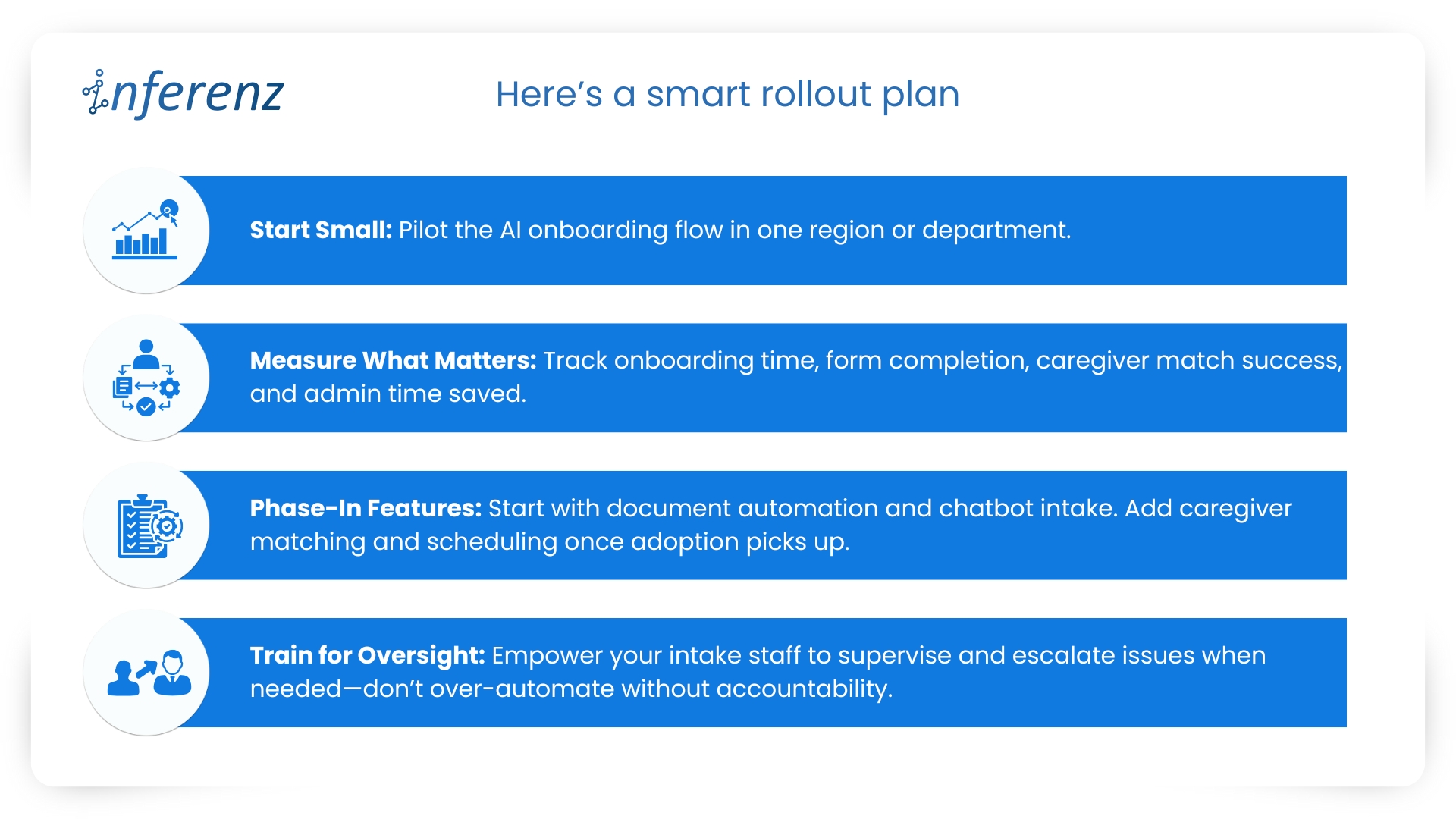
Here’s a smart rollout plan:
smart rollout plan
💡 Pro Tip: Choose vendors who offer modular deployment, HIPAA-compliance guarantees, and support for EHR integration (like Epic, Cerner).

The future of onboarding: what’s next

AI onboarding is just the beginning. As the healthcare ecosystem evolves, next-gen tools are already taking shape.

Voice-first intake for seniors

Scenario: A 78-year-old in assisted living completes onboarding by simply answering a few questions over a voice assistant or phone call—no typing, no touchscreen.
Sourced statistics: According to CB Insights, over 30% of AI health startups in 2024 are building voice-enabled interfaces for aging populations.

Multilingual bots for inclusive access

Scenario: A caregiver in Florida uses the chatbot in Spanish to complete intake for a new patient. Forms are automatically translated, and backend data remains unified.
Sourced statistics: McKinsey reports that multilingual tech will be a competitive differentiator for Medicaid and community-based care providers by 2026.

Pre-onboarding risk prediction

Scenario: Before a patient is onboarded, the system flags high hospitalization risk based on intake data. A higher-touch care plan is auto-suggested.
Sourced statistics: Gartner’s 2025 predictions on predictive AI in healthcare cite onboarding-level data as a new frontier for early intervention.

Seamless claims triggering

Scenario: Once a patient is onboarded and matched, billing pre-auth is initiated immediately based on care codes linked to intake data.
Sourced statistics: HealthEdge’s payer-tech report shows a 35% reduction in claim delays when intake is linked to backend revenue cycle systems.

Closing note: don’t let your first touchpoint be the weakest link

Here’s the simple truth: If your onboarding experience still runs on PDFs and follow-up calls, you’re losing patients, revenue, and goodwill—quietly, every day.

AI-powered onboarding isn’t about replacing people. It’s about giving your team room to breathe and your patients a reason to stay. And the best part? It pays for itself in efficiency, satisfaction, and speed to care.

If there’s one place to start your AI journey, it’s not billing. It’s onboarding.

Let your first impression be your strongest one.


Automated Patient Onboarding

FAQs for CXOs exploring AI-powered onboarding

  1. How long does it take to implement AI onboarding in a mid-sized care facility?

With a modular setup, initial rollout (including chatbot, form automation, and document parsing) can go live in 4–6 weeks. Full caregiver matching and scheduling can follow after pilot testing.

  1. Will this integrate with our existing EHR or CRM systems?

Yes. The system uses secure RESTful APIs and works well with platforms like Epic, Cerner, Salesforce Health Cloud, or even custom-built portals. Integration typically requires limited IT involvement.

  1. What’s the ROI we can expect within the first quarter?

Typical early benefits include a 60–80% drop in onboarding time, 75% reduction in admin errors, and a 20–25% increase in form completion rates—leading to faster care starts and fewer dropouts.

  1. How do we ensure patient data security and HIPAA compliance?

The entire architecture is designed with encryption, audit logging, access control, and HIPAA compliance baked in. Azure and Snowflake components adhere to top-tier security standards.

  1. What if our patients aren’t tech-savvy?

The system uses an intuitive chatbot interface with fallback options like voice-based intake or manual intervention. For seniors or non-digital users, guided support workflows ensure inclusivity.

  1. Can we customize caregiver matching rules to fit our network’s protocols?

Absolutely. The recommendation engine allows you to prioritize attributes such as languages, visit history, location radius, or skills based on your care guidelines.

Agentic AI in Healthcare: How Can CIOs Plan AI Implementation Across Departments

Background summary

Hospitals and home-health teams face repeat snags across Patient Access, ED, Inpatient Nursing, Radiology, Peri-op, and more. They face messy referrals and coverage checks, alert noise, heavy charting, imaging backlogs, or delays, medication risks, missed visits, claim denials, and late insight from feedback.  

Agentic AI tackles the repeat work behind these issues by reading context, deciding next steps, acting inside your EHR or ERP, and writing back with an audit trail, which speeds flow, reduces errors, and steadies cash. This article maps each department to clear Agentic AI capabilities across departments citing proof points and role-based benefits. -“Keep the lights on, fix the gaps, then let AI take the grunt work.

That quote, shared by a Mid-Atlantic hospital CIO in April, sums up 2025’s mood in health-system IT suites across the U.S. Cost pressure remains high, yet the conversation has moved from whether to apply AI to where first. 

Healthcare needs AI implementation, now! 

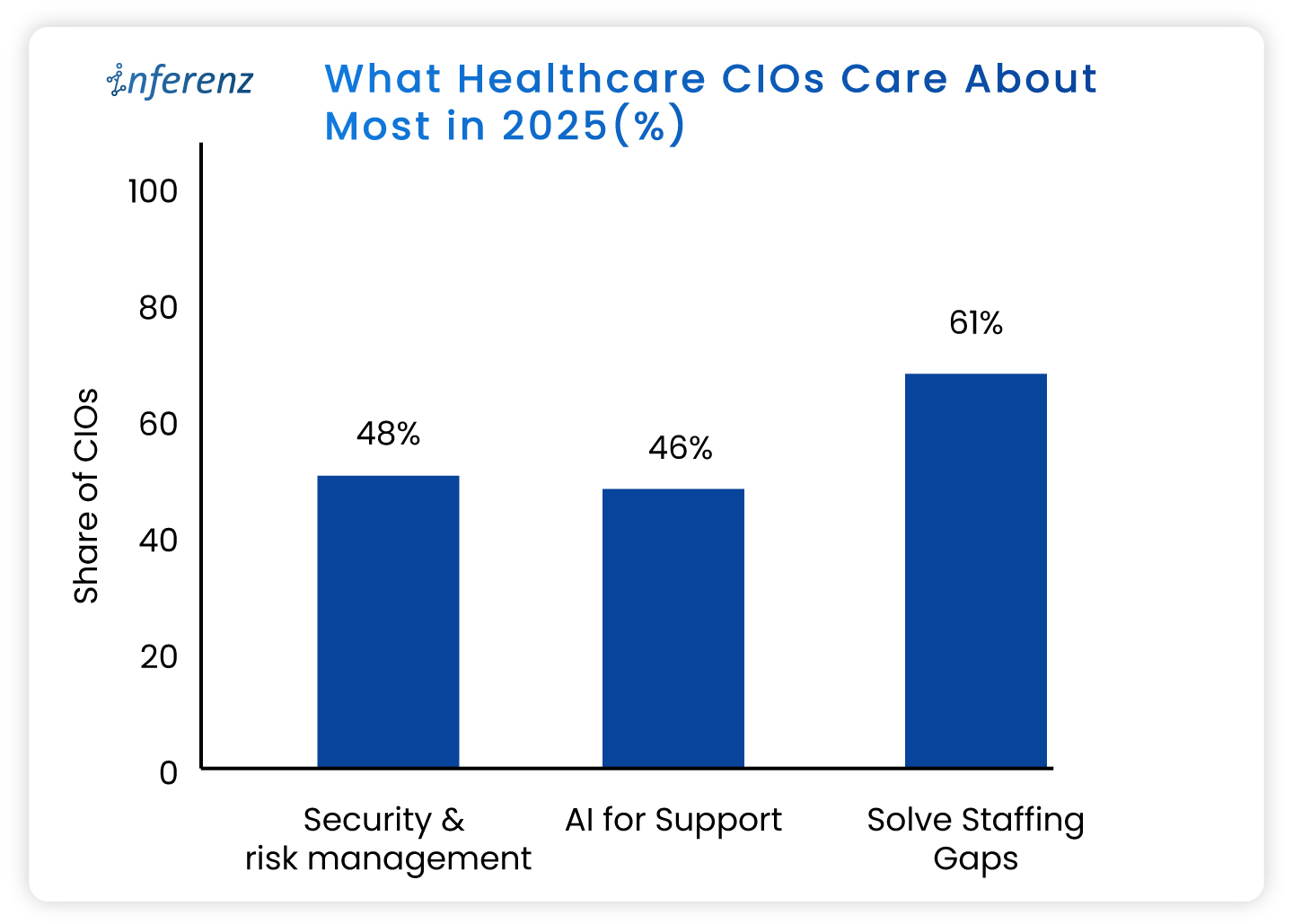
A fresh State of the CIOs survey of 906 healthcare IT leaders puts hard numbers behind the chatter: What Healthcare CIOs Care About Most in 2025


  • Solving IT staffing shortages ranks even higher, flagged by 61%.
    • Recruiting and keeping skilled people is harder than finding capital. 
  • AI for support and workflow relief lands at 46 %
    • This trend eclipses past favourites like cloud migrations. 
  • Security and risk management tops the chart at 48%
    • Ransomware worries still wake leaders at 3 a.m. 

What do these healthcare CIO priorities tell us? 

  • Staffing pressure makes patient access automation urgent, not optional. 
    • Leaders want bots that shave minutes, not moon-shot labs that promise a payoff five years out. 
  • AI momentum is practical. 
    • CIOs are testing agent-based tools inside revenue cycle, nursing rosters, and patient access because those areas pay back in months, not quarters or years. 
  • Security first means guardrails are non-negotiable. 
    • HIPAA-compliant AI is a must. The implementations need to comply also with HITRUST, and the new HHS cybersecurity proposals out for comment. 

Read more about the top operational issues that have got CIOs worried.  

Now that priorities are in place, let us see how agentic AI can help you simplify and enhance your operations. 

Agentic AI in healthcare, in full-speed action 

Agentic AI work like small digital co-workers that handle repeat work and quick decisions inside your existing systems. Each agent reads context from the EHR or ERP, decides the next step, takes the action, and writes back with a clear audit trail. That is why it fits real operations.  

The question is: where do you start? 

You start where delays hurt most, set a simple outcome, and let agents carry the routine tasks across three phases of care: Start of Care, Care Delivery, and Post Care. The payoff shows up as fewer handoffs, shorter queues, cleaner data, and faster payment cycles. 

Below, we set the context and the core challenge for the major operational areas. Under each, you will see the exact Agentic AI capabilities that meet healthcare AI use cases, using the solution buckets you shared so you can cross-link or pilot right away. 

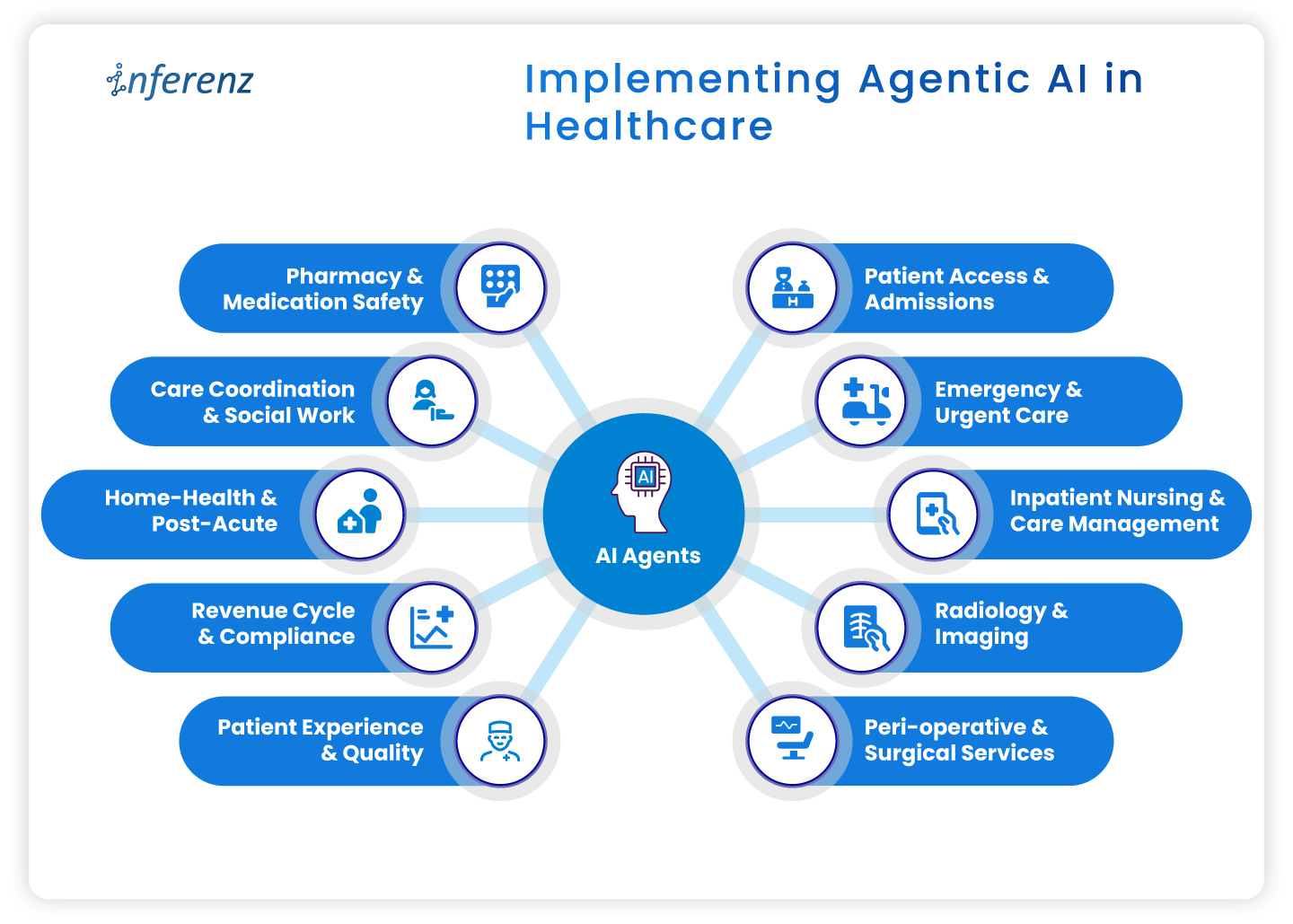
Implementing agentic AI in healthcare 

  • Patient access & admissions 
  • Emergency & urgent care 
  • Inpatient nursing & care management 
  • Radiology & imaging 
  • Peri-operative & surgical services 
  • Pharmacy & medication safety 
  • Care coordination & social work 
  • Home-health & post-acute 
  • Revenue cycle & compliance 
  • Patient experience & quality 

Implementing Agentic AI in Healthcare

1. Patient access & admissions 

Context. Intake teams deal with referrals that arrive in mixed formats, copy data across systems, and chase benefits by phone. Queues grow. First visits slip. 

How agentic AI helps. 

  • Referral & digital intake automation pulls, cleans, and routes referral data into the record. 
  • Eligibility checks & prior authorization verifies coverage and starts approvals without back-and-forth. 
  • Patient outreach sends reminders, prep steps, education, and e-consent through the channel patients prefer. 
  • Digital front desk lets patients book, reschedule, and confirm without a call. 
  • SDOH analytics flags transport or language barriers early to ease patient onboarding efforts. 
  • Intake fraud detection prevents duplicate or false identities at the gate. 

Operational outcome.

Faster first appointments, fewer re-keyed fields, cleaner claims from day one. 

2. Emergency & urgent care 

Context. Clinicians need early signal on deterioration. Alert fatigue and manual triage slow action. 

How agentic AI helps. 

  • Active monitoring streams vitals and new labs to an agent that watches for change. 
  • Alert prioritization filters noise and shows only actionable risks to the right role. 
  • Clinical risk modeling scores sepsis, readmit, or fall risk in near real time. 
  • Natural language copilots summarize recent notes so the team sees context on arrival. 

Operational outcome.  

Faster recognition, fewer false alarms, clearer handoffs. 

3. Inpatient nursing & care management 

Context. Nurses split time between bedside tasks and documentation. Care plans go stale when conditions shift. 

How agentic AI helps. 

  • Dynamic care plan personalization updates tasks and goals mid-cycle based on new data. 
  • AI documentation for clinicians drafts visit notes and care plans from voice or short prompts. ICD-10 and HHRG codes are proposed for review. 
  • Alert prioritization keeps clinicians focused on the few patients who need action now. 
  • Patient Caregiver Matching to align with patient and caregiver schedules dynamically and intelligently to stay ahead of patient needs. 

Operational outcome.  

More bedside time, fewer charting hours, faster response on the floor.

4. Radiology & imaging

Context. Studies arrive faster than they are read. Critical cases can wait behind routine ones. Reporting workflows feel heavy. 

How agentic AI helps. 

  • Clinical risk modeling uses order data, vitals, and history to score urgency, so teams handle the right studies first. 
  • Natural language copilots pre-draft structured impressions from key images and prior reports. 
  • AI documentation turns dictated notes into clean, compliant reports ready for sign-off. 

Operational outcome.  

Quicker turnaround, fewer sticky handoffs between techs and readers. 

5. Peri-operative & surgical services

Context. Small delays at pre-op and PACU ripple across the day. Discharge notes and coding often lag. 

How agentic AI helps. 

  • Dynamic care plan personalization keeps surgical pathways current from pre-op to recovery. 
  • Automated discharge & transition summaries create clear handoffs for floor teams and home-health partners. 
  • Billing/Compliance automation converts post-op documentation into coded encounters and gathers needed attachments. 

Operational outcome.  

Tighter case flow, on-time handoffs, faster coding after wheels-out. 

6. Pharmacy & medication safety

Context. Medication lists change often. Renal function, allergies, and interactions can be missed during rush hours. 

How agentic AI helps. 

  • Clinical risk modeling checks interactions and dose risks against labs and history. 
  • Natural language copilots summarize med rec and highlight conflicts for pharmacists. 
  • AI documentation writes structured notes for interventions and education.  

Operational outcome.  

Fewer preventable events and clearer documentation for audits. 

7. Care coordination & social work

Context. Teams try to close loops across clinics, payers, and community partners. Calls and emails eat hours. 

How agentic AI helps. 

  • SDOH analytics surfaces access risks that block progress. A solution like home care analytics works in this regard backed by natural language without dashboards. 
  • Patient outreach sends targeted messages, education, and transportation prompts. 
  • Automated follow-up schedules check-ins by protocol and milestone, then tracks responses. 
  • Feedback mining & sentiment analysis reads messages and surveys to spot issues before they escalate. 

Operational outcome.  

More completed actions per coordinator and fewer avoidable returns. 

8. Home-health & post-acute 

Context. Visit schedules, caregiver skills, and travel time rarely align. Drop-offs after week one are common. 

How agentic AI helps. 

  • Remote monitoring tracks symptoms or device readings between visits and flags change. 
  • Automated follow-up sends check-ins and instructions that match the care plan. 
  • Retention analytics predicts disengagement and suggests outreach that brings patients back. 

Operational outcome.  

More visits per day, steadier adherence, fewer surprises between appointments. 

9. Revenue cycle & compliance 

Context. Missing fields and late attachments create denials. Manual status checks slow payment. 

How agentic AI helps. 

  • AI documentation and billing/ compliance automation convert care notes into coded, compliant claims with proofs attached. 
  • Eligibility checks & prior authorization starts early at intake, then updates status automatically after visits as part of revenue cycle automation. 
  • Natural language copilots draft appeal letters and collect the right excerpts from the record. 

Operational outcome.  

Cleaner first-pass claims, fewer reworks, faster cash. 

10. Patient experience & quality 

Context. Comments from portals, calls, and surveys get scattered. Teams react late. 

How agentic AI helps. 

  • Feedback mining & sentiment analysis aggregates themes and flags risk in near real time. 
  • Automated discharge & transition summaries set clear expectations and reduce confusion. 
  • Longitudinal recovery prediction compares recovery against expected trends and signals when to step in. 

Operational outcome.  

Fewer escalations, clearer communication, tighter loop closure.  

Wrap-up 

Agentic AI pays off when it sits inside daily work, not beside it. Start with one area where delays or denials sting, choose a small outcome, and pilot the single agent that clears the path. Once the metrics move, extend the same logic to the next step in the care cycle. Hours return to care teams, data gets cleaner, and cash moves faster. 

Next step.  

If this flow matches your roadmap, you will certainly benefit having a short, printable CIO checklist for use-case selection, data access, privacy controls, success metrics, and for each healthcare department. 

Frequently asked questions  

1. Where should a CIO start with agentic AI?

Pick one workflow with a clear bottleneck and a single owner. Set one metric, such as first-pass claim rate or ED alert response time, and run a 60–90 day pilot. 

2. How does this connect to existing EHRs and ERPs?

Use standard interfaces like FHIR, HL7, and vendor APIs. Keep writes minimal at first, then expand once audit logs and role permissions are proven. 

3. What data access is required for a pilot?

Limit to the minimum fields that drive the task. Start with read access and a small write scope, enable full audit trails, and review logs weekly. 

4. Is HIPAA compliance realistic with agentic AI?

Yes. Enforce the minimum necessary rule, encrypt PHI in transit and at rest, control access by role, and keep Business Associate Agreements in place. 

5. How fast can we see impact?

Most pilots show movement within one quarter if the metric is narrow. Examples include shorter intake time, faster prior auth, or fewer denials. 

6. What are the top risks to plan for?

Data quality, alert fatigue, and unclear ownership. Reduce risk with a short pilot scope, clear playbooks, and weekly reviews. 

7. How do we prevent biased model behavior?

Test against stratified cohorts, monitor false positives and false negatives by group, and add simple rules that route edge cases to humans. 

8. What does change management for AI in healthcare look like?

Train the smallest group that touches the workflow. Use short job aids, shadow support for two weeks, and a clear feedback path to fix snags. 

9. How do we choose success metrics?

Tie each agent to a single operational number: minutes saved per referral, prior-auth turnaround, denials per 1,000 claims, or readmission alerts resolved. 

10. Do we need a data lake before starting?

No. Start with the systems you have. A lake or Snowflake layer helps at scale, but pilots can work with EHR and ERP feeds. 

11. How much does this affect staffing needs?

Agents reduce manual steps and overtime in targeted areas. Use attrition and reassignment rather than broad cuts to maintain buy-in. 

12. Can we reuse agents across departments?

Yes. Intake, documentation, and follow-up patterns repeat. Standardize connectors and governance so you can lift and place agents with minor tweaks. 

Building ‘Unify’- The Smart Data Dedupe App with Useful Lessons in Snowflake Native App Development

Summary

Healthcare data teams want apps that live where their data lives. Building Unifyone of our first Snowflake Native Apps-showed us why that choice solves headaches around security, speed, and trust. Here we break down each stage of the build for the deduplication app, share the problems we met, and list the habits that kept us on track. -Most healthcare data management apps still live outside the warehouse, pulling rows across networks and piling audit tasks onto already-tired security teams.  

We wanted a cleaner path.  

So, we built Unify as one of our first Snowflake Native Apps that run inside the customer account. Doing so changed how we think about trust, speed, and even pricing. This article spells out what we learned during the development of a data dedupe app, starting with the core idea—keeping the work where the healthcare data already lives. 

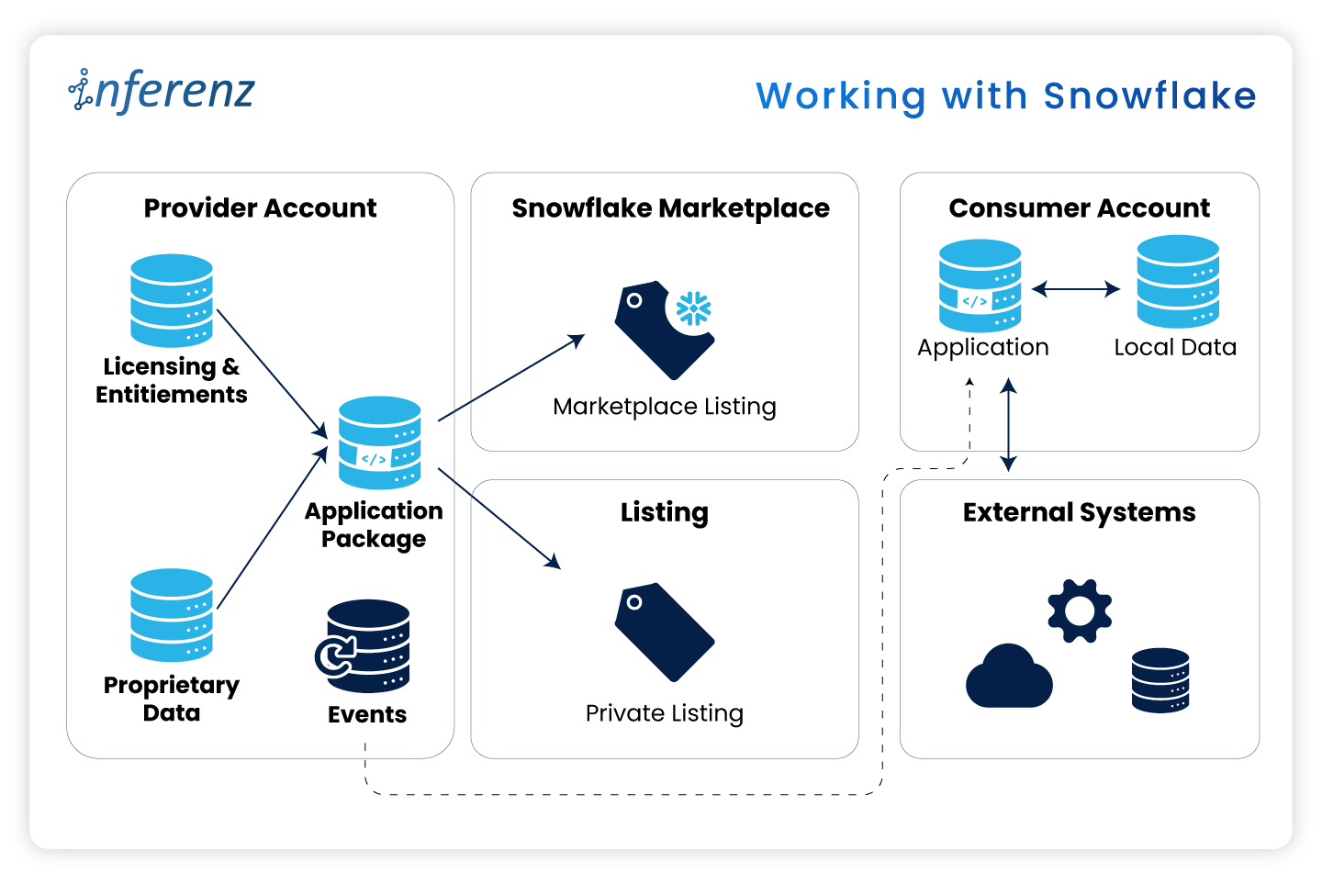
Working with Snowflake 

Security officers keep telling us the same thing: “If data leaves our Snowflake account, we need another risk review.” Those reviews can stall a project for weeks. When the data stays put, those blockers vanish.

The Snowflake Native App Framework

Here are some real-world pain points: 

  • Extra ETL hops slow reports and raise spend. 
  • Legal teams hold sign-off if data crosses a network line. 
  • Cyber teams reject any tool that opens a fresh inbound port. 

Let me elucidate how the Native App model fixes these issues here:
Native app model fixes issues

What this means for project teams

Running inside Snowflake flips the sales story.  

  • Security reviews shrink because no healthcare data exits the account.  
  • Legal teams check off fewer boxes.  
  • Ops teams stay happy because there is no new infrastructure to patch.  
  • And when the finance group is ready, you can turn on billing models that match real usage, with no speculation involved, whatsoever! 

Before we jump into code, folder names, and Git commands, let’s pause for a moment. You now know why staying inside Snowflake calms auditors and speeds go-live.  

The next question is how to keep that peace when your dev team starts shipping features at full tilt.  

A tidy project layout gives you that calm. It stops commit chaos, helps new engineers find their way on day one, and lets CI/CD jobs run without a hitch. In short, an ordered home keeps tech debt low and feature velocity high.

Setting up a clean project layout 

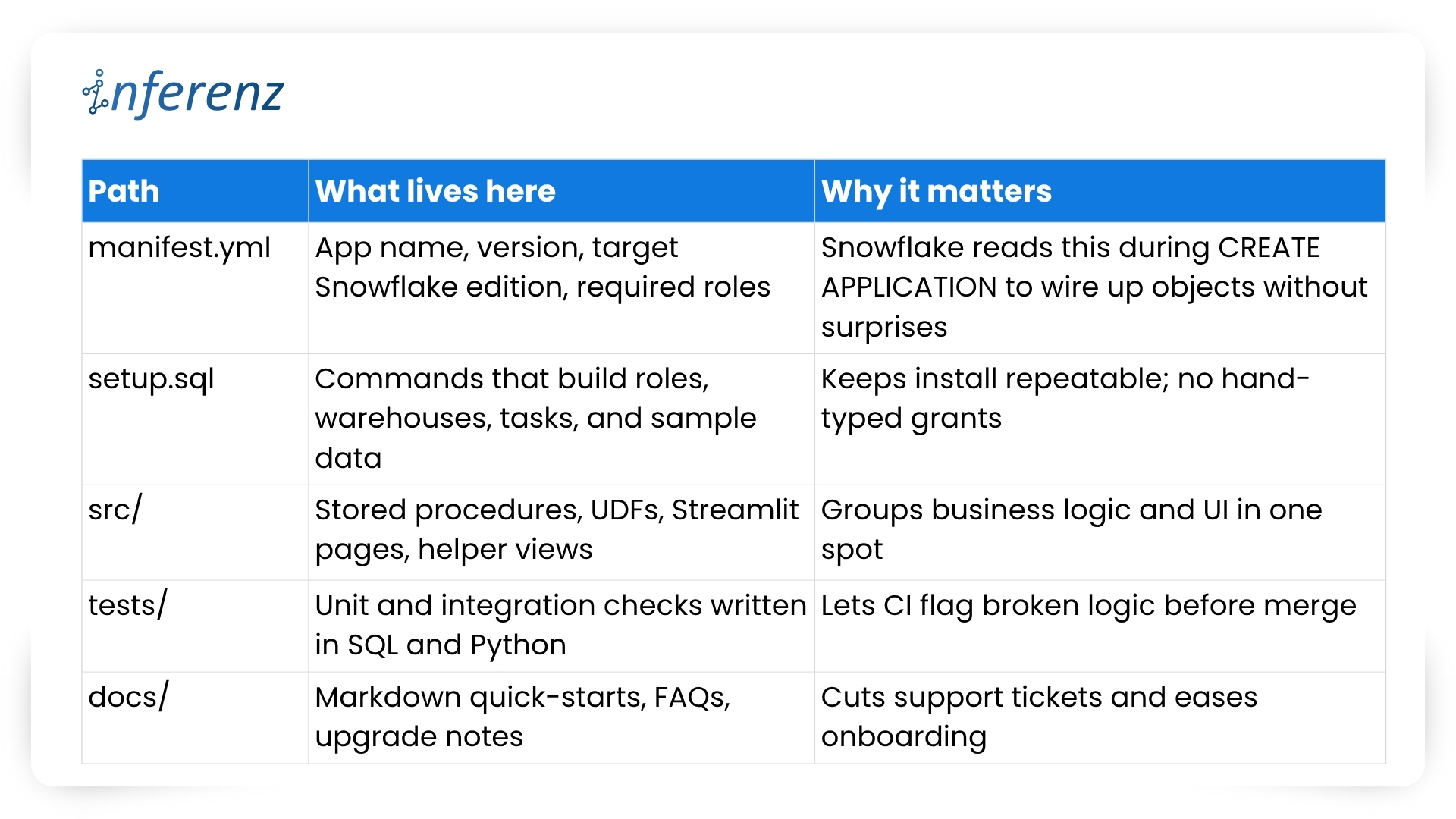
Think of Snowflake Native Apps as small, self-contained products. Every script, test, or doc page must live where others can spot it in seconds. Messy trees hide bugs; neat ones surface them early. 

Key folders and files 

Important elements to lock in early 

  1. One Git repo, two packages 
    • Create a dev package for daily commits and a prod package for signed releases.  
    • Both packages pull from the same branch but differ in version tags. 
    • Use semantic versions like 1.4.0-dev and 1.4.0 so rollback is a single command. 
  2. CI/CD with guardrails 
    • Hook your repo to a CI runner that  
      • spins up a Snowflake scratch account,  
      • loads the dev package,  
      • runs the tests/ suite, and  
      • fails on any blocked grant or failed assertion. 
    • Push to main only after CI passes; a promo script tags and pushes the prod build. 
  3. Streamlit in Snowflake for fast UI loops 
    • Store each page in src/streamlit/.  
    • Designers can tweak layouts while analysts see live data—no extra staging server needed. 
  4. Readable docs 
    • Keep install steps short: “Run setup.sql, grant the role, open /home in Snowsight.” 
    • Add a change log at docs/release_notes.md so users track what changed and why. 
  5. Security baked in 
    • Script every role, grant, and warehouse size in setup.sql. This guarantees least-privilege on each install. 
    • Place a permission matrix table in docs/security.md so buyers can audit in minutes. 

With a clear structure, your team ships features without fear, and your users enjoy stable installs that never drift from the source. Next, we will explore repeatable testing and deployment tactics that keep both packages in sync and production-ready. 

Speed with the right tool chain 

Teams juggle UI tweaks, SQL logic, and version bumps at once. Without a clear loop, staging environments drift and testers chase phantom bugs. 

Typical pain points we faced 

  • UI work stalls while engineers wait for fresh sample data. 
  • Manual deploy steps slip through Slack threads and get lost. 
  • Merge conflicts appear because no one owns the single source of truth. 

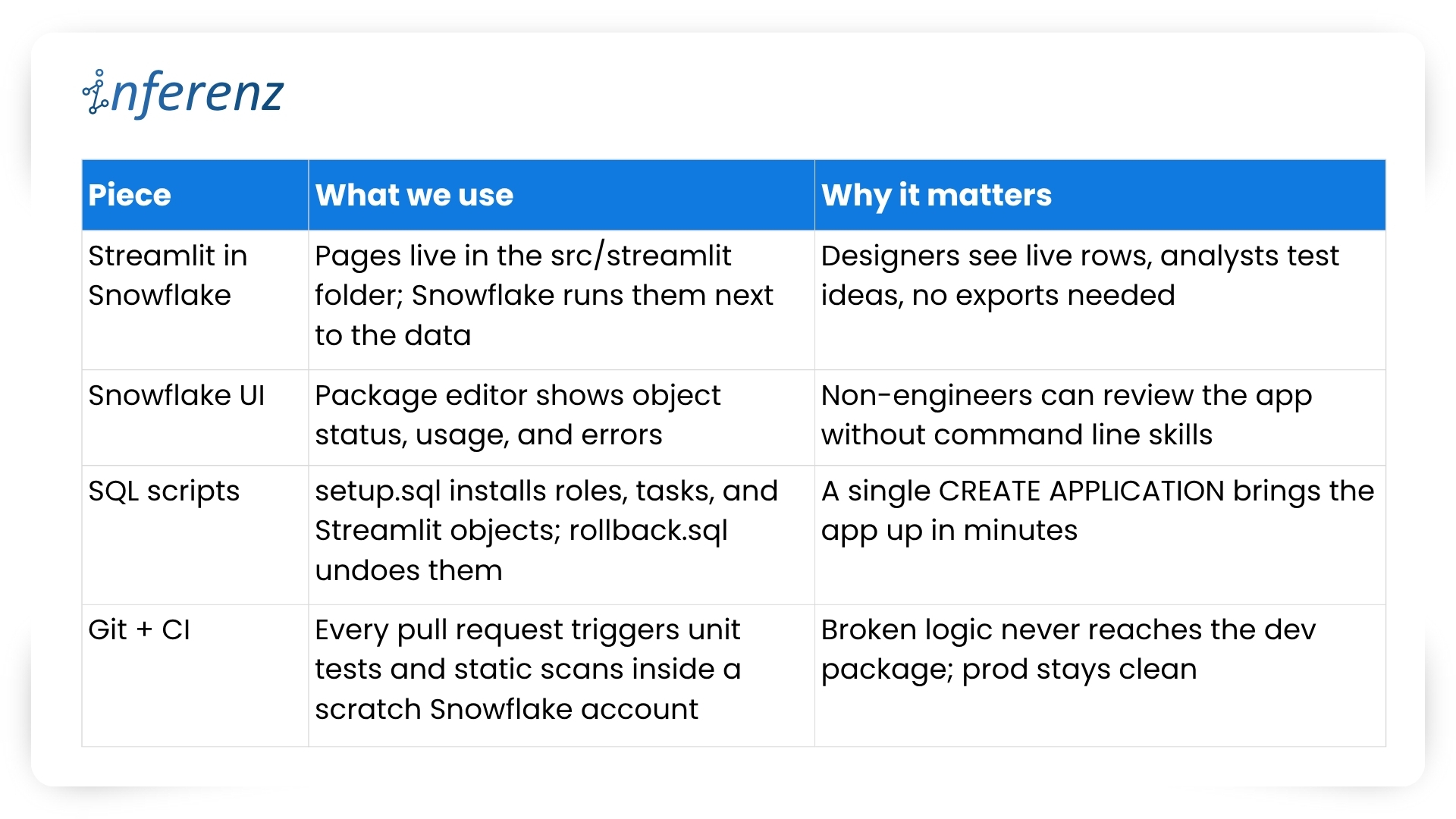
Our four-piece workflow 

Important habits that keep the loop tight 

  1. One repo, two packages: 1.5.0-dev lives in the dev package while 1.5.0 runs in prod. CI promotes only when tests pass and a human approves. 
  2. Self-testing setup: The same setup.sql that customers run also drives CI. If that script breaks, the build fails early. 
  3. Streamlit previews: Product owners open the dev package in Snowsight, click the /home page, and give feedback in real time. No separate staging server, no extra VPNs. 
  4. Automated rollbacks: rollback.sql reverses grants and drops objects, so you can reset an environment in seconds. 
  5. Consistent naming: Procedures and UDFs carry the app version in the schema name, which avoids clashes during side-by-side tests. 

We’ve covered why native apps live safer inside the warehouse and how a tidy repo plus a smart tool chain keeps feature work moving. The next guard-rail is environment isolation—running two application packages that share one codebase. Doing so sounds simple, yet it saves countless rollback headaches. 

Two packages, one codebase 

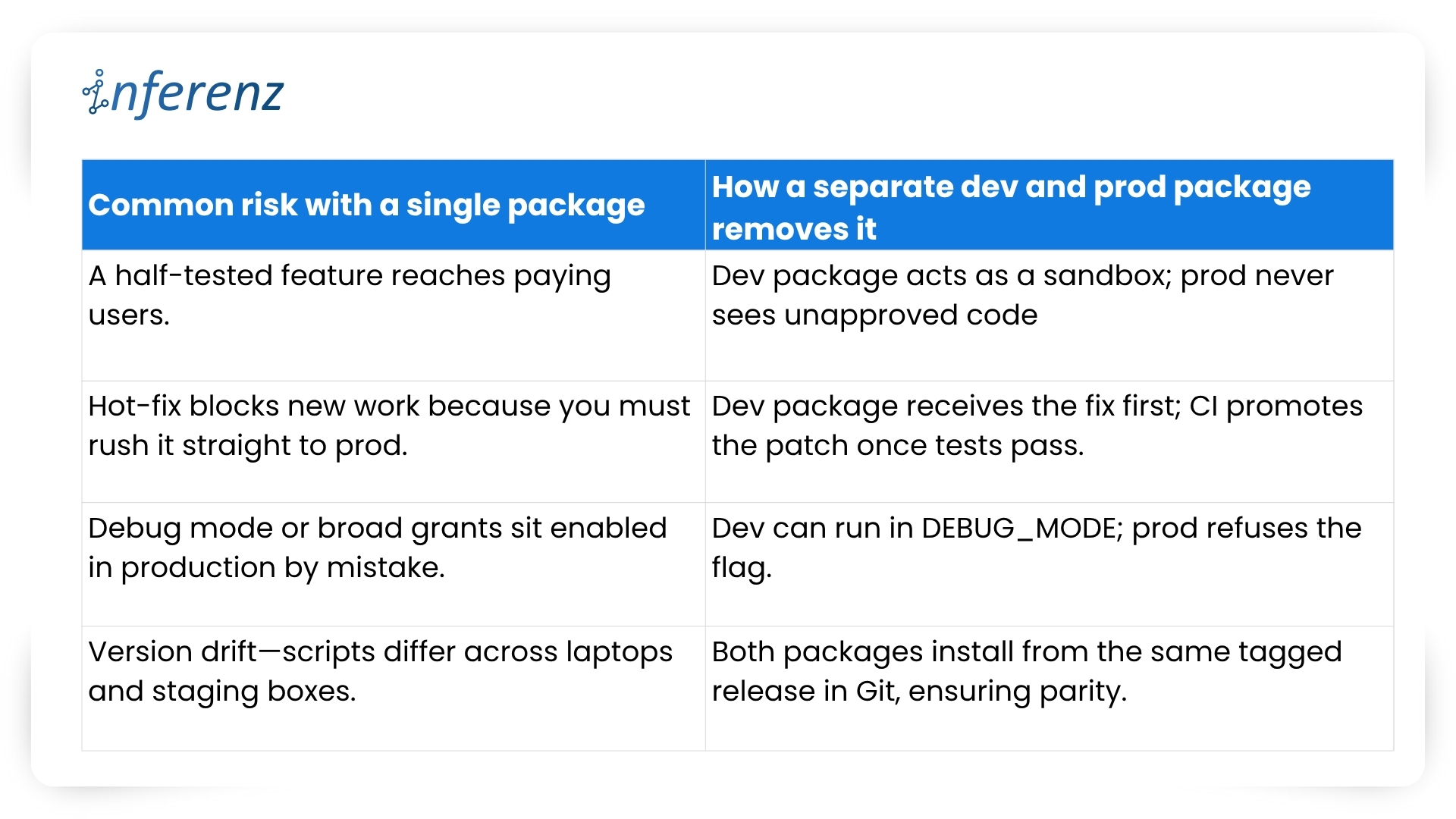
Why split environments? 

Snowflake itself recommends this two-package pattern to keep upgrades safe and reversible.  

Our promotion pipeline 

  1. Commit — Every change lands in a feature branch. 
  2. CI spin-up — The runner creates a fresh dev package with CREATE APPLICATION and runs the full tests/ suite.  
  3. Manual QA — Product owners open the Streamlit pages inside the dev package and sign off. 
  4. Tag & promote — A signed SQL script bumps the version (1.6.0-dev → 1.6.0) and copies objects into the prod package. 
  5. Release directive — We set RELEASE DIRECTIVE VERSION = ‘1.6.0’, so new installs pull only the stable build. 
  6. Rollback ready — If something slips through, ALTER APPLICATION … SET RELEASE DIRECTIVE VERSION = ‘1.5.2’ brings users back in seconds. 

Versioning habits that keep both worlds calm 

  • Semantic tags — major.minor.patch with a -dev suffix during QA: 2.0.0-dev. 
  • Schema per version — Runtime objects live in APP_DB.CODE_V1_6. This avoids name clashes when dev and prod packages sit side by side. 
  • Automated object diff — CI compares the manifest in dev vs. prod; promotion stops if objects are out of sync. 
  • Read-only prod — We grant end users a minimal role that blocks CREATE and ALTER inside the prod package, so accidental edits never persist. 

What it buys the business 

  • Predictable releases — Stakeholders get a calendar of when prod changes; no wild pushes. 
  • Audit clarity — Logs show who promoted what, matching each tag in Git. 
  • Happy support desk — Rollback is one SQL line, not a cross-cloud fire drill. 
  • Future compatibility — Older clients can stay on version 1.x while early adopters try 2.x in a separate prod package if needed. 

With isolation in place, both engineers and risk officers sleep better. Next, we’ll dig into security best practices—how strict roles, static scans, and clear docs keep Unify trusted from day one. 

Security that travels with the app 

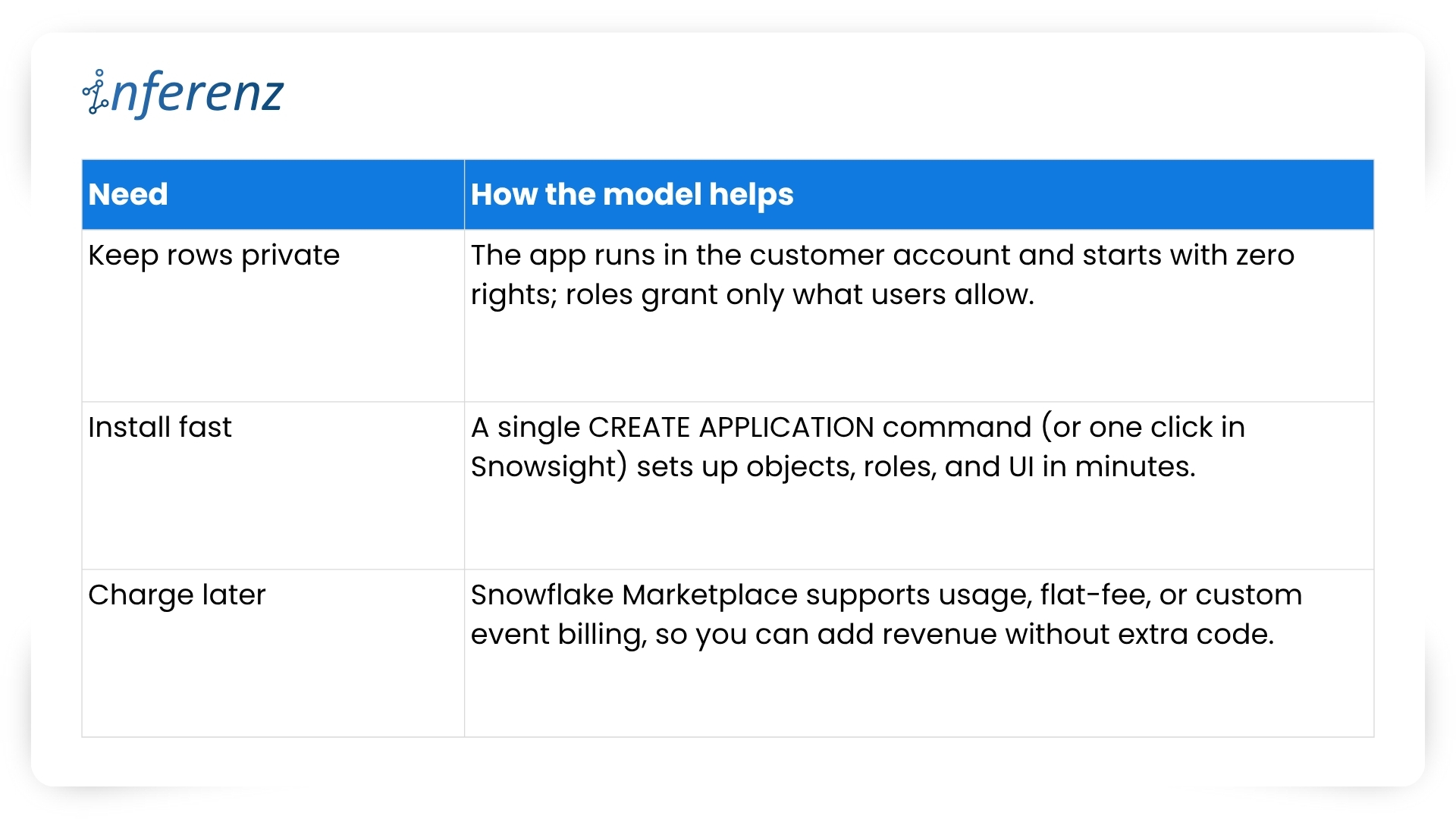
Security isn’t a bolt-on for Unify, the data deduplication app; it’s wired into the first CREATE APPLICATION script. Because the app sits inside each customer’s Snowflake account, we start from “no rights at all” and grant only what the features need. 

How we keep things tight 

  • Role-based access control – The install script creates an application-specific role with the narrowest set of privileges. All other objects inherit from that role, so nothing sits under a catch-all admin profile. Snowflake calls this the least-privilege pattern, and it makes auditors smile.  
  • Static scans on every merge – Our CI pipeline blocks the build if open-source libraries or stored-proc code show known CVEs. No red flags, no deploy. 
  • Secrets stay secret – Any outbound call (think Slack alerts or usage pings) pulls its token from a Snowflake secret object, never from plain text. 
  • End-to-end encryption – Snowflake handles disk and wire encryption for us, so we get AES-256 at rest and TLS in flight out of the box. 
  • Transparent docs – A short security appendix lists every grant and why we need it. Buyers can paste those commands into their own console and verify the scope in minutes.  

Result: Security teams see clear boundaries, compliance teams get quick sign-off, and our support desk fields fewer “Why does the app need this privilege?” emails. 

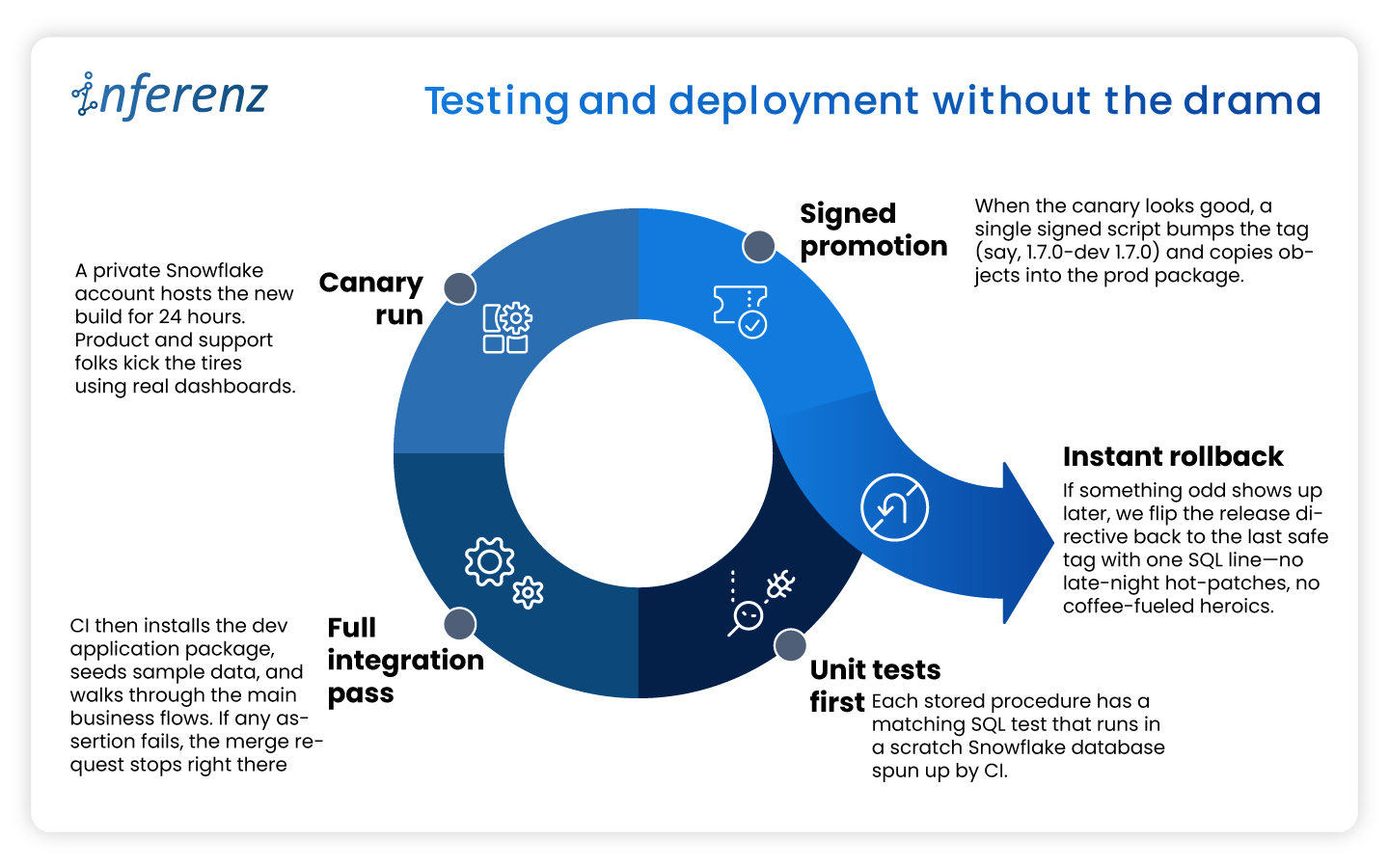
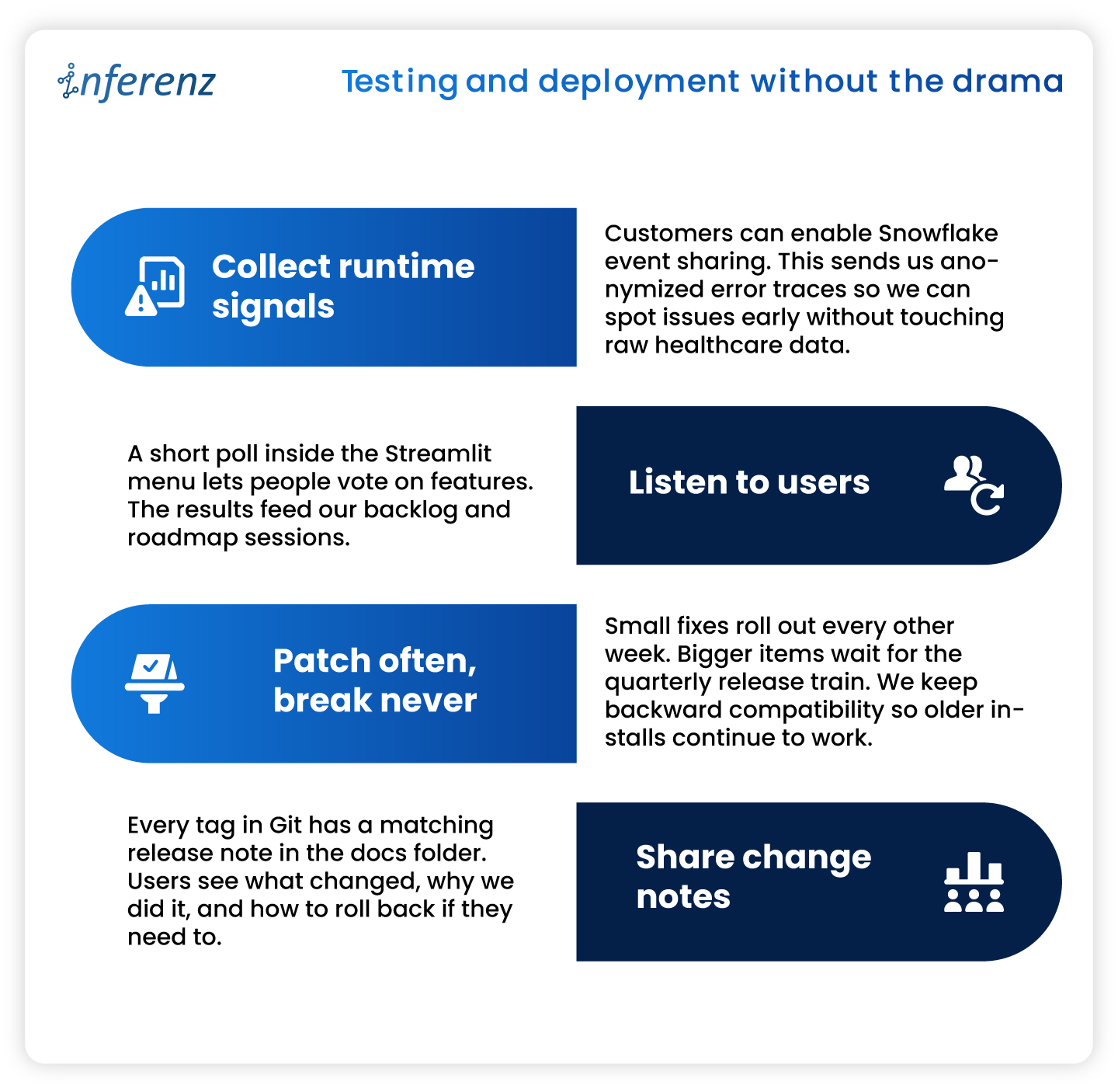
Testing and deployment without the drama 

A solid security story means little if the next release ships a typo to production. To avoid that nightmare we treat every change—no matter how small—the same way: 

This disciplined loop lets us ship improvements every two weeks while keeping both the dev and prod packages in lock-step—fast for engineers, calm for customers. 

Listing now, billing later 

When we first released Unify, the data deduplication app in the Snowflake Marketplace we kept the price at zero.  

A free listing let users test the app without budget hoops and gave us real usage stats. Snowflake’s marketplace model also means we can switch to pay-as-you-go, flat monthly, or custom event billing as soon as clients ask for an SLA. Turning that knob is mostly paperwork: update the listing, set a rate card, and push a new release. No extra infrastructure and no fresh contracts. 

Why this matters? 

  • Low-friction trials. Users click “Get” and start working in minutes. 
  • Clear upgrade path. When buyers need production support, we offer a price plan that matches their workload. 
  • Built-in invoicing. Snowflake handles metering and billing, so finance teams on both sides stay happy. 

The marketplace route shifts sales from long demos to quick hands-on proof. That streamlines procurement and puts the product in front of more data teams. 

Keeping the loop alive 

Shipping an app is only half the job. We keep Unify healthy and useful with a steady feedback cycle. 

What we do every sprint 

Note: Continuous improvement keeps trust high and shows users that the product is still moving forward. 

10 Key Takeaways from Our “Unify” Experience 

  1. Maintain separate development and production app packages from the same codebase to safeguard against accidental bugs. 
  2. Use Streamlit within Snowflake for efficient, interactive local development and prototyping. 
  3. Manage application packages using the Snowflake UI for clarity and ease. 
  4. Handle local deployment and testing through SQL for precise control. 
  5. Rely on robust version control and clear promotion processes for reliable releases. 
  6. Enforce strict security and access controls from day one. 
  7. Test thoroughly in both local and Snowflake environments before publishing. 
  8. Provide transparent, user-friendly documentation and support. 
  9. Continuously monitor, update, and improve your app based on real user feedback. 
  10. Plan for monetization early, even if you are not monetizing at launch. 

Conclusion 

Building inside Snowflake changed how we think about healthcare data management apps. Running code where the data already sits cuts risk, shortens audits, and speeds time-to-value. A tidy repo, two isolated packages, strict tests, and clear docs keep releases smooth. Marketplace listing turns installs into self-serve trials and unlocks revenue when clients are ready. If you plan to ship a native app, adopt these habits early. Your future self—and your customers—will thank you. 

Frequently Asked Questions about Snowflake Native App Development and Unify 

  1. Does Unify copy my data outside Snowflake?
    No. The app runs inside your Snowflake account, and all processing stays there. Only opt-in event logs (never raw rows) leave the warehouse for support purposes. 
  2. How long does installation take?
    Most teams finish in under few minutes. Go to Snowflake Marketplace, search the data dedupe app, click of ‘Get’ button, grant the app role, and you are ready. 
  3. Can I try new features without risking production?
    Yes. Keep a separate dev application package. Install the latest version there, run tests, and promote to prod when you are satisfied. 
  4. Do I need to upgrade/update application if new features released after I install it?
    No, you don’t need to do it yourself. All current installations are upgraded to new patch/version automatically (within few seconds to few hours depends on Cloud/Region) when new patch/version is released.  
  5. What happens if an upgrade causes trouble?
    Every release is versioned. Application can roll you back to the previous tag either through command or UI.  
  6. When will paid plans launch?
    We are finalizing usage metrics with early adopters. Expect flexible pricing options—usage based, subscription, and custom event billing—later this year. 

Top ML Algorithms for Anomaly Detection in Machine Learning

Anomaly detection in Machine Learning is identifying outliers to prevent network intrusions, adversary attacks, frauds, etc.

Every organization must focus on in-house business operations to ensure everything works efficiently.

However, a sudden suspicious activity due to data corruption or human error can impact a model’s performance. This is where anomaly detection in ML comes into the picture.

The approach identifies outlier data points to make the entire dataset free of anomalies. In this article, we’ve touched on every aspect of anomaly detection. Let’s get started!

ALSO READ: AWS Community Day 2022 With AWS Experts For AWS Insights

What Is Anomaly Detection in Machine Learning?

Anomalies are data points that do not confirm normal data behavior amongst other data points in the dataset. There are three board categories of anomaly detection.

  • Point Anomaly – if the tuple is far from the rest of the data. 
  • Contextual Anomaly – if the anomaly is due to the context of a specific observation. 
  • Collective Anomaly – the data set that helps you to find an abnormality.

The process of catching these outliers/anomalies is called anomaly detection. It is done using the concept of Machine Learning.

ML Algorithms For Anomaly Detection 

Multiple Machine Learning algorithms are available that will help you with anomaly detection. Below is the list of top ML and data science algorithms that every data scientist needs to understand.

  • DBSCAN

DBSCAN uncovers clusters in large spatial datasets based on the principle of density. When used for anomaly detection, the algorithm handles outliers where non-discrete data points represent data.

  • K-Nearest Neighbors

K-nearest neighbors have supervised Machine Learning algorithms used for classification. It is a valuable tool that helps to visualize data points and make anomaly detection intuitive.

  • Support Vector Machines 

Another supervised Machine Learning algorithm is SVM which uses hyperplanes in multi-dimensional space. SVM is effective when more than one class is involved in the problem.

  • Bayesian Networks

Bayesian networks enable Machine Learning engineers to discover defects in high-dimensional data. When anomalies are subtle and more complex, ML engineers use bayesian networks to discover and visualize abnormalities.

Different algorithms are used for anomaly detection in Machine Learning to get desired results. However, before commencing the project, you should have an experienced ML engineer team.

Need For Machine Learning In Anomaly Detection

According to Anomaly Detection Solution Market Research Report, the worldwide anomaly detection solution is expected to grow at a booming CAGR between 2022-2030. Let us now understand a few ways to use anomaly detection in Machine Learning in the real world.

  • Intrusion Detection 

Companies are concerned about protecting confidential data about clients and employees. Intrusion detection systems detect malicious activity and notify the team of actions.

  • Defect Detection

The manufacturing industry especially has to deal with defects in the supply chain. Anomaly detection in Machine Learning uses computer vision to monitor internal systems and detect faults.

  • Fraud Detection

Like intrusion detection, fraud detection aims to prevent activities that focus on obtaining money or property from customers. In addition, anomaly detection in ML detects fraudulent activities and documents to protect business operations.

  • Health Monitoring

Anomaly detection systems are incredibly useful in the healthcare sector. They assist health professionals in detecting unusual patterns in test results and MRIs to give a more accurate diagnosis.

Inferenz has worked with a manufacturing and eCommerce company to help them with text mining solutions. The AI and ML algorithms helped the company with 100% information availability and improved data quality. 

Different Anomaly Detection Methods

There are three different types of anomaly detection methods with Machine Learning.

  • Supervised – This method labels the datasets as normal and abnormal samples to classify future data points. ML engineers must collect and label examples to train the datasets in supervised anomaly detection. 
  • Unsupervised – It is the most common type of anomaly detection in Machine Learning that does not involve manual work. Artificial neural networks can be applied to unstructured data to determine anomalies. 
  • Semi-Supervised – This anomaly detection method combines supervised and unsupervised methods. ML engineers can automate anomaly detection of unstructured data with unsupervised learning methods and monitor the process to improve accuracy.

Make Your Business Smart With ML Solutions 

Machine Learning and computer vision are the leading technologies used by anomaly detection systems. Adapting this latest technology like ML will help you automate anomaly detection and efficiently manage large datasets.

If you intend to scale your business operations, automate redundant tasks, and digitize your business, contact Inferenz ML experts. The team helps companies to implement systems like anomaly detection in Machine Learning to manage their large datasets better.

FAQs for Anomoly Detection in ML

  • Which algorithm will you use for anomaly detection?

Data scientists can use multiple Machine Learning algorithms for anomaly detection depending on data type and size. Some standard algorithms include Local outlier factor (LOF), K-nearest neighbors, support vector machines, and more.

  • What are the three basic approaches to anomaly detection in ML?

The three basic approaches to anomaly detection in ML are unsupervised, semi-supervised, and supervised.

  • What is anomaly detection in AI?

Anomaly detection uses Machine Learning and Artificial Intelligence to identify abnormal behavior in datasets by comparing it with an established pattern.

  • How does anomaly detection work?

Anomaly detection works by analyzing the business data to identify the data points that do not align with standard data patterns. It helps to investigate inconsistent data, identify deviations from baseline, and so on.

Benefits Of Big Data Analytics In The Healthcare Industry

Summary

Big data analytics is fundamentally reshaping how healthcare organizations deliver patient care, manage operations, and control costs. From predictive diagnostics to supply chain optimization, data-driven decision-making is now a competitive necessity rather than an optional upgrade. The global healthcare analytics market is projected to surpass $84 billion by 2027. This article examines the measurable benefits, leading use cases, inherent limitations, and strategic considerations for healthcare leaders evaluating or expanding analytics adoption.

Healthcare organizations sit on one of the richest data reserves of any industry. Yet for most, that data remains fragmented across legacy systems, clinical workflows, and administrative records, generating noise instead of insight. The organizations closing that gap are gaining demonstrable advantages: faster diagnoses, reduced readmissions, and leaner supply chains. Those that are not are increasingly visible in outcome benchmarks.

What Is Big Data Analytics in Healthcare?

Big data analytics in healthcare refers to the process of collecting, processing, and interpreting large volumes of structured and unstructured clinical, operational, and financial data to support evidence-based decisions. Sources include electronic health records (EHRs), medical imaging, genomic sequences, IoT-connected devices, insurance claims, and patient-generated data from wearables.

The discipline spans four analytical modes: descriptive (what happened), diagnostic (why it happened), predictive (what is likely to happen), and prescriptive (what action should be taken). In practice, leading healthcare systems use all four in concert.

  • $84B+ Global healthcare analytics market by 2027
  • 30% Reduction in readmission rates with predictive tools (McKinsey)
  • 2.5 EB Daily healthcare data generated global
  • ~40% Of avoidable costs tied to late-stage disease detection

Core Benefits of Big Data Analytics in Healthcare

1. Improved Patient Outcomes Through Predictive Diagnostics

Predictive analytics models trained on longitudinal patient records can identify risk markers for sepsis, cardiac events, and chronic disease progression significantly earlier than traditional clinical assessments. Mayo Clinic and Mass General Brigham have both published evidence showing machine learning-assisted early warning systems cut ICU mortality rates by 10 to 20 percent in controlled deployments.

The practical implication is clear: earlier identification of high-risk patients allows clinicians to intervene before conditions deteriorate into high-cost emergency episodes.

2. Operational Cost Reduction

Administrative waste accounts for an estimated 25 to 30 percent of total healthcare expenditure in the US alone. Analytics platforms that optimize staff scheduling, patient throughput modeling, and claims processing workflows have demonstrated consistent cost reduction in the 12 to 18 percent range for mid-size hospital systems.

The lever here is not headcount reduction. It is eliminating unplanned overtime, discharge delays, and avoidable inventory stockouts through continuous data monitoring rather than reactive management.

3. Reduction of Medical Errors and Adverse Events

A 2024 JAMA study found that AI-assisted prescription review flagged clinically significant drug interactions in 7 percent of discharge orders that had passed standard pharmacist checks. Billing analytics tools have similarly reduced claim rejection rates in large health systems by detecting coding anomalies before submission.

These are not marginal gains. Medication errors alone contribute to over 250,000 preventable deaths annually in the US according to Johns Hopkins research. Data tools that reduce error rates even incrementally carry significant patient safety and liability implications.

4. Precision Resource Allocation and Staffing

Workforce shortages remain acute across nursing and specialist disciplines globally. Analytics platforms that integrate historical admission data, seasonal disease patterns, and local demographic trends enable hospitals to forecast staffing requirements 30 to 60 days in advance with measurable accuracy improvements over manual planning.

This reduces agency staff reliance, which typically costs 30 to 50 percent more per hour than employed staff, while maintaining care quality benchmarks.

5. Supply Chain Visibility and Waste Reduction

Medical supply chains became a critical vulnerability during the COVID-19 pandemic. Analytics tools that provide real-time inventory tracking, expiration monitoring, and demand forecasting have since become priority investments for health systems seeking supply chain resilience. Case studies from the NHS and Kaiser Permanente both document inventory waste reductions exceeding 20 percent following analytics integration.

6. Population Health and Disease Prevention

Aggregated and de-identified patient data, analyzed at scale, allows public health systems and large integrated care organizations to identify disease clusters, at-risk demographic cohorts, and intervention gaps before conditions reach epidemic thresholds. During recent influenza and COVID variant waves, health systems with mature population health analytics activated targeted outreach campaigns weeks before peers using conventional surveillance.

Key Applications: Where Analytics Is Creating the Most Value

  • Electronic Health Records (EHRs): Centralized patient histories enable cross-care-team coordination, reduce duplicate testing, and feed predictive model training pipelines.
  • Remote Patient Monitoring: IoT-connected devices and wearables transmit continuous biometric data, enabling real-time alerts for deviations in cardiac, respiratory, or metabolic markers.
  • Clinical Trial Optimization: Machine learning accelerates patient cohort matching for trials, cutting enrollment timelines by up to 30 percent in pharma applications.
  • Fraud Detection and Compliance: Anomaly detection across billing and claims data identifies fraudulent patterns that rule-based systems routinely miss, protecting both revenue and regulatory standing.
  • Genomics and Precision Medicine: Multi-omics data analysis is enabling treatment protocols tailored to individual patient genetic profiles, particularly in oncology and rare disease management.
  • Mental Health Analytics: Natural language processing applied to patient communications and clinical notes is increasingly used to flag deterioration in behavioral health conditions between appointments.

Benefits vs. Implementation Challenges: An Honest Assessment

  • Strengths: Earlier diagnosis, cost reduction, error prevention, resource optimization, population health insight.
  • Limitations: Data silos, interoperability gaps, algorithmic bias risks, talent scarcity, regulatory complexity (HIPAA, GDPR).
  • High ROI Areas: Predictive readmission, supply chain optimization, fraud detection, staffing automation.
  • Watch Points: Model drift over time, patient consent architecture, over-reliance on correlational models without clinical validation.

Implementation maturity matters significantly. Organizations in the early stages of analytics adoption often underestimate the data governance work required before models can generate reliable output. A clean, governed data layer is not optional infrastructure: it is the foundation on which every downstream analytics investment depends.

The Regulatory and Ethical Dimension

Healthcare analytics operates in a uniquely constrained regulatory environment. In the US, the Health Insurance Portability and Accountability Act (HIPAA) sets strict boundaries around patient data use and sharing. In Europe, GDPR and the EU AI Act (which took effect in 2024) impose additional requirements, including transparency obligations for high-risk AI systems used in clinical settings.

The ethical risks are equally real. AI models trained on historically biased datasets have demonstrated differential performance across racial and socioeconomic patient groups in peer-reviewed studies. Organizations deploying clinical AI need model validation frameworks that account for sub-population performance, not just aggregate accuracy metrics.

What Differentiates Leading Healthcare Analytics Organizations in 2026

  • Federated learning architectures that enable cross-institution model training without sharing raw patient data, resolving a major compliance bottleneck.
  • Real-time, event-driven data pipelines replacing batch processing, enabling same-encounter clinical decision support rather than retrospective review.
  • Clinician-in-the-loop model design, where AI augments rather than replaces physician judgment, improving adoption rates and clinical trust.
  • Synthetic data generation for model training, reducing reliance on sensitive patient records in the development environment.
  • Integration of social determinants of health (SDOH) data to move beyond purely clinical predictors toward whole-person risk stratification.

Conclusion

The case for big data analytics in healthcare is no longer speculative. The measurable outcomes, from reduced readmissions and medication errors to optimized supply chains and earlier disease detection, are documented across health systems at scale. The strategic question for healthcare leaders is not whether to invest, but where to invest first and with what governance structures in place.

Organizations that will lead in this space are not those that deploy the most tools. They are those that treat data quality, clinical validation, and responsible AI governance with the same rigor they apply to patient safety protocols. In that context, analytics is not a technology initiative. It is a clinical and operational strategy.

Frequently Asked Questions

What is big data analytics in healthcare and why does it matter?

Big data analytics in healthcare is the application of advanced data processing and statistical methods to large, complex datasets generated across clinical, operational, and patient touchpoints. It matters because it enables healthcare organizations to shift from reactive, experience-based decisions to proactive, evidence-based ones, improving both patient outcomes and financial performance.


How does predictive analytics reduce healthcare costs?

Predictive analytics reduces costs primarily by identifying high-risk patients before costly acute episodes occur, optimizing staff and resource scheduling to eliminate waste, and flagging billing anomalies that result in claim rejections or fraud. Studies consistently show 10 to 30 percent cost reductions in targeted operational areas after analytics integration.


What are the biggest challenges in implementing healthcare data analytics?

The primary barriers are data fragmentation across incompatible systems, regulatory compliance requirements (HIPAA, GDPR, EU AI Act), algorithmic bias in models trained on non-representative datasets, a shortage of healthcare-specialized data science talent, and change management resistance among clinical staff. Governance and interoperability challenges consistently outweigh the technical ones in practice.


Is patient data safe when used in healthcare analytics?

When properly governed, yes. Responsible analytics deployments use de-identification, encryption, role-based access controls, and consent management frameworks. Federated learning approaches are increasingly used to train models without exposing raw patient records. Regulatory frameworks like HIPAA and GDPR provide enforceable standards, though compliance quality varies significantly across organizations.


How is artificial intelligence different from traditional healthcare analytics?

Traditional analytics surfaces patterns from historical data using structured queries and statistical methods. AI, particularly machine learning and deep learning, can identify non-linear relationships across high-dimensional datasets, generate predictions on unseen cases, and improve autonomously with additional data. In healthcare, AI adds the greatest value in imaging analysis, early warning systems, and natural language processing of clinical notes.


What healthcare roles benefit most from data analytics tools?

Clinical leaders gain decision support and patient risk stratification. Operations teams gain staffing forecasts and capacity planning tools. Finance and compliance teams benefit from billing accuracy and fraud detection. Supply chain managers gain inventory visibility and demand forecasting. At the executive level, analytics provides system-wide performance visibility that was previously only available with significant reporting lag.