










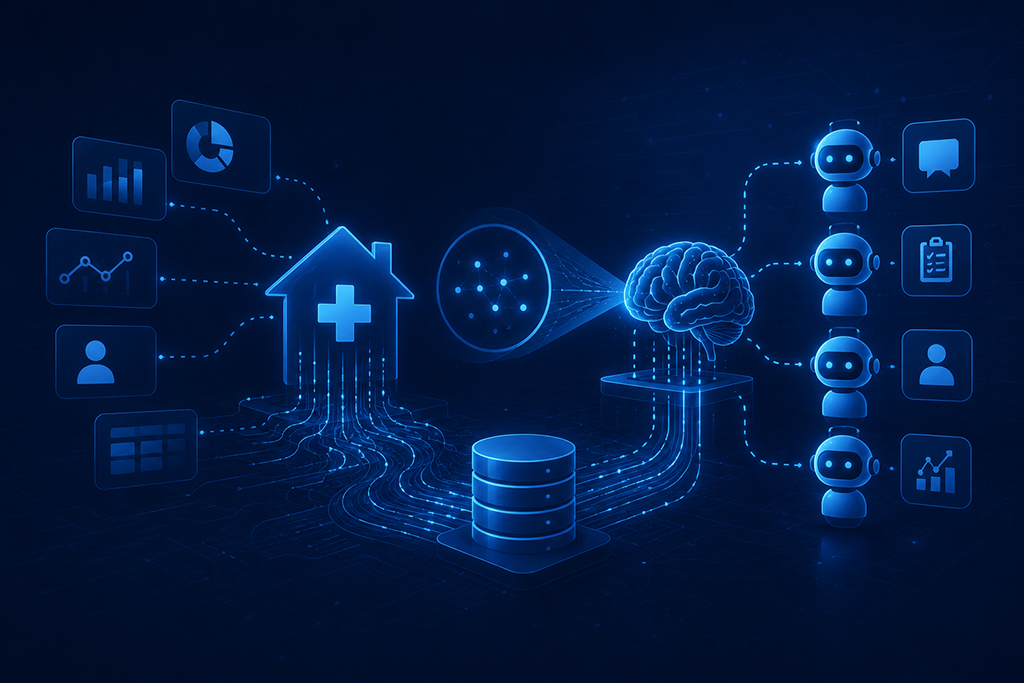
The Home Health Data Visibility Problem and the AI Agents that you Need

Summary

Home health generates more clinical data per patient than almost any other care setting, yet readmissions that remain preventable, keep happening and caregiver turnover sits at 75%. The problem has never been data shortage but data visibility to see patient data as a whole.

The 360 Patient Journey and Next Best Action Agent from Inferenz fix this by converting fragmented multi-system data into a unified intelligence layer that tells the right care team member exactly what to do, before a crisis happens.

The Real Problem Is Not Data. It Is the Architecture.

I have sat across from enough home health executives to know that “we don’t have the data” is rarely the actual complaint. What they say, when you press them, is closer to: “We have all this data, and I still can’t tell you which patients are trending toward hospitalization this week.”

That is a data architecture problem, not an absence of some clinical system or tool.

The average home health patient generates events across multiple, separate platforms in a single week.

  • The EMR records visits and OASIS assessments.
  • A remote monitoring platform logs vitals between visits.
  • A predictive analytics tool recalculates hospitalization risk scores.
  • A wound care system captures healing progression with images.
  • An ambient documentation tool transcribes clinical conversations.
  • An after-hours triage platform logs patient calls.

Every platform does its individual job well. Not one of them shows you the others.

The supervising care team managing 20-40 patients has no realistic way to correlate a vital spike on the remote monitoring platform with a risk score jump on the analytics tool and a missed visit in the EMR, because those three events exist in three separate systems, behind three separate logins, reviewed by three different people on three different timelines!

Check out how individual systems perform their individual roles in the care workflow:
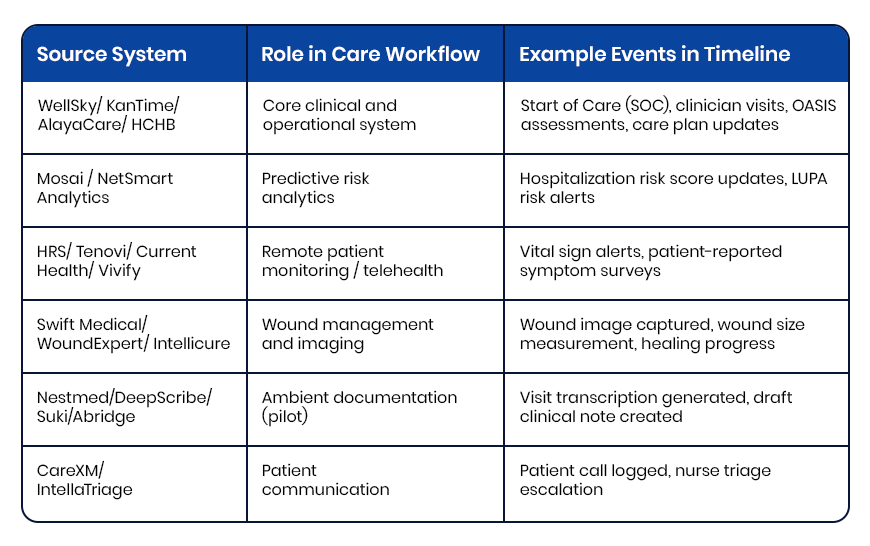
how individual systems perform their individual roles in the care workflow

The clinical pattern that would predict the next hospitalization is fully present in the data. It just cannot be read simultaneously.

What Clinical Fragmentation Actually Costs Home Health Agencies

This is where the stakes become concrete.

On patient outcomes

Hospital readmissions remain a major Medicare quality and cost concern, with CMS continuing to tie reimbursement penalties directly to excess 30-day readmission performance. In home health specifically, the deterioration signals that precede those hospitalizations: weight gain trends, rising vital thresholds, declining ADL scores, missed visits, are almost always present in clinical systems days before the ER visit.

On Medicare revenue

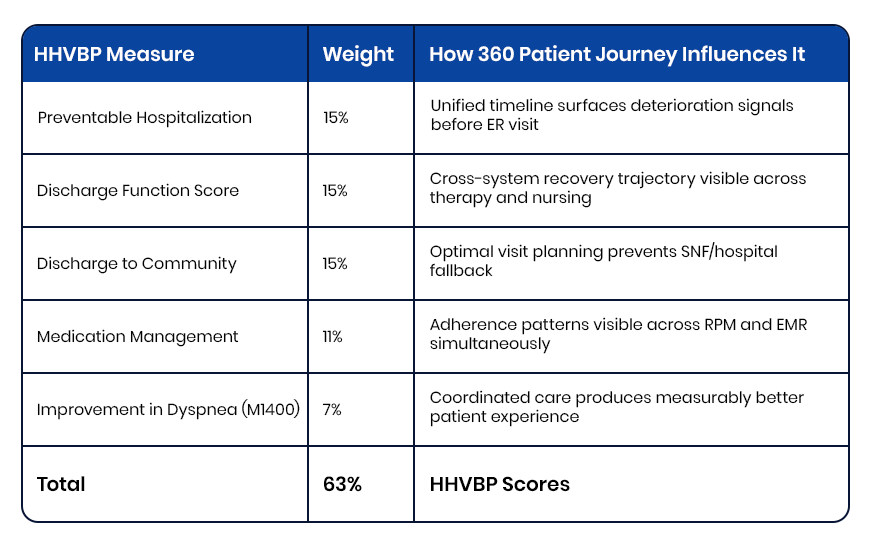
A 5% HHVBP payment swing equals $250,000 in annual revenue impact for a $5 million agency. That score is determined by 2024 performance data being calculated right now, as per expanded model. For most agencies, that performance data has never existed in a single unified view. The quality measures driving the score, including Preventable Hospitalization, Discharge Function Score, Discharge to Community, and Medication Management, are each shaped by whether care teams can see patient trajectory across systems in real time.

On workforce retention

Caregiver turnover sits at 75% annually,a staggering number! Nurses report spending up to two hours per shift navigating disconnected systems to assemble clinical context that should take two minutes. Documentation burden is a structural driver of attrition, not a cultural one. Reducing the time a clinician spends chasing information across platforms is a retention investment, not a workflow convenience.

What a Unified Patient Timeline Looks Like in Practice

Before describing how the 360 Patient Journey works technically, it helps to see what changes on a clinical level.

A supervising RN opens a single patient record. Without logging into anything else, she sees:

  • Tuesday: Blood pressure 158/94, threshold exceeded, flagged moderate severity
  • Tuesday: Patient survey reports increased fatigue and mild ankle swelling
  • Three days prior: Hospitalization risk score elevated from 38 to 59, contributing factors flagged
  • Four days prior: Diuretic dose increased per physician order
  • Five days prior: RN visit completed, weight 3.2 lbs above baseline, physician notified
  • Seven days prior: Start of Care, primary diagnosis CHF exacerbation

That sequence tells a complete clinical story. Rising weight. Medication adjustment. Risk score climbing. Fatigue worsening. Blood pressure spiking. The pattern is unmistakable when all events appear in order on one screen. Without a unified timeline, those same events sit across three platforms, reviewed by different people, connected by nobody.

This is what the 360 Patient Journey makes possible, and it is built entirely from data the organization was already generating. And then the Next Best Action Agent takes it further. It uses the visibility with a recommended next step attached. The right action, for the right patient, delivered to the right person before the pattern becomes a crisis. And it is built entirely from data the organization was already generating.
Book a demo CTA

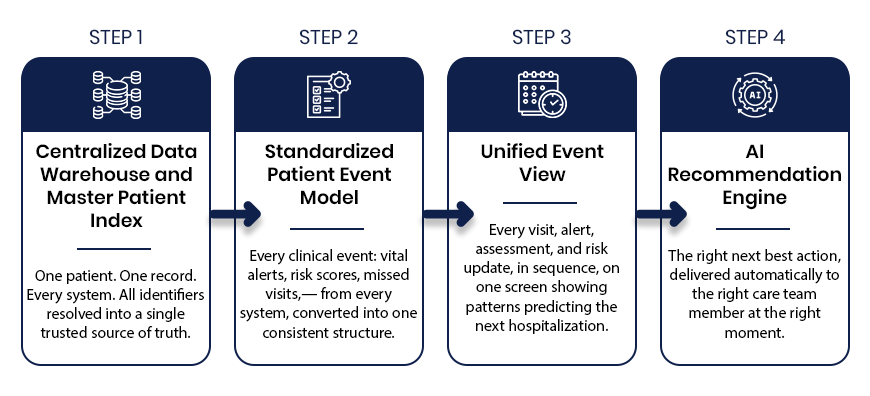
The 360 Patient Journey and the Next Best Action Agent: How They Work in Four Steps
The 360 Patient Journey and the Next Best Action Agent: How They Work in Four Steps

Step 1: Centralized Data Warehouse and Master Patient Index

What it solves: The same patient carries a different identifier in every system. A medical record number in the EMR. A device ID in remote monitoring. A Medicare beneficiary number in the analytics platform.

How it works: The Master Patient Index resolves every identifier, including name, date of birth, Medicare ID, and address, into one canonical patient record using probabilistic matching. One patient. One record. Across every system the organization runs.

Why it matters: Without identity resolution at this level, any downstream unification of clinical data is built on an unreliable foundation. Events get misassigned. Timelines become partial. Clinical decisions get made on incomplete records. The MPI is what makes everything that follows trustworthy.

Step 2: Standardized Patient Event Model

What it solves: Every clinical platform stores data in its own schema, its own timestamp format, its own taxonomy. A vital alert from a remote monitoring platform looks nothing like an OASIS completion from an EMR or a risk score update from a predictive analytics tool.

How it works: Every clinical event from every connected system gets converted into a single standardized structure: event type, timestamp, source system, clinical status, payload summary, and linked events. The care team does not log into six systems to understand one patient. The data arrives already translated into a common language.

Why it matters:For example, six systems with six formats produce six incomplete pictures. One standardized event model produces a complete one.

Step 3: Unified Event Timeline

What it solves: Even with data normalized, clinical teams need a way to see the full patient story in sequence, not as a database export.

How it works: Every normalized event displays in reverse chronological order on a single interface, flagged by severity, color-coded by source system, with linked event relationships visible briefly. The care team sees the complete longitudinal patient journey, from vital spikes and risk score changes to missed visits, wound progression, and after-hours calls, together and in the order they happened.

Why it matters: Patterns are only visible in sequence. The CHF patient whose weight gain, diuretic adjustment, risk score elevation, and vital spike appear as individual data points across three systems looks like four separate mild concerns. On a single unified timeline, they look like what they are: a hospitalization building over five days.

Step 4: AI Recommendation Engine and Next Best Action Agent

What it solves: A unified timeline shows what happened. The Next Best Action Agent tells care teams what to do about it.

How it works: The AI Recommendation Engine reads the complete patient timeline and delivers a specific, prioritized recommended action to the right care team member at the right moment. It surfaces patient summaries, risk drivers, and recommended action plans across every risk level, not just critical cases. The right nurse gets the right instruction automatically: schedule a visit today, escalate to the supervisory RN, request reauthorization before the unit gap widens.

Why it matters: Most clinical AI tools produce dashboards that require interpretation. The Next Best Action Agent produces decisions. There is a meaningful operational difference between a platform that shows a rising risk score and one that tells a specific person to make a specific call within the next four hours.

How Caregence Connects the Intelligence Layer to Clinical Workflows

The Next Best Action Agent runs on Caregence, Inferenz’s agentic AI platform built specifically for home health and hospice organizations. Caregence connects to existing EMR, payer, scheduling, EVV, and RCM systems without requiring agencies to replace a single platform they already use.

It provides the workflow infrastructure for deploying custom AI agents on top of unified patient data, including the Next Best Action Agent, with built-in governance, role-based access, and audit-ready communication tracking.

Think of Caregence as the operating system for proactive care. The 360 Patient Journey is an agent that provides the unified data foundation for visibility. It is based on Caregence that provides the AI agents that act on it, including the Next Best Action Agent.

The Measurable Impact: From Data Visibility to HHVBP Performance

Inferenz’s internal assessment of the 360 Patient Journey and Next Best Action Agent against the full HHVBP measure set found that this four-step process addresses up to 63% of HHVBP quality metrics directly.

The measures most influenced:
The Measurable Impact: From Data Visibility to HHVBP Performance

The agencies that improve HHVBP scores in 2026 will not do it by changing clinical protocols. They will do it by making existing clinical data visible in sequence, in context, and at the moment when action can still change the outcome.

The Bottom Line

Home health and hospice organizations are not data-poor. They are data-fragmented. Every signal needed to prevent the next hospitalization, protect HHVBP reimbursement, reduce documentation burden, and demonstrate outcomes to payers is already being generated inside the organization.

The 360 Patient Journey makes that data readable. Caregence makes it actionable. The Next Best Action Agent makes sure the right person acts on it before the window for intervention closes.

This is what Data to AI to ROI looks like in home health and hospice, built by Inferenz for organizations that cannot afford to keep losing $250,000 on a visibility problem they already have the data to solve.

Frequently Asked Questions

What is a unified patient timeline in home health?

A unified patient timeline is a single chronological view of every clinical event across a patient’s care episode, pulled from the EMR, remote monitoring, predictive analytics, wound care, and triage platforms, displayed in one interface without requiring multiple logins. Inferenz builds this through the 360 Patient Journey using a Master Patient Index and Standardized Patient Event Model.

How does a unified patient timeline help prevent hospitalizations in home health?

Deterioration signals: rising vitals, increasing risk scores, missed visits, declining ADL scores, almost always appear across multiple systems days before a hospitalization. A unified timeline places them in sequence on one screen so the care team sees the pattern before it becomes a crisis, not after.

What is a Next Best Action Agent in home health care?

A Next Best Action Agent is an AI system that reads the unified patient timeline and delivers a specific, prioritized clinical recommendation to the right care team member at the right moment. Where a dashboard shows information, the Next Best Action Agent delivers a decision which patient, what action, and when.

How do the 360 Patient Journey and Next Best Action Agent work together?

The 360 Patient Journey unifies data from every clinical system into a single patient timeline. The Next Best Action Agent reads that timeline and tells the care team exactly what to do next. Together they complete the full loop: data becomes visibility, visibility becomes action, action drives outcomes.

How does this improve HHVBP scores?

HHVBP’s highest-weighted measures: Preventable Hospitalization, Discharge Function Score, Discharge to Community, and Medication Management, all depend on early detection and proactive response. Inferenz’s internal assessment found this four-step process addresses up to 63% of HHVBP quality metrics directly.

What is Caregence and how does it power this solution?

Caregence is Inferenz’s agentic AI platform built for home health and hospice. It connects to existing EMR, payer, scheduling, and RCM systems and provides the workflow infrastructure for deploying the Next Best Action Agent on top of the unified data generated by the 360 Patient Journey.

Can this be implemented without replacing the existing EMR?

Yes. The 360 Patient Journey sits above existing systems, reading from them without replacing them. It connects to platforms including Homecare Homebase, Medalogix, Vivify, and Swift Medical through standard APIs and data integrations.

What is the difference between a risk dashboard and a Next Best Action Agent?

A dashboard shows a risk score and waits for a clinician to interpret it. The Next Best Action Agent reads the full patient timeline, interprets the risk in clinical context, and delivers a specific recommended action to a specific person, saving interpretation time that busy care teams rarely have.

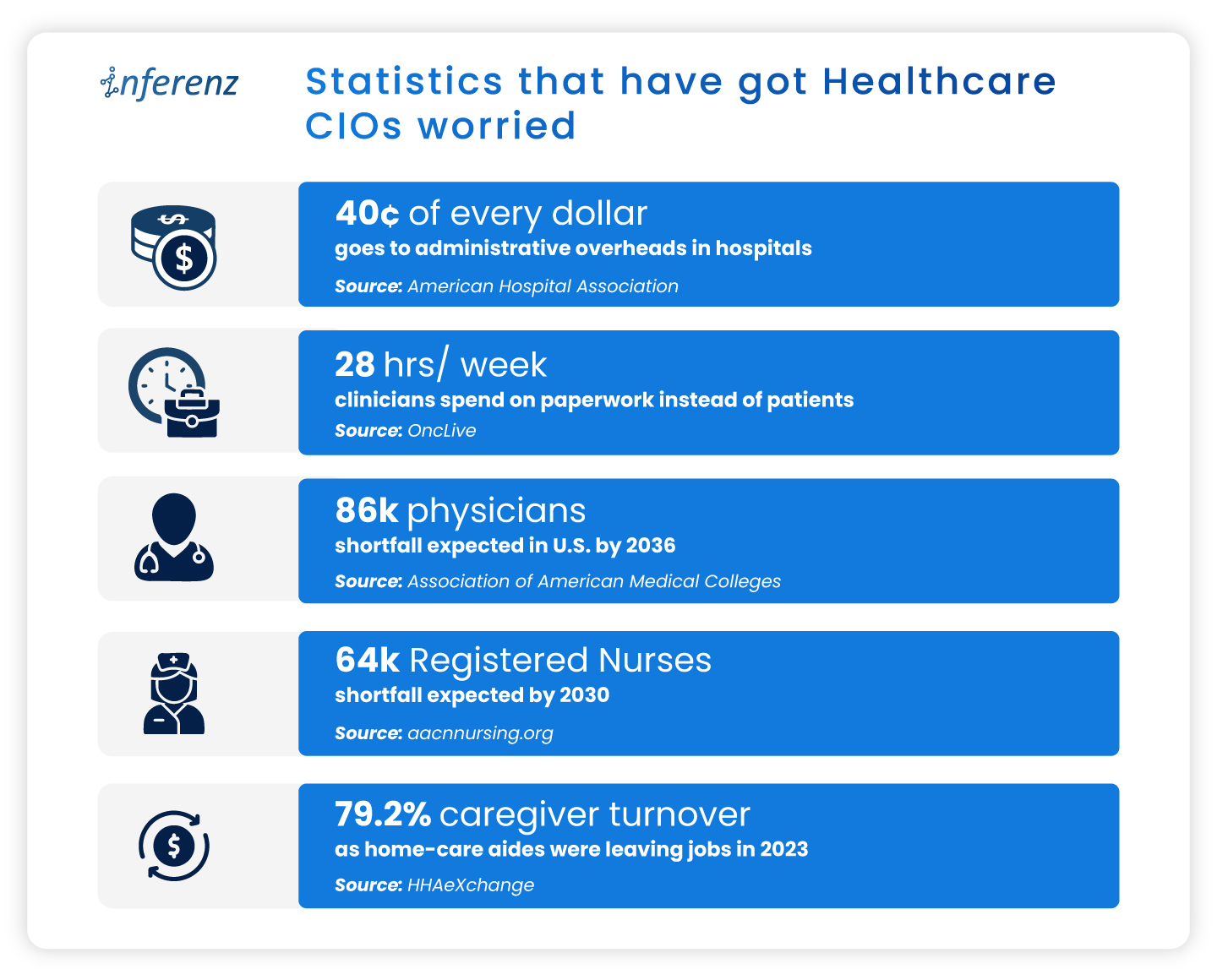
Top operational issues that have got Healthcare CIOs worried

Summary

US hospitals and home-care teams now juggle data silos, paperwork that eats cents of every dollar, and record turnover among doctors, nurses, and caregivers. This article lays out eight pressure points like data fragmentation, revenue leakage, caregiver burnout, and staffing gaps, sharing how each one drains time or cash. It also highlights key Healthcare CIOs challenges and shows how early wins with AI in healthcare and agentic AI hint at practical fixes that reclaim clinical hours, speed payments, and steady the workforce.-America’s healthcare bill keeps climbing, yet the day-to-day experience inside clinics and homes feels under-resourced.  

In 2023, national health spending had already reached $4.9 trillion, equal to 17.6 percent of GDP, and the share is still inching up. Patients see new buildings and apps, but behind the scenes many teams fight the same old bottlenecks. 

Statistics that have got Healthcare CIOs worried

Statistics that have got Healthcare CIOs worried

These cracks in data, dollars, and staffing weaken everything from preventive visits to complex surgeries.  

Early pilots suggest that well-targeted AI in healthcare—think ambient note-taking, predictive scheduling, real-time claims checks, and other caregiver burnout solutionscan relieve some of the load. The sections that follow unpack where the pain is sharpest before we outline, in a later article, how AI can begin to ease it.

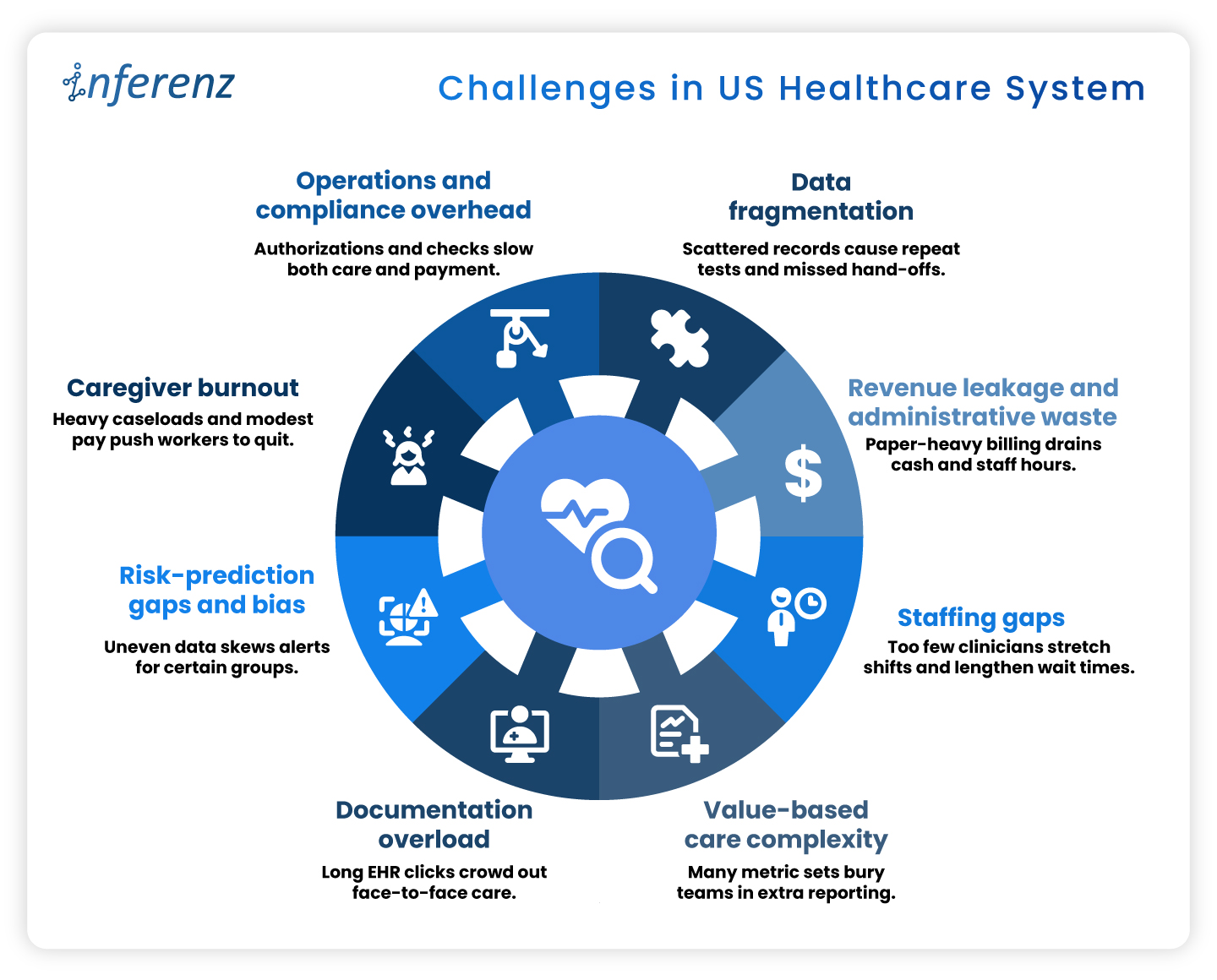
Challenges in US Healthcare System

Challenges in US Healthcare System

1. Data Fragmentation

Fragmented electronic records drive at least $200 billion a year in repeat labs, imaging, and other avoidable services. Patients often move between dozens of disconnected systems, and prior tests rarely follow them, leading to duplicate records too.  

Among chronically ill Medicare beneficiaries, those in the mostfragmented quartile run $4,542 higher annual costs and show more preventable hospitalizations than peers with integrated care. Scattered data undermines diagnosis accuracy, pushes redundant work onto staff destroying caregiver connect. You need a handy dedupe AI tool to avoid patient representation and other AI solutions to stop inflated claims that payers later dispute. 

2. Revenue Leakage and Administrative Waste

Hospitals run sophisticated clinical services, yet their business offices often look like paper factories. Prior authorizations, claim edits, and duplicate data entry push invoices back for revision and restart the payment clock. Each rework touches coders, billers, and case managers, draining time that could fund patient-facing roles. 

One hard number shows the scale: administrative costs now consume about 40 percent of every hospital dollar spent. When almost half the budget never reaches a bedside, leaders have less room to raise wages, buy new diagnostic tools, or expand rural outreach. The cycle feeds on itself: tight margins lead to leaner billing teams, which can increase denials and stretch accounts-receivable even further. News flash: Efficient revenue cycle management services are the need of the hour!

3. Staffing Gaps

Clinical talent has become the scarcest supply in health care. Retirement-age physicians leave faster than residency slots can refill them, and many younger clinicians choose outpatient or telemedicine roles over hospital call schedules. Nurses face similar pressures, with heavy workloads and limited autonomy pushing them toward travel contracts or careers outside medicine. 

The Association of American Medical Colleges warns that the United States could be short as many as 86,000 physicians by 2036. Staff shortage drives the system: wait times lengthen, overtime soars, and remaining staff shoulder extra shifts that speed burnout. For home-care agencies, thin rosters translate to missed visits and lost revenue when referrals must be declined. 

4. Value-Based Care Complexity

Linking payment to outcomes sounds simple on paper. In practice, every bonus program carries its own data dictionary, audit trail, and submission portal. Teams juggle dozens of Medicare, Medicaid, and commercial contracts, with different look-back periods and attribution rules. 

A landmark Health Affairs study found that physician practices sink about 15 hours per doctor each week into collecting and reporting quality metrics, at an annual cost of $15.4 billion nationwide. That is nearly two working days lost to spreadsheets instead of patient counseling or chronic-care planning. The hidden toll is morale: clinicians see quality work as vital, yet they resent duplicative forms that rarely inform real-time decisions. 

5. Documentation Overload

Electronic health records promised efficiency but often delivered extra clicks. Templates proliferate, alerts pop up mid-exam, and note bloat forces physicians to scroll through pages of copied text. After clinic closes, many providers log back in from home to finish charts. 

Recent research in JAMA Network Open shows primary-care doctors spending a median 36.2 minutes in the EHR for a 30-minute visit. Such documentation overload squeezes appointment slots, delays billing, and fuels frustration on both sides of the screen. Patients wait longer for follow-up calls, and clinicians lose family time, accelerating departure from full-time practice. 

6. Risk-Prediction Gaps and Bias

Predictive models guide everything from sepsis alerts to readmission flags, but they inherit the blind spots of the data beneath them. If some groups receive fewer tests, algorithms may label truly sick patients as low risk. Poor signal leads to poor care and potential legal exposure. 

A University of Michigan study found that white emergency patients received up to 4.5 percent more diagnostic tests than Black patients with similar presentations. When such data bias in records train AI, the resulting tools underrate risk for under-tested populations and can widen outcome gaps that policy aims to shrink. Predictive staffing in healthcare suffers on this front, a lot. 

7. Caregiver Burnout

Home-care aides, nurses, and therapists anchor community health, yet their jobs are physically taxing and poorly paid. Heavy caseloads, unpredictable schedules, and emotional labor drive many to exit the field. Agencies then scramble to recruit replacements, often at higher cost, instead of looking for effective caregiver burnout solutions. 

Industry tracking shows caregiver turnover in home care reached 79.2 percent last year. Nearly four in five workers left within twelve months, erasing institutional knowledge and breaking continuity for vulnerable clients. High churn forces agencies to reject new referrals or rely on overtime, compounding stress for those who remain. 

8. Operations and Compliance Overhead

Regulatory safeguards protect patients but can swamp providers in forms. Prior authorization, eligibility checks, and electronic visit verification (EVV) each add data steps between care and payment. Staff must phone insurers, upload documents, and wait for green lights before proceeding. 

An American Medical Association survey reports that 94 percent of physicians say prior authorization delays access to needed care. These holdups lead to cancelled procedures, rehospitalizations, and frustrated families. Organizations also pay for the privilege: teams spend hours per week on approvals that rarely change clinical decisions, yet every stalled claim inflates days-cash-on-hand risk. 


Why AI Sits at the Pivot Point 

Taken together, the pressure points above form a single pattern: vital clinical minutes vanish into data hunts, billing loops, and staffing scrambles. Every home care agency especially need to take note that 

  •  When intake stalls, a patient’s first touch runs late.  
  • When documentation drags, the visit itself shrinks.  
  • When claims wait in limbo, funds for follow-up dry up.  

The system feels these shocks end to end. 

Agentic AI in Healthcare

Agentic AI offers a direct counterweight because it slots into each phase of care: 

  • Start of care: Conversational intake tools collect histories, verify coverage, and label high-risk cases before the first appointment. Clean data flows forward instead of fragmenting at the gate. 
  • Point of care: Ambient notetaking, real-time risk scores, and predictive staffing engines give clinicians more face time and safer shift patterns. The visit becomes richer while administrative drag drops. 
  • Post care: Automated coding, denial prediction, and longitudinal analytics speed payment and flag avoidable readmissions through AI-based patient engagement software. Dollars return sooner, lessons cycle back into quality plans, and staff energy stays on patients rather than portals. 


Advanced analytics, ambient clinical documentation, predictive scheduling, and automated claims triage each target the pain points above. Early results such as Agentic AI scribes cutting note-taking time and fairness-aware models closing bias gaps, hint at relief.  

The next article will map problem-solution pairs in depth; for now, it is enough to see that AI, applied responsibly, can clear data blockages, shorten queues, and free human attention for care itself. 

Frequently Asked Questions 

1. How does AI in healthcare cut the daily paperwork load?
Smart tools pull data from multiple EHRs, fill forms, and flag missing fields in real time. Clinicians review and sign instead of typing from scratch, easing the healthcare administrative burden without changing clinical workflows. 

2. What makes agentic AI different from other healthcare AI systems?
Agentic models work as goal-driven “mini agents.” They read context, decide next steps, and update tasks across apps—ideal for EHR integration or claim edits that need many small, fast decisions. 

3. Can automation really fix revenue leaks?
Yes. Modern revenue cycle management services combine denial prediction with inline coding checks. They stop errors before submission, improve first-pass rates, and speed cash back to hospitals. 

4. How do hospitals use artificial intelligence scheduling to close staffing gaps?
Algorithms study census trends, PTO requests, and overtime patterns. The result is predictive staffing healthcare rosters that match demand hour by hour, which lowers burnout and agency-nurse spend. 

5. What role does ambient clinical documentation play at the point of care?
Voice AI listens during the visit, writes concise notes, and posts them to the chart. Providers keep eye contact with patients and note lag drops—often by more than half. 

6. How can a home care agency tackle 79 % caregiver turnover?
Platforms that blend caregiver burnout solutions with fair route planning let aides pick shifts, cut idle travel, and get instant mileage pay. Happier schedules improve 90-day retention. 

7. Why should payers and providers care about AI for prior authorization now? 
Automated PA engines read clinical notes, fill payer forms, and chase status updates. They shorten approval windows from days to minutes, freeing staff for higher-value tasks and improving patient engagement software scores. 

8. What do top healthcare AI companies focus on when starting a project? 
They begin with data quality. Clean data feeds every downstream model, whether for infection alerts or remote-care analytics. A solid pipeline beats flashy features that sit on bad inputs. 

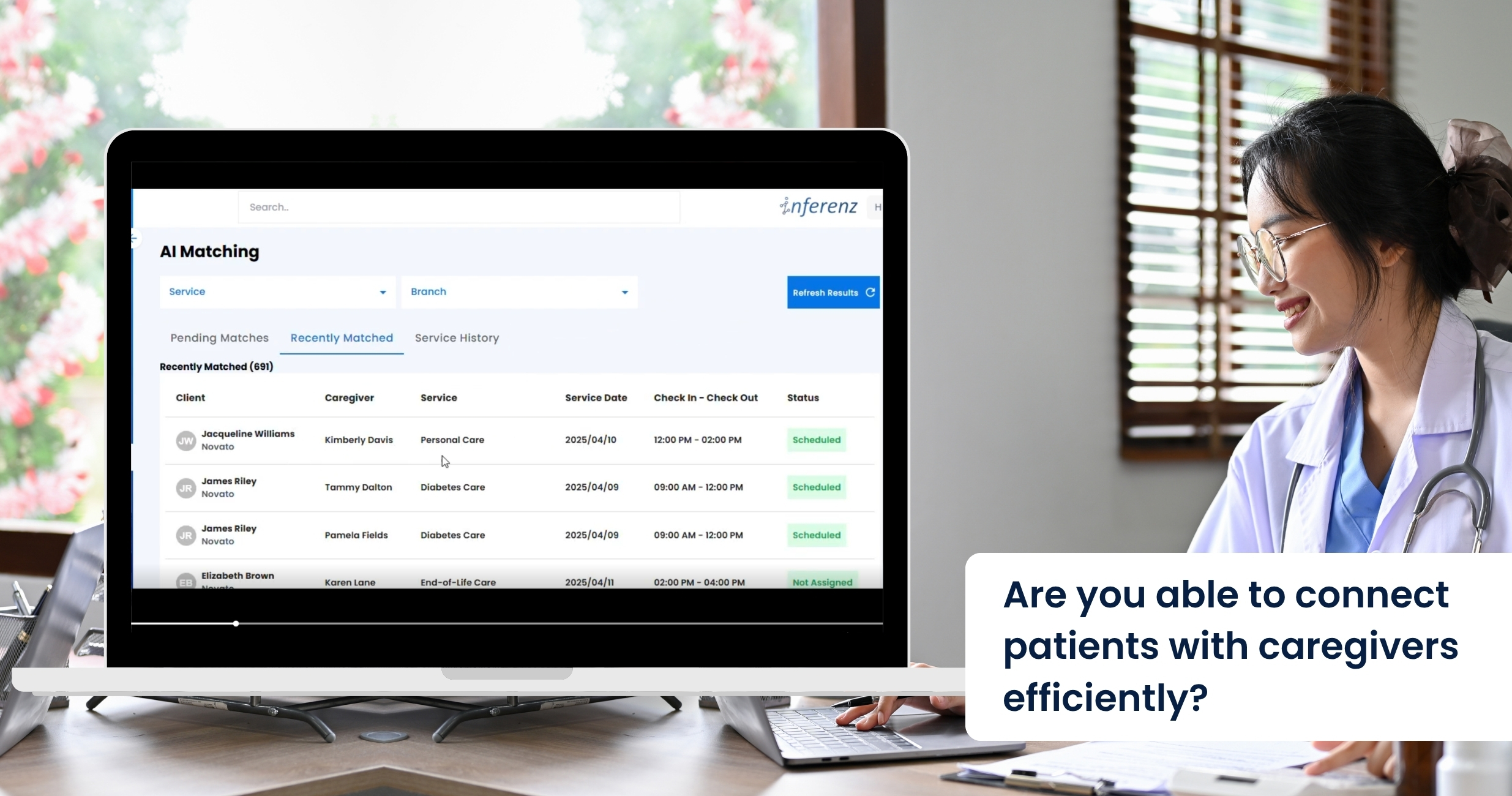
Patient Caregiver Matching: The AI-Powered Caregiver Connect Solution is Transforming Home Care

Overtime overruns alone threaten to siphon $1.05 billion from U.S. home- and community-care budgets this year, says Avalere Health—proof that shaky patient-caregiver matching is no longer just an operational headache but a bottom-line crisis. 

Schedulers still juggle phone calls, spreadsheets, and rule-based software that crumbles when a caregiver calls in sick. A comprehensive caregiver connect solution powered by agentic AI can flip that script. It watches every shift, learns from each match, and plugs gaps in minutes. No frantic dial-around, no client left waiting. Expect all efficiency with AI in healthcare. 

Problems Faced by the Homecare Industry in Scheduling Appointments


Modern EMR and AMS platforms capture plenty of data, yet most still fail at turning that data into fast, smart schedules. When we ask schedulers and field staff where things fall apart, three patterns rise to the top. 

Manual firefighting 

A single caregiver call-out often touches four or five tools: phone, text thread, spreadsheet, agency software, and finally an “all-staff” blast message. In practice, the rescue takes two to four hours, during which the client risks a missed visit. Home care organizations call this weekend scramble “unsustainable” and link it to high office burnout. 

Every unfilled hour can cost $25–$40 in lost billing. Late or missed wound-care checks raise hospital readmit odds by up to 15% (Loving Home Care study). Schedulers report after-hours stress as a top quit trigger; when one quits, five caregivers follow. 

Data silos 

Most schedulers never see real-time clinical flags. A recent report mentions that only about one in three U.S. home-care agencies have a point-of-care EHR that talks to their patient scheduling tool. The rest rely on notes or phone calls.  

Result

  • A wound-care alert sits in the EHR while the AMS assigns a basic aide. 
  • Medication-change notices arrive hours after the caregiver has left. 
  • Coordinators must cross-check two or three systems before offering a shift, slowing coverage. And there is the issue of duplicate patient records that create more chaos and confusion in scheduling. Check out our AI data duplication solution here. 

Without unified data, matches ignore skills that matter most—like current wound-vac certs, language fit, or post-surgery protocols. 

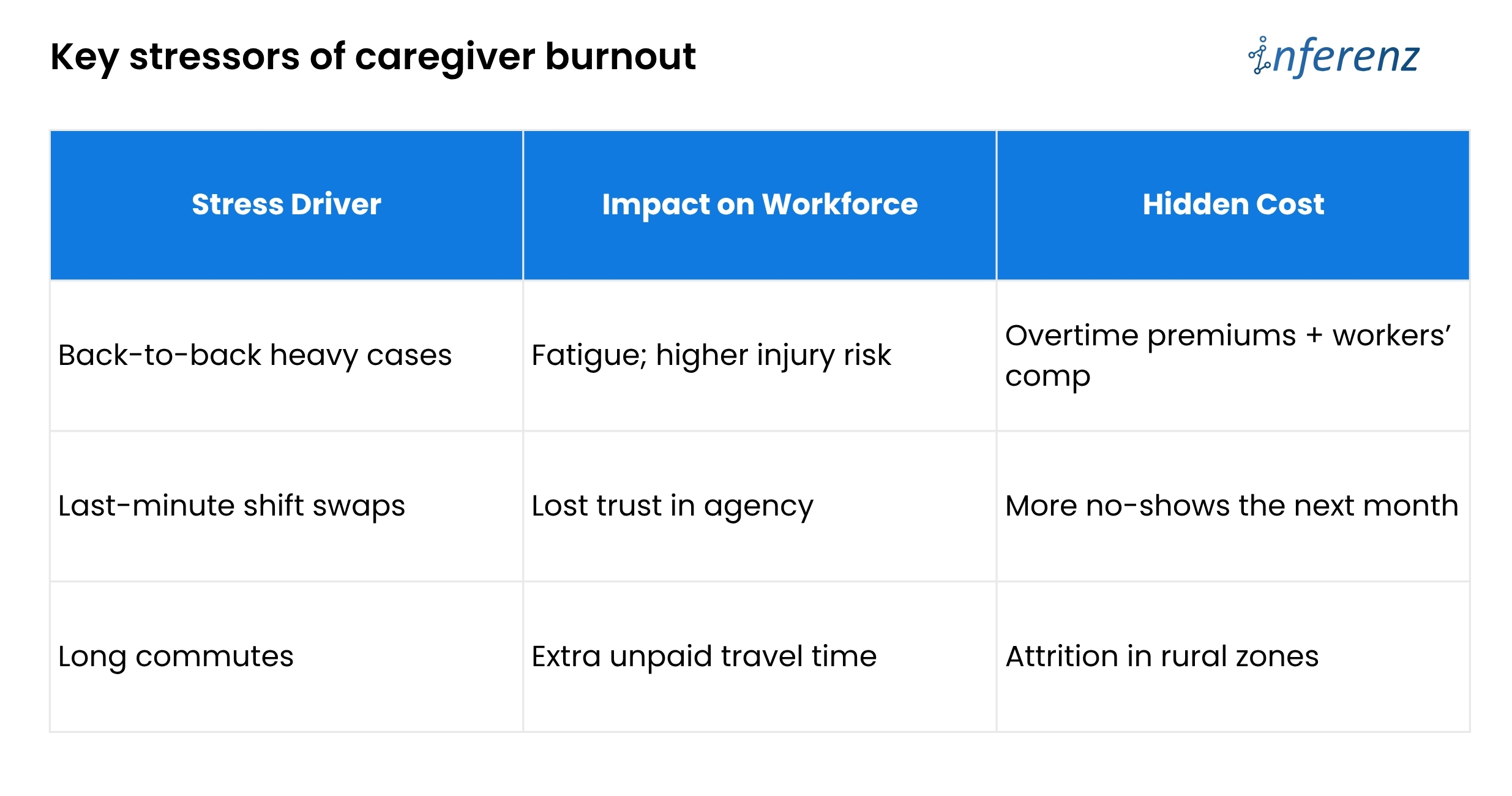
Burnout churn 

Shift imbalance drives turnover faster than pay issues. The 2024 Activated Insights Benchmarking Report put caregiver turnover at 79%—the highest in six years. Schedulers themselves are leaving too; agencies that lose a scheduler often see a linked caregiver exodus.  

Poor balance means good aides get overbooked, newer aides sit idle, and both groups start scanning job boards. Until schedules pull live clinical data, automate call-out recovery, and watch workload signals, agencies will keep paying for empty visits and exit interviews.  
The article now chalks out how predictive care in Patient Caregiver Matching solution fixes those three weak spots. 

What Is Agentic AI? 

Think of it as a digital care coordinator that can perceive, decide, and act without waiting for humans. Unlike first-gen AI healthcare companies that graft models onto old software, a true agentic layer: 

  1. Learns from every shift – Outcome scores, travel times, and client feedback loop back into the model. 
  2. Optimises on many goals at once – It balances continuity, cost, and worker well-being instead of chasing only fill rate. 
  3. Acts in real time – If traffic halts Nurse Maya, the agent reroutes someone closer and messages all parties automatically. 

The result is a living schedule that keeps adapting—no stale rule set, no bias from tired staff. 

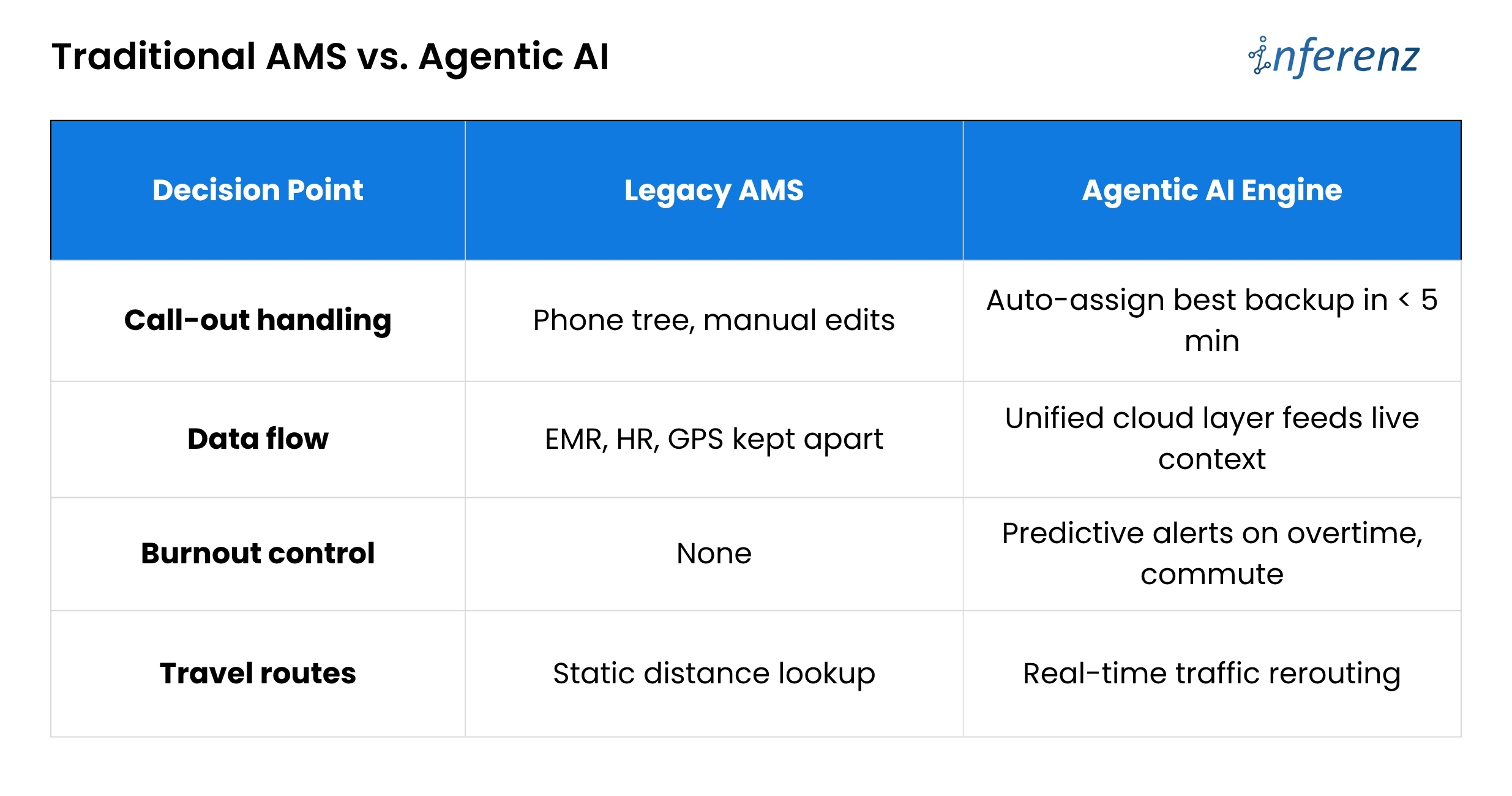
Traditional AMS vs. Agentic AI 

Bottom line: Outdated tools act like a notebook. An AI engine acts like a live dispatcher. 

PCM: the heart of smart scheduling

Patient Caregiver Matching (PCM) sits at the core of the agentic engine. It blends hard data that includes skills, licenses, and shift history with soft cues like language, pet comfort, and even commute stress.  

Each visit logged, each survey filled, feeds a feedback loop that sharpens the next match. 

AI extracts relevant details and binds them in a single narrative. This narrative helps caregivers walk in fully prepared and better informed about their assigned patients.  

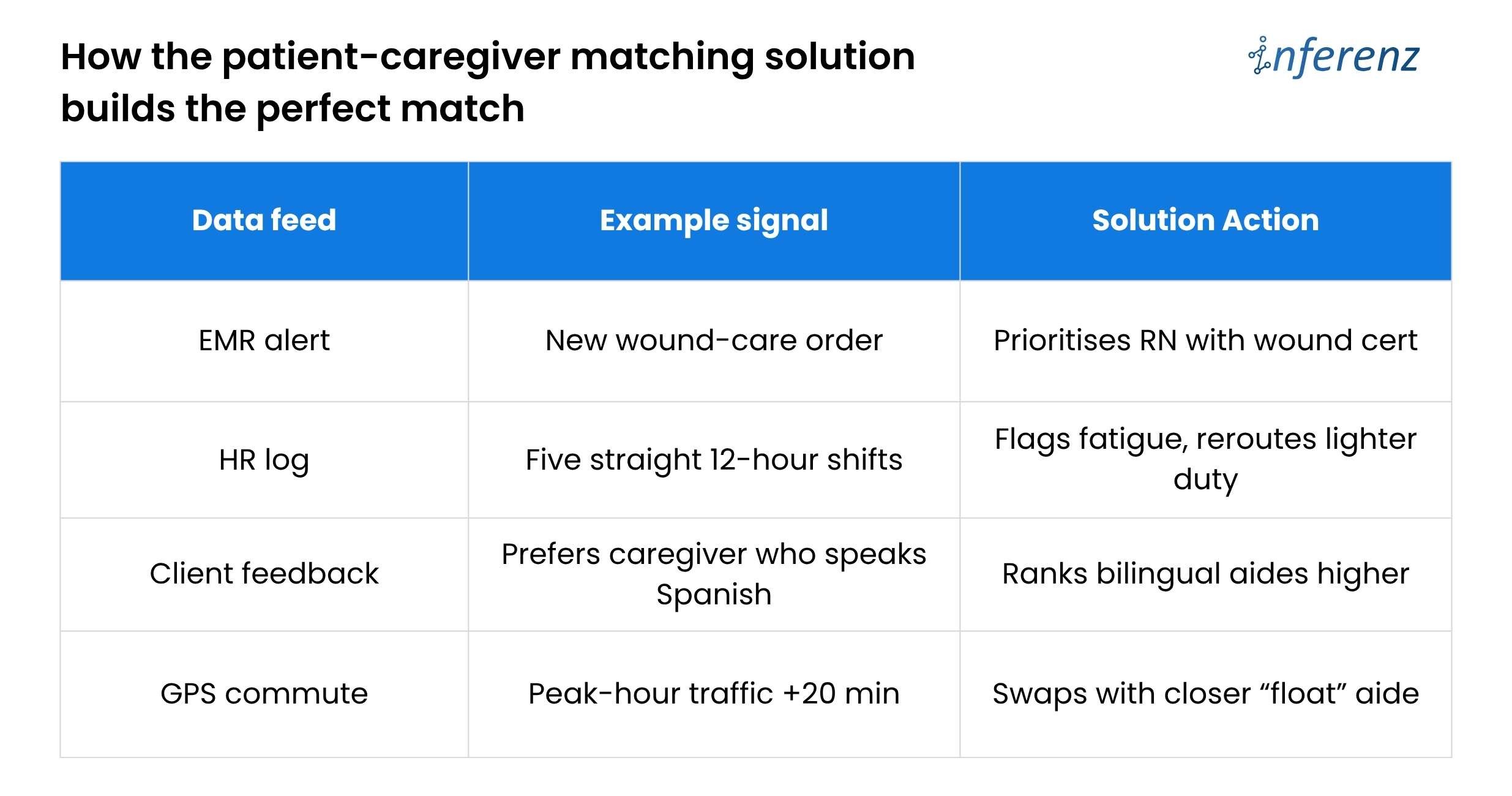
How the patient-caregiver matching solution builds the perfect match 

PCM makes thousands of micro-decisions that a human scheduler simply cannot track in real time.  

Caregiver Connect and Smart Scheduling in Homecare – Three Phases 

Phase 1 – Assist 

  • Role of AI:
    The system watches current openings, checks skill, location, and past ratings, then lists the best caregiver for each visit. It also sends and tracks shift texts for you. 
  • Why it matters:
    Speed is life in home care. By moving the “who is free and right for this client” search to an AI engine, booking time drops by half. A spot that once took twenty calls now locks in minutes. 
  • Effort change:
    Coordinators still approve picks, yet their keyboard time falls about 50%. That freed hour can go to client follow-ups or staff coaching. 

Phase 2 – Co-pilot 

  • Role of AI:
    The tool no longer waits for you to act when a callout hits. It finds the next best caregiver, confirms the shift, and pushes a note into the EMR so nurses see the new name. 
  • Why it matters:
    Missed visits tumble toward zero. Clients stay safe, and the agency avoids fines or angry phone calls on Friday night. 
  • Effort change:
    Because the AI covers most last-minute gaps, schedulers work on harder tasks and see about 70% less day-to-day scramble. 

Phase 3 – Autonomous 

  • Role of AI:
    The agent drafts the full weekly rota, juggles swaps, and even alerts HR when future demand will outrun supply. It chats with caregivers to shift times if traffic or family issues pop up. 
  • Why it matters:
    Fill rate climbs to 98% and holds steady. Fewer gaps mean higher revenue, better reviews, and calmer staff. 
  • Effort change:
    Coordinators shift to oversight. They scan dashboards, spot edge cases, and mentor teams. Routine scheduling work is now background noise handled by the system. 

During Phase 1, a coordinator still approves matches, building trust. By Phase 3, the agent posts a full weekly roster, flags any legal or pay exceptions for quick sign-off, and frees leaders to focus on quality and growth. 

A CXO-level Path to Patient–Caregiver Matching that Actually Works

Home-care agencies lose time and money because scheduling lives in silos. Skills sit in one system, vitals in another, PTO in a third.  

When a caregiver calls out, coordinators must sift through them all. The fix is a Patient Caregiver Matching (PCM) engine that learns and acts in real time—but only if leaders roll it out with equal focus on data, change control, and trust.  

Here is how to move from today’s chaos to tomorrow’s self-tuning roster, without hiring a small army of project managers. 

Start with clean data, not clever code. 

Feed every AMS, EMR, and HR stream into one secure lake through FHIR or other HIPAA-ready APIs. A single source of truth stops double entry and lets the AI see the full picture: licenses, wound alerts, commute times, even overtime risk. Until that lake is live, smart matching cannot begin. 

Prove value in a 90-day branch pilot. 

Switch PCM on for one location and track three simple numbers: shift fill rate, overtime hours, and coordinator minutes per booking. A branch-level test gives hard evidence, keeps risk low, and shows frontline staff that the tool helps rather than replaces them. 

Move to “co-pilot” across the agency. 

Once the pilot hits its marks, let PCM auto-cover call-outs everywhere. Keep one senior scheduler in an “air-traffic control” role to handle edge cases and to reassure teams that humans still guide policy. The daily scramble fades; missed visits trend toward zero. 

Let the AI look three months ahead. 

With real-time cover in place, turn on the forecasting lens. PCM scans referral trends, PTO calendars, and skill gaps, then warns HR before shortages hit. Growth continues without surprise overtime or rushed hiring. 

Build trust into every decision. 

A live roster run by AI only sticks if people believe it is fair and safe.  

Each match stores a plain-language reason such as “Carla assigned for dementia skill, four-mile commute.” Hard caps on weekly hours, license scope, and labor law live inside the rule set, so the engine cannot overstep. Monthly bias scans compare assignments across age, gender, and minority status while retraining drift triggers. The cloud zones keep scheduling live even if one data center fails. 

The payoff 

Weekend duty spreads evenly, time-off requests stick, and early fatigue signs rise to the surface before they become burnout. CXOs gain tighter control over cost and care quality without adding layers of back-office staff. Coordinators finally go home on time. 

“Caregivers who gain more autonomy over their schedule report lower stress.” — Cleveland Clinic flexible scheduling study 

Future-ready edge tapping the private caregiver pool 

Growth pressures will not spare preferred home health care brands. The patient-caregiver matching solution can open an on-demand bench of vetted private caregivers when internal staff hit capacity. The agent weighs cost, compliance, and continuity, then fills gaps without overtime blowouts. 

This “elastic staffing” positions agencies as connected care hubs, not just schedule brokers. It also sidesteps the narrow talent funnel that hammers many healthcare AI companies today. 


FAQs about Patient Caregiver Matching solution by Inferenz 

  1. What problem does Patient Caregiver Matching (PCM) solution fix in home-care scheduling?
    It cuts the costly overtime overruns that pile up when staff call out or shifts go unfilled. By learning from every visit, it matches the right aide in minutes and keeps clients from missing care. 
  2. How does Predictive Care Matching feature choose the best caregiver?
    The feature weighs skills, licenses, client feedback, travel time, and live clinical alerts, then ranks caregivers by overall fit in real time. 
  3. Will the system lower my agency’s overtime cost?
    Yes. Agencies in pilot tests saw overtime hours fall because open shifts got covered early, not at the last second when rates spike. 
  4. Can it handle a call-out at 7 p.m. on Friday?
    It can. The tool auto-selects the next best caregiver, sends the shift offer, and updates your EMR and AMS without manual intervention. 
  5. How does it guard against caregiver burnout churn?
    The engine flags heavy caseloads, long commutes, and back-to-back double shifts, then spreads work more evenly to keep staff fresh. 
  6. What data feeds the matching engine?
    It pulls live inputs from EMR, AMS, HR, and GPS tools, ending the data silos that slow most schedulers. 
  7. How soon will we see a higher shift fill rate?
    Most branches notice smoother coverage inside 30 days, with clear fill-rate gains by the end of a 90-day pilot. 
  8. Does it plug into our current EMR and AMS?
    Yes. A unified data layer links to standard FHIR or vendor APIs, so you keep your existing systems while adding smarter matching. 
  9. Is patient data secure and HIPAA-ready?
    Data stays in an encrypted, cloud-based lake with strict access controls and full audit logs that meet HIPAA standards. 


Navigating Healthcare Data Security & Compliance

As AI technology becomes increasingly integrated into healthcare, ensuring strict healthcare data security and regulatory compliance is essential for its seamless adoption. These AI systems allow healthcare providers to make more accurate interventions, improving care efficiency.

The use of AI algorithms to process different types of healthcare data, such as electronic health records and medical images, has become key to predicting health outcomes and refining individualized treatment plans. However, the sensitive nature of healthcare data makes its protection a primary concern.

Multi-layered encryption, real-time anomaly detection, multi-party computation, and access restrictions are vital to ensure the security of patient data. Healthcare providers must adopt comprehensive security measures, including data masking, federated learning, and robust auditing mechanisms.

Inferenz ensures compliance by leveraging automated systems alongside advanced encryption and access control, facilitating seamless integration of these protocols into AI systems, and providing healthcare organizations with a secure and compliant environment.

Key Compliance Regulations in Healthcare AI

Healthcare compliance regulations consist of laws and standards that safeguard patient privacy and ensure the quality of care. To navigate the complexities of healthcare data security, one needs a deep understanding of the regulations listed below:

HIPAA (Health Insurance Portability and Accountability Act) 1996

HIPAA establishes strict standards for the confidentiality and security of individually identifiable health information. Primary healthcare providers and their business collaborators are required to implement safeguards and notify individuals in the event of a breach.

HITECH Act  2009

The act strengthens HIPAA by enhancing penalties for data breaches and promoting the adoption of electronic health records (EHRs). It emphasizes secure electronic health information exchange, further protecting patient data and encouraging healthcare innovation.

21st Century Cures Act 2016

The act aims to foster scientific innovation, reduce administrative burdens, and improve healthcare data sharing and privacy protections. It also enhances the overall healthcare experience for patients while prioritizing healthcare data security.

GDPR (General Data Protection Regulation) 2018

GDPR applies primarily to the European Union and affects U.S. healthcare organizations handling data of EU citizens. It sets stringent rules for data protection, including health data, and mandates informed consent for data processing.

CCPA (California Consumer Privacy Act) 2020

The CCPA grants California residents control over their personal information, including health data. It mandates transparency in data practices and allows individuals to request the deletion of their data.

HITRUST CSF (Health Information Trust Alliance Common Security Framework)

Even though it is not a regulation, HITRUST provides a security framework for medical facilities. This framework helps ensure compliance with various regulations and protects patient data across platforms.

Information Blocking Rule  2021

Enforced by the Office of the National Coordinator for Health IT (ONC), this rule prohibits information-blocking practices and promotes interoperability while safeguarding the privacy and security of patient information.

Interoperability and Patient Access Final Rule 2021

Enforced by the Centers for Medicare & Medicaid Services (CMS), this rule advances patient data access and exchange. Health systems are required to share electronic patient data upon request, giving patients more control over their healthcare data.

According to the NHS, it’s essential to recognize that these regulations do not encompass AI applications such as software for health management, administrative tools, or clinical support systems for healthcare providers.

As these applications are intended to be used by qualified individuals who can make their own rational decisions based on the AI’s recommendations.

The analysis of global regulatory frameworks for AI in healthcare reveals that regulations predominantly include professional guidelines, voluntary standards, and codes of conduct adopted by both governments and industry players. However, these frameworks are not directly enforced by governments.

Addressing Healthcare Data Security Challenges

While AI enhances healthcare outcomes, it also brings forth challenges related to healthcare data security.

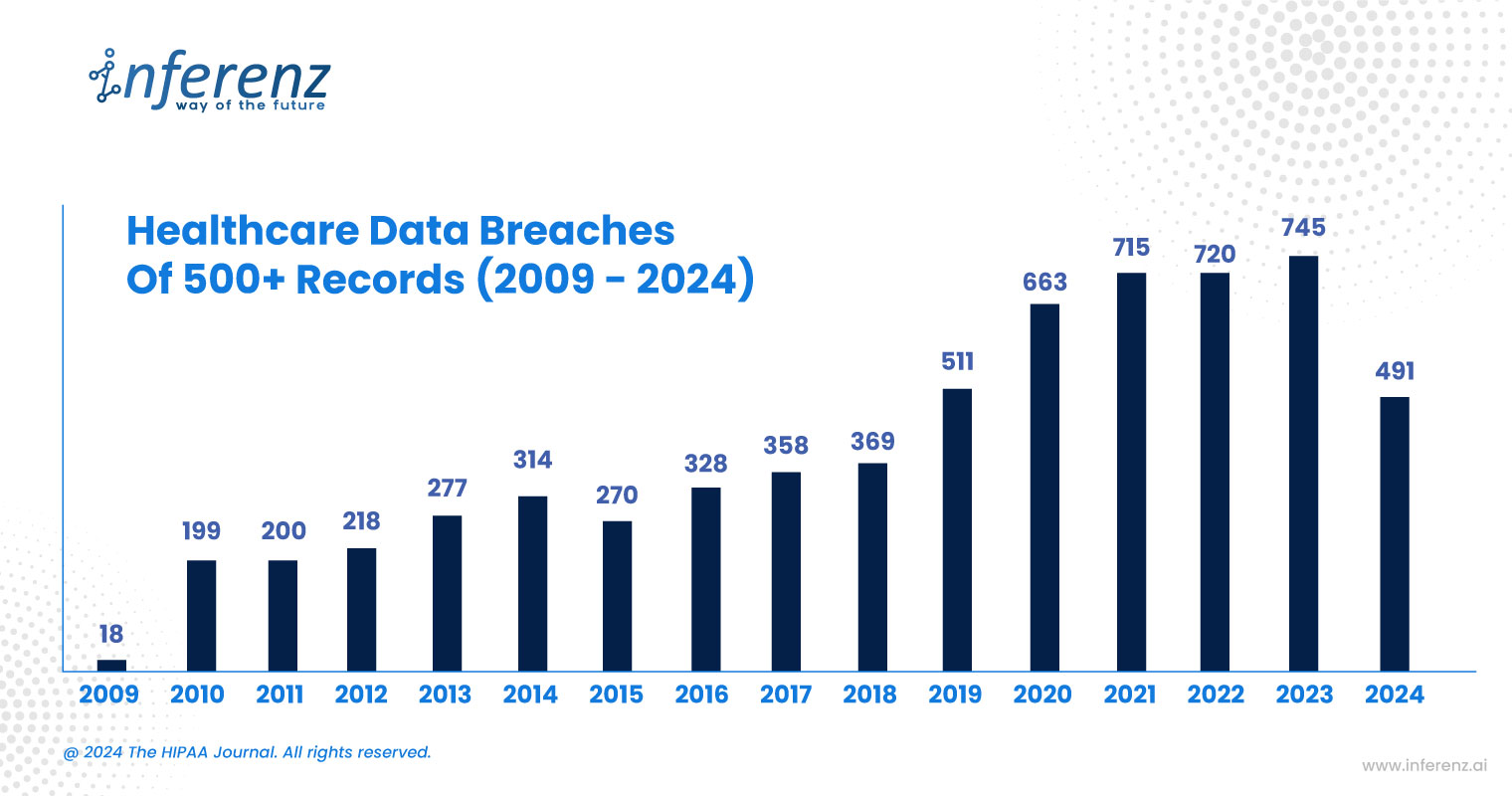
In the most recent period, in line with the Advisory board, the latest updates from California, DC, and Texas suggest that 2023 saw an alarming rise in healthcare data breaches, with 727 reported incidents compromising the data of nearly 133 million individuals.

The HIPAA Journal further reveals that in this year itself, February 2024 witnessed 69.5% of healthcare data breaches attributed to hacking, compromising nearly 5 million records in only one month. Here is a more detailed explanation:

Healthcare Data Security Breaches

The large volumes of sensitive data handled by healthcare organizations, combined with AI systems’ reliance on this data, make them vulnerable to data breaches and cyber-attacks.

Vulnerabilities in Machine Learning Models

ML models are at risk of data leakage, potentially resulting in privacy crises for organizations. As stated by the National Library of Medicine, while machine learning (ML) can significantly enhance physicians’ decision-making, it also introduces vulnerabilities in healthcare systems that are susceptible to attacks.

ML models are particularly vulnerable to various types of attacks, including data poisoning, where the training data is compromised. Evasion attacks, where test data is manipulated to mislead the model invalidation and backdoor exploits.

In response to these concerns, employing techniques like encryption, anonymization, and secure storage is essential for safeguarding sensitive healthcare data. While encryption secures data during both transfer and storage, anonymization minimizes the potential exposure of personal identifiers.

Data engineers and tech leaders are at the forefront of implementing these measures, working to ensure that AI architectures are both secure and scalable.

Inferenz boasts a team of skilled data engineers who specialize in developing AI-driven healthcare solutions that seamlessly integrate top-tier security practices, ensuring data protection and regulatory compliance.

Balancing Compliance and Security in AI Development

As suggested by the Diagnostic and Interventional Radiology Journal, research has shown that AI algorithms may unintentionally absorb biases in their models. Whether intentional or not, such biases could lead to unforeseen challenges in clinical practice.

To prevent bias in AI systems, it is crucial to focus on early-stage strategies in AI development. Here are key principles that are essential to guide AI design and minimize the risk of bias:

  • Transparency: Ensures that data collection and processing methods are clear, fostering trust and accountability in the AI system.
  • Fairness: Promotes equal treatment and considers diversity, preventing discriminatory practices and ensuring that AI systems serve all users impartially.
  • Non-maleficence: Focuses on ensuring AI systems do not cause harm, particularly by avoiding biased, discriminatory, or ineffective decisions that could negatively impact patient outcomes.
  • Privacy: Ensures that data is used responsibly, giving patients control over their information and maintaining the ethical handling of sensitive data.

Thus, by balancing compliance and security at every stage of AI development, from data collection and processing to model deployment, service providers can minimize the risk of breaches and vulnerabilities.

Real-Time Auditing and Cross-Functional Review

For sustained compliance and security, healthcare data security measures should be consistently audited and assessed using real-time monitoring tools for risks such as unauthorized access or breaches in data handling.

Furthermore, robust compliance relies on seamless collaboration between regulatory advisors, data analysts, and healthcare experts. Healthcare law advisors can ensure that the AI systems meet evolving regulatory standards. AI engineers can design and implement security measures, and clinicians can provide insights into clinical requirements.

This cross-functional teamwork will ensure that all aspects of AI system development and deployment are fully compliant with regulations and aligned with best practices for healthcare data security and patient care.

Conclusion

Healthcare data security is critical, and it demands unwavering attention to privacy and regulatory standards. Top executives, Chief Technology Officers (CTOs), and data architects need to work in tandem to ensure that patient data remains protected while pushing the boundaries of AI-driven innovation.

AI in Healthcare: Expert Insights, Use Cases, Future Trends

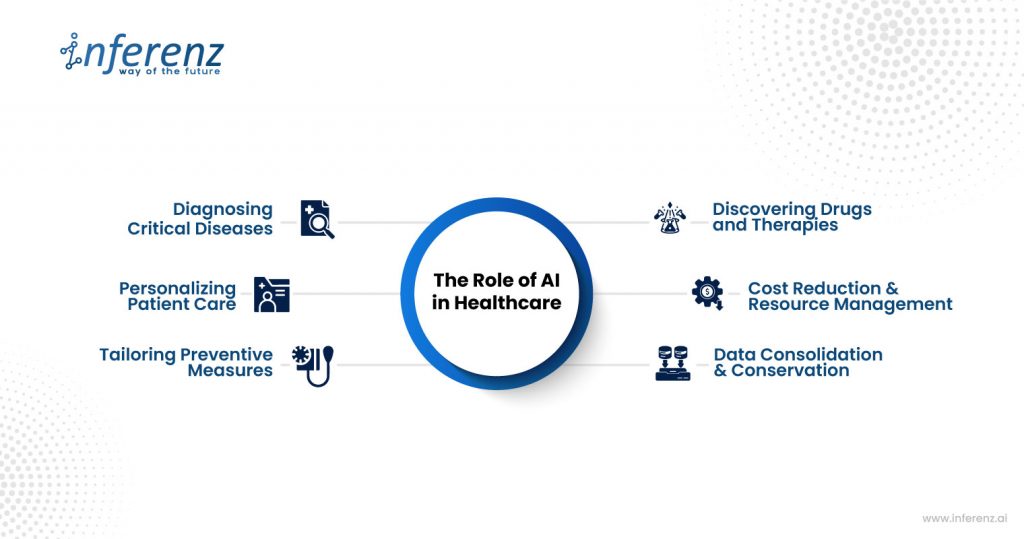
AI in healthcare is no longer a glimpse into the future but a breakthrough that is happening today. Its role is extremely conspicuous and has brought about a considerable change to many aspects of healthcare.

From diagnosing diseases with speed and precision, personalizing patient care, tailoring preventive measures, discovering drugs and therapies, and cost reduction to overseeing administrative workflow, the benefits are far-reaching. By consolidating and conserving data, predicting analytics, and natural language processing, AI has optimized healthcare data.role of ai in healthcare

Considering the upheaval brought by AI technology in healthcare, evaluating its usage is crucial, as unregulated AI can endanger patient safety and compromise trust in healthcare. Through this article, we will explore the critical role of responsible AI technology and how it is attainable.

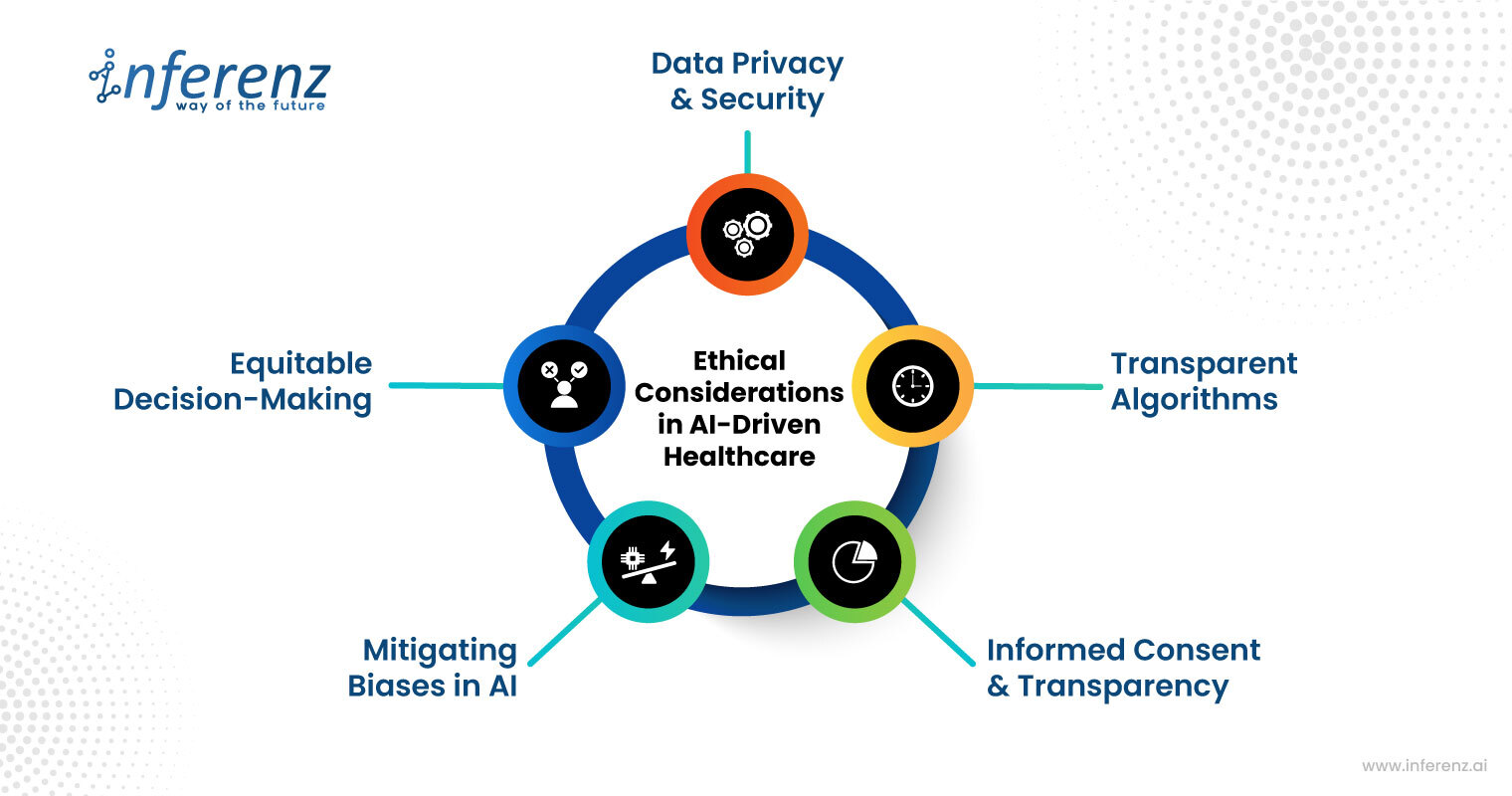
Ethical Considerations in AI-Driven Healthcare

Ethics in AI-driven healthcare is critical as its role in healthcare is one of a silent partner. It impacts the three fundamentals of the industry, which are products, services, and finance. Therefore, rightness in data privacy and security, patient autonomy, roles of stakeholders should be secured. Here are a few examples of ethical considerations in AI-driven healthcare:

Data Privacy & Security

As the volume of healthcare data is growing exponentially, data privacy and security have become primary concerns. Here are a few ways to ensure data privacy and security in healthcare:

Handling Sensitive Patient Data:

As the orientation of the healthcare industry is toward patients, ensuring their data confidentiality is crucial to it. The industry is faced with a wide spectrum of structured, unstructured, and patient-generated health data that necessitates the use of artificial intelligence to process large data sets. 

However, its unmonitored use can anonymize patient information. To mitigate that, healthcare organizations must have stringent compliance with security regulations like HIPAA and GDPR and ensure broadened protection of patients’ sensitive medical data. 

Risk Of Data Breaches and The Need For Robust Security Protocols:

The HIPPA journal’s healthcare data breach statistics have shown an upward trend in data breaches due to hacking incidents and ransomware attacks. In a record stated by OCR, there was a 239% increase in hacking-related data breaches between January 1, 2018, and September 30, 2023, and a 278% increase in ransomware attacks over the same period.

In 2023, 79.7% of data breaches were due to hacking incidents. Such breaches of healthcare data can be averted through widespread data encryption, the use of intrusion and malware detection systems, and strict security audit protocols.

HIPPA report on AI in healthcare

Bias in AI Algorithms

In healthcare generally, biases in AI can emerge from inherent design or learning mechanisms of the algorithm itself. A study published in the Science Journal described how biases in AI algorithms systematically discriminated based on gender, race, and socioeconomic parameters. Here are a few ways to overcome the prejudice in patient care:

Identifying and Mitigating Biases in Healthcare AI

Healthcare has struggled to include women and minorities in research despite knowing they have different risk factors and manifestations of the disease. Also, the algorithm assigned people to high-risk groups based on their socioeconomic status. According to biases, black people had to be sicker than white people before being referred for additional help.

Ethical considerations in AI driven healthcareThe bias in the algorithms that lead to inequities in healthcare can be identified and mitigated by capturing data from varied demography, collaborative research, continuous monitoring, and ensuring accurate and formatted data for use in multiple systems.


Importance of Transparent Algorithms for Equitable Decision-Making:

To ensure transparency in algorithms and support equitable decision-making, the design and implementation of AI algorithms must align with ethical guidelines and industry standards. 

The performance of algorithms must be continuously evaluated to ensure transparency and accountability. There should be mechanisms that regularly audit the AI systems to provide accuracy. 

Patient Consent & Transparency

The role of AI technology in healthcare must complement patient care and not compete with it. The AI decisions must be regularly scrutinized to identify any potential inaccuracy in the judgment

The outcomes must be explained to the patients using explainable AI (XAI) to ensure transparency throughout their treatment. Also, healthcare industries must allow insights and data collection from diverse patients to understand the impact of AI on them and mitigate disparities in their care.

Fair Use of AI in Healthcare Analytics and Decision-Making

Fair use of AI in healthcare means the use of unbiased AI that supports patient autonomy and provides accurate diagnoses and treatments for all patients regardless of their differences. Establishing this fairness requires an understanding of the potential causes of misuse of AI and the development of strategies to mitigate them.

AI in Diagnostics and Treatment Planning

The integration of AI in healthcare offers precision in diagnosis and effective treatment plans. With algorithms, AI can identify anomalies in medical data and offer evidence-based recommendations and insights. It can help monitor patient conditions and provide personalized treatment, thus improving overall patient care. 

Ensuring AI Recommendations Align With Human Clinical Judgment

Healthcare is human-centered, making it imperative that AI recommendations harmonize with human intelligence for enhanced clinical judgments. While AI can process large data sets and provide predictive analysis, it lacks the nuanced judgment and ethical reasoning of humans. 

The healthcare industry must have a collaborative human-in-the-loop model where AI is used as a tool to increase diagnostic accuracy, provide remote health monitoring and personalized treatment, and streamline administrative workflow.

Avoiding Over-reliance on AI

AI has the potential for misinformation, algorithmic bias, and lack of accountability that can endanger patient safety. Therefore, it is important to avoid over-reliance on AI, maintain human oversight to mitigate biases, and explore key ethical concerns, including patient data privacy, security, and discrimination.

By avoiding over-reliance on AI and integrating human oversight, we can ensure that AI technologies align with healthcare values and ethical standards, thereby fostering patient’s trust in healthcare systems. 

AI in Predictive Analytics

AI predictive analytics uses machine learning (ML) algorithms to assess how different diseases progress in individual patients and predict how they might respond to various treatments. This leads to more personalized treatment plans, maximizing effectiveness in healthcare management.

Responsible Use Of AI In Predicting Patient Outcomes

In the context of preventative care and personalized medicine, AI can be used responsibly to process broader medical data, including genetic data, medical history, and lifestyle factors, to identify patterns and make predictions about health outcomes. It can forecast public health risks, provide personalized risk assessments, and support decision-making in preventive medicine.

Ethical Implications Of Using Predictive Data In Patient Care Decisions 

Although AI is a potentially promising application, the ethical implications of using patient data raise concerns about patients’ autonomy in decision-making that could impact the doctor-patient relationship.

As over-reliance on predictive analytics grows, aspects like voluntary participation, informed consent, confidentiality, etc., must be necessitated. It’s crucial to strike a balance between taking advantage of the benefits and safeguarding the patient’s confidential data against misuse. 

Regulatory Landscape and Future Outlook

AI technologies are being rapidly deployed, which could either benefit or harm stakeholders, including healthcare professionals and patients. When using health data, AI systems could have access to sensitive personal information, necessitating robust legal and regulatory frameworks for safeguarding privacy, security, and integrity.

Current AI Regulations in Healthcare

The World Health Organization (WHO) has listed key regulatory considerations on the role of AI in healthcare. WHO emphasizes the following aspects in its listing:

  • Ensure accurate data quality through rigorous evaluations and prevent biases and errors in the AI algorithms.
  • Address risk management, issues like ‘intended use,’ ‘continuous learning, human interventions, training models, and cybersecurity threats.
  • Externally validate data and interpret the intended use of AI to assure safety and facilitate regulation.
  • Encourage dialogue and collaboration among stakeholders, including healthcare developers, regulators, manufacturers, health workers, and patients.
  • Foster trust and transparency in documentation by documenting the entire product lifecycle and tracking development processes.

Future Trends in Responsible AI Governance

The future of AI in healthcare is brimming with promises as it is expected to enhance the functionality of healthcare systems further and positively impact patient care. According to the Mayo Clinic, the future of AI in healthcare could create novel methods to diagnose, treat, predict, prevent, and cure disease. It can select and match patients with the most promising clinical trials and develop remote health-monitoring devices and more. Here are a few areas of development:

  • Adaptive Learning & Real-Time Data Analysis: The future of AI in healthcare will be more equipped with advanced learning capabilities and analyzing data in real-time. It will constantly update its knowledge base and algorithms with new data, research, and outcomes.
  • Adaptive Patient Care: Continuous learning will enable AI to assess patient-specific factors over time better, leading to more personalised and effective healthcare solutions.
  • Accuracy Over the Long Run: As AI gains more exposure to diverse patient cases and conditions, its diagnostic and treatment recommendations are expected to become precise and reliable.

FDA has developed SaMD (Software as a Medical Device) that necessitates the steps AI models must follow to be approved for healthcare. AI developers have to seek review and approval from the FDA when significant medication is involved.

Here are a few more ways to ensure that the future of AI in healthcare is made with greater responsibility: 

  • Maintain algorithmic accountability by building a framework that ensures that AI systems are audited and held accountable for their outcomes.
  • Develop a human-in-the-loop (HITL) model where human judgment is blended with AI technical know-how.
  • Mobilize Fast Healthcare Interoperability Resources (FHIR), a health level seven international (HL7) standard for exchanging healthcare information electronically. 
  • Execute a federal learning approach to train AI models using data from healthcare institutions without sharing sensitive data, ensuring patient privacy while still improving the model’s performance.

Inferenz is a team of skilled professionals that offers healthcare professionals cutting-edge solutions and products. We provide tailor-made machine learning and AI chatbots for healthcare to ensure they align with your business needs.

Contact us today, and let us help you build the right solution that seamlessly fits into the existing system. Responsible AI in healthcare

AI in Healthcare FAQs 

What is the future of AI in healthcare? 

The future of AI in healthcare includes tasks ranging from simple to complex—everything from reading radiology images to making clinical diagnoses and treatment plans and providing preventive healthcare measures.

What is the most common use of AI in healthcare?

One of the most common uses of AI in healthcare is training algorithms using data sets such as health records to create models capable of performing tasks like predicting and categorizing outcomes.

How to improve healthcare using AI? 

AI can improve healthcare in many ways, including medical diagnosis, drug discovery, patient safety and experience, and healthcare data management. While AI has many benefits in healthcare, patient education and building trust are also crucial for successful integration.

What are the ethical considerations in AI healthcare? 

Some ethical considerations in healthcare include addressing the biases in AI algorithms, ensuring data privacy, asking for patient consent, and maintaining complete transparency in the decisions.

How does AI reduce costs in healthcare? 

AI can process a vast amount of medical data to identify patterns that improve decision-making and offer more cost-effective treatments. It can also automate certain administrative tasks that reduce patients’ workloads and improve job satisfaction.

Snowflake Tutorial For Beginners: Guide To Architecture

Snowflake tutorial for beginners gives you a perfect start to learning everything you need to master the cloud-based warehousing platform. Keep reading as we have briefed Snowflake database architecture and its fundamentals. 

Built on the top of AWS (Amazon Web Services), Snowflake is a cloud-based data warehousing platform. It is a true SaaS offering. The Snowflake data warehouse is much faster, easy to set up, and far more flexible compared to traditional data warehouse solutions. 

With the demand for big data growing, enterprises are shifting from traditional data storage solutions to cloud data warehouses. The reason behind choosing the cloud for storage is its high scalability and flexibility. Snowflake is one of the most widely popular cloud data solutions on the market. 

Read our beginner’s guide to learn data warehousing solutions, their features, Snowflake architecture, and so much more. 

What Is Snowflake Cloud Data Warehouse? 

According to a 6Sense report for 2023, over 11718 companies have started using Snowflake as their data warehousing tool. The reason behind the adoption of Snowflake is its high scalability and easy data management. Snowflake is the first analytics database built for the cloud. In addition, it can run on the most popular cloud providers like AWS, Azure, and Google Cloud platforms. 

Snowflake is a data warehousing platform that enables businesses to store, manage, and analyze large data volumes. The unique multi-cluster shared data architecture delivers the concurrency, performance, and elasticity that organizations require. It features three main layers — compute, storage, and global services — that are physically separated but integrated logically. 

Architecturally, there are three layers in the Snowflake platform. 

Database Storage Layer 

The core aim of the database storage layer is to break massive volumes of data into multiple tiny partitions. The scalable cloud blob storage stores structured and semi-structured data systematically to make data management simple. Compute nodes link to the storage layer to acquire data for query processing. 

Query Processing Layer 

The second layer is responsible for query execution with the help of virtual warehouses. MPP (Massively Parallel Processing) compute clusters comprise many nodes with Memory and CPU hosted on the cloud. The best part about virtual warehouses is that they can be auto-resumed and auto-suspended using the auto-scaling factor. 

Cloud Services Layer 

The cloud services layer coordinates and handles all other services in Snowflake, such as sessions, SQL compilation, encryption, etc. The services in this layer include infrastructure management, authentication, metadata management, access control, and query parsing and optimization. 

Let’s take an example to understand how these different layers work together in a Snowflake. 

  • Snowflake connects through one of the supported clients and starts a session.
  • The first virtual warehouse starts working by submitting a query. 
  • The service verifies the authorized access data in the database to execute operations defined in the query. 
  • Once Snowflake processes the queries, the service layer creates an optimized query plan and sends query execution instructions to the virtual warehouse. 
  • Upon receiving the instructions, the virtual warehouse allocates resources to let the data in the storage layer execute the query. 
  • Finally, the users get the end results. 

Snowflake Tutorial: Connect & Load Data  

Now let us learn how to connect to Snowflake data warehouse in this Snowflake tutorial for beginners. There are multiple ways to connect with other services, including: 

  • ODBC and JDBC drivers
  • Third-party connectors like BI tools and ETL tools
  • Native connectors 
  • Command-line clients 
  • Web-based user interface 

Below we include the four options that enable you to load data in the scalable and secure cloud platform. 

SnowSQL for Build Loading 

The build loading is performed in two phases — file staging and loading data from CSV files. 

Staging the files: In this phase, all the data files are uploaded to a location where Snowflake can access them. Next, it loads massive amounts of data from stage files into tables in the database system. 

Loading the data: In the second phase, you will need a virtual warehouse to load data into Snowflake. The warehouse extracts data from each file. Next, it inserts the data as rows in the table. 

Snowpipe

Snowpipe is an excellent option for bulk-loading data in Snowflake. You can use this method to stage files in external locations. The best part about Snowpipe is that you can automate the process by using COPY command with additional features. With the help of external computing resources, you can continuously load the data and eliminate any need for a virtual warehouse. 

Third-Party Tools

Snowflake offers a comprehensive ecosystem of services and applications that lets you load data from disparate external data sources. 

Web Interface 

The last method to load data into a scalable and secure Snowflake platform is the web interface. You need to simply select the table and press the load button. This will help you load data into Snowflake. As it combines both staging and loading data into one operation, it simplifies the overall process. 

Whether you want to implement Snowflake or load data into it with the help of Snowflake tutorial for beginners, having an expert team by your side is vital. The Inferenz team has been helping enterprises streamline their data migration process. Feel free to contact Inferenz experts to make data management simple. 

Get Started With Snowflake Tutorial For Beginners

Snowflake is one of the best tools for data stacks, helping enterprises load and process data quickly. One of the best benefits that Snowflake provides is that the virtual warehouse can be scaled up or down to leverage the compute resources and pay only for what you use. 

Inferenz can help you transfer data to the fully managed cloud data warehouse — Snowflake. Our expert will focus on understanding your needs to load or store data in the modern cloud stack. For more information about the Snowflake tutorial for beginners or to learn more about the migration, contact Inferenz experts today.

What Is Google Cloud Platform (GCP): A Complete Guide

Summary

Google Cloud Platform (GCP) is Google’s suite of cloud computing services that runs on the same infrastructure powering Google Search, YouTube, and Gmail. It offers compute, storage, networking, AI, and big data services across a global network of data centers. Enterprises use GCP to reduce infrastructure costs, accelerate data analytics, and build scalable applications. As the third-largest cloud provider globally, GCP competes directly with AWS and Microsoft Azure, holding roughly 12% of the global cloud market share as of 2025.

Introduction: Why Choosing the Right Cloud Platform Matters

Most enterprises reach the same inflection point: on-premise infrastructure becomes too expensive, too slow, or too rigid to support growth. IT teams face mounting pressure to modernize infrastructure without disrupting ongoing operations.

Cloud migration solves this problem, but the choice of platform is consequential. AWS offers breadth. Azure provides deep enterprise integration with Microsoft products. GCP, however, delivers a distinct advantage: superior data analytics capabilities, competitive pricing, and a network built at Google scale.

For organizations evaluating cloud providers, understanding GCP, its services, strengths, and limitations, is essential to making a confident, strategic decision. This guide covers everything you need to know.

What Is Google Cloud Platform?

Google Cloud Platform is a collection of cloud computing services that Google built on its own global infrastructure. Launched in 2008, GCP gives businesses access to the same computing resources that power Google’s own products.

GCP operates across more than 40 cloud regions and 120 network edge locations worldwide. This infrastructure gives enterprises low-latency access to compute, storage, and data services, regardless of geographic location.

Where GCP Stands in the Cloud Market

According to Synergy Research Group’s 2025 data, GCP holds approximately 12% of the global cloud market. AWS leads with around 31%, followed by Microsoft Azure at 25%. However, GCP continues to grow faster than both rivals in specific segments, particularly AI infrastructure and data analytics.

For enterprises deeply invested in data, machine learning, or Kubernetes-based architectures, GCP often delivers more value per dollar than its competitors.

Core Features of Google Cloud Platform

Before comparing services, it helps to understand what makes GCP structurally different from other cloud providers.

Global Private Network

GCP runs on a private fiber-optic network that Google owns and operates. Unlike other providers that route traffic across the public internet, GCP keeps most traffic within its own infrastructure. As a result, users experience lower latency, higher throughput, and more consistent performance.

Security by Design

GCP encrypts all data at rest and in transit by default. Google’s zero-trust security model, BeyondCorp, applies to all cloud workloads. Additionally, customers retain full control over encryption keys through the Cloud Key Management Service.

Pricing Efficiency

GCP uses a per-second billing model with automatic sustained-use discounts. Customers who run workloads consistently throughout the month receive discounts automatically, without requiring upfront commitments. This structure is particularly cost-effective for steady, long-running workloads.

Flexibility Through Cloud Flex Agreements

Google introduced Cloud Flex Agreements to lower the entry barrier for organizations not ready for multi-year commitments. These agreements allow businesses to migrate workloads and scale on GCP without long-term contracts. This option is especially relevant for mid-market enterprises testing cloud economics before a full commitment.

Google Cloud Platform Services: A Structured Overview

GCP organizes its services into clear categories. Each category addresses a specific layer of enterprise infrastructure.

Compute Services

Google Compute Engine provides virtual machines (VMs) that run on Google’s infrastructure. It supports both Linux and Windows environments and offers custom machine types, allowing teams to configure CPU and memory independently.

Google Kubernetes Engine (GKE) is one of GCP’s most recognized offerings. It automates deployment, scaling, and management of containerized applications. GKE pioneered managed Kubernetes and remains the most mature managed Kubernetes service in the market.

Google App Engine is a fully managed platform for building and hosting web applications. Developers deploy code, and App Engine handles scaling, load balancing, and infrastructure management automatically.

Cloud Run allows teams to deploy containerized applications without managing servers. It scales to zero when idle, making it cost-efficient for variable or unpredictable traffic patterns.

Storage Services

Google Cloud Storage provides object storage for structured and unstructured data. It offers four storage classes, from Standard for frequently accessed data to Archive for long-term retention, each with different pricing tiers.

Cloud Bigtable is a fully managed NoSQL database optimized for large analytical and operational workloads. It scales seamlessly from terabytes to petabytes, making it well-suited for time-series data, financial data, and IoT applications.

Cloud SQL manages relational databases including MySQL, PostgreSQL, and SQL Server. Google handles backups, replication, and patching automatically, freeing engineering teams from routine database administration.

Cloud Spanner is GCP’s globally distributed relational database. It combines the consistency of relational databases with the horizontal scale of NoSQL systems. For organizations requiring global transactions with strong consistency, Cloud Spanner has no direct equivalent among competitors.

Networking Services

Virtual Private Cloud (VPC) allows organizations to define their own private networks within GCP. VPC supports custom subnets, firewall rules, and routing configurations, giving teams precise control over network topology.

Cloud Load Balancing distributes incoming traffic across multiple compute resources. It operates globally, routing users to the nearest healthy instance automatically.

Cloud CDN caches content at Google’s global edge network, reducing latency for end users and offloading traffic from origin servers. It integrates natively with Cloud Load Balancing.

Big Data and Analytics Services

BigQuery is GCP’s flagship analytics product. It is a fully managed, serverless data warehouse that analyzes petabyte-scale datasets using SQL. BigQuery’s separation of storage and compute allows teams to scale each independently. Furthermore, its built-in machine learning capabilities, through BigQuery ML, let analysts train and deploy models directly within SQL queries.

Dataflow is a fully managed service for stream and batch data processing. It uses the Apache Beam programming model, enabling teams to build pipelines that work consistently across both processing modes.

Dataproc simplifies the deployment of Apache Spark and Hadoop clusters. Instead of manually provisioning and managing clusters, teams spin them up in seconds and shut them down when jobs complete, paying only for actual usage.

Pub/Sub is a real-time messaging service for event-driven architectures. It decouples data producers from consumers, making it foundational for real-time analytics pipelines and microservices architectures.

AI and Machine Learning Services

Vertex AI is GCP’s unified platform for building, training, and deploying machine learning models. It brings together AutoML and custom model training under a single API, reducing the complexity of managing separate AI services.

Cloud AutoML allows teams without deep ML expertise to train high-quality custom models using their own data. It is particularly valuable for use cases like image classification, natural language processing, and structured data prediction.

Gemini on Google Cloud integrates Google’s latest large language model capabilities directly into GCP services. Enterprises use it for document understanding, code generation, and conversational AI applications built on enterprise data.

Management and Monitoring Tools

Cloud Monitoring (formerly Stackdriver) collects metrics, logs, and traces from GCP services and applications. It provides dashboards, alerting, and uptime checks to help operations teams maintain service reliability.

Cloud Console is the web-based management interface for GCP. The accompanying mobile application allows teams to monitor key services, respond to alerts, and take corrective actions from anywhere.

GCP Pros and Cons: An Honest Assessment

No cloud platform is universally superior. Therefore, enterprises should evaluate GCP’s strengths and limitations in the context of their specific workloads.

Advantages of Google Cloud Platform

Data Analytics Leadership: BigQuery, Dataflow, and Pub/Sub form one of the most capable analytics stacks in the cloud market. Organizations with heavy data processing requirements consistently rank GCP ahead of AWS and Azure for analytics workloads.

AI and ML Infrastructure: Google’s AI research history translates into tangible product advantages. Vertex AI, TPUs (Tensor Processing Units), and Gemini integrations give enterprises access to AI infrastructure that competitors have not yet matched.

Pricing Model: GCP’s sustained-use discounts and per-second billing reduce costs without requiring reserved instance commitments. For teams running workloads around the clock, this model delivers consistent savings.

Kubernetes Maturity: Google created Kubernetes. Consequently, GKE remains the most mature managed Kubernetes offering, with features and updates that often precede what AWS (EKS) and Azure (AKS) deliver.

Network Performance: Google’s private backbone, spanning over 1 million miles of fiber, delivers lower latency and higher reliability than internet-routed alternatives.

Limitations of Google Cloud Platform

Fewer Global Data Centers: GCP operates fewer regions than AWS and Azure, particularly in parts of Asia, the Middle East, and Africa. Organizations with strict data residency requirements in these regions may face constraints.

Enterprise Support Costs: GCP’s enterprise support tiers are more expensive relative to the coverage they provide. Smaller organizations often find the cost-to-value ratio of premium support difficult to justify.

Ecosystem Breadth: AWS offers over 200 cloud services. GCP’s catalog, while strong in its core areas, is narrower. Teams with specialized or niche infrastructure requirements may find fewer native options on GCP.

Vendor Adoption Curve: GCP has a smaller community of certified professionals and third-party tools compared to AWS. As a result, organizations transitioning from AWS face a steeper learning curve and less readily available talent.

GCP vs. AWS vs. Azure: Where Each Platform Excels

CriteriaGCPAWSAzure
Market Share~12%~31%~25%
Best ForData analytics, AI/ML, KubernetesBroad services, large enterpriseMicrosoft-integrated enterprise
Pricing ModelPer-second, sustained-use discountsReserved + on-demandReserved + pay-as-you-go
AI/ML StrengthLeading (Vertex AI, TPUs, Gemini)Strong (SageMaker)Strong (Azure OpenAI)
Global Regions40+33+60+
KubernetesGKE (most mature)EKSAKS
AnalyticsBigQuery (industry-leading)RedshiftSynapse Analytics

Choosing between these platforms depends on workload type, existing technology investments, and team expertise. In a direct AWS vs Azure vs Google Cloud comparison, each provider has a clear sweet spot: GCP frequently outperforms on pure data and AI workloads, AWS leads on broad service coverage, and Azure is the natural choice for Microsoft-centric enterprise environments.

Real-World Use Cases: Where GCP Delivers the Most Value

Retail and E-Commerce

Retailers use BigQuery to analyze customer behavior across billions of transactions. GCP’s real-time data pipeline capabilities allow pricing, inventory, and recommendation engines to respond to live market signals rather than overnight batch updates.

Healthcare and Life Sciences

Healthcare organizations rely on GCP’s HIPAA-compliant infrastructure to process genomic datasets, run clinical trial analytics, and build AI-powered diagnostic tools. GCP’s Healthcare API simplifies the integration of FHIR and HL7 data standards into cloud workflows.

Financial Services

Banks and fintech firms use Cloud Spanner for globally consistent transaction processing and BigQuery for fraud detection analytics. GCP’s compliance certifications, including PCI DSS and SOC 2, support deployment in regulated financial environments.

Media and Entertainment

Streaming platforms use GCP’s transcoding, storage, and CDN services to deliver video at scale. YouTube, one of the world’s largest streaming platforms, runs on the same infrastructure that GCP customers access.

How to Start with Google Cloud Platform

Organizations new to GCP typically follow a structured adoption path:

  1. Assessment: Evaluate existing workloads and identify which applications are cloud-ready.
  2. Pilot: Start with a non-critical workload, such as a development environment or analytics pipeline, to build team familiarity.
  3. Migration Planning: Use Google’s Migration Center to assess workload dependencies and estimate migration costs.
  4. Data Migration: Move data first using tools like Datastream (for database replication) or Transfer Service (for bulk data movement).
  5. Optimization: Apply sustained-use discounts, right-size compute resources, and implement Cloud Monitoring for ongoing cost and performance management.

Conclusion

GCP is not the largest cloud provider, but it is arguably the most specialized. Its data analytics platform, AI infrastructure, and Kubernetes capabilities are market-leading by measurable standards. For organizations where data velocity, machine learning, or container-based architecture are strategic priorities, GCP delivers a compelling value proposition.

However, enterprises with broad service requirements, large existing AWS investments, or Microsoft-centric technology stacks may find AWS or Azure more practical. The decision should not rest on market share alone. Instead, it should reflect the specific workloads, team skills, and business outcomes each organization is optimizing for.

A well-executed cloud strategy, regardless of provider, depends on precise workload mapping, disciplined migration planning, and ongoing optimization. Choosing GCP is the beginning of that journey, not the end.

Frequently Asked Questions

1. What is Google Cloud Platform used for?

GCP provides cloud computing infrastructure for businesses to run applications, store data, process analytics, and build machine learning models without managing physical hardware. Common use cases include data warehousing with BigQuery, containerized application deployment with GKE, and AI model development with Vertex AI.

2. How does GCP compare to AWS and Azure?

GCP excels in data analytics, AI/ML infrastructure, and Kubernetes management. AWS offers the broadest service catalog and the largest ecosystem. Azure integrates most deeply with Microsoft enterprise products like Office 365, Active Directory, and SQL Server. The right choice depends on workload type and existing technology investments.

3. Is Google Cloud Platform suitable for small businesses?

GCP suits small businesses with data-intensive or AI-driven applications. Its pay-as-you-go pricing and Cloud Flex Agreements reduce upfront commitment. However, premium support costs and a smaller talent pool can create challenges for teams without dedicated cloud expertise.

4. What is BigQuery and why is it important?

BigQuery is GCP’s serverless, fully managed data warehouse. It analyzes petabyte-scale datasets using standard SQL, with no infrastructure to manage. Its importance lies in speed, cost predictability, and built-in ML capabilities, making it one of the most widely adopted analytics platforms in the cloud market.

5. How secure is Google Cloud Platform?

GCP encrypts all data at rest and in transit by default. It follows a zero-trust security model (BeyondCorp), offers customer-managed encryption keys, and holds compliance certifications including HIPAA, PCI DSS, SOC 2, and ISO 27001. Google’s security team monitors the platform continuously for threats.

6. What is the pricing model for GCP?

GCP charges on a per-second basis for most compute services. It applies automatic sustained-use discounts when workloads run for more than 25% of a billing month. Additionally, committed-use discounts offer further savings for predictable workloads, and Cloud Flex Agreements remove multi-year commitment requirements for organizations in early migration stages.

7. What industries use Google Cloud Platform the most?

Healthcare, financial services, retail, media, and technology sectors are among GCP’s largest adopters. Healthcare organizations value its HIPAA compliance and genomics tools. Financial firms rely on Cloud Spanner and BigQuery for transaction processing and fraud analytics. Retailers use GCP’s real-time data pipelines to power personalization and pricing engines.

Top Competitors And Alternatives To Azure

Summary

Microsoft Azure remains one of the three dominant cloud platforms globally, but it is not the right fit for every organization. Businesses evaluating alternatives to Azure cite cost complexity, steep learning curves, and rigid support pricing as common reasons to explore other platforms. This guide examines the leading Azure competitors in 2026, including AWS, Google Cloud, IBM Cloud, and several emerging platforms. For each option, we assess core capabilities, cost positioning, and ideal use cases, so decision-makers can choose with clarity.

Introduction: Why Businesses Are Rethinking Azure

Cloud strategy is no longer a one-size-fits-all decision. While Microsoft Azure powers some of the world’s largest enterprises, many organizations find its pricing model difficult to predict, its support tiers costly, and its onboarding steep for teams without a Microsoft-heavy background.

For businesses scaling their infrastructure in 2026, the real question is not whether Azure is a strong platform. It clearly is. The more productive question is whether Azure is the strongest fit for your specific workload, team, and budget.

Furthermore, the cloud market itself has matured significantly. Competitors have closed the gap on features, security certifications, and global availability. As a result, organizations now have more credible alternatives than at any previous point in the industry’s history.

This guide cuts through the noise. It provides a structured, decision-ready comparison of the top Azure competitors and alternatives, covering both enterprise-grade paid platforms and open-source options.

What Is Microsoft Azure?

Microsoft Azure is a cloud computing platform that enables organizations to build, deploy, test, and manage applications and services through Microsoft-managed data centers. It supports all three primary cloud delivery models: Infrastructure as a Service (IaaS), Platform as a Service (PaaS), and Software as a Service (SaaS).

Azure currently offers more than 600 services across 60-plus regions worldwide. Its deep integration with Microsoft’s enterprise software ecosystem, including Active Directory, Microsoft 365, and Dynamics 365, makes it particularly attractive to organizations already operating within that stack.

Azure’s Market Position in 2026

According to industry tracking data, AWS holds roughly 31% of the global cloud infrastructure market, Azure follows at approximately 25%, and Google Cloud Platform (GCP) sits at around 12%. Together, these three providers control the majority of global cloud spending.

However, market share alone does not determine the right platform for your business. Cost structure, developer experience, compliance coverage, and workload compatibility all play equally important roles in the final decision.

Top Microsoft Azure Competitors and Alternatives

1. Amazon Web Services (AWS)

Amazon Web Services (AWS) is the most direct and capable alternative to Azure for enterprises seeking breadth of services, global reach, and an established ecosystem.

Key strengths:

  • More than 200 fully managed services spanning compute, storage, machine learning, networking, and security
  • The largest global infrastructure footprint, with availability zones across every major region
  • Deep machine learning and AI tooling through SageMaker, Bedrock, and Rekognition
  • Trusted by organizations including NASA, Netflix, Samsung, and Adobe

Considerations: AWS’s pricing model rewards usage but can be difficult to forecast at scale. Teams require meaningful cloud expertise to manage costs and infrastructure effectively. Additionally, AWS’s console and service sprawl can be overwhelming for smaller teams.

Best for: Large enterprises, startups building at scale, and teams with strong cloud engineering capabilities.

2. Google Cloud Platform (GCP)

Google Cloud Platform offers a compelling alternative, particularly for organizations prioritizing data analytics, machine learning, and container-native infrastructure.

Key strengths:

  • Industry-leading data and analytics services, including BigQuery, Dataflow, and Looker
  • Native Kubernetes support through Google Kubernetes Engine (GKE), given that Google created Kubernetes
  • Competitive per-second billing and sustained use discounts that reduce compute costs
  • Strong AI and generative AI tooling through Vertex AI and Gemini APIs

Considerations: GCP’s service catalog is narrower than AWS or Azure in some enterprise application categories. Moreover, its enterprise sales and support motion has historically been less mature, though Google has invested substantially in closing this gap.

Best for: Data-heavy workloads, AI/ML projects, and engineering teams that prioritize developer experience and open-source tooling.

3. IBM Cloud

IBM Cloud targets large enterprises with demanding compliance, security, and hybrid cloud requirements. Formerly known as SoftLayer, the platform has evolved into a robust multi-cloud and hybrid environment.

Key strengths:

  • Strong positioning for regulated industries, including financial services, healthcare, and government
  • More than 170 services spanning AI, IoT, blockchain, and data management
  • IBM watsonx provides enterprise-grade generative AI capabilities
  • Bare metal server options for performance-intensive workloads

Considerations: IBM Cloud carries a steeper learning curve and its user interface is less intuitive compared to AWS or GCP. For companies outside highly regulated industries, the platform may offer more compliance depth than they actually need.

Best for: Financial services firms, healthcare systems, and large enterprises with strict data sovereignty requirements.

4. Rackspace Technology

Rackspace operates differently from the hyperscalers. Rather than offering its own proprietary cloud infrastructure, Rackspace provides fully managed cloud services layered on top of AWS, Azure, and GCP.

Key strengths:

  • Managed services model removes the operational burden from internal teams
  • Platform-agnostic approach supports multi-cloud and hybrid environments
  • Strong support reputation with defined SLAs and dedicated account management

Considerations: Because Rackspace manages cloud infrastructure on your behalf, total cost is higher than self-managed alternatives. Organizations with strong internal DevOps teams may not justify the premium.

Best for: Mid-market companies lacking dedicated cloud engineering capacity, or enterprises seeking managed multi-cloud operations.

5. Linode (Akamai Cloud)

Now part of Akamai, Linode focuses on simplicity, transparent pricing, and accessible infrastructure for developers and growing businesses.

Key strengths:

  • Straightforward pricing without hidden fees or complex tiers
  • Linux-based virtual machines optimized for developer workflows
  • Competitive performance-to-cost ratio for standard compute workloads
  • Strong community documentation and developer support resources

Considerations: Linode’s service catalog does not match the depth of hyperscalers. Consequently, organizations with complex enterprise requirements will likely outgrow the platform. It also lacks the managed AI and analytics services that GCP or AWS provide.

Best for: Developers, startups, and small-to-mid-sized businesses running standard compute workloads at predictable cost.

6. Scaleway

Scaleway is a European cloud provider offering compute, storage, and serverless services with a focus on cost efficiency and data sovereignty within Europe.

Key strengths:

  • Competitive pricing structure suited to startups and digital businesses
  • European data residency for organizations subject to GDPR and regional compliance requirements
  • Object storage, bare metal, and managed Kubernetes offerings

Considerations: Scaleway’s global footprint remains limited compared to hyperscalers. Additionally, dedicated support and enterprise-grade SLAs are not as mature as AWS or Azure equivalents. Organizations requiring a global content delivery or multi-region failover strategy may find Scaleway insufficient.

Best for: European startups, digital agencies, and companies with GDPR-driven data residency needs.

Open-Source and Free Azure Alternatives

For organizations prioritizing flexibility and cost control, several open-source platforms present viable alternatives to Azure’s managed services.

OpenStack

OpenStack is an open-source cloud platform that manages distributed compute, network, and storage resources. Organizations use it to build private cloud environments with the same logical model as public clouds, without vendor lock-in.

It is particularly suitable for enterprises with large on-premise infrastructure that want cloud-like self-service provisioning without paying for public cloud compute. However, OpenStack requires significant internal expertise to deploy and maintain effectively.

OpenShift (Red Hat)

Red Hat OpenShift is a Kubernetes-based container platform designed for hybrid cloud environments. It combines the flexibility of containers with enterprise-grade security, developer tooling, and automated operations.

For organizations invested in container-native development, OpenShift delivers a managed Kubernetes experience that works consistently across on-premise, public cloud, and edge environments. Furthermore, Red Hat’s support model provides the enterprise backing that pure open-source deployments often lack.

How to Choose the Right Azure Alternative

Selecting the right cloud platform requires evaluating several dimensions beyond feature lists.

Evaluate Workload Requirements First

Different platforms excel at different workload types. For instance, data analytics at scale favors GCP’s BigQuery ecosystem. High-performance computing and regulated workloads often align better with IBM Cloud or dedicated bare metal on Rackspace. General-purpose enterprise applications frequently run equally well on AWS or Azure.

Assess Total Cost of Ownership

Published pricing is rarely the full story. Additionally, factor in support contract costs, data egress fees, reserved instance commitments, and the internal labor required to manage each platform. Organizations frequently discover that the cheapest per-hour compute rate does not translate into the lowest total cost.

Consider Ecosystem and Integration Depth

If your organization already runs Microsoft 365, Teams, or Dynamics 365, Azure’s native integrations reduce friction significantly. Alternatively, if your stack is Google Workspace-native, GCP’s integrations provide similar value. Therefore, existing ecosystem commitments often carry more decision weight than raw feature comparisons.

Factor In Support and Operational Maturity

Enterprise cloud migrations are not purely technical exercises. Consequently, the quality of vendor support, professional services availability, and partner ecosystem depth all influence long-term success. Platforms like Rackspace, IBM Cloud, and AWS have invested heavily in enterprise support infrastructure. Smaller providers, while cost-effective, may not provide the same response guarantees.

Conclusion

The cloud market in 2026 offers organizations a genuinely competitive set of choices. Azure remains a strong platform, particularly for Microsoft-centric enterprises. However, AWS leads on breadth and scale, GCP leads on data and AI workloads, IBM Cloud leads on regulated industry compliance, and open-source platforms like OpenStack and OpenShift offer flexibility for organizations that prioritize infrastructure control.

The right decision depends on your workload profile, existing technology investments, internal cloud expertise, and long-term cost tolerance. Migrating cloud platforms is a significant undertaking, so involve experienced cloud architects before committing to a direction.

Inferenz cloud specialists help organizations evaluate, migrate, and optimize cloud environments across all major platforms. If your team is reassessing its Azure strategy, the right expert guidance at the start prevents costly pivots later.

Frequently Asked Questions

1. What is the most direct alternative to Microsoft Azure?

Amazon Web Services (AWS) is the most feature-comparable alternative to Azure. Both platforms offer IaaS, PaaS, and SaaS models, broad global infrastructure, enterprise support tiers, and extensive compliance certifications. The primary differences lie in pricing models, ecosystem integrations, and specific service strengths.

2. Is Google Cloud Platform cheaper than Azure?

Google Cloud frequently offers lower per-unit compute pricing than Azure, particularly with sustained use discounts applied automatically to long-running workloads. However, total cost depends on your specific services, data transfer volumes, and support tier. Organizations should model their actual workload against current pricing for both platforms before drawing conclusions.

3. Which cloud platform is best for regulated industries like healthcare or finance?

IBM Cloud and Microsoft Azure both carry strong compliance certification portfolios for regulated industries. IBM Cloud’s financial services-ready infrastructure and dedicated isolated environments make it a preferred option for banks, insurers, and healthcare systems with strict data sovereignty requirements. Azure also holds a broad set of compliance certifications, including HIPAA, FedRAMP, and ISO 27001.

4. What are the best free or open-source alternatives to Azure?

OpenStack provides a full open-source cloud infrastructure stack suitable for building private clouds. Red Hat OpenShift offers an enterprise Kubernetes platform with hybrid cloud capabilities. Both require internal expertise to deploy and manage. For individual developers or small teams, GitHub provides free source code hosting and CI/CD pipelines as a narrow but useful alternative for specific Azure DevOps use cases.

5. How difficult is it to migrate from Azure to another cloud platform?

Cloud migration complexity depends heavily on the number of services in use, data volumes, custom integrations, and the target platform’s compatibility. Lift-and-shift migrations of virtual machines are generally straightforward, while re-architecting applications to use platform-native services requires more planning and testing. Engaging experienced cloud migration specialists significantly reduces risk and timeline.

6. Can a business use multiple cloud platforms simultaneously?

Yes. Multi-cloud strategies are increasingly common among large enterprises. Organizations may run production workloads on AWS for breadth of services, use GCP for data analytics pipelines, and retain Azure for Microsoft 365 integrations. Platforms like Rackspace and managed service providers help coordinate multi-cloud environments operationally. The trade-off is added complexity in governance, cost management, and security monitoring.

Azure Data Factory Vs. Databricks: Comparing Top Two Integration Tools

Summary

Azure Data Factory and Databricks serve different but sometimes overlapping roles in the modern data stack. Azure Data Factory (ADF) excels at orchestrating large-scale ETL and ELT workflows with minimal coding. Databricks, in contrast, provides a unified analytics platform for complex data engineering, machine learning, and real-time streaming. Choosing between them requires a clear understanding of your team’s technical maturity, workload type, and long-term data strategy. This guide breaks down the core differences, use cases, and selection criteria so your organization can make a confident, informed decision.

Introduction

Data teams today face a common dilemma: too many capable tools, too little clarity on which one solves the right problem.

Azure Data Factory and Databricks both appear on shortlists for data integration, ETL orchestration, and pipeline management. Both run on the Azure cloud ecosystem. Both handle large-scale data movement. Yet organizations that choose the wrong tool for the wrong use case often find themselves rebuilding pipelines six months later.

The real question is not which tool is better. It is which tool fits your specific data architecture, team capability, and business objective.

This comparison provides a structured, decision-ready breakdown of both platforms, examining their architecture, strengths, limitations, and ideal use cases.

What Is Azure Data Factory?

Azure Data Factory is a cloud-native, fully managed data integration service built on the Microsoft Azure platform. It functions as a Platform as a Service (PaaS) tool, which means Microsoft manages the underlying infrastructure so data teams can focus entirely on pipeline logic.

ADF specializes in Extract, Transform, Load (ETL) and Extract, Load, Transform (ELT) workflows. It connects to more than 90 built-in data sources, spanning on-premises databases, cloud storage, SaaS applications, and third-party services.

Core Strengths of Azure Data Factory

Fully Managed Infrastructure Microsoft manages provisioning, scaling, and maintenance through Azure Integration Runtime. Teams do not need to configure or maintain servers. This significantly reduces operational overhead for data engineering teams.

Low-Code Development Environment ADF provides a visual, drag-and-drop interface for building data pipelines. Non-developers and analysts can create complex data movement workflows without writing a single line of code. Consequently, business teams gain more autonomy over data operations.

Graphical Pipeline Designer The graphical user interface (GUI) allows developers to visually map data flows, configure transformations, and monitor pipeline execution. Furthermore, the visual approach reduces configuration errors that often occur with code-heavy tools.

Broad Connector Library ADF supports native connectors for Azure Blob Storage, Azure SQL Database, Amazon S3, Google BigQuery, Salesforce, SAP, and many more. This breadth of connectivity makes it particularly valuable for hybrid and multi-cloud environments.

Limitations of Azure Data Factory

  • Limited coding flexibility: developers cannot modify backend pipeline logic directly
  • No native support for real-time, live data streaming
  • Advanced transformations require integration with external compute services like Azure Databricks or Azure HDInsight
  • Less suited for machine learning workflows or exploratory data science

What Is Azure Databricks?

Azure Databricks is a Software as a Service (SaaS) analytics platform built on Apache Spark. Originally developed by the creators of Apache Spark, Databricks provides a collaborative environment for data engineers, data scientists, and ML engineers to work together within a single unified workspace.

Unlike ADF, Databricks is not primarily an orchestration tool. Instead, it provides a distributed compute engine capable of processing massive data volumes at high speed, running machine learning models, and supporting real-time data streaming.

Core Strengths of Databricks

Unified Analytics Platform Databricks brings ETL, data exploration, machine learning, and real-time analytics under one platform. As a result, data teams avoid switching between multiple tools and can build end-to-end pipelines within a single environment.

Multi-Language Support Data engineers and scientists can work in Python, Scala, R, SQL, or Java within Databricks notebooks. This flexibility allows teams to use the language best suited to each specific task. Moreover, the collaborative notebook environment supports simultaneous multi-user editing, which accelerates development cycles.

Real-Time and Batch Processing Databricks natively supports both batch processing and live data streaming through Spark Streaming and Delta Lake. Organizations dealing with IoT data, event streams, or financial transaction monitoring particularly benefit from this capability.

Machine Learning Integration Databricks includes MLflow for experiment tracking, model versioning, and deployment. Additionally, it integrates with Azure Machine Learning, Power BI, and other BI tools, making it a strong choice for organizations building production ML pipelines.

Multi-Cloud Portability Unlike ADF, which is Azure-native, Databricks runs across AWS, Azure, and Google Cloud Platform. This portability gives enterprises flexibility if their cloud strategy evolves over time.

Limitations of Databricks

  • Steeper learning curve, especially for non-technical users
  • Higher operational cost for small or infrequent workloads
  • Requires more hands-on configuration and cluster management
  • Not a standalone orchestration tool; typically used alongside workflow schedulers

Key Differences: Azure Data Factory vs. Databricks

Ease of Use

ADF provides a low-code, GUI-driven experience that enables business analysts and non-developers to build and manage data pipelines independently. In contrast, Databricks requires familiarity with distributed computing concepts and at least one programming language.

Verdict: ADF offers a significantly lower barrier to entry. Databricks suits technically proficient teams comfortable with code-first development.

Primary Purpose and Use Case

ADF focuses on data orchestration, movement, and transformation across systems. It works best as a pipeline coordinator, scheduling and managing data flows between sources and destinations.

Databricks, on the other hand, functions as an analytics and compute engine. Teams use it for complex transformations, exploratory analysis, machine learning model training, and streaming data processing. Therefore, the two tools frequently complement each other rather than compete directly.

Verdict: The right choice depends on the primary workload. For pure data movement and orchestration, ADF leads. For compute-heavy analytics and ML, Databricks is the stronger option.

Data Processing Capabilities

Both platforms support batch processing. However, Databricks adds native support for real-time data streaming, which ADF lacks. For organizations processing event-driven data, live sensor feeds, or clickstream analytics, this difference becomes critical.

Verdict: Databricks holds a clear advantage for real-time streaming use cases. ADF covers batch and scheduled data movement effectively.

Coding Flexibility

ADF limits developers to its GUI and mapping data flows. Backend code modification is not possible, which can constrain advanced users. Databricks, in contrast, provides full programmatic control. Developers can write, optimize, and fine-tune code at every layer of the pipeline.

Verdict: Databricks offers substantially greater coding flexibility. ADF prioritizes speed and simplicity over customization depth.

Cost Structure

ADF charges based on pipeline activity runs, data integration units, and the number of orchestration activities. Databricks pricing depends on Databricks Units (DBUs) consumed by cluster compute. For light, infrequent workloads, ADF tends to be more cost-effective. For sustained, large-scale processing, Databricks cost scales significantly.

Verdict: Evaluate both tools based on your actual workload volume and frequency before making a cost-based decision.

Integration with Azure Ecosystem

Both tools integrate well within the Azure ecosystem. However, ADF offers deeper native integration with Azure-specific services like Azure Synapse Analytics, Azure Blob Storage, and Azure SQL. Databricks complements this with stronger ML tooling and multi-cloud support.

When to Choose Azure Data Factory

ADF is the right choice when your organization needs:

  • Automated ETL and ELT pipelines without heavy coding
  • Scheduled data movement between on-premises and cloud systems
  • A fully managed service with minimal infrastructure overhead
  • Integration with a broad range of data sources through pre-built connectors
  • A cost-effective solution for structured data orchestration at scale

Typical ADF use cases include: migrating on-premises databases to Azure, consolidating data from multiple SaaS platforms into a central data warehouse, and automating nightly data refresh pipelines for BI dashboards.

When to Choose Databricks

Databricks is the right choice when your organization needs:

  • High-performance processing of large, complex datasets
  • Real-time or near-real-time data streaming capabilities
  • A unified platform for data engineering and machine learning
  • Collaborative development across data engineers and data scientists
  • Multi-cloud flexibility beyond Azure

Typical Databricks use cases include: building recommendation engines for e-commerce platforms, processing IoT sensor data from manufacturing equipment, training and deploying fraud detection models, and performing large-scale data transformation with fine-tuned Spark jobs.

Using ADF and Databricks Together

Many enterprise data architectures use both tools in combination. ADF handles orchestration and scheduling, while Databricks provides the compute engine for complex transformations and ML workloads. In this setup, ADF triggers Databricks notebooks or jobs as part of a larger pipeline, coordinating the overall workflow without duplicating compute responsibilities.

This integration pattern is common in organizations building data lakehouses on Azure, where raw data ingestion, transformation, and analytics all need to work in sequence at scale.

Conclusion

Azure Data Factory and Databricks address different layers of the enterprise data stack. ADF brings order and automation to data movement and orchestration. Databricks brings depth, flexibility, and compute power to analytics and machine learning.

Organizations that treat the two as competitors often end up constraining their architecture. Those that view them as complementary tools build more scalable, resilient, and capable data platforms.

Before selecting either tool, assess your team’s technical maturity, the nature of your data workloads, your real-time processing requirements, and your long-term ML ambitions. The right architecture rarely depends on one tool. Instead, it depends on knowing which tool plays which role.

Frequently Asked Questions

1. What is the primary difference between Azure Data Factory and Databricks?

ADF is a managed data orchestration and ETL service focused on moving and transforming data between systems. Databricks is a unified analytics platform built on Apache Spark, designed for large-scale data processing, machine learning, and real-time streaming. The two tools serve different purposes and frequently work together within the same data architecture.

2. Can Azure Data Factory and Databricks be used together?

Yes. Many enterprise data teams use ADF to orchestrate pipeline scheduling and Databricks as the compute engine for complex transformations. ADF can trigger Databricks notebooks and jobs directly, allowing both tools to operate as part of a unified data workflow.

3. Which tool is better for real-time data streaming?

Databricks supports real-time data streaming natively through Spark Streaming and Delta Lake. ADF does not offer live streaming capabilities. Therefore, for event-driven or time-sensitive data use cases, Databricks is the more capable choice.

4. Is Databricks suitable for organizations without strong engineering teams?

Databricks requires more technical proficiency than ADF. Teams working with Databricks generally need experience with distributed computing and at least one programming language such as Python, Scala, or SQL. For organizations with limited engineering resources, ADF offers a more accessible entry point.

5. Is Azure Data Factory an ETL tool?

Yes. ADF supports both ETL (Extract, Transform, Load) and ELT (Extract, Load, Transform) workflows. It provides a visual interface for designing and managing data pipelines, with more than 90 built-in connectors for cloud and on-premises data sources.

6. Which tool is more cost-effective for smaller workloads?

ADF generally offers lower cost for smaller, infrequent, or scheduled data movement workloads. Databricks cluster compute costs scale with usage, making it less economical for light or intermittent workloads. For sustained, large-scale processing, however, Databricks delivers higher performance per cost unit.

7. Does Databricks work outside of Azure?

Yes. Databricks runs on AWS, Azure, and Google Cloud Platform. This multi-cloud portability makes it a strong option for enterprises operating across more than one cloud provider. ADF, in contrast, is a Microsoft Azure-native service.

Artificial Intelligence In Healthcare: Benefits & Use Cases Of AI

Summary

Artificial intelligence in healthcare is reshaping clinical decision-making, patient engagement, diagnostics, and hospital operations at scale. From AI-powered imaging analysis to conversational AI in healthcare that supports patients around the clock, the technology delivers measurable improvements in accuracy, efficiency, and outcomes. Healthcare organizations that strategically adopt AI gain a clear operational edge, reduce diagnostic errors, and improve patient satisfaction. This blog examines the most impactful AI use cases in healthcare, the core benefits, and what decision-makers need to know before investing.

Introduction: A Sector Under Pressure Needs Smarter Solutions

Healthcare systems worldwide face a compounding set of challenges: aging populations, clinician burnout, rising treatment costs, and an explosion of patient data that no human team can process manually at speed. Misdiagnosis rates remain stubbornly high. Administrative burdens consume up to 30% of a clinician’s working time. Meanwhile, patients expect faster, more personalized care than ever before.

The role of artificial intelligence in modern healthcare is not simply to digitize existing processes. Instead, AI fundamentally transforms how providers identify disease, coordinate care, and interact with patients. Machine learning models surface patterns in data that human review would miss. Natural language processing accelerates documentation and coding. Robotic systems assist surgeons with precision that reduces complication rates.

For healthcare executives, CIOs, and clinical leaders evaluating AI adoption, the central question is no longer whether AI delivers value. The evidence is clear. The question is where to deploy it first, and how to govern it responsibly.

The Importance of Artificial Intelligence in Healthcare

The importance of artificial intelligence in healthcare becomes evident when examining the volume and complexity of data the sector generates. Electronic health records, imaging files, genomic data, wearable sensor outputs, and clinical notes represent a dataset far too large for manual analysis.

AI systems process this data in real time, identify clinically relevant patterns, and support faster, more accurate decisions. According to research from EIT Health and McKinsey, AI-powered systems can improve patient care quality, drive operational efficiency, and help professionals achieve better outcomes consistently.

Furthermore, the global AI in healthcare market continues to grow rapidly, projected to reach over USD 187 billion by 2030. This growth reflects not just technology optimism but demonstrated clinical and financial returns across early adopters.

Why Healthcare Organizations Are Prioritizing AI Investment

Several converging forces drive AI adoption across healthcare systems:

  • Diagnostic complexity: Conditions like cancer, rare diseases, and neurological disorders benefit significantly from AI-assisted pattern recognition in imaging and genomics.
  • Workforce constraints: Clinician shortages in radiology, pathology, and primary care make AI augmentation a practical necessity, not a luxury.
  • Regulatory evolution: Regulators in the US, EU, and other markets now provide clearer frameworks for AI-based clinical decision support, reducing adoption risk.
  • Cost pressure: Hospitals and health systems face margin compression that demands operational efficiency at every level.

Together, these factors make AI adoption a strategic priority rather than an exploratory experiment.

Key Applications of AI in Healthcare

The applications of AI in healthcare span the entire care continuum, from early detection and diagnosis to treatment planning, post-discharge follow-up, and administrative management. Below are the areas delivering the most significant impact.

Medical Imaging and Diagnostic Analysis

Medical imaging represents one of the most mature and validated applications of AI in clinical care. AI algorithms trained on millions of annotated images detect anomalies in CT scans, MRIs, X-rays, and mammograms with accuracy that matches or, in specific conditions, exceeds specialist performance.

For example, AI tools detect early-stage breast cancer in mammography screenings with greater sensitivity than radiologists reviewing the same images independently. This capability reduces false negatives, supports earlier intervention, and improves survival outcomes.

In ophthalmology, AI systems analyze retinal images to detect diabetic retinopathy, macular degeneration, and glaucoma at population scale. This matters particularly in regions where specialist access is limited, as AI enables community-level screening without requiring an ophthalmologist present at every site.

Predictive Analytics and Early Warning Systems

Hospitals increasingly deploy AI models that predict patient deterioration before clinical signs become obvious. These early warning systems analyze vital sign trends, lab results, and nursing observations to flag patients at high risk of sepsis, cardiac events, or respiratory failure.

Because of this early detection capability, clinical teams can intervene hours before a crisis develops, reducing ICU admissions and improving outcomes. Studies in high-volume hospitals show that AI-powered early warning systems reduce sepsis mortality by 20% or more in deployments with proper workflow integration.

Administrative Automation and Workflow Optimization

How AI is used in healthcare extends well beyond clinical care. Administrative functions represent a significant share of healthcare operating costs, and AI automation delivers measurable savings.

Specifically, AI handles the following administrative tasks effectively:

  • Healthcare claims processing and prior authorization review
  • Patient record management and clinical documentation coding
  • Appointment scheduling, rescheduling, and automated reminders
  • Insurance eligibility verification and billing reconciliation

Natural language processing (NLP) tools transcribe physician-patient conversations in real time and populate electronic health record fields automatically. As a result, clinicians spend less time on documentation and more time on direct patient interaction. In practices where AI scribing tools are deployed, physicians report saving 1.5 to 2 hours per shift on average.

Drug Discovery and Pharmaceutical Research

AI use cases in healthcare extend into pharmaceutical R&D, where the cost and time required to bring a new drug to market have long been prohibitive. AI platforms analyze molecular structures, predict protein folding, identify candidate compounds, and model clinical trial designs at speeds no traditional research approach matches.

For instance, Inferenz collaborated with a pharmaceutical company in Germany to deploy AI and ML tools that predict health outcomes from patient data. By analyzing vital health parameters, the AI models helped clinicians diagnose and treat patients with greater precision, reducing time to treatment and supporting better drug-outcome matching.

Moreover, AI reduces the failure rate of clinical trials by improving patient selection, identifying biomarker-based inclusion criteria, and predicting adverse events before they occur in large-scale testing.

Benefits of AI in Healthcare: A Structured View

The benefits of AI in healthcare span clinical quality, operational performance, and patient experience. Each dimension matters when building the business case for AI investment.

More Accurate Diagnosis, Fewer Errors

Misdiagnosis remains one of the most serious patient safety risks in healthcare. AI-powered diagnostic tools reduce error rates in radiology, pathology, dermatology, and cardiology by providing a consistent, data-driven second opinion that does not suffer from cognitive fatigue or confirmation bias.

Specifically, computer vision models analyze MRI reports, CT scans, and mammograms with a level of consistency that human reviewers cannot sustain across an entire shift. The result is a measurable reduction in missed diagnoses and a shorter time to treatment for patients whose conditions are identified earlier.

Improved Patient Engagement and Communication

Poor communication between providers and patients reduces medication adherence, increases no-show rates, and lowers overall care quality. Conversational AI in healthcare addresses this gap directly.

AI-powered virtual assistants and chatbots handle appointment scheduling, send medication reminders, answer common clinical questions, and triage patient concerns before a clinician needs to engage. Patients receive timely responses around the clock, without placing additional demand on front-desk staff or nursing teams.

Furthermore, conversational AI platforms support patients with chronic conditions by checking in regularly, collecting self-reported symptom data, and alerting care teams when a patient’s condition appears to be changing. This continuous engagement model improves chronic disease management at scale.

Safer, More Precise Surgical Procedures

AI-assisted robotic surgery systems give surgeons enhanced precision, real-time visual guidance, and motion stabilization that reduces surgical trauma. Patients who undergo robotic-assisted procedures consistently report shorter recovery times, lower post-operative pain scores, and fewer complications compared to traditional open surgery.

In addition, AI systems can analyze intraoperative data streams to flag potential risks during a procedure, providing the surgical team with decision support in real time rather than retrospectively.

Operational Efficiency and Cost Reduction

Beyond clinical impact, AI delivers material operational value. Automated prior authorization workflows reduce claim denials and accelerate reimbursement cycles. Predictive scheduling tools reduce appointment no-shows and optimize clinic throughput. Supply chain AI models improve inventory management and reduce medication waste.

Consequently, healthcare organizations that deploy AI across both clinical and administrative functions report reductions in operating costs alongside improvements in patient satisfaction scores. These two outcomes, typically in tension, become simultaneously achievable with well-implemented AI.

Conversational AI in Healthcare: A Closer Look

Conversational AI in healthcare deserves particular attention because its adoption has accelerated sharply since 2023. These systems use large language models and NLP to understand and respond to patient queries in natural language, across text and voice interfaces.

Use cases include:

  • Pre-visit triage: Patients describe symptoms through a chat interface; the AI collects structured clinical history and routes the patient to the appropriate care level.
  • Post-discharge follow-up: AI contacts discharged patients by text or voice to check on recovery progress and flag concerns to the care team.
  • Mental health support: AI-powered tools provide evidence-based conversational support for mild anxiety and depression, extending the reach of behavioral health services.
  • Patient education: Conversational AI explains diagnoses, treatment plans, and medication instructions in plain language, improving comprehension and adherence.

However, organizations must govern conversational AI deployments carefully. Clear escalation pathways to human clinicians, transparent AI disclosure to patients, and robust audit logging are non-negotiable requirements for responsible deployment.

Limitations and Responsible Deployment Considerations

No honest assessment of AI in healthcare can overlook its current limitations. AI models perform best on data distributions that closely match their training data. Demographic gaps in training datasets can introduce bias, leading to reduced accuracy for underrepresented patient populations.

Additionally, AI systems require ongoing monitoring after deployment. Model drift, where performance degrades as patient populations or clinical workflows change, is a real operational risk that governance frameworks must address.

Therefore, healthcare organizations should treat AI adoption as a continuous program, not a one-time implementation. Clear ownership of model performance, structured validation protocols, and clinician training on AI tool limitations are essential components of a responsible deployment strategy.

Conclusion: AI as a Strategic Imperative, Not an Optional Add-On

The evidence for AI’s value in healthcare is no longer theoretical. Across diagnostics, surgical assistance, patient engagement, administrative automation, and pharmaceutical research, AI delivers outcomes that improve care quality and reduce costs simultaneously.

The organizations that benefit most are those that approach AI adoption strategically: identifying high-value use cases, investing in data quality, building governance frameworks, and treating clinicians as partners in deployment rather than passive recipients of new tools.

For healthcare leaders evaluating where to begin, the practical advice is straightforward. Start with use cases where AI augments rather than replaces clinical judgment, where data quality is high, and where measurable outcomes allow rapid validation. Build from there.

The role of artificial intelligence in modern healthcare will only expand as models become more capable and data infrastructure matures. The question is not whether your organization will operate in an AI-enabled environment. It is whether you will lead that transition or follow it.

Frequently Asked Questions

What is artificial intelligence in healthcare?

Artificial intelligence in healthcare refers to the use of machine learning, natural language processing, computer vision, and related technologies to analyze clinical data, support diagnosis, automate administrative workflows, and improve patient outcomes. AI systems learn from large datasets to identify patterns that guide clinical and operational decisions.

What are the most important benefits of AI in healthcare?

The core benefits of AI in healthcare include more accurate diagnostics, reduced administrative burden, improved patient engagement, safer surgical procedures, and faster drug discovery. Together, these benefits lower costs and improve the quality of care delivered across the patient journey.

How is AI used in healthcare today?

AI is used in healthcare for medical imaging analysis, predictive patient deterioration monitoring, clinical documentation automation, drug discovery, robotic surgery assistance, and patient-facing conversational interfaces. Each application addresses a specific inefficiency or clinical quality gap.

What is conversational AI in healthcare?

Conversational AI in healthcare refers to AI-powered chat and voice systems that interact with patients in natural language. These systems handle appointment scheduling, symptom triage, post-discharge follow-up, medication reminders, and patient education, extending care team capacity without adding headcount.

What are the limitations of AI in healthcare?

Current AI limitations in healthcare include potential bias in models trained on non-representative datasets, vulnerability to model drift over time, reliance on high-quality structured data, and the need for ongoing clinical oversight. Responsible deployment requires governance frameworks, continuous monitoring, and transparent communication with patients about AI use.

How does AI support drug discovery?

AI accelerates drug discovery by analyzing molecular structures, predicting protein interactions, identifying viable drug candidates, and optimizing clinical trial design. These capabilities reduce the time and cost required to bring new therapies to market, while improving the probability of trial success.

Will AI replace doctors in healthcare?

AI will not replace doctors. Instead, it augments clinical judgment by handling data-intensive, repetitive, or pattern-recognition tasks. Clinicians remain responsible for final decisions, patient relationships, and complex ethical judgments. AI functions as a precision tool that extends what a clinician can accomplish within a given period.