








Conversational AI in Healthcare: The Fragmentation Problem Hiding Behind Every Healthcare Chatbot

Summary 

Patient-facing agents fix long hold times, clinician-facing agents fix manual charting, and care-coordination agents fix the five-system scramble behind both. Each only works once the data underneath it is clean. 

 A care coordinator needs about ninety seconds to answer one question about one patient. Log into the EHR. Pull up a telehealth dashboard. Scan a wound-care note. Now multiply that by every patient on a caseload, every shift, every day. The real cost of a fragmented tech stack shows up in burnout numbers long before it shows up on a balance sheet.  

Where the friction lives What breaks today What a real agent should do Who owns the fix 
Patient-facing Long hold times, generic bots Book, verify, and answer in one pass COO, CEO 
Clinician-facing Manual charting, alert fatigue Draft notes, surface risk, cite the source CMIO, CNO 
Care coordination Five systems, one question One conversational answer, grounded in real data CIO, COO 

 Conversational AI in healthcare promises to collapse that search into one plain-language question, answered in seconds. Most healthcare firms aren’t there yet. The reason has less to do with the chatbot on the website than with everything sitting behind it.

What is Conversational AI in healthcare, and why “agent” doesn’t mean “chatbot” 

A chatbot answers a question. An agent does something about it. It books the appointment, pulls the chart, or escalates to a nurse when the answer isn’t safe to give on its own.  

Conversational AI in healthcare covers both ends of that spectrum, and the industry has spent a decade treating them as the same thing. They aren’t.  

A scripted bot that can’t see a patient’s real chart is a phone tree with better manners. An agent wired into the EHR and the care team’s actual workflow works more like a colleague who never sleeps and never forgets to check the chart first. 

There’s a third term worth separating out here too: ambient AI. Where conversational AI is interactive, someone asks and it answers, ambient AI listens passively in the background, capturing a visit without anyone prompting it. Healthcare organizations increasingly need both, and the two work best when they feed the same underlying record instead of running as separate tools with separate logins. 

Inside a Conversational AI agent: how it actually works 

A useful mental model treats the agent as three layers stacked on top of each other, not one black box.

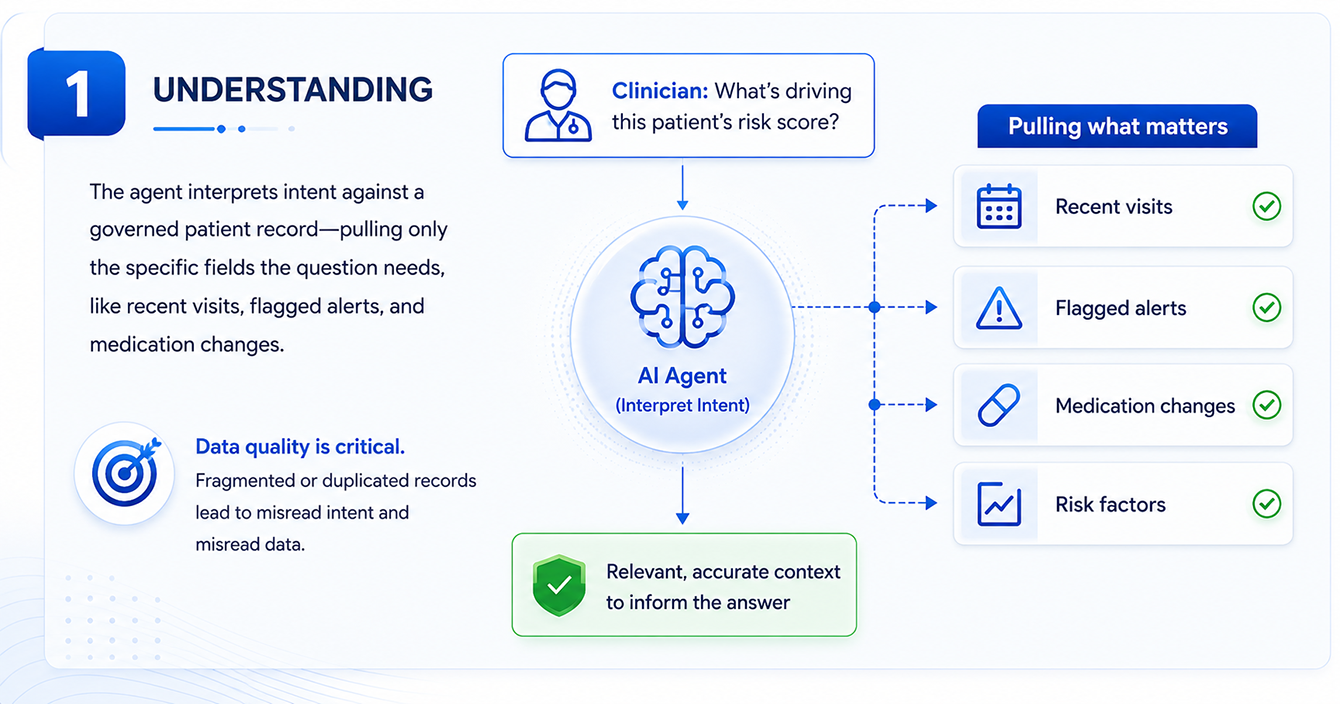
The first layer is understanding. When a clinician asks what’s impacting a patient’s vitals, the agent isn’t matching keywords or walking a decision tree. It’s interpreting intent against a governed patient record, pulling the specific fields the question needs, recent visits, flagged alerts, medication changes, rather than dumping everything based on what is accessible.  

This is also why data quality matters so much. An agent grounded in a fragmented, duplicated record misreads intent almost as often as it misreads the data itself. 

AI agent understanding layer interpreting user intent in a conversational AI system

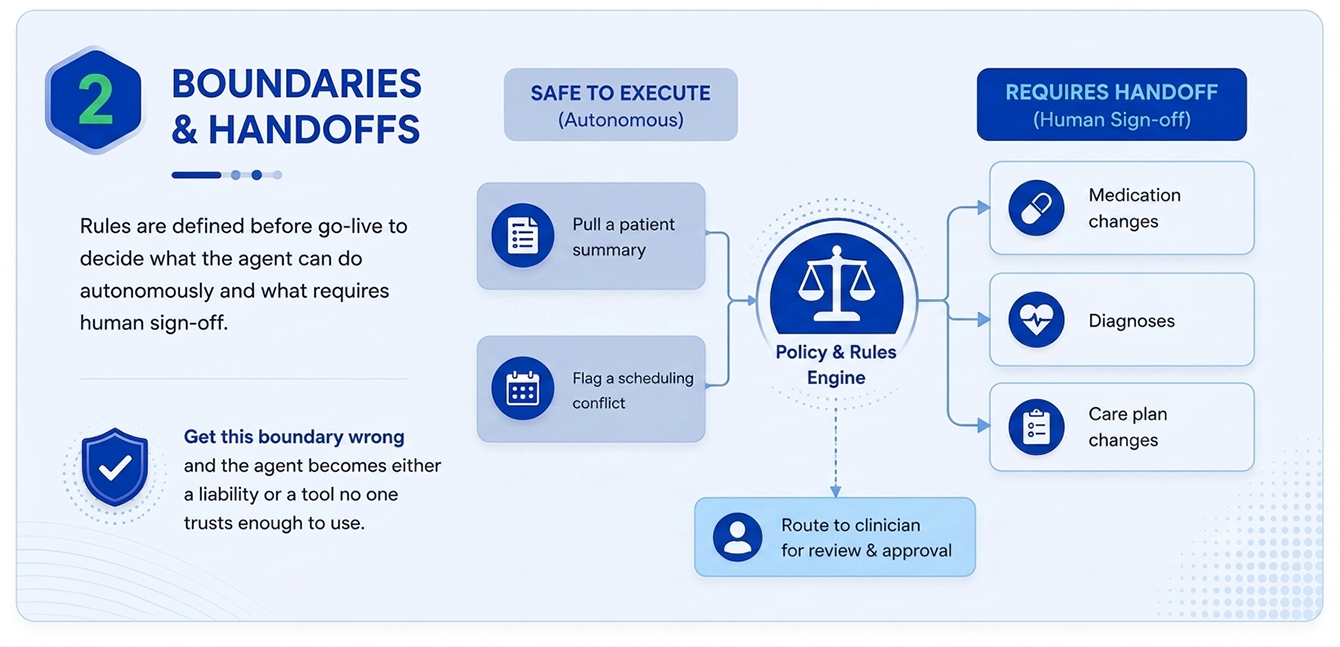
The second layer is the boundary between what the agent can do on its own and what it has to hand off. These rules get defined before the agent ever goes live. Some actions are safe to execute autonomously: pulling a summary or checking on patient record updates. Others always route to a clinician for sign-off: anything touching a medication, a diagnosis, or a care plan change. Get this boundary wrong, either too loose or too conservative, and the agent becomes a liability on one side or a tool that nobody trusts enough to use, on the other. 

Conversational AI agent boundary layer for autonomous actions and human handoffs

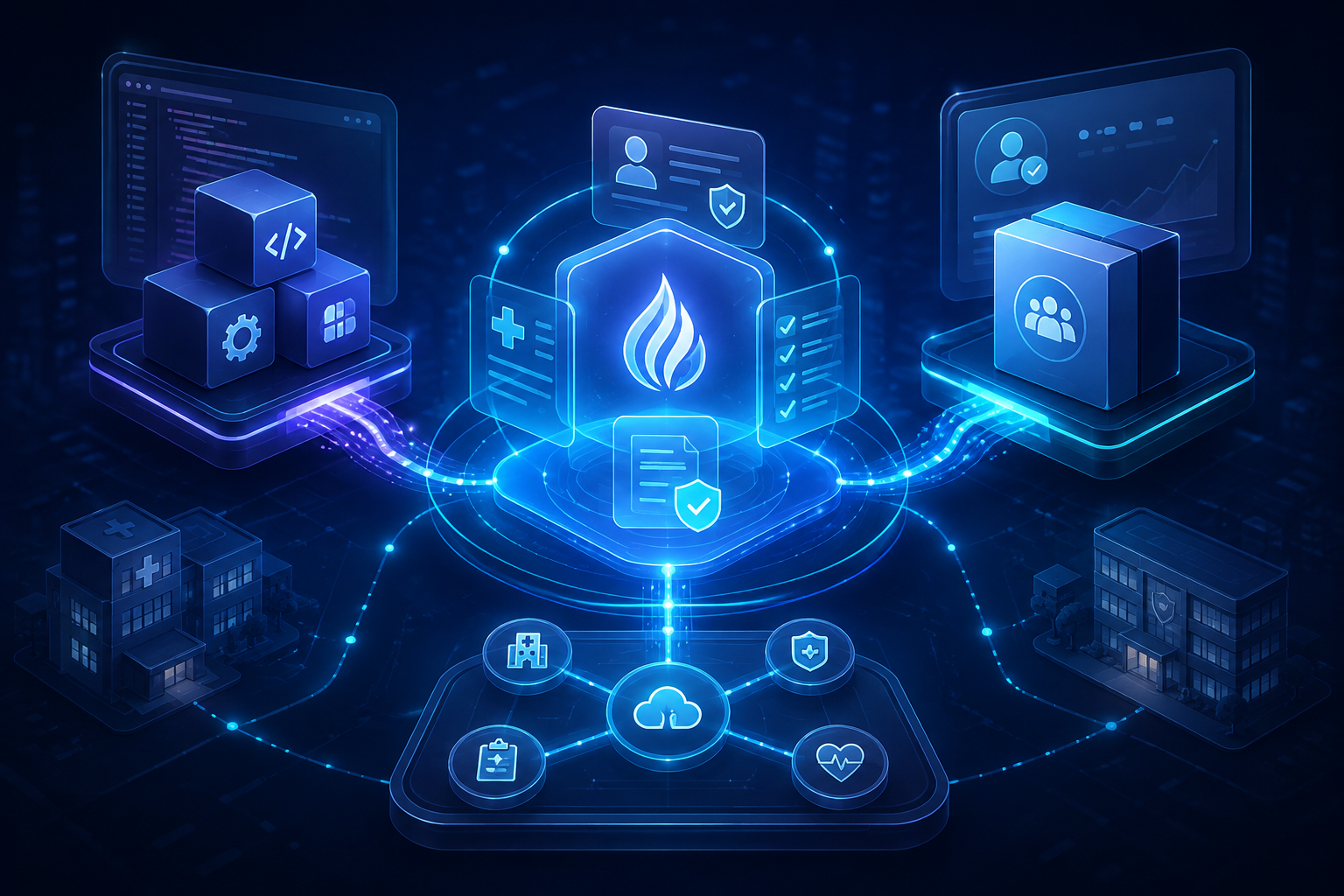
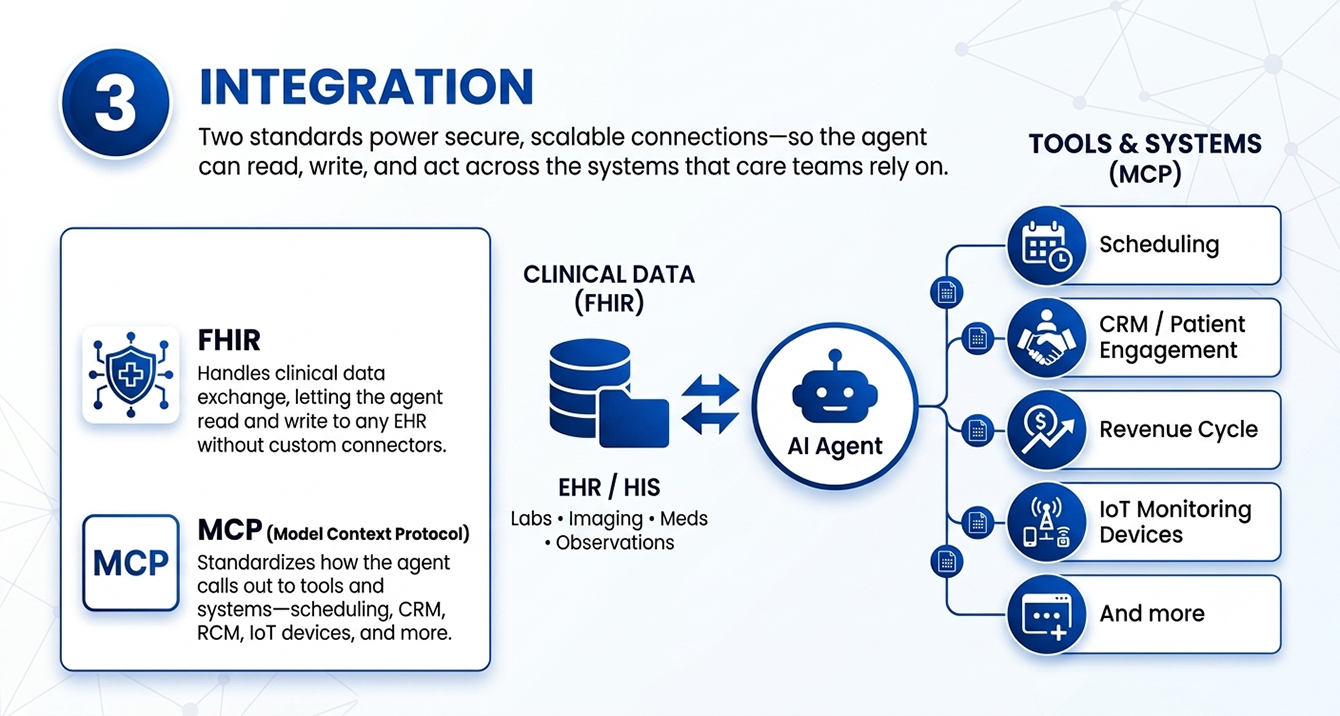
The third layer is integration, and it’s the one most vendors gloss over. Two standards do the real work here. FHIR handles clinical data exchange, letting an agent read and write to an EHR without a custom-built connector for organization’s specific system. The newer piece is MCP, the Model Context Protocol, which standardizes how an AI agent calls out to tools and systems generally: scheduling platforms, CRM, revenue-cycle software, IoT monitoring devices.  

Conversational AI agent integration layer connecting systems, tools, and workflows

Caregence conversational AI agent is built directly on this pattern: an orchestrator-led, multi-agent architecture with several pre-built MCP tool connectors, so adding a new data source becomes a configuration step instead of a months-long integration project. That’s the difference between a pilot that stays a pilot and one that actually scales past a single department.

Why healthcare organizations are adopting Conversational AI agents now 

The math is hard to ignore. One widely cited 2026 market report puts the global conversational AI in healthcare market at $18.8 billion in 2025, growing to roughly $59 billion by 2030, a rate north of 25% a year. Provider organizations are buying because the staffing math ain’t mathing otherwise. 

 The outcomes data is what makes the case to a CFO, not the market-size number. A 2025 systematic review of hybrid chatbot deployments, published in Frontiers in Public Health, found reductions in hospital readmissions of up to 25%, a 30% lift in patient engagement, and consultation wait times cut by 15%.  

 Readmission reduction alone is the number worth sitting with, for CXOs. It’s tied directly to reimbursement penalties, which makes it one of the few AI metrics that shows up on the same spreadsheet a CFO already reads every quarter. 

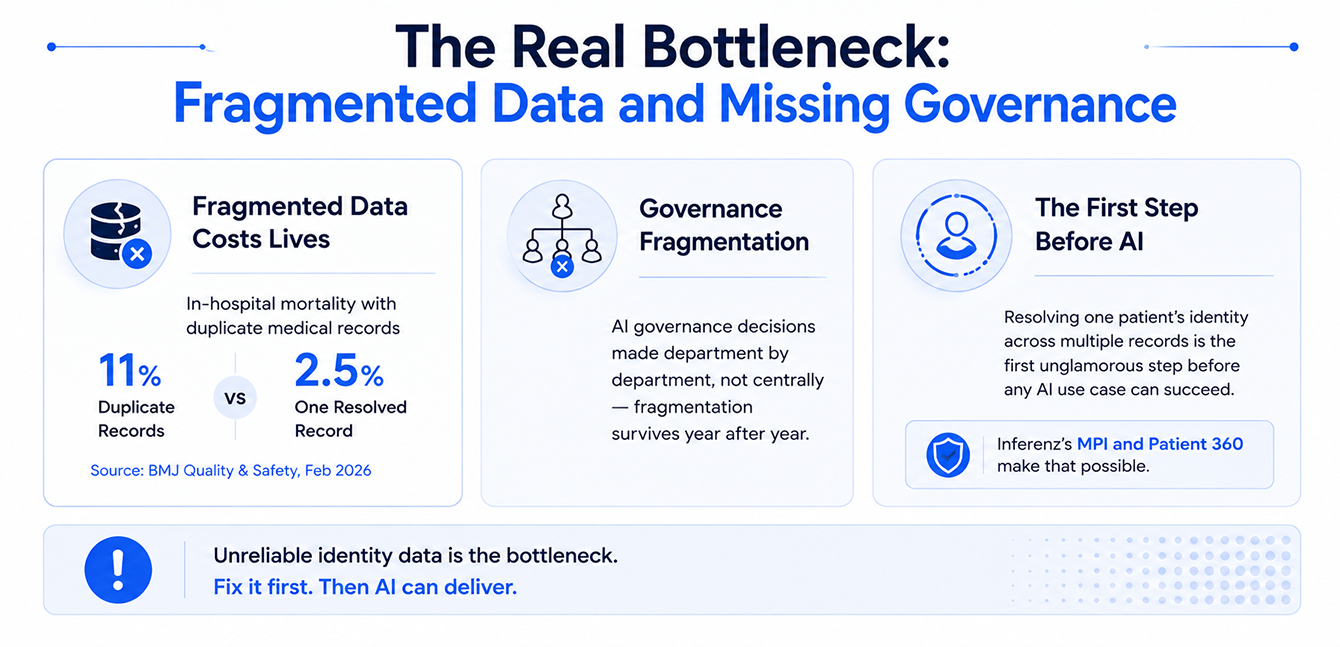
The real problem is the lack of a common patient identity 

Now conversational AI pitches seem laidback nowadays but some primary points of note before going further on the subject need to be considered.  

A healthcare organization’s clinical documentation, analytics platform, its telehealth monitoring tool, its wound-care software, and its population-health dashboard almost never share one common patient identity.  

 Here is the typical process: 

  1. A care coordinator asking how a patient is doing is really asking five separate systems five separate questions.  
  2. Then it stitches the answer together manually.  
  3. An agent layered on top of that mess doesn’t fix any of it. It just answers faster and sounds more confident, and a fluent wrong answer does more damage than a slow one ever could. 

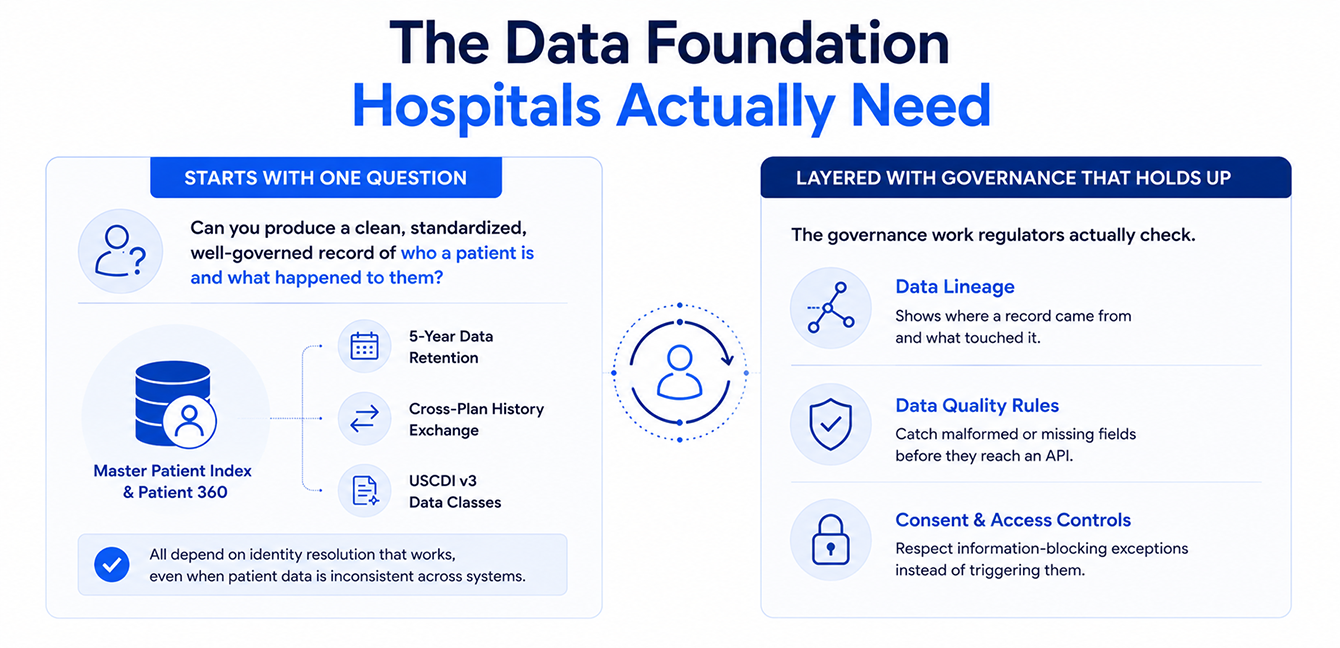
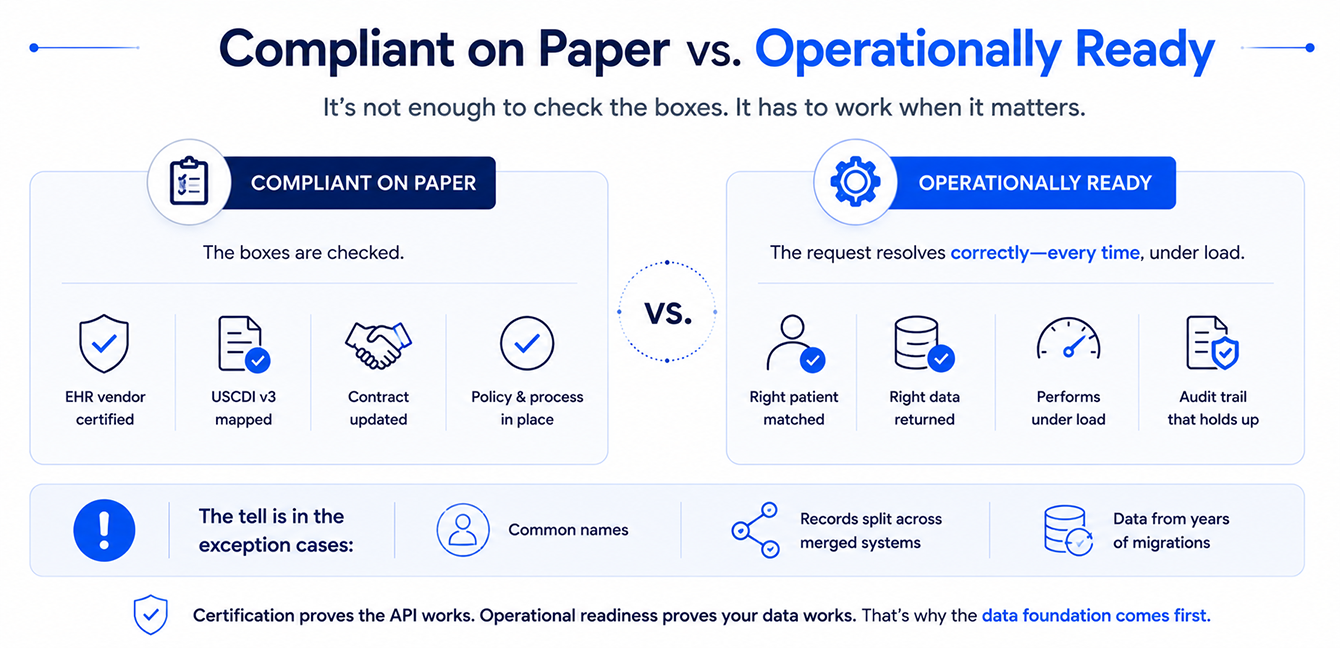
 When a core piece of data, a patient, a customer, a claim, gets defined differently across systems, no agent built on top of it can be trusted. That holds no matter how good the underlying model is. The agent is only as trustworthy as the identity layer and the governed data sitting beneath it: the same golden record and clean BI foundation that must exist before any of this works. 

Where the value shows up 

Patient-facing agents, the healthcare virtual assistant layer most patients actually see, run the digital front door: scheduling, insurance verification, and prescription refill requests, handled in one conversation instead of a phone tree. A patient asks when their next appointment is and gets a direct answer, not a menu of numbers to press. 

Clinician-facing agents, often named as AI medical scribes, listen to a visit and draft the note. Physicians want their evenings back. Ambient documentation is the fastest path there, modest-savings caveat included. 

Care coordination agents are the newest lane, and the one closest to the fragmentation problem above. Instead of checking a documentation system, a management tool, and a monitoring platform one at a time, a coordinator asks a single question and gets a summary grounded in all three. The source of every fact stays attached, so nobody must take the answer on faith.  

A question that used to mean five browser tabs and a phone call to a colleague now takes one sentence and a few seconds. 

See-what-one-conversational-layer-over-your-existing-data-actually-looks-like

Who should own this in your organization? 

The CFO wants provable call deflection and a real staffing offset. The CIO wants one orchestration layer instead of another integration project. The CMIO needs an answer grounded in the actual chart, because a fluent guess is worse than no answer at all. The CISO wants a full audit trail on anything that touches PHI, no exceptions. The interface changed from a dashboard to a conversation. The underlying demands got sharper now. 

Every agent that touches a clinical decision needs a human in the loop before it acts, not after. That means HIPAA-grade handling by design, a full audit trail, and a clear override path for anything a clinician needs to correct in real time. Once you skip that step, then even the fastest conversational agent on the market would turn into a liability the first time it’s confidently wrong about a medication. 

Where healthcare firms consistently get this wrong 

Across deployments, the same handful of mistakes show up again, regardless of size or which vendor is involved. 

Buying the interface before the foundation 

A polished chat window is the easy part. Teams get excited about the demo, sign the contract, and only discover mid-implementation that the patient record underneath it is fragmented across five systems with no shared identity. The agent launches anyway, and it’s confidently wrong from day one. 

Leaving the human-in-the-loop boundary undefined until something breaks 

Nobody sits down before launch and writes out exactly which actions the agent can take on its own versus which always need a clinician’s sign-off. That conversation tends to happen reactively, right after the first bad answer, which is the most expensive time to have it. 

Measuring success in numbers that don’t mean anything to a CFO.  

Conversations handled and queries answered are activity metrics, not outcomes. They look good in a vendor’s quarterly business review and mean nothing in a budget meeting. The deployments that survive past year one measure call deflection, readmission rate, or documentation hours, numbers that already live on someone’s spreadsheet. 

Rolling out to the whole organization at once.  

Enthusiasm after a good pilot is real, and it’s also how a working solution turns into an unmanageable one. Every department has different questions, different systems, and different risk tolerance. Scaling everywhere at once multiplies every unresolved problem from the pilot instead of fixing it first. 

These are majorly sequencing failures and every one of them is avoidable with the roadmap below. 

A practical roadmap for Conversational AI rollouts 

Most conversational AI agents for businesses fail for the same reason enterprise AI projects fail everywhere else: teams buy the interface before they’ve built the foundation underneath it. A workable sequence for healthcare rollout looks like this: 

  1. Unify the data first. Establish one governed definition of “patient” across every system that touches care. An agent can’t reason well from a fragmented record, no matter how good the language model behind it is. 
  2. Pick one high-impact use case, not an enterprise rollout. Find the single question your care teams ask most often and the workflow where the current process visibly wastes the most time. Prove the value there before expanding. 
  3. Design human-in-the-loop from day one. Decide up front which actions an agent can take on its own and which ones always route to a clinician for sign-off. Retrofitting oversight after a bad answer ships is the wrong order. 
  4. Measure the win in numbers a CFO already tracks. Call deflection, readmission rate, documentation hours, time-to-answer. Skip vanity metrics that don’t map to something already on a budget line. 
  5. Expand department by department, using what the first deployment taught you rather than repeating the same assumptions somewhere new. 
Where this leads: Caregence’ conversational AI agent  

This is exactly the direction Caregence’ conversational AI agent for healthcare takes, and it’s aimed squarely at leadership. Any CXO can ask it a plain-language question, which risk drivers are trending across a population, what’s on this week’s visit schedule, whether a medication discrepancy has been flagged, and the answer comes back pulled straight from the EHR, the scheduling system, and the clinical notes sitting underneath it.  

No dashboard to interpret first. Access follows the same care-team assignments already governing the rest of the platform, so a leader never sees data outside what they’re cleared to see, and nobody has to police that separately.  

The agent lives inside a dashboard that pairs a business-KPI view: active patients, high-risk counts, referrals by source, with the full patient and operational picture behind each number, so a metric moving isn’t the end of the question. It’s the start of one a CXO can actually ask.  

And the shape of the answer matches the shape of the question: a summary comes back as a summary, a comparison comes back as a table, a trend comes back as a chart with two lines of context with clarity and precision.

Conclusion 

This article series started with the case for an AI-ready hospital. The next one showed why a golden patient record must exist before any of it works. The one after that turned clean data into dashboards leadership could actually use.  

Conversational AI agents in healthcare are where all three pay off in a form care teams touch every day. A single, plain-language question gets a trustworthy answer, whether that’s a patient checking an appointment, a nurse asking about a risk driver, or a coordinator finding out what to do next. 

Where this goes next matters too. The current generation of healthcare ready AI agents mostly work alone: one bot for scheduling, one scribe for documentation, one risk tool bolted on separately. That’s already starting to change. The more useful pattern is agents that call on each other, a care-coordination agent that pulls in a Next Best Action recommendation mid-conversation instead of sending the coordinator somewhere else to get it.  

That kind of multi-agent orchestration is exactly what standards like MCP were built to support. It’s why Caregence was architected as an orchestration layer from the start instead of a single chatbot with a healthcare skin. The organizations treating conversational AI as a platform decision now are the ones that won’t have to rebuild in two years when a single bot stops being enough. 

What decides whether any of this works in your organization is the same thing it’s been for the entire series: whether the data underneath it is something you’d actually trust a decision to.

Frequently Asked Questions 

Databricks Genie One: Inside the Agentic Coworker Turning Business Data into Action

Summary 

Databricks Genie One is the agentic coworker on Databricks’ Data Intelligence Platform, letting any business user, not just analysts, ask questions of governed data, save repeatable skills, and automate recurring work through scheduled tasks. It runs on Genie Agents and Metric Views for descriptive analytics, then extends into predictive use cases, like hospital readmission risk, through custom agents built on the Mosaic AI Agent Framework. This guide covers setup, accuracy and cost tuning, and field-tested best practices for rolling Genie One out across marketing, finance, sales, HR, and clinical operations teams. 

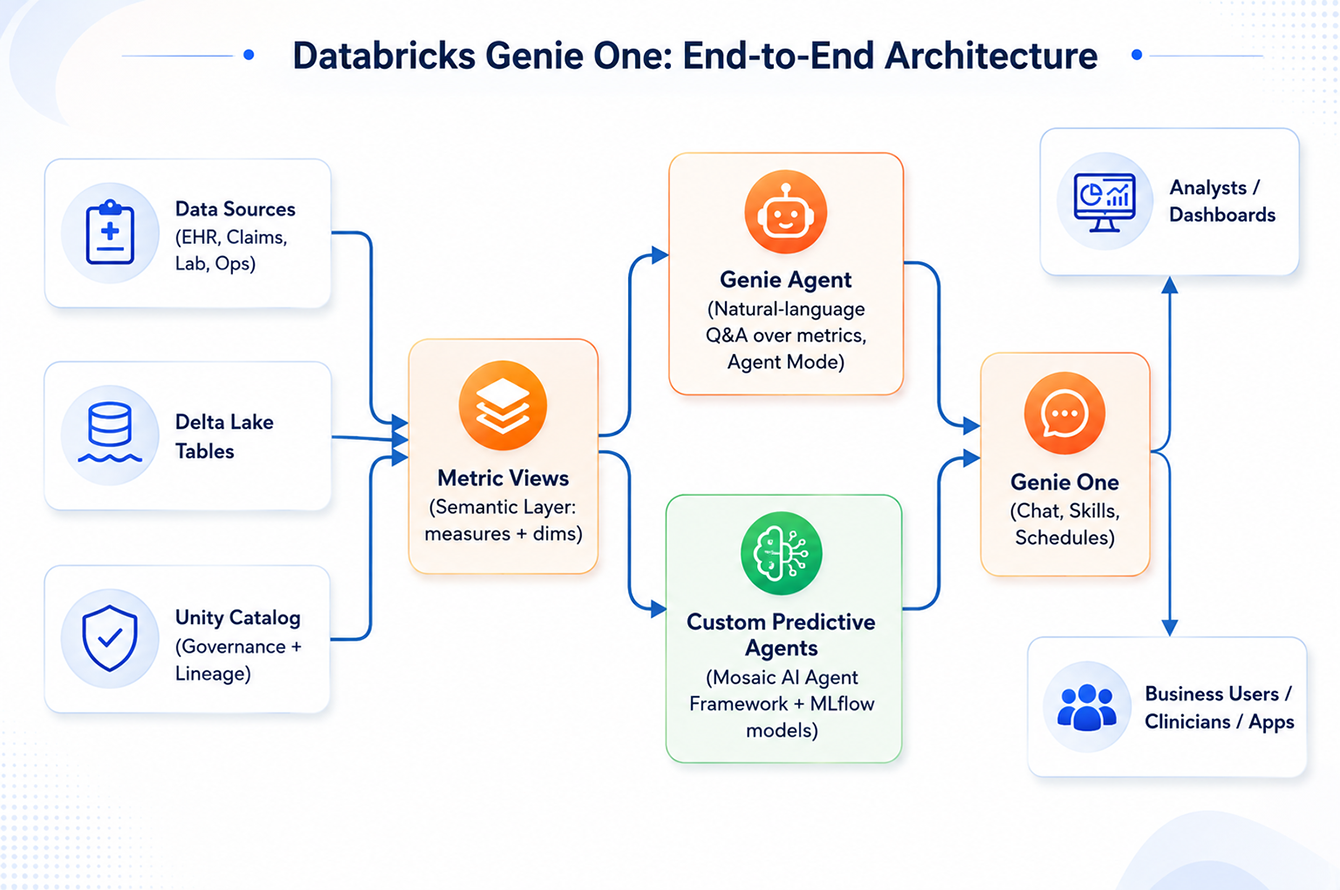
Databricks Genie One: End-to-End Architecture

A care coordination lead at a mid-size hospital system used to lose two days to a single readmission report: pulling numbers from three dashboards, emailing an analyst, and hoping the definitions matched. That wait is going away. 

Databricks Genie One, the agentic coworker built into the Data Intelligence Platform, lets any business user, not just analysts, ask questions of governed data, teach it repeatable skills, and hand it recurring work through scheduled tasks. Gartner expects 40% of enterprise applications to embed task-specific AI agents by the end of 2026, up from under 5% in 2025, and Genie One is Databricks’ clearest answer to that shift yet. 

This guide breaks down what Genie One does, the Genie Agents and Metric Views it runs on, how teams extend it into predictive work, and where the real accuracy and cost trade-offs live. 

care coordination lead at a mid-size hospital system used to lose two days to a single readmission report.

What Is Databricks Genie One?

Databricks Genie One is the general-purpose chat surface of the Data Intelligence Platform, built for people who have never written a line of SQL.

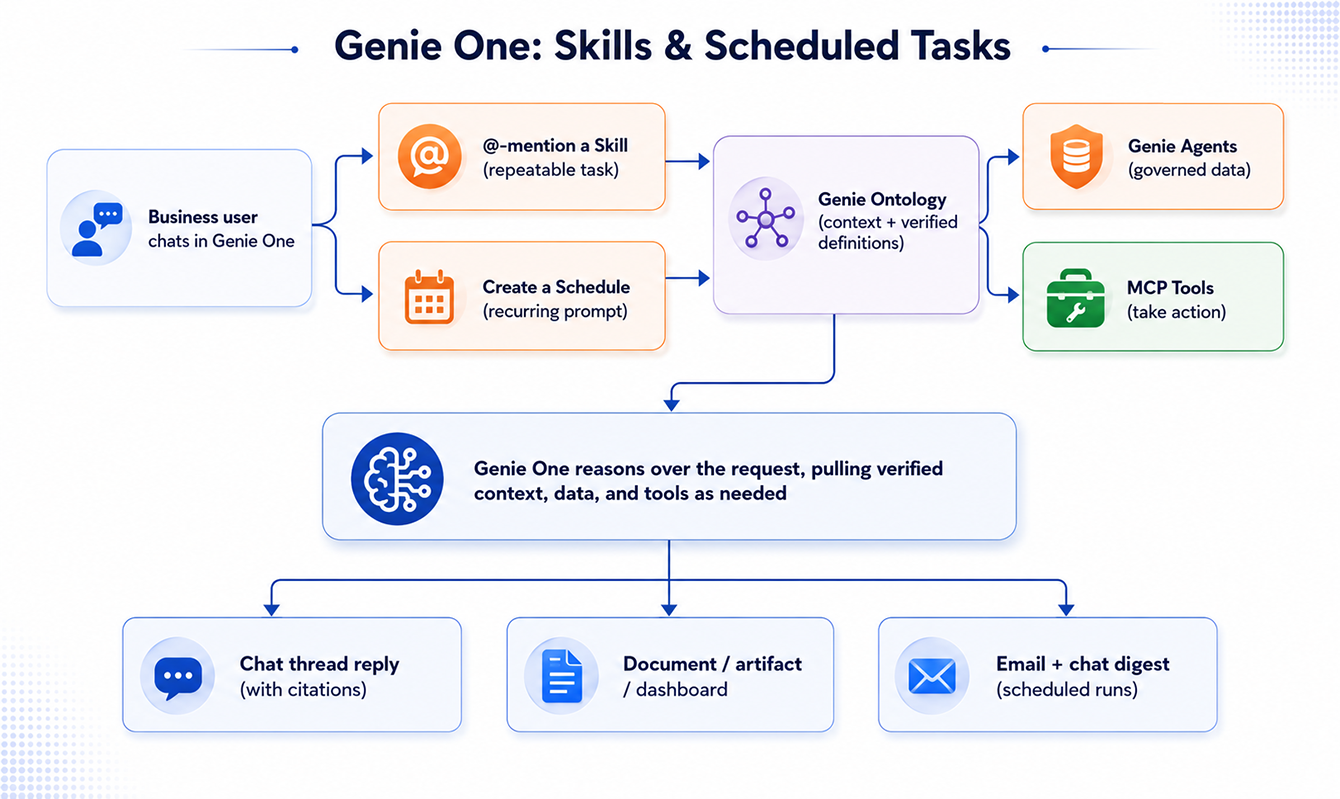
Where a Genie Agent is a governed, domain-scoped data building block, Genie One is the coworker any business user talks to. It draws its verified context from Genie Ontology and its trusted data and metrics from one or more Genie Agents, then layers on the capabilities a conversational agent needs to actually get work done. It answers questions, drafts documents and artifacts, takes action through MCP tools, etc. The two capabilities most relevant to day-to-day adoption are covered in depth below: skills and scheduled tasks.

Databricks announced it on June 16, 2026 at the Data + AI Summit, positioning it as a real step up from the original Genie, which only answered questions about data already sitting inside Databricks. 

Genie One reaches further. It works across structured and unstructured data, inside and outside the platform, and it ships on web, iOS, and Android. Marketing, finance, sales, HR, and clinical operations teams all get the same coworker, grounded in the same Unity Catalog permissions and lineage that govern everything else on the platform. 

At Inferenz, a data and AI solutions-led services company and Databricks partner, our team has believed that the differentiators sit underneath: Genie Agents, Metric Views, and, once the question turns predictive, custom agents, built on the Mosaic AI Agent Framework. 

Skills and scheduled tasks: how Genie One learns to work like you do 

Two features separate Genie One from a chatbot that forgets everything after each session. 

A skill is a task you teach the coworker once and reuse by name. Ask it to build your weekly metrics report, and it saves that approach as reusable, inspectable text under the open Agent Skills standard, the same convention Genie Code runs on. User skills currently sit in Public Preview, saved privately to your workspace, and Genie One applies one automatically unless you @-mention it directly.

Skills and scheduled tasks: how Genie One learns to work like you do

A scheduled task runs that same logic on a cadence you set, in plain English (something like “send me a daily briefing of new customer reviews”), then posts results into a chat thread plus an email. Schedules currently cap at daily frequency by default and need the Databricks SQL access entitlement to create or run. 

Dimension Skills Scheduled Tasks 
Trigger Manual, or auto-detected by Genie One Runs automatically on a set cadence 
Best for Repeatable, on-demand tasks Recurring reports and monitoring 
Output Chat response, document, or action Chat message plus an email notification 
How you set it up Ask Genie One to save an approach, or build one directly Natural-language request, or a manual form: Title, Instructions, Connections, Schedule, Timezone 
Governance note Ordinary files in your workspace folder, not hidden settings Capped at daily frequency by default; needs the SQL access entitlement 

Caregence-pairs-Genie-style-conversational-agents-for-hospital,-home,-care-and-hospice-operatorsGenie Agents: What They Are, and How to Set One Up

None of this works without trustworthy data underneath it, and that’s the job of a Genie Agent (what Databricks called a Genie Space through mid-2026). It’s a curated, conversational layer built over roughly 30 tables or views at most in current releases, configured with three things: instructions that teach Genie your vocabulary, SQL examples that anchor its query generation, and trusted assets, certified metrics Genie reuses instead of regenerating from scratch. 

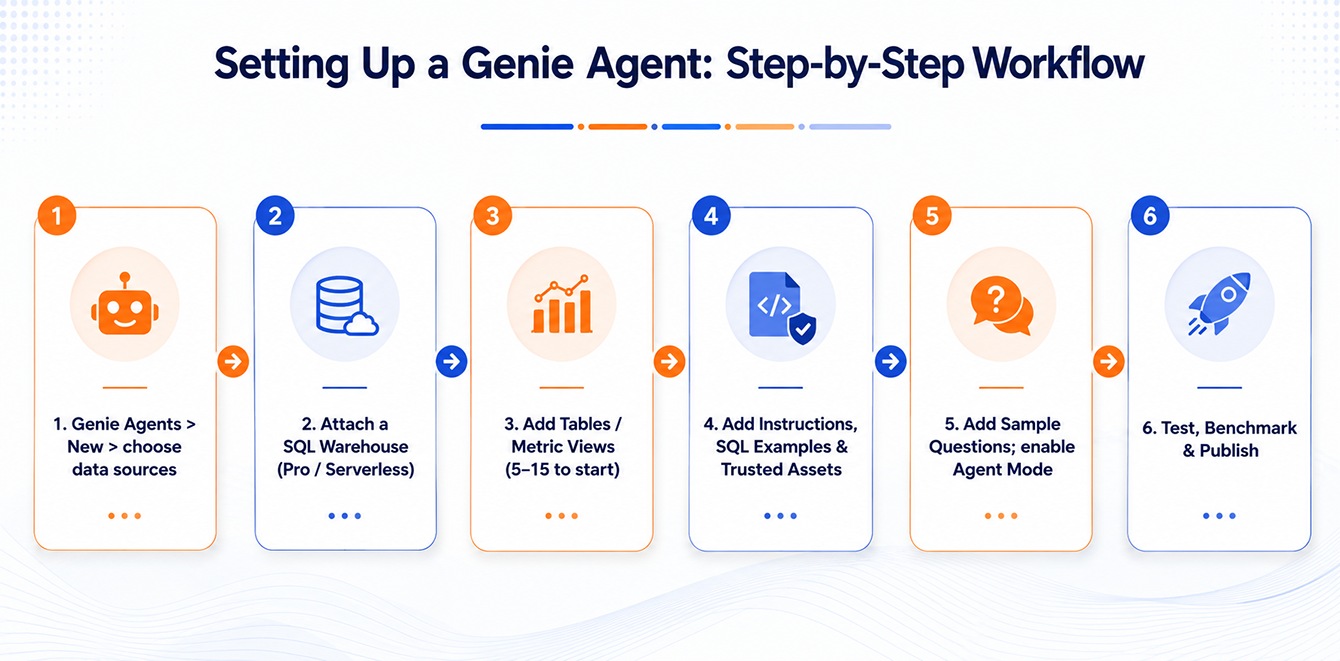
Setting up Genie Agent step-by-step workflow

A user’s question becomes SQL, runs on a SQL Warehouse, and comes back with the generated query attached for verification. Nothing here is a black box. As of mid-2026, Agent Mode adds iterative reasoning for open-ended “why” and “what-if” questions, running several queries and returning a cited report instead of a single number. 

Setting one up is mostly configuration, not code: 

  1. Prerequisites: a Pro or Serverless SQL Warehouse, Unity Catalog SELECT privileges, and well-documented tables (column comments, keys, certified tags).
  2. Create the agent: pick your Unity Catalog sources, name it, attach a warehouse.
  3. Add data assets: start with 5 to 15 tables or Metric Views in one business domain, not the whole warehouse.
  4. Add context: instructions, SQL examples, trusted assets. This is the single highest-leverage step for accuracy.
  5. Add sample questions, and enable Agent Mode if users will ask open-ended, multi-step questions.
  6. Test, benchmark, and publish, then connect it to Genie One through Unity Catalog groups. 

At Inferenz, this is exactly the discipline we bring to Unity Catalog rollouts across healthcare Lakehouse environments: narrow scope first, governance built in from step one, not bolted on after. 

Metric views: why Genie One never gives two different answers 

Ask two people the same business question in different words, and a language model can generate two different SQL statements, and two different numbers. That’s the failure Metric Views were built to close. 

A Metric View is a Unity Catalog object that defines dimensions, measures, joins, and, in current releases, parameters that let one definition answer differently depending on what’s calling it: a dashboard, a Genie Agent conversation, or a Genie One skill. Write a readmission_rate_30d calculation once, certify it once, and every surface on the platform reuses that same logic instead of re-deriving it from scratch. 2026 updates added native median and percentile expressions (useful for skewed metrics like length of stay), cluster-by configuration for large fact tables, and wildcard expressions that cut boilerplate when composing layered views.

Genie Agent or Custom Predictive Agent: Which one do you actually need? 

A Genie Agent answers questions from data that already exists. “What’s our 30-day readmission rate this quarter?” sits squarely in its lane, even with Agent Mode’s deeper reasoning. The moment a question turns forward-looking, “which of my current inpatients is likely to be readmitted, and what should we do about it?”, you need a custom predictive agent built on the Mosaic AI Agent Framework instead. 

This is a genuinely different tool. You own the model choice, the tool calls, the orchestration, and the evaluation, all inside the same Unity Catalog governance boundary. Genie One can call either one the same way: as an MCP-connected tool, or wrapped inside a skill so a business user never sees the machinery underneath. 

Dimension Genie Agent Custom Predictive Agent 
Best for Descriptive, exploratory Q&A over governed tables and Metric Views Predictive, multi-step, tool-calling workflows 
Who owns the logic Databricks-managed reasoning and SQL generation You define the reasoning, tools, and orchestration 
Runs on A SQL Warehouse Model Serving endpoints, MLflow models, UC functions 
Typical output An answer, generated SQL, or a cited Agent Mode report A ranked list, a risk score, or a recommendation 
Reached from Genie One via Direct chat, skills, scheduled tasks An MCP tool connection, or a skill that wraps it 

Turning a readmission risk score into action in healthcare 

Hospital readmissions are one of the most closely watched numbers in healthcare, for good reason. According to CMS, historically about one in five Medicare patients discharged from a hospital are readmitted within 30 days, and the Hospital Readmissions Reduction Program financially penalizes hospitals that exceed their peer benchmark. The gap that matters here isn’t the prediction. It’s what happens between a risk score sitting in a dashboard and a care team acting on it before the patient walks out the door. 

A Genie-One-orchestrated version looks like this:  

  1. A care-coordination lead could define a Genie One skill called weekly_readmission_digest that pulls the latest 30-day readmission metrics from a Genie Agent
  2. It cross-references a custom predictive agent’s high-risk worklist, and formats both into a one-page summary.
  3. A scheduled task then runs that skill every Monday morning and delivers the digest to the unit’s chat thread and inbox, turning a report someone used to assemble by hand into something that simply shows up, grounded in the same governed data and metric definitions used everywhere else on the platform. 

Unifying fragmented clinical data and then acting on it is exactly the kind of work Inferenz does for hospital and home-based care operators moving from reactive reporting to real-time, value-based care, using predictive models built for clinical operations. 

None of this replaces clinical judgment. Any production system touching protected health information still needs to clear your organization’s HIPAA and model-governance review before it influences care.

Tuning accuracy and cost: The discipline behind reliable answers 

Genie One is only as good as the Genie Agents and Metric Views feeding it, so accuracy is a stack-wide habit, not a setting you flip once and forget. 

Start by writing down 20 to 50 representative questions with known-correct answers before touching a single instruction. Prioritize SQL examples and trusted assets over prose instructions, since concrete patterns anchor SQL generation far more reliably than descriptive text. Keep instructions short and free of contradictions, and re-run the benchmark after every schema change or instruction edit. Field reports cite 10 to 40 percent accuracy gains from this loop alone, applied consistently, against an agent nobody ever benchmarks. 

Result What It Means What To Do 
Pass Correct answer, correct grain Keep as a regression test 
Partial Right direction, wrong filter or period Add a targeted SQL example 
Fail, schema Can’t find or join the right tables Add column comments, keys, or a Metric View 
Fail, ambiguity Maps to more than one plausible metric Add a trusted asset to disambiguate 

Cost follows a similar rhythm. Serverless SQL Warehouses suit the bursty, ad-hoc pattern of conversational analytics better than always-on clusters, and Genie’s query-level attribution makes it possible to track cost per agent and manage the operating model, not just per warehouse, which is what makes chargeback to a specific business unit realistic. Agent Mode and scheduled tasks both add real compute. Budget for them separately from ad-hoc chat, and audit schedules nobody actually reads. 

Contact our Data and AI Experts

The bottom line 

Genie One gives every business team one coworker to talk to, instead of five dashboards and an analyst’s calendar. But the chat interface is the easy part. What makes it trustworthy is everything underneath: Genie Agents that turn governed Unity Catalog data into plain language, Metric Views that keep every surface computing the same number, and custom predictive agents that pick up exactly where descriptive analytics runs out of road. 

Treat the whole stack the way you would any production system: benchmark it, tune it on a short loop, and keep watching it after launch. The organizations already ahead here aren’t the ones with the flashiest chat interface. They are the ones who did the unglamorous data foundation work first. 

Frequently Asked Questions 

5 Things Every Data Engineer Gets Wrong About Delta Lake

Summary 

Delta Lake never edits a Parquet file in place. Every UPDATE, MERGE, or DELETE writes new files and records the change in _delta_log:the transaction log that also powers ACID guarantees, time travel, and VACUUM’s retention rules. Understand that log, and the next five “weird” Delta behaviors stop being weird.

Introduction

Most of us started using Delta Lake the same way, we swapped “parquet” for “delta” in a write call, things kept working, and we moved on. It reads like Parquet, it writes like Parquet, and MERGE INTO feels like a normal SQL statement. So, it’s easy to build a mental model of Delta Lake as “Parquet with extra features” and never look further.

Understanding the Delta Lake transaction log; the append-only ledger that decides what every reader and writer sees, is what separates engineers who trust their pipelines from those who get blindsided by them.

That model works fine until it doesn’t, until a job rewrites far more data than expected, or a VACUUM quietly breaks time travel for your Business Intelligence team.

Underneath every Delta table is a transaction log, a directory called _delta_log sitting right next to your data files. Once you understand what that log is doing, a lot of Delta’s behavior stops feeling like magic. Here are five misconceptions that trip people up, and the log-level reason behind each one.

1. Delta Lake updates Parquet files directly

“UPDATE” and “DELETE” are words we use for in-place changes everywhere else in a database, so it’s natural to picture Delta reaching into an existing Parquet file and rewriting the relevant bytes.

It doesn’t, because it can’t. Parquet files are immutable by design. There’s no supported way to modify a single row inside one without rewriting the whole file, because of how column chunks, row groups, and footers are laid out. Delta works with that constraint instead of fighting it:

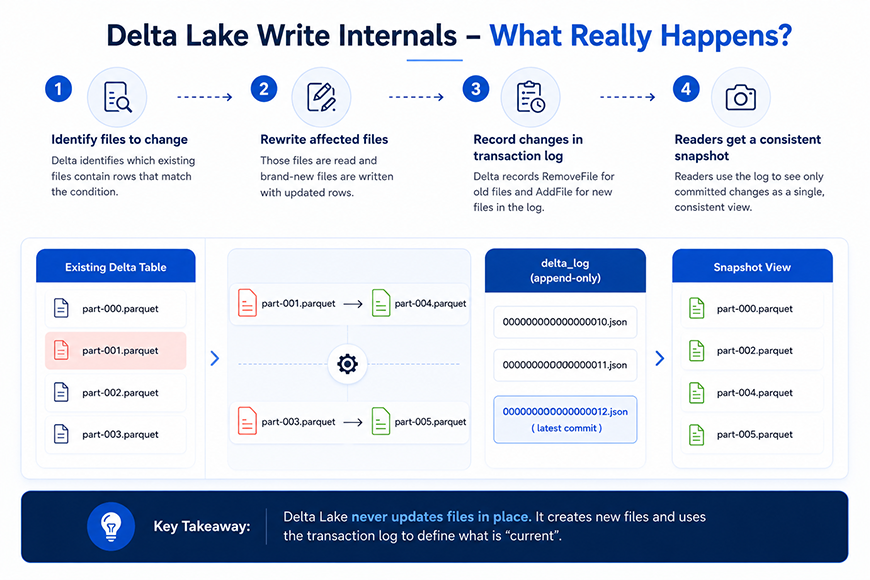
  • Delta identifies which existing files contain rows that match the update.
  • It reads those files and writes brand-new files that include the updated rows.
  • It records a RemoveFile action in the log for every old file that’s no longer valid.
  • It records an AddFile action for every new file that replaces it.
  • The old physical files are not touched or deleted yet, they’re just marked as logically removed from the table’s current state.

The takeaway: the unit of change in Delta Lake is the file, not the row. That’s why an UPDATE touching a single row can still rewrite a 500MB file.
2. MERGE updates only the rows that changed

MERGE reads like row-level logic, “when matched, update when not matched, insert”, so it’s tempting to assume Delta finds the exact rows and patches them in place.

What actually happens is a two-phase operation:

  • Scan phase, Delta compares source and target to figure out which files in the target table contain at least one row that needs to change.
  • Rewrite phase, every one of those files is rewritten in full, even if only one row inside it needed an update, producing a fresh set of AddFile and RemoveFile actions for the commit.

MERGE INTO target t
USING updates u
ON t.id = u.id
WHEN MATCHED THEN UPDATE SET *
WHEN NOT MATCHED THEN INSERT *

Why it matters for performance:

  • If matching rows are scattered across many files, MERGE has to rewrite all of those files, even if the actual number of changed rows is small.
  • Keeping join keys aligned with your partitioning strategy (or using liquid clustering) narrows down how many files a MERGE has to touch in the first place.
  • DESCRIBE HISTORY shows the number of files added and removed by a MERGE, usually the fastest way to explain a slow MERGE to someone.

3. Readers can see partially written data

This worry comes from experience with plain object storage. If a large batch job produces dozens of files and fails halfway through, it seems reasonable that a concurrent reader might see a mix of old and new files, an inconsistent, half-committed table.

Delta avoids this because readers never look at files in storage to decide what’s “current.” They look at the transaction log:

  • A table’s state at any version is defined by replaying the AddFile and RemoveFile actions recorded in _delta_log, in order, up to that version.
  • A reader opening a table is reconstructing a snapshot from the log, not scanning a folder.
  • A write only becomes visible once its JSON commit file is successfully written to _delta_log, and that write is atomic.
  • If a job dies mid-write, the new Parquet files it produced just sit in storage, unreferenced by any commit. No reader ever sees them, because nothing in the log points to them.

This is Delta’s version of snapshot isolation, every read is against a consistent, fully-committed version of the table, never one in progress.

The commit itself relies on optimistic concurrency control (OCC):

  • Delta doesn’t take a lock up front. Each writer proceeds assuming no conflict.
  • When it’s ready to commit, it checks whether the version it based its changes on is still the latest version in the log.
  • If someone else committed first, the commit is rejected, and the writer re-checks for conflicts and retries.

Put together, this is what delivers Delta’s ACID transactions: atomicity from the single, all-or-nothing JSON commit, and isolation from readers always working off a fixed snapshot.

Get a free delta lake performance review

4. Time travel keeps multiple copies of my table

Querying a table as it looked at version 40, or three days ago, sounds like it requires Delta to be storing a separate copy for each version, the way some snapshot-based systems do.

It isn’t. There’s only ever one set of data files; some are referenced by the current version, some aren’t anymore.

  • The transaction log keeps every commit, not just the latest one, each is a numbered JSON file in _delta_log (version 0, version 1, and so on).
  • Querying an old version means replaying the log up to that version number and reconstructing which files were valid at that point in time.
  • Replaying thousands of commits from scratch every time would be slow, so Delta periodically writes a checkpoint, a Parquet file capturing the fully reconstructed state at a given version, so readers can start there instead of from version 0.
  • Checkpoints happen roughly every 10 commits by default (configurable) and are a performance optimization, not a separate source of truth, the log still defines correctness.

— query by version
SELECT * FROM my_table VERSION AS OF 40

— query by timestamp
SELECT * FROM my_table TIMESTAMP AS OF '2026-07-01'

— see the commit history
DESCRIBE HISTORY my_table

Enterprises that depend on point-in-time reporting, healthcare organizations reconciling patient records across systems, for instance; often build their entire audit trail on this exact mechanism. Our recent work unifying 40+ source systems into a single enterprise data platform for a national home-based care provider leaned on this same time-travel guarantee for rollback and audit.

This also explains why time travel isn’t free forever: it only works as far back as the data files it needs are still physically present in storage, which brings us to the last misconception.

5. VACUUM only deletes old files

VACUUM is a cleanup command, and cleanup commands delete things. What catches people off guard is how fast the connection between VACUUM and time travel can bite you.

There are two distinct kinds of “delete” at play:

  • Logical delete, an UPDATE, DELETE, or MERGE never removes the old Parquet files it replaces. It just records a RemoveFile action so the log stops pointing to them. The file still sits in storage, unused by the current version, but still referenced by older versions, this is exactly what makes time travel work.
  • Physical delete, this is what VACUUM does. It looks for data files no longer referenced by any version within the retention window and removes them from storage for good.

— preview what would be deleted, without deleting anything
VACUUM my_table DRY RUN

— delete files older than the default 7-day retention
VACUUM my_table

What this means in practice:

  • The default retention period is 7 days, and it exists specifically to protect concurrent readers and time travel queries, not as an arbitrary safety number.
  • Once VACUUM physically deletes a file, any table version that depended on it can no longer be reconstructed. Time travel to that version fails, even though the version still shows up in DESCRIBE HISTORY.
  • The log remembers the version existed; it just can’t rebuild it anymore, because the underlying data is gone.
  • Lowering the retention period below the default is risky enough that Delta requires you to explicitly disable a safety check to do it, a long-running query reading an old snapshot can get caught out by a VACUUM that runs while it’s still in flight.

Retention windows like this sit at the center of compliance-driven governance in regulated industries. For a closer look at how retention and access controls work together in practice, see our breakdown of building a unified data governance layer with Databricks Unity Catalog in healthcare.

Here’s the short version, if you’re skimming for the fix rather than the full mechanics:

MisconceptionWhat’s Actually Happening in _delta_logWhy It Matters
Delta Lake updates Parquet files directlyNew files are written; old ones are marked removed via RemoveFile/AddFile actionsExplains why a single-row UPDATE can rewrite a 500MB file
MERGE updates only the rows that changedMERGE rewrites every file that contains a matched row, not just the row itselfWhy a “small” MERGE can run far longer than expected
Readers can see partially written dataSnapshot isolation via log replay + one atomic JSON commitGuarantees consistent, ACID-compliant reads even during concurrent writes
Time travel keeps multiple copies of the tableOne set of files; older versions are rebuilt by replaying the log and checkpointsExplains why storage stays lean but old queries can still fail
VACUUM only deletes old filesVACUUM permanently deletes files that time travel still needsThe 7-day retention window isn’t arbitrary; it protects live queries

How a write actually gets from Spark to a reader

Putting all of that together, here’s the path a single write operation takes, from the moment Spark executes it to the moment it’s visible to someone running a query:

  1. Spark executes the write: an UPDATE, DELETE, MERGE, or INSERT.
  2. Delta scans the log to identify which existing files contain affected rows.
  3. New Parquet files are written with the updated data; the old files stay untouched in storage.
  4. Delta checks for conflicts under optimistic concurrency control, comparing against the latest version in _delta_log.
  5. If there’s no conflict, a new atomic JSON commit is written, recording the AddFile and RemoveFile actions for that write.
  6. The instant that JSON commit lands, it becomes the new “current” version of the table.
  7. A reader querying the table replays the log up to the requested version and resolves exactly which files are valid right now.

Every one of those steps maps back to something in this article: immutable Parquet files, AddFile and RemoveFile actions, atomic JSON commits, optimistic concurrency control, and a version number that readers resolve against. None of it is hidden, it’s all sitting in _delta_log if you want to go look.

Conclusion

None of this changes how you write day-to-day SQL or PySpark against Delta tables. But the next time a MERGE runs longer than expected, or a time travel query fails right after a VACUUM, you’ll know exactly where to look, and that the transaction log had the answer the whole time.

If your team is scaling Delta Lake pipelines and wants a second set of eyes on MERGE performance, VACUUM policy, or transaction log health, that’s the kind of data engineering work we do day to day at Inferenz.

Talk to our data engineering team

Frequently asked questions