










Hospice Eligibility Agents: Automating Intake Validation Against CMS Criteria

Summary

A hospice eligibility agent reads each referral packet, checks it against CMS eligibility criteria and your own scoring rules, and returns an Eligible, Pending Review, or Ineligible status with the reasoning attached. Your physician still certifies the prognosis. This guide shows COOs and CIOs where AI eligibility verification for hospice fits, which documentation gaps it can catch, and how to evaluate it before you buy.

Introduction

Picture a Friday, 4:40 p.m. A 38-page referral packet arrives by fax from a hospital discharge planner.

Half of it is scanned, the face-to-face note is buried on page 29, and your intake nurse has six more packets waiting. She has two bad options: rush the review and risk admitting a patient the chart can’t support or hold the referral until Monday and risk losing it to the hospice that answered first. The first option has a documented price. In a June 2026 audit, the HHS Office of Inspector General reviewed 100 initial hospice certification periods and found that 45 did not meet Medicare requirements. In 21, the clinical record didn’t support a terminal illness. In the other 24, the documentation fell short.

A hospice eligibility agent is built for that Friday. It reads the packet, checks it against CMS criteria and your own rules, and tells your team what’s missing in minutes. We are covering how AI agents improve hospice eligibility verification while staying CMS-compliant, which covers the agent layer that sits on top of a governed data foundation. This is the first of a series of articles focusing on hospice eligibility agents and how they can help in automating intake validation in line with CMS criteria.

COOs and CIOs at hospice care agencies who need answers before they sign anything will find a lot of value here. Know what the agent checks, where it stops and the physician starts, and what evidence it leaves behind for a reviewer.
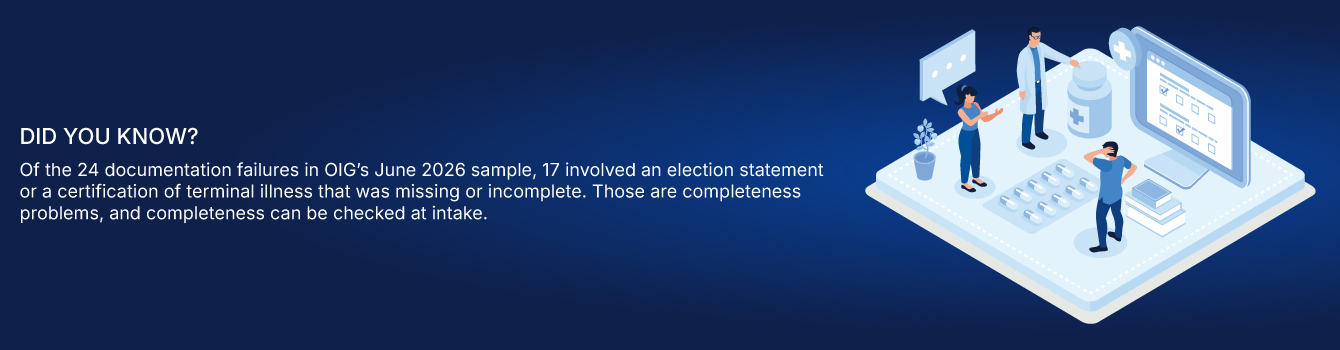
Did you know?

What is a hospice eligibility agent?

A hospice eligibility agent is an AI workflow that reads a referral packet, extracts the clinical values that matter for Medicare hospice eligibility, scores them against criteria your clinical team defines, and returns a status with the reasoning attached. The status is Eligible, Pending Review, or Ineligible. A person approves the result.

A checklist needs someone to read the packet first. The agent does the reading. Referral packets arrive as scanned PDFs, faxed notes, and EHR exports, and optical character recognition (OCR) turns them into structured values such as the Palliative Performance Scale (PPS) score, hospitalizations, and documented decline. Manual packet review is one of the biggest drivers of referral intake delay, and two reviewers will often score the same chart differently. An agent applies one set of rules to every packet.
What is a hospice eligibility agent? A hospice eligibility agent is an AI workflow that reads a referral packet, extracts the clinical values that matter for Medicare hospice eligibility, scores them against criteria your clinical team defines, and returns a status with the reasoning attached. The status is Eligible, Pending Review, or Ineligible. A person approves the result. A checklist needs someone to read the packet first. The agent does the reading. Referral packets arrive as scanned PDFs, faxed notes, and EHR exports, and optical character recognition (OCR) turns them into structured values such as the Palliative Performance Scale (PPS) score, hospitalizations, and documented decline. Manual packet review is one of the biggest drivers of referral intake delay, and two reviewers will often score the same chart differently. An agent applies one set of rules to every packet. What do CMS hospice eligibility criteria require at intake? The federal rules at 42 CFR 418.22 set the documentation standard that most intake errors trace back to. The table maps each requirement to what an agent can check and who makes the call. Requirement What CMS expects What the agent can check Who decides Six-month prognosis Certification that life expectancy is six months or less if the illness runs its normal course Statement is present; supporting clinical findings are in the packet Certifying physician Who certifies For the first 90 days: medical director, physician designee, or an IDG physician, plus the attending physician if there is one Required signatures and dates are present Physicians Timing Written certification before the claim; oral certification within 2 calendar days if the written one isn’t in hand; up to 15 calendar days before the election date Certification dates against the election date Hospice admin staff Narrative Brief, patient-specific explanation of clinical findings. No check boxes or standard language. Signature and attestation in the right place Narrative is present, placed correctly, and signed Certifying physician Face-to-face encounter Required before the third benefit period and each recertification after it, no more than 30 days prior, by a hospice physician or nurse practitioner, with a signed attestation Dated, signed attestation is in the record Hospice physician or NP Election statement Names the hospice and attending physician, acknowledges care is palliative, carries the patient’s signature Each element is present Patient or representative, hospice staff Election statement addendum FY 2027 final rule: addendum on non-hospice service coverage for every beneficiary at election Yes or no field is complete Hospice staff Benefit periods Two 90-day periods, then unlimited 60-day periods, each needing certification Which period applies and what is due Hospice staff What is a certification of terminal illness (CTI)? A CTI is the physician’s signed statement that the patient’s life expectancy is six months or less if the illness runs its normal course. It needs a patient-specific narrative of the clinical findings, a signature and date, and the dates of the benefit period it covers. Who certifies hospice eligibility? Physicians do. OIG’s report notes that only a Doctor of Medicine or Osteopathy can certify or recertify a terminal illness. For the first 90 days that means the hospice medical director, physician designee, or an interdisciplinary group physician, and the attending physician if the patient has one. What is a face-to-face encounter, and when is it required? It’s an in-person visit by a hospice physician or nurse practitioner to gather clinical findings on continued eligibility. It’s required before the third benefit period and before every recertification after that, no more than 30 days ahead, with a signed and dated attestation. How do LCDs and MAC jurisdiction change the eligibility check? A local coverage determination (LCD) is a Medicare Administrative Contractor’s published criteria for when a service is reasonable and necessary. For hospice, LCDs define terminal status by diagnosis. Three MACs cover four home health and hospice jurisdictions: National Government Services (two), CGS Administrators (one), and Palmetto GBA (one), according to OIG. Their criteria differ. NGS keeps its terminal-status criteria in a single LCD (L33393), Palmetto publishes disease-specific ones, and as we covered in our look at why polished AI documentation still fails hospice audits, CGS and NGS diverge on conditions such as ALS and renal disease. Reviewers look for documented decline, and for dementia, heart failure, and COPD they look for diagnosis-specific findings alongside PPS. For a COO, that makes one national eligibility template a liability. Your scoring rules need to reflect the LCD language your MAC applies and the diagnosis in the packet. Caregence’s eligibility agent applies criteria that your clinical leaders write in plain English, so the LCD logic is yours to define and update. Ask every vendor, us included, who owns that mapping and how quickly it changes when a MAC revises an LCD. Where does the hospice eligibility agent stop and the physician start? The agent screens. The physician certifies. Under the federal rules, certification rests on the physician’s clinical judgment about the normal course of the illness, and the narrative has to be composed by the physician from the patient’s record. The agent prepares the evidence, checks it for completeness, and scores it. A human approves every determination. Task Who does it Why it sits there Read the packet and extract PPS, prognosis, hospitalizations, decline indicators Agent High volume, repeatable, and OCR handles scanned pages Check that the CTI, narrative, and election statement are complete Agent Rule-based and fully checkable Apply the scoring criteria to every referral Agent Same logic every time removes reviewer variance Write and update the scoring criteria Clinical leadership The platform never sets the clinical standard Judge the prognosis and write the narrative Certifying physician Required by 42 CFR 418.22 Resolve Pending Review cases Clinician Borderline packets need clinical judgment Approve the final status Human reviewer AI scores and explains; a person decides Pending Review is where the design matters. A borderline packet should land in front of a clinician with the gap named, and it shouldn’t be quietly scored up or down to fit a threshold. Which documentation gaps cause eligibility denials, and which can an agent catch? OIG’s June 2026 audit gives a clear breakdown of how initial certification periods fail. Its sample covered fiscal year 2021 claims, so the counts describe failure types and shouldn’t be read as today’s error rate. The same records are what a MAC asks for in an additional documentation request (ADR) or a Targeted Probe and Educate (TPE) review. Failure type in OIG sample (of 100 periods) Count Can an intake agent help? Clinical record did not support a terminal illness 21 Partly. It surfaces decline indicators and flags thin evidence. The physician judges. No supporting records provided 7 Partly. The stored packet and audit trail create a record to produce. Election statement missing 3 Yes. Completeness check at intake. Election statement missing required elements 7 Yes. Element-level check. Certification of terminal illness missing 5 Yes. Completeness check. Certification elements missing, such as signatures 2 Yes. Signature and date check. Seventeen of the 45 failures were election statements or CTIs that were missing or incomplete. A rule-based completeness check at intake addresses those directly. The 21 clinical-support failures stay with the physician, though an agent can pull the decline indicators out of the packet so the narrative has evidence to cite. OIG also flagged new enrollees with no inpatient or emergency room claim in the prior 18 months as a high-risk group, estimated Medicare could have saved $255.1 million had the MACs reviewed that group, and CMS concurred with the recommendation to consider it in eligibility reviews. The finding is claims-based, and a packet shows only what’s documented. Still, a configurable intake rule can route a packet with no recent hospital or ER use to a clinician for a closer look. The pressure is rising on the compliance side too. The CMS FY 2027 hospice final rule, issued July 30, 2026, requires an election statement addendum on non-hospice coverage for every beneficiary at election, and CMS now scores providers with the Service and Spending Variation Index, which uses nine claims-based measures. Each new required field is another item a reviewer can check across every admission. How does the Caregence Hospice Eligibility Agent work? The Caregence Hospice Eligibility Agent runs in five steps. It starts when a referral lands through your intake portal, EHR, or CRM, or through an API call, webhook, or scheduled task. Step What happens Output 1. Get data Pulls the physician certification, face-to-face notes, decline indicators, admission form, and clinical notes from the hospice system Complete referral packet in one place 2. Extract (OCR) Azure Document Intelligence parses scanned and unstructured PDFs Structured values: PPS, prognosis, hospitalizations, decline indicators 3. Score The intelligent agent applies your scoring logic and reasons over gaps Total score, determination, and the factors behind it 4. Update status Writes the determination back to the hospice system and portal record Eligible, Pending Review, or Ineligible 5. Notify Emails the recipients you configured Clinician sees score breakdown and notes Inferenz reports under five minutes per determination, against 30 to 90 minutes of manual clinical review. In the example Inferenz uses, a 25-person intake team can properly review about 75 referrals a day, and some days bring 500. Run the numbers on your own volume. What does the agent extract, and how transparent is the score? By default it scores terminal prognosis, PPS, documented functional decline, hospitalization history over the past six months, and documentation completeness. Each criterion carries a weight, the agent totals the points, and it returns the factors behind the total. A clinician can see why a packet landed in Pending Review without reopening all 38 pages. Can you set your own criteria, or are you stuck with vendor defaults? The defaults are a starting point. Clinical staff edit the weights, thresholds, mandatory documents, and routing in plain English, and a change goes live when saved, with no developer ticket. That speed needs a guardrail: every edit should have a named owner and a date, so you can show which rules were live the day a patient was admitted. What does the second workflow add? Eligibility tells you who qualifies. A second workflow scores eligible referrals on their likelihood of becoming admissions, using your own history: diagnosis fit, referral source, geography, caregiver availability, and documentation completeness. The coordinator still decides, and the score runs only on referrals already marked eligible. Caregence sits above your existing systems as an orchestration layer on the Caregence platform, so there’s no migration. Dimension Manual intake Caregence (Inferenz-reported) Time per determination 30 to 90 minutes Under 5 minutes Scoring consistency Varies by reviewer and by day Same logic on every referral Changing the criteria IT ticket and a development cycle Text edit, live on save Prioritization Intuition and whoever called last Conversion probability with reasoning Audit evidence Reconstructed after the fact Timestamped at every step Image suggestion Workflow diagram: referral arrives, five Caregence steps, human approval, status written back to the EHR, with the audit log running underneath. Alt text: Caregence hospice eligibility agent five-step workflow What audit trail does the agent leave for a reviewer? Every workflow step is timestamped against the patient record: the inputs pulled, the logic applied, the score produced, the decision written, and the notification sent. That gives you one consistent record per referral and removes the reviewer-by-reviewer variance that audits penalize. Push those determinations into your reporting layer too. An audit-ready dashboard connects each compliance number to the patient-level evidence behind it, and our guide to building audit-ready dashboards for CMS reviews shows how to wire that up. When a records request arrives, your team answers from one screen. What should a COO or CIO ask before choosing a hospice eligibility AI? Some hospice AI tools read well and still fail in practice. They misread ambiguous clinical language, or they apply the wrong standard for your jurisdiction. A 2026 PLOS Digital Health study shows the right habit. Researchers used self-hosted language models to extract prognostic indicators from the notes of 2,708 lung cancer and 814 colon cancer patients, then validated the extracted features against structured EHR data and physician annotations. The study covered oncology notes. Its method transfers to hospice packets; its accuracy figures don’t. Question to ask What good looks like Red flag Who writes the eligibility criteria? Your clinical leaders, in plain language, with change history Vendor-locked rules; changes need a ticket How does it handle LCD variation by MAC? Criteria mapped to your MAC and diagnosis, with a named owner and update process One national template Can it explain every score? Factor-level breakdown on each referral A single opaque number How is extraction accuracy measured? Tested on a sample of your own packets against clinician-confirmed values Demo accuracy only Where does the human sit? A person approves; borderline cases route to Pending Review Auto-admits or auto-declines What protects PHI? BAA, retention terms in writing, minimum-necessary access, audit logs Verbal assurances How does it connect to our systems? Triggers from portal, API, or webhook; writes status back; no migration Requires replacing your portal What audit evidence can you export? Timestamped inputs, logic, score, and decision per referral A summary report only On safeguards, ask for the business associate agreement and the data-retention terms in writing. Caregence’s platform design applies minimum-necessary access, role-based permissions, and audit logging across its agents, and your contract should spell out how that applies to your data. How do you connect the agent to your EMR and recertification workflow? The agent is portal-agnostic. A button click, a form submission, an API call, a webhook, or a scheduled run can trigger it, and the result is written back to the hospice system and portal record, so intake staff keep working in the tools they know. That makes EHR and referral data integration the real project. Check that your billing, EHR, and referral data agree on patient identity and dates before go-live. Data readiness decides how well any of this works. Most hospice AI projects stall without it, and a missing admission date or a duplicated patient record turns into a wrong determination. Recertification follows the same pattern. Scheduled runs are a documented trigger, so a nightly sweep of patients approaching a benefit-period boundary can flag a missing face-to-face attestation or an absent recertification narrative before the claim goes out. Confirm that scope during scoping, since the published workflow centers on referral screening. How do you measure the return on automated eligibility checks? Start with the Inferenz-reported figures and your own volume. At 75 referrals a day and 30 minutes per manual review, your clinicians spend 37.5 hours a day on first-pass review. If the agent returns each determination in under five minutes and a clinician only reviews the score and the flags, that burden shrinks to a fraction. Measure the fraction in your own pilot. Our guide to referral intake delays lists six baseline metrics worth capturing first. • Referral-to-determination time: hours from packet arrival to status. • First-pass completeness: share of packets with CTI, narrative, and election statement in order on day one. • Reviewer variance: score spread when two clinicians review the same packets. • Pending Review rate and time to clear: how many packets need a clinician and how fast. • Denial and ADR outcomes: documentation-related findings per quarter. • Referral-source rework: requests back to hospitals and SNFs for missing documents. How do you pilot a hospice eligibility agent in 90 days? 1. Days 1 to 15: Pull one week of past referrals with the decisions your team made. Write the scoring criteria in plain English with your clinical leads. 2. Days 16 to 45: Run in shadow mode. Compare agent determinations with past decisions, and have two clinicians score the same packets to measure human variance. 3. Days 46 to 75: Go live on one branch or service line, with a person approving every determination. 4. Days 76 to 90: Review the metrics, tune weights, record who owns each rule, and decide on rollout. A strong data layer speeds all four steps. A post-acute care provider that worked with Inferenz unified multiple EMRs, a triage platform, and a state HIE on one governed Snowflake warehouse with a master patient index, and leadership recovered two hours a day from manual spreadsheet audits (Inferenz-reported). Final thoughts Eligibility decisions carry the most weight in hospice. They decide who gets care, and they decide what survives a review. An agent can read every packet the same way, every time, and tell your team exactly what’s missing. It can’t replace the physician’s judgment, and it shouldn’t try. The hospices that get this right will write their own rules, keep a person on every determination, and keep the receipts.

What do CMS hospice eligibility criteria require at intake?

The federal rules at 42 CFR 418.22 set the documentation standard that most intake errors trace back to. The table maps each requirement to what an agent can check and who makes the call.

RequirementWhat CMS expectsWhat the agent can checkWho decides
Six-month prognosisCertification that life expectancy is six months or less if the illness runs its normal courseStatement is present; supporting clinical findings are in the packetCertifying physician
Who certifiesFor the first 90 days: medical director, physician designee, or an IDG physician, plus the attending physician if there is oneRequired signatures and dates are presentPhysicians
TimingWritten certification before the claim; oral certification within 2 calendar days if the written one isn’t in hand; up to 15 calendar days before the election dateCertification dates against the election dateHospice admin staff
NarrativeBrief, patient-specific explanation of clinical findings. No check boxes or standard language. Signature and attestation in the right placeNarrative is present, placed correctly, and signedCertifying physician
Face-to-face encounterRequired before the third benefit period and each recertification after it, no more than 30 days prior, by a hospice physician or nurse practitioner, with a signed attestationDated, signed attestation is in the recordHospice physician or NP
Election statementNames the hospice and attending physician, acknowledges care is palliative, carries the patient’s signatureEach element is presentPatient or representative, hospice staff
Election statement addendumFY 2027 final rule: addendum on non-hospice service coverage for every beneficiary at electionYes or no field is completeHospice staff
Benefit periodsTwo 90-day periods, then unlimited 60-day periods, each needing certificationWhich period applies and what is dueHospice staff

What is a certification of terminal illness (CTI)?

A CTI is the physician’s signed statement that the patient’s life expectancy is six months or less if the illness runs its normal course. It needs a patient-specific narrative of the clinical findings, a signature and date, and the dates of the benefit period it covers.

Who certifies hospice eligibility?

Physicians do. OIG’s report notes that only a Doctor of Medicine or Osteopathy can certify or recertify a terminal illness. For the first 90 days that means the hospice medical director, physician designee, or an interdisciplinary group physician, and the attending physician if the patient has one.

What is a face-to-face encounter, and when is it required?

It’s an in-person visit by a hospice physician or nurse practitioner to gather clinical findings on continued eligibility. It’s required before the third benefit period and before every recertification after that, no more than 30 days ahead, with a signed and dated attestation.

How do LCDs and MAC jurisdiction change the eligibility check?

A local coverage determination (LCD) is a Medicare Administrative Contractor’s published criteria for when a service is reasonable and necessary. For hospice, LCDs define terminal status by diagnosis. Three MACs cover four home health and hospice jurisdictions: National Government Services (two), CGS Administrators (one), and Palmetto GBA (one), according to OIG.

Their criteria differ. NGS keeps its terminal-status criteria in a single LCD (L33393), Palmetto publishes disease-specific ones, and as we covered in our look at why polished AI documentation still fails hospice audits, CGS and NGS diverge on conditions such as ALS and renal disease. Reviewers look for documented decline, and for dementia, heart failure, and COPD they look for diagnosis-specific findings alongside PPS.

For a COO, that makes one national eligibility template a liability. Your scoring rules need to reflect the LCD language your MAC applies and the diagnosis in the packet. Caregence’s eligibility agent applies criteria that your clinical leaders write in plain English, so the LCD logic is yours to define and update. Ask every vendor, us included, who owns that mapping and how quickly it changes when a MAC revises an LCD.

Where does the hospice eligibility agent stop and the physician start?

The agent screens. The physician certifies. Under the federal rules, certification rests on the physician’s clinical judgment about the normal course of the illness, and the narrative has to be composed by the physician from the patient’s record. The agent prepares the evidence, checks it for completeness, and scores it. A human approves every determination.

TaskWho does itWhy it sits there
Read the packet and extract PPS, prognosis, hospitalizations, decline indicatorsAgentHigh volume, repeatable, and OCR handles scanned pages
Check that the CTI, narrative, and election statement are completeAgentRule-based and fully checkable
Apply the scoring criteria to every referralAgentSame logic every time removes reviewer variance
Write and update the scoring criteriaClinical leadershipThe platform never sets the clinical standard
Judge the prognosis and write the narrativeCertifying physicianRequired by 42 CFR 418.22
Resolve Pending Review casesClinicianBorderline packets need clinical judgment
Approve the final statusHuman reviewerAI scores and explains; a person decides

Pending Review is where the design matters. A borderline packet should land in front of a clinician with the gap named, and it shouldn’t be quietly scored up or down to fit a threshold.

Which documentation gaps cause eligibility denials, and which can an agent catch?

OIG’s June 2026 audit gives a clear breakdown of how initial certification periods fail. Its sample covered fiscal year 2021 claims, so the counts describe failure types and shouldn’t be read as today’s error rate. The same records are what a MAC asks for in an additional documentation request (ADR) or a Targeted Probe and Educate (TPE) review.

Failure type in OIG sample (of 100 periods)CountCan an intake agent help?
Clinical record did not support a terminal illness21Partly. It surfaces decline indicators and flags thin evidence. The physician judges.
No supporting records provided7Partly. The stored packet and audit trail create a record to produce.
Election statement missing3Yes. Completeness check at intake.
Election statement missing required elements7Yes. Element-level check.
Certification of terminal illness missing5Yes. Completeness check.
Certification elements missing, such as signatures2Yes. Signature and date check.

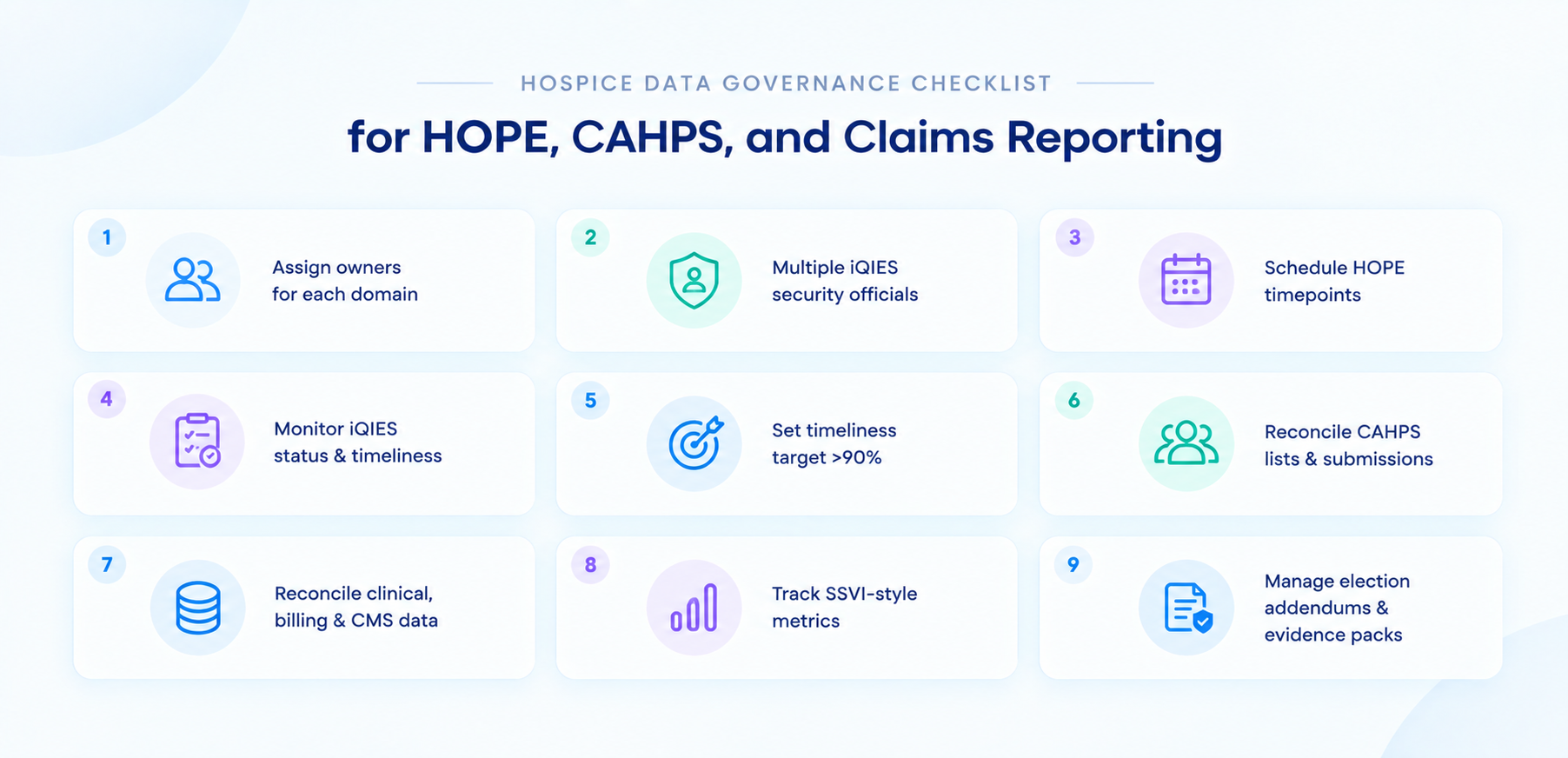
Seventeen of the 45 failures were election statements or CTIs that were missing or incomplete. A rule-based completeness check at intake addresses those directly. The 21 clinical-support failures stay with the physician, though an agent can pull the decline indicators out of the packet so the narrative has evidence to cite.

OIG also flagged new enrollees with no inpatient or emergency room claim in the prior 18 months as a high-risk group, estimated Medicare could have saved $255.1 million had the MACs reviewed that group, and CMS concurred with the recommendation to consider it in eligibility reviews. The finding is claims-based, and a packet shows only what’s documented. Still, a configurable intake rule can route a packet with no recent hospital or ER use to a clinician for a closer look.

The pressure is rising on the compliance side too. The CMS FY 2027 hospice final rule, issued July 30, 2026, requires an election statement addendum on non-hospice coverage for every beneficiary at election, and CMS now scores providers with the Service and Spending Variation Index, which uses nine claims-based measures. Each new required field is another item a reviewer can check across every admission.

How does the Caregence Hospice Eligibility Agent work?

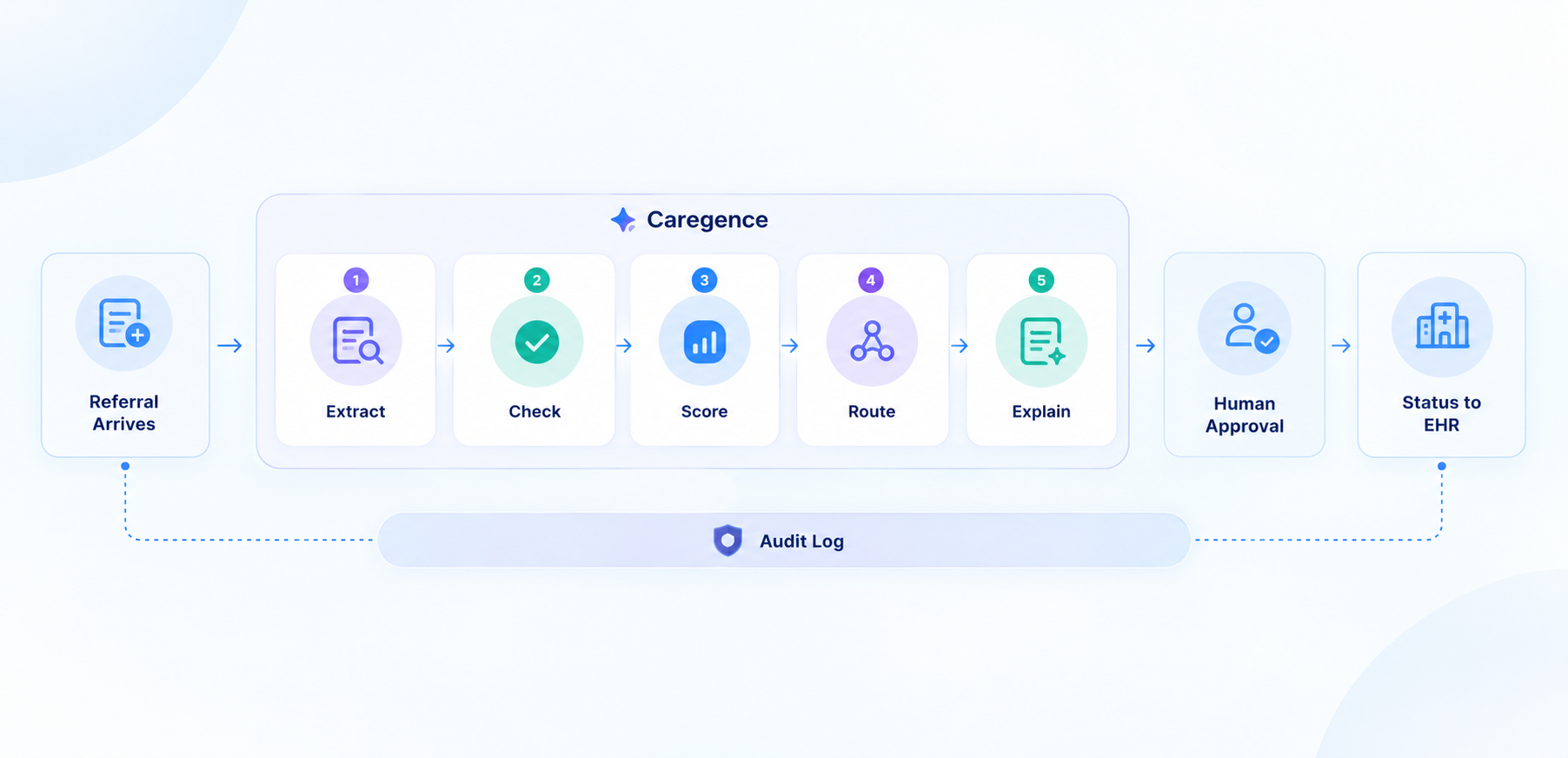
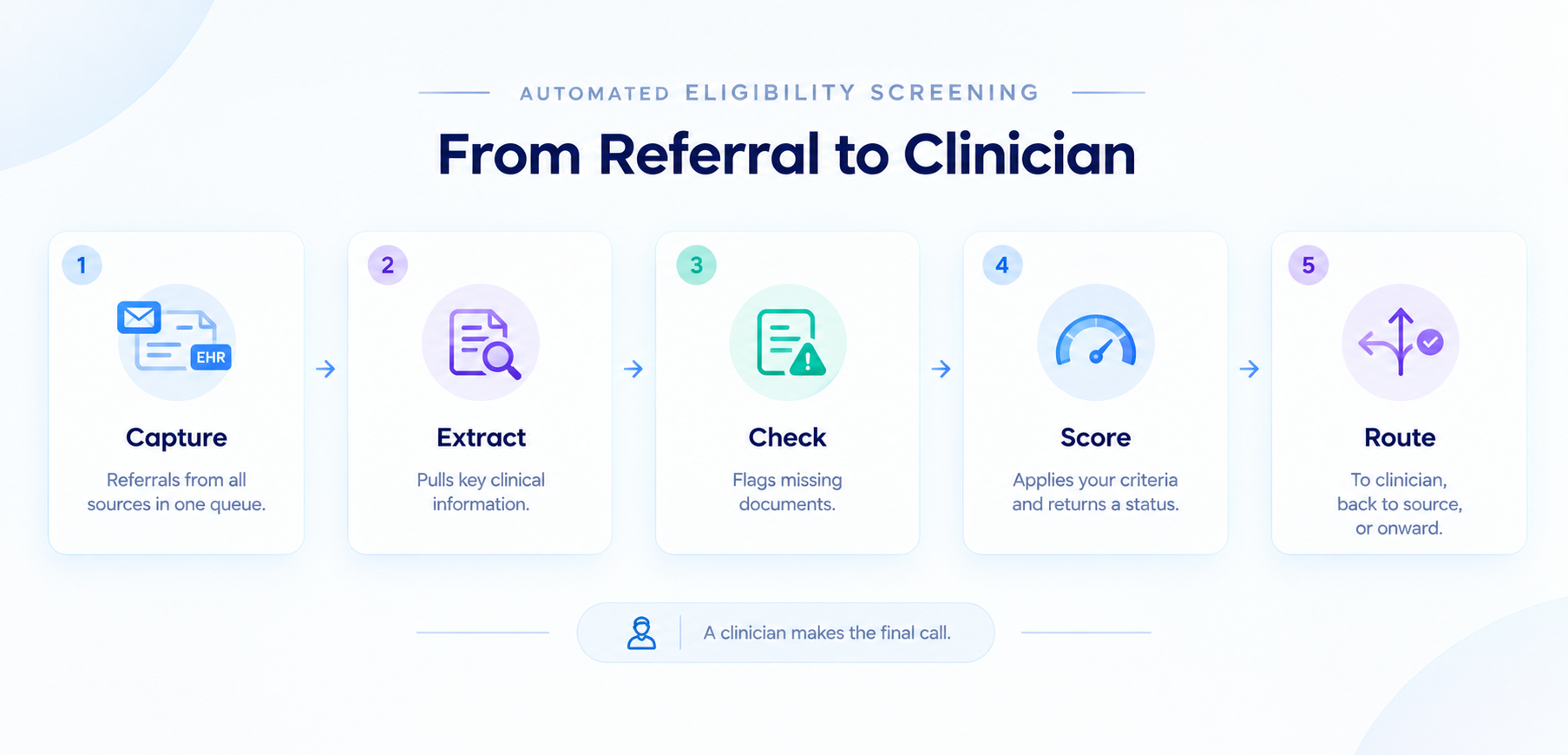
The Caregence Hospice Eligibility Agent runs in five steps. It starts when a referral lands through your intake portal, EHR, or CRM, or through an API call, webhook, or scheduled task.

StepWhat happensOutput
1. Get dataPulls the physician certification, face-to-face notes, decline indicators, admission form, and clinical notes from the hospice systemComplete referral packet in one place
2. Extract (OCR)Azure Document Intelligence parses scanned and unstructured PDFsStructured values: PPS, prognosis, hospitalizations, decline indicators
3. ScoreThe intelligent agent applies your scoring logic and reasons over gapsTotal score, determination, and the factors behind it
4. Update statusWrites the determination back to the hospice system and portal recordEligible, Pending Review, or Ineligible
5. NotifyEmails the recipients you configuredClinician sees score breakdown and notes

Inferenz reports under five minutes per determination, against 30 to 90 minutes of manual clinical review. In the example Inferenz uses, a 25-person intake team can properly review about 75 referrals a day, and some days bring 500. Run the numbers on your own volume.

What does the agent extract, and how transparent is the score?

By default it scores terminal prognosis, PPS, documented functional decline, hospitalization history over the past six months, and documentation completeness. Each criterion carries a weight, the agent totals the points, and it returns the factors behind the total. A clinician can see why a packet landed in Pending Review without reopening all 38 pages.

Can you set your own criteria, or are you stuck with vendor defaults?

The defaults are a starting point. Clinical staff edit the weights, thresholds, mandatory documents, and routing in plain English, and a change goes live when saved, with no developer ticket. That speed needs a guardrail: every edit should have a named owner and a date, so you can show which rules were live the day a patient was admitted.

What does the second workflow add?

Eligibility tells you who qualifies. A second workflow scores eligible referrals on their likelihood of becoming admissions, using your own history: diagnosis fit, referral source, geography, caregiver availability, and documentation completeness. The coordinator still decides, and the score runs only on referrals already marked eligible. Caregence sits above your existing systems as an orchestration layer on the Caregence platform, so there’s no migration.

DimensionManual intakeCaregence (Inferenz-reported)
Time per determination30 to 90 minutesUnder 5 minutes
Scoring consistencyVaries by reviewer and by daySame logic on every referral
Changing the criteriaIT ticket and a development cycleText edit, live on save
PrioritizationIntuition and whoever called lastConversion probability with reasoning
Audit evidenceReconstructed after the factTimestamped at every step

Caregence hospice eligibility agent five-step workflowWhat audit trail does the agent leave for a reviewer?

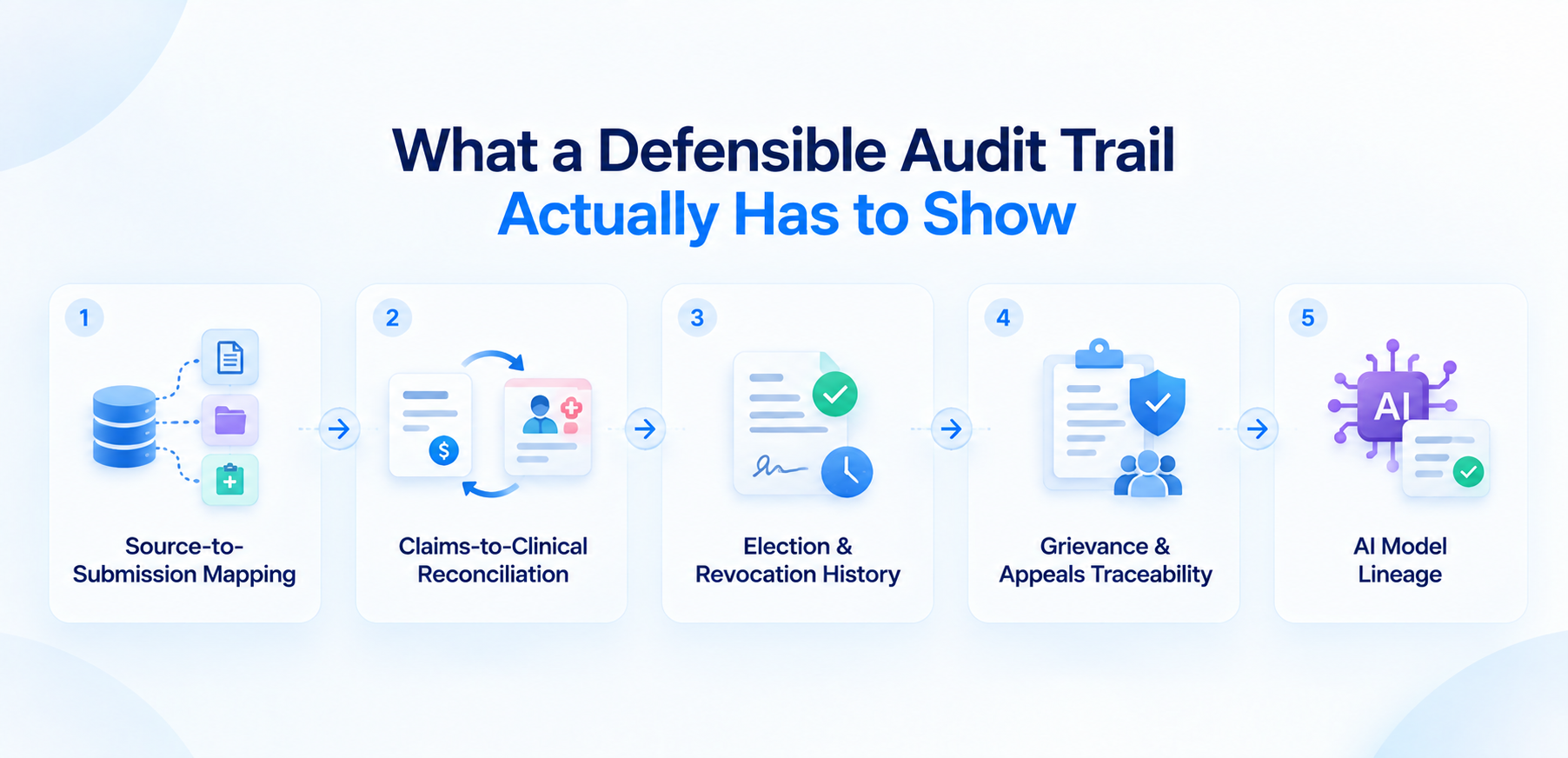
Every workflow step is timestamped against the patient record: the inputs pulled, the logic applied, the score produced, the decision written, and the notification sent. That gives you one consistent record per referral and removes the reviewer-by-reviewer variance that audits penalize.

Push those determinations into your reporting layer too. An audit-ready dashboard connects each compliance number to the patient-level evidence behind it, and our guide to building audit-ready dashboards for CMS reviews shows how to wire that up. When a records request arrives, your team answers from one screen.

What should a COO or CIO ask before choosing a hospice eligibility AI?

Some hospice AI tools read well and still fail in practice. They misread ambiguous clinical language, or they apply the wrong standard for your jurisdiction. A 2026 PLOS Digital Health study shows the right habit. Researchers used self-hosted language models to extract prognostic indicators from the notes of 2,708 lung cancer and 814 colon cancer patients, then validated the extracted features against structured EHR data and physician annotations. The study covered oncology notes. Its method transfers to hospice packets; its accuracy figures don’t.

Question to askWhat good looks likeRed flag
Who writes the eligibility criteria?Your clinical leaders, in plain language, with change historyVendor-locked rules; changes need a ticket
How does it handle LCD variation by MAC?Criteria mapped to your MAC and diagnosis, with a named owner and update processOne national template
Can it explain every score?Factor-level breakdown on each referralA single opaque number
How is extraction accuracy measured?Tested on a sample of your own packets against clinician-confirmed valuesDemo accuracy only
Where does the human sit?A person approves; borderline cases route to Pending ReviewAuto-admits or auto-declines
What protects PHI?BAA, retention terms in writing, minimum-necessary access, audit logsVerbal assurances
How does it connect to our systems?Triggers from portal, API, or webhook; writes status back; no migrationRequires replacing your portal
What audit evidence can you export?Timestamped inputs, logic, score, and decision per referralA summary report only

On safeguards, ask for the business associate agreement and the data-retention terms in writing. Caregence’s platform design applies minimum-necessary access, role-based permissions, and audit logging across its agents, and your contract should spell out how that applies to your data.

How do you connect the agent to your EMR and recertification workflow?

The agent is portal-agnostic. A button click, a form submission, an API call, a webhook, or a scheduled run can trigger it, and the result is written back to the hospice system and portal record, so intake staff keep working in the tools they know. That makes EHR and referral data integration the real project. Check that your billing, EHR, and referral data agree on patient identity and dates before go-live.

Data readiness decides how well any of this works. Most hospice AI projects stall without it, and a missing admission date or a duplicated patient record turns into a wrong determination.

Recertification follows the same pattern. Scheduled runs are a documented trigger, so a nightly sweep of patients approaching a benefit-period boundary can flag a missing face-to-face attestation or an absent recertification narrative before the claim goes out. Confirm that scope during scoping, since the published workflow centers on referral screening.

How do you measure the return on automated eligibility checks?

Start with the Inferenz-reported figures and your own volume. At 75 referrals a day and 30 minutes per manual review, your clinicians spend 37.5 hours a day on first-pass review. If the agent returns each determination in under five minutes and a clinician only reviews the score and the flags, that burden shrinks to a fraction. Measure the fraction in your own pilot. Our guide to referral intake delays lists six baseline metrics worth capturing first.

  • Referral-to-determination time: hours from packet arrival to status.
  • First-pass completeness: share of packets with CTI, narrative, and election statement in order on day one.
  • Reviewer variance: score spread when two clinicians review the same packets.
  • Pending Review rate and time to clear: how many packets need a clinician and how fast.
  • Denial and ADR outcomes: documentation-related findings per quarter.
  • Referral-source rework: requests back to hospitals and SNFs for missing documents.

How do you pilot a hospice eligibility agent in 90 days?

  1. Days 1 to 15: Pull one week of past referrals with the decisions your team made. Write the scoring criteria in plain English with your clinical leads.
  2. Days 16 to 45: Run in shadow mode. Compare agent determinations with past decisions, and have two clinicians score the same packets to measure human variance.
  3. Days 46 to 75: Go live on one branch or service line, with a person approving every determination.
  4. Days 76 to 90: Review the metrics, tune weights, record who owns each rule, and decide on rollout.

A strong data layer speeds all four steps. A post-acute care provider that worked with Inferenz unified multiple EMRs, a triage platform, and a state HIE on one governed Snowflake warehouse with a master patient index, and leadership recovered two hours a day from manual spreadsheet audits (Inferenz-reported).

Final thoughts

Eligibility decisions carry the most weight in hospice. They decide who gets care, and they decide what survives a review. An agent can read every packet the same way, every time, and tell your team exactly what’s missing. It can’t replace the physician’s judgment, and it shouldn’t try. The hospices that get this right will write their own rules, keep a person on every determination, and keep the receipts.

Test it on your own referrals

Frequently Asked Questions

What Happens When You Run dbt build? A Step-by-Step Guide

Summary

A plain-English map of the dbt build process, from parsing your project to the moment Snowflake writes the final table, built for analytics engineers who want to know exactly what is happening under the hood.

Introduction

You type dbt build, hit enter, and for a few seconds, nothing seems to happen. Then the terminal fills with green: models built, tests passing, a tidy summary waiting at the bottom. It looks effortless. It isn’t.

Underneath that simplicity, dbt works through a dozen distinct stages before Snowflake ever touches a query. This article walks through every one of them, using a single pipeline as the running example throughout:

RAW.CUSTOMERS

↓

stg_customers

↓

int_customers

↓

dim_customers

A raw customer table lands in Snowflake. stg_customers cleans it up. int_customers enriches it a bit further. dim_customers is the final table your BI tool actually queries. By the end of this piece, you will be able to trace that pipeline from the .sql files you wrote to the objects sitting in Snowflake, and know exactly where to look when something breaks.

The lifecycle at a glance

Before getting into any single stage, it helps to see the whole shape of the process:

dbt build

↓

Initialize dbt -> Discover project -> Parse project

↓

Build dependency graph (DAG) -> Select execution nodes

↓

Compile SQL -> Materialize model -> Adapter -> Snowflake executes

↓

Tests run -> Continue or skip downstream nodes -> Artifacts written

The rest of this article unpacks each of these stages, one question at a time.

What Does dbt Do Before It Runs Any SQL?

dbt spends its first moments confirming it can even talk to Snowflake, then reads dbt_project.yml, then parses every model into a single internal map called manifest.json, before a single line of your SQL gets touched.

The first thing dbt does has nothing to do with your models. It checks that it is set up correctly: which dbt version is running, which adapter plugin is available (dbt-snowflake, in our case), where profiles.yml lives, and which target and credentials apply to this invocation. Nothing project-specific happens yet. dbt is simply confirming it has a working connection before it goes looking for anything else.

Once that is settled, dbt goes looking for your project. It starts by reading dbt_project.yml to understand where your models live and what configuration applies. From there, it sweeps through those folders looking for .sql model files, .yml files holding source and test definitions, plus any macros, seeds, and snapshots along the way.

It is worth pulling apart two things that sound alike but are not: locating the files versus actually understanding what is inside them. What dbt has done so far is only the first one. It has a list of files it knows it will need to look at, nothing more.

Understanding what those files mean is a separate step called parsing. For every model, dbt works out what kind of resource it is, what SQL it contains, whether it calls ref() or source() (and if so, what those calls point to), what it is configured to materialize as, and what its YAML says about tests and columns.

Take stg_customers.sql:

select *

from {{ source(‘raw’, ‘customers’) }}

Parsing tells dbt that this is a model called stg_customers, and that it depends on the raw.customers source. It does not turn that Jinja into real SQL yet. That happens later, during compilation. Parsing is purely about structure and relationships.

All of this structured understanding, every model’s type, dependencies, configuration, and tests, gets written to a single file called the manifest (manifest.json). Conceptually, one entry in it looks something like this:

stg_customers

resource_type = model

depends_on = raw.customers

materialized = view

Every later stage, building the dependency graph, selecting nodes, compiling SQL, reads from this manifest instead of re-parsing your files from scratch. It is dbt’s internal map of the project: not your code, and not the results of running it, just how everything relates.

How Does dbt Know What Depends on What?

This is arguably the single most important idea in the entire dbt build process, and it hinges on two small functions: ref() and source().

Here is what a developer writes in int_customers.sql:

select *

from {{ ref(‘stg_customers’) }}

It is tempting to read ref() as a fancy way to type a table name. It is not. It is doing two separate jobs at once.

The first job is declaring a dependency. The moment dbt parses this file and sees ref(‘stg_customers’), it records that int_customers depends on stg_customers. That single fact is what feeds the dependency graph.

The second job is resolving to an actual relation, and that only happens later, at compile time. ref(‘stg_customers’) eventually becomes something like ANALYTICS.PROD.STG_CUSTOMERS. dbt works out the correct database, schema, and object name based on your target and config. Point the same project at a QA target instead of prod, and ref() resolves to something different automatically, without you editing a single model file.

source() works the same way, just pointed outward instead of at another model:

select *

from {{ source(‘raw’, ‘customers’) }}

In stg_customers.sql, this line tells dbt two things: that stg_customers depends on a source defined in your YAML as raw.customers, and that at compile time it resolves to the real relation, RAW.CUSTOMERS. This is the very first edge in our pipeline:

RAW.CUSTOMERS

↓

stg_customers

source() exists so that raw, untransformed data has a documented, traceable entry point into the graph, instead of the first model simply hard-coding a table name with no metadata attached.

Because every ref() and source() call also declares a dependency, dbt can assemble the entire dependency graph, the DAG, or Directed Acyclic Graph, just by scanning for these calls across the project. Directed, because dependencies only point one way: stg_customers depends on raw.customers, never the reverse. Acyclic, because dbt will not allow a model to depend on itself, even indirectly through a chain of other models. For our pipeline, the DAG is a straight line:

RAW.CUSTOMERS -> stg_customers -> int_customers -> dim_customers

Real projects usually branch. Picture two models, B and C, that both depend on A, and a fourth, D, that depends on both:

 A

/ \

B   C

\ /

D

B and C do not depend on each other, so dbt is free to build them at the same time. D needs both to finish first. There is no way around that ordering. There is no separate step where you tell dbt “this is the order things should run in.” The order falls directly out of how your models reference each other.

How Does dbt Decide What to Build, and in What Order?

dbt does not ask you to specify a build order. It already has one, because the order falls directly out of your ref() calls.

By default, dbt build tries to build your entire project. Most of the time you do not want that. You want to work on one model, or one branch of the graph, without re-running everything.

dbt build –select stg_customers

builds only stg_customers. Add a trailing plus sign:

dbt build –select stg_customers+

and the meaning changes to “build stg_customers and everything downstream of it.” In our pipeline, that pulls in int_customers and dim_customers too, since they depend on it either directly or transitively.

dbt already has the whole graph mapped out in the manifest. Selection just narrows it down to the subset that matters for this run. Everything after that (compiling, materializing, executing) only touches the nodes that got selected.

With a subgraph selected, dbt still needs an execution order, and that falls straight out of the graph structure: a node cannot start until everything it depends on has finished. Where the graph branches, like B and C above, dbt is free to work on independent branches at the same time, up to a limit you control:

dbt build –threads 4

It is worth being precise about what –threads actually controls, because this is a common point of confusion. More threads means dbt can have more independent branches of the graph in flight at once. It does not make Snowflake execute any individual query faster. If your project is one long straight line, like our stg_customers to int_customers to dim_customers pipeline, there is no branching to exploit, and extra threads will not help that chain at all. Threads control how many things dbt can submit and coordinate simultaneously, not how fast the warehouse processes any single query.

What Does “Compiling” Actually Mean in dbt?

dbt compile turns the Jinja-laced SQL you wrote into plain SQL that Snowflake can actually execute, and it does this without sending anything to your warehouse.

This is one of the more confusing parts to grasp early on, mostly because the word “compile” gets used loosely elsewhere in software. Here it means something specific: turning the Jinja-laced SQL you wrote into plain SQL that Snowflake can actually execute.

Take this model:

select customer_id

from {{ ref(‘stg_customers’) }}

Snowflake has no idea what {{ ref(…) }} means. That is Jinja template syntax, not SQL. Before this can go anywhere, dbt must render the template: resolve ref(‘stg_customers’) to its real relation, apply any variables or macros, and produce plain SQL:

select customer_id

from ANALYTICS.PROD.STG_CUSTOMERS

That is compilation: Jinja plus the dbt context (which knows your variables, target, and macros) plus the node’s metadata from the manifest, going in; warehouse-specific SQL, coming out.

The one thing worth remembering above everything else here: compilation does not execute anything. dbt can generate this SQL without ever sending it to Snowflake. You can trigger just this step yourself:

dbt compile

dbt compile renders every model’s SQL and writes it to target/compiled/, but does not touch your warehouse. dbt build, by contrast, compiles and then actually sends that SQL to Snowflake to be executed. If you ever want to sanity-check what dbt is about to run before committing to it, dbt compile, or just checking target/compiled/ after a build, is the tool for that.

Does dbt Run the SQL, or Does Snowflake?

dbt never touches the warehouse computation itself. It understands your project, builds the dependency graph, compiles the SQL, and hands it off through the dbt Snowflake adapter. Snowflake does every bit of the actual work.

This distinction is worth stating as plainly as possible, because it is probably the single most common point of confusion for people new to dbt.

dbt

understands the project

builds the dependency graph

compiles SQL

coordinates execution

↓

(adapter) Snowflake

executes the SQL

creates/updates database objects

dbt’s core framework does not know how to talk to Snowflake. That is the job of the adapter (dbt-snowflake, in our case). Adapters exist because every warehouse has its own connection protocol, SQL dialect quirks, and way of implementing things like incremental merges. The adapter is the translation layer that lets dbt’s core logic (parsing, DAG construction, compilation, orchestration) stay largely the same across warehouses, while the platform-specific bits live in the adapter.

Here is the split: dbt understands your project, builds the graph, compiles the SQL, and figures out the run order. Snowflake handles the actual work: executing queries, doing the joins, filters, aggregations, reading and writing data, creating or updating tables and views, spinning up compute. dbt itself never touches the warehouse computation. It just passes the compiled SQL through the adapter and waits to hear back whether it worked.

Your dbt Pipeline Is Only as Reliable as the Data Feeding It

What Does Materialization Actually Change?

Materialization is the configuration that tells dbt whether your SELECT statement becomes a view, a full table, or an incrementally updated table. Understanding dbt incremental models is the part worth being careful about, since they do not behave the same way on every run.

Your model file is just a SELECT statement. Nowhere in select * from {{ ref(‘stg_customers’) }} does it say whether the result should become a view, a full table, or something updated incrementally. That decision comes from materialization: configuration that tells dbt what kind of database object your SELECT should become.

As a view, dbt conceptually issues something like create or replace view … wrapping your SELECT. No data gets duplicated; Snowflake re-runs the query underneath every time the view is queried. As a table, dbt has Snowflake compute and store the result, conceptually a create table … as select …, fully rebuilt each run.

Incremental models are the one worth being careful about, because the behaviour is not the same on every run. On the first run, an incremental model behaves like a plain table: dbt builds the whole thing from scratch. On every run after that, dbt needs to work out what is new or changed and apply it according to a configured incremental strategy:

{% if is_incremental() %}

where updated_at > (select max(updated_at) from {{ this }})

{% endif %}

is_incremental() is only true once the model already exists as a table and you are not forcing a full refresh. It lets you write logic that only applies on subsequent runs. {{ this }} refers to the model’s own resulting relation, which is how a model can reference “the table I am currently building” inside its own logic.

It is easy to assume incremental models just insert the new rows, but that is not universally true. Whether rows get appended, merged, or replaced for matching keys depends entirely on which strategy is configured, and that can vary by adapter and by dbt version. If you are relying on specific incremental behaviour, check the strategy your project actually has configured rather than assuming.

Where Do Tests Fit Into dbt build?

Tests are nodes in the graph, just like models. dbt runs each one immediately after the model it checks, and it can skip downstream models if that test fails.

This is the part that justifies the name dbt build, rather than it just being dbt run with extra steps.

Picture a not_null test on a column in stg_customers. In the graph, that test is itself a node, sitting right after stg_customers and before anything downstream of it:

stg_customers

↓

not_null test

↓

PASS?

YES -> int_customers -> dim_customers

NO  -> downstream models are skipped (int_customers, dim_customers)

If the test passes, int_customers is cleared to run. If it fails, int_customers, and anything downstream of it, including dim_customers, may be skipped, because dbt considers the data it would be built from suspect.

Compare that to running things separately:

dbt run

dbt test

Here, dbt run builds every model first, with no test feedback involved at all. Only after everything is built does dbt test run and potentially reveal that stg_customers has bad data, by which point int_customers and dim_customers have already been built on top of it. dbt build avoids that by interleaving tests into the graph as it goes, so a failure upstream can stop bad data from propagating downstream within the same run.

One thing worth flagging: the precise rules around test severity, and what causes a skip versus just a warning, can shift depending on your dbt version and how a particular test’s severity and error handling are set up. If you are counting on exact skip behaviour, check it against the dbt version you are on rather than assuming.

dbt run vs. dbt test vs. dbt build: What Is the Real Difference?

Since this question comes up in almost every dbt onboarding conversation, here is the direct comparison in one place. The one people search for most often is dbt run vs dbt build, since that is the pairing that actually changes whether a failed test can stop bad data from moving downstream:

CommandWhat It DoesRuns Tests?Best Used For
dbt runBuilds and materializes every selected modelNoFast iteration when you just need tables refreshed
dbt testRuns configured tests against objects that already existYes, onlyValidating data that has already been built
dbt compileRenders Jinja into SQL and writes it to target/compiled/NoSanity-checking SQL before anything touches the warehouse
dbt buildBuilds each model, then immediately tests it before moving downstreamYes, interleavedProduction runs where bad data must not propagate

What Files Does dbt Leave Behind After a Run?

Every dbt build writes a set of artifacts to the target/ directory, and each file answers a different question about your project or your run.

target/

manifest.json

run_results.json

compiled/

run/

partial_parse.msgpack

manifest.json is the structured understanding of your project built during parsing: every node, its dependencies, its configuration. Think of it as answering, what does dbt know about my project? It describes the project itself, independent of whether you have ever actually run it.

run_results.json answers a different question: what happened during this specific run? Which nodes ran, which passed, which failed, which were skipped, and how long each one took.

compiled/ holds the rendered SQL for every model, with all Jinja resolved: exactly the SQL dbt generated, before it went anywhere.

run/ holds the SQL executed against the warehouse for each materialization step. This can differ slightly from compiled/, since some materializations wrap the compiled SQL in additional setup or teardown statements.

partial_parse.msgpack is a caching optimization. dbt keeps a record of the previous parse and, where it safely can, only re-parses files that changed instead of walking the whole project again. On a small project this saves nothing noticeable; on one with hundreds or thousands of models, it meaningfully speeds up every invocation. It does not change the result, just how quickly dbt gets there.

Why This Matters Beyond a Single dbt Project

Understanding the dbt build lifecycle is genuinely useful for debugging one pipeline. It becomes a different kind of useful once you are responsible for dozens of them, spread across a real modern data stack.

The pipeline in this article had one source and three models. Most enterprise environments look nothing like that. They have a dozen source systems, several warehouses or lakehouses, a mix of batch and streaming ingestion, and a dbt layer sitting on top of all of it, expected to stay reliable while the business keeps adding new data every quarter.

That is where the discipline behind a single dbt build run (dependency graphs, tested transformations, clear artifacts) scales into something closer to a data platform: data pipeline automation built on frameworks like Airflow, dbt, and Kafka, cloud data integration across AWS, Azure, and Snowflake, and DataOps practices that catch a broken pipeline before it reaches a leadership dashboard.

This is the exact problem Inferenz’s Data Engineering and Integration practice is built to solve: designing the architecture, building the ingestion and transformation pipelines, and layering in the data observability and governance that keep every downstream model, dashboard, and AI initiative standing on data that can actually be trusted.

Turn Your dbt Models into a Production-Grade Data Platform

Frequently Asked Questions

Building Audit-Ready Dashboards for CMS and Compliance Reviews

An audit-ready dashboard ties every compliance number to the patient record behind it. Learn what CMS and OIG reviewers check in 2026, which KPIs to track, and how to build the trail.

CMS now publishes provider-level hospice scores. The Service and Spending Variation Index uses nine claims-based measures, so a reviewer can spot your pattern before you’ve pulled a single record.

This article is the reporting step in our series on predictive analytics for hospice operations, written for CEOs and COOs who need an answer ready when a reviewer asks.

An audit-ready dashboard connects each compliance metric to the patient-level evidence behind it. For hospice care agencies, that means the hospice team can answer a record request from one screen. The sections below cover what to track, how to trace it, and where AI-powered automation for hospice fits.

What is an audit-ready dashboard in healthcare?

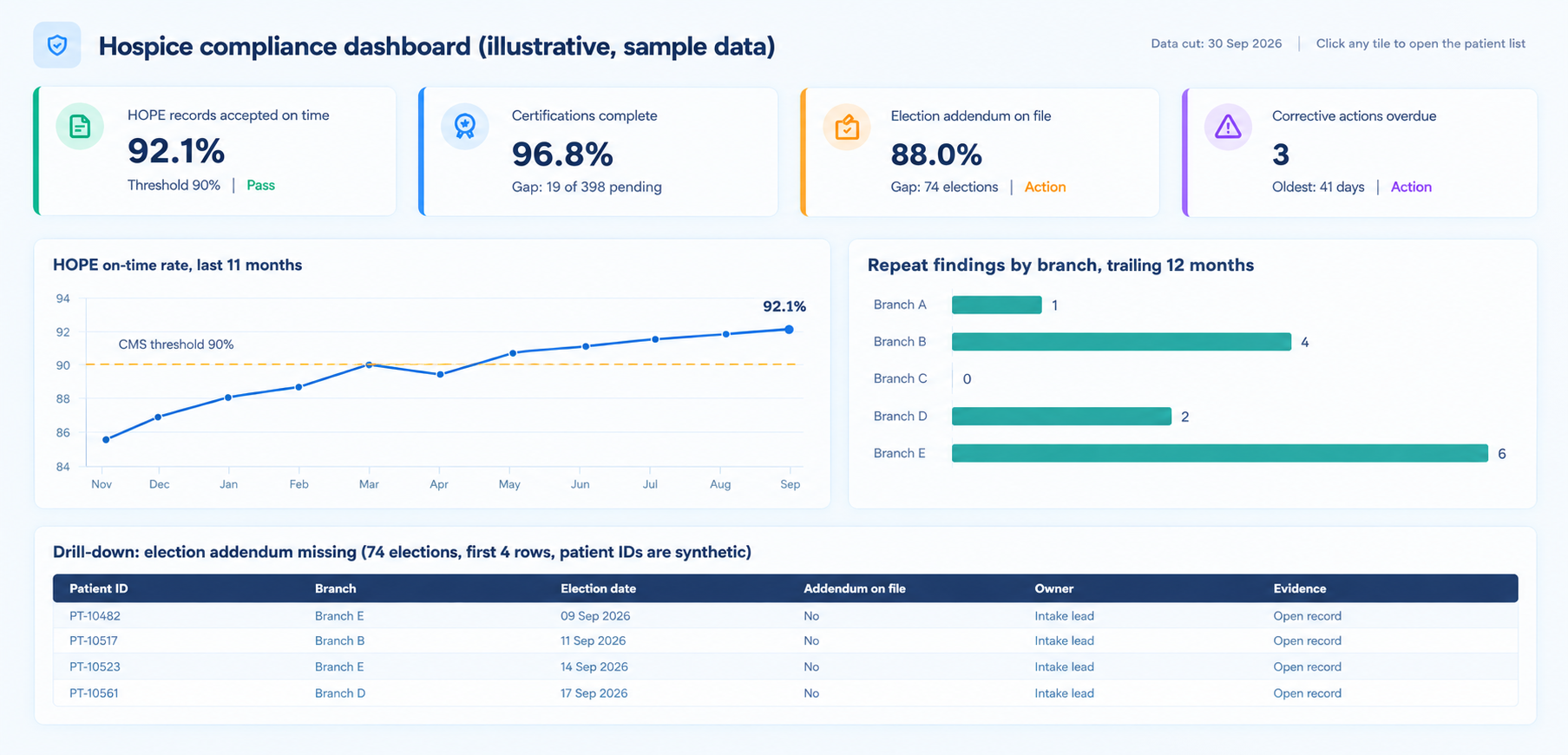
An audit-ready dashboard in healthcare is a reporting view where every tile opens to the patients, records, and rules behind the number. It carries a data cut date, a named owner, and a saved history. A reviewer can test it without asking your team to rebuild anything.

Summary dashboards show how you’re doing. Audit-ready dashboards show how you know. Continuous audit readiness means the dashboard holds that standard every month, including the months nobody is asking.

DimensionSummary dashboardAudit-ready dashboard
What a tile showsA percentage or a countThe percentage plus the list of patients behind it
Drill-downStops at the aggregateOpens to the source record
Data cut dateOften missingPrinted on every tile
DefinitionsDiffer by teamOne dictionary, versioned
HistoryOverwritten at each refreshMonthly snapshots saved
Who it satisfiesThe Monday meetingThe board, a reviewer, and a buyer

What are CMS and its contractors reviewing in 2026?

Four pressures shape hospice reviews this year. Each calls for a different tile.

Review pressureWhat reviewers checkWhat your dashboard needs
Claims pattern analyticsThe Service and Spending Variation Index (SSVI) scores utilization and non-hospice spending. Provider-level data is published, and a higher score signals potentially concerning patterns.Your own monitoring of non-hospice spending and utilization by branch and patient, run before CMS publishes its next update.
Eligibility and certification recordsWhether the chart supports a terminal prognosis and meets documentation rules.Certification completeness, a clinician review queue, and a flag for admissions with no hospital or emergency visit in the prior 18 months.
HOPE quality reportingAt least 90% of HOPE records submitted within 30 days of admission, update visits, and discharge.HOPE timeliness by branch and assessment type, with a countdown for records approaching day 30.
Billing compliance samplesA sample of claims, such as OIG’s 100-claim samples, tested against Medicare rules.Sampled claim accuracy by branch and error type, plus policy adherence.

The numbers behind these rows are specific. In FY 2026, 20.37% of hospices missed the HOPE reporting requirement, and the FY 2027 final rule adds a Care Compare icon for them, effective no earlier than FY 2028. Missing the requirement also cuts the payment update by four percentage points, which turns a 2.3% increase into a 1.7% reduction.

The same rule makes the election statement addendum mandatory for every beneficiary who elects hospice. Before, hospices issued it on request. That adds a yes-or-no field to every election, and a reviewer can check all of them.

Record-level review has teeth too. In a June 2026 audit, OIG reviewed 100 initial certification periods for new hospice enrollees and found that 45 did not meet Medicare requirements. In 21, the medical record did not support a terminal illness. In 24, the documentation requirements went unmet. OIG flagged new enrollees with no inpatient or emergency room claims in the prior 18 months as a high-risk group, estimated Medicare could have saved $255.1 million, and CMS concurred with its recommendation.

Why do dashboards that look fine internally fail when reviewers ask for patient-level evidence?

A rate can’t answer a records request. Reviewers sample patients, and a summary tile doesn’t say which patients sit behind it.

Sampling also multiplies small errors. In a July 2026 audit, OIG tested 100 claims from Hospice of the Valley West and found 15 non-compliant, worth $69,184 in overpayments over a two-year audit period. From that sample, OIG estimated at least $8.6 million in unallowable payments out of $86 million paid. The errors occurred primarily because the hospice did not always follow its own policies and procedures.

A dashboard that reports 94% compliance says nothing about which 6% failed or why. Three gaps cause most of the trouble:

  • No patient list behind the percentage, so nobody can find the failures.
  • No as-of date, so the number can’t be reproduced for a past period.
  • Definitions that differ from billing, so a reviewer who recomputes the metric gets a different answer.

One distinction matters for the OIG findings. A dashboard can automate completeness checks, such as whether a signature, a date, and a narrative exist. It can’t judge whether the narrative supports the prognosis. Build a clinician review queue for that second test and log who reviewed which record.

Eligibility evidence starts at intake

What KPIs should a hospice compliance dashboard include?

A healthcare compliance KPI dashboard works when each KPI has a definition, a source, and a reason a reviewer would ask about it. Ten KPIs cover the pressures above.

KPIDefinitionSourceWhy a reviewer cares
HOPE on-time rateRecords accepted within 30 days (admission, update visit, discharge). Aim above 90%.iQIES, EHRCMS threshold. Icon on Care Compare from FY 2028 at the earliest.
Certification completenessPeriods with signed certification, narrative, and required elements before the claim.EHR, billingOIG found 45 of 100 periods deficient.
Narrative review rateCertification narratives reviewed by a clinician against the prognosis.EHR review logTests clinical support as well as completeness.
Election addendum on fileElections with the addendum delivered at election.EHRMandatory for every election under the FY 2027 rule.
Non-hospice spendingMedicare spending outside hospice for patients on service, by branch.ClaimsA core concern behind the SSVI.
Live dischargesRate and reason mix by branch.EHR, claimsUnusual patterns draw questions.
Aggregate cap positionProjected payments against allowance. The FY 2027 cap is $36,174.75 per beneficiary.Claims, PS&RTies the dashboard to the forecast.
Corrective action closureShare closed on time, items reopened, repeat findings.Action registerShows whether fixes hold.
Policy adherenceSampled records that follow your own policy.Mock auditPolicy gaps drove the Hospice of the Valley West errors.
Evidence retrieval timeHours to assemble a full record set for one sampled patient.Mock auditReveals how scattered your evidence is.

The last four rows serve as compliance program effectiveness metrics. They answer whether the program works, which differs from whether policies exist.

How do you make every dashboard number traceable to source data?

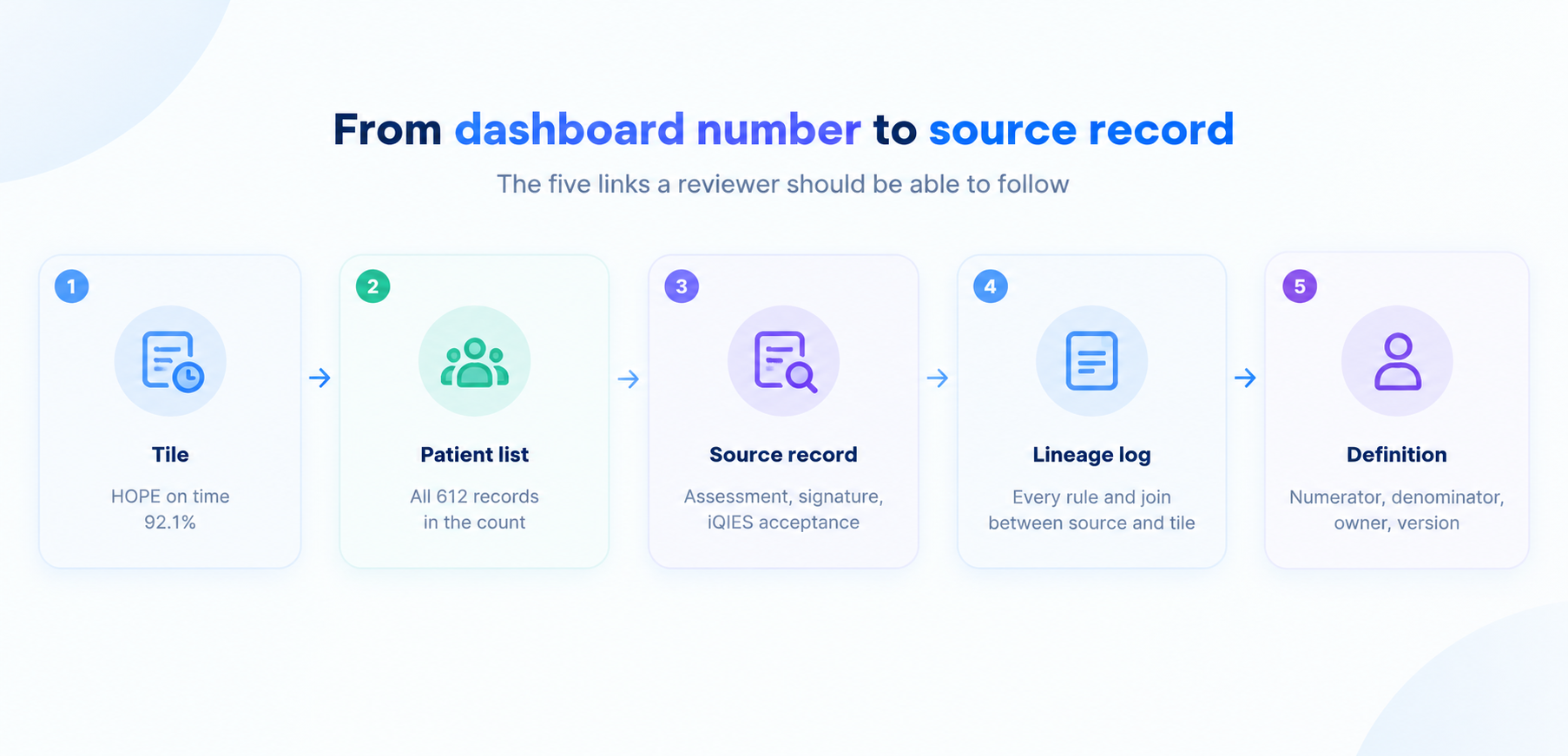
Give every tile a five-link chain. A reviewer should be able to walk it from the headline number to the document that proves it.

The five-link evidence chain behind each dashboard tile. Sample figures for illustration.

  1. Tile: the headline number with its as-of date.
  2. Patient list: every record counted, with exclusions listed separately.
  3. Source record: the assessment, signature, claim, or iQIES acceptance that proves the status.
  4. Lineage log: each rule, join, and correction between the source system and the tile.
  5. Definition: numerator, denominator, owner, and version.

The chain starts at referral intake, what vendors call the digital front door in healthcare, because election and certification paperwork begins there.

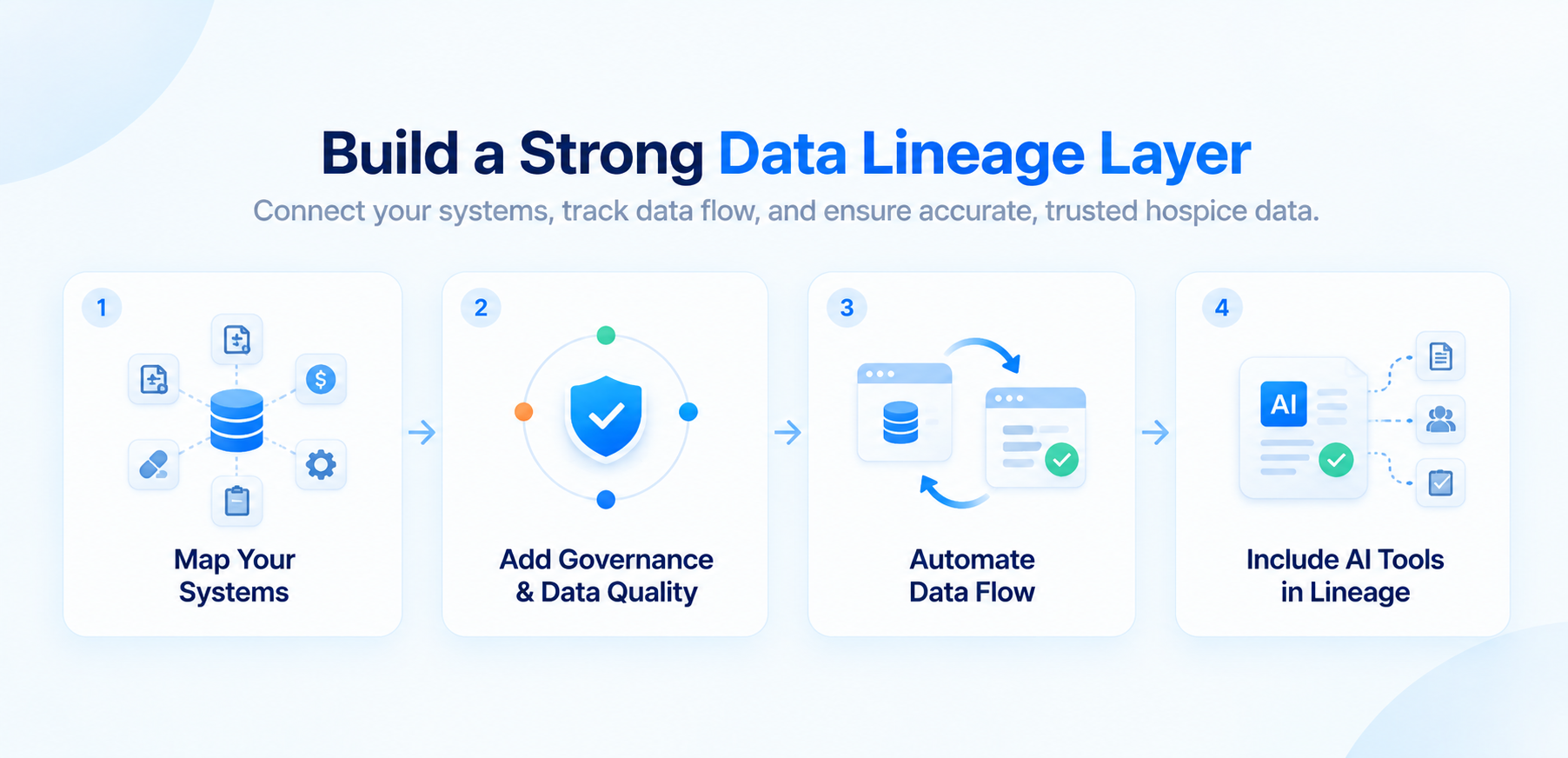
Data lineage behind dashboard metrics is the fourth link, and reviewers find it the hardest to improvise. Our guide to audit-ready data lineage shows how to record it without replacing your current systems.

Tracing doesn’t have to slow reporting. Store the patient-level detail table beside each aggregate in the gold layer and refresh both on the same schedule. Drill-down becomes a query, with no project attached.

What is the difference between a compliance dashboard and an audit-ready evidence system?

A compliance dashboard tells operations what to fix this week. An evidence system proves what was true on a given date. Reviewers ask the second question, usually about a period that closed months ago.

Point-in-time vs real-time compliance view

DimensionReal-time compliance viewPoint-in-time evidence snapshot
Question answeredWhat needs attention today?What was true on the date of service or submission?
RefreshContinuous or dailyFrozen monthly and at each submission
AudienceBranch managers and the compliance leadReviewers, the board, and buyers
Main riskNumbers change under youGoes stale without a live view beside it
Best forOperational fixesRecord requests and mock audits

Run both. Freeze a snapshot at month end, store the inputs and the rules, and let the live view keep working. The live view catches problems, and the snapshot proves the past. Together they deliver audit-ready reporting for CMS reviews.

An illustrative audit-ready dashboard using sample data. Every tile opens to the patient list behind it.

How should hospices track corrective action plans so repeat findings don’t become systemic?

Treat every finding as a record with an owner and a clock. A corrective action plan monitoring dashboard should pull findings from every source: internal audits, contractor letters, OIG recommendations, and survey results.

  1. Log the finding with its source, date, and the records affected.
  2. Name the root cause category, such as training, workflow, system, or policy.
  3. Assign one owner and a due date.
  4. Attach proof of the fix, such as a changed workflow or a retraining roster.
  5. Retest at 30, 60, and 90 days on a fresh sample and record the result.

Show open items by age, overdue items, reopened items, and repeat findings by branch and root cause. The Hospice of the Valley West report shows what the retest step guards against. Among its recommendations, OIG suggested internal audits of later claims to find similar overpayments and added training for clinical staff on validating the terminal prognosis.

How do multi-site hospices run one compliance view across branches and contracted providers?

A multi-site compliance dashboard works only when every branch uses the same definitions. Roll up to the organization, then let a leader click down to a branch, a team, and a patient. A branch with six repeat findings beside a branch with none shows where to look first.

Where contracted providers fit

Contracted providers belong on the same screen. Hospices keep professional management responsibility for care delivered under contract, so track credential currency, contract review dates, and any findings tied to those providers in the same register.

How early should a hospice run a mock audit?

Run one every quarter and run the first before you need it. A mock audit pulls a sample, tests whether the hospice team can assemble each record, and checks three things: whether the narrative supports the prognosis, whether certifications were complete before the claim, and whether the addendum reached the family at election.

Validate the record population first

Reconcile patient, claim, and day counts between clinical and billing systems each month, so the numbers tie before anyone asks. As a starting point, try 25 records per branch each quarter, then adjust to your risk. OIG’s 2026 audits each reviewed a sample of 100, so test your own records the same way.

Where do AI in hospice care and automation fit in an audit-ready dashboard?

AI in hospice care earns a place on the compliance side when it takes over repetitive checking and leaves judgment with clinicians. AI-powered automation for hospice can run these jobs every night:

  • Reconcile HOPE records against iQIES acceptance.
  • Flag missing addenda and incomplete certifications on the day they occur.
  • Assemble the evidence pack for a sampled patient from the five-link chain.
  • Draft the corrective action entry for a steward to review.

Keep a human at the final decision. Log each AI suggestion, the reviewer, the decision, and the timestamp, so the dashboard can show that a clinician confirmed eligibility and signed the certification. Reviewers ask who decided, and the log answers.

Should you buy an audit management platform or build on your existing data stack?

Both paths work. The test is whether the tool meets the standard above. Ask every option these six questions:

  • Does every tile open to a patient list?
  • Does it save dated snapshots?
  • Can it export a reviewer-ready evidence pack?
  • Can your clinicians edit rules without a developer ticket?
  • Does it restrict PHI access by role?
  • Does it log automated suggestions and human decisions?

Teams with a governed data layer often build on it, because the lineage already exists. Smaller teams may buy. Vendors that sell value based care software or quality reporting tools now add compliance modules, so ask each one to demonstrate the checklist on your own records. For in-house builds, a data partner offering business intelligence and visualization services can shorten the work.

How do you explain dashboard methodology to a board, an auditor, and a regulator in one document?

Write one metric card per KPI. Each card lists the definition, numerator, denominator, source system, owner, refresh time, version, and known limits. The board reads the headline and the trend, the auditor reads the definition and source, and the regulator reads the lineage appendix. One document serves all three at different depths.

A 90-day plan for your hospice team

  1. Days 1 to 30: Name an owner for each KPI, write the metric cards, and list where certification, election, and HOPE evidence lives.
  2. Days 31 to 60: Build patient-level drill-down for the top five KPIs and start monthly snapshots.
  3. Days 61 to 90: Run the first mock audit, open the corrective action register, and review results with your board or compliance committee.

Final Thoughts

Reviewers ask which patients are in the number. If your hospice team can answer from one screen, a CMS review becomes a records exercise your team has already rehearsed.

Start with the five-link chain for one KPI, HOPE timeliness, since the 90% threshold gives you a clear pass line. Add certifications next, then the election addendum.

Ready to make every dashboard number traceable?

Frequently Asked Questions

Home Health Staffing Analytics: Capacity Planning for Home-Based Care Networks

Summary

Home health staffing analytics shows home-based care networks where visit capacity leaks: turnover, scheduling friction, drive time, and documentation load. This guide covers capacity planning, workforce forecasting, burnout signals, and referral conversion, so COOs can match staffing to demand across home health, home care, and hospice.

Introduction

A hospital can count its empty beds. A home health agency has no equivalent, and neither does Medicare. MedPAC’s March 2026 report says no occupancy-style measure exists for home health care, so claims data can’t show whether an agency has room for one more patient.

Operators feel that gap every week. Homecare Homebase data reported by Home Health Care News shows referral conversion down 13%, with staffing-related rejections running about twice their pre-pandemic level.

Home health staffing analytics closes the gap. It joins scheduling, EVV, payroll, referral, and case-mix data into one view of how many visits your network can deliver next week and next quarter. It extends the staffing layer of predictive analytics for hospice operations to every line of a home-based care network.

This guide covers capacity, metrics, forecasting, burnout signals, payment scenarios, and shared hospice and home health nursing. Each section opens with a direct answer.

What is capacity planning in home health?

Capacity planning in home health estimates how many visits a network can deliver, compares that with expected referral demand, and closes the gap through scheduling, hiring, and training. It links three numbers: demand (referrals and census), supply (clinician and caregiver hours), and the share of those hours that reach a patient.

Why is time the real constraint in home health staffing?

Hiring can’t outrun churn. The Bureau of Labor Statistics counts 4.7 million home health and personal care aides in 2025 and projects about 760,500 openings a year through 2035. Most of those openings replace workers who leave the occupation or the labor force.

Capacity also leaks after the hire. Home Health Care News reported in July 2026 that documentation burden and scheduling friction drive home-based care turnover. Long drives and charting that spills into evenings take hours that a headcount number still counts as available.

Visit capacity = retained headcount × productive hours per head × share placed where demand sits. Recruiting feeds the first term. Analytics works on all three.

Will your next open shift fill with the right caregiver or whoever is free first?

What does the 2026 data say about home health staffing and referral conversion?

It shows rising demand, heavy churn, and falling conversion. The table collects the latest federal and trade figures in one place.

IndicatorLatest figureSource
Home health and personal care aides employed, 20254,677,100BLS, updated August 2026
Projected annual openings, 2025 to 2035About 760,500BLS
Home health RN turnover25.46%Homecare Homebase via Home Health Care News, July 2026
Home health aide turnover34%Homecare Homebase via Home Health Care News, July 2026
Personal care caregiver turnoverAbove 70% in many marketsHomecare Homebase via Home Health Care News, July 2026
Referral conversionDown 13%Homecare Homebase via Home Health Care News, July 2026
In-person visits per full 30-day period, FFS Medicare, 20248.4, down from 10.2 in 2019MedPAC, March 2026
Hospital discharges followed by a home health period, early 202418.0%, up from 15.8% in 2019MedPAC, March 2026

Sources: BLS Occupational Outlook Handbook; Home Health Care News (July 2026); MedPAC March 2026 Report to the Congress, Chapter 8.

Agencies deliver fewer visits per period than in 2019, while hospitals lean on home health more. The cause is mixed because payment design changed in 2020, so track visits per period by branch as your baseline.

How do referral conversion rates connect to staffing capacity?

A declined referral is a capacity signal. When an agency can’t staff a start of care inside the referral source’s window, the referral goes elsewhere and conversion falls. MedPAC adds that studies link delayed starts of home health care to adverse outcomes, so speed matters clinically as well.

Log every turn-away with a reason code: no clinician with the skill, no one inside the drive-time limit, authorization pending, or patient declined. Reason codes turn a lost referral into a forecast input. Our piece on referral leakage to post-acute care covers the revenue side.

Which metrics should leadership track to measure home-based care capacity?

Track visits per clinician per week, productive-hour share, travel time per visit, referral-to-first-visit time, turn-away rate, vacancy rate, first-year retention, and authorized-visit balance.

MetricWhat it tells youCommon trap
Visits per clinician per weekOutput per personIgnores acuity and case mix
Productive-hour sharePatient-facing hours divided by paid hoursNeeds EVV and payroll joined
Travel time per visitRoute and branch design qualityAverages hide rural outliers
Referral-to-first-visit timeWhether demand converts into careStart the clock at referral receipt
Referral turn-away rateUnmet demandUseless without reason codes
Vacancy rate by role and branchSupply gapCount unfilled hours, not only open positions
First-year retentionPipeline healthTrack by hire-month cohort
Authorized-visit balanceDemand ceiling for Medicare Advantage and Medicaid-funded careReview weekly, not at renewal

Productivity or staffing ratio: which tells you more about capacity?

Productivity tells you more. Ratios count people, and productivity counts completed visits per paid hour. A branch can hit its staffing ratio and still turn away referrals if drive time and documentation absorb the week. Use the ratio to set hiring targets and productivity to check that hires become visits. Weight each visit by acuity, because a wound care visit and a medication check take different time.

How do home-based care networks forecast demand and capacity across branches?

They forecast demand and supply on the same data and calendar, then rebalance every week. Demand comes from referral volume, hospital discharges, census, and case mix. Supply comes from clinician hours net of leave, vacancy, and ramp-up.

  1. Unify the inputs. Join EVV punches, scheduling history, HR and payroll, EHR case mix, the referral log, and authorizations.
  2. Forecast demand by branch and discipline on rolling 13-week and 12-month views.
  3. Forecast supply. Count clinician hours net of leave and vacancy, and treat first-year hires at partial productivity.
  4. Add constraints. Skills and licenses, drive-time limits, continuity of care, patient preferences, and overtime caps.
  5. Balance and review. Move work to where waitlists and idle hours coexist, compare forecast with actual visits weekly, and retrain the model.

Hospitals run the same forecast-then-schedule logic, and our piece on hospital staffing and demand forecasting shows the pattern. Home-based care adds drive time, visit continuity, and payer authorizations.

What data do you need before AI scheduling tools deliver results?

You need linked data from scheduling, EVV, HR, EHR, and referral systems, with one identifier per clinician and patient across all of them. Without it, a model optimizes a plan that never happened.

Data sourceWhy the model needs itWhat breaks without it
EVV punchesActual visit start, end, and travel gapsPlans built on times that never occurred
Scheduling historyWhat was planned, changed, and cancelledNo measure of schedule volatility
HR and payrollHire dates, hours, overtime, separationsNo retention curves by tenure
EHR and OASIS case mixAcuity and expected visit timeEvery visit looks identical
Referral logDemand and turn-away reasonsForecast reflects only accepted work

Agencies often hold these in separate systems with no shared key. That is a data engineering and integration job first, and models come second.

How do you balance capacity when some branches have waitlists and others have idle clinicians?

Treat the network as one pool with drive-time limits. Set rules for which clinicians can cover which zip codes, review waitlists and idle hours together each week, and move work before moving people. MedPAC notes that because home health isn’t delivered in a facility, agencies can adjust service areas as local conditions change. Remote options add headroom, yet telehealth or remote monitoring appeared in only 2.2% of FFS Medicare 30-day periods in 2024.

How should you plan hiring and training pipelines over 12 months?

Plan on four horizons, each with its own decision and method.

HorizonDecisionTypical method
DailyWho covers an open or new visitRule-based matching or AI ranking by skill, distance, and workload
WeeklySchedules and routes for the next one to two weeksOptimization such as mixed-integer linear programming (MILP)
QuarterlyHiring starts and training cohortsDemand forecast plus attrition by tenure
12 monthsHeadcount plan, branch openings, budgetScenario modeling across payment and referral cases

MILP picks visit assignments that minimize something, such as travel time, while obeying hard rules like skills, hours, and continuity. Demand and turnover come from separate forecasts, and the optimizer consumes both.

Plan hospice and home health capacity from one census forecast

Can predictive analytics identify burnout risk before clinicians leave?

Partly. Models can flag clinicians whose workload, schedule changes, and charting load resemble those of people who later left. They can’t see intent, and research shows that stated intent is an imperfect stand-in for actual exits.

A March 2026 study in the Journal of Occupational and Environmental Medicine followed U.S. nurses and nursing assistants. Burnout affected both turnover intention and actual turnover, while a sense of thriving at work affected intention without raising actual turnover. For modelers, that means training on actual separations from HR records.

Candidate signalWhere it comes fromWhy it matters
After-hours documentationEHR audit logsHome Health Care News cites documentation burden as a turnover driver
Schedule volatility (changes inside 48 hours)Scheduling systemScheduling friction is a named turnover driver
Weekly hours and overtimePayrollSustained overload
Tenure under 12 monthsHREarly exits concentrate among new hires
Declined shifts and call-outsScheduling systemEarly withdrawal

Candidate features. Validate each against your own separation history before acting on a score.

Use burnout scores to trigger support: rebalance a caseload, publish schedules earlier, or prompt a manager check-in. Keep a human decision-maker, log every alert, and test for bias across shifts and roles. Never tie a score to discipline. Our guide to building trusted agentic AI beyond HIPAA compliance covers these controls.

What does caregiver turnover cost, and how much can analytics prevent?

Turnover cost equals separations times direct replacement cost, plus the visit capacity lost while seats sit empty. Analytics can reduce the share tied to controllable causes such as schedule volatility and uneven workloads. No published benchmark gives a universal reduction rate, so measure yours in a pilot against the 2026 turnover rates above.

How do you evaluate vendor claims about staffing savings and turnover?

How do you evaluate vendor claims about staffing savings and turnover

Ask for a control group. Headline percentages alone don’t qualify as evidence.

  • Turnover cuts: compared with what, over what period? Look for matched control branches and separations from HR data.
  • Cost savings: which lines? Overtime, agency use, and replacement cost should be tracked separately.
  • Burnout prediction: validated against what? Ask for a backtest on your own separations.
  • AI scheduling: who approves assignments? Expect coordinator approval and an audit trail for each override.

How does AI scheduling reduce caregiver turnover in home care?

It targets churn drivers an agency controls: last-minute changes, mismatched assignments, long drives, and uneven workloads.

  • Predictive scheduling in home health: publish schedules one to two weeks ahead, built on the demand forecast.
  • Better matches: rank caregivers by skill, language, distance, and continuity with the patient. Our write-up on AI-powered patient-caregiver matching shows how this works in home care.
  • Shorter drives: cluster visits by geography.
  • Fair load: balance acuity and hours so no single clinician absorbs the hard cases.

Agents can draft schedule options and flag conflicts while coordinators approve each change, the model described in our framework for agentic AI in home care operations. Evidence for turnover reduction is still mostly vendor-reported, so pilot with a control branch before you scale.

How do Medicare payment changes and Medicare Advantage affect staffing forecasts?

Payment sets the labor budget, and Medicare Advantage shapes visit volume. Build forecasts on scenarios, because the CMS proposal and MedPAC’s recommendation point in different directions.

ItemStatusPlanning implication
CY 2027 payment updateCMS proposes a 2.4% aggregate increase, about $420 millionBase case for the labor budget
Temporary base-rate reductionCMS proposes a 3.0% reduction again for 2027Keep recoupment in margin assumptions
MedPAC recommendation7% cut to the 2026 base rate for 2027, which needs CongressDownside scenario
Palliative careCMS seeks comment on palliative care under the home health benefitNew demand source and overlap with hospice teams

Sources: CMS CY 2027 Home Health PPS Proposed Rule Fact Sheet (July 1, 2026); MedPAC March 2026 Report to the Congress. The rule is proposed, so check the final rule when it publishes.

Read the CMS proposed rule fact sheet for the full detail before you lock a budget. For Medicare Advantage, forecast approved visits and not referred patients, and monitor authorization balances weekly. Quality scores add a second link between staffing and revenue, because timely starts and consistent caregivers drive both.

How do hospice and home health teams plan shared nursing capacity?

Plan both from one workforce model with separate demand curves. Hospice demand follows census and stay-length bands. Home health demand follows referrals and 30-day payment periods.

Agencies that run both services can pool nurses and aides. BLS notes that aides in certified home health or hospice agencies must complete formal training and pass a standardized test, so credentials already overlap. CMS’s interest in palliative care under the home health benefit pulls the two services closer.

Start from the hospice census forecast. Our guide to hospice length of stay forecasting shows how stay bands set visit demand. Feed those bands and the home health demand forecast into one scheduling model, so two teams never promise the same clinician hour twice.

Forecasts earn their keep when each one routes to a named owner. A visit-demand spike should reach the scheduler with a proposed coverage list, and the scheduler approves it.

How do you start a home health staffing analytics program in 90 days?

Start with two or three branches and one question: where does visit capacity leak?

  1. Days 1 to 30, build the baseline. Join EVV, scheduling, HR, and referral data. Write one data dictionary for productive hours, vacancy, and turn-away.
  2. Days 31 to 60, size the leaks. Report productive-hour share, drive time, schedule volatility, and first-year retention by branch. Pick the biggest leak.
  3. Days 61 to 90, pilot one lever. Test predictable schedules, matching, or caseload rebalancing in one branch, with a control branch alongside.
  4. After day 90, decide with data. Compare pilot and control on separations, visits per clinician, and referral conversion. Scale what worked.

Workforce planning software helps when it reads from governed data and leaves scheduling authority with your coordinators. A predictive analytics partner can build the models, and your team should own the definitions and the approval step.

Final Thoughts

Networks that treat capacity as a measured, forecast number make better hiring, scheduling, and payer decisions. Start with one branch, one leak, and one control group. The next referral your team declines will then trace back to a cause you can fix.

This article is part of our series on predictive analytics for hospice operations, which extends the same governed data foundation from hospice to the wider home-based care network.

Ready to see where your network's visit capacity goes?

Frequently Asked Questions

Predictive Analytics for Hospice Operations: How Governed Data Becomes Forecasts Leadership Can Defend

Summary

Hospice predictive analytics works only when census, claims, and cost report data share governed definitions. This guide shows hospice care agencies how to forecast cap exposure, census, staffing, and payment updates on data that a board, auditor, or buyer can trace.

Introduction

Picture the Monday leadership meeting. Finance projects a cap liability of $380,000. Clinical operations reads the same census and sees no exposure at all. Billing counts beneficiaries differently from Medicare’s own reports. FY 2027 began on October 1 with a cap amount of $36,174.75 per beneficiary, so the gap between those three answers now carries a fresh number.

Predictive analytics for hospice operations starts with governed data. This article builds on the foundation in How Hospice Organizations Build a CMS-Ready Data Foundation and shows what becomes possible once that foundation exists: forecasting, eligibility screening, staffing models, and reporting that stands up to questions.

It’s written for CFOs, COOs, and CEOs at hospice care agencies who have to stand behind a number in front of a board, an auditor, or a buyer. Each section ends with a practice you can start this quarter.

Why do hospice forecasts fail when data definitions differ across teams?

Each team measures a different thing under the same name. A hospice forecast pulls from the clinical record, the billing system, HOPE submissions, the cost report, and Medicare’s own cap reports. Every source defines census, beneficiary, and length of stay a little differently, and the forecast inherits each disagreement.

MetricClinical recordBilling systemGovernance fix
CensusPatients on service at midnightPatients with paid days in the periodOne published definition of average daily census, with the source named
Beneficiary countAdmissions logged in the EMRUnique patients on submitted claimsReconcile to the Medicare PS&R and hospice cap reports before use
Live dischargeReason chosen by the clinicianDischarge status code on the claimMap both to one reason list and have a steward review exceptions
Length of stayDays since admissionDays billed per electionLabel every chart as current-election or lifetime stay

Typical definitions. Your own data dictionary should record the exact version each team uses.

Timing adds a second layer. Claims settle slowly, and MedPAC waits 15 months after a cap year ends before it estimates cap results. A forecast built on the first claims run will move as claims mature. Lineage is the third layer. When the number lives in a spreadsheet that three people edit, nobody can say which version the board saw.

A hospice data governance framework settles these arguments once. It names one steward per metric, writes the definition down, and runs the check inside the pipeline. Publish the cleansed result in the gold layer, and every team pulls the same number.

What is the hospice aggregate cap, and how is it calculated?

The aggregate cap limits total Medicare payments to a hospice in a cap year. Multiply the beneficiaries a hospice served by the cap amount and you get the most it can keep. Anything above that returns to Medicare. For the FY 2027 cap year the amount is $36,174.75, up 2.3% from $35,361.44 in FY 2026. A hospice that counts 1,000 beneficiaries has a ceiling of $36,174,750.

Two details shape every forecast. The cap applies across the whole patient population, so short stays create room for long ones. MedPAC calculates that the 2026 cap equals about 178 days of routine home care at a wage index of 1.0, and its worked example shows half a hospice’s patients staying 30 days while the other half average up to 335 days before the hospice crosses the line. The cap also carries no geographic adjustment.

The calendar matters as well. The FY 2026 cap year closed on September 30. CGS Administrators, a Medicare administrative contractor, tells hospices to file a self-determined cap three to five months after year end, which puts the window between December 31 and February 28. Beneficiary counts for that filing come from CMS’s PS&R and hospice cap reports, so those reports belong in your forecast pipeline from day one.

How do you forecast aggregate cap exposure every quarter?

How do you forecast aggregate cap exposure every quarter

Project total Medicare payments for the cap year, project the cap allowance from your beneficiary count, and compare the two. Then repeat it on a fixed schedule. Five steps keep the process repeatable:

  • Anchor on reconciled actuals. Start from paid claims and PS&R beneficiary counts to date, matched to the clinical census.
  • Project admissions and discharges by stay band. Short, typical, and long stays behave differently, and they move cap allowance in opposite directions.
  • Apply current rates and level-of-care mix. Use the published payment rates and the wage index for your area.
  • Compare payments with allowance. Report the gap in dollars and as a share of the allowance.
  • Freeze the snapshot. Save the inputs and assumptions with each run so anyone can reproduce the number later.

How often should a hospice project its cap liability?

Quarterly is the floor. Move to monthly in the last two quarters of the cap year, and run one more projection after the year closes and before the self-determined filing goes out. The reopening rule is the reason to keep every snapshot, because contractors can reopen a cap calculation for up to three years, according to MedPAC.

How do length of stay and live discharges change cap risk in a forecast?

Length-of-stay mix drives cap risk more than any other input, and the distribution is wide. In CMS’s April 2026 hospice monitoring report, 55.5% of FY 2025 stays ended within 30 days while 17.6% ran past 180. Medicare hospice payments reached $30.3 billion that year, so the long tail carries real money.

Lifetime hospice stay, FY 2025Share of Medicare fee-for-service beneficiaries
1 to 4 days20.4%
5 to 10 days16.4%
11 to 30 days18.7%
31 to 60 days10.9%
61 to 90 days6.0%
91 to 180 days10.0%
181 days or more17.6%

Source: CMS Hospice Monitoring Report, April 2026. Beneficiaries whose hospice stays had ended.

That spread is why hospice length-of-stay forecasting works best by band and diagnosis group, with survival probabilities at set horizons. A single average hides both the short stays and the long ones, and each pulls the cap in a different direction. Length-of-stay forecasting turns the distribution into a patient-level view that finance can roll up.

Live discharges belong in the same model. CMS reports a live discharge rate of 19.1% for FY 2025, and revocations (35.8%) plus patients no longer deemed terminally ill (31.1%) made up two-thirds of live discharges and transfers. Each one changes the beneficiary count and the payments that follow. MedPAC adds that above-cap hospices show longer stays and higher live discharge rates than below-cap hospices, even for patients with similar diagnoses, so reviewers read the two patterns together.

Cap projection starts with patient-level stay forecasts

How should a hospice forecast treat the FY 2027 payment update?

Treat it as a scenario, because three outcomes sat on the table this year. In its March report, MedPAC recommended 17 to 0 that Congress eliminate the FY 2027 update. In July, CMS finalized a 2.3% update, worth an estimated $755 million across the benefit. A hospice that misses quality reporting requirements takes four percentage points off that figure, which leaves a 1.7% reduction.

Reporting failures are common enough to model. CMS found that 20.37% of hospices were non-compliant in FY 2026, and HOPE records with 2026 target dates drive the FY 2028 update. That ties your revenue forecast to HOPE timeliness data. The cap amount also moves with the update percentage, so the same assumption touches both revenue and cap room.

ScenarioPayment updateEffect on $20 million in Medicare payments
Full update finalized by CMS2.3% increase$460,000 increase
Zero update (MedPAC recommendation)0%No change
Quality reporting miss1.7% reduction$340,000 reduction

Hypothetical hospice with $20 million in annual Medicare payments at prior-year rates. The gap between the first and last rows is $800,000.

How do you connect HOPE, claims, and cost report data into one forecast?

Start with the sources and name an owner for each:

  • Clinical record: census, visits, level of care, diagnosis, and HOPE assessments.
  • Billing and claims: paid days, payments, and PS&R reconciliation.
  • iQIES submission status: accepted and late HOPE records, which feed the payment update scenarios.
  • Cost report: cost per day and margin by service line.
  • CMS publications: payment rates, the cap amount, and the wage index.

The cost report deserves extra scrutiny. MedPAC says irregularities in how some hospices report revenue and expenses on cost reports keep it from calculating reliable all-payer margins. Medicare margin forecasts depend on the same fields, so hospice cost report data accuracy is a governance task with a named steward.

Integration comes first. If EMR, billing, and CMS reporting data never meet in one place, every forecast starts with a manual merge. Our guide to connecting EHR, billing, and CMS reporting covers that layer and shows how existing systems can feed it.

How do hospices forecast census and revenue?

Census forecasting combines three moving parts: new admissions, the survival curve of patients already on service, and discharges. Revenue follows from census days, level-of-care mix, and the payment rates in force. Admissions are the least governed part of that chain. A referral that waits days for a manual eligibility check and a physician signature becomes an admission on a different date, and that date can land in a different month, or a different cap year, than the forecast assumed. Teams that cut referral intake delays with automated eligibility screening hand the forecast cleaner admission dates, so intake noise stops showing up as census error.

Can predictive models improve census forecasting, or is data quality the real bottleneck?

Both matter, and the order matters more. A model trained on conflicting census definitions produces confident, wrong numbers. Once definitions and lineage are in place, healthcare predictive analytics adds real value: survival probabilities by horizon, stay-length bands, and live discharge risk roll up into a monthly census and cap projection. The benefit is earlier warning, and in hospice that means seeing a cap gap in June while there’s still time to act.

AI in hospice care follows the same sequence. Predictive modeling earns trust when each prediction carries a source, a date, and an error band that leadership can read. AI-powered automation for hospice can then run the routine checks, such as reconciling beneficiary counts to PS&R each month and alerting a steward when the cap gap crosses a set threshold. The model proposes, and people decide.

How do staffing and capacity plans fit into the forecast?

A census forecast doubles as a workload forecast. Stay-length bands show which patients will need heavier nursing and social work visits in their final days and which will need steady aide hours for months. For networks that run hospice alongside home health and personal care, staffing and capacity planning analytics ties caregiver supply to that demand curve, so a scheduler sees a shortfall weeks before a shift goes unfilled. The inputs are the same governed census and stay forecasts, so no second data build is needed.

Which data governance controls make a hospice forecast defensible?

Which data governance controls make a hospice forecast defensible

When CMS, an auditor, or a buyer questions an assumption, six controls decide whether you can answer in an hour or need a month:

  1. A metric dictionary with named owners. Every KPI has one definition, one steward, and a version history.
  2. As-of dates on every input. Each forecast run saves the data cut it used, so last quarter’s number can be rebuilt exactly.
  3. Reconciliation before release. Beneficiary counts and payments tie to PS&R and claims before any cap figure leaves finance.
  4. An assumption register. Payment update, stay-length mix, live discharge rate, and admissions each get an owner, a source, and a date.
  5. Lineage from dashboard to source. Anyone can trace a board-pack number through every transformation, as we describe in our piece on audit-ready data lineage.
  6. Independent re-performance. Someone who didn’t build the model reruns it twice a year and signs off. It’s the test of whether a new CFO or an outside reviewer could reproduce your numbers.

Scenario models leadership should run for FY 2027

Run at least four: the full 2.3% update, a quality reporting miss, a shift in stay-length mix toward longer diagnoses, and a rise in live discharges. The cap amount is set at $36,174.75 for the year, which makes it the one input you can lock.

How should forecasts reach the board?

Compress the results into one page: projected cap position, average daily census trend, margin, and the three assumptions that move them most, with the data cut date printed at the top. Add utilization and non-hospice spending metrics so directors see what CMS sees, since CMS now publishes provider-level Service and Spending Variation Index scores. Audit-ready dashboards carry the source and data cut date on every tile, so a number shown in the boardroom can be defended in a CMS review.

How does an unaccrued cap liability affect hospice valuation in due diligence?

Buyers re-perform the cap calculation from claims, and they usually treat any shortfall in your accrual as a debt-like item. The result is typically a lower price, an escrow, or an indemnity. The exposure also reaches backward, because contractors can reopen cap calculations for up to three years.

What margins should a forecast be tested against?

MedPAC projects an aggregate fee-for-service Medicare margin of about 9% for hospices in 2026, and it cited strong margins when it recommended no update for FY 2027. An average hides the spread. For a hospice with a high share of long stays, the cap can take back most of that margin, which is why the forecast should show margin before and after repayment.

Forecast the full repayment as owed. Diligence teams ask for the cap workpapers, the PS&R reconciliations, and the assumption history. If those exist as dated, governed files, the conversation gets shorter. If they live in someone’s inbox, expect the buyer to build a worst case on your behalf.

What does a mature hospice forecasting process look like?

DimensionSpreadsheet-based processGoverned process
DefinitionsEach team keeps its ownOne dictionary with named owners
Data refreshManual exports, merged by handScheduled loads reconciled to PS&R and claims
AssumptionsCell comments and memoryRegister with owner, source, and date
TraceabilityFile names like final_v7Lineage from board number to source
ReproducibilityDepends on the authorAny reviewer can rerun from a saved snapshot

Hospice budgeting and forecasting software works best when it reads from the governed column, because a faster tool on conflicting data produces conflicting numbers faster.

Final Thoughts

Your next forecast will be questioned by a board member, a reviewer, or a buyer. The open question is whether you can answer in an afternoon. The FY 2027 cap year opened on October 1, and the self-determined filing for FY 2026 comes due by February 28. That leaves roughly four months to reconcile beneficiary counts, freeze assumptions, and write the methodology down.

Start with one number, the cap projection. Make it traceable from the board page to the claim. Every other forecast you build, from census to staffing, will follow the same pattern.

Ready to trace every number in your forecast?

Frequently Asked Questions 

Cutting Hospice Referral Intake Delays with Automated Eligibility Screening

Summary

Most hospice referral intake delays trace back to manual eligibility checks, scattered referral channels, and slow physician signatures. Automated eligibility screening lets your team check every referral against the same criteria in minutes. It flags gaps early. This guide shows where the time goes, what to automate first, and what the 2026 research supports.

Introduction

Hospice referral intake delays are the time between a referral arriving and a patient being admitted. This article shows how automated eligibility screening shortens that window for hospice care agencies. It’s written for COOs and intake directors. You’ll see what slows admissions, which fixes you control, and what the evidence says.

The stakes show up in federal data. The median hospice stay for Medicare decedents was 19 days in 2024. MedPAC reports that more than one in four enrolled only in the last week of life. Every day lost at intake comes out of a stay that’s already short.

This is the second article in our series on predictive analytics for hospice operations. The main article of this series, How Hospice Organizations Turn Governed Data Into Forecasts Leadership Can Defend, explains and extends the process of how clean referral and admission data feeds leadership forecasts.

Where hospice referral intake delays come from

Delays start in two places: at the referral source and inside your own intake process. You control the second directly and can influence the first.

CauseWhere it sitsWhat it looks likeTypical fix
Late hospice conversationsReferral sourceHospice comes up only when death is nearLiaison outreach, referral feedback loop
Scattered referral channelsYour intakeFax, email, portal, and EHR referrals are keyed in by handOne intake queue
Manual eligibility reviewYour intakeA nurse reads each packet and results vary by reviewerAutomated screening
Missing documentsBothGaps surface after the first review, then phone calls startCompleteness check on arrival
Certification delaysYour team and the physicianThe patient is ready and the signature is still pendingDigital workflow with reminders
Coverage checksYour intakePayer eligibility is confirmed by hand, late in the processReal-time verification
Family decision timePatient and familyThe family needs time before electingEarly education, staff support


The referral side

MedPAC points to physicians who wait until death is near and families who prefer regular care first. Your intake team can’t remove those causes. It can make sure no referral waits once it arrives.

What the 48-hour hospice admission timeline covers

The 48-hour rule sets the deadline for the registered nurse’s initial assessment after election. Eligibility certification runs on its own clock.

RequirementDeadlineRule
Initial assessment by the hospice RNWithin 48 hours after election of hospice care is complete, unless the physician, patient, or representative asks for sooner42 CFR 418.54(a)
Comprehensive assessment by the IDGNo later than 5 calendar days after election42 CFR 418.54(b)
Written certification of terminal illnessBefore the hospice submits its claim42 CFR 418.22(a)
If written certification isn’t readyOral certification within 2 calendar days, and written before the claim42 CFR 418.22(a)(3)
Early certificationAllowed up to 15 calendar days before the election takes effect42 CFR 418.22(a)(3)
  • Early certification means your team can request signatures ahead of election day for patients who already screen as eligible.
  • The physician’s narrative has to reflect the patient’s individual circumstances. Check boxes and standard language don’t meet the rule.

What automated eligibility screening does

What automated eligibility screening does

Automated eligibility screening reads a referral packet and pulls out the clinical signs that matter. It scores them against criteria your clinical leaders wrote. Then it returns a status for a clinician to confirm.

  1. Referrals from fax, email, portal, and EHR land in one queue.
  2. Document processing pulls diagnosis, functional status, hospitalizations, and decline indicators from the record.
  3. The system flags missing documents right away and requests them.
  4. Your written criteria produce a status with the reasons attached.
  5. Eligible referrals move on, borderline ones go to a clinician, and incomplete ones go back to the source.

A clinician makes the final call. The tool gives every packet the same review, whatever the day or the reviewer.

Intake Automation vs. Eligibility Screening

Vendors use both terms loosely, so separate them before you buy.

DimensionReferral intake automationAutomated eligibility screening
What it doesMoves referral data between channels and systemsScores clinical indicators against your criteria
OutputA complete record in your EHR or CRMA status with reasons for a clinician to confirm
Saves time onKeying, routing, acknowledgmentsPacket review and follow-up calls
Needs clinical rulesNoYes
Weak spotSpeeds up referrals nobody has screenedDepends on complete, accurate source data

Payer verification belongs in the same workflow

Hospice eligibility verification automation also covers payer checks for Medicare, Medicare Advantage, and Medicaid. Run them in the same workflow so coverage and clinical status come back together.

Speed needs accuracy

MedPAC reports an aggregate live-discharge rate of 19.1% in 2024. It says high rates can signal a hospice admits patients who don’t meet eligibility criteria. Consistent, documented scoring protects your admissions as well as your timeline.

See how an eligibility agent scores a hospice referral packet

What the 2026 research says about automated screening

A 2026 meta-analysis in npj Digital Medicine pooled seven randomized trials covering 125,666 patients. The trials tested algorithms inside hospital and clinic EHRs that flag patients who may need palliative care. They did not test hospice-side intake screening.

FindingResultWhat it means for you
Palliative care consultationsRelative risk 2.19 for non-cancer patients and 5.31 for cancer patientsAlgorithms prompt earlier conversations at the referral source
Hospice useRelative risk 0.97 (95% CI 0.95 to 1.00) across two trialsNo clear lift in hospice enrollment overall
Timing of hospice startOne included trial found usual-care patients more likely to start hospice in the last 3 days of lifeThe authors suggest timing can improve even when totals stay flat
Staff capacityIn one included trial, fewer than half of eligible patients received a consultation, largely due to workforce limitsFlags only help when someone can act on them quickly

The authors also report high variation between trials and note that all of them ran in the United States.

What this means for your hospice

  • Referral-source algorithms run inside other organizations’ EHRs. You can support them through liaison relationships, and you don’t control them.
  • Hospice-side screening sits in your hands. The review didn’t test it, so your own baseline is the evidence that matters.
  • Capacity decides results. Pair automation with staff who answer flags the same day.

Baseline these six metrics before you automate

You can’t judge ROI without a starting point. Pull these from the last 90 days.

MetricHow to measureWhat it tells you
Referral-to-decision timeHours from receipt to eligibility statusWhere manual review slows you down
Referral-to-admission conversionAdmissions divided by eligible referralsWhether faster decisions turn into census
Time to admissionHours from referral to electionTotal delay, including physician and family steps
Missing-document rateShare of referrals incomplete at first reviewChannel and referral source quality
Certification turnaroundHours from request to signaturePhysician workflow friction
Median stay by referral sourceDays, grouped by hospital, SNF, and clinicWhich relationships send patients late

Fix the channel problem first: fax, email, portal, and EHR

Referrals that arrive through four channels get four different levels of care unless one workflow sits underneath them. Good hospice referral management technology starts there.

  • Route every channel into one queue and time-stamp each handoff.
  • Use one required-fields checklist, whichever channel the referral used.
  • Send an automatic acknowledgment so the referral source knows you have it.
  • Return incomplete packets with a specific list of what’s missing.

To automate the referral intake process without creating new data silos, connect it to your EHR and billing systems. Our guide to hospice EMR and referral data integration shows how.

Build a feedback loop with hospitals and SNFs

  • Send each referral source a monthly summary: volume, time to decision, share of complete packets, and median stay.
  • Flag sources whose volume is falling or whose referrals are arriving later.
  • Review the pattern with your liaisons, since they own the relationship.

Those drops add up fast. Our look at referral leakage to post-acute care explains the revenue side.

Close the certification gap

A referral can be screened, covered, and ready, and still wait on a signature.

  • Trigger the certification request the moment screening returns eligible.
  • Give the physician a one-page clinical summary drawn from the record.
  • Let the physician write the narrative. The rule bars check boxes and standard language.
  • Use e-signature, automatic reminders, and escalation to the medical director.
  • Track hours from request to signature every week.

What one day of intake delay costs

For patients with a short prognosis, the date of death is fixed. Each day lost at intake is a day of care that never happens.

Revenue at risk

Days lost × average daily payment × referrals affected

MedPAC puts the average Medicare hospice payment at about $191 per day in 2024. If 40 referrals a month wait an extra 1.5 days, that’s about $11,460 a month in unbilled care (40 × 1.5 × $191). Treat the number as an illustration. Your rates, levels of care, and delay data will change it.

The figure leaves out the harder losses. Families get fewer days of support. Referral sources send the next patient to a faster hospice.

How to choose hospice intake automation software

Ask every vendor to demonstrate these capabilities on your own referrals. Intake is one of several workflows where AI-powered automation for hospice now delivers value, and our overview of AI in hospice care covers the rest.

CapabilityAsk the vendor to show
Live payer verificationDoes it check coverage against the payer in real time, or only route paperwork?
Editable clinical rulesCan your clinicians change criteria without a developer ticket?
Visible reasoningDoes every score list the source documents and values behind it?
Audit trailAre inputs, rules, scores, and confirmations time-stamped and exportable?
Clinician in controlDo borderline cases route to a person who confirms eligibility?
Channel coverageDoes it take fax, email, portal, and EHR referrals?
EHR write-backDoes the status land in your hospice EHR without re-keying?

A 90-day plan for your hospice team

  1. Days 1 to 30: Baseline the six metrics and map every referral channel.
  2. Days 31 to 45: Write screening criteria with your medical director. Give non-cancer diagnoses such as heart failure, COPD, and dementia their own checklists. The 2026 meta-analysis notes palliative care delays are especially common there.
  3. Days 46 to 90: Pilot on one channel or one referral source and compare against baseline each week.
  4. Day 90: Decide whether to extend, using conversion and time to decision as the deciding numbers.

Ready to shorten your referral-to-admission window?

Frequently Asked Questions 

Hospice Length of Stay Forecasting: Building Models Leadership Can Defend

Summary

Hospice length of stay forecasting estimates how long each patient will stay on service, so COOs can see cap exposure, staffing strain, and live discharge risk early. This guide covers what the models predict, the data they need, how accurate they are, and how to validate one before leadership relies on it.

Introduction

Ask most hospice leaders how long their current census will stay, and the honest answer is a number from last quarter’s report. That number describes stays that have already ended. Hospice length of stay forecasting estimates it patient by patient and day by day, so a COO can see cap exposure, staffing strain, and live discharge risk before any of them reach a compliance report.

The timing matters. FY 2027 began on October 1 with a higher aggregate cap, and CMS now displays provider-level service and spending scores built from claims data. Hospice care agencies that can’t forecast their own stays are guessing at both.

This guide is for COOs and clinical operations leaders at hospice and palliative care organizations. It covers what the models predict, the data they need, how accurate they really are, and how to validate one before your leadership team stakes a decision on it.

What hospice length-of-stay forecasting predicts

Hospice length of stay forecasting uses statistical and machine learning models to estimate how many days a patient will remain on hospice service. The estimate starts from clinical, functional, and claims data at admission and updates as the stay unfolds.

Most hospice data analytics programs produce one of three outputs:

  • Survival probability by horizon. The chance a patient is still on service at 7, 30, 90, and 180 days.
  • Stay-length bands. A short stay of under a week, a typical stay, or a long stay past 180 days.
  • Live discharge risk. The likelihood a patient leaves hospice alive through revocation, an improved prognosis, or a move out of the service area.

How hospice length-of-stay prediction differs from hospital models

Most predictive analytics in healthcare was built for hospitals, where the question is when a patient goes home. A hospice model asks when a patient with a prognosis of six months or less will die or leave service, and the benefit’s rules shape that target. A hospice 6-month prognosis prediction model informs the physician’s certification, and the physician keeps the decision.

DimensionHospital length of stay modelHospice length of stay model
What it predictsDays until discharge home or transferDays until death or live discharge
Typical horizonDays to weeksDays to six months and beyond
Why accuracy mattersBed flow and discharge planningCap exposure, visit planning, and quality scores
Key inputsDiagnosis, procedures, labs, vitalsFunctional status, diagnosis trajectory, prior utilization, care setting
Regulatory tieThroughput targetsAggregate cap, Hospice Care Index, SSVI

That’s why a hospital model can’t be reused as-is. The target, the error costs, and the regulatory stakes all change.

Palliative Care and Hospice Need Separate Models

The palliative care vs hospice line shapes your models. Palliative care sits outside the hospice benefit, so it carries no aggregate cap and no six-month certification. A 2026 study of 261,290 Australian palliative care patients found that predicting episode duration stayed modest, with R² around 0.2 after calibration. That’s a useful reality check for any palliative care length of stay AI project. Train each service line on its own data and set accuracy expectations before launch.

Which of your current patients are drifting toward day 180?

Why length of stay drives cap, quality, and staffing risk

Length of stay touches three pressure points at once: Medicare payment, quality scores, and clinical capacity. Each one rewards a hospice that sees stays coming.

How Hospices Use Predictive Models to Manage Aggregate Cap Risk

The aggregate cap limits total Medicare payments to a hospice in a cap year. CMS finalized the FY 2027 cap amount at $36,174.75 per beneficiary, up 2.3% from FY 2026. Long stays raise payments per beneficiary, which is the pressure the cap is designed to catch. A forecast lets finance and clinical leaders project hospice aggregate cap financial risk every month and act before the year closes.

Short Stays and Long Stays Both Carry Risk

Both ends of the distribution matter. In FY 2025, about 20% of Medicare fee-for-service hospice patients stayed four days or fewer, while the share staying past 180 days climbed from 14.5% in FY 2021 to 17.6%. Short stays strain admission and visit capacity. Long stays raise cap exposure and need a documented clinical case for continued eligibility.

Lifetime length of stayFY 2021FY 2025Change (points)
1-4 days23.0%20.4%-2.6
5-10 days18.1%16.4%-1.7
11-30 days19.4%18.7%-0.7
31-60 days10.6%10.9%+0.3
61-90 days5.6%6.0%+0.4
90-180 days8.9%10.0%+1.1
181+ days14.5%17.6%+3.1

Source: CMS Hospice Monitoring Report, April 2026. Share of Medicare fee-for-service beneficiaries whose hospice stays had ended. The change column is calculated from the CMS figures.

Why the Average Length of Stay in Hospice Misleads

Headline averages blur this split. About 56% of FY 2025 stays ended within 30 days, and more than one in six ran past 180. A single mean describes neither group well. Forecasting by band lets a hospice team plan for the stays it will actually see.

How Length of Stay Ties to the Hospice Care Index

Stay length also shows up in public quality scores. The Hospice Care Index scores hospices on ten claims-based indicators, including live discharges in the first seven days and live discharges on or after day 180. CMS reports that the live discharge rate among Medicare hospice patients rose from 16.9% in FY 2021 to 19.1% in FY 2025. Early and late departures are exactly the events a forecast helps a hospice team see coming.

Where the CMS Service and Spending Variation Index Fits

The SSVI adds a second lens. It scores each hospice on nine claims-based measures covering utilization and non-hospice spending, and CMS says higher scores signal potentially concerning patterns. A hospice that models its own claims sees its profile before CMS does.

What data does a hospice length-of-stay prediction model use?

Strong models draw on four families of data. Every input needs a timestamp, so the model sees only what the hospice team knew on the day of prediction.

  • Functional status. Palliative Performance Scale (PPS) scores, decline in daily activities, weight loss, and oral intake. The PPS rates patients from 0% to 100% in 10-point steps across mobility, activity, self-care, intake, and level of consciousness.
  • Diagnosis and trajectory. Primary diagnosis, comorbidities, and recent hospitalizations.
  • Utilization and claims history. Prior hospital use, earlier hospice elections, referral source, and care setting.
  • Operational signals. Visit frequency, level-of-care changes, and notes from the interdisciplinary group (IDG).

Using Palliative Performance Scale data in machine learning models

Functional scores earn their place because they change. One PPS score at admission is a snapshot. The slope across repeat assessments carries the signal, and pairing it with claims history gives the model both trajectory and context.

Why data integration decides model quality

These inputs sit in different systems. Functional scores live in the clinical record, utilization in billing, and referral context in intake tools. Teams that connect EHR, billing, and CMS reporting data first spend their modeling time on modeling.

Point-in-time discipline matters just as much. Every feature should carry the date the hospice team learned it, and any later edit should keep the original version. A model trained on cleaned-up history will look more accurate than it ever is in live use.

A governed gold layer serves these inputs as consistent, documented features, so a prediction made in March can be reproduced in an audit in June.

How accurate are machine learning models at predicting hospice length-of-stay?

Accuracy depends on the horizon. Machine learning hospice mortality prediction and palliative care prognosis prediction both separate near-term deaths well and drift on longer horizons.

In a 2026 prospective cohort of 166 advanced cancer patients in a palliative care unit, specialist judgment and two prognostic scores reached a concordance index above 0.8 for short-term survival. Clinical judgment tended to underestimate 7-day survival, and every tool tended to overestimate 90-day survival.

Duration is harder still, as the Australian study above shows. Use a forecast as a triage and planning signal with a stated error band, and keep the physician’s certification as the decision of record.

Machine Learning vs Clinical Judgment

Combine them. The same 2026 cohort study recommends pairing specialist judgment with a validated prognostic score. Build the workflow the same way: the model proposes a stay band, the hospice team reviews it, and each override is recorded and fed into the next retraining cycle. That’s how hospice eligibility prognostication tools earn clinical trust.

Predicting Non-Cancer Length of Stay for Dementia and Heart Failure

Cancer accounts for about 22% of hospice users in the latest CMS data, so most of a typical census follows a non-cancer path. Dementia, heart failure, and COPD decline more slowly and are harder to date. Validate every model by diagnosis group, care setting, and age band, and share the gaps with clinical leaders. A model that works for advanced cancer and misfires on dementia will quietly distort cap projections at hospice care agencies of any size.

How to build a hospice length-of-stay forecasting model leadership can defend

How to build a hospice length-of-stay forecasting model leadership can defend

A defensible model is one a compliance officer, a medical director, and an outside reviewer can each interrogate. Six steps get you there.

  1. Name the decision. Cap projection, admission triage, visit planning, and live discharge outreach each need a different horizon and error tolerance.
  2. Build a point-in-time data set. Timestamp every feature and version every edit, so the model trains on what the hospice team knew at the time.
  3. Start with a transparent baseline. Logistic regression or a Cox model sets the benchmark. Gradient-boosted trees such as XGBoost have to beat it on calibration and subgroup performance as well as raw accuracy.
  4. Validate beyond accuracy. Check calibration by horizon, test on a later time period, and compare performance across diagnoses, care settings, and demographic groups.
  5. Make every prediction explainable. Show the top drivers for each patient, log clinician overrides, and keep model documentation current.
  6. Trace and monitor. Record where each input came from with audit-ready data lineage, and re-test performance after rule or workflow changes.

Clinical and compliance reviewers tend to ask the same three questions before they trust a model.

  • Which inputs drove this estimate?
  • How often has the model been wrong for patients like this one?
  • Who can override it?

Build those answers into the interface, because they’re hard to add later.

Putting length of stay forecasts to work

A forecast earns its keep when it triggers a task. AI-powered automation for hospice works best when each forecast routes to a named owner with a due date.

Hospice Census Forecasting and Cap Planning

Roll patient-level forecasts into a monthly census and cap projection for finance and the COO. Then test scenarios, such as what happens if admission mix shifts toward longer-stay diagnoses.

Staffing and Visit Planning by Length of Stay

Patients with a high near-term mortality estimate need added nursing and social work visits in the coming days, which also supports the CMS Hospice Visits in the Last Days of Life measure. Long-stay patients need steady aide and nursing hours. A hospice team that schedules against both curves matches visit hours to need as it develops.

Live Discharge Rate Prediction and Recertification Risk

Compare each forecast with the patient’s recent functional trend. When they diverge, the patient is a candidate for an earlier IDG review, which lets a hospice catch an eligibility question before a recertification raises it. Our COO playbook on predicting readmission risk before it happens covers the same alert-to-action discipline for discharge loops.

Admission Timing and Referral Triage

Referrals with a high near-term mortality estimate can move to the front of the intake queue. A predictive model for hospice admission that also estimates timing tells the team how much capacity next week’s admissions will require.

Where the Return Shows Up First

Returns tend to appear where exposure is largest: avoided cap repayments, visit hours moved to higher-need days, and fewer avoidable early live discharges. A pilot on one service line, scored against your own history, shows the size of the prize before anyone commits budget.

Final Thoughts

Hospice length of stay forecasting won’t call any single patient’s final day, and good teams don’t ask it to. What it gives leadership is a calibrated view of the census, a stated margin of error, and a record of how each estimate was made. That’s the version that survives a question from the board or a reviewer.

It also depends on the data underneath it. Forecasting is one use of AI in hospice care, and the same governed foundation supports eligibility, documentation, and admissions work. This article is part of our series on predictive analytics for hospice operations, and the staffing, referral intake, and dashboard pieces of that series build on the same models.

Ready to forecast hospice length of stay with data your auditors can trace?

Frequently Asked Questions 

Databricks Lakebase: Serving Lakehouse Data to Applications with Synced Tables

Summary

Databricks Lakebase is managed PostgreSQL inside Databricks that serves Gold-layer lakehouse data to applications with low latency, and synced tables handle the reverse ETL. This guide covers the architecture, a Customer 360 walkthrough, sync mode choice, limits and Lakebase pricing.

Which Lakebase does this guide describes

Everything below describes Lakebase Autoscaling, the current version, and is accurate as of October 2026. Databricks made Lakebase generally available on 22 January 2026. Since 12 March 2026 new instances are created as Autoscaling projects, and existing Provisioned instances were upgraded automatically, with the upgrade completed in July 2026.

Sizing changed with the move. In Lakebase Provisioned, one capacity unit allocated roughly 16 GB of RAM. In Autoscaling, one Compute Unit (CU) allocates roughly 2 GB, so sizing an Autoscaling database with Provisioned numbers puts you off by a factor of eight. Confirm current pricing, region availability and compute sizing in the Databricks documentation before you commit a budget.

The problem: lakehouse analytics your application can’t reach

Modern data platforms handle data engineering, analytics, machine learning and AI well. The last mile is harder: handing a single row to an application in a few milliseconds while a user waits on a page load.

Suppose a Databricks Gold table holds a Customer 360 dataset with customer details, segmentation, churn probability and next-best product. A web application only needs to run:

SELECT

customer_name,

customer_segment,

churn_probability,

recommended_product

FROM customer_360

WHERE customer_id = 1001;

That query is an operational point lookup: one row, one key, one user waiting. A warehouse endpoint is the wrong engine for it. You pay analytical startup cost to fetch a single row, and application developers end up writing retry logic around a system that was never designed to sit in a request path. Latency in that path shows up on the bill too, as one Inferenz team found when it cut DynamoDB costs and improved latency with ElastiCache in an IoT event pipeline.

Databricks Lakebase closes that gap.

What is Databricks Lakebase?

Databricks Lakebase is a fully managed PostgreSQL database integrated with the Databricks Data Intelligence Platform. It keeps analytical work in the Lakehouse and serves the results through PostgreSQL, an open source database that has been ACID compliant since 2001. Lakebase runs PostgreSQL 16, 17 and 18 with more than 50 extensions, including pgvector for vector search and PostGIS for geospatial data.

LayerWhat it handles
LakehouseIngestion, large-scale transformation, analytics, machine learning and AI
LakebaseLow-latency lookups, transactions, application state and operational serving

The split follows the OLTP and OLAP divide. OLTP systems handle short reads and writes on individual records in milliseconds. OLAP systems scan large datasets in seconds to minutes. The Lakehouse takes the second job and Lakebase takes the first.

Need to know more about Lakebase on Databricks?

How the Lakehouse and Lakebase connect: from Medallion architecture to serving

Data from CRM platforms, ERP systems, APIs, files and operational databases lands in the Lakehouse and moves through the Medallion architecture. Bronze holds raw ingested data. Silver cleans, standardizes and validates it. Gold holds business-ready datasets: Customer 360, recommendations, risk scores and model predictions.

Selected Gold datasets are then synchronized into Lakebase using synced tables, and applications query the resulting PostgreSQL tables over ordinary PostgreSQL connectivity. That detail does more work than it looks like. Application developers keep the drivers, ORMs and connection pools they already know, and never learn a new data access pattern to consume a model output.

The overall pattern, built on a well-run data lake architecture that we had shared a couple of years back now is changed to:

Source Systems → Bronze → Silver → Gold → Synced Tables → Lakebase PostgreSQL → Applications

The end-to-end Databricks Lakehouse and Lakebase pattern: source systems land in the Lakehouse, curated Gold tables are synced into Lakebase, and applications query them over PostgreSQL.

Inside Lakebase: projects, branches and separated compute

Lakebase Autoscaling uses a project-and-branch architecture with compute separated from storage. A project is the PostgreSQL environment for an application. Within a project, branches serve production, development, testing or feature work.

Branches are copy-on-write, so a development branch is charged storage only for the data that diverges from its parent. That changes team behavior: you stop maintaining a fleet of near-identical PostgreSQL environments and start branching a database the way you branch a repository.

Separating compute from storage makes the rest possible: autoscaling, scale-to-zero, branching, read replicas, high availability, backup and point-in-time restore. It also drives the cost model, covered in the pricing section below.

Lakebase synced tables: reverse ETL from Unity Catalog to PostgreSQL

Say the Lakehouse holds main.gold.customer_360. A custom PySpark or ETL job could export that dataset into an external PostgreSQL instance. A synced table does the same work as a managed object: Databricks handles the synchronization between the Unity Catalog source and its PostgreSQL representation.

This is a reverse ETL pattern. Traditional ETL moves data from operational systems into the Lakehouse, and synced tables move selected analytical results back out in the serving direction. Databricks describes reverse ETL as syncing high-quality lakehouse data into the operational systems that power applications.

The pipeline you don’t have to write is the point. Most organizations already have a reverse-ETL job somewhere: a nightly notebook that writes to an RDS instance, built by someone who has since changed teams, monitored by nobody, and discovered to be four days stale on the morning a campaign depends on it. Synced tables replace that job with a managed object registered in Unity Catalog, so the serving copy sits under the same governance layer as the rest of your data.

ETL brings operational data into the Lakehouse; synced tables carry curated Gold results on to Lakebase, where applications query them.

Hands-on: serving a Customer 360 from Lakebase

The Gold table

Suppose the data engineering pipeline produces this Delta table:

CREATE TABLE main.gold.customer_360

(

customer_id BIGINT,

customer_name STRING,

customer_segment STRING,

lifetime_value DECIMAL(12,2),

churn_probability DOUBLE,

recommended_product STRING,

updated_at TIMESTAMP

)

TBLPROPERTIES (delta.enableChangeDataFeed = true);


INSERT INTO main.gold.customer_360 VALUES

(1001, ‘Rahul Sharma’, ‘Premium’, 125000.00, 0.12, ‘Flagship handset’, current_timestamp()),

(1002, ‘Priya Patel’, ‘Standard’, 45000.00, 0.42, ‘Wireless earbuds’, current_timestamp()),

(1003, ‘Amit Shah’, ‘Premium’, 210000.00, 0.08, ‘Pro laptop’, current_timestamp());

The TBLPROPERTIES line matters. Triggered and Continuous sync modes need Change Data Feed enabled on the source table, and the synced-table dialog warns you if it is missing.

Creating the synced table

In Catalog Explorer, select main.gold.customer_360 → Create → Synced Table, and configure it. Databricks documents synced tables for AWS, Azure and GCP, so follow the synced tables documentation for your cloud.

SettingValue
Source tablemain.gold.customer_360
Primary keycustomer_id
Lakebase projectcustomer-serving-project
BranchProduction
PostgreSQL databasecustomer_app
Destination tablemain.gold.customer_360_synced
Sync modeSnapshot, Triggered or Continuous

Why the primary key matters

The primary key uniquely identifies individual records in the synchronization process. A good one is unique, stable and non-null: customer_id = 1001 should always mean the same customer. Rows with nulls in primary key columns are excluded from the sync.

If the source holds multiple records per key, configure a timeseries key as well so the latest version can be identified. In our table that would be updated_at, if it held several rows per customer. Without one, duplicate keys make the sync pipeline fail. With one, the synced table keeps only the row with the latest timeseries value for each key, at some cost in sync performance. As written, our table has one row per customer, so it needs none.

Choosing a sync mode: Snapshot, Triggered or Continuous

Pick the sync mode from the application’s freshness SLA and the source’s change pattern.

Sync modeBest forFreshnessChange data feed
SnapshotMore than about 10% of rows change per cycle, or the source is a viewFull refresh each runNot required, only SELECT
TriggeredHourly updates or a refresh at the end of a pipelineAs fresh as the last runRequired
ContinuousFreshness requirement below the pipeline cadenceSeconds, 15-second minimum intervalRequired

Snapshot

Snapshot performs a full refresh of the source dataset. It fits when a large share of rows changes every cycle (Databricks suggests above roughly 10%, where it is up to 10 times more efficient) or when the source can’t provide a change data feed, as with views and materialized views. Snapshot only requires the source to support SELECT *.

Triggered

Triggered processes changes when the sync runs. It works well when the application tolerates periodic updates, such as hourly or on completion of a data pipeline. Databricks flags triggered syncs more frequent than every five minutes as costly, so consider Continuous at that cadence.

Continuous

Continuous suits applications that need fresher data than a scheduled run can give: recommendations, risk scores and live operational analytics. Latency is measured in seconds, with a minimum refresh interval of 15 seconds.

Triggered and Continuous both need a change data feed on the source. Enable Change Data Feed on eligible Delta tables, or use Automatic Change Data Feed on supported sources, which Databricks now recommends where available. Check its status in your workspace. Views and materialized views have no change data feed and can only sync in Snapshot mode.

Our default is Triggered, fired at the end of the pipeline that writes the Gold table. If a churn score is recalculated four times a day, Continuous mode pays to keep a sync pipeline warm so it can propagate four updates. Triggering the sync as the last pipeline step gives the application exactly the freshness the data has. Reach for Continuous when the freshness requirement sits below the pipeline cadence, and be ready to name the SLA when someone asks.

Querying from PostgreSQL

Once synchronized, the application queries an ordinary PostgreSQL table:

SELECT

customer_id,

customer_name,

customer_segment,

churn_probability,

recommended_product

FROM gold.customer_360_synced

WHERE customer_id = 1001;


/* returns: 1001 | Rahul Sharma | Premium | 0.12 | Flagship handset */

The synced table lands in a Postgres schema named after its Unity Catalog schema, so main.gold.customer_360_synced is queried as gold.customer_360_synced.

Connecting from an application

The client side is a standard PostgreSQL connection:

import psycopg


conn = psycopg.connect(

host=LAKEBASE_HOST,           # your compute endpoint

dbname=”customer_app”,

user=SERVICE_PRINCIPAL,

password=oauth_token(),       # short-lived OAuth token

sslmode=”require”,

)


with conn.cursor() as cur:

cur.execute(

“SELECT customer_name, customer_segment, churn_probability ”

“FROM gold.customer_360_synced WHERE customer_id = %s”,

(1001,),

)

print(cur.fetchone())

Design for credential expiry on day one. Lakebase authenticates with OAuth tokens that expire after one hour. Expiry is checked at login, so open connections stay alive, but a long-running application needs a fresh token each time its connection pool opens a new connection. It’s small work and an annoying thing to discover in production.

Native Postgres password roles exist for clients that can’t refresh credentials hourly, and they also work with PgBouncer pooling, which OAuth tokens don’t. New projects have password roles disabled by default.

When the Gold data changes

Suppose the ML pipeline recalculates a customer’s churn probability:

UPDATE main.gold.customer_360

SET churn_probability = 0.78,

recommended_product = ‘Premium retention offer’,

updated_at = current_timestamp()

WHERE customer_id = 1001;

With Triggered or Continuous mode, the update propagates into Lakebase and the application picks up the new result through PostgreSQL, without knowing how the number was calculated. Your data science team can change the model, the features, even the library, and the application contract stays one row and five columns.

Mixing synced data with application tables

Lakebase also holds application-owned PostgreSQL tables next to synced data:

CREATE TABLE public.customer_session

(

session_id UUID PRIMARY KEY,

customer_id BIGINT,

device_type TEXT,

login_time TIMESTAMP

);

That table is application-owned and supports normal INSERT, UPDATE, DELETE and SELECT. Meanwhile gold.customer_360_synced carries analytical information from Databricks, and the application joins the two:

SELECT s.session_id,

s.device_type,

c.customer_name,

c.customer_segment,

c.churn_probability,

c.recommended_product

FROM public.customer_session s

JOIN gold.customer_360_synced c

ON s.customer_id = c.customer_id;

Application state plus Lakehouse intelligence, joined in a single PostgreSQL query. Most teams end up building this pattern.

Treat synced tables as read-only

Modifying a synced table directly in Postgres is possible, but Databricks strongly recommends running only read queries, so use them as serving tables. Anything transactional belongs in an application-owned table. Design the boundary deliberately, because teams that skip this step find it halfway through a sprint.

Lakebase vs running PostgreSQL yourself: when does it pay off?

Sometimes running your own PostgreSQL is the right call. Lakebase earns its place when:

  • The data your application serves is produced by the Lakehouse, and its freshness is a product requirement.
  • You would otherwise own the export pipeline yourself, with backfills, failure alerting and the rest.
  • Governance Synced tables are registered in Unity Catalog, so the serving copy stays visible to your governance tooling. Access on the Lakebase side runs through Postgres roles, so plan permissions on both sides.
  • Non-production environments carry real cost or friction. Branching plus scale-to-zero is a different economic model from running four always-on instances.

It earns less when your application’s data is overwhelmingly transactional and touches analytics rarely, when you already operate a mature PostgreSQL platform with the people and tooling around it, or when you depend on extensions and version control that a managed service won’t hand you. Lakebase is a serving layer with a database attached. Position it beside your core OLTP estate, because pitching it internally as a full replacement is the fastest way to lose the argument.

Lakebase synced tables: limits and gotchas to plan for

  1. The sync pipeline is a separate cost. It doesn’t appear in your database compute figure, and Continuous mode raises spend to lower latency. Budget it explicitly and watch it with data observability like any other production pipeline.
  2. Continuous has seconds of lag. Updates arrive within seconds, so an application that must read its own write should store that write in an application-owned table.
  3. Change Data Feed is a prerequisite. Triggered and Continuous modes need it on the source table, and views and materialized views sync in Snapshot mode only.
  4. Region and feature availability move quickly. Lakebase shipped high availability, compliance profiles and SOC 2 Type 2 coverage during 2026, according to the release notes. Check what your region and tier offer before designing around it.
  5. Connection limits scale with compute size. A database sized for data volume can still be sized wrong for concurrency. With autoscaling, the limit follows the smaller of your maximum CU and eight times your minimum CU, and each synced table can use up to 16 connections.
  6. Schema changes are additive only. In Triggered and Continuous modes, adding a column flows through. Changing a key or making any other non-additive change means deleting and recreating the synced table.
  7. Sync throughput is finite. Incremental syncs write roughly 150 rows per second per CU, and Snapshot syncs reach up to 2,000 rows per second, so size for the initial backfill and for high-churn tables as well as steady-state reads. A single source table can have up to 20 synced tables, and Databricks recommends keeping tables that need refreshes under 1 TB, per the synced tables limits.

Where Lakebase fits: use cases for serving lakehouse data

Lakebase becomes useful wherever data engineering, ML or AI output needs to reach an operational application.

Customer 360 for CRM and web apps

The Lakehouse calculates the customer profile, and Lakebase serves it to the CRM or web application.

Real-time recommendations

Recommendations generated in Databricks reach an e-commerce application through PostgreSQL, with no bespoke serving infrastructure in between. The scoring side is where predictive analytics work lives.

Risk and fraud scoring

Applications retrieve the latest calculated risk score without querying analytical infrastructure inside a request path.

AI applications and agents

Lakebase can hold analytical context and agent state together, a combination that is awkward to assemble anywhere else. An agent that needs a customer’s segment and churn score next to its own conversation state gets both from one connection. Teams building these systems can start with AI application development patterns.

Healthcare data serving

Curated patient data, encounters, risk scores and care recommendations can be computed in the Lakehouse and served to authorized applications. Lakebase supports workspaces with the compliance security profile set to HIPAA, C5 or TISAX, and it is SOC 2 Type 2 compliant.

Platform compliance covers the platform. Your application still needs its full PHI review against the safeguards in the HIPAA Security Rule. Our guide to PII and PHI protection in healthcare is a good place to start the full PHI review for the healthcare domain.

What Databricks Lakebase costs: compute, storage and the sync pipeline

Lakebase pricing is consumption-based, built primarily on compute and storage. Databricks bills pay as you go with a 14-day free trial, and the pricing page carries current rates by cloud and region.

Cost ≈ compute + storage + snapshots + optional HA and read replicas + the sync pipeline

Compute units and Lakebase autoscaling

Compute is measured in Compute Units (CU). Each CU allocates roughly 2 GB of RAM along with associated CPU and local SSD.

ComputeApprox. RAM
0.5 CU~1 GB
1 CU~2 GB
2 CU~4 GB
4 CU~8 GB
8 CU~16 GB
16 CU~32 GB
32 CU~64 GB

Commonly used sizes. The Lakebase App shows a subset. Through the API, Terraform, Asset Bundles or the SDK you can set any integer CU value: 1 to 64 for autoscaling, 65 to 112 for larger fixed-size computes.

Sizes start at 0.5 CU and rise in integer increments. Autoscaling reaches 64 CU (128 GB), and larger fixed-size computes go up to 112 CU. Confirm sizing in the Databricks compute documentation before you set a budget.

Configure a production database between, say, a 2 CU minimum and an 8 CU maximum (the gap between minimum and maximum cannot exceed 16 CU). Lakebase watches CPU load, memory use and working set size to decide when to scale. During quiet periods the database sits near the floor, and as traffic rises Lakebase adds capacity and later gives it back. Conceptually:

compute cost ≈ actual CU consumption × active time × CU rate

The database doesn’t need to stay sized for peak demand all day.

. Lakebase autoscaling with scale-to-zero, as you might configure a development or intermittent workload. You pay for the area under the line.

Scale-to-zero

Lakebase can suspend compute when a workload is idle, which suits development, testing, proofs of concept, internal tools and anything intermittent. A development database used only during working hours suspends after its configured inactivity period. New instances default to a 24-hour idle timeout, which you can set anywhere from 60 seconds to 7 days. While suspended, compute charges stop, though durable storage remains billable.

Scale-to-zero is available only when a compute’s maximum size is 32 CU or smaller, and a suspended database restarts at its minimum autoscaling size on the next connection. That wake-up is why production databases usually leave it off. High availability configurations don’t support scale-to-zero at all.

For non-production estates, this is often where the business case lives, well before anyone measures a latency gain in production.

Always-On pricing for production

Scale-to-zero suits new or intermittent workloads. An established production database with a steady floor of traffic never idles, so scale-to-zero saves it nothing. Turn scale-to-zero off and set the autoscaling range. After 24 hours of continuous use, the baseline (your minimum CU) bills at a rate 25% lower than standard Autoscaling, and anything above the baseline bills at the standard rate. HA replicas and the largest instances qualify automatically. Databricks is also running a 50% promotional discount through 31 January 2027 that stacks on top. Set the minimum from a baseline you have observed, because you pay for it whenever the compute runs.

The costs teams forget

  • Synced table pipeline: its own compute, outside your database figure.
  • Storage: PostgreSQL data stays in durable storage even while compute is suspended.
  • Snapshots: snapshot and backup retention adds to storage consumption. Databricks’ cost optimization guide puts snapshot storage at 74% less than branch storage, so match recovery windows to real incident needs.
  • High availability: production HA adds one to three secondary computes, and HA computes don’t scale to zero.
  • Read replicas: read-heavy applications add replica compute.
  • Branches: storage-efficient thanks to copy-on-write, but active branch compute still costs.

As a Databricks partner, we recommend one saving worth taking early: sync only the working set the application needs. A rolling window, for example 60 days, keeps Lakebase storage small while the full history stays in the Lakehouse.

Ready to retire your reverse-ETL job?

Frequently Asked Questions

Data Governance and CMS Compliance Frameworks for Hospice Organizations

Summary

A hospice data governance framework gives your leadership team named owners, tested data rules, and traceable records across HOPE, CAHPS, and claims data. This article lays out the hospice CMS compliance framework that protects your Annual Payment Update, prepares your hospice team for the October 1, 2026 election statement addendum rule, and holds up when CMS asks for proof.

Introduction

A hospice data governance framework decides whether your organization can prove, record by record, that CMS requirements were met. On October 1, 2026, a mandatory election statement addendum becomes part of every Medicare hospice election. Calendar year 2026 HOPE records keep counting toward your fiscal year 2028 payment update. A hospice CMS compliance framework built on real governance ties each of those obligations to a named owner, a tested rule, and evidence you can pull in minutes.

Picture a hospice team reviewing its quarter. The charts are clean. The overall HOPE timeliness number reads 92%, which feels safe. Then someone splits it by site, and one location, running a different EMR, sits at 84%. Nobody owned that site’s data. The rolling percentage hid the problem until it was a problem.

That gap is what this article closes. It’s the fourth article in our hospice series and builds on the hub, How Hospice Organizations Build a CMS-Ready Data Foundation. Here you’ll find what to govern, who should own it, and a checklist leaders at hospice care agencies can use this quarter.

What is data governance in a hospice organization?

Data governance in a hospice organization is the set of decisions about who owns each data domain, which quality rules apply, who can access the data, and how every change gets recorded. It covers clinical data in the EMR, billing and claims data, HOPE submissions in iQIES, and CAHPS records handled by an outside vendor. HIPAA data governance sits inside it: minimum-necessary access, audit logs, and PHI controls apply to every one of those systems.

Healthcare data governance and compliance are related, and they aren’t the same thing. Compliance asks whether you met a requirement. Governance asks whether you can prove it again, for every record, without heroics.

A hospice can pass HOPE this quarter through overtime and manual checks and still have no governance. That’s compliance without maturity. Maturity means the result holds when your quality director leaves or you add a fifth site. It also means one person can answer a CMS reviewer’s question without calling three departments.

Need a governance model built for HOPE, CAHPS, and claims data?

Why Hospice CMS Compliance Now Depends on Data Governance

The Hospice Quality Reporting Program (HQRP) draws on three data sources: HOPE assessments, the CAHPS Hospice Survey, and Medicare claims, according to CMS’s January 2026 HQRP guide. Each fails in its own way, so each needs its own governance.

HOPE Timeliness and the 90% Threshold

Hospices must submit and have accepted at least 90% of HOPE records within 30 calendar days of the admission date, the HOPE Update Visit (HUV) completion date, or the discharge date. Compliance is judged on records whose target date falls in the calendar year, so records dated January 1 to December 31, 2026 decide the fiscal year 2028 payment update.

The penalty is a 4 percentage point cut. For FY 2027, CMS set the payment update at 2.3%, so a hospice that misses HQRP requirements gets a 1.7% reduction instead, per the CMS FY 2027 final rule fact sheet. That’s a six point swing on the same patients and the same care.

The math is unforgiving. A hospice filing 1,000 HOPE records in a year can afford 100 late ones. The 101st costs four points of payment. And “accepted” is a status in iQIES, not in your EMR, so if nobody owns the accepted-status check, late records sit unnoticed until year end.

CAHPS Hospice Survey Data and Your Vendor

Every Medicare-certified hospice takes part unless it qualifies for the newness exemption or the size exemption (fewer than 50 survey-eligible decedents in the prior year). A CMS-approved vendor runs the survey and submits data quarterly. Compliance means the vendor submits complete, accepted data for all 12 months of the collection year. HOPE and CAHPS have separate requirements, and failing either one triggers the reduction, as the CMS reconsideration page explains.

Here’s the governance gap. Your hospice sends the vendor a monthly list of decedents and caregivers, and that list comes from your EMR. A wrong or late list means wrong or late survey data. Give the list an owner, reconcile it against discharge records, and check the CAHPS data warehouse account so you see what the vendor actually submitted.

Claims Data, HCI, HVLDL, and the SSVI

Two HQRP quality measures come from Medicare claims: Hospice Visits in the Last Days of Life and the Hospice Care Index. Because CMS pulls claims directly, hospices count as fully compliant on that requirement automatically. The exposure is data quality. The claim is the record, and CMS reads it whether you reviewed it first or not.

The FY 2027 final rule, issued July 30, 2026, finalized the Service and Spending Variation Index (SSVI). It scores each hospice from 0 to 16 using nine claims-based measures covering utilization and non-hospice spending, and a higher score signals potential concern. CMS published provider-level scores based on FY 2024 and 2025 claims and made no substantive changes to the methodology. It also says it monitors metrics such as live discharge rates, average visits per routine home care day, and non-hospice spending per day.

So, a governed hospice runs its own version of those numbers every month. Reconcile clinical visit records against billing, review live discharge patterns, and catch discrepancies before a federal score reflects them.

The Compare Tool Icon and Public Reporting

CMS finalized an icon on the Medicare.gov Care Compare tool for hospices that submit no quality data, or under 90% on time, within a year. It takes effect no earlier than FY 2028. CMS reports that 22.06% of hospices were non-compliant in FY 2024, 23.53% in FY 2025, and 20.37% in FY 2026. Roughly one in five is missing the mark, and the icon puts that gap where families and referral sources look.

What should a hospice data governance framework include?

Strong HQRP data governance rests on five components. Skip one and the others carry weight they weren’t built for.

Ownership and Stewardship

Every data domain gets one named steward: HOPE records, CAHPS lists, claims and billing, and election statement addendum data. Orphan fields are where missed timepoints hide.

Data Standards and Quality Rules

Write down what “complete” means for each HOPE timepoint, then automate the check. A missing HUV date should trigger an alert while the 30-day window is still open, not after it closes.

Lineage and Reconciliation

You need to trace any record from the clinical entry to the iQIES acceptance receipt. Layering data into raw, cleaned, and reporting-ready zones makes that trace practical, which we cover in Medallion Architecture Explained.

Access and Privacy Controls

Role-based access, PHI logging, and de-identified evidence packs keep HIPAA obligations intact while your hospice team shares data across IDG, billing, and QA.

Monitoring, Escalation, and Audit Evidence

Dashboards by site and by timepoint, thresholds that trigger escalation, and archived reports that prove what you knew and when.

Data domainTypical stewardCore controlEvidence a reviewer can ask for
HOPE recordsQuality or QA directorTimepoint alerts and daily accepted-status check in iQIESSubmission and acceptance reports by record and date
CAHPS lists and vendor dataCompliance officerMonthly list reconciliation against dischargesVendor submission confirmations for all 12 months
Claims and billingBilling or revenue cycle leadClinical to billing reconciliation before claims dropReconciliation logs and exception resolutions
Election statement addendumAdmissions and IDG leadRequired-field checks and version controlSigned addendum with timestamp and determinations

Who owns Data Governance across IDG, Billing, and QA Teams?

Build a Governance Council with one accountable executive

Committees can advise, but they can’t be accountable. Name one executive, often the COO or the compliance officer, who answers for HQRP data outcomes. Under that person, seat a council with your IDG lead, billing, QA, IT, and compliance, and have it meet monthly to review exceptions by site, domain, and timepoint.

Stewards then handle the daily work. The QA steward watches HOPE. The compliance steward owns the CAHPS vendor relationship. The billing steward owns the clinical to claims match. Everyone knows whose name is on which number.

Stop one missed hope update visit from becoming a compliance failure

One late record won’t fail you. A pattern buried inside a percentage will. Treat each HOPE timepoint as a scheduled task created at admission, with an alert to the steward when the window is closing. Pull a daily iQIES accepted-status report. Track rolling timeliness by site each week and set an escalation threshold well above 90% so you have room to correct.

That last step matters most. A 90% floor gives you no margin, so govern to an internal target that leaves one.

How to govern the hospice election statement addendum in 2026

In final rule CMS-1851-F, published in the Federal Register on August 3, 2026 and effective October 1, 2026, CMS made the addendum mandatory for every Medicare hospice election. Before, hospices provided it only when a beneficiary or representative asked. The addendum lists the conditions, items, services, and drugs the hospice has determined are unrelated to the terminal illness and related conditions, and therefore not covered by the hospice benefit. CMS also notes it gives non-hospice providers the information they need for claims, per its fact sheet.

The regulation text sets delivery in the first five days of the election effective date. That turns a document into a data workflow. Governance should cover these points:

  • Store each related or unrelated determination as a structured field tied to the plan of care, so it can be queried and audited.
  • Version every addendum and keep the signed copy, or the recorded refusal or unable-to-sign status, linked to the election record.
  • Alert the admissions steward when an election is approaching its five-day mark without an addendum on file.
  • Connect addendum data to your claims review, because CMS has tied non-hospice spending to the SSVI.

Reconciling clinical, billing, and CMS submission data

The hard question in any review is whether three sets of records agree: what clinicians documented, what billing claimed, and what CMS received. A governance framework runs that comparison on a schedule, so a reviewer never gets there first. Our piece on connecting EHR, billing, and CMS reporting covers the integration side in detail.

One billing detail deserves a flag. The FY 2027 rule extends the telehealth allowance for the hospice recertification face-to-face encounter through December 31, 2027, and adds a requirement to report modifiers or codes for those encounters. Those data points need a clean home in your billing feed.

Build reconsideration-ready evidence

When CMS finds a hospice non-compliant, it notifies through the Medicare Administrative Contractor and an electronic letter in iQIES. The hospice then has 30 days from the date on that letter to request reconsideration, by email only, with supporting documentation. CMS decisions typically follow in September, and an unresolved finding means the payment reduction starts October 1. These details come from the CMS reconsideration page.

Proof of timely submission, iQIES submission reports, and vendor confirmations all count as evidence. Requests can’t include PHI or PII, and files can’t exceed 20 MB. Keep de-identified evidence packs ready all year, because 30 days passes fast.

Centralizing governance for multi-site and multi-EMR hospices

If your sites run different EMRs, standardize the definitions before you standardize the tools. Agree on one data dictionary for HOPE timepoints, one reconciliation routine, and one reporting view that rolls every site into a shared dashboard. A central governance team owns the rules. Site stewards own execution and report exceptions upward.

Hospice data governance checklist for HOPE, CAHPS, and claims reporting

Hospice data governance checklist for HOPE, CAHPS, and claims reporting

  1. Name one accountable executive and one steward for each data domain.
  2. Register more than one iQIES Provider Security Official, since CMS recommends it.
  3. Schedule every HOPE timepoint at admission and alert stewards as windows close.
  4. Run a daily accepted-status check in iQIES and a weekly rolling timeliness view by site.
  5. Set an internal timeliness target above 90% and define an escalation path.
  6. Reconcile the monthly CAHPS decedent and caregiver list against discharge records, and monitor vendor submissions.
  7. Reconcile clinical, billing, and CMS submission data on a fixed schedule.
  8. Track your own SSVI-style utilization and non-hospice spending metrics each month.
  9. Structure and version election statement addendum data, and keep de-identified evidence packs ready for reconsideration.

Where AI-Powered automation for Hospice fits after governance

Automation earns its keep once the rules are written down. Alerts for closing HOPE windows, addendum tracking, and reconciliation checks are all rule-driven work that AI-powered automation for hospice can run continuously. Automate a process with no owner and you just move mistakes faster.

That’s why governance comes first in this series. The foundation in our hub article supports these controls today and the forecasting and agent use cases coming next.

How Inferenz approaches data governance consulting services for hospice teams

Inferenz works with hospice and home-based care organizations on ownership models, data quality rules, lineage, and integration across EMR, billing, and CMS reporting systems. If you’re weighing data governance consulting services, start with your highest-risk domain, usually HOPE timeliness, and build outward from there.

Ready to pressure-test your hospice data governance?

Frequently Asked Questions

Building Audit-Ready Data Lineage That Survives a CMS Review

Summary

A Medicare Administrative Contractor’s additional documentation request gives a hospice 45 calendar days to produce a complete record for the one claim it’s questioning. Most compliance teams can pull that claim in minutes. Far fewer can show, system by system, exactly how it got there, and that second skill is what a real audit tests.

Introduction

The letter rarely looks like the start of something serious. It names a patient, a date of service, a benefit period, and a deadline. From there, someone at the hospice has to rebuild the full story behind that record: which system captured the physician’s narrative, when the election statement was signed, whether the diagnosis on the claim still matches the diagnosis in the chart, and who touched the file along the way. That rebuild is exactly what audit-ready data lineage is built to answer, ideally long before any letter shows up.

Most hospices can answer that question eventually. Very few can answer it inside the 45 calendar days a Medicare Administrative Contractor (MAC) allows for an Additional Documentation Request, and fewer still can answer it the same way twice if a second reviewer asks. That gap, between having the data and being able to prove where it came from, is the specific problem data lineage is built to close. CMS and the HHS Office of Inspector General have both gotten sharper at testing for exactly that gap.

What “Audit-ready” actually means, and why it’s different from “Data-ready”

A hospice can be data-ready and still fail an audit. Data-ready means the EMR holds a diagnosis, the billing system holds a claim, and the two roughly agree. Audit-ready means the hospice can show, for any single record an auditor picks, the full chain of custody: which system created the data element, which system or person changed it, when the change happened, and why. That chain is data lineage, and it’s a meaningfully different deliverable from data quality alone.

The distinction matters because CMS and OIG reviewers aren’t just checking whether a number is correct. They’re checking whether the hospice care agencies can reconstruct, on demand, how that number came to be. A hospice that connects its EMR, billing, and referral intake data has usually solved the double-entry problem that eats staff time. It still has separate work to do on the lineage problem, because a clean interface moves data between systems without automatically recording where each value originated or who last touched it.

The audits that actually show up at a hospice’s door

Three oversight mechanisms account for almost every real compliance event a hospice will face, and each one tests data lineage in a slightly different way.

  • OIG compliance audits, built on statistical sampling and extrapolation. The HHS Office of Inspector General runs an ongoing series of hospice compliance audits, and it doesn’t review every claim to do it. It pulls a sample, commonly around 100 claims, checks each one against Medicare requirements, and when the error rate is high enough, extrapolates the dollar impact across the full population of claims the hospice billed for that period. CMS’s own 2026 oversight update pointed to how real that exposure has become, noting that enhanced review in four states alone had already produced more than 200 hospice Medicare enrollment revocations. OIG picks which hospices to review in the first place using computer matching, data mining, and data analysis techniques run against claims data, so audit risk starts building long before any letter shows up. A hospice that can’t trace a sampled claim back through its clinical and billing history has no real way to challenge either the finding or the extrapolation that follows it.
  • MAC medical review, through Additional Documentation Requests and Targeted Probe and Educate. MACs run both broad and targeted reviews of hospice claims. Under Targeted Probe and Educate, a MAC pulls 20 to 40 claims per round from providers with the highest denial rates or the most unusual billing patterns, running up to three rounds with individualized education between each. The clock on any ADR starts the moment it lands.
  • HQRP compliance, enforced through the HOPE submission threshold. Since October 1, 2025, the Hospice Outcomes and Patient Evaluation
  • (HOPE) tool has replaced the Hospice Item Set, and every record now has to move through iQIES, the only channel CMS accepts since the legacy QIES/ASAP system was retired. CMS requires 90% of HOPE records submitted within 30 days of the relevant admission, discharge, or update-visit date, or the hospice loses 4 percentage points off its Annual Payment Update. That threshold functions as a lineage problem more than a paperwork one: the data has to flow cleanly from the point of clinical assessment into iQIES without someone manually re-keying it under deadline pressure.

CMS has also been raising the general level of scrutiny hospices operate under. In 2026, the agency proposed new transparency measures built partly on a Service and Spending Variation Index that scores hospices using claims-based utilization metrics, publishes those scores, and flags high-scoring hospices for additional review. The same announcement noted that roughly 20% of hospices were out of compliance with HQRP reporting requirements in CY 2025, a rate CMS described as comparable to prior years. That consistency is the tell and this is a widespread industry gap.

What CMS’s Medicare Advantage Audit Framework Signals for Hospice

Hospice program audits don’t run on the same protocol as Medicare Advantage program audits, and it’s worth being precise about that before drawing any comparison. Still, the logic CMS applies to one Medicare program tends to surface in the others eventually, and the classification system CMS already uses for Part C and Part D audits is a useful preview of where hospice oversight is headed.

CMS’s Part C and Part D program audit framework sorts findings into an Observation, for noncompliance that doesn’t need a formal fix, a Corrective Action Required (CAR), for noncompliance that does, and an Invalid Data Submission (IDS) finding, reserved for cases where a sponsor cannot produce an accurate, complete “universe” of records and CMS cannot determine compliance as a result. CMS has also been evaluating Compliance Program Effectiveness (CPE) less as a checklist of written policies and more as a live conversation about how a plan actually detects and corrects problems as they happen.

The IDS classification is really a test of whether a sponsor can produce a defensible, complete record on demand, and a single incorrect answer is a much smaller problem than a universe of records nobody can reconstruct. Risk Adjustment Data Validation (RADV) audits, the mechanism CMS uses to verify Medicare Advantage risk-adjustment payments, run on a related logic: the diagnosis on a claim has to trace back to a specific, contemporary clinical encounter, or CMS claws back the payment.

Hospice oversight runs on a different vocabulary altogether: OIG extrapolation, MAC documentation requests, and SSVI scoring. The underlying test is the same one regardless. Can the organization produce a complete, source-traceable universe of records on demand? A governed data lineage layer exists to pass exactly that test.

See how hospice organizations can build a CMS-ready data foundation efficiently

Data Lineage vs. Data Provenance: A Distinction That Matters Once CMS Asks

The two terms get used interchangeably, and in a hospice audit context, the difference is worth keeping straight. Data provenance answers where a piece of data originated: which system, which form, which staff member entered it first. It’s answers the fuller question: every system and transformation that record passed through afterward, including edits, merges, and exports, on its way to the CMS submission.

Data Provenance vs. Data Lineage

Data ProvenanceData Lineage
What it answersWhere a piece of data originatedEverywhere that data went afterward
ScopeA single point in time: the system, form, or staff member who first entered itThe full path: every system, edit, merge, and export the record passed through
Example (election statement)Confirms the election was signed in the EMR on a given dateConfirms that update also reached billing and the referral record before any revocation, benefit-period change, or new admission touched the same patient again
What it catchesWho entered a value, and whenDesynchronization between systems, the exact pattern CMS’s hospital-hospice claims edits are built to flag
Why a hospice needs bothEstablishes the starting point of the recordEstablishes whether that record stayed consistent all the way to the CMS submission

A hospice election statement is a good example of why the difference matters. Provenance tells you the election was signed in the EMR on a given date. Lineage tells you whether that election status update also reached billing and the referral record before a revocation, a benefit-period change, or a new admission touched the same patient again. CMS’s newer claims edits, the ones comparing hospital and hospice claims for overlapping services and flagging admission-date and billing-date mismatches, are built to catch exactly the kind of desynchronization a gap like this creates.

What a Defensible Audit Trail Actually Has to Show

What a Defensible Audit Trail Actually Has to Show

When a MAC, a state surveyor, or an OIG auditor asks a hospice to defend a record, they’re rarely asking for a single data point. They’re asking for a reconstruction. A defensible audit trail needs to show, for any patient and any date range:

  • Source-to-submission mapping. Which system captured the original clinical assessment, referral, or diagnosis, and every hop that data made on its way into a HOPE record, a claim, or an iQIES submission.
  • Claims-to-clinical reconciliation. Whether the level of care, visit dates, and diagnosis codes on the claim still match the clinical documentation behind them, since a mismatch here is the specific pattern CMS’s newer hospital-hospice billing edits are designed to catch.
  • Election and revocation history. A timestamped, cross-system record of every election statement, revocation, and benefit-period change, so EMR, billing, and referral records can’t disagree about a patient’s current status.
  • Grievance and appeals traceability. A hospice’s own complaint and grievance records, plus any Medicare claim appeals filed on a beneficiary’s behalf, need the same source-to-outcome trail as clinical data, because surveyors and MACs both ask for it.
  • AI model lineage, where applicable. If a hospice uses AI to support documentation, eligibility screening, or care planning, an auditor can reasonably ask which data informed that output and what a clinician reviewed before it reached the record. Most hospices haven’t built for this yet, and it’s becoming a standing expectation.

Where Hospice Data Lineage Actually Breaks

Four gaps account for most of the lineage failures we see in hospice organizations, and every one of them is fixable without touching the underlying systems.

  1. The first is the referral-to-EMR handoff, where a referral arriving by fax or portal gets keyed in as a new patient record and later turns out to duplicate one created through a different intake path.
  2. The second is election status drift, where a revocation updates in one system only, creating the exact mismatch CMS’s audit logic is built to flag.
  3. The third is the pharmacy and durable medical equipment gap, where medication and equipment data still move by phone and fax while everything else has been automated, leaving a hole in the same clinical record CMS is checking.
  4. The fourth, and increasingly the most consequential, is the spreadsheet workaround: the export someone pulls into Excel to reconcile two systems by hand, which quietly becomes the record of truth nobody can trace back to its source once an auditor asks where a number came from.

These line breaks mean that hospice care agencies will repeatedly bank on erroneous data for their processes. Fixing the data lineage is crucial for these organizations to rely on accurate data and make informed decisions.

Building the Lineage Layer Without a Rip-and-Replace

Building the Lineage Layer Without a Rip-and-Replace

Fixing this leakage starts with a governed data layer that sits underneath the EMR, the billing platform, and the referral tools a hospice’s staff already know and use every day. That layer tracks, at the record level, where data entered the organization, every system it moved through, and every transformation applied along the way. In practice, that means:

  • Mapping the systems first, before the tools. Before evaluating any data lineage software, a hospice needs a clear map of every system that touches a patient record: EMR, billing, referral intake, pharmacy, DME, and any AI tools layered on top. Lineage mapping only works when it starts from a complete inventory.
  • Treating lineage as one feature of a broader governance foundation. Standalone data lineage tracking works best as part of a wider data quality management and governance framework. A point tool that only visualizes lineage after the fact does little to fix the upstream data quality gaps that create the mismatches auditors flag in the first place.
  • Building automated, near-real-time interfaces. The same bidirectional integration principles that solve hospice EMR-to-billing double entry also generate a cleaner lineage record along the way, because a system that writes and reads data automatically leaves a far more traceable trail than one staff bridge by hand.
  • Treating AI documentation and eligibility tools as lineage sources. Any AI system touching clinical documentation, eligibility screening, or care planning needs its own record of what data it used and what a clinician confirmed, a gap Inferenz has covered separately in the context of hospice AI readiness generally.

A hospice’s own data quality, governance, and compliance program is the natural home for this work, since lineage without governance mostly produces a very detailed record of an ungoverned mess. Inferenz has built this kind of foundation for post-acute care organizations moving off 32 disconnected source systems onto one governed data platform, the same underlying problem most hospices face at a smaller scale.

What to Have Ready Before the Letter Arrives

Continuous audit readiness looks different from the once-a-year scramble most hospices still run today. The organizations that stop dreading MAC letters and OIG notices tend to share a few habits: they can pull a complete case file, source-to-submission, for any patient within minutes; their compliance officer reviews a sample of records against CMS’s current claims-edit logic on a standing schedule; and their hospice and palliative care operations team treats data governance as an ongoing operational function.

That shift, from periodic to continuous, is also where CMS’s own compliance language across every Medicare program keeps pointing: fewer point-in-time checklists, more real-time evidence that an organization catches and corrects its own problems before an outside reviewer does it.

Ready to know more about building an audit-ready data foundation for your hospice?

Frequently Asked Questions